

MixerReturn bolts a Dugan Automixer onto a console that hasn’t got one — post-fader, without spending an insert slot or a second channel strip per mic.
It is a VST3/AU/Standalone plugin that gives a plugin host something it does not otherwise have: a shared summing bus spanning many instances. Put one instance after the automixer on each channel’s rack, and one more instance set to output the sum. That sum returns to the desk as a mix’s External Input.
Before you rely on this: the summing bus is verified numerically against the actual shipped processor class — a one-block delay with the summing instance processed both first and last, 24 senders with the host’s processing order reshuffled every block, 400 blocks with 17 instances racing on their own threads — and it is clean under ThreadSanitizer.
pluginvalpasses at strictness 8.But it has not been loaded in SuperRack Performer, not been run against a real console, and not been used on a show. Every claim about SQ behaviour here comes from the reference guide, not from hardware. Review it before use on live gear.
This codebase was created with AI assistance, directed and reviewed by a human author.
Why this exists
SuperRack’s patcher allows only one rack per output I/O, so twenty-four rack outputs cannot be patched onto one output to sum them. The desk can’t sum them either without spending twenty-four input channels to do it.
MixerReturn fills that one gap. Everything else about the design follows from it.
What it doesn’t cost you
Because the automixer works on the direct outs rather than on channel inserts:
- The insert slots stay free. You can still insert plugins on the channel strips exactly as normal — the automixer isn’t competing for them.
- The automixer sits post-fader, without relocating any insert points.
- No channel is used twice. One channel strip per mic, as usual.
It adds an automixer to a desk without taking anything away from it.
The signal flow
SQ channels 1-24
  |  direct outs, set to follow the fader
  v
SLink / Dante / Waves card  ---->  SuperRack Performer
                                     Rack 1..24:  Dugan Automixer -> MixerReturn (Send)
                                     Rack 25:                       MixerReturn (Bus Sum)
                                                                          |
SQ mix "External Input"  <-------------------------------------------------
The operator keeps working ordinary channel strips. Dugan sees post-fader signals.
The two roles
Sending and receiving are independent, so an instance can be a sender, a receiver, or both.
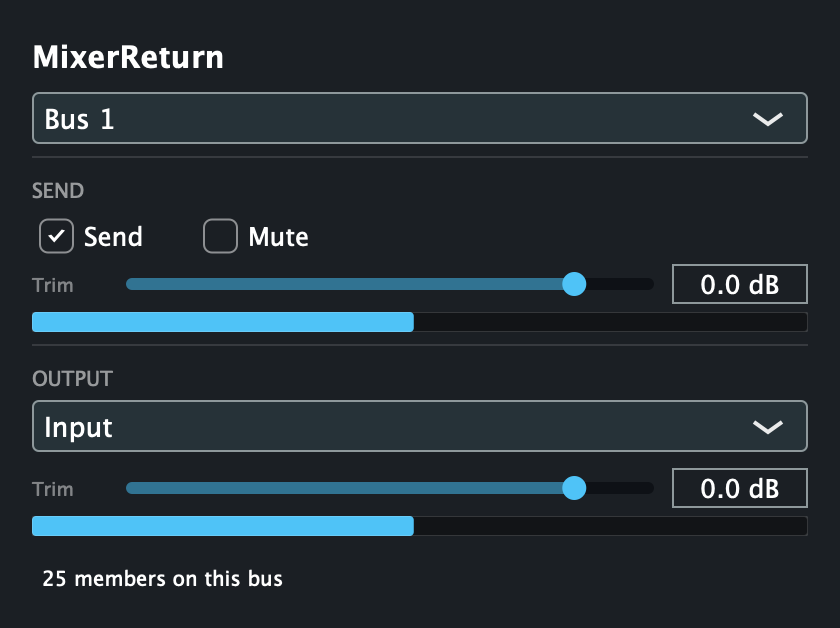
On each channel, after the automixer: Send enabled, Output set to Input so the rack
passes its own audio through.
On the return rack: Send disabled — so the send meter is empty — and Output set to
Bus Sum.
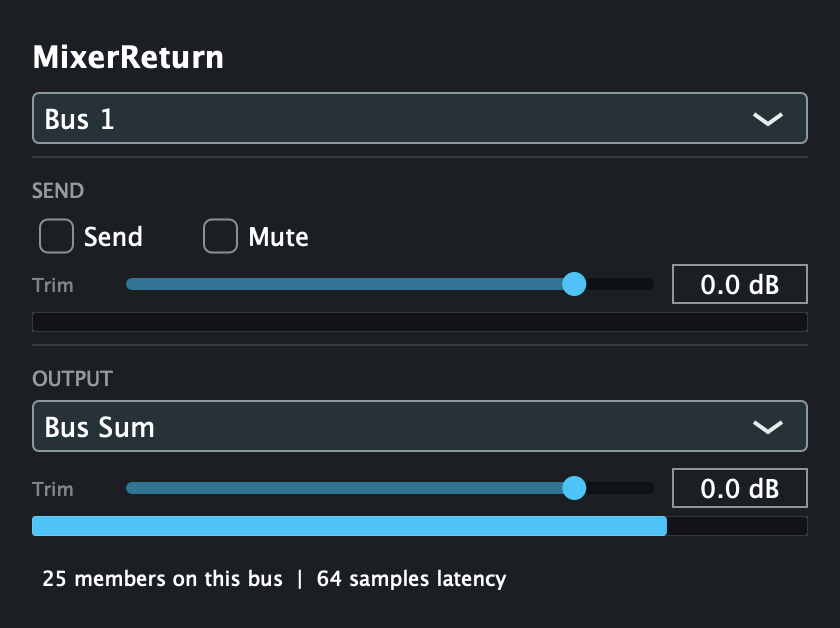
Both rendered from the real editor with a full 24-channel rig registered on the bus, which is why the member count and latency readout are actual values rather than a mock-up.
The member count is the readout to trust when setting up: if it does not say what you expect, an instance is on the wrong bus or hasn’t loaded.
The controls
| Control | What it does |
|---|---|
| Bus | Which of the 8 shared buses this instance joins. |
| Send / Mute | Whether this instance contributes its input to the bus. |
| Send Trim | −inf to +10 dB on the contribution, matching the SQ’s own direct-out trim range. |
| Output | Input (pass through), Bus Sum (emit the sum), or Input + Bus Sum. |
| Output Trim | −inf to +10 dB on this instance’s output. |
The one thing to know
The bus sum is delayed by exactly one block, identically for every sender, no matter what order the host processes the instances in.
That uniformity is deliberate, and it is the reason the design looks the way it does: a shorter but uneven delay across channels would comb-filter the sum. See DESIGN.md.
Setting it up on an Allen & Heath SQ
Two console-side details that will bite otherwise.
“Follow Fader” on direct outs is global across all 48 channels. There is no post-fader tap point; post-fader comes from that one switch, and it is all-or-nothing.
If you also multitrack off direct outs, that recording becomes post-fader too. Route multitrack over tie lines — post-preamp, bypassing the processing path — instead.
Unroute the automixed channels from the main mix. The summed return must be their only path there. A channel reaching the mix both directly and through the return will comb.
Pre-fader monitor sends stay inside the desk and are fine.
The SQ core runs at 96 kHz, so the plugin host must too.
Troubleshooting
| Symptom | Cause |
|---|---|
| Member count is lower than expected | An instance is on a different bus, or hasn’t loaded. The count is the authoritative readout. |
| Comb filtering on the automixed channels | They are reaching the main mix both directly and through the return. Unroute them from the mix. |
| Automixer is reacting to the wrong level | Direct outs are pre-fader. “Follow Fader” is one global switch on the SQ. |
| Multitrack recording levels now follow the faders | Same switch — it is global. Move multitrack to tie lines. |
| Bus Sum instance outputs nothing | Check Output is Bus Sum and not Input, and that senders are on the same bus. |
| Send meter is empty on a channel instance | Send is disabled, or Mute is on. |
| Sample-rate mismatch with the console | The SQ core is 96 kHz; the host must match. |