
01
Rolling, or not rolling
Record and stream status per device with live timecode and a tally-red tile border while a switcher is rolling, plus the ISO-versus-program-only record mode. Start and stop record or stream on any of them from the browser.

ATEM
ATEM Software Control is one switcher, on one machine, doing one thing at a time. These four cover what happens when there are twelve of them to watch, when they all need the same configuration before the truck leaves, when the layout you're about to cut to has no preview anywhere, and when every aux and keyer across the fleet has to behave like one router.
All four are free and open source. None of them is affiliated with or endorsed by Blackmagic Design; ATEM is their trademark.
01 — ATEM Overseer
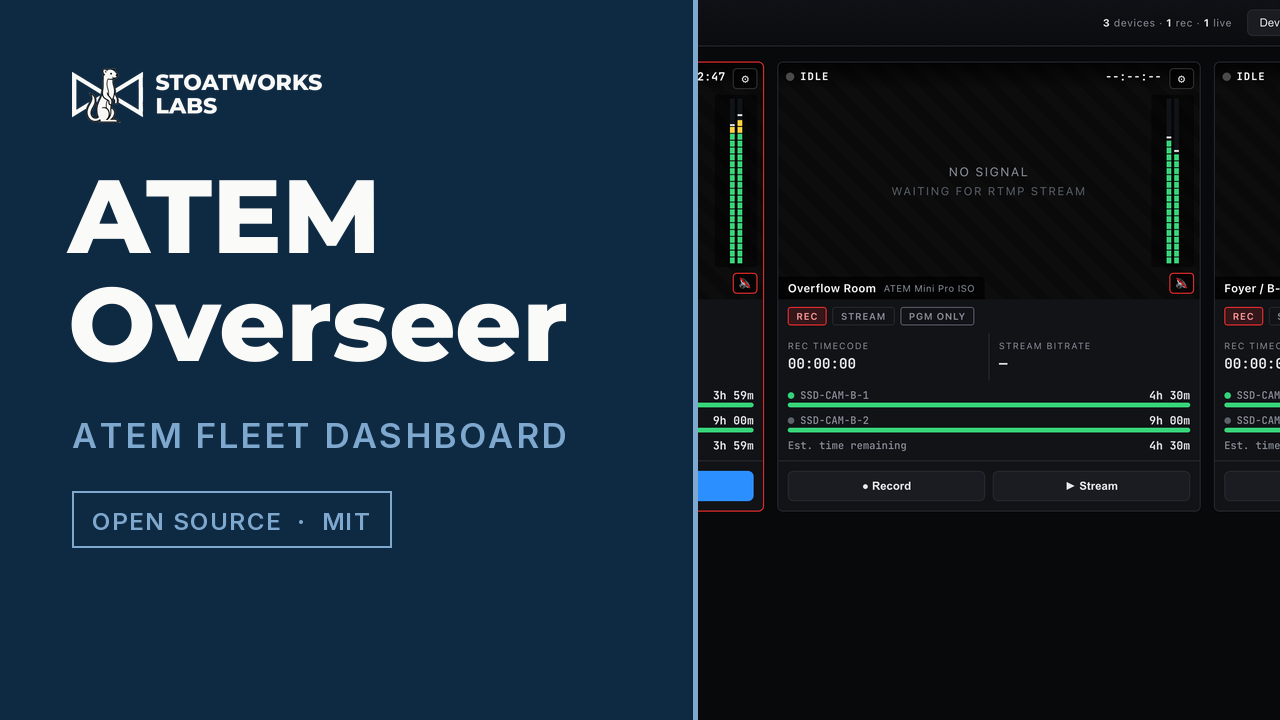
One tile per switcher on one screen, styled after the multiviewer you already know: record and stream state with live timecode, program-audio meters, recording time remaining per drive, and transport control across the whole fleet.
A Node server talks to the switchers over the network and runs its own RTMP ingest, so the picture in a tile is the switcher's actual output rather than a placeholder. Run it as a server and point a browser at it, or install the desktop tray app. The live demo is the real dashboard replaying recorded telemetry. The meters move and the timecode advances, and the transport controls do nothing and say so.
01
Record and stream status per device with live timecode and a tally-red tile border while a switcher is rolling, plus the ISO-versus-program-only record mode. Start and stop record or stream on any of them from the browser.
02
Time remaining per disk with working-set and low/critical warnings. The protocol reports recording time available rather than raw capacity, so the bar is scaled against a nominal four hours. Read the figure, not how full the bar looks.
03
No transcode
The switcher streams to Overseer's bundled RTMP ingest and plays back in its tile as http-flv, and stereo program metering runs at display rate with peak hold. Per-device audio mutes independently so you can listen to one wall at a time. The mute is local playback only and never touches the meter or the switcher.
04
Best-effort mDNS discovery plus manual add by IP or hostname, with model, address, record name and protocol version per device, added and removed live. One click launches ATEM Software Control or ATEM Setup pointed at the device you were just looking at, for the jobs that still need them.
The server binds every interface, and anyone who can reach port 4700 can start and stop recording and streaming on your switchers. There's no token, no session and no TLS option. That's a scope decision rather than an oversight, but it means this belongs on a private production network and nowhere else.
Developed and verified end to end against the built-in simulated fleet (--mock), with real test-pattern streams pushed into the RTMP ingest so the picture is genuine even though the switcher state isn't, and since tested against real ATEM hardware in a lab environment. A lab still isn't a show, so check transport and upload behaviour against your own models before one depends on it.
It holds this app's fleet and ingest settings. It isn't an ATEM state backup, and device-list changes take effect on restart. Fleet Admin, below, is the one that writes switcher configuration.
02 — ATEM Fleet Admin
Define every switcher in one project file and build each one's configuration through forms that already know what that model can do. Then write a loadable config.xml and media folder per device, or push the settable subset live over the network.
The project file is a plain, versionable file, so a fleet configuration becomes something you can diff and hand over rather than a state of mind. There's a browser build of it too, over on the web tools page, which generates identical XML but can't reach a switcher, because a web page has no way to open a socket to one.
01
The point of it
Each device is assigned a model, and the editor shows only the tabs that model has: a Mini Extreme ISO gets Streaming and Recording, a 4 M/E Broadcast Studio gets SuperSource and multiple M/Es instead. The generator emits only the sections that model has, so a configuration can't claim a capability the hardware doesn't have.
02
Input and output names, AUX routing, show and project name, recording bitrate and mode, SuperSource layout and sources, media pool items and player assignments, streaming destination, key and bandwidth, fade to black, default transition time and type, DVE.
03
config.xml plus a Media/ folder per switcher, named after it, applied through ATEM Software Control's own Load button. The XML matches the element, attribute and nesting conventions of real ATEM save files rather than a guess at them.
04
Set an address and push the settable subset: input names, AUX routing, SuperSource boxes, media-player assignments, transition and FTB rates, streaming service, ISO mode. Anything the Ethernet protocol can't reach, such as media-pool uploads, UVC routing and recording bitrate, is reported as folder-export only rather than quietly skipped.
No ATEM Mini save file was available to check against, so those <Streaming> and <Recording> elements are reconstructed from the protocol rather than copied from a known-good file. For those specific fields, Connect & apply is the one to trust.
Phase 1 covers the two hardware classes (ATEM Mini Extreme ISO and 4 M/E Broadcast Studio 4K), which is what makes the model-aware forms meaningful in the first place. Adding a model is one entry in a table rather than a new code path, but a model that isn't there isn't there.
ATEM is their trademark and none of this is endorsed by them. The save-file format was matched against real files, not read from documentation, so verify a generated configuration on your own hardware before it goes anywhere near production.
03 — animATEM
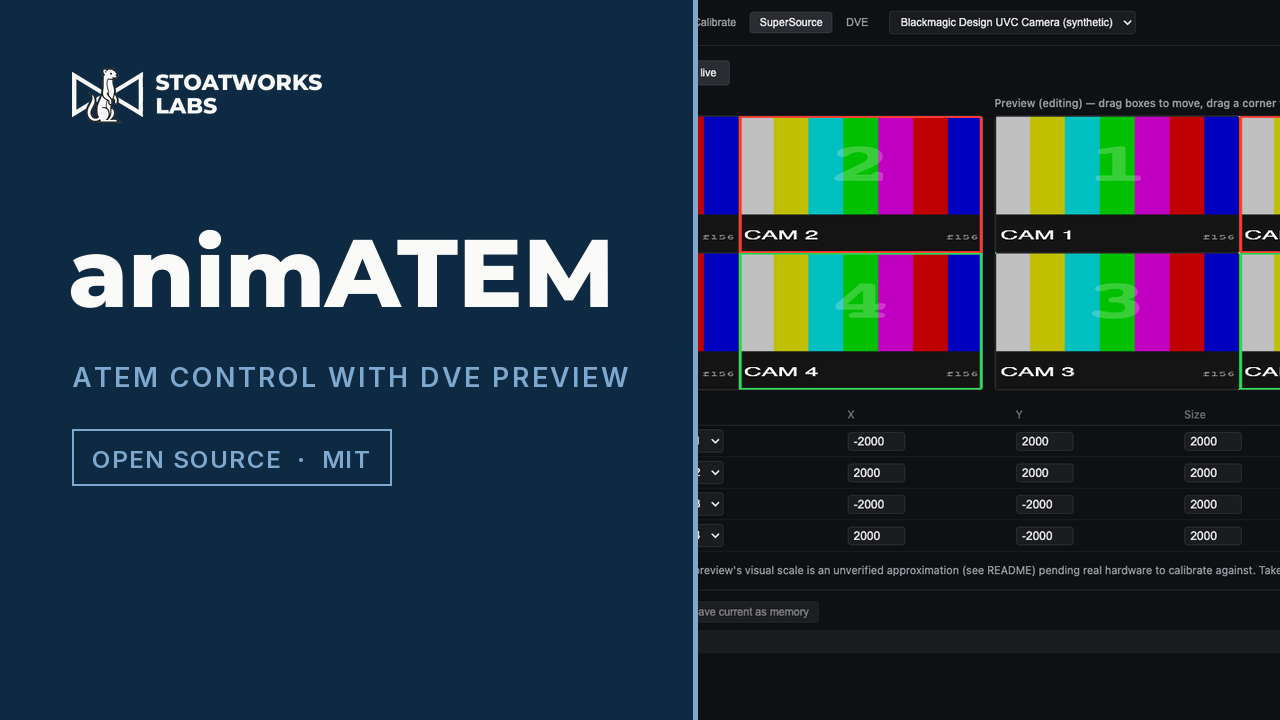
Standard PGM/PVW control for an ATEM Mini Pro or Extreme ISO, plus the thing the hardware doesn't give you: a composited preview of a SuperSource or DVE arrangement built from the switcher's own multiview, so a layout can be checked before it goes to air.
Rather than synthesising a preview from scratch, it captures the multiview over USB (where the switcher shows up as a UVC webcam), crops the individual source boxes out of that live feed and recomposites them. It runs as a desktop app with a touchscreen operator UI and a kiosk mode, and a Bitfocus Companion module drives it from a Stream Deck.
01
The point of it
The boxes in the preview are the switcher's own sources, cropped out of its live multiview and recomposited into whatever arrangement you're building, rather than coloured rectangles standing in for them. What you approve is what goes to air.
02
The protocol has no native SuperSource tweening. An upstream keyer's DVE is animated by the switcher itself via fly-keyframes, but SuperSource isn't, so the app eases into the target layout from the outside, as a fixed-cadence stream of interpolated positions. Pick a duration and press Animate instead of Take.
03
Layout presets that belong to the app rather than to the ATEM's own macro system: capture an arrangement, name it and recall it, either as a cut or as an animated move into it. Drag to reposition and drag a corner to resize while you build one.
04
A touchscreen operator UI with a kiosk mode for a rack-mounted panel, and a Companion module covering cut, auto, FTB, source selection and animated memory recall, with feedback and variables for the current program and preview input.
The compositing workflow reads the multiview over USB, and the default USB output is Program. Without that one change the app still connects and still switches, but the preview has nothing to crop.
The UVC multiview capture and the calibration screen have been run against a real ATEM Mini Extreme ISO, where the assumption that multiview windows run left-to-right and top-to-bottom turned out to be wrong and broke every crop. The operator now confirms each box against the switcher's own source names, and the fix was confirmed on that switcher. Two things that session didn't settle: the coordinate scale the preview panes lay out against is still an uncalibrated placeholder, and the cut, auto, FTB and recall command path has only ever run in harnesses. It has never been used on a live show.
Anything that can reach port 51234 on the machine can cut, auto, FTB or recall a memory. That's fine bound to localhost, which is the default and the only configuration shipped. Don't rebind it to a network address without adding authentication first.
04 — BlackMatrix
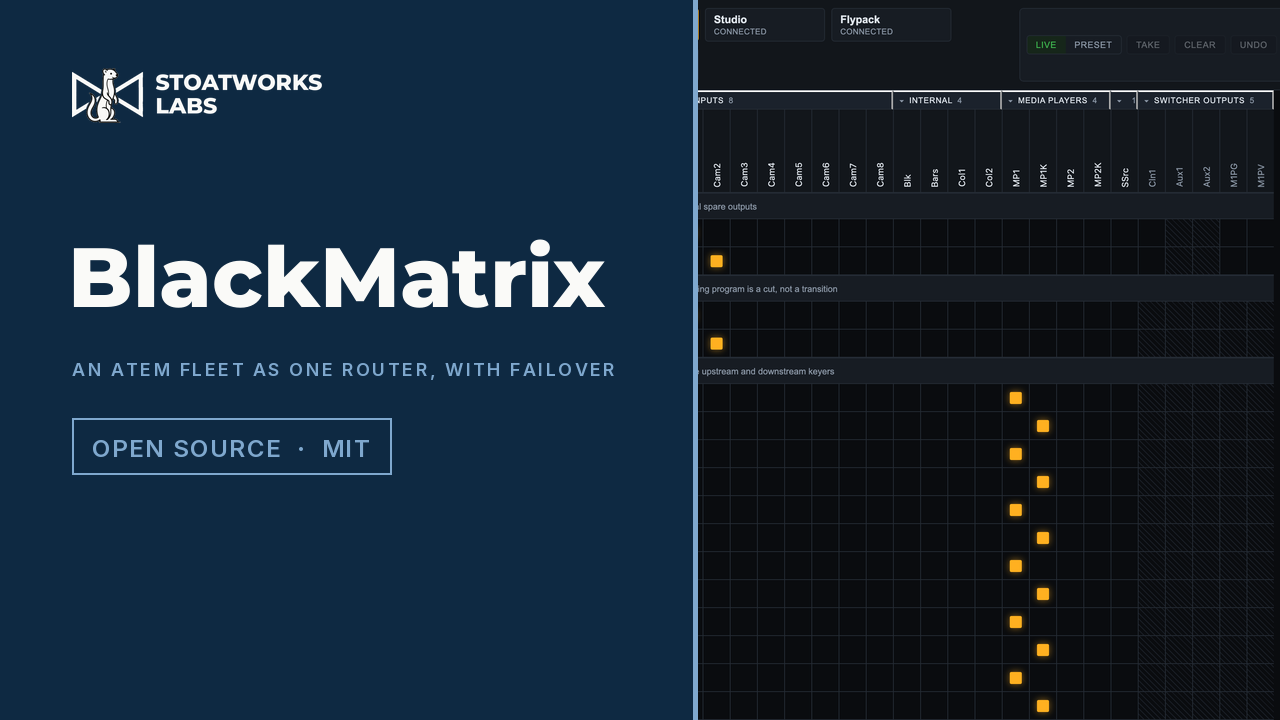
Sources across the top, destinations down the side, one click to route. Every bus that takes one source at a time is a destination: the aux outputs, program and preview per M/E, upstream and downstream keyer fill and key, every SuperSource box plus art fill and key, and every multiviewer window. On a Mini Extreme ISO that's 29 sources by 39 destinations, across as many switchers as you point it at.
The other half is protocol emulation: each switcher also gets its own Videohub Ethernet Protocol v2.3 server, so a hardware router panel, Companion's Videohub surface or Blackmagic's own software can drive the crosspoints without knowing an ATEM is on the other end. An ATEM already serves that protocol itself on TCP 9990, and read back to back the two agree on every destination they share. Blackmagic's server offers five outputs, and this offers the other thirty-four. There's a Companion module too, whose presets are an X-Y panel rather than one button per crosspoint.
01
The point of it
Every ATEM input reports an availability mask, so which sources are legal on which destination comes from the hardware rather than a per-model table. Illegal cells are drawn hatched and refused server-side, which is what stops an aux output being routed back onto an aux bus, or ME 1's own output onto ME 1, without anyone maintaining a compatibility matrix.
02
A real Blackmagic Videohub can sit in the same fleet as a device rather than only as a client: its inputs become sources and its outputs become destinations in the same matrix, so one screen covers the switchers and the router between them, and a salvo can span both. Write down how they're cabled and a route goes through the router end to end, whether that's a router input straight onto a switcher bus or a switcher output out to a screen.
03
A watch polls a machine (a TCP port, a URL, or a heartbeat it must be sent) and fires an ordinary salvo when it stops answering. That's the safety argument: the failover is the same button an operator can press by hand, so it can be rehearsed before the show rather than discovered during it. It won't fire until it has seen the machine working once, it starts disarmed, and it doesn't switch back unless you say what back means.
04
disguise's understudy sends matrix routing on failover and PIXERA fires a control action at a matrix switcher, and for both the Videohub emulation is the target. For everything that can send a string but not speak Videohub there's a plain-text line protocol on TCP and UDP.
Both were probed against a real Mini Extreme ISO: 80 tests across all sixteen multiview windows, which found that windows 1 and 2 aren't fixed to program and preview and that the switcher reports one window while actually having sixteen. The aux side had no such pass. The aux-only availability bits were read off the masks and the aux-kind source IDs, never watched against what an aux output actually did.
On 2026-10-04 a Smart Videohub 12G 40x40 was one of its devices through a live show, beside an ATEM 4 M/E Constellation 4K. The other end is still software only: the emulation has been exercised by a TCP client speaking the protocol and served as a 29x39 router, but no hardware Videohub control panel has ever driven it.
The line protocol listens on TCP and UDP. A forged routing datagram only moves a crosspoint, which is what the port is for, but the full command language can cut a programme, stop a recording or end a stream, so languageOverUdp ships off. A show controller that needs it can turn it on, and nobody gets it by accident.
Why four and not one
Fleet Admin is the day before, on a laptop, with nothing plugged into it. Overseer is during, at front of house, watching all of them at once. BlackMatrix is during as well but a layer down, turning every aux, keyer and multiview window in the fleet into one grid, and standing by to fire a salvo when the media server stops answering. animATEM is one operator on one switcher, building a layout. Folding them into a single application would mean carrying all of it to do any one of those jobs.
The macOS builds are signed and notarised and open normally. The Windows builds are unsigned, so SmartScreen wants a word the first time; Linux has no signing gate. Each project page carries the steps for its platform.