Stoatworks Labs

Pixel Peeker

LED wall layout, port patching and capacity

In developmentRuns in a browser tab

A wall that doesn't fit is a thing to find out in the office.

Lay out cabinets on a canvas, add processors, wire the ports, and see the load on each one, its headroom and the highest frame rate it could actually sustain at that load, all before anyone's standing in front of it on site.

This is the full build: the design tool, the Line calc view, the PDF report and the Resolume export, plus the NovaStar exports (a cabinet schedule, an LCT/VMP configuration brief and a JSON interchange file). Those are a schedule and a brief rather than the .scr and .nprj files you might expect: LCT's .scr is proprietary and partly binary, and VMP's port mapping is still ambiguous. A lite build without them comes out of the same repo.


Pixel Peeker — LED wall layout, port patching and capacity
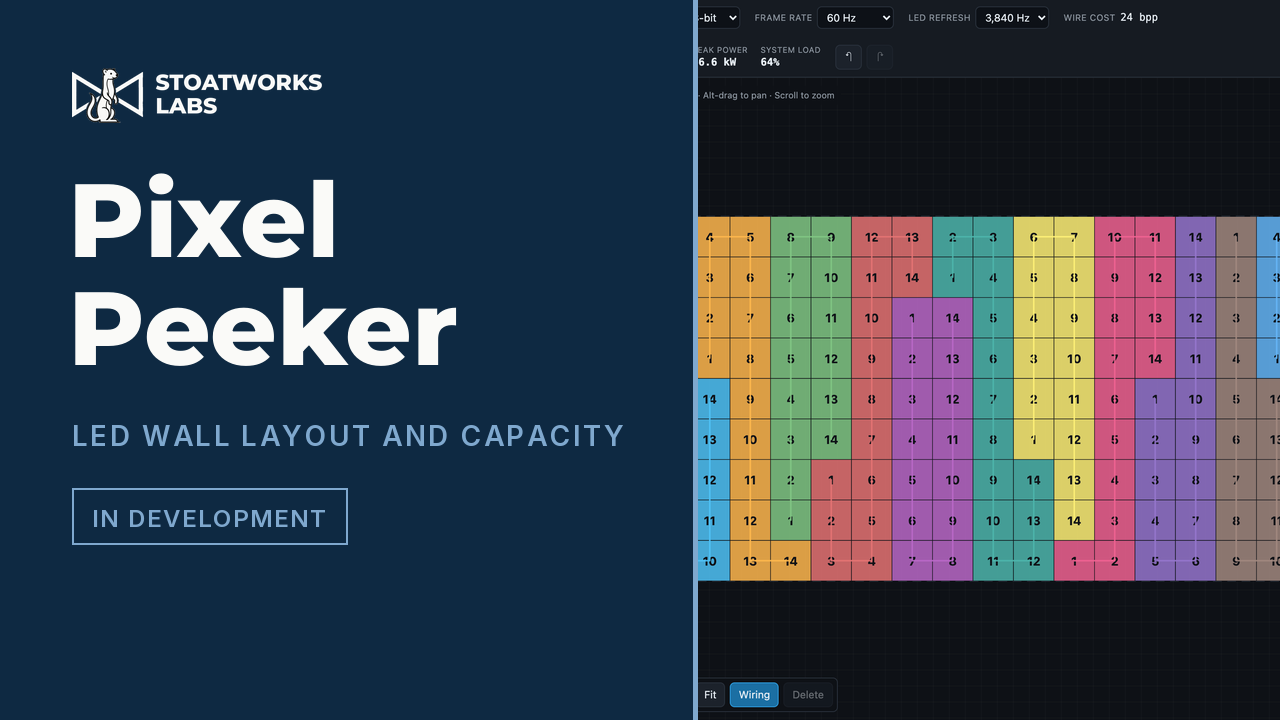
144 cabinets on one MX40 Pro, auto-wired: 11 of 20 ports used, colour-coded by port, 64% of the device's rated capacity.

What it does

01

Lay out a wall

Pick a cabinet from the library or define a custom panel by resolution and receiving card. Fill a canvas, build blocks, or place tiles by hand. Every record in the library was parsed out of the manufacturer datasheet it names as its source.

02

Wire it up

NovaStar and Brompton controllers with their real port counts, input connectors and device capacity limits. Auto-wire in serpentine or column order to a chosen fill limit, or patch ports by hand.

03

Then check it

Overlapping cabinets, unpatched tiles, over-capacity ports, a device that runs out before its ports do, an input too small to carry the wall, panels that can't reach the refresh rate you asked for, and chains that jump around the wall.

04

Capacity maths that matches the datasheet

The point of it

Controllers pack each colour into a power-of-two container, so 10-bit costs 32 bits per pixel, not 30. With those containers a single 0.9500 link efficiency reproduces NovaStar's three published MX40 Pro per-port figures exactly. The usual spreadsheet formula overstates capacity by about 7%, and in the direction that gets you into trouble.

What to check before a show

  1. 01

    Alpha, and no wall designed here has been built

    The capacity model is pinned in tests against published manufacturer figures, and it reproduces them to the pixel. That isn't the same as site-proven: no processor, receiving card or panel has ever been connected to this, and nothing it has laid out has been rigged.

  2. 02

    Check the cabinet against its own datasheet

    Records carry a verified flag and a source, and unverified ones are badged in the UI and called out in the PDF. Receiving-card pixel limits specifically are conservative placeholders rather than verified figures.

  3. 03

    The Resolume file's schema is verified; this arrangement isn't

    Element names, nesting and number formatting were read off real files written by Arena 7.27.0, not guessed from documentation. What hasn't happened yet is this particular arrangement (one screen per processor, one slice per output port) being loaded into a running Arena, and Resolume do change the format between releases.

Run your own copy

Pixel Peeker is also published as a Docker image, ghcr.io/stoatworks-labs/pixel-peeker, serving the same files as the hosted copy. On a laptop or a box in the rack it keeps working when the venue's internet doesn't.

Docker

docker run -d --name pixel-peeker --restart unless-stopped -p 8526:80 ghcr.io/stoatworks-labs/pixel-peeker:latest

Then it's at http://localhost:8526/. The repo's docker-compose.yml does the same with docker compose up -d.

Unraid

Search Community Applications for pixel-peeker and install it. The template sets the port to 8526 for you.

Self-hosting the web tools, and which ones you can