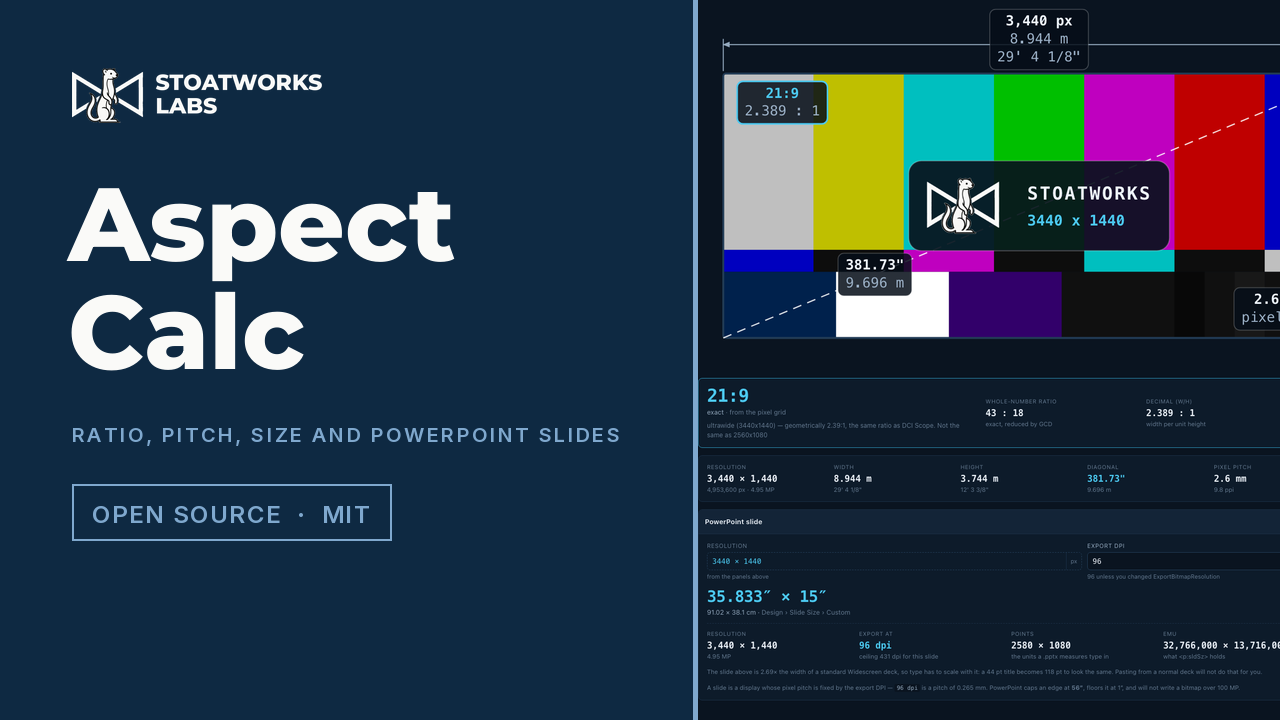
Resolution × pixel pitch = physical size. Give it any two and it works out the third, then names the ratio the way the trade names it and tells you how far off that name actually is. It sizes PowerPoint slides on the same arithmetic, in either direction, limits and all.
Everything is computed in the page, and the state lives in the URL hash rather than on a server, so a calculation can be pasted into an email and opens showing what the sender saw. Nothing you type leaves the tab.
3440 × 1440 on 2.6 mm cabinets: nine metres of wall, the ratio named, the arithmetic it was named from sitting next to it, and the PowerPoint slide that fits it, at 35.833″ × 15″.
What it works out
01
Any two give the third
One relation, three panels, and the one being solved is marked calculated. Type into that panel and it becomes an input instead, and whichever group you touched longest ago takes over as the answer. So pitch from a resolution and a size, size from a resolution and a pitch, or the resolution a size and a pitch imply.
02
It names the ratio properly
The point of it
3440 × 1440 reduces exactly to 43:18, which is arithmetic rather than an answer, because it's sold as 21:9. So is 2560 × 1080, which is 64:27. They're 0.8% apart, and it names both and then tells you which one you're holding. Two lookups do it: trade names keyed on the exact reduced fraction, then nearest-by-decimal with the deviation always stated.
03
A near miss is never called exact
1366 × 768 reduces to 683:384, which isn't so much a ratio as an accusation. The useful answer is 16:9, and the accurate one is that it's 0.049% off, which is what it says. A whole-number input that didn't match a fraction exactly is reported as nominal, with the error, every time.
04
Pitch that matches the cabinet
Pitch is centre-to-centre and every pixel owns a full cell, so physical width is horizontal pixels × pitch. A 168 × 168 cabinet at 2.9 mm is 487.2 mm square, not 484.3. The other convention loses one pitch across a whole wall, which is invisible in a spreadsheet and very visible when the last cabinet doesn't fit the frame. Units are read as written, too: 2500mm, 8′ 2 1/2″ and 16ft 4in all parse, and an explicit unit beats the dropdown.
05
PowerPoint slide sizes
A slide is a display whose pixel pitch is fixed by the export DPI, so the same relation solves it: slide size × DPI = pixels, either direction, reported in inches, centimetres, points and EMU. What makes it worth working out for you is that PowerPoint caps a slide edge at 56 inches and a 7680-wide wall wants eighty, so it picks the divisor and the export DPI that land back on the exact pixel count, and says when a shape is too steep to be a slide at all. For a 16:9 target it'll usually tell you not to resize the deck: leave it on Widescreen and export at 288 dpi, and every template, master and point size stays where it is.
What to check before a show
01
The colour bars are a picture, not a signal
The pattern is stretched to whatever aspect you're looking at, which is what a real generator does, and the values are the standard 75% bars, but they aren't colour-managed and this is a browser. It's there to show you the shape of the display. Don't grade against it.
02
Pitch presets are trade names, not datasheet figures
A product sold as "2.6" is usually 2.604 or 2.5 exactly depending on who made it. The dropdown is there to save typing; put the real figure from the datasheet in before you commit to a cabinet count.
03
Solving for resolution rounds, and says by how much
Ask it for the pixel grid behind a physical size and the answer has to land on whole pixels, so the size you get back isn't quite the size you asked for. It reports the difference in millimetres rather than hiding it. But if the wall has to finish on a cabinet boundary, choose the resolution and let it tell you the size, not the other way round.
04
PowerPoint has two 16:9 slide sizes and they aren't the same size
Widescreen is 13.333 × 7.5 inches. On-screen Show (16:9) is 10 × 5.625, which is also what Google Slides defaults to. Both are exactly 16:9 and they're a third apart, so a deck moved between them keeps its shape and loses its type scale. It always reports a size, never just a ratio, and the presets carry the exact figures, because the dialog shows 13.333 while the file stores 40/3, which is a measurably different slide.
05
Nothing is uploaded, and there's nowhere to upload it to
There's no backend, account or telemetry. The state is kept in the URL hash and in local storage on your own machine, which matters here because a screen size and a pixel pitch are the shape of somebody's unannounced set.
Run your own copy
Aspect Calc is also published as a Docker image, ghcr.io/stoatworks-labs/aspect-calc, serving the same files as the hosted copy. On a laptop or a box in the rack it keeps working when the venue's internet doesn't.
Docker
docker run -d --name aspect-calc --restart unless-stopped -p 8520:80 ghcr.io/stoatworks-labs/aspect-calc:latest
Then it's at http://localhost:8520/. The repo's docker-compose.yml does the same with docker compose up -d.
Unraid
Search Community Applications for aspect-calc and install it. The template sets the port to 8520 for you.