Stoatworks Labs

PDF Presenter Lite

Presenter view and a fullscreen output, in two tabs

Field provenv1.7.3Runs in a browser tab

A presenter view, without installing a presenter.

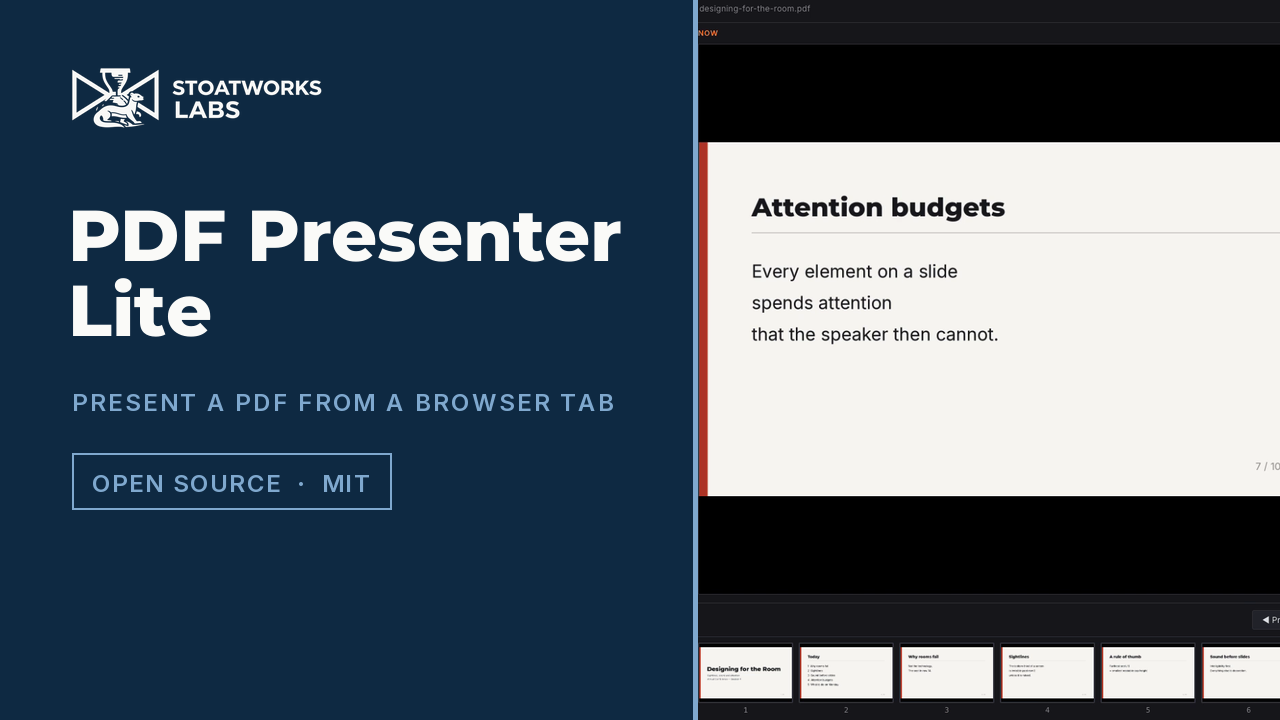
Open a PDF and get the two windows a presentation needs: Now and Next with a clickable thumbnail strip in front of you, and a clean fullscreen slide with no chrome on the projector. It's the whole app, running in a browser tab, on a machine you were handed ten minutes ago.

This is the browser build of a desktop app called PDF Presenter, and the Lite in the name is this page. The rendering was always done by pdf.js in a page, so the presenter view, the output window, blanking and the laser pointer are the real thing here rather than a demo of it. What needs a desktop is the remote control: OSC and the Companion module need a UDP socket, and the watched folder needs to read a directory, so if you drive the show from a Stream Deck, use the download.


PDF Presenter Lite — Presenter view and a fullscreen output, in two tabs
A 47-second tour of this build, filmed at this address: a deck opened from disk, Now and Next, the thumbnail strip, then the Output window on top of it. The deck is generated for these videos, so nobody else's slides appear in it.

What you get

01

Presenter view

Now and Next side by side, and a strip of every slide underneath that you can click to jump straight there. Arrow keys, Page Up/Page Down and Space all advance, so a presentation clicker works without setting anything up, because a clicker is just a keyboard.

02

A separate output window

A second window showing only the current slide, which you drag to the projector and make fullscreen. Keys pressed while that window has focus still drive the show, so a stray click on the output, or a clicker aimed at it, doesn't strand you.

03

Blanking and the laser pointer

Press B or W to cut the output to solid black or white without losing your place, the way PowerPoint's presenter shortcuts do. Move the mouse over the Now preview with the pointer enabled and a glowing dot tracks it on the output.

04

The PDF's own structure

Links authored into the deck (a contents page, "back to agenda") are clickable on the Now slide and jump to the right page. Top-level bookmarks become named sections. There's also a timed auto-advance that stops at the last slide rather than looping.

What to check before a show

  1. 01

    Allow pop-ups, and click once for fullscreen

    The output opens as a pop-up window, so a blocker will stop it the first time. On Chromium it then puts itself on your second display, which needs the window-management permission, and refusing it just means you move the window yourself. What it can't do either way is open fullscreen: only a gesture inside a window can make that window fullscreen, so it opens as a normal window with a prompt, and one click finishes the job.

  2. 02

    Field proven, like the desktop app

    This build has now been run on real events, not just checked on the bench. The bench came first: a real multi-page PDF on a dual-display setup, with the deck rendering, both windows staying in sync, keys from the output driving the control window, and the output window opening on the second display by itself. Still run your own deck through it once before it matters, because the pop-up and the fullscreen click are two steps best met in rehearsal.

  3. 03

    No OSC, no Companion, no watched folder

    Those need a UDP socket and a readable directory, so they're left out here rather than shown and broken. The desktop app has all three, and its Companion module is a separate download.

  4. 04

    Your deck never leaves the machine

    There's no backend and no upload. The file is read by the page from your own disk and stays there, which matters rather a lot when the PDF is an unannounced product or somebody's results a week before publication.

Run your own copy

There's no container for PDF Presenter Lite, so the hosted copy is the one to use, or the app you install from its project page.

Self-hosting the web tools, and which ones you can