Find the dead air, then let Resolve do the cutting.
Drop a recording, set a threshold and a minimum gap, and every silence shades red on a loudness waveform. Export a cut list that DaVinci Resolve imports as the ripple-deleted timeline, a marker list to review the silences before anything's cut, an FCPXML for Premiere and Final Cut, or an ffmpeg command. Or render the cut file right there in the browser, with its own hardware codecs, streamed to disk.
An early preview. Resolve 20.2 and later have Ripple Delete Silence built in, so this is for the review-first marker pass, batch prep and cutting outside Resolve.Everything runs in the page and the recording is never uploaded. The browser decodes the audio locally, and the exports are text files put together in the page and saved to your machine.
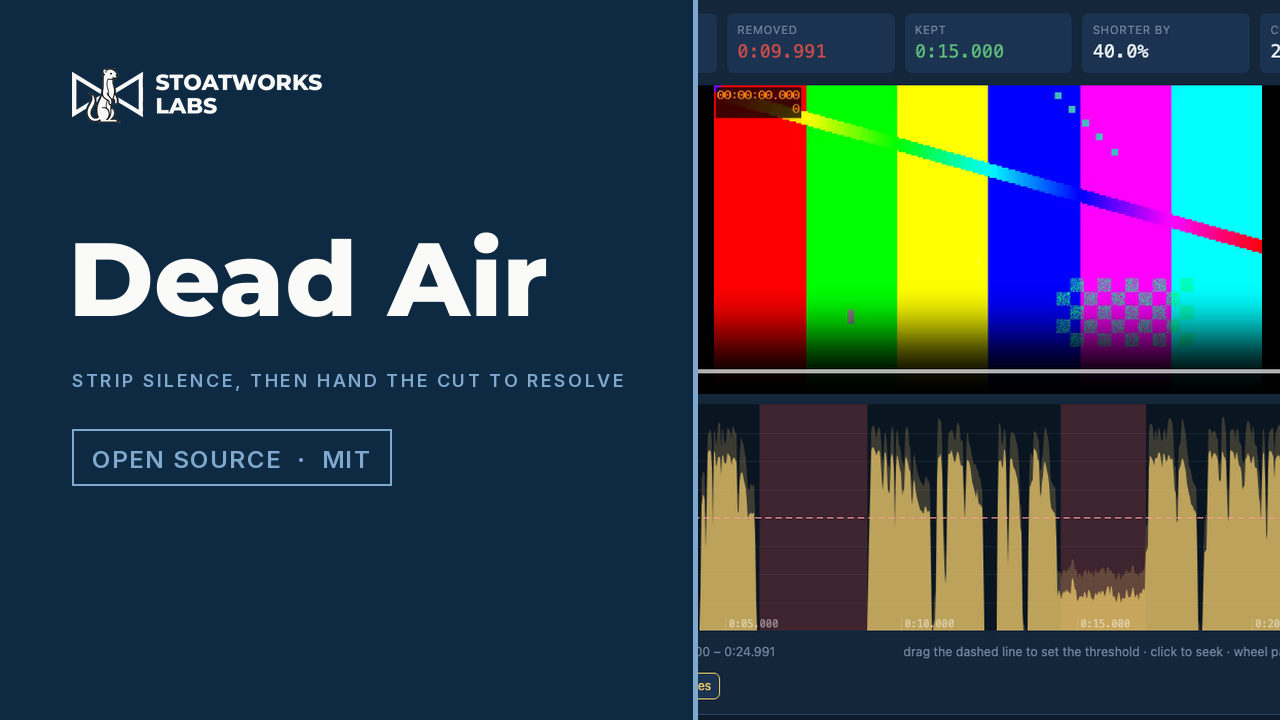
A 25-second test recording at 25 fps with a 01:00:00:00 timecode track: four silences found at −40 dBFS, ten seconds removed, three kept spans, and the same three events in the EDL Resolve imported.
What it does
01
A cut list Resolve links, not a rendered file
The point of it
The kept spans are laid end to end as a CMX3600 EDL whose source timecodes are offset by the clip's start TC, so File › Import › Timeline links every event to the clip already in the bin, and you get the ripple-deleted timeline with video and audio still linked. Nothing is re-encoded and nothing leaves the grade.
02
Review first, as markers
The marker EDL puts a coloured span on every silence and touches nothing else (Resolve reads it from the media pool's Timeline Markers from EDL). Step through them, delete the ones that are dramatic pauses, then cut. It's a level detector, and it can't tell dead air from a pause for effect.
03
The timecode comes from the file
For MP4 and MOV the frame rate, the picture size and the start timecode are read from the tmcd track the way cameras and Resolve write it, from the box headers alone, so a 40 GB ProRes file costs kilobytes. A phone recording has none and starts at zero, which is also what Resolve shows for it.
04
One decision, four files
The EDL, the FCPXML and the ffmpeg command are all written from the same frame-quantised spans, so they cut on identical frames whichever you use. Kept spans floor their start and ceil their end, so quantisation only ever keeps more, never less.
05
Or just make the file, in the page
The Render panel decodes the recording with the browser's WebCodecs decoders, re-encodes it with its H.264 and AAC encoders (hardware-accelerated where the machine has them) and muxes an MP4 on exactly the frames the EDL describes, streaming it to disk as it goes so there's no size limit. A 77-second 1080p file took seven seconds on an M-series Mac, and no ffmpeg build was downloaded to do it. The codecs are the browser's, so ProRes, DNx and MXF still go through the ffmpeg command.
06
Padding that never touches speech
A pre-head keeps quiet before speech resumes and a post-tail keeps quiet after it stops, so a word's attack and its ending survive the cut. Kept islands too short to be a word can be swallowed into the surrounding silence, and the silence at the very start and end is trimmed or kept as you choose.
What to check before a show
01
Verified on synthetic files
The cut EDL, the marker EDL and the FCPXML were imported into a running Resolve Studio 21.1 and read back frame for frame, and the ffmpeg command and the browser render each produced a file of exactly the expected frames with no silence left. That was on a 25 fps test recording with a synthetic timecode track and on a 77-second 1080p H.264 file. A real camera file hasn't been through it yet.
02
Drop-frame is arithmetic-only
The 29.97 and 59.94 drop-frame conversions are tested against the standard minute and ten-minute boundaries, and a drop-frame MOV reads its 10:00:00;00 start correctly, but no drop-frame EDL has been imported into Resolve.
03
The browser holds the whole file
Decoding needs the entire file in memory, so anything over about 1.5 GB is refused, with an ffmpeg command that pulls the audio out to a WAV. Drop the WAV instead, and the frame rate and timecode read from the original are kept. Codecs the browser can't decode (most ProRes audio in MOV, MXF) need the same step.
04
Chromium only so far
Safari hasn't been tried. Its audio decoder and the sample-rate range of its offline audio context are the two things most likely to differ.
Run your own copy
There's no container for Dead Air (preview), so the hosted copy is the one to use.