

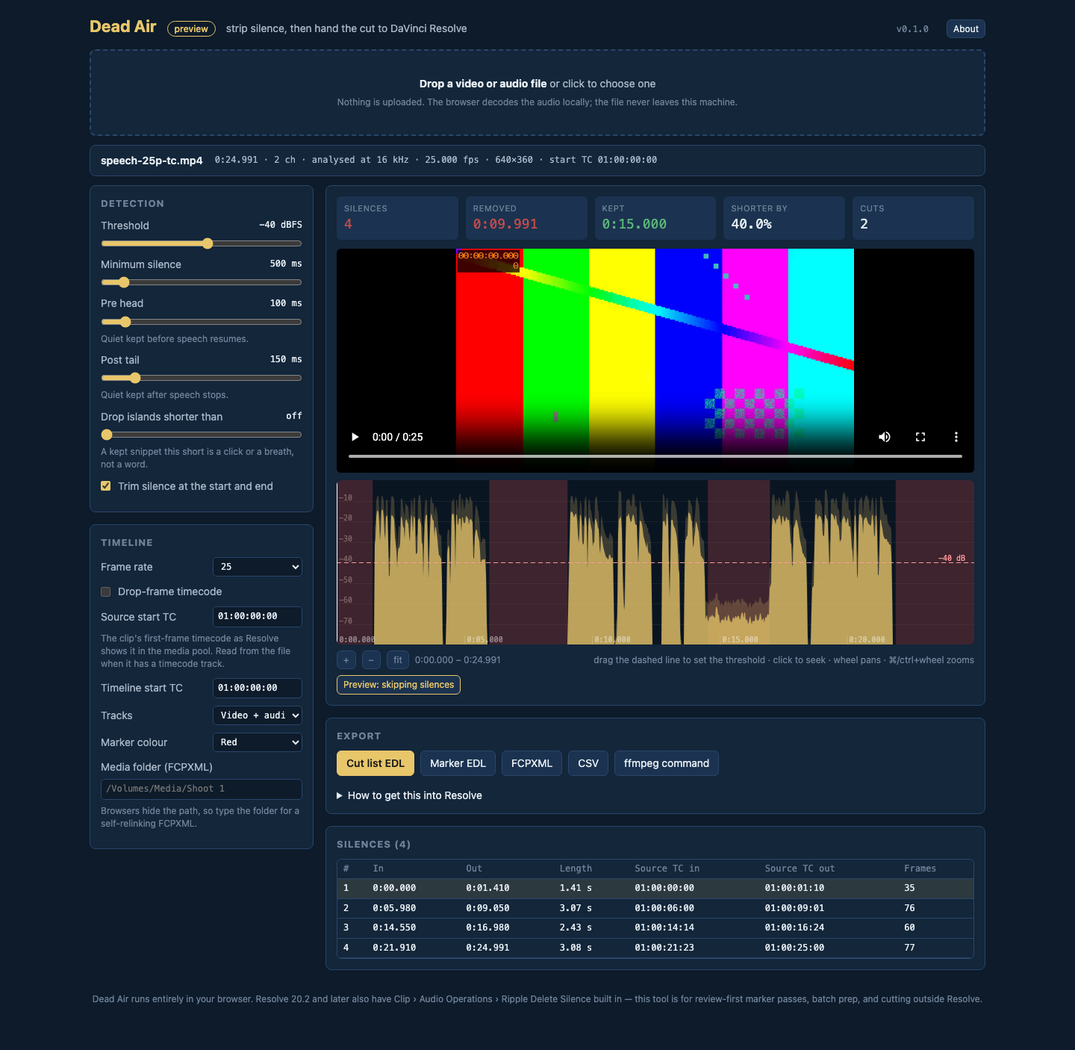
What it does
Resolve 20.2 added Ripple Delete Silence to the Edit and Cut pages, and for a linked talking-head clip that's the quickest way. Dead Air is for everything around it: reviewing the silences as markers before anything gets cut, sorting out a folder of raw captures before they go near a timeline, handing an ffmpeg command to a machine with no Resolve on it, and giving Premiere or Final Cut the same edit.
It reads the container first. For MP4 and MOV it pulls the frame rate, the picture size and the start timecode from the tmcd track the way cameras and Resolve write it, reading only the box headers and the moov, so a 40 GB ProRes file costs a few kilobytes of I/O. Then the browser decodes the audio at 16 kHz, RMS loudness is measured in 10 ms windows with the loudest channel winning, and any run below the threshold that lasts at least the minimum is trimmed by a pre-head and a post-tail so a cut never touches speech.
Every export comes from the same set of frame-quantised keeps, so the EDL, the FCPXML and the ffmpeg command all cut on the same frames. The cut list is a CMX3600 EDL with its source timecodes offset by the clip's start TC, which is what lets Resolve link every event to the clip that's already in the bin.
It can make the file too. The Render panel demuxes with mediabunny, decodes with the browser's WebCodecs decoders, re-encodes with its H.264 and AAC encoders (hardware-accelerated where the machine has them) and muxes an MP4 on exactly the frames the EDL describes, streaming it to disk through the File System Access API so there's no size limit. A 77-second 1080p file took seven seconds on an M-series Mac. It doesn't download an ffmpeg build, and the catch is that the codecs are the browser's, so ProRes, DNx and MXF still go through the ffmpeg command.
- Cut-list EDL that Resolve imports as the ripple-deleted timeline, video and audio linked
- Marker EDL — a coloured span per silence, nothing cut, for a review-first pass
- FCPXML 1.10 with exact rational times, for Resolve, Premiere and Final Cut
- ffmpeg trim-and-concat command on the same frames, for cutting without an NLE
- Render the cut in the browser: WebCodecs decode and hardware H.264 + AAC encode, muxed to an MP4 that streams to disk as it goes
- Frame rate, picture size and start timecode read from the file's own timecode track
- Non-drop and drop-frame timecode at every broadcast rate
- Threshold, minimum silence, pre-head, post-tail, island swallowing and end trimming
- A loudness waveform with the threshold drawn across it, and a preview player that skips the silences
Where it stands
An early preview. The detector and the timecode arithmetic are covered by tests, and all three Resolve routes (the cut-list EDL, the marker EDL and the FCPXML) were imported into a running Resolve Studio 21.1 and read back frame for frame, on one synthetic 25p file. The browser render was checked end to end in headless Chromium on that file and on a 77-second 1080p H.264 file: exactly the kept frames, and no silence left. Drop-frame output has only been checked against the arithmetic, never through Resolve, and Chromium is the only browser it's run in. Check every cut.