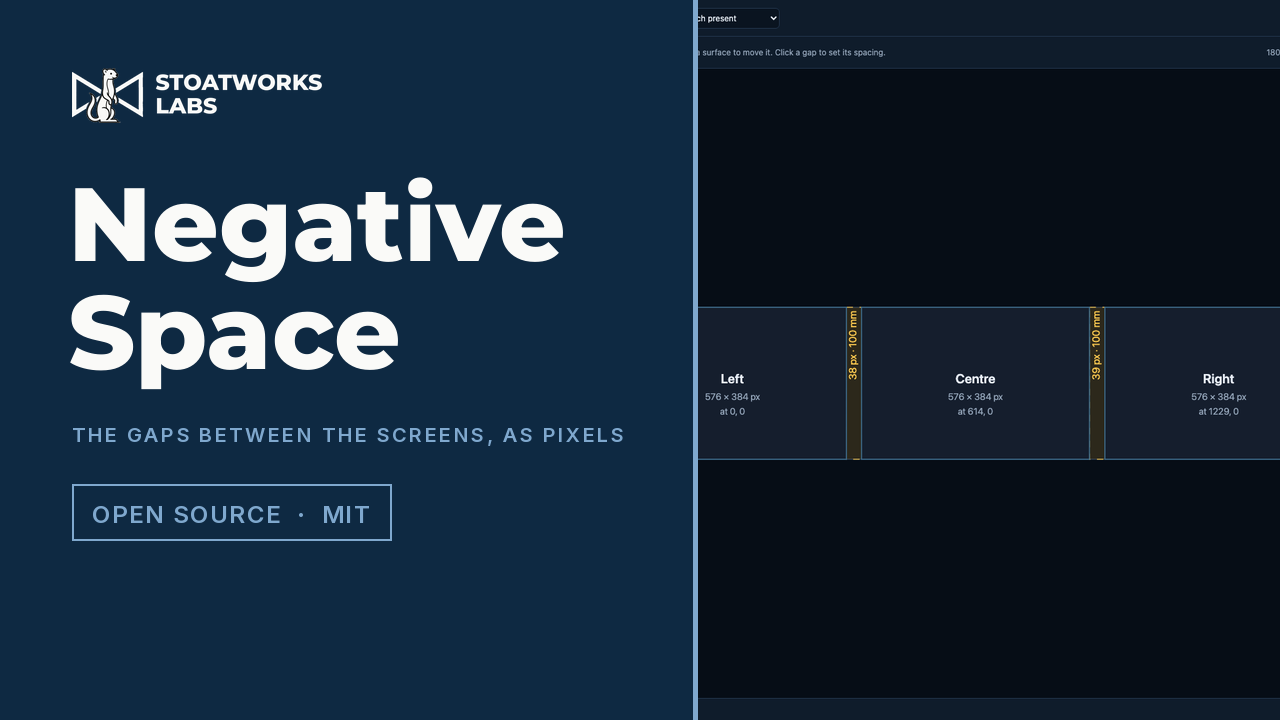
Three walls in a row aren't one picture 1728 pixels wide.
Lay out LED walls or projection surfaces with their real dimensions and resolutions, say how far apart they are, and it works out the composite canvas, blank pixels in the gaps included. Content laid out across that canvas treats the space between the screens as if it were pixels, so a graphic crossing the stage goes behind each gap and comes out the far side at the speed it was actually going, instead of jumping.
Everything is worked out in the page and nothing you type is uploaded. The exports (the Resolume file, the guide plate, the starter deck, the CSV and the PDF) are all put together in the browser and saved straight to your machine.
Three 576 × 384 walls on P2.6 cabinets, 100 mm apart: a 1805 × 384 canvas of which 29,568 pixels, or 4.3%, are gap, with each slice already offset past the blank columns, and the two equal gaps landing on 38 and 39 pixels.
What it works out
01
A canvas with the gaps in it
The point of it
Three 576 × 384 walls 100 mm apart composed as 1728 × 384 is the shape everyone builds, and it's wrong: the composition has no idea the gaps exist, so anything moving across the array leaves the first wall and pops up instantly on the second. The correct canvas is 1805 × 384, with the blank columns between the walls composited into the dark. Out of that come the per-surface slice rectangles with the gap offsets already applied, so the Resolume composition and the input rects agree without anyone doing sums.
02
Pitch is almost never a round number
A cabinet sold as "P2.6" is 2.604166… mm, so the blank pixel count in a gap is a physical distance divided by a number with a tail on it, for every gap, with every later surface offset by the running total. Two equal 100 mm gaps can legitimately come out at 38 pixels and 39, because each gap is rounded against its absolute position rather than on its own, which is what stops the error drifting along a long row. The page reports the millimetre error it accepted on each one rather than hiding it.
03
Six ways out, all at the real raster
Resolume Arena advanced output, as the AdvancedOutput.xml and as preset forms. A guide plate in SVG and PNG at exactly the canvas resolution with the gaps shaded, to drop behind a PowerPoint slide or into After Effects and design against. PowerPoint slide geometry and a starter .pptx with the surfaces and gaps drawn on it. A CSV of every surface and gap. A JSON project file to save and reload. And a PDF report with a scale plan, for taking to site.
04
LivePremier pitch compensation
One Analog Way LivePremier screen spanning surfaces of different pitches needs each output told how much canvas its raster is worth, or a layer crossing between them changes physical size on the way. The two numbers per surface for Preconfig > Canvas > Pitch come from aquilon-pitch's engine, vendored as source. That carries the four things about the device that are easy to get backwards and still look right, each one established by driving a simulator rather than by reading the manual: the ratio multiplies a raster to give its canvas footprint, so a coarser wall goes above 1.000; the field is an integer in thousandths from 0.100 to 10.000; an out-of-range write is discarded rather than clamped; and the footprint floors.
05
Ragged layouts still have gaps
Gutters are merged bands rather than adjacent pairs, which is what makes a layout that isn't a tidy row still answerable: "the gap between A and B" stops meaning anything once the surfaces are staggered, but "the columns nothing lights" always does. Mixed pitches are handled too. The canvas defaults to the finest pitch present, so no surface is ever asked to show fewer pixels than it has.
What to check before a show
01
The Resolume XML has never been through a running Arena
The structure conforms to real Arena files and that's asserted in CI, but no slice has been round-tripped through Arena and put on a wall. Check one against the real output before trusting a show to it.
02
It gives a LivePremier the ratios, not the layout
A LivePremier lays its canvas out from each output's own area of interest, which nothing here can reach into. So the gaps, which are the reason the canvas exists, still have to be built on the device by hand, from the canvas rectangles shown beside each ratio. The ratios are the part that's solved.
03
Two equal gaps that differ by a pixel are correct
It looks like a bug and is the opposite of one. Rounding each gap against its absolute position rather than on its own is what keeps a long row from drifting, and the cost is that two identical physical gaps can land a pixel apart. The behaviour is pinned by a test so nobody tidies it away.
04
Those ratios are always built on the finest pitch
A reference below 1.000 would set the whole screen upscaling, so the finest pitch present is the reference. If the canvas pitch is set to coarsest or to a manual value, the two canvases are different sizes and the panel says so. The rectangles it shows there are rescaled to match the ratios, and on purpose aren't the pixel numbers shown elsewhere on the page.
05
The saved file is the project, not the answers
The JSON holds what you entered, never the solved outputs. Saving those would be saving a cache: reopened after a rounding change it would contradict what that version computes, with no way to tell which of the two was right.
Run your own copy
Negative Space is also published as a Docker image, ghcr.io/stoatworks-labs/negative-space, serving the same files as the hosted copy. On a laptop or a box in the rack it keeps working when the venue's internet doesn't.
Docker
docker run -d --name negative-space --restart unless-stopped -p 8541:80 ghcr.io/stoatworks-labs/negative-space:latest
Then it's at http://localhost:8541/. The repo's docker-compose.yml does the same with docker compose up -d.
Unraid
Search Community Applications for negative-space and install it. The template sets the port to 8541 for you.