

Negative Space
The gaps between the screens, as pixels
What it does
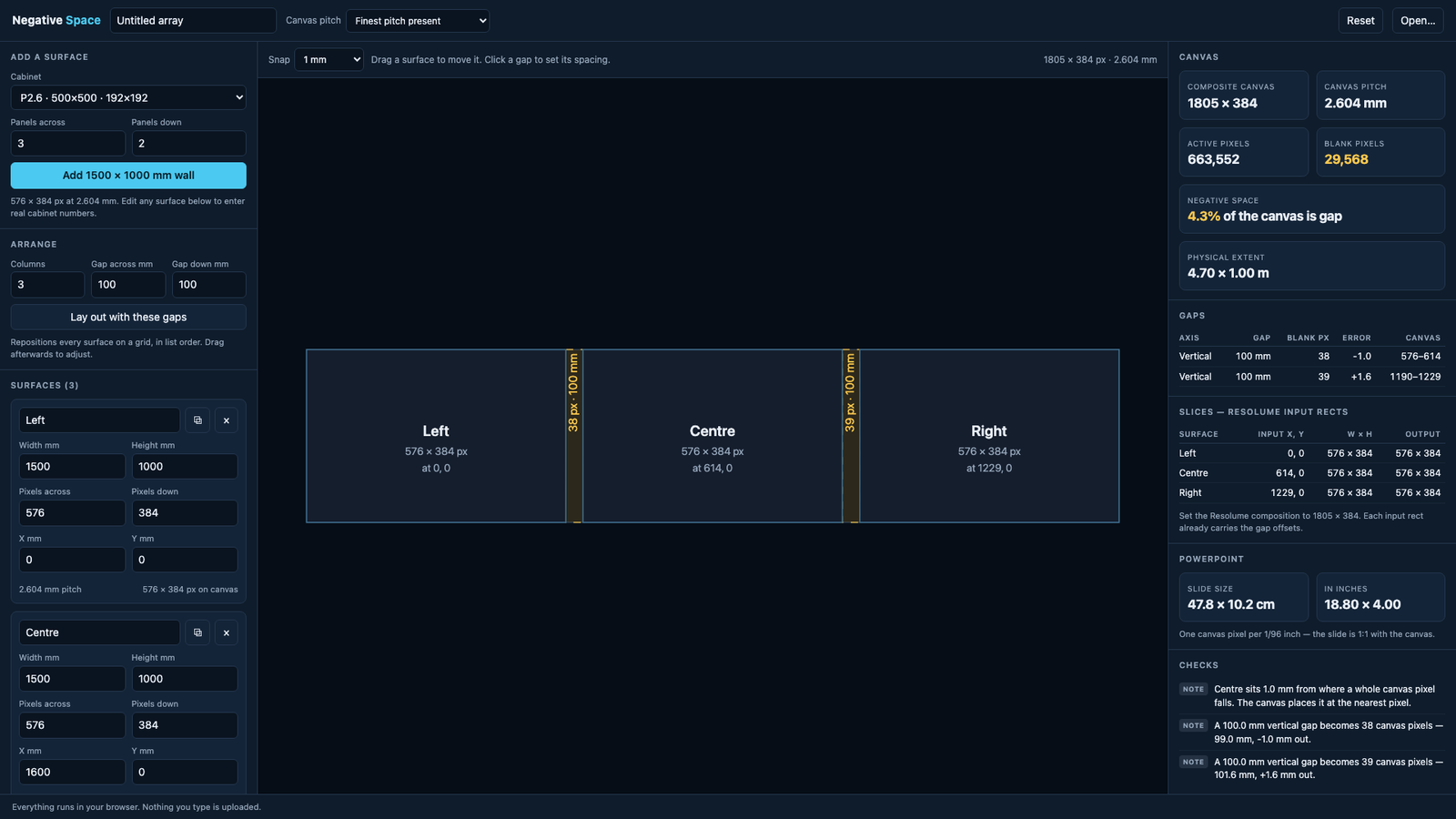
Three LED walls in a row, a hundred millimetres apart. Build the composition as the three rasters butted edge to edge and anything moving across the array jumps. It leaves the first wall and arrives on the second in the same frame, because the composition has no idea there's a gap. What you want is a canvas with the gaps in it as blank pixels, so the object crosses them at the speed it was travelling and comes out the far side where your eye expects it.
Working that out by hand means dividing every physical gap by a pixel pitch that's almost never a round number (a cabinet sold as P2.6 is actually 2.604166… mm) and then offsetting every slice by the running total. Do that for a dozen surfaces and the arithmetic isn't hard so much as unforgiving, and a slice four pixels out doesn't show until the content's on the wall.
So this takes the layout instead. Add surfaces from the cabinet presets or type the numbers straight in, drag them about, and click any gap to set its spacing exactly. It tells you the composite canvas, how much of it is dead, and what each gap costs in pixels, including how far the whole number of pixels sits from the actual distance, which is a figure most people never get to see. Then it exports the tedious bits: the Resolume screen setup with the offsets applied, a guide plate to design against, and a printable plan.
- Pixel pitch derived from physical size and resolution, so a P2.6 cabinet is treated as the 2.604166 mm it actually is
- Negative space found by merging the surfaces' projections on each axis — works on ragged layouts, not just tidy rows
- Mixed pitches handled: the canvas defaults to the finest present, so no surface is asked to show fewer pixels than it has
- Click a gap and type its spacing; everything beyond it slides
- Resolume Arena advanced output, both the AdvancedOutput.xml and preset forms
- A guide plate as SVG and PNG at exactly the canvas resolution, gaps hatched and dimensioned
- PowerPoint slide geometry, plus a starter .pptx with the surfaces and gaps drawn on it
- A vector PDF report with a scale plan of the canvas, for taking to site
- Checks for overlapping surfaces, non-square pixels, resampled surfaces and gaps too small to survive the pitch
- Self-hostable as a container image, with a compose file and an Unraid template
- LivePremier pitch compensation — the H and V ratios an Analog Way switcher needs to drive surfaces of different pitches from one screen, on aquilon-pitch's own engine. It emits no positions: the gaps still have to be built by hand on the switcher
Where it stands
Published as a first version. The arithmetic is covered by eighty-one tests, including the pixel-conservation invariant and a Resolume schema conformance test built from shapes pulled mechanically out of real Arena 7.27 files, which has been shown to catch an invented parameter, so it can't pass by accident. The PowerPoint file has been opened in actual PowerPoint, and the PDF and guide plate were rasterised and looked at, not just parsed. What isn't proven is the bit that matters most: no generated Resolume file has been round-tripped through a running Arena, and no array has been driven from this tool. Load one, put a test pattern up and check a slice against the wall before you trust a show to it.