Making an EDID is the easy half. Knowing what'll accept it is the other.
Type a resolution, a refresh rate and a name and get a complete, valid EDID, or open up every field and edit one by hand. Then comes the part that usually costs an afternoon and a rack of test gear: the smallest HDMI or DisplayPort version that carries the mode, and twenty-three models of event processor answering yes, no, or which input mode you'd have to set up first.
It's a beta. The arithmetic is tested hard and the page says where the gap is: no EDID this tool has produced has been fed to a real processor, and the compatibility table is built from vendor manuals rather than bench results. Nothing is uploaded. An EDID never leaves the tab, and there's no server for it to leave to. Product names are used to state compatibility only; not affiliated with, endorsed by or supported by any of the manufacturers named.
An 8192 × 1080 wide format at 60 Hz. The panel on the left explains that this mode can't be a detailed timing descriptor, not because it's too fast but because 8192 won't fit a 12-bit field, so it's carried in a DisplayID block instead.
What it does
01
A resolution in, a whole EDID out
Simple mode writes the mode as a detailed timing, a range-limits descriptor sized to it, the name where every input menu will read it, and a CTA-861 extension carrying the standard video code when the mode has one. Pick the timing standard or let it choose. A mode that's a broadcast raster is generated as that raster, not re-derived from a formula that would give a different one.
02
Or every field, by hand
Advanced mode is the whole structure: identity, video input definition, chromaticity, established and standard timings, all four descriptors, the CTA-861 extension (video and audio descriptors, the HDMI and HDMI Forum vendor blocks, HDR metadata, colorimetry, 4:2:0 maps) and a DisplayID 2.0 extension. Open a .bin or paste a hex dump from anywhere and edit that instead.
03
The minimum interface that carries it
The point of it
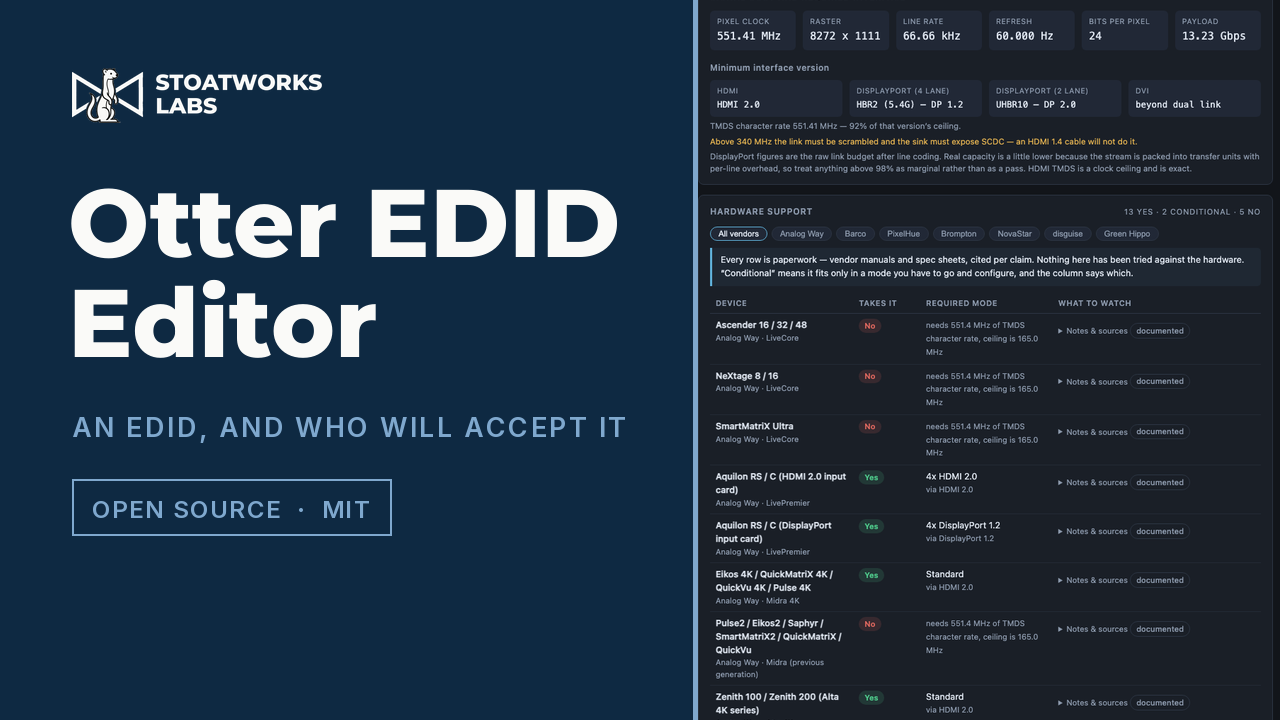
Pixel clock, raster, line rate and payload, and from those the smallest HDMI version that'll do it (1.0–1.2, 1.3/1.4, 2.0, or which fixed-rate link), plus the DisplayPort rate at four lanes and at two, and whether DVI needs one link or two. 4:2:0 halves the character rate and drops 4K60 onto an HDMI 1.4 link; ten-bit pushes the same mode past 600 MHz and off TMDS altogether. Both are one dropdown away.
04
Twenty-three processors, and the mode you have to set
Cited per claim
Whether a processor takes a mode is rarely a plain yes or no. A dual-link input can cost you the neighbouring one. A 4K60 input can mean two cables carrying half the picture each. A card can be four inputs or two, depending which version of the port you switch it to, and which two ports survive isn't always in the manual. Each row names the mode required and what it costs, and carries the document it came from, quoted, with the date it was read.
05
Compression and variable refresh, as switches
DSC and variable refresh are toggles, and both are real: they change the bandwidth arithmetic, they change which interface version is required, and they're written into the EDID itself. Turning compression on correctly makes every older HDMI input in the table say no, because a compressed stream only travels over a fixed-rate link.
06
It'll open what you've already got
A .bin, or a hex dump pasted out of xrandr, edid-decode, xxd or a C header, and it works out which it is. A bad checksum is reported and the file is parsed anyway, because the dump off a misbehaving device is exactly when you need to look inside it.
What to check before a show
01
It's a beta, and this is the reason
No EDID this tool has produced has been fed to a real processor. What's proven is everything that can be proven without one: the timing generators reproduce published VESA values exactly, the DisplayID descriptor layout was checked byte for byte against a reference parser, and every EDID it builds survives a full round trip back through its own decoder. A hundred and twenty-seven tests. None of that is the same as a switcher locking to it.
02
The compatibility table is paperwork, and says which kind
Every figure comes from a vendor manual or spec sheet, quoted and dated in the app. Each device is graded: documented where the vendor states the number, inferred where it follows necessarily from one they do state, and unverified where it's neither. One row is a placeholder on purpose, with no source at all, and is labelled as such. Nothing in it has been confirmed against hardware.
03
DisplayPort numbers are the link budget, not the last word
The DisplayPort figures are the raw signalling rate after line coding. Real capacity is slightly lower, because the stream is packed into transfer units with per-line overhead that depends on the blanking, so a mode landing within a couple of percent of a rate boundary is marginal rather than a pass, and the app says so when it is. HDMI is a clock ceiling and is exact.
04
The manufacturer field is somebody’s registered code
Those three letters are a registered identifier, and writing a real vendor's into an EDID you invented makes a device report the wrong maker. The default isn't a registered one, on purpose, and the field says so where it's edited.
Run your own copy
EDID Editor (beta) is also published as a Docker image, ghcr.io/stoatworks-labs/edid-editor, serving the same files as the hosted copy. On a laptop or a box in the rack it keeps working when the venue's internet doesn't.
Docker
docker run -d --name edid-editor --restart unless-stopped -p 8529:80 ghcr.io/stoatworks-labs/edid-editor:latest
Then it's at http://localhost:8529/. The repo's docker-compose.yml does the same with docker compose up -d.
Unraid
Search Community Applications for edid-editor and install it. The template sets the port to 8529 for you.