

WebLinked
A URL in, SDI, NDI and a screen out
What it does
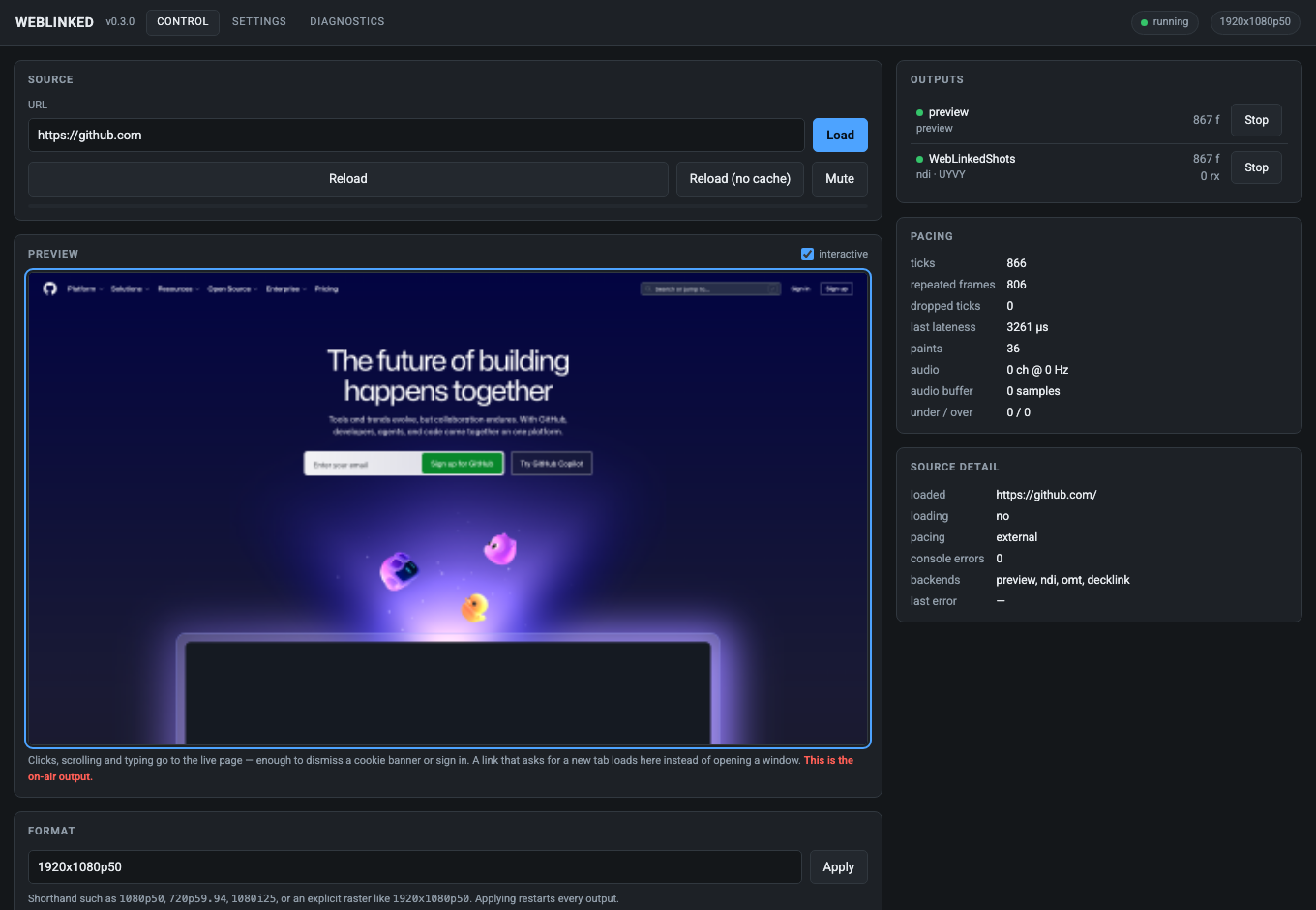
Point WebLinked at a scoreboard, a lower third, a countdown clock, a dashboard or a whole HTML playback page, and it becomes a source your vision mixer can cut to, or a feed for a projector or LED processor. It renders the page offscreen through Chromium at a broadcast raster and rate, then sends it to DeckLink and AJA over SDI, to the network as NDI and OMT, and fullscreen to an attached display, with every output taking the same frame.
The engine clocks the browser one frame at a time instead of letting it paint on its own timer, so 50 ticks a second means 50 paints. It's kept small: one binary, no service to install and no framework in the page. It doesn't open a window for an operator at all. The UI is the control page it already serves, which is why there's no GUI toolkit anywhere in the project. The one window it does open is an output, the fullscreen picture on a display, which takes no input and is just another place for the same frames to go.
- SDI out to Blackmagic DeckLink and AJA, including separate key and fill
- NDI and OMT out on the network, with alpha carried correctly — Chromium composites premultiplied and every destination expects straight, so it is un-premultiplied on the way out
- Fullscreen out to a GPU-attached display for a projector, a wall or a confidence monitor — paced by that display, so a 50 Hz page on a 60 Hz head repeats frames rather than tearing, and fitted, filled or stretched to a head whose shape does not match the raster
- Frame-accurate external pacing rather than free-running browser paint
- Several sources in one process: each is a whole pipeline of its own and they share nothing, so one hung page or one missing card leaves the rest on air. HTTP and OSC address a feed by name; omit the name and you get the first, so anything that drove one source still works
- An interactive preview: click, scroll and type into the live page to dismiss a cookie banner or sign in, on a machine whose browser you cannot otherwise reach
- A settings page — outputs added, edited and started from the browser, saved to a file the next launch reads back
- Diagnostics without a shell: the live log with the level changeable while the fault is happening, and a bundle that downloads as a file rather than naming a path
- Driven from the command line, over HTTP, or over OSC from Companion or a show-control system
- A menu-bar and system-tray icon on macOS, Windows and Linux, showing the running source count and opening the control page in a click
- Syphon on macOS and Spout on Windows, so the page is a source inside Resolume, VDMX or TouchDesigner on the same machine, over shared memory, with its own alpha intact
- RTMP and SRT to a streaming server, the page encoded to H.264 and AAC through an ffmpeg subprocess
- The page's audio carried too — WebAudio, video elements, anything Chromium plays — as 48 kHz float, embedded in SDI or sent alongside the IP video
Where it stands
Used on a live event, and released as v1.3.1 with installers for macOS, Windows and Linux, the macOS ones signed and notarised. v1.3.1 changes nothing in the engine: it's the release where the v1.3.0 DeckLink fixes were verified on a real card, an UltraStudio Mini Replay 12G, by Daniel Nyström, who found the bugs, through a test recipe and an eight-hour soak with faults thrown at it, and nothing hung. I haven't run them on a card myself. v1.3.0 fixed a hang inside the DeckLink driver that took the control API down with it, and frames staying late for ever after a stall, and added a premultiplied fill for keyers that want one. v1.2.0 added a KMS output (fullscreen on Linux with no X server, compositor or GPU) and a SIGTERM that actually shuts it down. v1.1.0 added show files, saving and loading a show's tabs and outputs together or separately, and fixed a crash when a tab playing sound was removed, pages running their animations 20 to 200 times faster than the output, and a Windows crash when started from System32. v1.0.5 fixed the Windows screen output, and v1.0.4 changed nothing in the app. The engine now puts its own icon in the menu bar, so the separate tray launcher has been retired and there's one download per platform. WebLinked has no window of its own: it's a render host and a control server, and the control page it serves is the whole UI, which you open in any browser or from WebLinked's menu-bar icon. NDI is checked end to end against a real receiver, alpha included. Syphon is checked against Resolume Arena 7.27.1, which lists the source, loads it on a layer at 1920x1080 and treats it as premultiplied without being told. Spout has only been through a harness (the real backend and SDK, its pixels read by a Spout receiver), so no real Spout application has received it and the shipped Windows build's own Spout output hasn't been driven. RTMP has been received by a real Restreamer from a Mac, 652 frames of 1280x720 H.264 with none dropped; a commercial ingest such as YouTube or Twitch, SRT in any form, a server dropping mid-stream and the Windows streaming path are all untried. The KMS output has only been checked on a virtual display, all four rotations and letterboxing read back by ffmpeg's kmsgrab inside the BirdDog PLAY's own Debian 10 rootfs, and never on a real display controller or monitor. SDI has been measured against a real DeckLink Duo 2: colour confirmed by a loopback capture against an independent BT.709 reference, a two-minute soak holding its buffer at 6 frames with no dropped ticks, and key + fill carrying straight alpha rather than premultiplied (the bug that was real on NDI isn't there on SDI). The key channel itself, audio over SDI and genlock over hours are still unmeasured, and AJA and OMT compile against their SDKs but have never met hardware or a receiver. The fullscreen output is checked on this machine across two displays: picture, all three scaling modes, live add and remove, and pacing against the display's own refresh, where a 50 Hz source on a 60 Hz head presents at 60.1/s. Its Linux backend is checked too, as a 1920x1080 window under X11 and EGL on software GL, by screenshotting what landed on it against the source page rather than trusting its own counters. The Windows backend showed only black on first contact while its counters cheerfully reported frames presented as normal. v1.0.5 fixed it, checked by reading the desktop back on a software renderer, but no real Windows GPU has run it yet. Several sources run as tabs, each a whole pipeline of its own, and two instances can run side by side. Downloads bundle the NDI runtime, so NDI works on a machine that's never had the SDK installed, but the hosted builders have no DeckLink or AJA SDK, so SDI out needs a local build. In August 2026 Windows and Linux were run on real systems, a Windows 11 x86_64 machine and Ubuntu 24.04, where the unit suite passes (115 tests, 26191 checks), the control API, OSC, mDNS and the tray all work, and an independent receiver on another machine received and decoded NDI in both directions. Neither of those machines has an SDI card, so DeckLink and AJA are untouched there, and the Windows one has two cores and no GPU driver, so it shows the code works without saying anything about how fast it runs. That run also found the v1.0.1 Linux tarball had been built without the application inside it, 355 MB of runtime and resources with nothing to run. **Linux users should take v1.0.2 or later**, which is the release that fixes it. docs/04-verification.md has the numbers and the method.
Watch it running

Nothing loads from YouTube until you press play.Watch it there instead