

animATEM
ATEM control with DVE preview
What it does
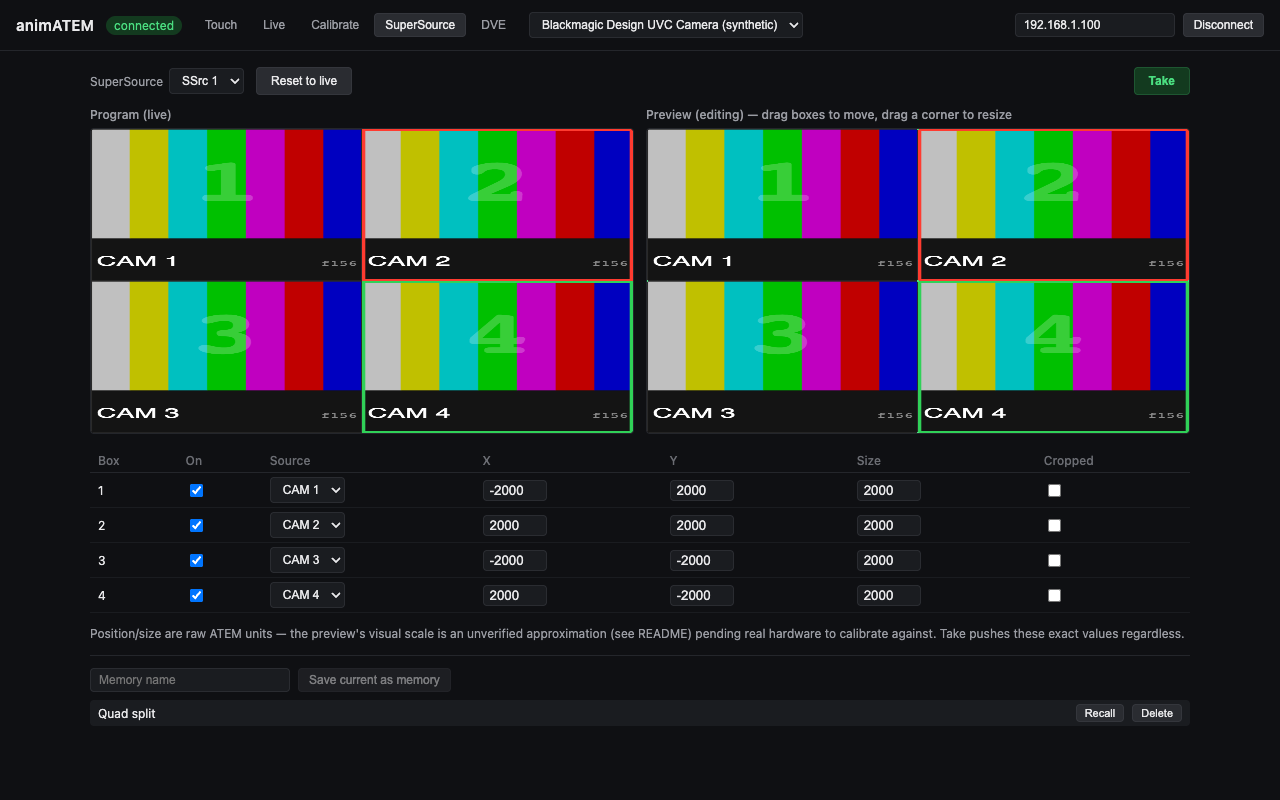
Network control for Blackmagic ATEM Mini Pro and Extreme ISO switchers, with something the hardware doesn't do: a preview of SuperSource and DVE box layouts, composited in software from the actual live pictures.
Instead of faking a preview from scratch, animATEM grabs the switcher's own multiview over USB (it shows up as a UVC webcam), crops the individual source boxes out of that live feed and puts them back together in whatever arrangement you like, so you can check a layout before it goes to air.
- Standard PGM/PVW switching alongside the composited SuperSource and DVE preview
- Named memories — app-level layout presets, independent of the ATEM's own macro system
- Animated SuperSource moves: the protocol has no native SuperSource tweening, so the app eases into the target layout client-side as a stream of interpolated positions
- Touchscreen operator UI
- A Bitfocus Companion module in its own repo — cut, auto and FTB per M/E, program, preview and aux selection by input name, animated memory recall, and program/preview tally
Where it stands
Released at v0.2.2, a dependency release (Electron 44.4.5, React 19.3). v0.2.1 signed and notarised the macOS builds and made the docs say what has actually been run on hardware, and nothing in the app itself has changed since v0.2.0. It's been run against a real ATEM Mini Extreme ISO: the UVC multiview capture and the calibration screen were tested live, and that's where I found and fixed a wrong assumption about multiview window numbering that broke every crop. Two things that session didn't settle: the coordinate scale behind the Preview panes' layout is still an uncalibrated placeholder, and the cut/auto/FTB/recall commands have only ever run in harnesses. It's never been used on a live show. The multiview boxes in the screenshots are a synthetic test-pattern feed standing in for a switcher, so the screenshots don't need hardware plugged in, but everything else on screen is the real UI.
Watch it running
Nothing loads from YouTube until you press play.Watch it there instead