

Porthole is a variable fisheye and defish lens warp for Resolume Arena and Avenue, as an FFGL effect.
It does not draw a bulge. It re-photographs the picture through a different lens: every output pixel stands for a ray at some angle off the optical axis, the lens model says where a ray at that angle lands on the image, and the picture is resampled accordingly.
Before you rely on this: the projection maths is verified numerically — the GLSL is measured against an independent C++ implementation of the same maths across 120 combinations of fit, projection, field of view and direction, agreeing to 0.6 of an 8-bit level (which is the quantisation of the test ramp, not the maths), and the fish/defish round trip lands within 0.001 of a level at moderate settings. It has since been run inside Resolume on real content.
Still open: performance has never been measured, and while Windows binaries are built and shipped in the release, the plugin has only been exercised in Resolume on macOS.
This codebase was created with AI assistance, directed and reviewed by a human author.
Installing
Drop the plugin bundle into Resolume’s FFGL folder and restart Resolume:
macOS    ~/Documents/Resolume Arena/Extra Effects/
         (or /Users/Shared/Resolume Arena/Extra Effects/)
Windows  %USERPROFILE%\Documents\Resolume Arena\Extra Effects\
Avenue uses the same layout under its own folder name. Porthole then appears in the effects browser.
Needs Resolume Arena or Avenue 7.3.1 or newer.
On macOS the build is unsigned, so Gatekeeper may quarantine it:
xattr -dr com.apple.quarantine ~/Documents/Resolume\ Arena/Extra\ Effects/Porthole.bundleProjection is which lens, not how much
This is the control that matters, and the thing to understand about it is that it is not a strength knob. It is a single continuous family that passes exactly through all five projections that have names:
| Projection | Formula | What it is |
|---|---|---|
| Rectilinear | r = tan θ |
An ordinary lens — and the identity |
| Stereographic | r = 2 tan(θ/2) |
“Little planet”; preserves angles |
| Equidistant | r = θ |
The classic fisheye |
| Orthographic | r = sin θ |
The mirror-ball |
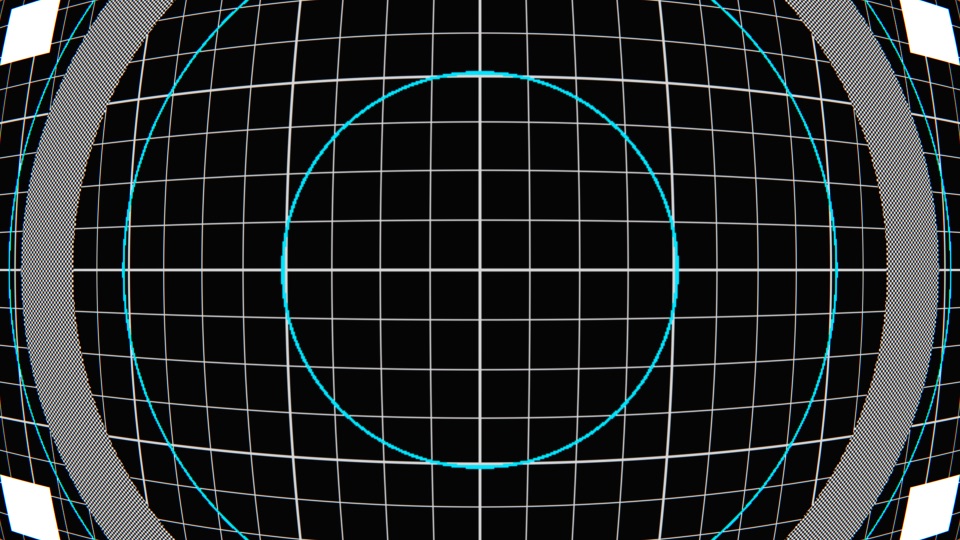
Three behaviours follow from modelling it this way rather than fitting a curve that looks about right. All three are consequences, not features — which is why they are exact:
- Rectilinear does nothing at all, at any field of view. A flat picture re-photographed through a flat lens is the same picture; the maths says so without being told. If you park the Projection control there and see any change, something is wrong.
- Defish exactly undoes fish. It is the same formula with source and destination swapped, not a similar-looking inverse curve.
- The frame always stays full. The reference radius is a fixed point of the map, so only the interior is redistributed. Strength changes the character of the warp instead of shrinking the picture into a black field.
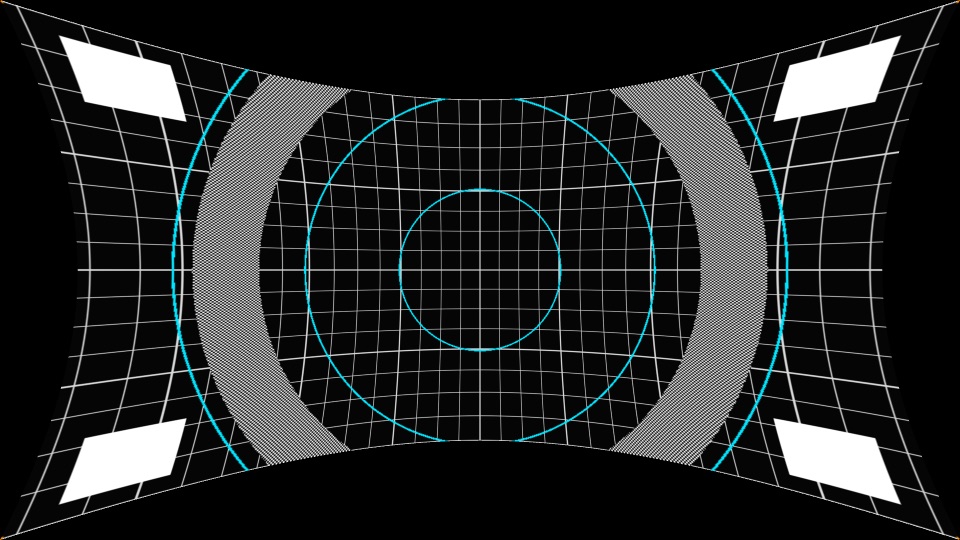
Undoing a fisheye genuinely wants picture from beyond the frame, and there is none — so the corners go transparent rather than being invented.
Field of View is the null
There is deliberately no wet/dry mix. Cross-fading two different geometries double-exposes the picture rather than easing between them — you would see both warps at once, not a blend.
The null is Field of View at zero, where every projection agrees anyway. That is the control to animate if you want the effect to come and go.
Troubleshooting
| Symptom | Cause |
|---|---|
| Plugin doesn’t appear in Resolume | Wrong folder, or Resolume older than 7.3.1. On macOS, also check quarantine. |
| macOS: installed but never loads | Gatekeeper quarantine on the bundle — clear it with xattr -dr. |
| Rectilinear is changing the picture | It shouldn’t, at any field of view. That is a bug worth reporting. |
| Corners go transparent when defishing | Correct and deliberate — that picture does not exist. Composite something behind it. |
| I want to fade the effect in | Animate Field of View to zero rather than looking for a mix control. |
| Defish doesn’t perfectly undo my fisheye footage | It exactly inverts Porthole’s fish. Real camera glass is not one of these five ideal projections. |
| Performance is poor | Genuinely unmeasured — please report it with your raster and GPU. |
See also
- README — the projection family in pictures, and the download links