

A menu-bar tray launcher for the fleet’s local web-server apps: pick a network interface and port, Start/Stop the server, Open the web UI, and leave it in the system tray.
If you’re using srt-router, flock or RFutils as a desktop app, this is the shell you’re
looking at.
If the server won’t start on a clean Mac, read this first
The released builds are now Developer ID-signed and notarised, so this should no longer bite
anyone who downloads the .dmg or .pkg. It is still the first thing to check if you built the
app yourself, or if you are running a download from before that changed — because for an
unsigned .app that bundles helper binaries, approving the app does NOT unquarantine its
payload, and the helpers are SIGKILLed silently.
That is exactly this app’s shape — a tray app wrapping an embedded server binary. The failure mode is nasty:
- the app launches and looks completely fine;
- the server never starts;
- there is no visible error.
This is the first thing to check, not a bug in the server. Clearing the quarantine attribute on the whole bundle is the usual fix:
xattr -dr com.apple.quarantine "/Applications/<the app>.app"Consuming apps ship signing notes of their own — see each app’s launcher/SIGNING.md.
What has and hasn’t been tested
The Rust backend compiles and the panel UI has been exercised via its mock backend. The full tray app has not been run end-to-end against a live server on the target machine.
Given the above, that gap matters: the untested path is exactly the one where the Gatekeeper problem shows up.
Using the panel
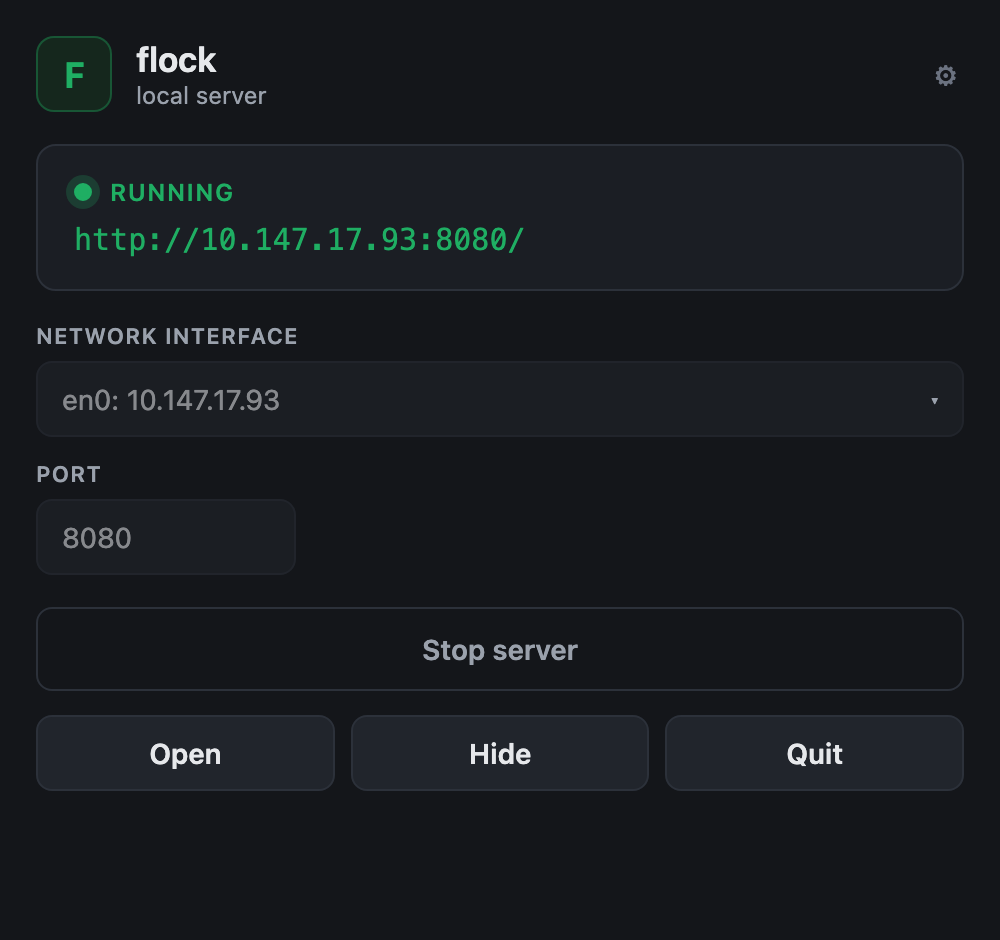
The same shell, themed per app — srt-router and RFutils get their own name, icon and colour, and behave identically.


The URL under the RUNNING badge is the address the server is actually bound to, not a
template. If it says 127.0.0.1 when you expected a LAN address, the interface selector is the
thing to change — copy that URL to reach the app from another machine.
| Control | Does |
|---|---|
| GUI Interface | which network interface the server binds |
| Port | which port |
| Start / Stop | run or kill the server |
| Open | open the web UI in your browser |
| Hide | back to the tray — the server keeps running |
| Quit | stops the server and exits |
Hide and Quit are different. Hiding leaves the server running; quitting kills it. If you close the panel expecting the app to keep serving, use Hide.
Interface and port
The GUI Interface dropdown lists every bindable IPv4 interface plus All interfaces (0.0.0.0).
- A specific interface → the server binds that IP, and the URL shows that IP.
- All interfaces → the server binds
0.0.0.0, and the URL shows your primary non-loopback IP so the link is still clickable.
“All interfaces” means the server is reachable from your whole network. Whether that’s appropriate depends on the app you’re launching and what it can do — several of these fleet apps have no authentication. Pick a specific interface if you want it contained.
Your interface and port choice is remembered between launches, in the OS app-config directory.
If your port silently reverts to the default, the saved settings file is missing or unreadable — every failure there falls back to the default without an error.
Starting and stopping
- Pressing Start when it’s already running does nothing harmful — it just reports the current status. It does not restart the server.
- If the server exits on its own, the panel notices the next time it refreshes status, not instantly.
- Stop and Quit kill the process outright. There’s no graceful shutdown, so an app that writes state on exit may not get the chance. Stop the server before unplugging anything it was writing to.
Troubleshooting
| Symptom | Cause |
|---|---|
| App opens, server never starts, no error (macOS) | The Gatekeeper quarantine trap (If the server won’t start on a clean Mac, read this first). Check this first. |
| Server starts then immediately stops | Often the working directory: several apps read relative paths (state/routes.json, data/registry.json) and fail if started elsewhere. That’s a launcher-config issue, not a server bug. |
| Port reverted to the default | The saved settings file is missing or unreadable; it falls back silently (Interface and port). |
| URL shows an IP I didn’t pick | You chose “All interfaces”, so it shows your primary non-loopback IP to keep the link clickable (Interface and port). |
| Others on the network can reach it | “All interfaces” binds 0.0.0.0 (Interface and port). |
| Closed the panel and the app kept serving | That’s Hide. Quit stops it (Using the panel). |
| Start did nothing | It was already running (Starting and stopping). |
| The app lost unsaved state on Quit | Quit kills the child; there’s no graceful shutdown (Starting and stopping). |
See also
- API.md — the launcher contract and the command surface
- adding-an-app.md — wrapping another app in this shell
- DEVELOPING.md — building it