

Blend Calc is a projector edge-blend calculator that runs entirely in the browser. Define a projection canvas, set the array, pick a projector and lens from a library you control, and get the system resolution, the overlap budget, the lens requirement per position, a PDF report, and a Resolume Arena advanced-output file.
No backend, no accounts, no telemetry. Everything is computed client-side and stored in the browser.
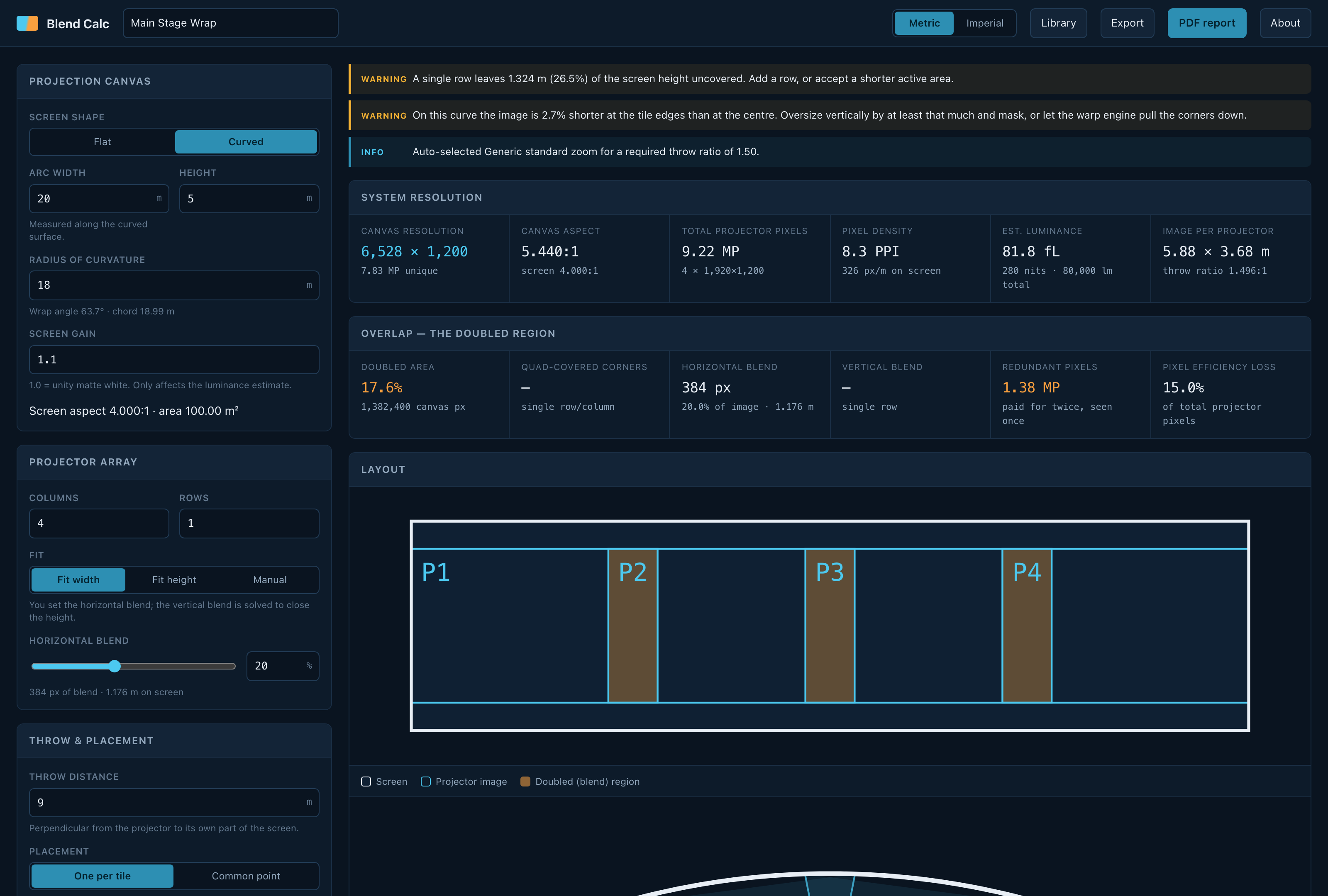
A 20 m × 5 m cylindrical screen on an 18 m radius, four projectors wide at 20% blend. The warnings are live: this array leaves 26.5% of the screen height uncovered, and the curve makes the image 2.7% shorter at the tile edges than at the centre.
Before you rely on this: the blend, pixel-budget and curved-optics maths is verified numerically — 66 tests pin the conservation invariants, the flat and curved limit cases and the lens-selection logic — and the PDF report is generated and inspected across flat, curved, single-projector, large-array and deliberately broken designs.
The shipped projector and lens specifications are seed data, flagged
unverifiedthroughout. The Resolume exporter’s vocabulary was derived from real Arena 7.27.0 files and is asserted in CI to invent nothing, but it has not been round-tripped through a running Arena, and no blend has ever been driven onto real projectors from it.This codebase was created with AI assistance, directed and reviewed by a human author.
The canvas
Flat or cylindrical. On a curve you give the arc width — measured along the surface, the way a screen is actually built — and the radius; the wrap angle and chord fall out of that.
The array, and which blend you pin
Any grid of columns × rows. You pin one blend and the solver derives the other so the array closes on the screen exactly:
| Fit mode | You set | Solver derives |
|---|---|---|
| Fit width | horizontal blend | vertical blend |
| Fit height | vertical blend | horizontal blend |
| Manual | both | reports the spill or shortfall instead of correcting it |
Manual is the honest mode when the array is fixed by rigging rather than by arithmetic — it tells you what you are short by rather than quietly moving a projector.
The doubled region, which is what makes blends expensive
Blend bands are covered by two projectors; where a horizontal and a vertical blend cross, by four.
The report separates all three cases, in canvas pixels and as a share of the canvas, and totals the redundant pixels you pay for twice and see once.
That total is the number to take to a hire quote. It is also the number that decides whether a 2×2 array of one projector class beats a 1×4 of another.
System resolution and light
The blended canvas size, total projector pixels, pixel density on the screen surface in PPI, and an estimated screen luminance in foot-lamberts and nits.
Luminance is an estimate from the projector’s rated output — it knows nothing about your screen gain, ambient light or lamp hours.
Throw and lens
Required throw ratio per column, the lens that covers it, where it sits in its zoom range, and the horizontal lens shift needed.
Two placement models, and they are genuinely different jobs:
- One per tile — each projector on the axis of its own tile. No shift needed.
- Common point — the whole array stacked at one position. Off-axis tiles need shift, and on a curve the throw varies per column.
“Where it sits in its zoom range” is the field to read before ordering: a lens at the very end of its range is a lens with no adjustment left on site.
Curved screens are not flat maths with a fudge factor
A projector forms a flat image; a curved screen does not — so the flat image has to be wider than the tile’s arc length to reach around the curvature.
Two consequences the tool reports and a flat calculator misses:
- You need a wider lens than the flat maths suggests.
- The image is shorter at the tile edges than at the centre, because a concave screen’s edges bulge towards the projector. You oversize vertically and mask, or let the warp engine pull the corners down. The percentage is on screen and in the report.
A projector at the centre of curvature (throw = radius) is a normal, often ideal position and is handled. The real constraint is that the projector must be in front of the plane through its own tile’s edges.
The library is yours
Projectors by brand and model with their native resolution, light output and lens mount; lenses grouped into mount families, so they are entered once rather than once per body.
Fully editable, with JSON import and export — which is how you carry a hire company’s real stock between machines.
The shipped data is seed data and is flagged unverified. Check a spec against the manufacturer before it decides a purchase.
Exports
A PDF system report, a Resolume Arena advanced-output XML, and the design itself as JSON.
The Arena export writes only elements and attributes seen in real Arena files, and CI asserts it invents none — but it has never been loaded back into a running Arena. Treat the first import as a test.
If something looks wrong
| Symptom | Cause |
|---|---|
| The array does not cover the screen | You are in Manual fit. It reports the shortfall rather than correcting it. |
| The lens is at the end of its zoom | Read the range field — that is what it is for. Choose another lens or move the array. |
| The image is short at the tile edges | A concave screen. Oversize vertically and mask, or warp. The percentage is reported. |
| The pixel count is much higher than the canvas | The doubled region. That is the cost of blending, itemised. |
| A projector spec looks wrong | It is seed data, flagged unverified. Edit the library. |