

Conway is Conway’s Game of Life for Resolume Arena and Avenue, as two FFGL plugins in one download: SW Conway, a source that plays Life (and twelve of its relatives) from a random soup or a famous pattern, and SW Conway Over, an effect whose clip seeds the field and keeps feeding it.
None of it is a picture drawn to look like Life. A grid of cells runs the rule, one generation at a time, and everything you’d recognise falls out of it: gliders crawling across the frame, blinkers and pulsars, a gun firing gliders, a soup boiling and then settling into still shapes.
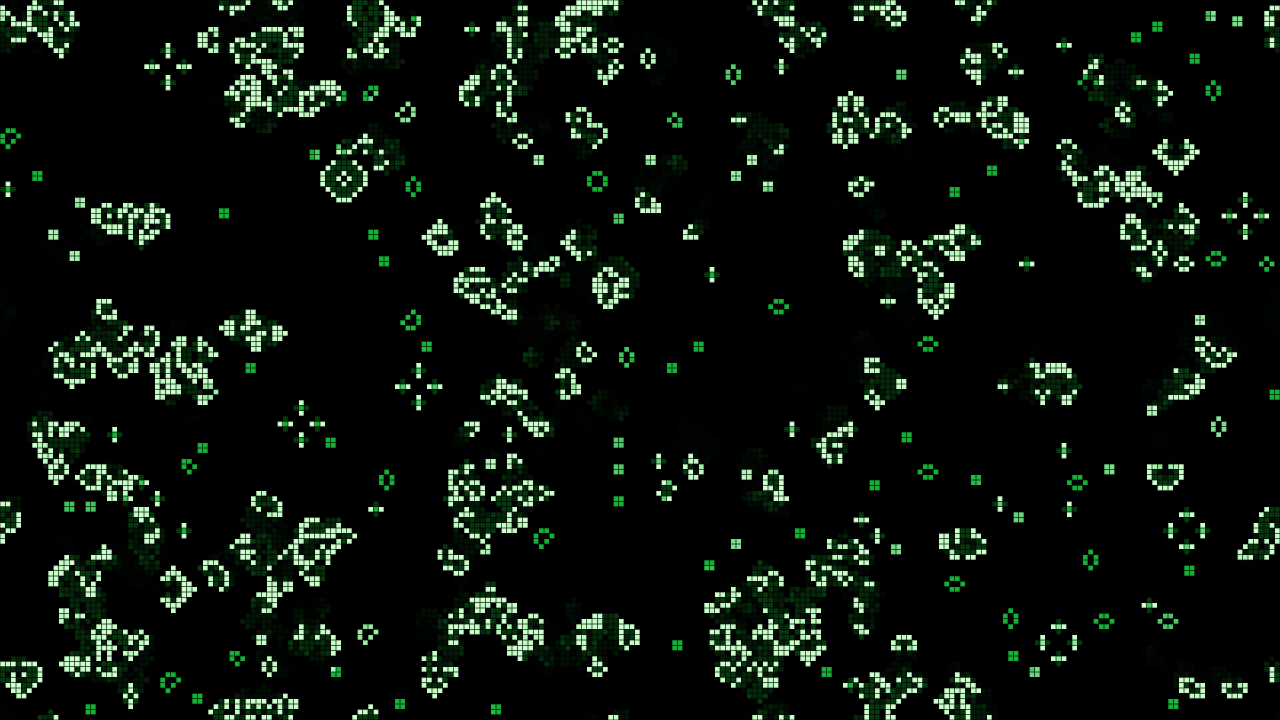
SW Conway at its defaults after ten seconds (generation 149), rendered by the offline harness rather than captured from Resolume: a 35% soup burning down, newborn cells white, cells that have lived forty generations green, the just-dead trailing.
Before you rely on this: released at v0.1.0, and still early days. The automaton is measured rather than asserted, by a harness that drives the plugin classes themselves headless, at two rasters and on a software renderer. It asks the plugin for the published facts of Life and gets them: the R-pentomino has 116 cells at generation 1103 (118 at 1102), Diehard is gone at 130, Gosper’s gun adds a glider every 30 generations, the oscillators come back at periods 2, 3 and 15 and not before, the glider moves one cell diagonally every four generations and the lightweight spaceship two cells across. All thirteen rules match an independent stepper cell for cell for 64 generations, on a torus and with dead edges, every cell’s age included; Day & Night and Anneal are symmetric under swapping live and dead, as published. Every pixel is the live area it covers, to within float rounding. Fourteen models that are wrong on purpose each fail their check, one-character mutations of the shipped shaders are caught, and all 41 parameters over both plugins are shown to change the picture. It’s never been loaded into Resolume on macOS. The one host it’s run in there is the fleet’s own test host,
oxbow, for 120 frames each. On Windows both plugins have been loaded: a build of this source loads, registers and renders in Resolume Arena 7.27.1 on software rendering (win-lab, Mesa llvmpipe, no GPU, no sound device), with every control matching what the plugins declare (24 and 30 host controls) and Arena’s log clean, in the fleet’s Arena gate: 15 of 15 checks, with the audio rows skipped. Because the field changes every generation, no two grabs of the picture are alike, so the gate could only confirm some controls one at a time: all 14 of the source’s valued controls and 7 of the effect’s, with the rest inconclusive (none dead). The harness’s own sweep (every one of the 41 parameters moves the picture) covers the rest. Software rendering tells you nothing about a GPU or about speed. Try it on a spare layer before you put it in a show.This codebase was created with AI assistance, directed and reviewed by a human author.
Installing
Every download has both plugins in it: SW Conway (a source) and SW Conway Over (an effect). Drop them into Resolume’s effects folder and restart Resolume:
macOS    ~/Documents/Resolume Arena/Extra Effects/
Windows  %USERPROFILE%\Documents\Resolume Arena\Extra Effects\
Avenue uses the same layout under its own folder name. SW Conway shows up among the sources and SW Conway Over in the effects browser.
The macOS download is a universal build (Apple silicon and Intel), as a .dmg or a .zip. It’s
Developer ID-signed and notarised by the release pipeline after publication, so the bundles just
load. If macOS refuses a download, it’s from before the signing, so download it again. The
Windows download is an x64 installer or a .zip. It isn’t code-signed, so the installer trips
SmartScreen once: More info → Run anyway.
One rule, and everything falls out of it
The field is a grid of cells, each alive or dead. Every generation, every cell looks at its eight neighbours at once, and Conway’s rule decides what it becomes:
- a dead cell with exactly three live neighbours is born;
- a live cell with two or three live neighbours survives;
- every other cell dies, or stays dead.
That’s it. The rule is the same for every cell and every generation, and nobody draws the shapes. They’re just what the rule does:
| what you see | why |
|---|---|
| gliders crawling diagonally | a five-cell shape that rebuilds itself one cell over every four generations |
| spaceships running across | the lightweight spaceship rebuilds itself two cells over every four: twice a glider’s speed |
| blinkers, toads, beacons | oscillators of period 2: three-in-a-row turning on its side and back |
| pulsars, pentadecathlons | oscillators of period 3 and 15 |
| a gun firing gliders | Bill Gosper’s 1970 gun makes a new glider every 30 generations, for ever |
| a methuselah boiling | five cells (the R-pentomino) take 1103 generations to settle; seven (the acorn) 5206 |
| ash | a random soup burns down to still shapes (blocks, beehives, boats), blinkers, and gliders wandering until they hit something |
The look is the state. A cell’s colour is its age, from newborn to elder, so the still shapes (old) and the boiling front (young) read apart at a glance, and a cell that’s just died glows for a few generations before it’s gone.
Start here
- Put SW Conway in a clip slot and trigger it. A random soup appears and starts to burn down: white where it’s busy, green where it’s settled.
- Change Rule. The same field continues under a different rule: Day & Night grows blobs, Seeds explodes, Maze builds corridors, Brian’s Brain sparks.
- Pick Pattern Gosper Gun and turn Cell Size up: at the default 135 rows the gun is a speck. It fires a glider every 30 generations; on the wrapping field they come round again and eventually hit it, sooner the bigger the cells and the higher the Speed.
- Turn Speed down to watch one generation at a time, or to 0 and press Step.
- Leave it. When the soup has settled into ash, Auto Reseed starts a new one.
- For your own footage: put SW Conway Over on a clip. Its bright parts are the seed, and Feed keeps breeding cells there, so Life spills out of the picture’s highlights.
The Automaton group
Resolume shows every slider as 0 to 1; the ranges below are what the ends of each slider mean.
Rule (default Conway). Which rule the cells obey. Changing it doesn’t reseed: the field carries on under the new rule, which at first looks like the old rule’s leftovers. Press Reseed to see the new rule from a soup.
| rule | notation | what it does |
|---|---|---|
| Conway | B3/S23 | the Game of Life |
| HighLife | B36/S23 | Life plus a birth at six: a pattern that copies itself (Nathan Thompson, 1994) |
| Day & Night | B3678/S34678 | blobs of live and dead that behave the same way round (Nathan Thompson, 1997) |
| Seeds | B2/S | no cell ever survives: every pattern explodes |
| Life without Death | B3/S012345678 | nothing ever dies: growth and ladders |
| Maze | B3/S12345 | corridors |
| Replicator | B1357/S1357 | every pattern becomes copies of itself (Edward Fredkin) |
| Diamoeba | B35678/S5678 | diamond-shaped amoebas |
| 2x2 | B36/S125 | patterns of 2x2 blocks stay blocks |
| Morley | B368/S245 | slow, high-period spaceships |
| Anneal | B4678/S35678 | blobs that melt and smooth their edges |
| Brian’s Brain | B2/S/C3 | every cell fires once, then is dying for a generation and cannot be born (Brian Silverman) |
| Star Wars | B2/S345/C4 | like Brian’s Brain with two dying generations |
B lists the neighbour counts at which a dead cell is born, S those at which a live one survives, and a C marks a Generations rule, whose cells spend C − 2 generations dying, counting as nobody’s neighbour and unable to be reborn.
Edges (Torus, Dead; default Torus). On the torus the field wraps: a glider leaving on the right comes back on the left, and the top joins the bottom. With dead edges, everything past the edge is dead, and gliders crash into it.
The Time group
Speed (0; 0.5 to 500 generations a second, default 15). At 0 the field stands still and only Step and Audio Steps advance it. A frame runs at most 32 generations, so at very high speeds on a slow frame rate it runs slower than set rather than jumping.
Smooth (0 to 1, default 0.35). A crossfade from the last generation into this one, as a share of a generation’s period. At 0 every generation is a hard cut; at 1 cells fade in and out over the whole period, which reads well at low Speed.
Step (a button). One generation, by hand.
The Seeding group
Pattern (default Soup in the source, Clip in the Over). What the field starts from, and what Reseed lays down. Soup is random cells at Density over the whole field. R-pentomino, Acorn, Diehard and Gosper Gun are single famous patterns in the middle: the R-pentomino boils for 1103 generations, the acorn for 5206, Diehard vanishes completely at 130, and the gun fires for ever. Gliders is a fleet: each 16 × 16 block of cells holds a glider with probability Density, heading in one of the four diagonal directions. Clip (the Over only) is the clip’s bright cells. Choosing a pattern reseeds at once.
Density (0 to 1, default 0.35). The soup’s fill, and the glider fleet’s, and the audio patches’.
Seed (0 to 9999, default 1). Which soup. The same Seed always gives the same first soup.
Reseed (a button). The next soup in the Seed’s sequence (or the pattern again, or the clip as it is now).
Auto Reseed (on by default). The plugin counts every generation’s live cells exactly. When the count has repeated exactly, with a period of 30 generations or less, for 120 generations, the field has settled into ash and wandering gliders, and it reseeds. An empty field reseeds once it has been empty for 8 generations. A large field can take minutes to settle. With Noise above 0 the count never repeats exactly, so Auto Reseed never fires: Noise is the other way to keep a field alive.
Noise (0; one in a million to one in a hundred per cell per generation, default 0). Spontaneous births anywhere, outside the rule. A little keeps ash from ever going still.
The Over only:
Threshold (0 to 1, default 0.5). How bright a part of the clip must be to count as alive. The clip’s brightest channel is used, not its luma, so a saturated blue counts as well as a white; the clip’s alpha multiplies it. Each cell asks the one pixel under its centre.
Feed (0 to 1, default 0.3). Every generation, each cell under a bright part of the clip is reborn with this chance (squared, so the low end of the slider has room: 0.3 is a 9% chance). At 0 the clip seeds the field and the rule takes it from there; at 1 every bright cell is alive every generation and Life grows out from the edges of the bright shapes.
The Audio group
Audio (Resolume’s FFT input). Audio Steps (0 to 8 generations, default 0): each onset in the sound advances the field that many generations, so with Speed at 0 the field moves only on the beat. Audio Seeds (0 to 1, default 0): each onset drops a disc of soup somewhere new, up to half the field’s height across, at Density. The first frame after a clip trigger fires nothing, even if the music is already loud.
The Look group
Cell Size (default 135 rows: 8 pixels at 1080p). From a cell a pixel tall at 1080p (1080 rows) to sixteen rows. The columns follow the output’s shape. The grid doesn’t depend on the output’s size, so the field looks the same at any resolution, and a cell that’s a fraction of a pixel wide is drawn evenly, never as alternating 7- and 8-pixel columns. Changing Cell Size keeps the cells: the field is cropped or extended around its middle, not reseeded.
Gap (0 to half a cell, default 0.12). Dark space round each lit cell.
Palette (Phosphor, Heat, Ice, Mono, Spectrum; default Phosphor). The colours from newborn to elder and of the trail. Spectrum turns the hue with age, so oscillating and growing regions come out as rainbow bands.
Age Span (1 to 1000 generations, default 40). How many generations a cell takes to go from the newborn colour to the elder one (with Spectrum, one turn of the hue wheel).
Trail (off; 0.5 to 200 generations, default 3). How long a cell that’s just died keeps glowing: its brightness falls by e every Trail generations.
The Over only:
Clip Colour (0 to 1, default 0). The cells take the clip’s colour under them. At 1, with Backdrop 0, the live cells are windows onto the clip.
Backdrop (0 to 1, default 0.35). How much of the clip shows behind the cells.
Mix (0 to 1, default 1). The whole effect against the clip. At 1 the output is opaque whatever the clip’s alpha; at 0 the clip is returned exactly, alpha and all.
SW Conway Over: your clip is the seed
The clip decides which cells are alive. When the field is seeded (on load, on Reseed, when Auto Reseed fires), each cell looks at the pixel under its centre and is alive if that pixel is brighter than Threshold. From then on the rule runs, and Feed keeps the clip in the picture: every generation, cells under its bright parts are reborn at random. So bright shapes stay crowded with newborn cells, and Life spreads out from their edges into the dark.
Point it at something with bright shapes against a dark ground: Resolume’s Trinity (rings), BattleWeapon Tank, OrganicMotions and Galactucity all read well. A clip that’s bright almost everywhere (IntoTheGlow) fills the field: raise Threshold. A dim grey clip (Beat 003) seeds almost nothing at the default: lower Threshold to 0.25.
The source is transparent where nothing lives
SW Conway’s output is premultiplied: dead cells are transparent, so the field layers over whatever is below it in the composition. Use it on Add or Screen for a glow, or Alpha to lay the cells over a picture.
How it works
- The state is an integer texture, one texel per cell, holding the cell’s age (generations alive) and, once it dies, the generations since. Every generation is one pass that reads the eight neighbours and writes the next state, in integer arithmetic only, so the automaton is identical on every graphics card.
- The rules are written once, in the notation above, and parsed into the masks the pass uses.
- Time is Resolume’s clock in double precision (it runs to hundreds of millions of milliseconds, where a single-precision float can’t resolve a frame). Speed times the elapsed time is owed; whole generations run and the fraction carries, so the count is exact at any frame rate.
- The population of every generation is counted on the graphics card by an occlusion query over the live cells, exactly, and read back when it’s ready, which drives Auto Reseed.
- The picture averages the grid over each pixel’s footprint, weighting every cell by the exact area it covers.
Performance
At the defaults, on an Apple M4 Max shared with other builds, the median frame is 0.32 ms at 720p, 0.18 at 1080p and 0.37 at 4K for SW Conway, and 0.18, 0.26 and 0.71 ms for SW Conway Over; with Cell Size at its smallest (1080 rows, two million cells) 0.19, 0.21 and 0.45 ms. That’s 1–4% of a 60 fps frame.
If it looks wrong
The field went still and nothing happens. It’s settled; Auto Reseed waits until the count has repeated for 120 generations. Press Reseed, or turn on a little Noise.
Auto Reseed never fires. Noise is above 0, or the field is still busy somewhere. A large field can take minutes to burn down.
The Over shows almost no cells. The clip is dimmer than Threshold: lower it, or raise Feed.
The Over is a solid mass. The clip is bright almost everywhere: raise Threshold, or lower Feed.
Cells look smeared between generations. That’s Smooth: set it to 0 for hard cuts.
Changing Rule did nothing. The field carries on under the new rule from where it was; some rules change ash slowly. Press Reseed to start the new rule from a soup.
Neither plugin is in the browser. Check the folder under Installing, and that Resolume was restarted.
It does nothing at all. That’s what a shader that won’t compile looks like, and the actual error is in the log:
macOS    ~/Library/Logs/conway/conway.YYYY-MM-DD.log
Windows  %LOCALAPPDATA%\conway\logs\conway.YYYY-MM-DD.log
It records the GL vendor, renderer and version at load, and which shader failed if one did.
Known limits
- Auto Reseed is a heuristic. It looks for a population that repeats exactly, with a period of 30 or less, for 120 generations. Ash, oscillators and gliders on a torus all do; a field with Noise never does.
- Counts arrive a frame or two late in a host, so a reseed lands a generation or so after the field settled.
- At 500 generations a second below 16 frames a second, the field runs slower than Speed: a frame runs at most 32 generations.
- Threshold is one number for the whole clip, read from one pixel per cell: a clip with a wide range of brightness may want it moved.
- The colours are chosen by eye (mine); the age and trail are a look, not a measurement of anything.
- The literature was checked against Wikipedia for this release (the LifeWiki, where the patterns are published, refuses automated reads), and every number is reproduced by the harness’s own stepper before the plugin is asked for it.
- Never loaded into Resolume on macOS. Everything numeric was compiled, rendered and measured
offline against the plugin classes themselves in a headless GL context, plus an
oxbowload. No real audio has reached it in a host: the audio controls were checked with a synthetic spectrum only. - Never seen on camera footage, only on Resolume’s bundled CG loops and the harness’s card.
- Only ever run on an Apple M4 Max, although the macOS build contains an Intel slice. On Windows, see the note at the top of this guide.
- No presets, no OpenFX version.
- There’s a browser demo at conway-demo.stoatworks-labs.com. It’s a port to a web page rather than the plugin: the shaders run unedited in WebGL2, and the generation clock, the buttons, the rules, the patterns, the grid and the settle law are rewritten in JavaScript. WebGL2 has no exact occlusion count, so the page reads its count pass back to find the population. It has no audio, so the audio controls are left off, and the page lists what else it doesn’t reproduce.
About
The last group, About, has the plugins’ name, version, licence and maker, and buttons that open this user guide (stoatworks-labs.com/software/conway/guide/), the project page, the source on GitHub and the support page in your browser.