

Handleman is an FFGL effect for Resolume Arena and Avenue that runs your clip through a hand-cranked camera and a hand-cranked projector, onto a silver print that’s been round a few cinemas, and gives you a button that runs the reel out.
Before about 1927 neither end had a motor. A cameraman turned the camera, eight frames to a turn of the handle and two turns a second if he was counting properly, and at the other end a projectionist turned the projector, with a loop of film running between them. The plugin models those two hands, and the old-film look falls out of them: motion that rushes and drags, a picture that breathes lighter and darker in step with it, and a frame rate that won’t sit still, with a flicker that wanders along with it. The print is orthochromatic or panchromatic silver, black and white, sepia toned or tinted, with grain, weave, scratches, dust and now and then a hair, and Run Out fogs the roll to blank cells with the frame line crawling up the screen.
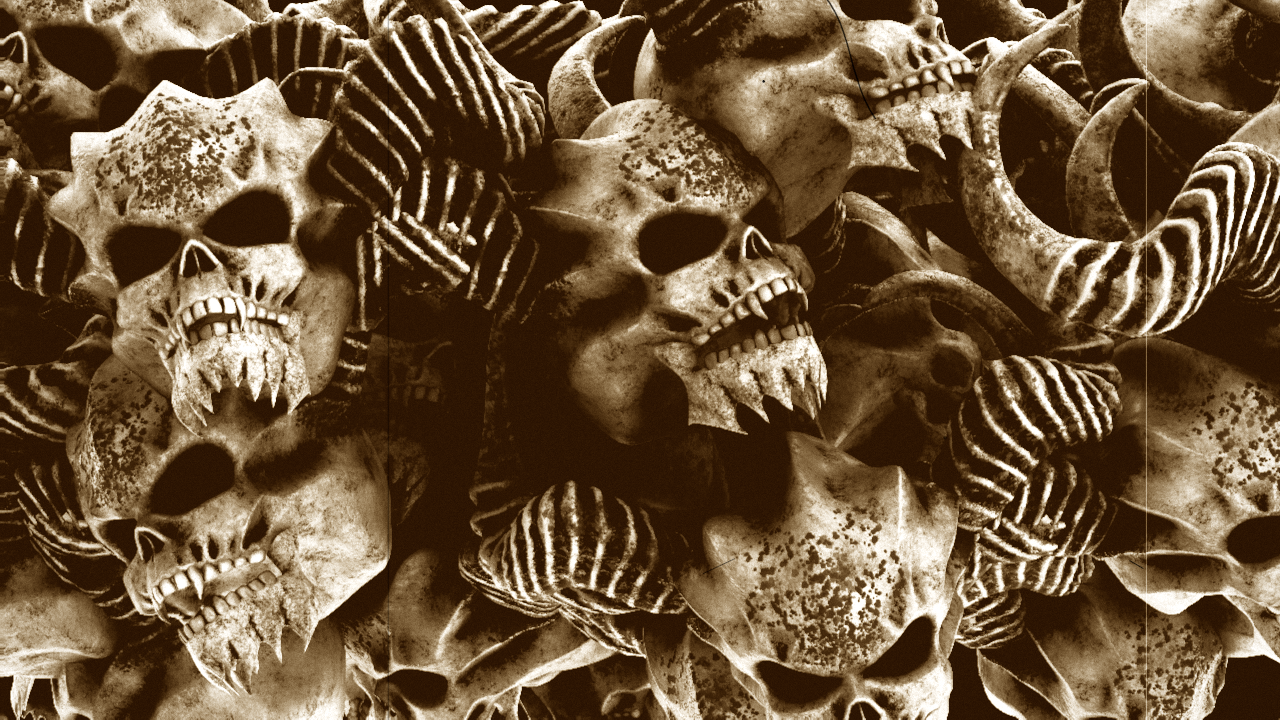
Resolume’s bundled NoHopeJustFear_44 through the plugin, rendered by hmtest --pipe, the offline
harness, rather than captured from Resolume: the defaults with Hair turned up, which is
orthochromatic stock, sepia toned and cranked at sixteen frames a second.
Before you rely on this: it’s at v0.1.0, the first release, and very early days. On macOS it has never been loaded into Resolume. In Resolume Arena 7.27.1 on Windows (software rendering, no GPU, no sound) it loads, registers and renders, with every control as declared, and passed all 9 of the fleet’s Arena checks three times, the last on the shipped download itself. With the grain, the wear and the hands held still, 12 and then 15 controls measurably changed the picture there and none read dead. Crank Rate and Hair (a rare event) were too close to call every time, and Run Out Time and Tail only act after a press of Run Out, which the gate never sends. What’s here was compiled, rendered and measured offline on an Apple Silicon Mac (an M4 Max, macOS 26.4), by a harness that drives the plugin’s own class in a headless GL context, at two rasters (1280×720 and 320×180) and again on Apple’s software renderer. Most of its checks feed the plugin a picture that says which frame it is, so the screen says when the camera exposed what’s on it. With both hands still, all 598 display frames show the picture a steady clock predicts. The projector’s hand changes how long each frame stays on screen and never which picture it is; the camera’s changes which instant each frame holds and never when it’s shown. A frame cranked slowly prints lighter, at the print’s gamma (a slope of 1.440 against 1.40). A flat grey’s flicker matches the shutter’s Fourier series to 2.3e-8 in every bin. Black & White is neutral to the last bit, sepia keeps its density law to 1.3e-6 and the tints theirs to 1.1e-7, and the orthochromatic stock’s weights read back out of the picture to four places. Run Out ends in blank cells with a frame line of the published height (41 or 42 rows at 720), crawling up 47.55 rows a pull-down. Ten models broken on purpose and a one-character change to the shipped shader are all caught, and all 19 controls measurably change the picture. The only host it’s run in on a Mac is the fleet’s own test host,
oxbow, which loads it asSW Handleman(HM01, an effect) and renders 120 frames through it, so on a Mac its panel in Resolume and Resolume’s clock driving the cranks are untried. How the hands wander, the fog, the grain and the tones’ colours are numbers I picked to look right, not measurements of a cameraman or a print, and it’s only been seen on Resolume’s bundled demo clips. Try it on a spare layer before you put it in a show.This codebase was created with AI assistance, directed and reviewed by a human author.
Installing
Every download carries one effect, SW Handleman: Handleman.bundle on macOS, Handleman.dll
on Windows. Drop it into Resolume’s effects folder and restart Resolume:
macOS    ~/Documents/Resolume Arena/Extra Effects/
Windows  %USERPROFILE%\Documents\Resolume Arena\Extra Effects\
Avenue uses the same layout under its own folder name. The effect then shows up in the effects browser as SW Handleman.
The macOS download is a universal build (Apple silicon and Intel), as a .dmg or a .zip. It’s
Developer ID-signed and notarised, so the bundle just loads. The Windows download is an x64
installer or a .zip. It isn’t code-signed, so the installer trips SmartScreen once: More info
→ Run anyway.
Two hands and a loop of film
The plugin is both machines and the film between them:
- The camera’s hand decides when each frame was exposed. Every film frame the camera’s crank passes is exposed to whatever your clip is showing at that moment. The cameraman’s speed ripples once a turn (the arm pushes harder on the down stroke), with a harmonic of that, and his count drifts over about five and nine turns.
- The projector’s hand decides how long each frame stays on the screen. The projectionist’s speed ripples and drifts as well, and the shutter’s geared to the handle, so it flickers faster and slower with him.
- The loop of film between them is what the camera has exposed and the projector hasn’t shown yet. The projector runs a set distance behind the camera, so it never asks for a frame the camera hasn’t got to, and the camera never gets more than twice that distance ahead. At the defaults the projector is about 1.2 film frames behind on average and never more than 2.3; with both hands at full it’s 3.9 and 7.8, which at sixteen frames a second is about half a second. That’s how far the projection runs behind your clip, plus however long the frame in the gate has been up.
- The film is silver on a nitrate base: the negative’s eye for colour (Stock), the print’s curve (Contrast), toning or a tint, grain, and the marks a print picks up on its travels.
What comes out of that:
| what you see | what causes it | control |
|---|---|---|
| motion that rushes and drags | each frame holds the instant the camera’s crank passed it. When the cameraman slows, the frames are further apart in the scene’s time, so projected steadily the action rushes; when he hurries, it drags | Camera Hand |
| the picture breathing lighter and darker, in step with the speed | the camera’s shutter is a fixed angle, so a frame cranked slowly was exposed for longer and prints lighter, and a hurried one darker | Camera Hand, Contrast |
| a faint flicker from frame to frame at the crank’s rate | the hand’s jerk while the camera’s shutter was open | Camera Hand |
| some frames held longer than others | the projectionist’s speed | Projector Hand |
| flicker that speeds up and slows down | the shutter’s geared to the projector’s handle, and beats against your display’s refresh | Projector Hand, Blades, Shutter Angle |
| a display frame showing two pictures at once | it spans a pull-down, with the shutter open either side of it | Blades, Shutter Angle |
| red going dark and blue going pale | orthochromatic film is blind to red | Stock |
| brown shadows under white highlights | sepia toning converts the silver, so it only colours where there’s silver | Tone |
| coloured highlights over black shadows | a tint is a dye in the base, so it colours the light | Tone |
| grain that holds still while a frame is up | the grain is in the film frame, so it changes at each pull-down, not each display frame | Grain |
| each frame landing a little off | the claw and teeth of a hand-turned projector | Weave |
| scratches that stay put while the picture moves | grit in the gate | Scratches |
| specks for a frame or two | dirt riding the print, white where it was on the negative | Dust |
| a hair trembling at the edge of the frame | one caught in the gate | Hair |
| fog, blank cells and the frame line crawling up the screen | the end of the roll going through | Run Out, Tail |
A frame’s exposure belongs to the frame. The camera’s speed when a frame was exposed is recorded with it, and the projector never touches it: the projectionist can change how long a frame stays up, but not how it looks.
Start here
Put SW Handleman on a layer with something moving in it and leave every control where it is. The defaults are sixteen frames a second (two turns of the handle) with both hands a little unsteady: the cameraman wanders by up to 15% and the projectionist by up to 12%. The shutter has three blades at 315°, the stock is orthochromatic, and the print is sepia toned and well travelled: some grain and weave, two or three scratches at a time, a bit of dust and now and then a hair.
Then, in this order:
- Mix to 0 and back. Your clip against the projection.
- Camera Hand to 1. Watch anything that moves steadily: over each turn of the handle it rushes and drags, and it gets lighter as it rushes and darker as it drags. Put it back to 0.3.
- Projector Hand to 1. Frames now stay up for different lengths of time, and the flicker wanders about with them. Back to 0.3.
- Tone to Black & White, then Stock to Panchromatic and back. Anything red or orange goes from dark grey to light and back again, and anything blue goes the other way.
- Tone through Amber Tint, Blue Tint and Green Tint, then back to Sepia.
- Framing to 0.4. The picture rides up a tenth of its height and the frame line comes in at the bottom, with the top of the next frame under it.
- Press Run Out. The picture fogs to white from the edges in, and in about a second it’s blank cells with the frame line crawling up the screen. Press it again to thread a new roll.
A word about flicker. The shutter flickers the whole frame in the 3 to 30 Hz band that broadcast flash guidelines restrict, and every Run Out ends on a white screen, frame line or no, with the same flicker on it. Read Photosensitivity before this goes on a big screen in front of an audience.
Recipes
A steady modern restoration. A clean print of the old film, on a projector that doesn’t wobble. Projector Hand to 0, Weave, Scratches and Hair to 0, Dust to 0.05, Grain to 0.2, Tone on Black & White and Vignette to 0.15. Then Crank Rate to 20 (0.75 on the slider): three blades at twenty frames a second cut the light sixty times a second, which a 60 Hz output can’t tell from steady light, so the beat goes. Leave Camera Hand where it is. That’s the cameraman, and he’s in the negative. What’s left is his breathing, at the turn’s two and a half times a second and slower: on a flat grey the light steps by about 7% at most from one display frame to the next (95 steps in a hundred). Camera Hand to 0 as well and a flat grey doesn’t flicker at all.
A rough nickelodeon print. A worn print on a projector that’s had a hard week. Crank Rate to 14 (0.375), Camera Hand and Projector Hand to 0.8, Contrast to 0.75 (gamma 1.8), Grain to 0.7, Weave to 0.8, Scratches to 0.9, Dust to 0.8, Hair to 1, Vignette to 0.8, and Framing a touch below the middle (0.45), so a strip of frame line sits at the bottom of the screen, wobbling with the weave. Tone to taste: Black & White, or Amber Tint. This flickers a good deal harder than the defaults. On a flat grey the light steps by up to 42% from one display frame to the next (95 steps in a hundred), against the defaults’ 21%, and two blades at 180° would be far worse again; see Photosensitivity.
A night scene tinted blue. Silent films often shot their night scenes in daylight and tinted the print blue. Tone on Blue Tint, Stock on Orthochromatic, Contrast up to about 0.6 (gamma 1.56) and Vignette to 0.6, which puts the corners at 76% of the centre. The orthochromatic stock prints a blue sky pale, the tint turns pale into moonlight, and the blacks stay black. Amber Tint did the same job for lamplit interiors. A real print was often toned and tinted at once, and this can only do one or the other (see Known limits).
Red-blind: orthochromatic faces and skies. Stock on Orthochromatic and Tone on Black & White, on anything with skin or sky in it. Red exposes orthochromatic film about 5% as much as white does, green a third as much and blue two thirds, so red lips and warm skin print dark and a blue sky prints pale. It’s why silent-era make-up looks the way it does. Panchromatic shows what a modern black-and-white conversion would have made of the same picture.
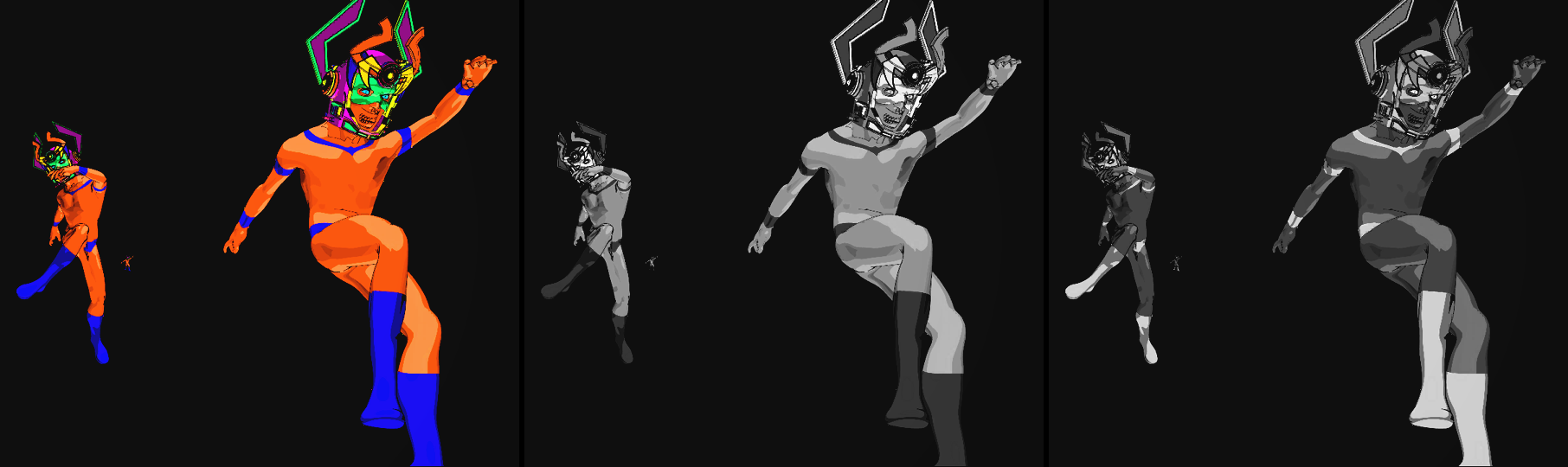
Resolume’s bundled Galactucity_21 through the plugin at the defaults, with Grain, Weave, Scratches,
Dust and Hair at 0 so the stock is all that changes. Left, Tone on Colour; middle, Black & White on
Panchromatic; right, Black & White on Orthochromatic. Rendered by hmtest --pipe, the offline
harness, at 960 × 540 and cropped to the figures.
Ending a set. Press Run Out on the last beat you want to see. Run Out Time sets how long the picture takes to burn out: 1 s at the default, 2 s at 0.75 on the slider, 4 s at the top. Then Tail decides how it ends:
- Rolling leaves the blank cells crawling up the screen, a frame line going by about once a second, until you do something about it. It’s a decent thing to fade the layer out on.
- Framed is the projectionist reaching for the framing knob. After a second and a half of blank cells the strip creeps on until the frame line has gone, and you’re left on a still white cell, about 2.7 s after the press at the defaults.
- Off the End is the tail whipping out of the gate after the same second and a half, leaving the lamp on an empty screen, about 2.6 s after the press at the defaults.
Tail is read as each cell goes through, so you can leave it on Rolling while the cells crawl and switch it to Framed or Off the End when you’ve had enough. Every ending is a white screen, so keep the layer’s opacity on a fader.
Threading a new roll. Press Run Out again. You get a few blank cells of leader (six at the defaults, or a third of the run-out’s frames if that’s more), then the fog clears back to your picture over Run Out Time and the frame line comes to rest. At the defaults the picture’s clear about a second and a third after the press. After Off the End, the new roll’s leading edge comes up into the gate from below. A press halfway through either turns it round from wherever it had got to.
As a transition, with Handleman on the layer rather than on the clip: press Run Out, change the clip while the screen is blank cells, and press it again. The camera keeps exposing whatever the layer’s showing all the while the projector’s showing blank cells, so the new roll comes up on the new clip.
The Crank group
Every slider in the inspector runs from 0 to 1. The ranges below are what those positions mean, and where it isn’t obvious, where on the slider a value is.
- Crank Rate: how fast both handles turn, 8 to 24 frames a second in a straight line (default 16, the middle of the slider; 12 at 0.25, 20 at 0.75). A turn of the handle is eight frames, so that’s one to three turns a second. It’s the camera’s rate and the projector’s: a live clip has no future for the projector to run ahead into, so there’s no undercranking here. The hands’ wobble is counted in frames, so the loop of film is the same number of frames long at any rate. A change carries on from where both cranks are.
- Camera Hand: how far the cameraman’s speed wanders, 0 to 50% of Crank Rate either way, in a straight line (default 0.3, which is 15%). His speed ripples once a turn, with a harmonic, and his count drifts over about five and nine turns; the percentage is the peak if they all line up, which they rarely do. A slow stretch spaces the frames further apart in the scene’s time and exposes each one for longer, so the action rushes and the picture lightens; a hurried stretch drags and darkens. At 1, over a turn, the scene runs at between 0.77 and 1.37 of real time. Each frame also gets a little exposure of its own, from the hand’s jerk while the shutter was open, which flickers faintly at the crank’s rate. At 0 the camera turns like a motor.
- Projector Hand: how far the projectionist’s speed wanders, 0 to 40% of Crank Rate either way, in a straight line (default 0.3, which is 12%). It’s mostly the turn, with a harmonic and a drift over about six turns. Some frames stay up longer than others, and the shutter’s flicker speeds up and slows down with the handle. It never changes which picture is shown or what’s in it. At 0 the projector turns like a motor: every frame up for the same time, and the flicker a steady beat.
- Blades: 1, 2 or 3 (default 3). How many times the shutter cuts the light per frame. The pull-down always happens behind a blade. The lamp flickers Blades × Crank Rate times a second, 48 at the defaults; see Photosensitivity for what that does against your output.
- Shutter Angle: how long each blade’s opening is, 45° to 315° in a straight line (default 315°, the top of the slider; 180° is the middle). Wider flickers less. The light is normalised to the opening, so a steady picture keeps its brightness at any angle, which means the lit moments of a narrow shutter are brighter than the picture (twice it at 180°) and whites clip. Three blades at 315° is the gentlest shutter the projector has.
The Print group
-
Stock: Orthochromatic (the default) or Panchromatic: what the negative was sensitive to. Orthochromatic film is blind to red. Red exposes it 4.8% as much as white does, green 33% and blue 65%, so red lips and warm skin print dark and blue skies pale. That’s an assumed sensitivity worked through Smits’ spectra, not a measured stock. Panchromatic sees the world the way a modern black-and-white conversion does (Rec. 709 luminance). Stock does nothing with Tone on Colour.
-
Tone: what became of the print’s silver.
- Colour keeps your clip’s colours. Each channel goes through the print’s curve on its own, with the hands, the grain and the wear on top.
- Black & White is plain silver, neutral to the last bit.
- Sepia (the default) is toned. Toning converts the silver, so it only colours where there’s silver: the density in red, green and blue becomes 0.70, 0.93 and 1.35 of the silver’s, so the shadows go brown and white stays white.
- Amber Tint, Blue Tint and Green Tint are a dye in the base, so they colour the light: each channel’s light is multiplied by amber’s (1.00, 0.70, 0.28), blue’s (0.35, 0.55, 1.00) or green’s (0.45, 0.85, 0.40). White goes the colour and black stays black.
The colours are mine, picked by eye; the two laws are what the harness checks.
-
Contrast: the print’s gamma, 0.6 to 2.2 in a straight line (default 1.4, the middle; 1.0 at 0.25, 1.8 at 0.75). It’s the slope of the print’s curve, which pivots on an 18% grey, so the middle of the picture stays put while the ends spread out or close up. The curve rolls off softly at the clear base and at the print’s deepest black.
-
Grain: 0 to 1 (default 0.35). Silver grain: noise in the print’s density, in clumps 0.02 mm across on the film (about a pixel and a quarter on a 1080-line picture), with more of it where there’s more silver. Each frame of film has its own, so it holds still while a frame is up and changes at every pull-down. It sparkles at the crank’s rate, not your display’s.
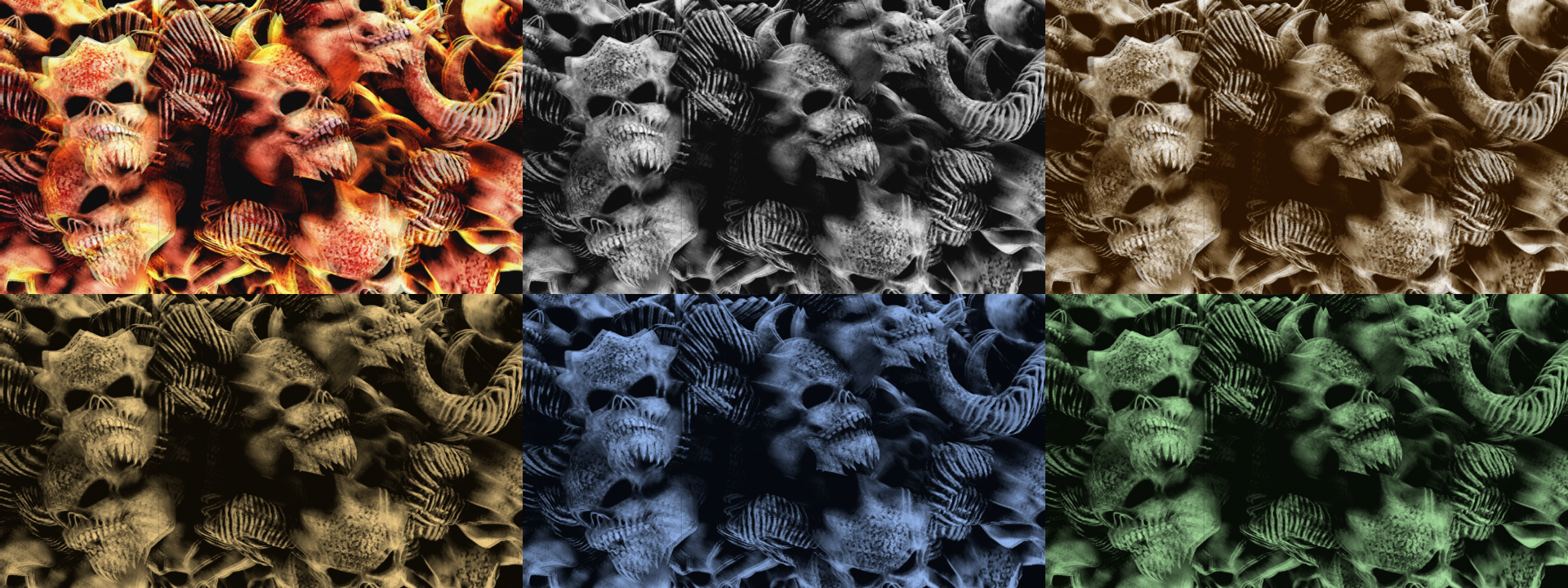
Tone, left to right and top to bottom: Colour, Black & White, Sepia, Amber Tint, Blue Tint and
Green Tint, all orthochromatic except Colour, which has no stock. Resolume’s bundled
NoHopeJustFear_44, rendered by hmtest --pipe. This display frame caught a pull-down with the
shutter open, so it shows two frames at once, which a projector does too.
The Wear group
- Weave: 0 to 1 (default 0.35). How far each frame lands off true in the gate: a standard deviation of 0.15 mm of film across at 1 (about 9.4 px on a 1080-line picture), 0.6 of that up and down, with each frame like the last by a correlation of 0.75. At the default it’s about 3.3 px across and 2 px up and down at 1080 lines. A hand-turned projector’s claw and teeth are looser than a motor’s.
- Scratches: 0 to 1 (default 0.35). How much grit gets into the gate. Each bit sits at one place across the frame and cuts a scratch on every frame that goes past, so the scratch stays put while the picture moves and weaves under it. At 1 a new one turns up about once a second at sixteen frames a second, and each lasts at least a second and a half, about seven and a half on average and thirty at most, so there are about seven on screen at once at 1 and two or three at the default (sixteen at most). They’re 0.5 to 2.5 px wide at 1080 lines. Just over half are on the base side: they scatter light and print dark. The rest are on the emulsion side: they take the silver off and print light, and on a tinted print they take the dye too, so they’re white.
- Dust: 0 to 1 (default 0.35). Specks on the print: on average 8 × Dust new ones a frame, most riding the print for one frame and a few for up to four, drifting a little, and weaving with the picture. A quarter of them are fibres. Most are dark; about one in seven is white, dirt that was on the negative, so the print has no silver there.
- Hair: 0 to 1 (default 0.25). The chance that a hair gets caught in the gate in each stretch of 96 frames (six seconds at sixteen frames a second). It hangs in from an edge of the aperture, the bottom most often, stays for between 36 and 92 frames (about two to six seconds), trembles at every pull-down and slides back out over its last four. It’s in the gate, so it doesn’t weave with the picture.
- Framing: ±half a picture height (default centred, the middle of the slider). The framing knob. The camera exposed a little more than the projector’s aperture shows, 2.2% of the height at each end, so the first 2.2% either way is still picture. Past that comes the frame line, the unexposed gap between frames, 5.7% of the picture’s height, and past that the neighbouring frame. Below the middle moves the picture up, with the frame line coming in at the bottom and the next frame under it. Above the middle moves it down, with the line at the top and the frame before it above.
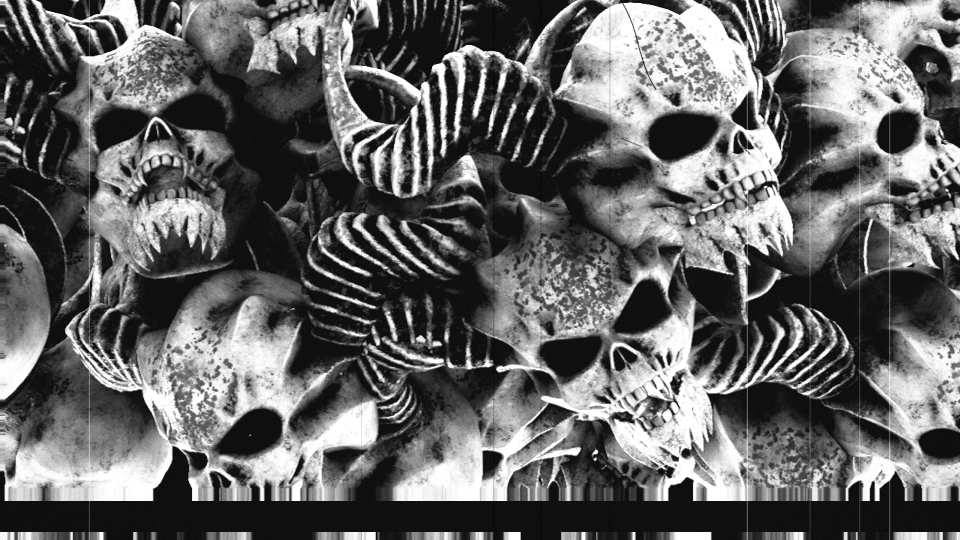
Resolume’s bundled NoHopeJustFear_44 on Black & White and Panchromatic, with Weave at 0.6,
Scratches, Dust and Hair at 1 and Framing at 0.4, the rest at the defaults: scratches where the grit
took the emulsion off (white) or scuffed the base (dark), dust, a hair, and the frame line coming
up from the bottom with the next frame under it. The streaks either side of the frame line are the
clip’s edge row repeated, standing in for the bit of picture the camera exposed beyond the
projector’s aperture. Rendered by hmtest --pipe at 960 × 540.
The Run Out group
Press Run Out and the roll runs out. From the next frame the projector pulls down, light gets into the film: the picture fogs and burns out to white from the edges in, over Run Out Time. After that every frame is a blank cell, white in the gate and black at the frame line, and once the fog’s past halfway the projector loses its loop and the frame line starts crawling up the screen.
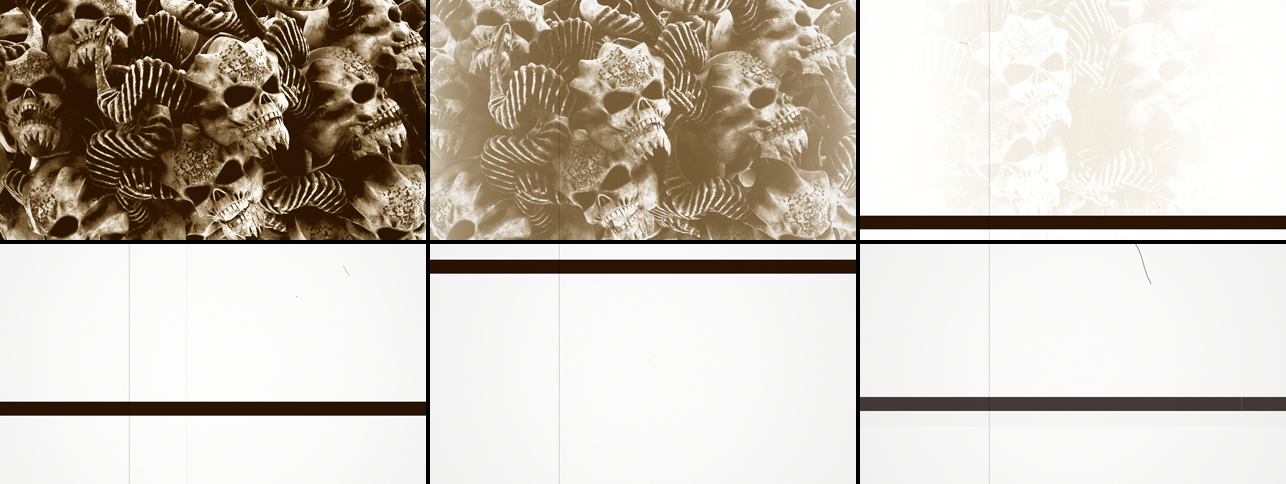
From the press to blank cells in about a second at the defaults, on Resolume’s bundled
NoHopeJustFear_44. Rendered by hmtest --pipe.
-
Run Out: a button. The first press runs the roll out. The next threads a new roll: a few blank cells of leader, the fog clearing back to your picture over Run Out Time, and the frame line coming to rest. A press halfway through either turns it round from wherever it had got to. Once it’s out, it stays out until you press it again.
-
Run Out Time: how long the fog takes, 0.25 to 4 seconds, with each quarter of the slider doubling it (0.5 s at 0.25, 1 s at the middle, which is the default, 2 s at 0.75). It’s turned into film frames at the press (Run Out Time × Crank Rate), so the projector’s hand moves it about a little, and changing it counts from the next press. It also sets how long a new roll takes to clear, and its leader: at least six blank cells, or a third of the run-out’s frames if that’s more.
-
Tail: what happens once the cells are blank.
- Rolling (the default): the loop stays lost and the frame line keeps crawling up the screen at 0.06 of a frame a pull-down, which is about a frame a second at sixteen frames a second.
- Framed: after 24 blank cells (a second and a half at sixteen frames a second) the projectionist reaches for the framing knob. The strip creeps on until the frame line has gone, then the claw seats and you’re left on a still blank cell.
- Off the End: after 24 blank cells the tail whips out through the gate, 0.35 of a frame a pull-down, and the lamp shines on nothing at all. Without even the clear base in the way that’s 15% more light than a blank cell, which mostly clips to the same white.
Tail is read as each cell goes through, so you can change it while the cells are rolling. A new roll threaded after Off the End comes up into the gate from below.
Blank cells still carry a trace of grain, the print’s dark dust and its base-side scratches, and the hair if one’s caught. Off the End’s bare lamp has nothing on it but the hair.
The Output group
- Vignette: the lens’s cos⁴ falloff, set as how far off axis the corners are, 0° to 35° (default 0.35, about 12°, which puts the corners at 91% of the centre; at 1 they’re at 45%).
- Mix: the projection over your clip, 0 to 1 (default 1). At 1 the output is opaque: the projection paints the whole frame, and a transparent part of the clip prints as black film. At 0 it’s your clip, alpha and all, bit for bit.
Photosensitivity
The shutter cuts the projector’s light Blades × Crank Rate times a second, 48 at the defaults, and your output shows that light added up over each of its own frames. What you see is the beat between the two rates: three blades at sixteen frames a second against a 60 Hz output beat at 12 Hz, and the projector’s hand moves the beat about, mostly between 12 and 15 Hz. On top of that, the camera’s hand makes the picture breathe, mostly below 3 Hz. It’s the whole frame that flickers, inside the 3 to 30 Hz band that broadcast flash guidelines restrict.
Measured through the offline harness on a flat 18% grey at 60 Hz (160 × 90, nine seconds with the first left out, Grain, Weave and the marks off, the light at the centre of the frame), each row changing only what it says from the defaults:
| setting | strongest line, 3–30 Hz | step between display frames, 95th percentile | brightest to darkest |
|---|---|---|---|
| the defaults | 1.6% at 13 Hz | 21% | 53% |
| Camera Hand 0 | 1.6% at 13 Hz | 20% | 21% |
| Projector Hand 0 | 5.8% at 12 Hz | 13% | 50% |
| both hands 0 | 5.7% at 12 Hz | 9% | 9% |
| both hands 1 | 4.9% at 4.5 Hz | 33% | 128% |
| Crank Rate 20 (0.75) | 1.2% at 5 Hz | 8% | 39% |
| Crank Rate 20, both hands 0 | none | 0% | 0% |
| Blades 2, Shutter Angle 180° | 34% at 27 Hz | 186% | 229% |
The line is the biggest single frequency in the light, as a share of its average. The step is how much the light changes from one display frame to the next, as a share of the average, with one step in twenty bigger than that. The last column is the brightest display frame less the darkest, over the average.
What helps:
- Camera Hand at 0 stops the breathing, and Projector Hand at 0 makes the beat regular. With both at 0, the light steps by under a tenth from frame to frame.
- Crank Rate 20 (0.75 on the slider) with three blades cuts the light sixty times a second, which a 60 Hz output can’t see: with both hands at 0 the measured light doesn’t move at all. For a 50 Hz output the same trick is 16⅔ frames a second (0.5417 on the slider), which measured flat as well. That takes the hands out of it, but the stocks, the tones, the wear and Run Out all still work.
- Three blades at 315°, the default, is the gentlest shutter there is. Fewer blades or a narrower opening flicker harder. Measured the same way, one blade at 315° steps by 62% and three blades at 270° by 38%, and two blades at 180°, the classic, swings the light by more than its own average from one display frame to the next.
- Blank cells and the bare lamp are a white screen with the same flicker on it, which on a bright LED wall is a lot of light.
The beat is between the lamp and your output, so an output at another frame rate beats differently, and none of this was measured inside Resolume. Check before it goes to a broadcast feed or a big screen in front of an audience.
Time comes from the host
Both cranks run on the host’s clock. Each frame they move on by the host’s time since the last one, so when the host’s clock stops, both hands stop and the picture holds on the last frame it showed. A stall or a jump forward moves them on by a quarter of a second at most, and a step backwards passes no time. For the first few frames after it loads, while it works out whether the host counts in seconds or milliseconds, the plugin runs on a steady clock of its own. The cranks count in film frames, in double precision on the CPU, because Resolume’s clock outgrows a float; the shader only ever sees weights, offsets and which picture to use.
Crank Rate changes carry on from where both cranks are, so nothing jumps. A hand’s control is followed at a limited rate, so the crank still turns forwards when you throw it from 0 to 1. Push both hands up at once and the loop lengthens faster than the projector turns, so the projector stands still for a moment while the camera gets ahead.
The camera only sees what the host hands over. Every film frame its crank passes during a host frame is exposed to that host frame’s picture. At 60 Hz it never passes two in one host frame (24 frames a second, 50% fast and the hand catching up is still only 42 a second), but in a slower composition it can, and those frames share a picture.
Changing the composition’s resolution keeps the loop of film: every picture in it is copied to the new size, so nothing that’s on its way to the gate is lost.
How it works
Every host frame:
- The cranks, on the CPU. Both move on by the host’s time at Crank Rate, each with its hand’s timing error: a few sine waves counted in cycles per film frame (the turn, its harmonic and a drift or two), scaled so the peak speed is the hand’s percentage. The projector runs the loop’s length behind the camera.
- The shutter, in closed form. The projector frames this display frame overlaps, each weighted by the light the blades let through during its share, normalised to the opening.
- The reel. Every pull-down since the last host frame goes through it in order, and it decides the fog, the slip and the tail.
- The camera. Every film frame the camera’s crank passed is exposed to the host’s picture and stored in a ring of 8-bit pictures (the loop of film), along with its exposure from the crank’s speed and the hand’s jerk.
- The print, on the GPU, per display pixel and per projector frame lit in it: which part of the strip is there (the frame in the gate, or the frame line and the frame above or below it), the picture through the stock’s sensitivity, the frame’s exposure and fog, the print’s curve, the grain, the scratches, dust and hair, and the toning or tint. The frames are summed by their shutter weights in linear light, then come the lens’s cos⁴, the sRGB encode and Mix.
Grain, dust and fog belong to the film frame; the scratches and the hair belong to the gate. Every mark is worked out from the frame’s number and a fixed seed, so two instances show the same print, and a resize changes nothing about it.
Performance
Measured by the offline harness (hmtest --bench) on an Apple M4 Max at the defaults, best of
three, glFinish both sides, on a GPU shared with other work:
| ms/frame | % of a 60 fps frame | state held | |
|---|---|---|---|
| 1280×720 | 0.050 | 0.3% | 21 MB |
| 1920×1080 | 0.066 | 0.4% | 47 MB |
| 3840×2160 | 0.175 | 1.0% | 190 MB |
The state is the loop of film: a stack of 8-bit pictures at the input’s size, as deep as the hands have needed. That’s six at the defaults and twelve with both hands at full, so up to about 400 MB at 4K. Nothing was timed inside Resolume, and nothing was timed on Windows.
If it looks wrong
It sticks on the first picture for a moment after it loads. The loop of film between the hands is threaded with the first picture the plugin sees, so the projector shows that until it reaches the frames the camera exposed afterwards. In the harness that’s 8 display frames at the defaults (about an eighth of a second at 60 Hz) and 27 with both hands at full, against a normal hold of about 4.
The projection runs a little behind the clip. That’s the loop: the projector runs behind the camera, by never more than 2.3 film frames at the defaults and up to 7.8 with both hands at full (about half a second at sixteen frames a second). With both hands at 0, the only delay is the frame in the gate.
Motion rushes and drags, or the picture breathes. That’s the cameraman, Camera Hand. At 0 the camera turns like a motor.
Frames stay up for different lengths of time. That’s the projectionist, Projector Hand.
The whole frame flickers or pulses. The shutter against your output’s refresh; see Photosensitivity.
Some frames show two pictures at once. A display frame that spans a pull-down gets light from the frames either side of it. At sixteen frames a second on a 60 Hz output that’s about one display frame in four.
Red things have gone dark and the sky’s gone pale. That’s orthochromatic stock. Stock to Panchromatic.
Stock does nothing. Tone is on Colour, which keeps your clip’s colours and has no stock.
The clip’s transparency has gone, or the transparent parts are black. At Mix 1 the projection paints the whole frame, and a transparent part of the clip prints as black film. Lower Mix to bring the clip’s own alpha back.
It’s gone white and stays white. The roll has run out, and it doesn’t come back by itself. Press Run Out again to thread a new one.
The frame line won’t stop crawling. Tail is on Rolling. Switch it to Framed and the projectionist frames up.
The screen’s white with nothing on it at all, not even a frame line. That’s Off the End: the film has gone and that’s the lamp. Press Run Out to thread a new roll.
Run Out Time or Tail does nothing. Both only act after a press of Run Out. Run Out Time is read at the press, so a change counts from the next one, and Tail only matters once the cells are blank.
There’s a black band at the top or bottom. Framing is off the middle by more than the 2.2% of picture the camera exposed beyond the aperture, or the roll is running out.
There are streaks next to the frame line. That’s the bit of picture the camera exposed beyond the projector’s aperture, which your clip hasn’t got, so it’s the clip’s edge row repeated. See Known limits.
A scratch doesn’t move with the picture. It isn’t meant to: it’s grit in the gate, not a mark on the film. The hair’s in the gate as well.
There’s never a hair. Hair is the chance of one in each six-second stretch (96 frames at sixteen frames a second), so at the default you can go a while without seeing one. At 1 there’s one in every stretch, for between about two and six seconds of it.
SW Handleman isn’t in the effects browser. Check the folder under Installing, and that Resolume was restarted.
The effect does nothing at all. That’s what a shader that won’t compile looks like. The actual error is in the log:
macOS    ~/Library/Logs/handleman/handleman.YYYY-MM-DD.log
Windows  %LOCALAPPDATA%\handleman\logs\handleman.YYYY-MM-DD.log
It records the build, the GL vendor, renderer and version at load, which shader failed if one did, whether the loop of film couldn’t be allocated, and what unit the host’s clock arrives in.
Known limits
- Never loaded into Resolume on macOS. Everything there was compiled, rendered and measured
offline against the plugin’s own class in a headless GL context, plus a load in
oxbow. On Windows, see the box at the top. - The hands are mine. The published figures are the eight frames a turn and the film’s apertures and pitch. How the hands wander, the jerk, the slip, the fog’s curve and reach, the grain and the tones’ colours are numbers I picked to look and behave right, not measurements of a cameraman, a projector or a print.
- The orthochromatic stock is an assumed shape (a blue band, a gap near 500 nm and a green band out to 600 nm), not a curve digitised from a real emulsion.
- The look is judged by eye: the grain, the fog’s creep, the tones’ colours, the dust and the hair. The harness proves each control moves the picture; nothing measures how good it looks.
- Only seen on Resolume’s bundled demo clips, never on camera footage or a film scan.
- It opens on the first picture. The loop is threaded with the first picture rather than with blank leader (see If it looks wrong). Whether a fresh instance should open on leader, like a real reel, is an open question.
- One rate for both cranks. Silent film shot at 16 and shown at 20 or 24 runs fast, and this can’t do that: a live clip has no future for the projector to run ahead into, so the loop would have to empty and jump back every few seconds.
- The pull-down is instant and always in the dark. A narrow blade over a slow pull-down smears the picture up and down (the travel ghost), and there’s no control for that, nor a setting with no shutter at all.
- The camera’s shutter angle is fixed, so there’s no motion blur from it.
- Toned or tinted, not both. Real prints often were both: a blue-toned night scene tinted amber, say.
- The picture beyond the aperture is made up. The camera exposed 2.2% more at each end than the projector shows, and as your clip hasn’t got that, it’s the clip’s edge row repeated, which shows as streaks next to the frame line.
- The clip fills the frame at the output’s shape. There’s no 4:3 silent frame with bars at the sides.
- Two instances turn alike. The hands and the marks come from a fixed seed, and there’s no control for it.
- A 16-bit composition is quantised to 8 bits in the loop of film.
- Checked at 320 × 180 and 1280 × 720 in the harness, and on Apple’s software renderer. Only timed at 4K.
- No presets, no OpenFX version and no browser demo.
About
The last group, About, has the plugin’s name, version, licence and maker, and buttons that open the project page, this user guide, the source on GitHub and the support page in your browser.
Links
- Project page: stoatworks-labs.com/software/handleman
- Source: github.com/stoatworks-labs/handleman
- User guide: stoatworks-labs.com/software/handleman/guide
Reporting something
If something’s wrong, shout at github.com/stoatworks-labs/handleman/issues. A screenshot, the Crank and Print settings, whether Run Out had been pressed, any controls you moved, and the composition’s resolution and frame rate are usually enough. If the effect did nothing, attach the log.