

One wide shot in, several tighter shots out.
Kestrel takes a single video input — typically a locked-off wide of a stage — lets you draw any number of regions of interest on it, and sends each region back out of a Blackmagic DeckLink, cropped and scaled to the output raster. A kestrel hovers over a wide field and picks out one thing at a time; so does this.
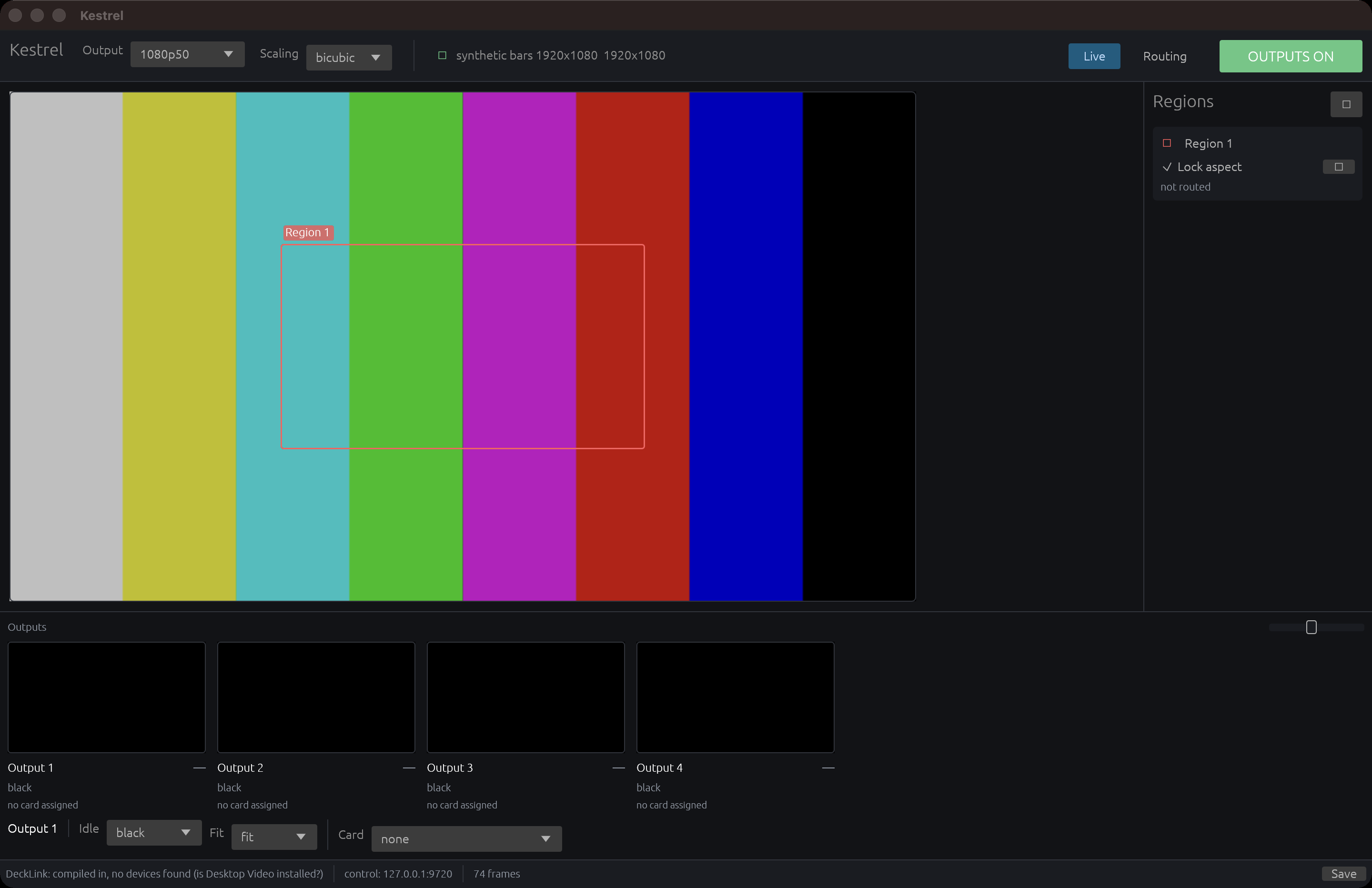
The operator window on its own synthetic bars — one region drawn on the wide, four outputs black because no DeckLink is in this machine, the control server listening. Captured from the build on this Mac by window: the first time the layout has been looked at rather than served.
Before you rely on this: the GPU path is verified by pixel readback (14 tests, including a raster whose rows need padding), the control API end to end, and the Companion module against a really-running Kestrel — with 49.99 fps sustained at 1080p50 with the GUI open.
No DeckLink has ever been connected to this code. Every line of SDI — capture, playback, pre-roll, format detection, profile handling — is written against the SDK headers and is unproven here. Windows and Linux have never been run.
This codebase was created with AI assistance, directed and reviewed by a human author.
The rule everything else follows
Every output produces a frame, every frame, always.
Not “every routed output”. An SDI output that stops is an output the switcher downstream has to re-lock, and re-locking costs frames on air. So:
- An output with nothing routed to it carries its idle fill — legal black by default, or bars, or the whole input as a confidence feed.
- The global outputs kill blacks every output at once and leaves every crosspoint intact. The signals keep running; nothing downstream notices anything but the picture.
- Losing the input blacks the routed outputs rather than freezing them. A frozen last-good frame looks live to anyone watching, which is worse than black.
- An output with no card assigned is still planned and still rendered. It simply has nowhere to go.
Everything you might otherwise read as odd behaviour — a kill that does not clear routing, black rather than a freeze — is that rule.
Running it
kestrel-guiWith no DeckLink in the machine it runs on generated colour bars with a sweeping marker, and everything except the SDI works — regions, routing, the matrix, the Companion module, the previews. That is deliberate: build the show’s layout on a laptop, then take it to the rack.
Headless, for a rack:
kestrel run --http 0.0.0.0:9720And to see what the machine has:
kestrel devicesThe screen
- A large preview of the input, with the regions drawn on it and draggable.
- A row of output previews along the bottom, each showing exactly what is on that wire, with a scale percentage saying how far the source is being blown up. That percentage is the number to watch — it is what tells you a region has been pushed past what the source can stand.
- A crosspoint matrix — regions down the side, outputs across the top — on its own tab.
SDI support is opt-in at build time
The DeckLink SDK is a free but licence-gated download and is not ours to redistribute, so nothing from it is vendored. Point the build at your copy:
DECKLINK_SDK_DIR="/path/to/Blackmagic DeckLink SDK 12.9" cargo build --releaseSDK 11.0 or newer. Without one the build succeeds and reports DeckLink: not compiled in —
which the app is careful to distinguish from no devices found, because the two have
completely different fixes.
Profiles, which is the thing that wastes an afternoon
A multi-sub-device card presents all its sub-devices whatever profile it is in, and the ones the profile has switched off support no display modes at all.
A DeckLink Duo 2 in its two-sub-device profile shows four sub-devices of which two are dead — and an attempt to open one of those looks exactly like a broken card.
Kestrel wants one input and several outputs at once, which on a Duo 2 means the four-sub-device
half-duplex profile. kestrel devices says which sub-devices are inactive and why, and the UI
greys them out with the reason rather than showing an empty menu.
Control API
HTTP for commands, a WebSocket for pushed state.
GET /api/state |
the whole state |
WS /ws |
the same, pushed when it changes |
POST /api/route |
{"output":1,"roi":2}, or "roi":null to clear |
POST /api/output/enable |
{"enabled":false} or {"toggle":true} |
POST /api/roi |
create; POST/DELETE /api/roi/{id} to edit or remove |
POST /api/output/{id} |
label, idle fill, fit mode |
A refused command comes back as HTTP 200 with
ok:falseand a populatederror. Check the body, not the status code.
There is no authentication. Anyone who can reach the port can re-route every output and kill them all. Keep it on a management interface.
The Stream Deck end is companion-module-kestrel.
How a frame gets across
Four GPU stages, all fragment shaders:
- decode — UYVY to full-raster RGB, BT.709 limited range, chroma interpolated rather than nearest-sampled. Once per captured frame.
- crop — a rectangle of that, scaled to the output raster, Catmull-Rom bicubic or bilinear. Once per output per output frame.
- fill — black or bars, for an output carrying nothing.
- pack — RGB back to UYVY, into a half-width target whose rows are exactly the byte layout DeckLink wants.
Stage 4 is why the CPU never touches a pixel — it only copies rows out of a mapped buffer. Everything intermediate is linear, never sRGB: these pixels arrived over SDI already encoded, and a gamma re-encode on the way through would shift every colour on the output.
If something is wrong
| Symptom | Cause |
|---|---|
DeckLink: not compiled in |
The build had no SDK. Different problem from no devices found. |
| A sub-device will not open, card looks broken | Wrong profile. On a Duo 2, use four-sub-device half-duplex. kestrel devices says which are inactive. |
| An output went black rather than freezing | The input was lost. That is deliberate — a frozen frame looks live. |
| Killing outputs did not clear my routing | Also deliberate. The crosspoints stay; only the picture goes. |
| A command returned 200 and did nothing | Read ok and error in the body. |
| The output is soft | Check the scale percentage under that output preview. |