

LivePremier Plus is a local app that adds extra panels to an Analog Way LivePremier Web RCS session, drawn in Web RCS’s own design language so they look like part of the product rather than something bolted on.
- Edit: the Screens / Aux. page with one row instead of two, and that row is a programmer, a buffer that’s on neither preview nor program. Build a look with the same sources, the same layer parameters and the same memory bank, and the switcher sees none of it until you save it into a memory.
- VPU Map: the device’s mixing-resource allocation, drawn as a budget: which units are fitted, who’s holding them, what’s spare, and what a staged preconfig would change. On firmware with no mixer map (6.1.60), each screen’s layer sizes and the room left instead.
- Console: a lighting-desk command grammar for a video switcher. It also takes raw AWJ, store writes and OSC addresses, and on a Midra 4K or Alta 4K it routes audio.
- Timeline: a theatre-style cue stack that steps on with one GO, with per-cue fade, delay and follow times, and cues that fire from MIDI Time Code, LTC or a pushed timecode.
- Memories: every memory bank in one searchable list, showing which buffer holds each one.
- Layer: all 67 of a layer’s properties, from the switcher’s own catalogue, and names for layers, which the switcher has nowhere to keep.
- Layer Groups: several layers, on one screen or on many, driven as one. A ganged group follows a source change made to any member, wherever it came from.
- Layer Lock: a take that leaves chosen layers where they are, or takes one layer (or one group) on its own. The switcher can’t do either by itself.
- Preview lock during takes: the vendor’s own PRW padlock shut while a screen transitions, so a memory recalled straight after TAKE is refused instead of riding the take onto program. Off until you switch it on.
- Pixel Map: an image from the switcher’s own library laid over a screen’s preview as a mask, so you see what the LED wall will show of each layer. No layer spent, nothing written, and it never takes a click.
- Surfaces: the LED elements a screen lands on, as rectangles on its canvas, with layers bound to them. A bound layer stays inside its surface however it’s moved, and full screen fills the surface. Off until you switch it on.
- UMD Generator (preview): thin borders and dark name tabs for an aux laid out as a multiviewer, drawn as one transparent PNG from where each layer is and what it shows, and put on the aux’s top layer, with 1, 3, 5 and 7-box layouts to start from. Off until you switch it on.
- Send to: a
…on every source card that routes it to a screen and layer, or to a whole group, in preview or program, without a drag. - Matrix Routing: patch the frame’s own SDI and HDMI sockets to ports on a Blackmagic Videohub, a Lightware or a Turtle AV router, and route through it from the panel, a cue, the Console or OSC.
- Audio Matrix: the frame’s audio channel matrix as a crosspoint grid: inputs and Dante onto outputs, Dante and multiviewers, by blocks of eight or by single channels.
- HyperDecks: Blackmagic HyperDecks, and Mitti through its HyperDeck control, played, cued and recorded from the panel, a cue or OSC. Link a deck to the input it feeds and rules play it when it goes on air, load its next clip when it comes off, and take when its clip ends.
- Companion: a Bitfocus Companion linked to this app: its buttons drawn and pressable here, a Companion trigger on cues and memory recalls, its own editor on the same address as Web RCS, and a panel that knows which switcher you’re on and offers to add the connections that belong in the show.
- Dante (preview): the Dante audio network’s routing as a crosspoint grid next to the switcher it feeds, with snapshots and Dante Controller presets in and out. Off until you switch it on.
- EDID builder: EDIDs made beside the EDID bank and saved straight into it: one per custom format, automatically if you like, or by hand in the full Otter editor.
- Mosaic inputs: the editor’s Mosaic mode carried through to the frame: inputs grouped 2X1 or 2X2, each plug loaded with its tile EDID.
- Pitch Compensation: the H and V ratios a screen spanning LED walls of different pitches needs, worked out from the pitches you give it.
- OSC input: QLab, TouchOSC, a lighting desk or Companion driving the switcher over UDP, with no browser open.
- MIDI Mapping: a control surface driving the switcher, from the page itself.
- Speed Editor (preview): a DaVinci Resolve Speed Editor as a switcher panel, plugged into the machine this app runs on. CAM 1–9 pick sources, CUT and DIS cut and take, and the wheel moves opacity, position and size. Any browser works, as long as DaVinci Resolve is quit.
- Pixelhue panel (preview): a Pixelhue U5, U5 Pro or U5 mini driving the switcher, with Pixelhue Mapping to give any key, fader or encoder a different job.
- Background Slicer (preview): one picture cut into a pixel-exact background for every output of one or more screens, uploaded and put into a background set, or each output fed live from an input, with the output map for the media server behind it. Off until you switch it on.
- Thumbnail relay and Multiviewer thumbnails (preview): lighter source thumbnails, or live ones cut from a multiviewer. Both are off until you switch them on.
- Remote access: the app served over Tailscale (with a real HTTPS certificate) or ZeroTier, without binding it to the venue LAN.
- Your setup in one file: the cue stack, groups, names and locks, variables, pixel maps, surfaces, UMDs and Companion triggers, the routers and the patch to them, HyperDecks, Dante snapshots and settings, saved and restored together.
- Arithmetic in the vendor’s own numeric fields: type
1080-80into a layer width and get 1000. - Variables:
$S1.widthand friends for what the switcher reports, and@namesof your own, wherever a number goes: the Console, a numeric field, an OSC argument.
Every one of these is a plugin, so you can switch any of them off, and you can add your own; see Switching features off.
The panels ride the vendor app’s own WebSocket, so there’s no second Web RCS connection to the
device, no replacement UI and nothing to install in the browser. OSC input, the Pixelhue panel,
the Console’s AWJ get and the Edit page’s direct save and memory export each open a brief AWJ
connection of their own when they act, which is worth knowing, because the switcher only allows five AWJ clients at once.
Before you rely on this: the panels render inside a real Web RCS session and the device store mirrors live. Both are verified through this proxy against LivePremier Simulator 6.2.73, along with cue-stack persistence and the whole setup flow. The VPU map has been read from a live Aquilon C and is tested against that capture, including Optimized mode, interleaved output links, and a staged preconfig that differs from the running one. It has also been read from a live Aquilon RS4 on firmware 6.1.60, which reports no mixer map at all, not even over its own protocol; there the panel shows each screen’s layers and the room left on the box instead. Both were read only, never written to.
Midra 4K and Alta 4K (QuickVu, Pulse, Eikos, QuickMatrix, Zenith 100/200) have been supported since 0.6.0 for the Timeline, Console, Memories, Layer and Pitch Compensation, and since 0.17.0 for the Edit page, HyperDecks and the Background Slicer too; Preview lock is proven on the Midra 4K simulator, and the UMD Generator gives a Midra its PNG. There’s no VPU to map on those, and Matrix Routing, Audio Matrix, Mosaic inputs, Pixel Map and Surfaces are LivePremier only. MIDI Mapping and the Speed Editor hang under Virtual RC400T, which a Midra’s sidebar doesn’t have, so they don’t appear, and the Plugins card says so on their rows; Pixelhue Mapping goes at the foot of the PLUS section instead. The port was proven on a live Pulse 4K: every write over the device protocol by a test harness, and the Console panel’s own lines typed by the operator, which were the first writes this app’s panels have made to real hardware. On LivePremier the one write to a physical device so far is a preview opacity the Layer tab set on an Aquilon RS4 and put back, and the timeline has only ever fired at a simulator.
The Edit page and Companion (0.10.0, 0.11.0) have been proven on simulators and a running Companion 5.0.5, not on a physical switcher. Two of their limits are worth knowing now. The Edit page’s direct save hands the switcher a file path that the switcher resolves, so it’s unproven on real hardware (its via preview route works anywhere). And Companion can’t add the LivePremier Plus connection until a Companion module for this app exists. The Pixelhue panel hasn’t met a console at all.
0.13.0 rebuilt every feature as a plugin. Each was checked against the simulator and a Videohub emulator as it moved, and what each one does didn’t change. A plugin of your own runs with the same access to the switcher as the app itself, so only switch on what you trust.
0.14.0 adds the Thumbnail relay and placeholder routers, both proven on the simulator only. The relay is off until you switch it on.
0.15.0 adds Layer Lock, HyperDecks, the EDID builder, Mosaic inputs, Pixelhue Mapping and the Speed Editor, all proven on the simulator (and emulated decks and panels) only. None had met real hardware at 0.15.0; the Speed Editor met a real panel in 0.16.0, below.
0.17.7 adds the UMD Generator, a preview: a thin border round each box and a dark tab with its source’s name, drawn as a transparent PNG from where each layer is and what it shows, put on an aux’s top layer or handed to the Background Slicer for a screen, with 1, 3, 5 and 7-box layouts for an aux. Off until you switch it on. Proven on LivePremier Simulator 6.2.73 only, and not on a real frame yet.
0.17.6 adds Surfaces, the LED elements a screen lands on as rectangles on its canvas, with the layers bound to them kept inside. Off until you switch it on. Proven on LivePremier Simulator 6.2.73 only; on 6.1.60 only by comparing the vendor’s bundle, and not on a real frame yet.
0.17.5 adds Pixel Map, an image from the switcher’s library laid over a screen’s preview as a mask. Proven on LivePremier Simulator 6.2.73 only; on 6.1.60 only by comparing the vendor’s bundle, and not on a real frame yet.
0.17.4 says a 6.1.60 box’s spare room once. The VPU map’s Screens table gave the same room figure on every row; it’s the whole box’s, so it’s now given once under the table.
0.17.3 is for firmware 6.1.x and a crowded tab strip. The plugin tabs on Screens / Aux. sit behind a ⋯, arithmetic works in 6.1.x number fields, the Layer tab offers only the sources the switcher has, the VPU map shows a 6.1.60 box’s layer sizes per screen instead of calling it a simulator, and two saves of one file at once no longer lose one.
0.17.2 fixes three things the live test suite found. Mosaic inputs no longer offers an input that already belongs to a mosaic as the start of another, the Thumbnail relay no longer counts a revalidated frame as sent, and a plugin that’s off because one it needs is off says so.
0.17.1 fixes the Background Slicer’s LivePremier apply, which took its own write as the switcher’s answer, so a refused write read as landed. It now waits for the switcher’s echo.
0.17.0 adds Variables and arithmetic wherever a number goes, and Preview lock (off by default). Dante and the Background Slicer arrive as previews, off by default and proven on simulators only. HyperDeck commands end with a bare line feed, so Mitti accepts them.
0.16.0 adds Audio Matrix, Remote access and Multiviewer thumbnails, and the Speed Editor works on a real panel, through the app’s new device host, over USB. Audio Matrix and Multiviewer thumbnails are proven on the simulator only.
Built with AI assistance, directed and reviewed by a human author.
Running it
It needs Node 20 or newer, and there are no dependencies to install.
npm startThen open http://127.0.0.1:8535/ and give it the switcher’s address. It remembers it.
npm start -- --device 192.168.2.142| flag | meaning |
|---|---|
--device <host[:port]> |
the switcher. Port defaults to 80 (a simulator is usually :3000). |
--port <n> |
local port to listen on (default 8535) |
--host <addr> |
local address to bind (default 127.0.0.1). Bind a LAN address or 0.0.0.0 to reach it from other machines. On the machine running it, keep using http://127.0.0.1:<port>/ — that is the address browsers treat as secure, which MIDI Mapping and the timecode sources need; a local browser that arrives by the LAN address is sent there automatically. Other machines get everything except those, unless they come in over Remote access’s HTTPS. |
--data <dir> |
where it keeps everything: settings, the last switcher, cue stacks, every plugin’s per-switcher documents, and your own plugins (default ~/.livepremier-plus) |
--appliance |
this host exists to run the app, so Remote access may join and leave Tailscale and ZeroTier networks for it |
--no-devices |
don’t start the device host for USB panels (the Speed Editor) |
Each has an environment variable too, for a service manager or Docker: LPP_DEVICE, LPP_PORT,
LPP_HOST, LPP_DATA, LPP_APPLIANCE=1 and LPP_DEVICES=0.
There’s a desktop app too: a tray launcher with an interface and port picker.
In Docker
Every change to the main branch publishes an image to ghcr.io/stoatworks-labs/livepremier-plus.
:latest is the newest of those, which can be ahead of the last release. Each image is also
tagged with its commit, so you can pin a release by the commit its tag points at.
docker run -d -p 127.0.0.1:8535:8535 -v "$PWD/config:/config" \
  ghcr.io/stoatworks-labs/livepremier-plus:latest
The repo’s docker-compose.yml does the same with docker compose up -d, but it publishes the
port on every interface of the host. Change 8535:8535 to 127.0.0.1:8535:8535 unless the
whole network is meant to reach it (see On binding wide below). ./config keeps your cue stacks
and the remembered switcher, and setting LPP_DEVICE skips the setup page.
On binding wide. The default is loopback for a reason: this proxy is an unauthenticated route to a switcher’s entire control surface, and once a Companion is linked, to that Companion’s admin UI too.
--host 0.0.0.0hands that to everyone on the network, so only do it when you mean to.
From another machine: Tailscale or ZeroTier
Preconfig ▸ LivePremier Plus → Remote access serves the app to a Tailscale tailnet or a ZeroTier network while it stays bound to loopback on the venue LAN. Both are off until you switch them on.
- Tailscale, HTTPS:
https://<machine>.<tailnet>.ts.net/, throughtailscale serve, with a real certificate. Because it’s HTTPS, MIDI and LTC input work from the remote browser too. Switch HTTPS certificates on for the tailnet once (admin console ▸ DNS); the first load after that waits about 15 seconds while the certificate is issued. - Tailscale, plain http:
http://100.x.y.z:<port>/, a listener on this host’s tailnet addresses only. No MIDI or audio input from there. - ZeroTier:
http://<zerotier address>:<port>/on every network this host is authorised on.zerotier-clihas to be able to read the service’s auth token.
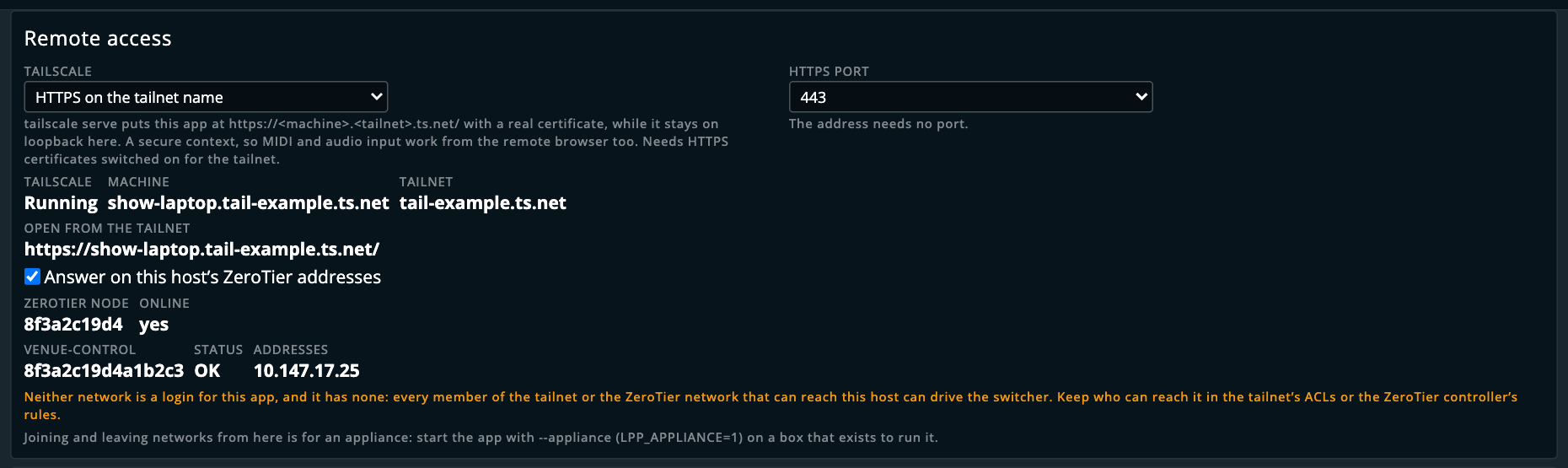
The names in that picture are made up, from stand-ins for the two command-line tools.
Switching Tailscale off, or stopping the app, removes the tailscale serve entry it made. Joining
and leaving networks from the card is only offered when the app was started with --appliance,
because on a laptop the networks belong to whoever owns the laptop.
⚠️ Neither network is a login, and this app doesn’t have one. Everyone who can reach the host can drive the switcher, so who can reach it belongs in the tailnet’s ACLs or the ZeroTier controller’s rules. The README has the full table, and what to do in Docker.
Open it through the proxy, not at the switcher
If you open the switcher’s own address directly, the panels aren’t there and MIDI won’t
work. Web MIDI is a secure-context API, and http://127.0.0.1:<port> counts as one where a
plain-HTTP LAN address doesn’t (Remote access’s HTTPS on a tailnet name does). The panel tells you
rather than failing silently.
Edit — programming a look off the buses
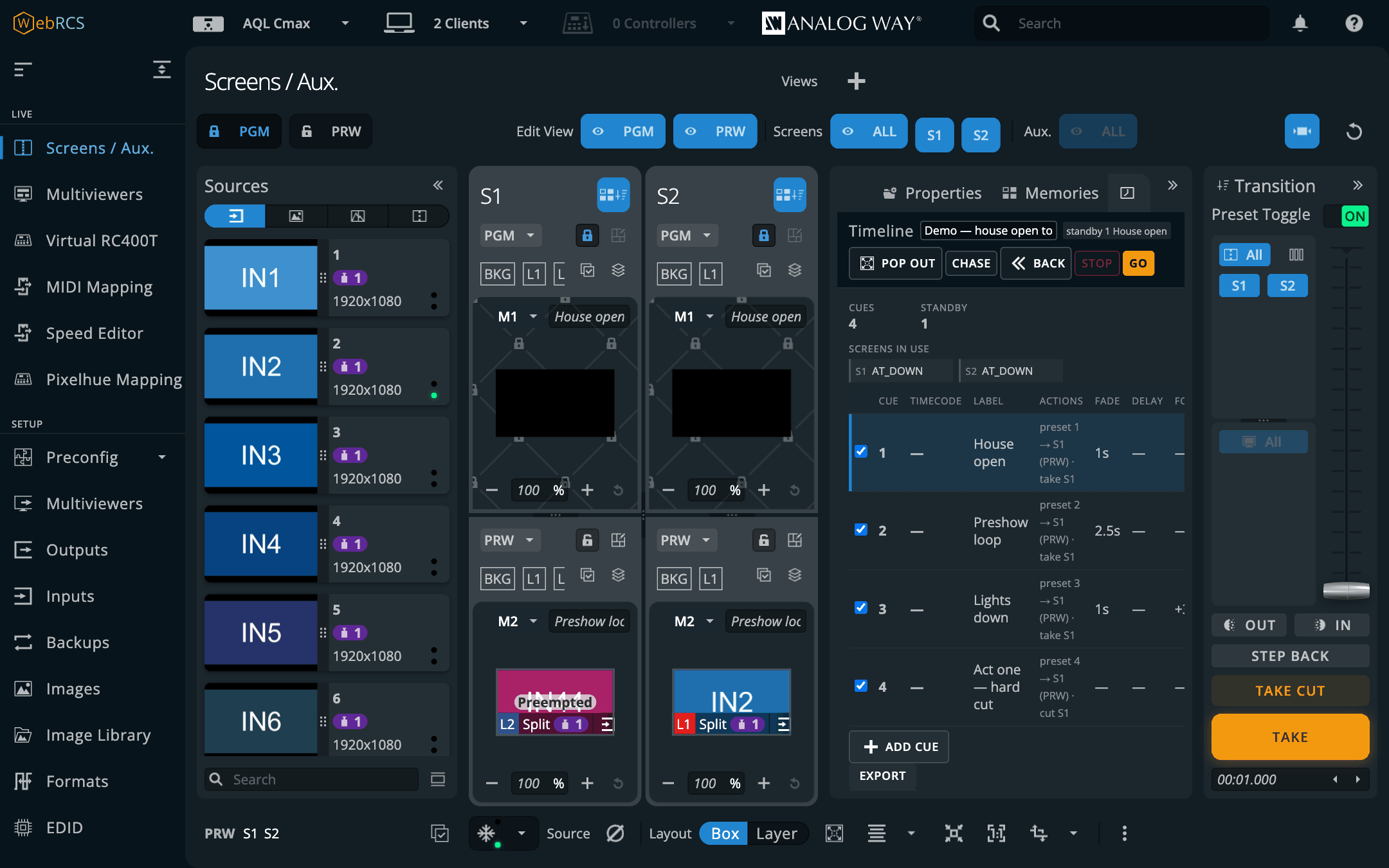
PLUS ▸ Edit. The Screens / Aux. page, with one row per destination instead of two. Sources on the left, the destinations in the middle and the layer panel on the right: the vendor’s own layout, so everything is where you’d look for it. The difference is the row. It’s marked EDIT in amber rather than PGM in red or PRW in green, because it’s on neither bus.
Nothing you do here reaches the switcher. There’s no TAKE, no T-bar and no padlock, because there’s nothing to transition and nothing to protect.
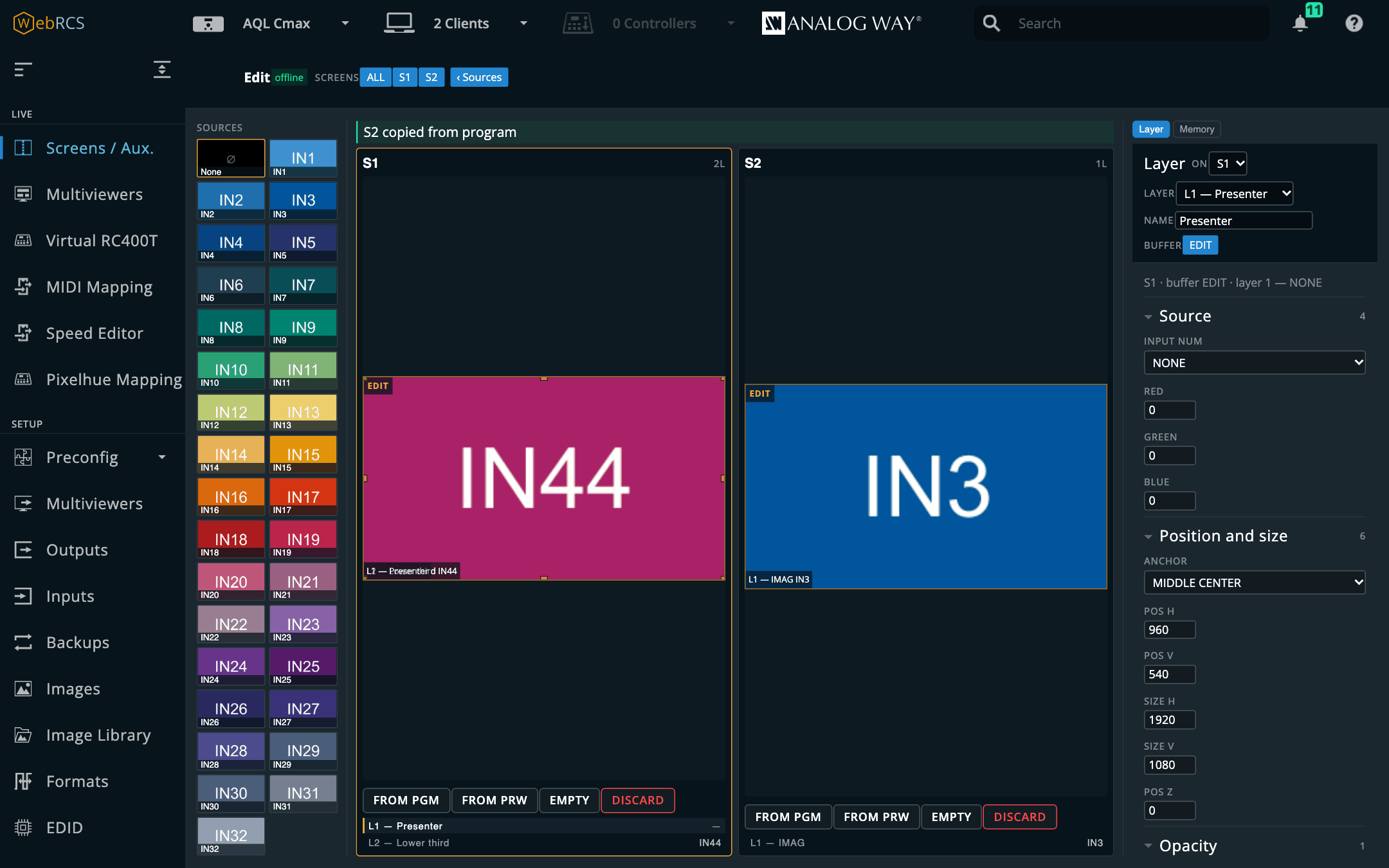
Building a look
Each card starts empty. There are three ways to fill it, and none of them asks the device for anything:
| From PGM | copy what is on air into the programmer |
| From PRW | copy what is cued |
| Empty | every layer full-frame with no source, which is what an untouched preset looks like |
Then work the way you would on the vendor’s page:
- click a layer on the card, or a row in the strip beneath it, to select it;
- drag it to move, or take one of the eight handles to resize; the numbers land in the Layer panel as you go, clamped to the switcher’s own limits;
- click a source on the left to put it on the selected layer;
- Layer on the right is the full parameter set, all sixty-seven of them: the same panel the vendor’s tab strip carries, pointed at the programmer.
Discard forgets a destination’s buffer entirely; Empty keeps it and clears it.
Saving it into a memory
The Memory tab is the one control on this page that touches the switcher. Name a slot, give it a label, and choose a route:
- Direct writes the memory bank itself. No preset buffer is written and no take is fired, so neither preview nor program moves. This needs the switcher to be able to read a file this app writes, which it can when both are on the same machine: a simulator, or an installation where the Shared directory under Saving memories from the Edit page (Preconfig ▸ LivePremier Plus) points at a share they can both see.
- Via preview puts the look into the preview buffer, fires the switcher’s own save, then puts preview back property for property. Program never moves. Preview shows the look for about a second, and afterwards the bank calls it modified even though the content is identical (the switcher is right that the buffer was written to). It’s refused while a take is in flight. This route works on any switcher, and it’s the only one on Midra 4K and Alta 4K.
Load into the programmer reads a slot back the other way. A memory’s contents aren’t in the device’s own data (a slot only publishes its name, its canvas and what categories it holds), so reading it out is the only way to see inside one, and it’s how you pick up yesterday’s look and change it.
VPU Map
PLUS ▸ VPU Map. A LivePremier configuration either fits the mixing resources the chassis has or it doesn’t, and the switcher’s own interface only tells you which by refusing it. This draws the budget instead: which VPUs are fitted, which screen holds which mixers, and what’s spare.
Each VPU is drawn the way Analog Way’s own manual draws one (an 8 × 8 field of links, with layer links coming in from the left and output links running down from the top), so the picture matches the documentation you’ve already got:
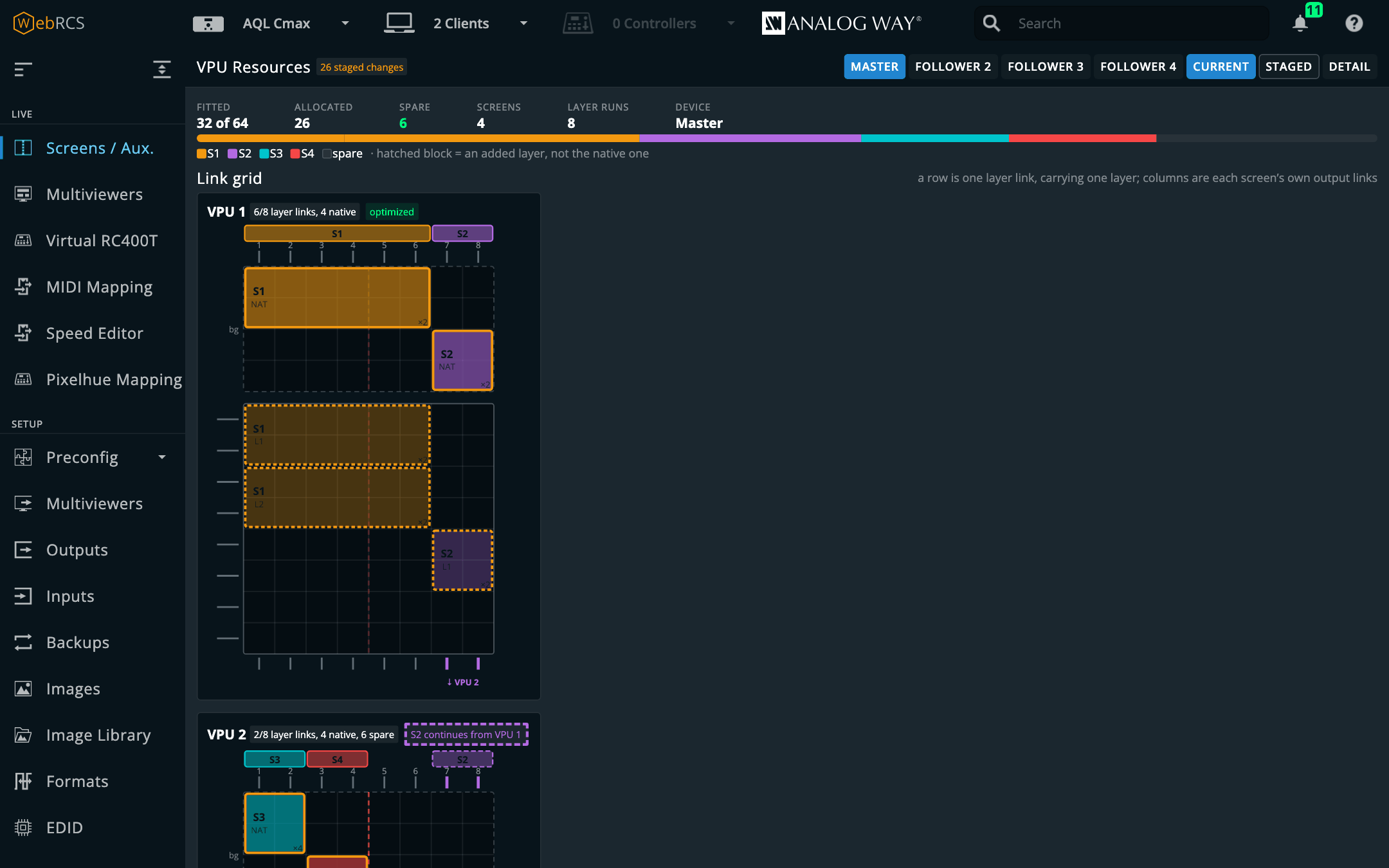
- Native layers sit in a band above the field, because a native is the bottom of the stack.
- A screen that ran out of mixers and carried on onto another VPU has the two cards stacked, with the link drawn straight down out of one and into the next.
- The header over the columns names each link’s screen, and its region and output plug where the switcher’s own output figures add up.
Current and Staged switch between the running configuration and the one waiting in Preconfig, and a count says how many changes applying it would make, including a layer moving onto different links with every other value identical, which still counts as a change. On linked frames a button per frame (MASTER, FOLLOWER 1 and so on) picks which one you’re looking at, and Detail adds a table of every fitted mixer: the screen and layer holding it, its slice, capability, cut and fill, and links.
Under the grid, Screens lists what each screen spends: outputs, output capabilities, and its layers and their sizes (4K, DUAL and so on). On the staged side it also says how many more layers of each size the box has room for. That figure is the whole box’s, so it’s given once rather than on every row, where it would invite adding up; if the screens ever report different figures, each gets its own. On firmware 6.1.60 that table is all you get. The switcher doesn’t say how its VPU is allocated, not to this page and not over its own protocol either, so there’s no grid to draw and the panel tells you that rather than pretending there’s no VPU.
It only reads; nothing on this page writes to the switcher. It’s LivePremier only: a Midra 4K or Alta 4K has fixed processing rather than allocated mixers, so there’s no budget to draw and the entry isn’t there.
Console
Screens / Aux. ▸ ⋯ ▸ Console. The Console, Timeline, Layer, Groups and Pixel Map (and Surfaces and UMD, when they’re switched on) live in the vendor’s own tab strip on Screens / Aux., but on LivePremier there’s only room in it for one more thing after Properties and Memories. So they sit behind a ⋯ at the end: click it and pick one. While one is open the ⋯ stays lit and shows that tab’s icon; click Properties or Memories to go back. If the strip has room (on a Midra 4K, say, or with some of these plugins switched off) they show as ordinary tabs instead.
Verb first, then objects, innermost scope last. Every keyword abbreviates to any unambiguous prefix, and nothing is sent until you press Enter.
Recall Screen 1 Memory 5
R Sc 1 Th 4 Me 5 Pre          the same command
Store Master 12
Take Screen 1
The line parses as you type and shows what it’ll do (Recall 3 → Screen 1 Preview) before
anything reaches the device. Tab completes, and ↑ brings back history.
Variables go wherever a number does (Set Screen 1 Layer 2 Size ($S1.width / 2) $S1.height),
and the feedback names what each one reads before you press Enter. Sums go in brackets. See
Variables.
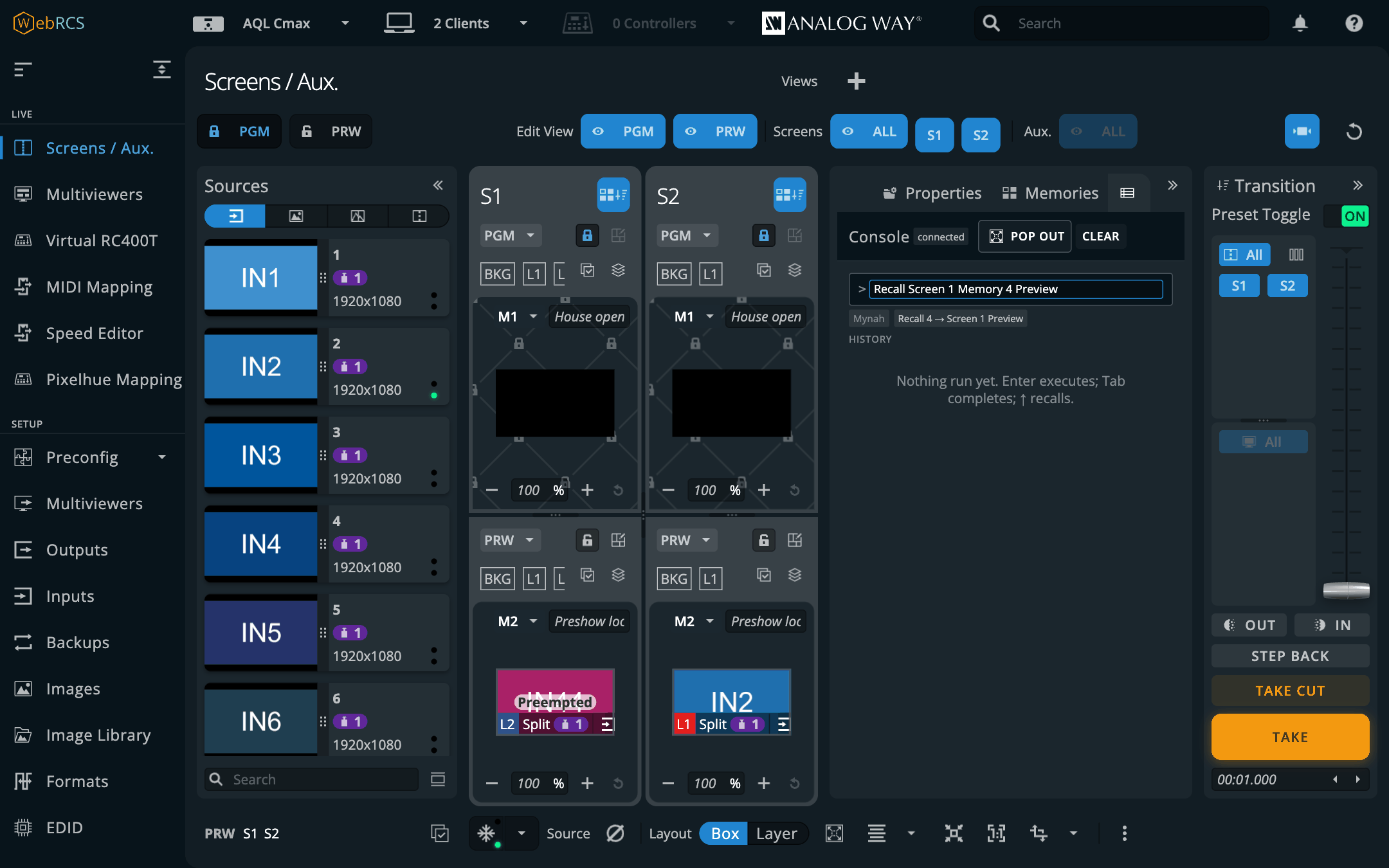
This panel has no grammar of its own. Every token, rule and device path comes from mynah’s own build output, the same file its Companion module vendors. If a command means the wrong thing, the fix goes in mynah.
There’s a reason for that beyond tidiness. Mynah’s compiler and this repo’s command builder were written independently, and they produce byte-identical store paths for the commands both know. Two independent derivations agreeing is about the best evidence you’ll get that either is right, and it only stays true while nobody re-types the grammar here.
Raw AWJ, store JSON and OSC
The same line takes three other languages, for when you’ve been handed a path rather than a command: a line out of a packet capture, a frame out of the browser’s network panel, an address a lighting desk already sends. These are all the same write:
Take Screen 1
AWJ DeviceObject/$screenAuxGroup/@items/S1/control/@props/xTake = true
{"path":["device","screenAuxGroupList","items","S1","control","pp","xTake"],"value":true}
/lp/screen/1/take
Each line is read as whichever language it looks like, and the verdict shows beside the feedback
before you press Enter. Start a line with MYNAH, AWJ, JSON or OSC to say which outright,
or turn detection off on the Console language card in Preconfig ▸ LivePremier Plus. Everything
rides the vendor’s own socket, an AWJ line included, unless AWJ via on that card says to send
AWJ exactly as typed on a socket of its own.
AWJ get <path> reads a value back, and it’s the one line that always opens its own AWJ
connection, because the vendor’s socket carries a stream of changes rather than answers. The
reply lands in the console’s log.
Pop out opens the Console in a window of its own, with three things the tab hasn’t room for: a command dictionary generated from mynah’s own grammar, with every word’s shortest abbreviation; live previews of the screens and auxes; and a Variables shelf, where a click puts a name on the line.
Timeline
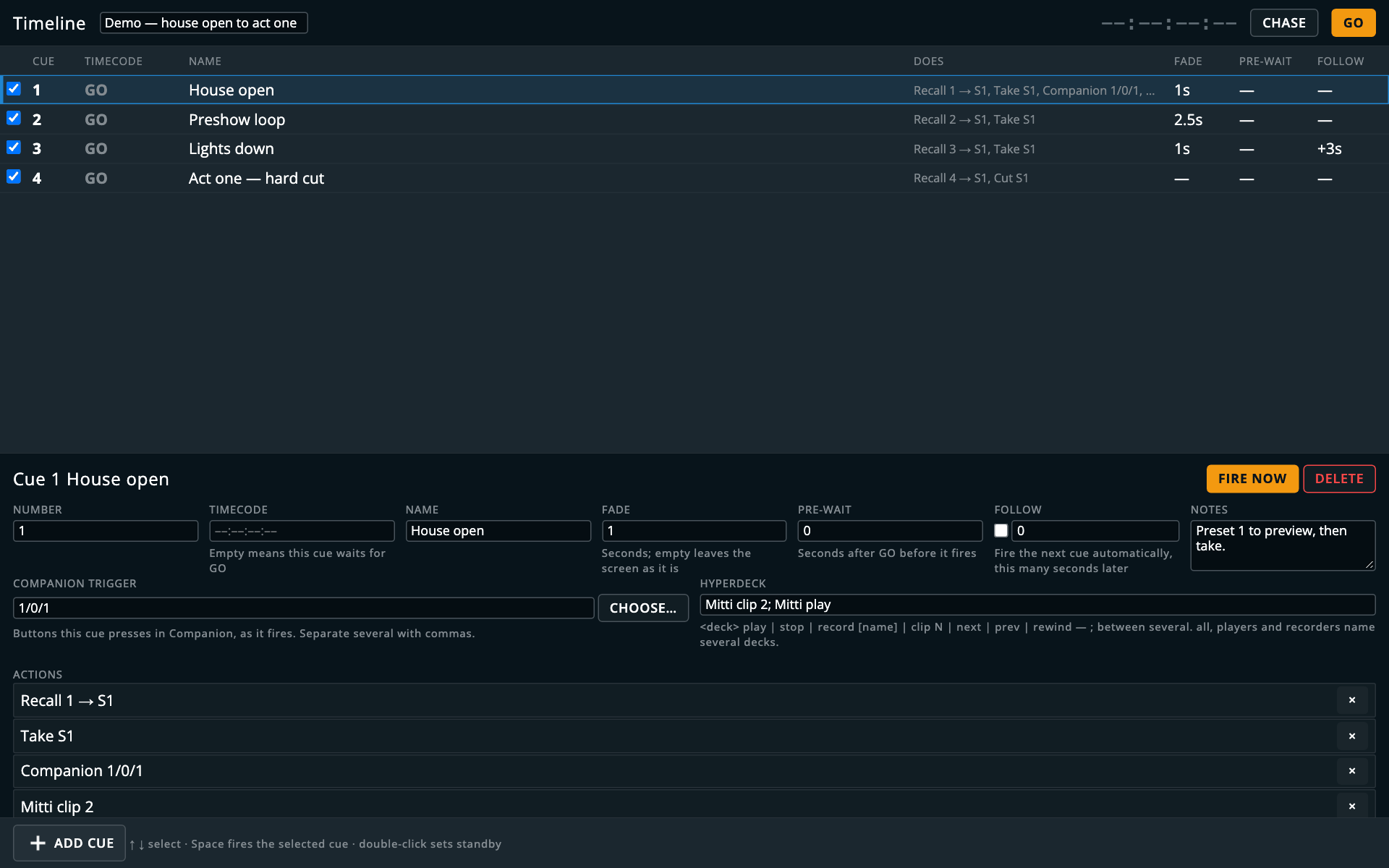
Screens / Aux. ▸ ⋯ ▸ Timeline. A lighting desk’s cue stack, driving a switcher: a numbered list that steps on with one GO, where each cue recalls memories onto screens and takes them.
Each cue can carry:
| fade | its own transition time, written to the screen before the take |
| pre-wait | wait this long after GO before firing (the list’s DELAY column) — a second GO during the wait fires it at once |
| follow | after this cue fires, fire the next one by itself, after a follow time you set |
| timecode | fire when incoming timecode passes this point (below) |
| Companion trigger | press these Companion buttons as the cue fires — see Companion below |
A few things behave the way a desk does rather than the way a switcher does:
- GO fires the standby cue, then advances. BACK moves the pointer only.
- BACK isn’t the switcher’s STEP BACK. That one is the vendor’s own button in the Transition column, and it restores the device’s previous state rather than replaying a cue. The two differ as soon as a cue does more than recall and take, and no cue ever presses it.
- A cue is sent, never confirmed. The switcher answers recalls and takes with silence, so the log says what left this app and the device status is shown separately.
Add cue opens a short form: what to recall (a screen memory or a master memory), the slot, into preview or program, then a take, a cut or nothing, a fade, a label, and which screens and auxes it targets (the ones the switcher has in use, all ticked to start with). Each cue in the list has a tick box beside it; untick one and it sends nothing when its turn comes. Export and Import write the stack out as a file and read one back.
The editor pops out into a window of its own, which is handy on a second monitor while the stack runs. Select a cue there and everything it carries is editable below the list: number, timecode, name, fade, pre-wait, follow, notes, the Companion buttons it presses, the HyperDeck commands it sends, and its actions, with Fire now to try it on its own. It’s keyboard first: ↑ and ↓ move the selection, Space fires the selected cue, and a double-click makes a cue the standby.
Firing cues from timecode
Choose a source under Preconfig ▸ LivePremier Plus → Timecode:
- MIDI Time Code from any MIDI input the browser can see;
- Audio (LTC) from an audio input on this machine;
- Pushed to LivePremier Plus: anything that can POST a timecode to this app, such as a generator on another machine, a lighting desk or a script.
Then give the cues a timecode and press Chase on the Timeline; it reads Chasing while it’s armed. Nothing fires from timecode until you do, and arming it part-way through doesn’t fire the cues whose time has already gone: you armed it to catch what’s coming.
A cue fires once per pass, not on every reading. Going backwards re-arms it, so you can rehearse the same scene twenty times. Jumping forward doesn’t run everything it skipped. The cues in between are silently marked done and the show carries on from the new position, rather than firing a hundred takes in a second.
Cue timecodes are written at 25 frames a second, so the frames run 00 to 24, whatever the source runs at; the comparison is made in seconds, so a cue still lands within a frame. LTC doesn’t say what rate it’s running at, so the reader assumes 25 as well.
Memories
PLUS ▸ Memories. Every memory bank in one list: master, screen and layer on a LivePremier; master, screen and aux on a Midra 4K or Alta 4K. Search by name, rename in place, and see which preset buffer is holding each memory right now, and whether it’s still unmodified.
- A recall names its target every time. The To chip says PRW or PGM, starts on PRW and never quietly becomes program, and program is coloured like the risk it is.
- Save and erase do what the vendor’s own buttons do, and the page says which save filters the switcher will apply before you press it. Saving over a memory that’s already there, or erasing one, takes a second click: the button turns into Overwrite? or Erase? first.
- It pops out onto a second monitor, which the vendor’s own Memories tab can’t do.
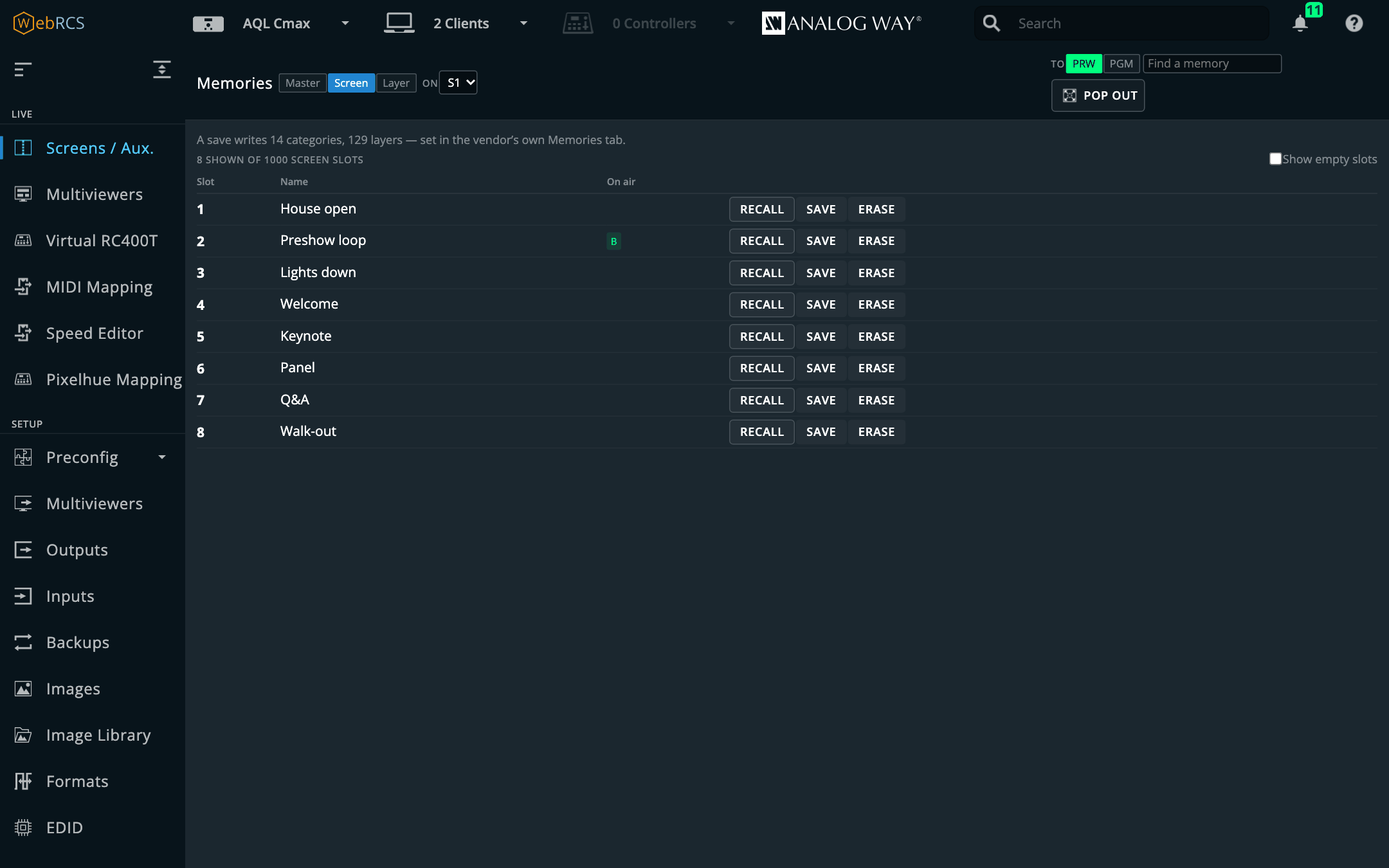
Click a name to rename it; Enter saves, Esc backs out.
Layer
Screens / Aux. ▸ ⋯ ▸ Layer. Every one of a layer’s 67 properties (source, position, size, opacity, cropping, border, transitions, effects, masks and keying), generated from the switcher’s own parameter catalogue, so a firmware that adds a property grows a field for it.
You name the destination, the buffer and the layer outright, rather than the panel following what you clicked. What you clicked is React state inside the vendor’s page and can’t be read from here, and on a second monitor a panel that stays where you pointed it turns out to be better anyway.
- The buffer is shown resolved. PRW means “whichever letter is preview right now”, and the panel says which letter that is. A buffer that’s on air is banded in red.
- Mid-take, it refuses to write to PRW or PGM, because neither reliably names a buffer while a transition is running. A literal letter still works.
- The source list is the switcher’s, not the catalogue’s. It offers the inputs and stills that are available, enabled and in use in the applied preconfig (and screens set to Freestyle), and only the kinds this layer can take: a native layer takes background sets, an aux layer no colour. A source the layer already shows stays in the list, marked (not available), so you can see what it is. The Edit page’s picker follows the same rule; a cue, the Console or a group is not narrowed.
- It pops out into its own window.
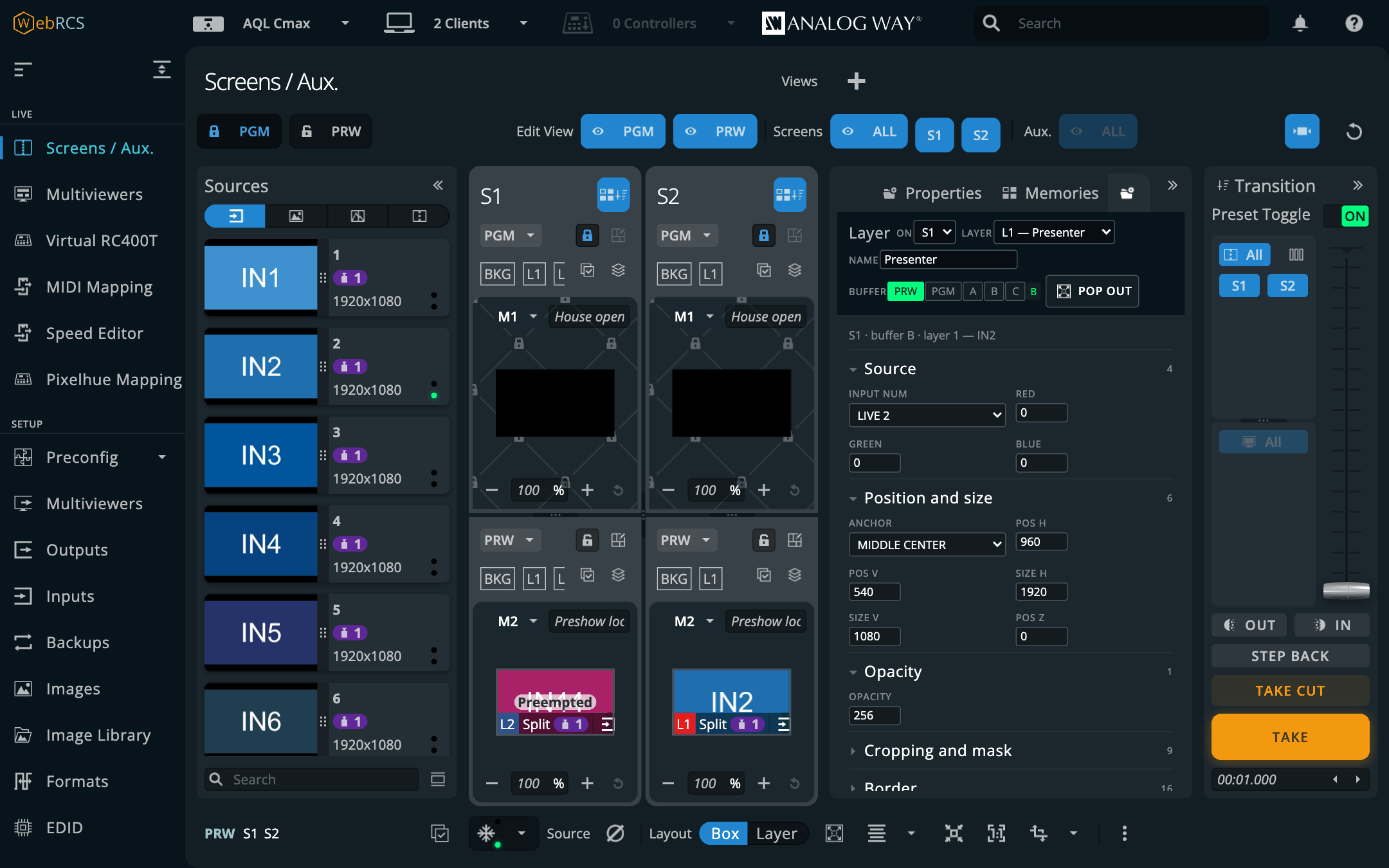
Naming a layer
Type a name into Name and it appears everywhere a layer is listed: this panel, the groups, the
… menu, and the vendor’s own layer lists. The switcher has no field for a layer name, so this
app keeps it, per switcher, and anything that talks to the switcher directly won’t see it.
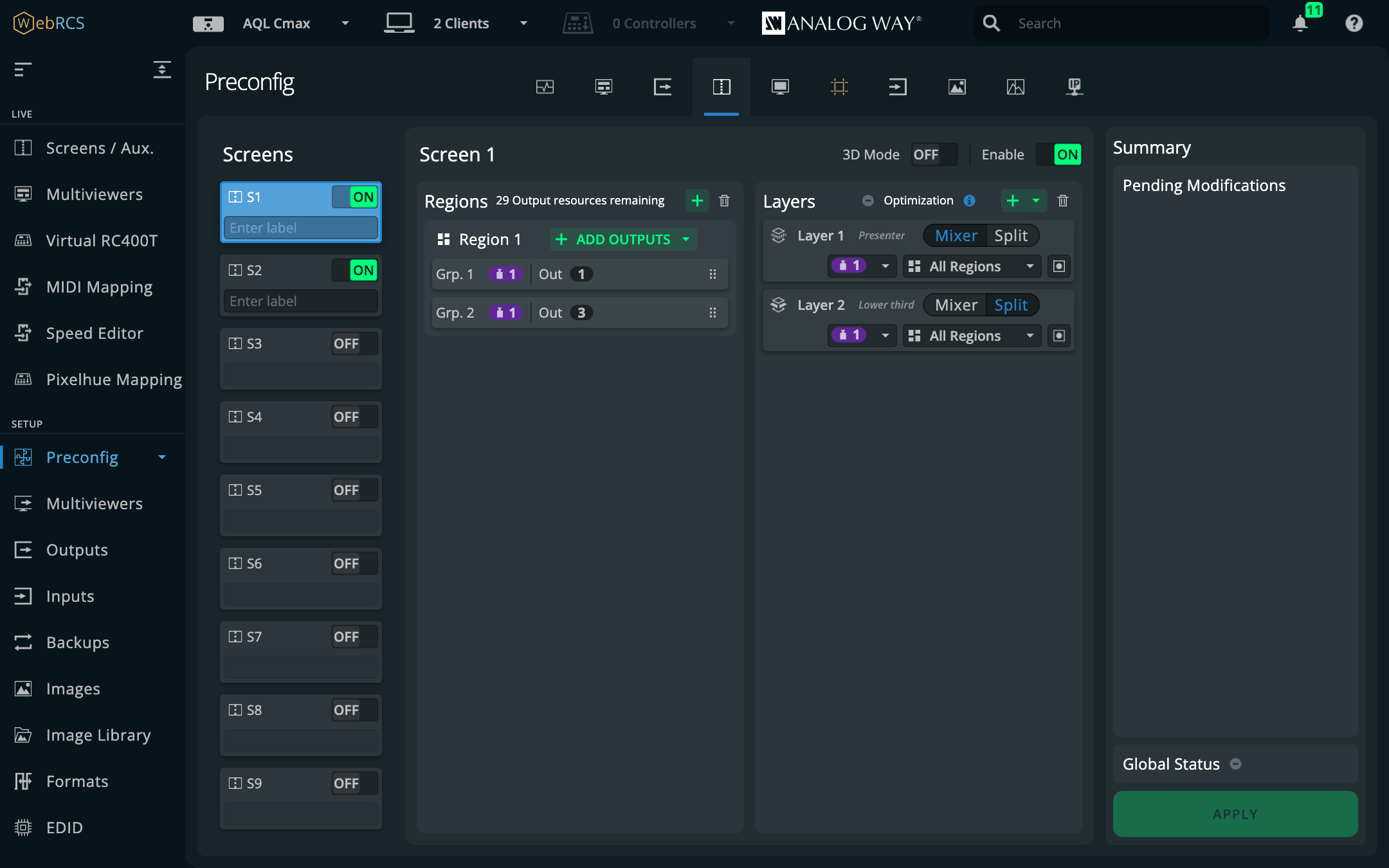
Layer Groups, and the … on a source card
PLUS ▸ Layer Groups. A group is a name and a list of layers, on one screen or on several: layer 2 on screen 1 with layer 1 on screens 2 and 3 is the side screens. Add a layer with the destination and layer pickers at the bottom of each group card. The layer list is the device’s own fitted list, so you’re never offered a slot the hardware hasn’t got.
The two source columns beside each member show what it’s showing now, in program and in preview, so you can see at a glance whether the group agrees.
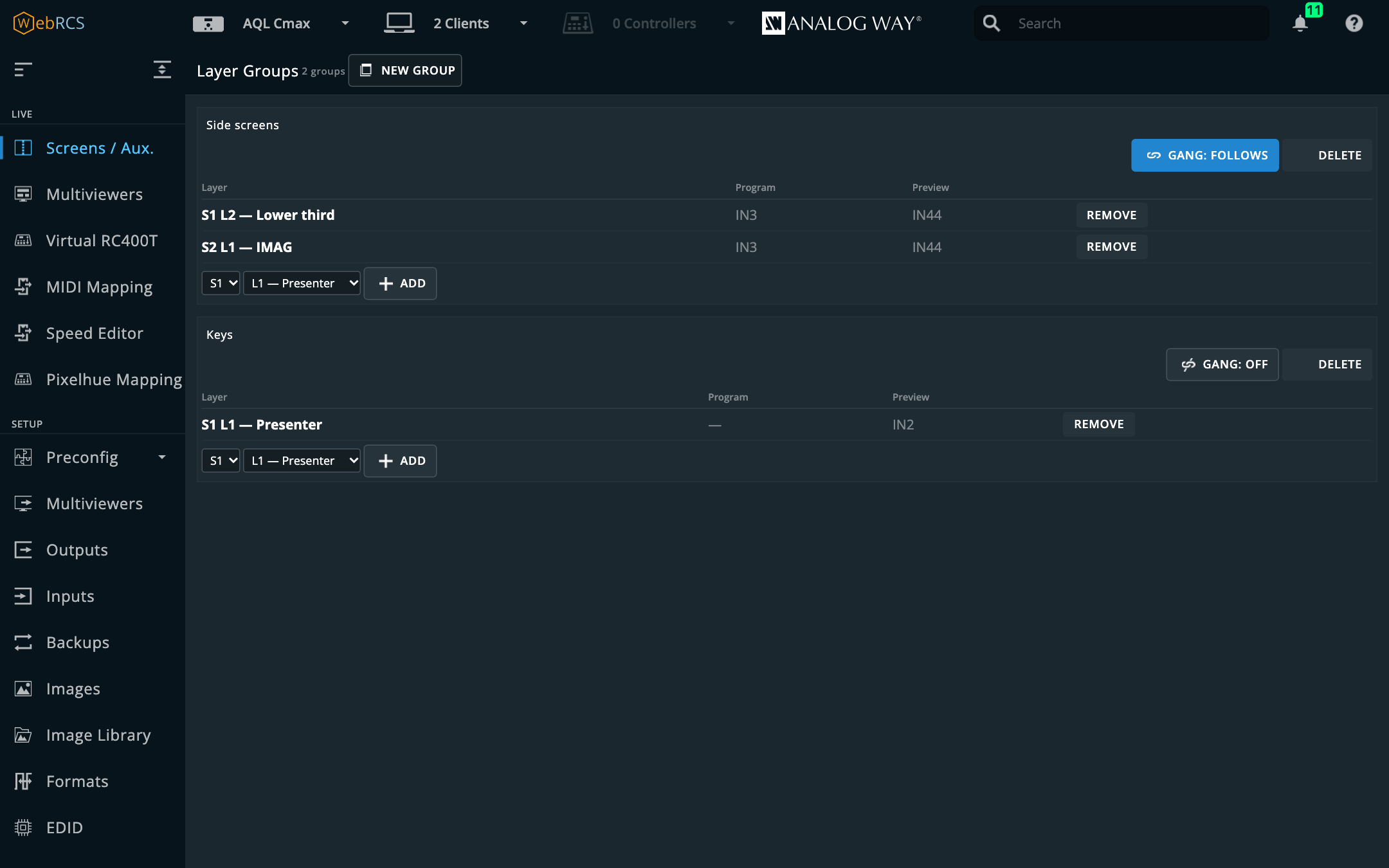
Gang: follows is on by default. The rest of the group is written to match whenever any
member’s source changes: by the … menu, by the vendor’s own drag-and-drop, by a memory recall,
by another client. Turn it off and the group stays useful as a target and does nothing on its own.
A layer belongs to one group at a time. Adding it somewhere takes it out of where it was, and the panel says so.
Sending an input
Every source card in the Sources panel gets a … beside the vendor’s own ⋮. The ⋮ is the
vendor’s and opens that input’s settings; the … is this app’s and routes it.
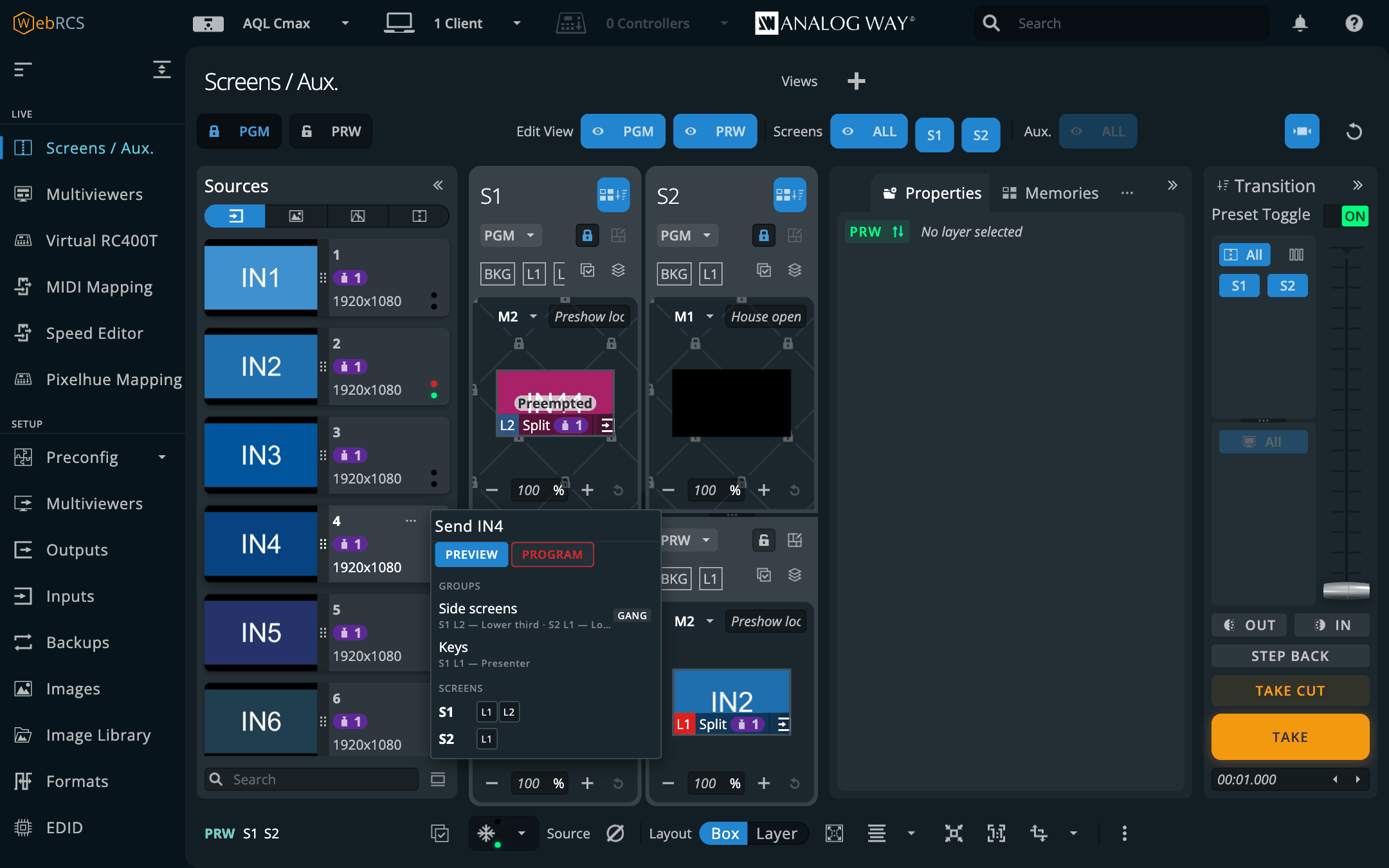
Preview and program mean the role, resolved per screen at the moment you click. Two screens sitting on opposite preset letters (which is normal) still both get it in the right buffer.
The PGM padlock is respected. With program unlocked on the screens involved, a program send goes through on one click. With it locked, you get a step that names every layer it’s about to change and asks. A screen you haven’t got on the page has no padlock to read, so it’s treated as locked and you get asked about that one too.
Mid-take nothing is sent. While a transition is in flight, “program” and “preview” don’t reliably name a buffer, and the menu says so rather than guessing.
Groups are kept per switcher, beside the cue stack. Point the app at a different frame and you get that frame’s groups.
Layer Lock — a take that leaves a layer alone
PLUS ▸ Layer Lock. One card per screen or aux, one row per fitted layer, each with Lock and Take only. When Layer Groups is on, each group gets the same two buttons at the top.
The switcher has no per-layer take: TAKE swaps the whole program and preview buffers. What this uses instead is the fact that a layer that’s the same in program and preview has nothing to transition.
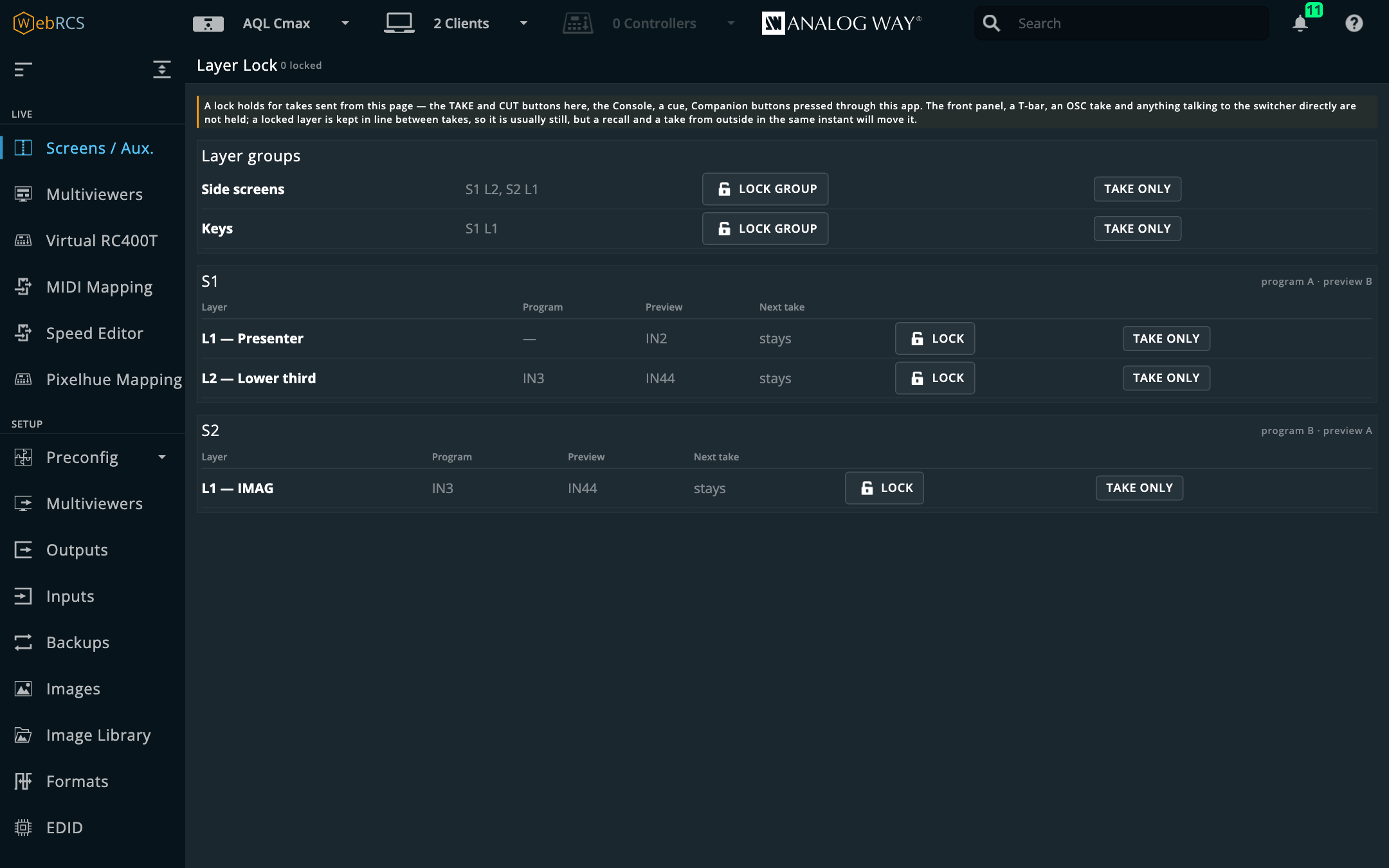
- Lock keeps the layer’s preview copy equal to its program copy. Change it in preview (the vendor’s properties, a memory recall) and it’s put straight back; change it on program and preview follows. Every TAKE and CUT sent from this page, the vendor’s own buttons included, is held for the few milliseconds it takes to line a locked layer up if it has drifted (never more than three quarters of a second), then sent. Locks are kept per switcher and survive a reload.
- Take only takes that layer (or that group, on each of its screens) on its own: every other layer on the screen is set equal to program, the take is sent, and once it has landed the other layers’ preview looks are put back into what is now preview. A locked layer can’t be taken this way; unlock it first.
Next take is the switcher’s own word for what each layer will do on the next take: stays, opens, closes, crosses, flies. On a real frame, stays beside a locked layer is the switcher agreeing. A simulator cheerfully says stays for every layer, whatever the buffers hold.
⚠️ Only takes sent from this page are held. The front panel, a T-bar, an OSC take, a Companion button speaking AWJ straight to the switcher and another operator’s browser go straight to the switcher. Between takes a locked layer is kept in line, so it usually stays put anyway, but a recall and a take from outside in the same instant will move it. The panel says this at the top every time.
⚠️ Proven on the simulator only. No real frame has yet been asked what it does with a locked layer that has a live source on it. The first time you use this on a frame, lock a layer in rehearsal, take, and watch it.
Preview lock during takes
It’s off until you switch it on in Preconfig ▸ LivePremier Plus → Plugins, and its card is on the same settings page.
Press TAKE, then recall the next memory into preview before the take has finished, and the memory doesn’t wait. While a transition runs, the buffer the switcher calls preview is the one fading up onto program, so the recall lands in the picture going to air.
Web RCS already has the guard rail for this, the PRW padlock on each screen card. This feature presses it for you:
- When a take starts on a screen (TAKE sent from this page, or a transition the switcher reports from anywhere: front panel, T-bar, Companion, OSC), that screen’s PRW padlock is shut. A TAKE from this page shuts it before the switcher has even answered.
- While it’s shut, Web RCS refuses a memory recalled into that screen’s preview, with its own warning (Screen memory could not be loaded … because PRW is locked). A screen memory loaded on several selected screens still loads on the ones that aren’t mid-take; a master memory that includes a screen mid-take is refused whole, with Web RCS’s master warning (read from its code, not yet tried).
- When the take lands, the padlock is opened again. A take that never starts is let go after a second and a half.
It’s careful with your own padlocks: one you’d shut before the take stays shut, and one you open mid-take is left open. The card lists the screens it looks after (untick one to leave it alone), what’s mid-take now, and the last few things it did.
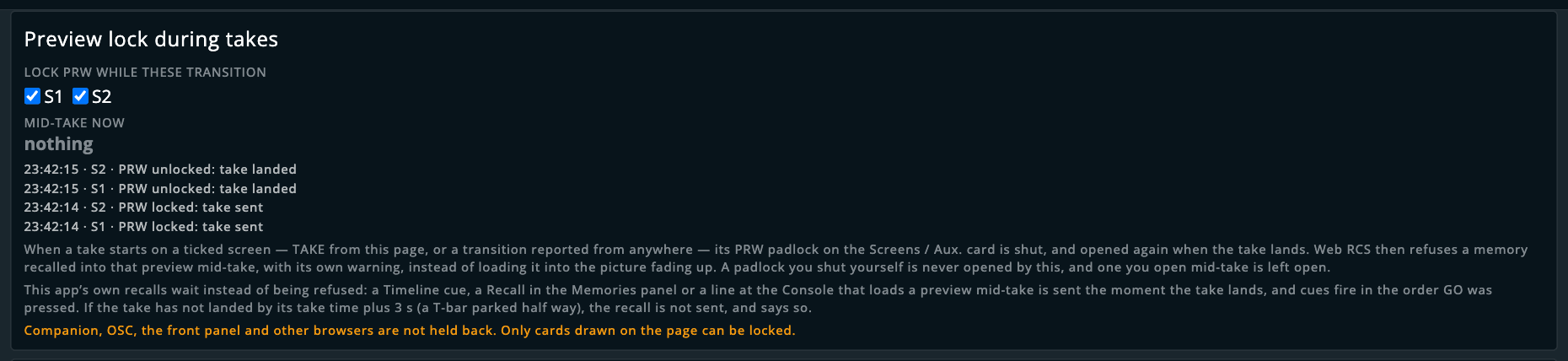
This app’s own recalls wait rather than being refused. The padlock only stops Web RCS’s own buttons, so with this switched on the app holds its own recalls back itself:
- Timeline cues. GO on a cue that recalls into a preview that’s mid-take, and the cue waits for the take to land and then fires whole: recall, fade and take in the usual order. The Timeline shows waiting for take: 12 → S1 meanwhile, and Stop cancels it. Cues fire in the order GO was pressed: press GO twice quickly and the second waits for the first cue’s take to land before it recalls, rather than loading over the look the first was about to take.
- Recall in the Memories panel, and a Recall line at the Console, work the same way: waiting for the take to land, then sent.
- A recall into program is never held. That’s you saying on air, now.
- If the take hasn’t landed by its take time plus three seconds (a T-bar parked half way, say), the recall is not sent, and the cue, panel or Console line says so. Sending it late, into the picture fading up, is the one thing this exists to stop.
⚠️ Not held back: Companion, OSC, the front panel and other browsers go straight to the switcher. And only screens whose card is drawn on the Screens / Aux. page can have their padlock shut; a screen whose card isn’t on the page when its take lands is unlocked the next time it is.
⚠️ With Web RCS’s remote selection switched on, padlocks are shared between everyone connected, so run this in one browser only.
On a Midra 4K or Alta 4K the padlock is the same one on each screen’s card, but Web RCS shows it differently: a shut PRW greys out that buffer’s memory Load, its source pickers and memory drops, rather than refusing with a warning. A fresh Midra page also starts with every padlock open, PGM included.
Proven on the LivePremier simulator against Web RCS 6.2.73’s own lock: a memory clicked into PRW while a screen was mid-take was refused for that screen and loaded on the other, and loaded on both once the take had landed. Proven on the Midra 4K simulator (3.2.29) with real takes: without this feature, a memory recalled 0.6 s after TAKE went to program when the take landed. With it, the PRW padlock shut for the whole take (from this page or sent straight to the switcher) and opened on landing, a recall from the Memories panel waited and went into the new preview the moment the take landed, and with the T-bar parked half way the recall gave up and wasn’t sent. Not yet run on a real frame or a real Midra 4K / Alta 4K.
Pixel Map
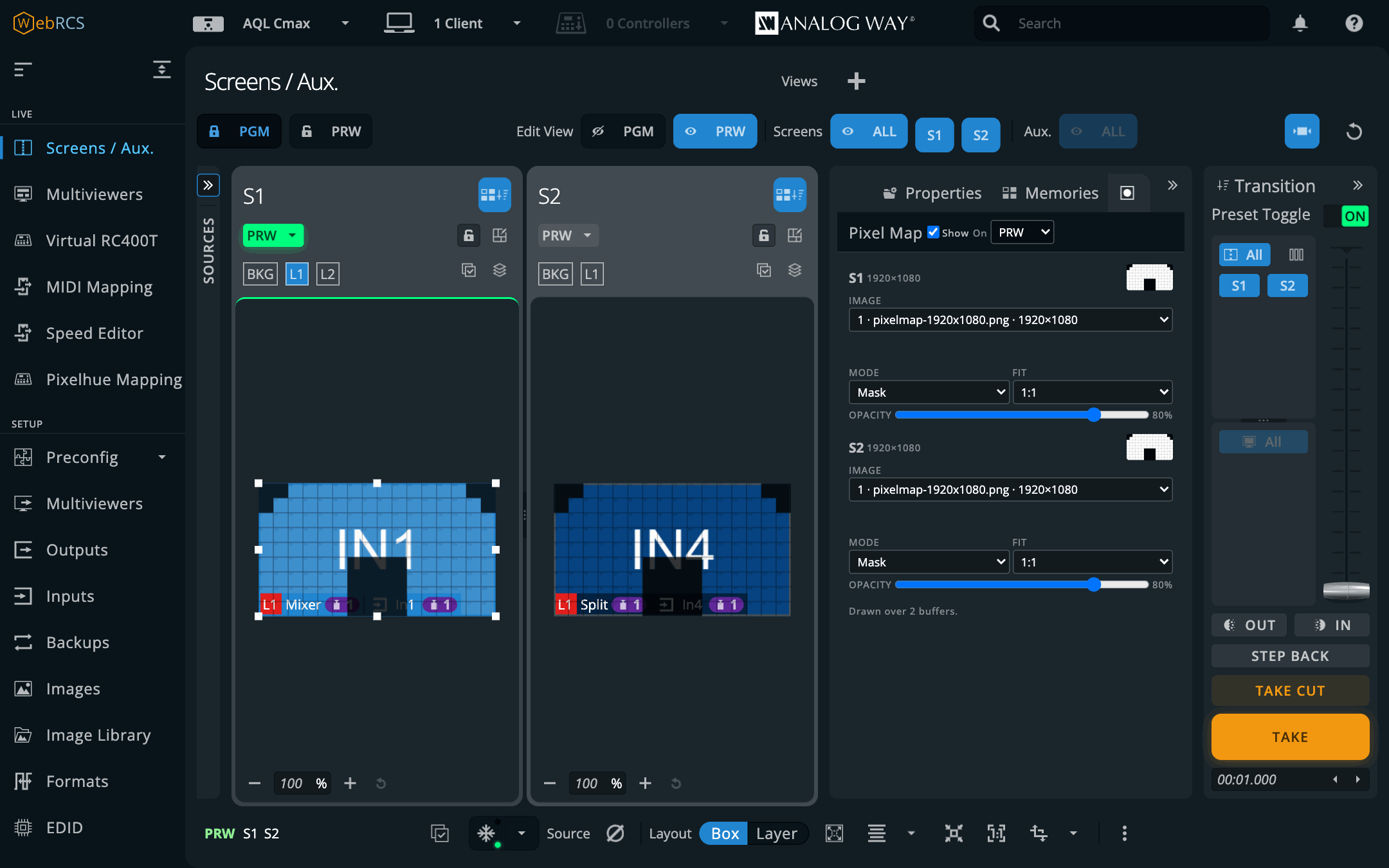
Screens / Aux. ▸ ⋯ ▸ Pixel Map. A pixel map is a picture of what a screen’s canvas really lands on: which bits of the raster are LED, where the gaps between panels are, the hole in the middle where the set piece goes. Pick one from the switcher’s image library for a screen and it’s drawn over that screen’s PRW canvas, on its own card, while you build the look.
-
Put the map in the image library. Image Library in the vendor’s sidebar, any PNG or JPEG. Draw it at the screen’s canvas size if you can: white where there’s LED, black where there isn’t.
-
Pick it for the screen. Each screen and aux in service has a row: Image is the list of what’s in the library, by slot, file name and size.
-
Choose how it’s drawn.
- Mask: black in the map hides what’s under it and white leaves it alone. What’s left is what the wall will show of each layer. Over an empty preview that’s black, correctly.
- Over: the map as it is, at the opacity, for panel numbers and outlines.
- Lines: only the light parts show, for a white grid of panel edges over dark content.
Opacity sets how strongly, and moves the map as you drag it.
-
1:1 or Stretch. 1:1 puts each map pixel on one canvas pixel, from the top left, which is the only way a pixel map tells the truth. Stretch fits the whole map to the canvas, for a map drawn at another size. A map that isn’t its screen’s size says so under its row.
On at the top of the tab draws the maps on PRW (the default), PGM or both, and Show hides every map at once without forgetting them.
It never gets in the way. The map sits between the layers and their selection handles, so a selected layer’s handles are drawn on top of it, and it takes no pointer at all: clicking a layer, dragging it, dropping a source on it and zooming the card all work as if the map weren’t there.
The switcher never knows. No layer is spent and nothing is written to the switcher. Which image goes on which screen is kept per switcher by this app, and goes into the setup file under Pixel maps. The picture is the library’s original file, the one the Image Library page’s Download button fetches, not its thumbnail, so one-pixel panel edges stay sharp as you zoom.
If a map’s library slot is emptied, the map stops being drawn and its row says Library slot 3 is empty now; it’s kept, so loading the file back into that slot brings it back. The line at the bottom of the tab says how many buffers it’s drawn on, and says so if it can’t find the cards.
LivePremier only. A Midra 4K or Alta 4K has an image library too, but its Screens page lays the cards out differently, so the tab isn’t offered there.
Proven on LivePremier Simulator 6.2.73: drawn over S1 and S2 in every mode, on PRW, PGM and both; a click through a map selected the layer under it; the map followed the card’s zoom, came back after leaving the page and went when its slot was deleted. On 6.1.60, the RS4’s firmware, the library and the image routes answer the same and the card is drawn by the same code, but no card was drawn there. Not yet run on a real frame.
Surfaces
Screens / Aux. ▸ ⋯ ▸ Surfaces, once it’s switched on in Preconfig ▸ LivePremier Plus → Plugins. It’s off to start with because it rewrites the vendor’s own layer moves on their way to the switcher, and you should get to decide that.
A screen’s canvas is one raster, but what it lands on is usually several physical things: a wall in three pieces, a header strip, a pair of IMAG screens either side. Each of those is a surface, and a layer bound to one stays inside it.
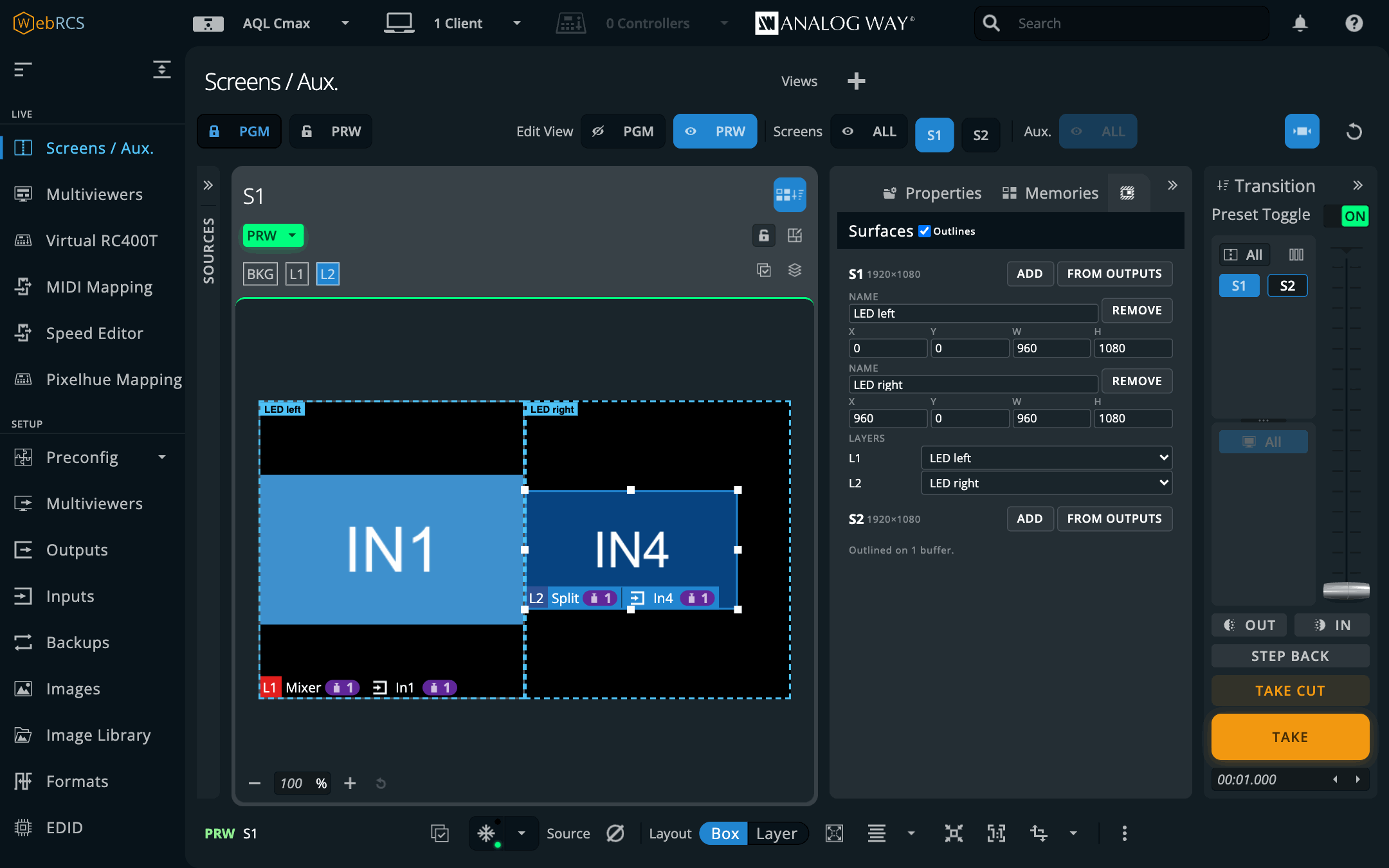
- Make the surfaces. Each screen in service has a section. Add makes a surface the size of the canvas; type its name and its X, Y, W and H in canvas pixels, the same units a layer’s own position and size are in. From outputs makes one per output feeding the screen, where that output sits on the canvas. That’s right when one processor drives one element, and only a start when one output feeds several.
- Bind layers. Under the surfaces, each layer has a list: pick the surface it lives on. A binding is the layer slot, so it holds in program, preview and on the Edit page.
- Watch the outlines. Every surface is drawn as a dashed outline on its screen’s PGM and PRW cards, over a Pixel Map and under the selection handles. They take no clicks. Outlines at the top of the tab hides them; the layers are still kept in.
What “kept in” means:
- A drag or a nudge stops at the surface’s edge. Drag one edge past it and the opposite edge stays put. Drag a corner with the ratio kept and it stops with its shape.
- Full screen fills the surface, and so does anything that asks for the whole canvas, such as a memory that was saved full screen.
- The align buttons align to the surface: centre means its centre, left its left edge.
- A layer too big for its surface is made to fit, keeping its shape unless you were changing its shape.
On the Edit page the same rule applies to the programmer, and a dragged layer stops at the edge while you’re still dragging. On the vendor’s page the box follows the pointer past the edge and settles back inside when you let go, because the vendor draws its own drag; the switcher never sees it outside.
From anywhere else. Companion, OSC, the front panel, another browser or a memory recall can still put a bound layer outside its surface. On preview it’s pulled back in a moment later. On program it isn’t: nothing here moves what’s on air by itself. It’s flagged instead, red on the card and in words at the top of the tab, so you can fix it in preview and take. A layer that something keeps moving back out is let go after three goes rather than fought over, and the tab names it; change its binding to try again.
Layer Lock wins. A locked layer is kept equal to program, so Surfaces leaves it alone, and the binding says locked.
Changing a surface moves nothing. Layers it no longer fits are flagged until they’re next moved.
The surfaces and bindings are kept per switcher by this app and go into the setup file under Surfaces.
LivePremier only, for now.
Proven on LivePremier Simulator 6.2.73 on 2026-10-16: full screen and align-to-middle on a bound layer landed on its surface; a drag past the edge stopped there on the switcher and on the vendor’s card; a change from outside the page was pulled back on preview and left alone on program; the Edit page’s drag stopped at the edge. 6.1.60’s Web RCS has the same buttons and the same drag code. Not yet run on a real frame.
UMD Generator (preview)
Screens / Aux. ▸ ⋯ ▸ UMD, once it’s switched on in Preconfig ▸ LivePremier Plus → Plugins. It’s off to start with because it uploads into the image library and writes a still and an aux’s layers, and it hasn’t met a real frame yet.
It draws a multiviewer’s furniture (a thin line round each box and a dark tab with the source’s name) as one transparent PNG the size of the screen or aux, from where its layers really are and what they’re really showing.
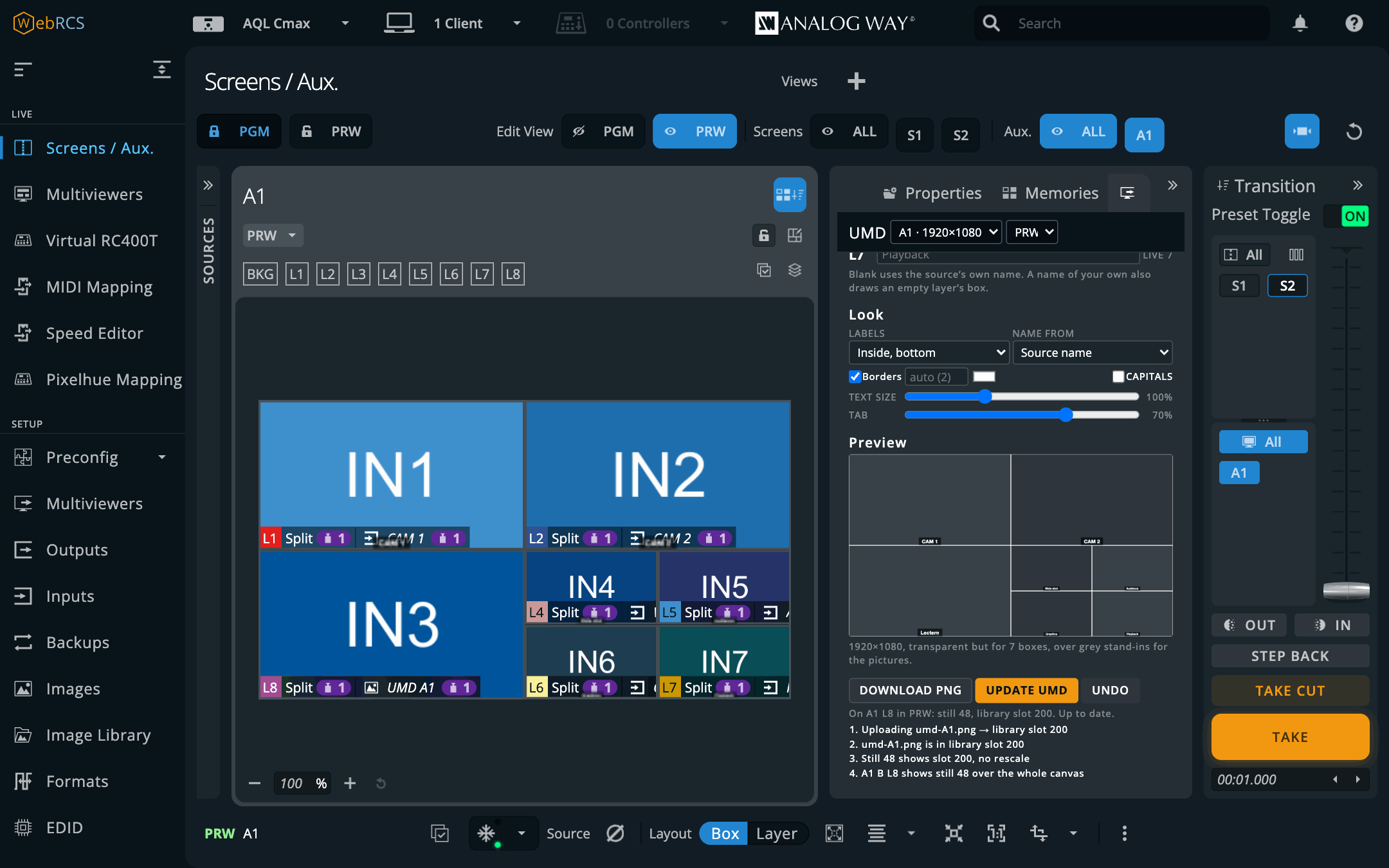
- Pick the destination at the top of the tab, and the buffer: PRW to build it in preview and take it, PGM to work on what’s on air.
- Lay it out (an aux, optionally). Template lists the layouts the aux has layers for. An aux’s layers come with its capability, in pairs (an advanced aux gets 2 at 4K, 4 at 5K, 6 at “6” and 8 at 8K), and the top one carries the UMD, which leaves 1, 3, 5 or 7 boxes. Every box keeps the canvas’s shape; Gap stands them apart. Lay out writes the box layers’ positions and sizes and empties the box layers the template doesn’t use. It leaves sources alone, so route your cameras before or after, as you like. Layers as they are skips this and draws whatever you’ve built yourself.
- Name the boxes. Each box layer has a field. Leave it blank and the box is named after its
source: the input’s or still’s label, or
IN5if it hasn’t got one. Type a name and it wins. Name from ▸ Layer name uses the names from Layer names instead. A layer with nothing on it isn’t drawn, unless you’ve named it. - Set the look. Labels in a dark tab inside the bottom of each box, inside the top, under the box, or none; the border, its width (blank is 2 px at 1080, in proportion above) and its colour; the text size; CAPITALS; and how dark the tab is. The preview shows the boxes as grey stand-ins with the UMD over them, and lists anything wrong: a name too long for its box (it’s shrunk, then cut short), a label with no room under its box, a label a layer would hide.
- Put it on the switcher.
- An aux: Put on Ln. The PNG goes into a free library slot, a free still is pointed at it (no rescale), and the aux’s top layer shows the still over the whole canvas. After the first time the button is Update UMD, which only uploads the PNG again: the still and the layer follow by themselves. If the UMD is on program, the button asks first, since the update is on air as soon as it lands. The line under the buttons says where the UMD is and whether it still matches the layers.
- A screen: To Background Slicer. A screen’s background is cut per output, and the Background Slicer does that, so the UMD is handed to it as its picture with the screen chosen. Open PLUS ▸ Background Slicer and carry on there. It has to be switched on.
- Anywhere: Download PNG, to load it yourself.
Undo takes back the last thing the tab wrote to the destination you’re looking at: a layout, or a UMD’s layer, still and library slot. An update can’t be undone back to the previous picture, which wasn’t kept.
Why an aux uses a layer and not its background. The vendor’s page offers an aux’s background nothing but None, and the preconfig never gives it any capacity. The switcher’s control software will in fact accept a still there (it did on the simulator), but whether a frame then shows it is not known yet, so the UMD uses a layer it knows will.
The box names, label positions and where each UMD went are kept per switcher by this app and go into the setup file under UMDs.
LivePremier for writing. A Midra gets the preview and the download.
Proven on LivePremier Simulator 6.2.73 on 2026-10-16: a 7-box layout on an 8-layer aux; the UMD put on its top layer and checked over AWJ; an update after a rename, on program; a screen’s UMD handed to the Background Slicer. Not yet run on a real frame.
Matrix Routing
PLUS ▸ Matrix Routing. Patch the switcher’s own sockets to ports on an external router (a Blackmagic Videohub, a Lightware or a Turtle AV) and route through it from here. LivePremier only for now: the Router tab and box it adds are written into LivePremier’s own pages.
You describe the cable, and the rest follows. The direction inverts, which looks wrong at first glance every single time:
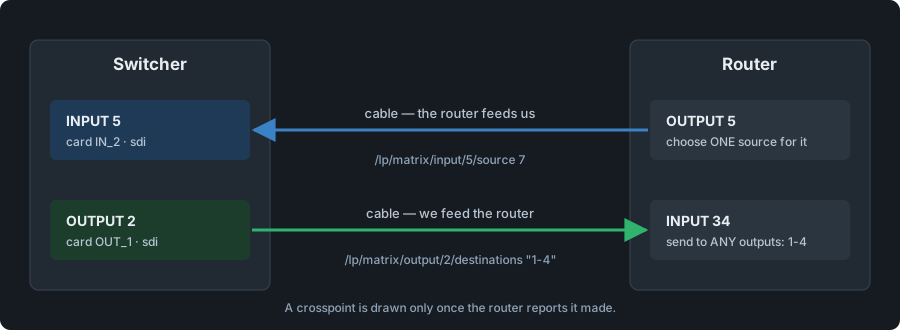
So a switcher input is fed by a router output, and a switcher output arrives at a router input. The patch form says which of the two it wants as you fill it in.
Set it up in three steps. Add the router (name, protocol, address; the port follows the protocol’s own default). Patch each cable: pick a socket, pick the router, give the port number at the other end. Then route.
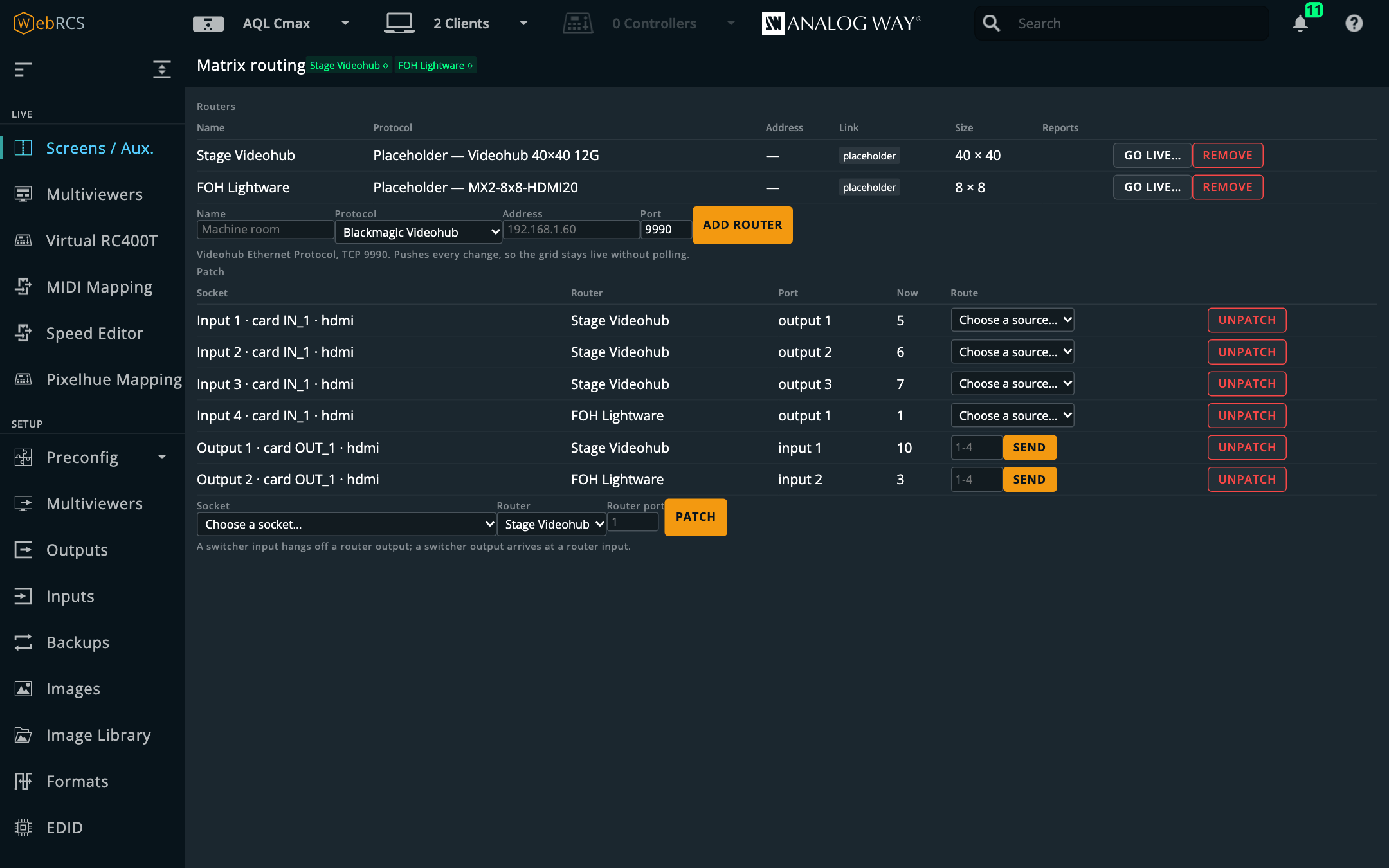
Sockets are named in the device’s own words, because which connector “card 2, port 1” is depends on a legend this app can’t see:
Input 13 · card IN_2 · connector IN_25 · sdi
Output 5 · card OUT_2 · hdmi
The two route controls are different, on purpose. An input row gets a source dropdown with one
choice, because a socket is fed by one router output, and that settles what the input sees. An
output row gets a destination field, because the signal arrives at one router input and can go to
any number of outputs at once: type 3, or 1-4, or 1,2,5-8.
⚠️ Sending adds; it never takes away. Naming outputs 1-4 routes those four and leaves output 5 alone, even if it was showing this source a moment ago. A router output always shows something, so “removing” a destination would mean choosing a different source for it, and there’s no right answer to which one.
The Now column is what the router says, not what you asked for. A click doesn’t move the grid until the router agrees, and it keeps up with changes made at the router’s own front panel or by another operator. A Videohub answers a route it won’t make with an acknowledgement and the unchanged crosspoints, so a panel that just showed your request back to you would look right and be wrong, at the worst possible moment.
Placeholder routers — building before the rack
A router that hasn’t turned up yet can still be patched and routed. Add it with Protocol ▸ Placeholder (no hardware) and pick its Model (Videohub, Lightware MX2 or MX-FR, Turtle AV, or a custom size), and it behaves like the real one everywhere: the panel, the Router tabs, cues, OSC and the Console all route through it. Nothing’s on the other end; its crosspoints are kept here as the router’s plan.
When the rack arrives, Go live… gives it an address. The patch carries over, nothing is sent on connect, and Push plan sends only the crosspoints that differ. A planned port past the real frame’s size is named, not dropped.
On the input and output pages
You don’t have to leave the socket you’re working on. Inputs ▸ an input and Outputs ▸ an output carry a Router tab beside Signal, Aspect and the rest, and Preconfig ▸ Inputs / Outputs shows a Router box under the selected card’s own boxes.
Each says which router port the cable is on (if it isn’t patched yet, patch it right there), then shows the router’s ports twice: as a grid of tiles and as a list with the router’s own port names.
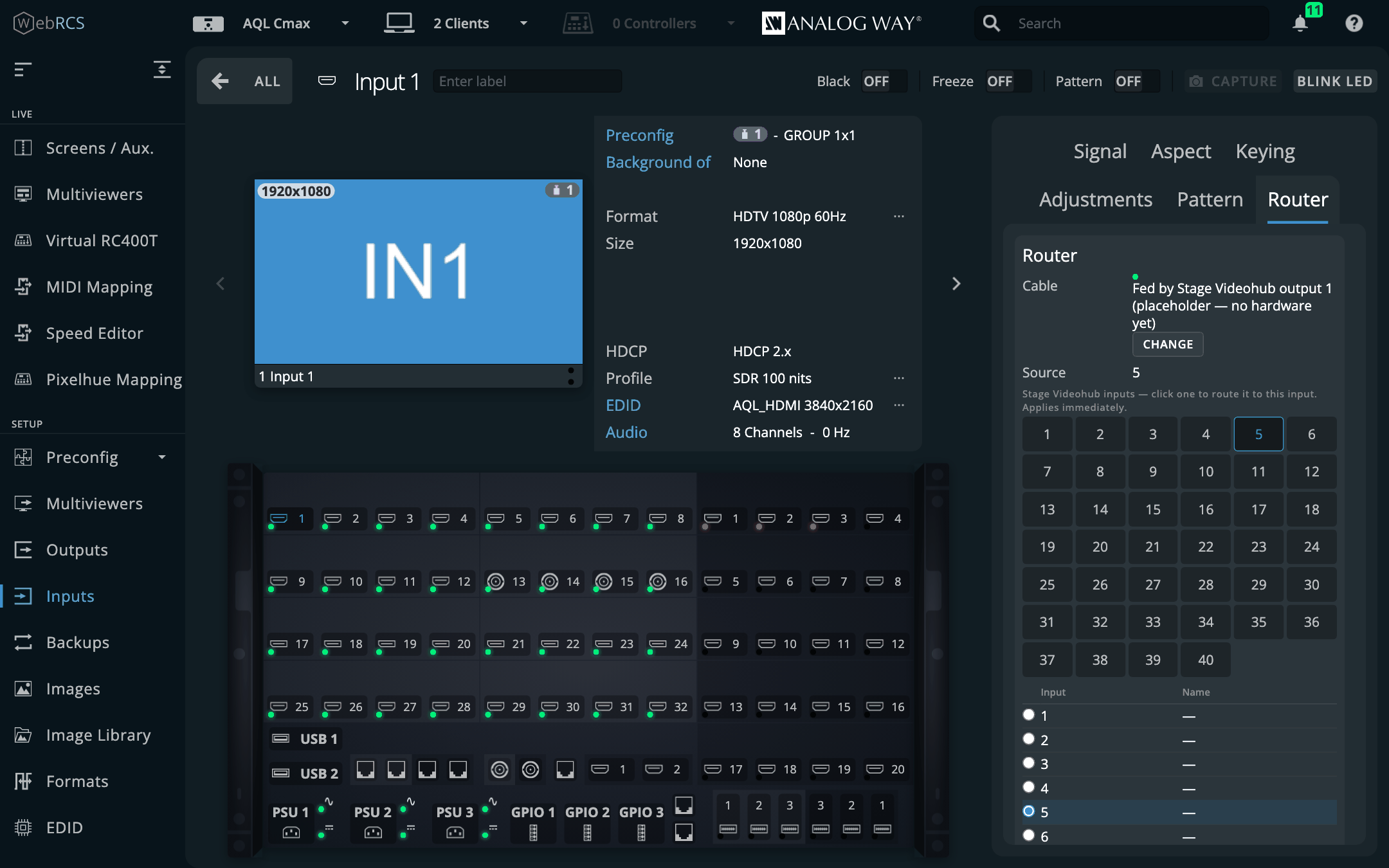
- An input picks one source. Click a tile or a row and it routes at once.
- An output picks any number of destinations. Clicking builds a selection (a dashed outline), and Route sends it. A solid blue tile is one the router already has on this output; the list shows what every other destination is showing now, which is what a route there would replace.
⚠️ In Preconfig this is live, not part of Apply. The route goes to the router straight away; Apply only concerns the switcher.
From a cue, the Console and OSC
A cue can carry a matrix route beside its recalls and takes. It goes out ahead of the take, so the signal is there before anything switches to it.
⚠️ A cue doesn’t wait for the signal to lock. An SDI reclock is quick, but an HDMI or HDCP handshake through a router can take a second or more, and nothing reports when it’s done. A cue that routes and takes in one breath can take to black, so put the route in an earlier cue when the format may change.
The same three addresses work typed at the Console and sent over OSC:
/lp/matrix/input/5/source        7        switcher input 5 now sees router input 7
/lp/matrix/output/2/destinations "1-4"    switcher output 2 out of router outputs 1-4
/lp/matrix/hub/route/3           9        router "hub": output 3 takes input 9
The routers are kept for the installation, not per switcher, because a Videohub doesn’t move when you fail over to a backup frame. The patch is per switcher, beside the cue stack, because it describes that frame’s own sockets.
What’s been proven, and what hasn’t. The Videohub driver was driven end to end against a working implementation of the protocol, including the crosspoint numbering, which counts from zero on the wire and from one everywhere you can see. No real Videohub has been in the loop. The Lightware and Turtle AV drivers are written from their vendors’ protocol documents and have never spoken to the hardware at all.
docs/MATRIX.mdgives a short procedure for proving each on your own kit before a show.
Audio Matrix
PLUS ▸ Audio Matrix (LivePremier only). The frame’s audio channel matrix as a crosspoint grid, with sources down the side (inputs and Dante) and destinations across the top (outputs, Dante and multiviewers).
The whole matrix is 576 source channels by 272 destinations, which is far more than anyone can read, so it opens as blocks of eight. A block says how many of that destination’s channels come from that source, and is solid when it’s exactly 1→1 … 8→8. Click a block to lay the source across the destination channel for channel, or to clear it when that’s what is there. Click a row or column header to open it into its eight channels; where an open row meets an open column, each cell is a single crosspoint.
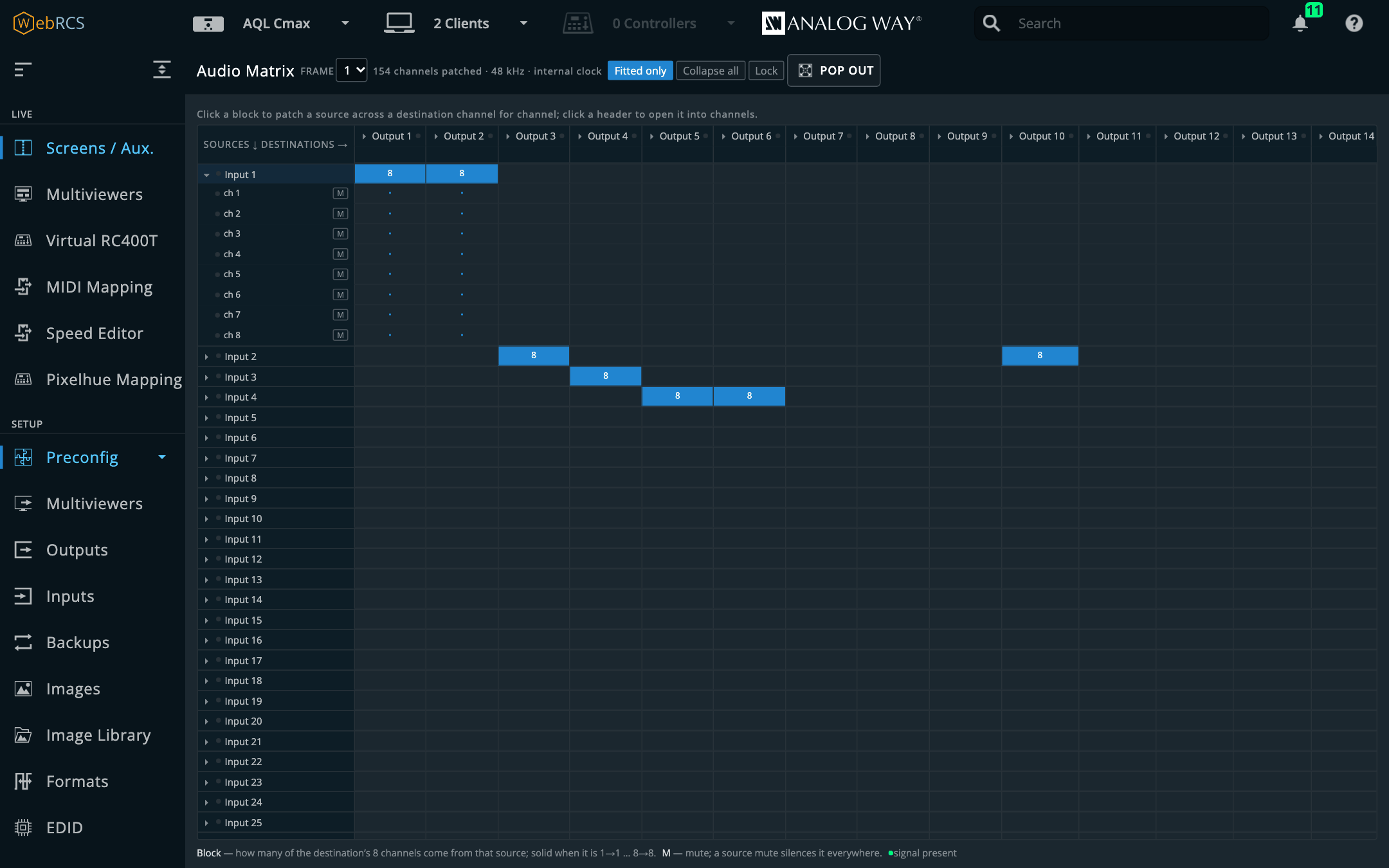
- What’s lit is what the switcher reports, not what was clicked. A click marks the cell as pending, the switcher’s echo lights it, and a write it never echoes is named in the note line.
- M mutes a destination channel, or a source; a source mute silences it everywhere. A dot beside a name means signal is present.
- Fitted only hides the inputs and outputs this frame has no card for (anything patched is always shown), and Collapse all closes every open row and column.
- Lock stops clicks from patching, for a matrix that’s live on a show. Groups still open and close.
- It pops out, because a matrix is wide and the sidebar isn’t.
The Console’s Set Audio Patch Input 3 Channel 1 Thru 8 To Output 1 is the same write as a click.
On a Midra 4K or Alta 4K there’s no channel matrix and the entry isn’t offered; audio there is
routed from the Console.
Proven on the simulator only.
HyperDecks
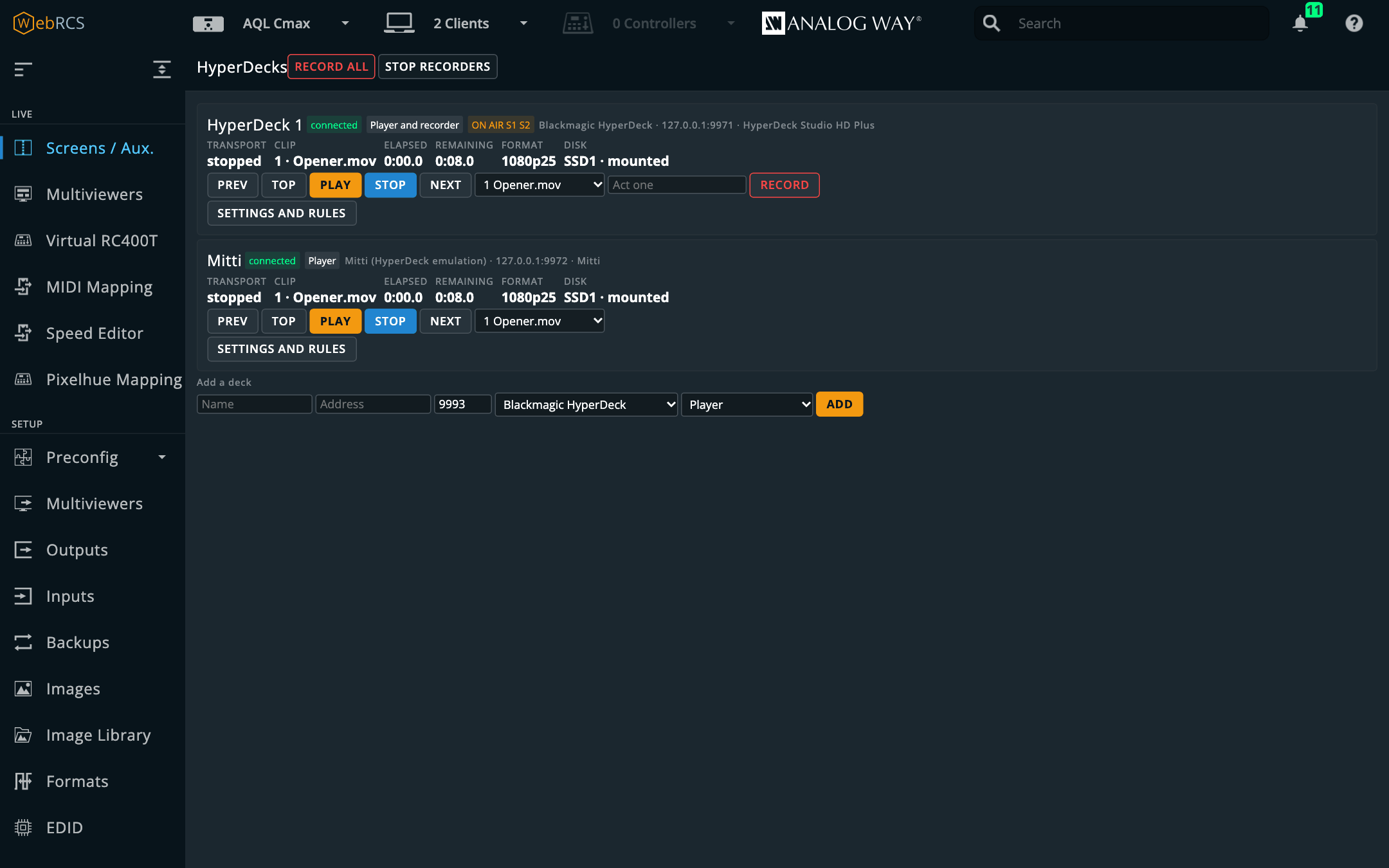
PLUS ▸ HyperDecks. Blackmagic HyperDecks, and anything that answers their protocol (Mitti included), played, cued and recorded from the switcher’s own UI, and made to follow the show.
-
Add a deck at the foot of the panel: a name, its address, port 9993, its kind (HyperDeck, Mitti, or other) and its role (player, recorder or both). For Mitti, switch HyperDeck control on in Mitti’s own preferences first.
-
Open Settings and rules on its card and pick the input it plays into: the plug on the back of the frame its output is cabled to. A recorder can name the output that feeds it.
-
Its card now shows what the deck is doing (clip, elapsed, remaining, ON AIR / PVW) and drives it: Prev, Top, Play, Stop, Next, a clip to cue, and Record on a recorder. Record all and Stop recorders are in the toolbar.
-
Tick Follow the switcher and choose what happens when its input is put on program (play), put in preview (rewind), taken off (pause, rewind or load the next clip), and when a clip ends (take or cut the screens it’s on air on, optionally a few seconds early so the mix lands on the last frame). Tick screens to narrow it; none means all.
The rules run in an open page. One page at a time runs them (the panel says which), and a page that starts running them only acts on what changes after that, so opening one never plays a deck that’s already on air. With no Web RCS page open, the buttons, cues and OSC still work, but nothing follows the switcher.
In a cue, the HyperDeck field takes VT 1 clip 3; VT 1 play; recorders record Act 1. Over OSC
it’s /hyperdeck/<deck>/play and the rest, all in docs/OSC.md.
⚠️ Written from Blackmagic’s published protocol and proven against an emulation of it, but not yet against a real HyperDeck.
docs/HYPERDECK.mdhas a short procedure for proving it on your own deck before a show.Mitti needs 0.17.0 or later. A real Mitti 2.8.18 answers
103 unsupportedto any command that ends in a carriage return, which is how 0.16.0 ends them. 0.17.0 ends them with a bare line feed, which a HyperDeck takes as well. With 0.16.0, Mitti accepts the connection and refuses everything after it.
Dante (preview)
PLUS ▸ Dante. The Dante audio network’s routing (who’s listening to what), read off the devices themselves, beside the switcher it feeds. It’s off by default: switch it on in Preconfig ▸ LivePremier Plus → Plugins, then reload.
⚠️ Preview: it hasn’t been run against a real Dante device yet. Its protocol code is held to packets Dante Controller itself sent, and everything else was proven against a simulated network.
docs/DANTE.mdhas a short test to run with Dante Virtual Soundcard or the switcher’s own card before you trust it with a show. Keep Dante Controller open beside it the first time.
Finding the devices
Devices are found on their own. The app asks the network every 30 seconds by default, from a port of its own, so Dante Controller and Dante Virtual Soundcard on the same machine aren’t disturbed. On the Dante card in Preconfig ▸ LivePremier Plus you can change how often it asks, choose which network interface to ask on, list devices by address for a network where multicast doesn’t reach this machine, and set how often each device is read again (every 5 seconds by default; this is how a change made in Dante Controller shows up here).
The grid
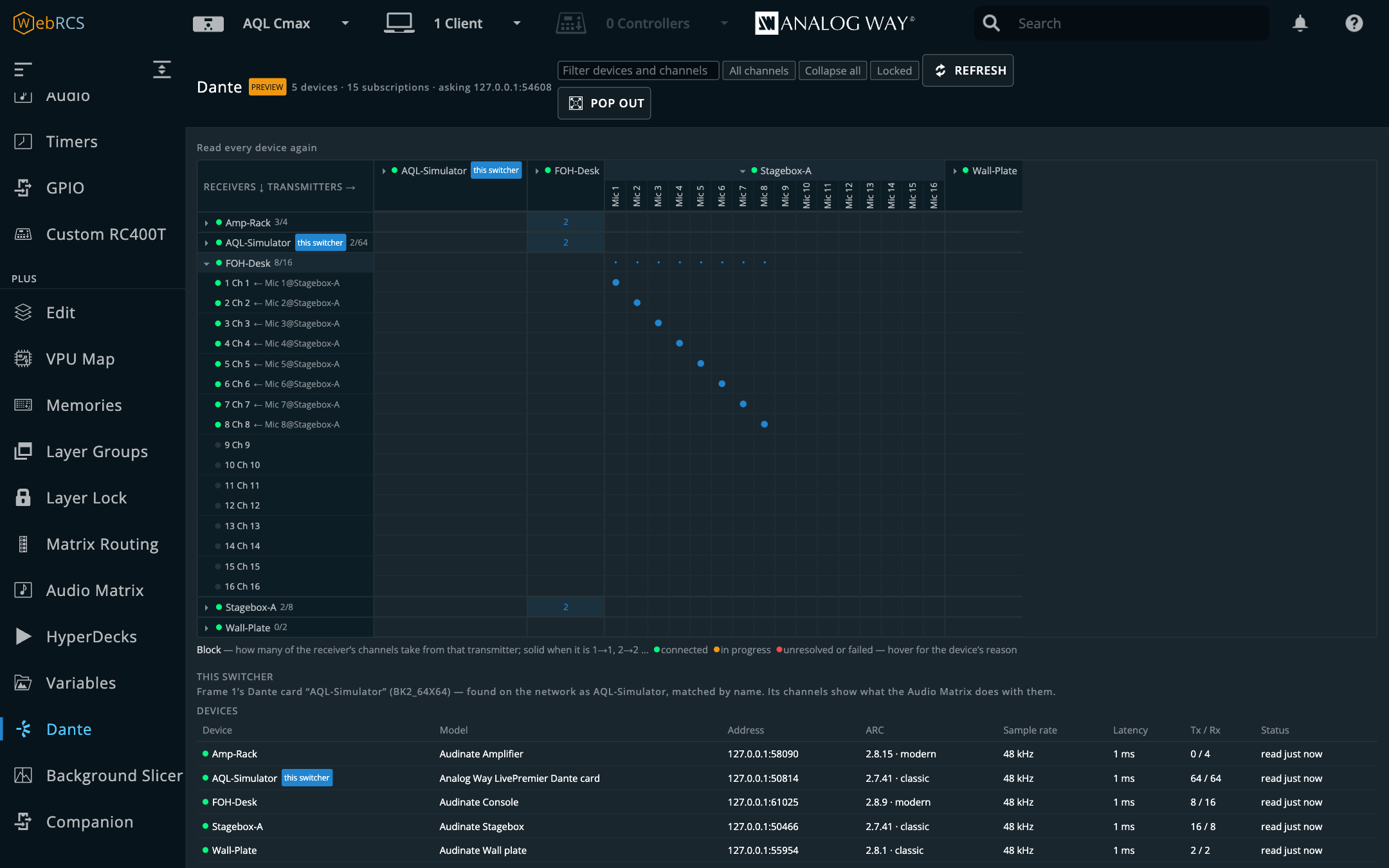
Receiving devices down the side, transmitting devices across the top. A block says how many of the receiver’s channels take from that transmitter, and is solid when it’s channel for channel (1→1, 2→2 …). Click a device’s name to open it into its channels. Where an open receiver meets an open transmitter, each cell is one subscription, coloured by what the receiver reports: blue for connected, orange while it’s being set up, red for unresolved or failed. Hover over a cell or a channel for the device’s own words.
- Unlock the grid (it opens Locked: clicks only open and close devices).
- Click a cell to subscribe that receive channel to that transmit channel, or to clear it when it is already lit. Click a block to lay the transmitter across the receiver channel for channel, or to clear exactly that; past eight subscriptions it asks first.
- The cell waits (dashed) until the device has been read back. The note line and Last change say what each device reports: confirmed, or why not.
Filter narrows the grid by name, and Routed only hides the empty channels. Devices, under the grid, lists each device’s model, address, protocol revision, sample rate, latency and channel counts, and says why one can’t be changed, if it can’t.
This switcher. The switcher’s own Dante card is found by the name in its store and marked
this switcher. Its receive channels show the outputs the Audio Matrix sends them to
(→ Output 7 ch 1), and its transmit channels the input they carry. If it isn’t found (its Dante
name was changed, say), choose it on the same card, under This switcher’s Dante card.
Dante Controller presets
- Export preset saves a Dante Controller preset of every device read. In Dante Controller, File ▸ Load Preset opens it like one of its own.
- Import preset… reads a preset saved by Dante Controller and shows, device by device, which subscriptions applying it would change, including the ones it would clear: as Dante Controller does, a receive channel the preset leaves empty, or doesn’t list, is cleared. Each role in the preset is matched to a device by its id or name; pick another, or not applied, to change that. Apply sends exactly what was shown, and if the network has changed since, it says so and shows the difference again.
Only subscriptions are applied from a preset, never names, sample rates, latency or network settings. Dante Controller is the tool for those.
Snapshots
Type a name and Save current routing to keep every receiving device’s subscriptions. Recall says how many subscriptions it would change, then changes only those, and lists anything it couldn’t do. Snapshots are saved in the setup file with everything else.
From a cue, the Console and OSC
In a cue, the Dante field takes snapshot Show A, or 1@Amp-1 <- Mix L@Desk to subscribe
receive channel 1 of Amp-1 to Mix L on Desk, or Front L@Amp-1 <- none to clear one, with ;
between several. Over OSC or at the Console: /lp/dante/snapshot/Show-A/recall,
/lp/dante/route/Amp-1/2 "Mix R@Desk", /lp/dante/clear/Amp-1/2. The full list is in
docs/OSC.md.
Companion
PLUS ▸ Companion. A Bitfocus Companion (5.0 or newer) linked to this app: its buttons drawn and pressable here, a cue or a memory recall that presses them, and its own editor served on the same address as Web RCS, so there’s no second port to get through a firewall.
Connecting
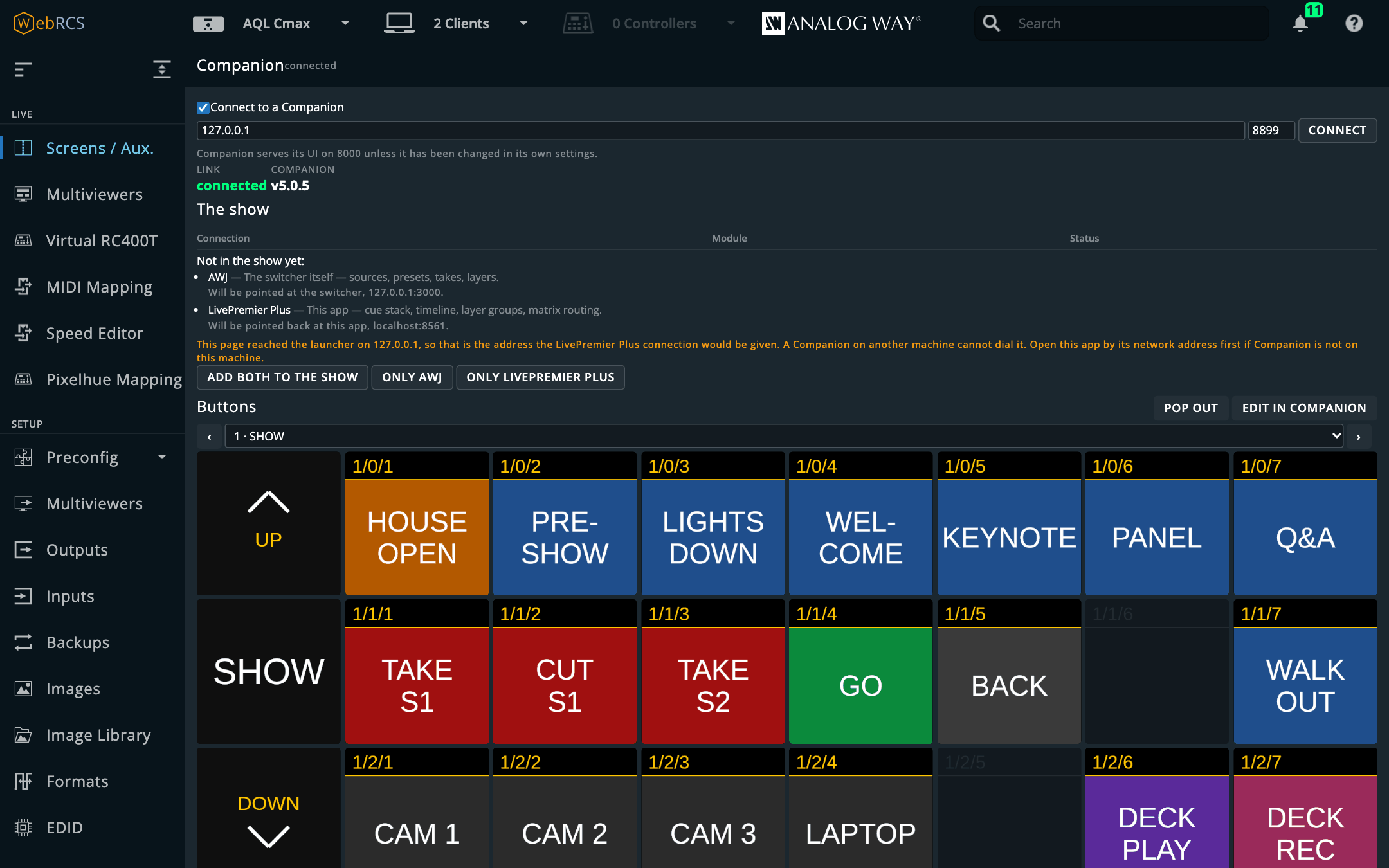
Tick Connect to a Companion, give its address, and press Connect. The port is Companion’s own admin port: 8000 unless it’s been changed in Companion’s settings. The link is off until you turn it on, because an app that reached out to a machine on the show network the moment it started wouldn’t be one you could reason about.
What is in the show
The panel lists the show’s connections (label, module and status) and follows them live, so a connection added or disabled in Companion (including in its editor, opened from here) shows up without a reload. The two it has an opinion about are highlighted:
- AWJ: the switcher itself: sources, presets, takes, layers.
- LivePremier Plus: this app: cue stack, timeline, layer groups, matrix routing.
What it does with them is an offer, never a sync:
- a connection already in the show is used as it is, and its settings are left alone, whatever it’s labelled;
- two of the same module is reported, not resolved: a show with a main and a backup frame is a perfectly correct show, and the panel won’t pick one for you;
- a missing one is listed under Not in the show yet, with the address it would be pointed at, and Add … to the show creates it and configures it for the switcher you’re on. Nothing is written until you press it.
The LivePremier Plus connection can’t be added yet. It needs a LivePremier Plus module in Companion, and there isn’t one yet; the panel says so in those words. The AWJ connection works today.
If you opened this app on 127.0.0.1, that’s the address the LivePremier Plus connection would be given, and a Companion on another machine can’t dial it. The panel warns you. Open this app by its network address first if Companion is somewhere else.
Buttons
The panel draws Companion’s pages as a grid, in this app’s own look, with each button exactly as Companion renders it (text, colours, feedbacks, variables) and updated the moment it changes. Press one and it’s pressed in Companion; hold it and it’s held, so a long-press or a while held action behaves as it does under a finger. Pick the page from the list, or step through with ‹ and ›. Dim buttons have nothing on them.
- Pop out puts the grid in a window of its own, for a second monitor or a touch screen.
- Edit in Companion opens Companion’s own button editor in a new window, through this app, for programming a button. Everything you change there shows here at once.
The grid only runs while it’s on screen. Move to another panel and it stops asking Companion for images.
A cue that presses a button
Each cue has a Companion trigger field, in the cue editor (Timeline ▸ Pop out) and in the
Timeline tab’s New cue form. Type buttons as page/row/column, the way Companion numbers them
(1/0/3; several separated by commas), or press Choose… and click one in the grid (nothing is
pressed while you’re choosing). When the cue fires, the buttons are pressed alongside its recalls
and ahead of its take, the same moment a matrix route goes out. An address it can’t read is
refused, and the field says why.
The press goes through this app’s own link, not the page, so it works whether or not the Companion panel has been opened, and whether or not Companion’s HTTP API setting is on.
A memory recall that presses a button
Memory triggers, at the bottom of the panel: choose a bank and a slot, the buttons to press, and Set. From then on, recalling that memory presses them, whether from the Memories panel, a cue, the Console or the vendor’s own Memories tab. Test presses them now. One recall sent to several screens at once presses once.
Only recalls made in this page are seen. A memory recalled from the switcher’s front panel, from Companion itself, or from a browser that isn’t going through this app presses nothing, because this app has no way to hear about it. That’s also why two open pages don’t press the button twice.
Triggers are kept per switcher, beside the cue stack, and travel in the setup file.
Linking a Companion widens what this app exposes. Everything below
/__lpp/companionis Companion’s admin UI, reachable by anyone who can reach this app. On the default loopback binding that’s only this machine; see On binding wide above before you change that.
EDID builder
Setup ▸ EDID. The switcher keeps a hundred custom EDID slots (the EDID Bank tab, ED1 to ED100) and has nowhere to make an EDID to put in them. It wants a file, and getting one is your problem. This puts the Otter EDID editor beside the bank, so an EDID is built and saved without a file changing hands.
From your custom formats
From Formats is a third tab beside Default EDIDS and EDID Bank. It lists every valid custom format in Setup ▸ Formats (M1–M16) with an EDID already built for it:
- Every porch is kept. The EDID is built around the format’s exact timing, not re-derived from its resolution and rate. Where the raster is exactly a CTA-861 mode (1080p60 is VIC 16), the VIC goes in too, because consumer sources act on VICs; anything else is a detailed timing.
- Its name is the label you gave the format when it fits the EDID’s 13 characters, otherwise
M3 1080p50. It’s what the bank card and every input show. - Save to ED… puts it in the next empty slot. Save N to the bank does every one that’s
missing. Edit… opens it in the editor first. The download button saves the
.bin. - Keep the bank filled does it for you: whenever a format has no EDID in the bank, one is added to the next empty slot. It never overwrites a slot and never deletes one. A format you change leaves its old EDID where it was, because an input may be using it.
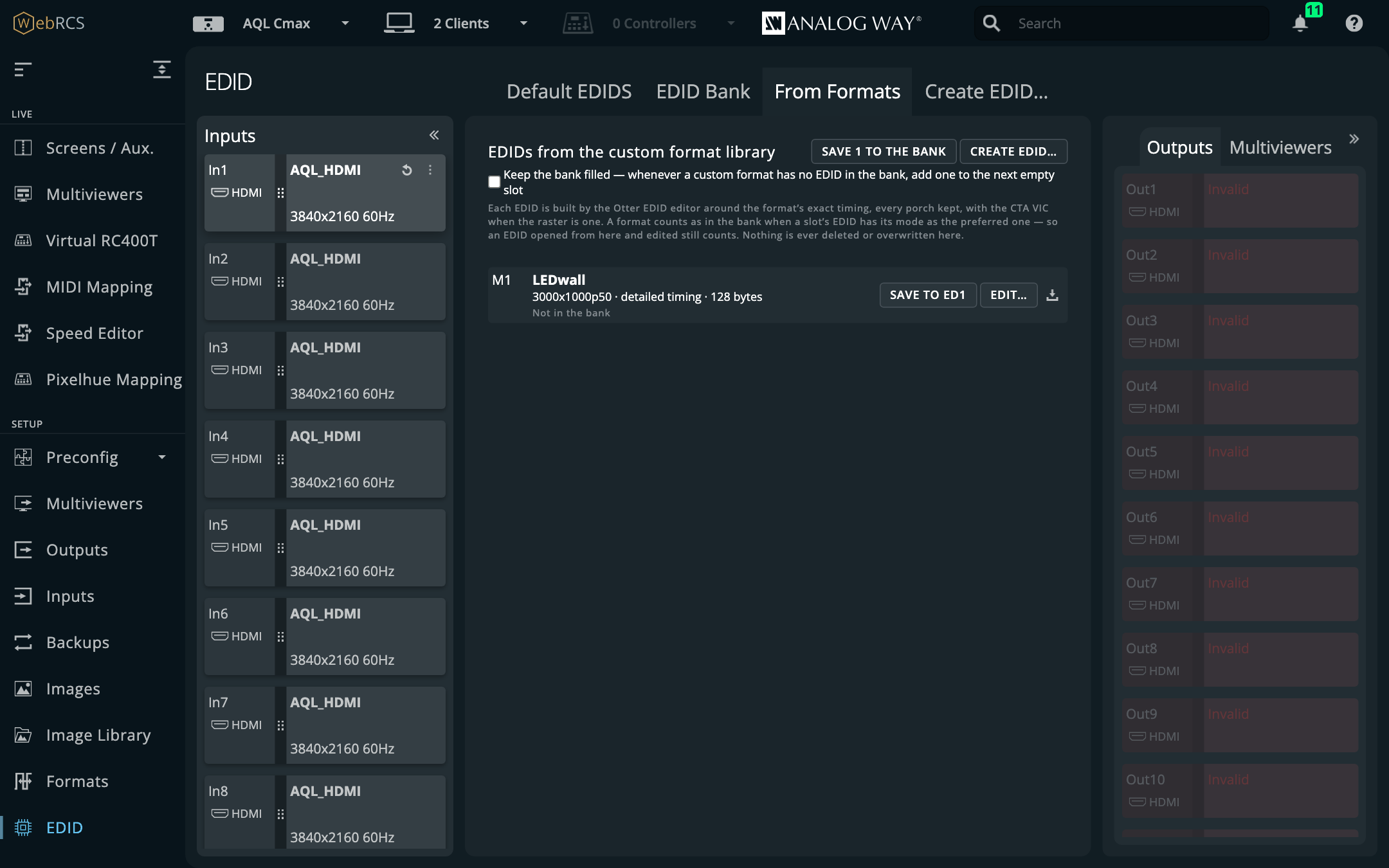
A format counts as in the bank when some slot’s EDID has the format as its preferred mode, so an EDID you opened from here, renamed and saved still counts, and the switch won’t add a second copy beside it.
The rate can read 0.01 Hz low. An EDID states its pixel clock in 10 kHz steps, so a format whose clock falls between two steps comes back as the nearest: 3000x1000 at 50 Hz is 162.424 MHz, stored as 162.42, which the bank shows as 49.99Hz. Every porch is exact; it’s the nearest rate an EDID can say.
Creating or editing one by hand
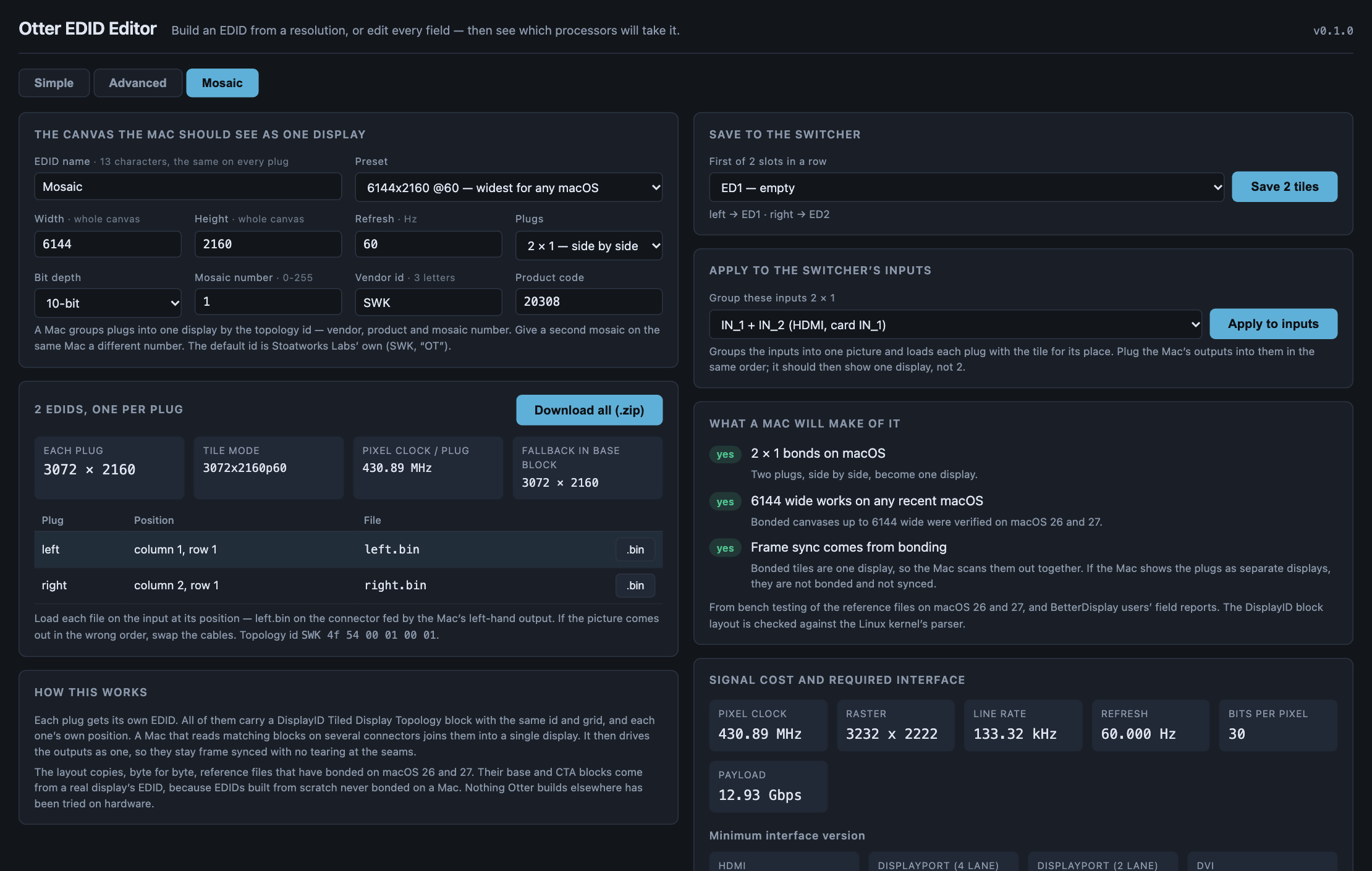
Create EDID…, at the end of the same row of tabs, opens the full editor in a window of its own. An edit tool on every filled bank card opens it on that slot. It’s the same editor as the website: Simple (a resolution and a rate), Advanced (every field), Mosaic (one tiled EDID per plug, so a Mac bonds its outputs into one display), the signal cost, and which Analog Way, Barco and PixelHue inputs will take it.
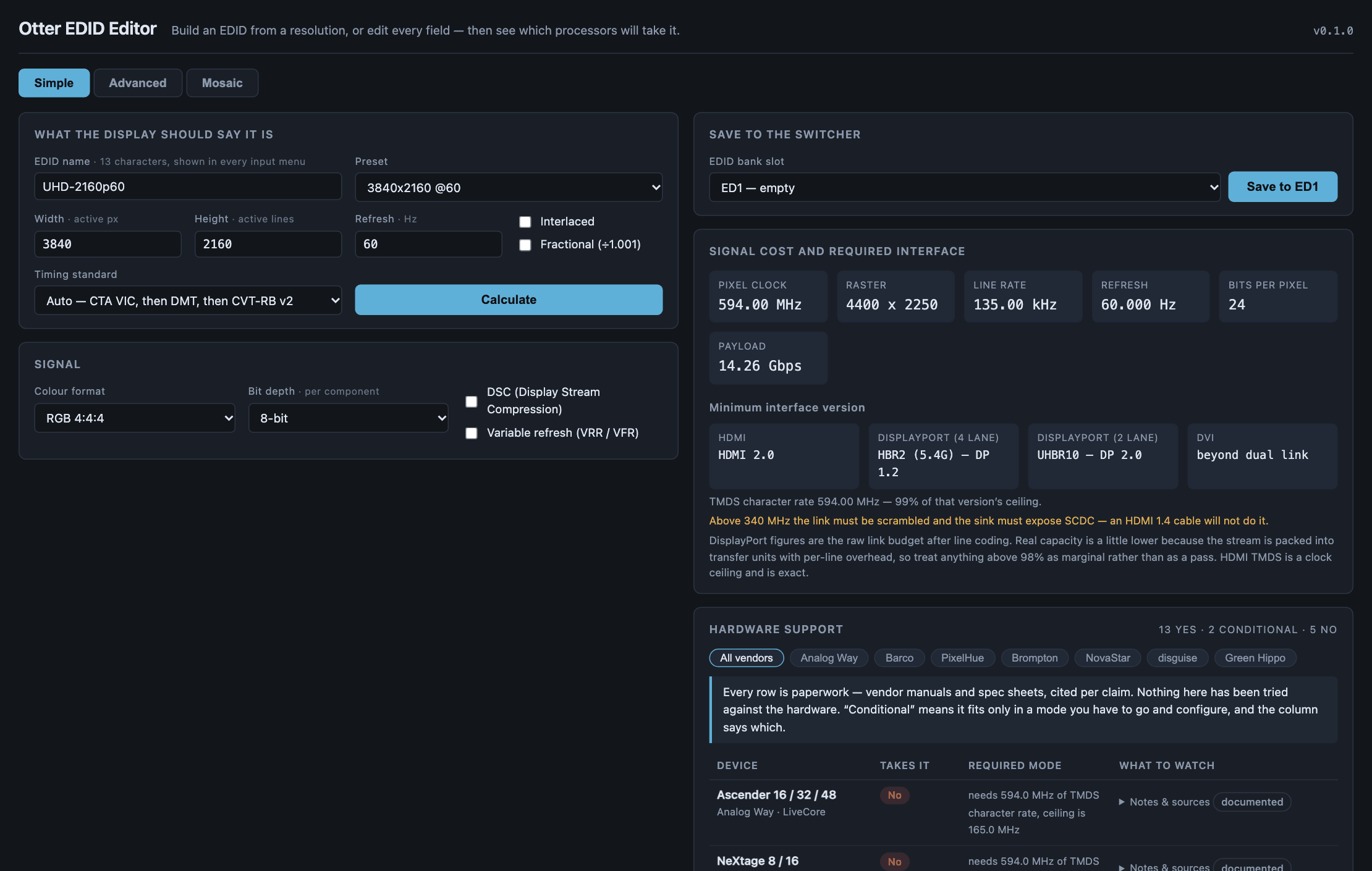
Save to the switcher, at the top right, writes it. Pick the slot (it starts on the first empty one, or on the slot you opened), and it says what it would replace before you press. A mosaic saves its tiles into that many slots in a row, as their exact bytes, and Apply to inputs groups the inputs 2 × 1 and loads each plug with the tile for its place.
The save finishes when the switcher reports the new EDID, not when it accepts the request.
The window works through the Web RCS tab it came from, like every popped-out panel here. Close that tab and it tells you it can’t save any more.
Mosaic inputs
Apply to inputs comes from a plugin of its own, Mosaic inputs, which is on unless you switch it off and only appears in the editor’s Mosaic mode (so with the EDID builder off it has nowhere to show). It does the two halves a Mac needs to bond several outputs into one display: it groups the inputs 2X1 or 2X2 (IN_n and the next inputs in order become its members) and loads each member plug with its own tile EDID, because grouping on its own leaves the plugs with the stock EDID and the Mac sees separate displays. It’s offered only the inputs that can start a group.
⚠️ Grouping is a preconfig change. It copies the running preconfig, sets the group, has the switcher check it and applies it, the same steps Preconfig ▸ Inputs sends, and there’s no undo in the window: put an input back to single in Preconfig ▸ Inputs. LivePremier only, and proven on the simulator only; no Aquilon has bonded a Mac’s outputs this way yet.
Pitch Compensation
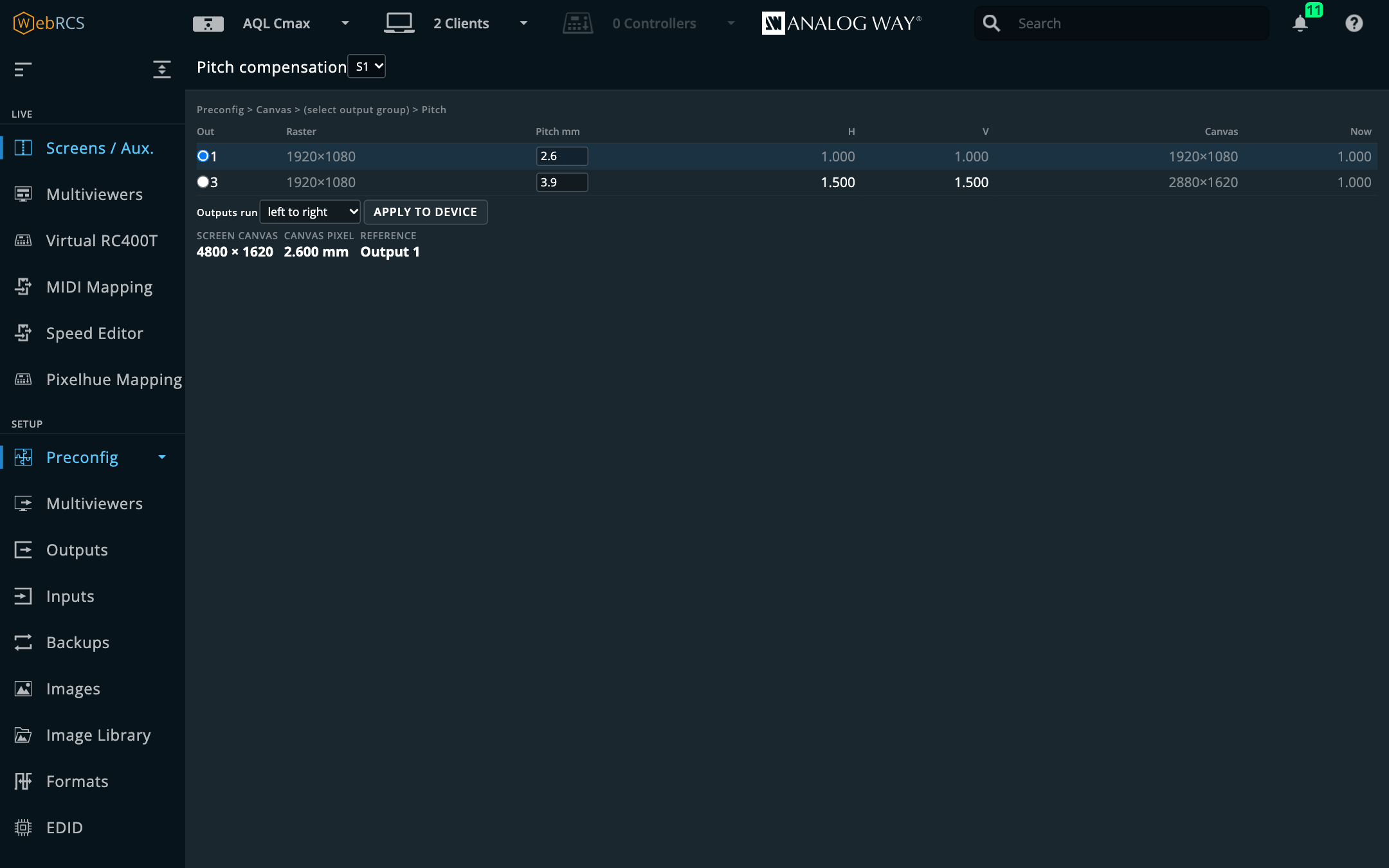
Preconfig ▸ Pitch Compensation, beside the fields it fills in. A screen spanning LED walls of different pixel pitches needs each output told how much canvas its raster is worth, or a layer changes physical size the instant it crosses the join. The switcher has the fields for it (Preconfig ▸ Canvas ▸ Pitch, H Ratio and V Ratio) and no help working out what to put in them.
It knows every number but one. The panel reads the rasters, the outputs on the screen and the
ratios already set, and only asks you for the pitches, one per output: 2.6, or 2.6 x 3.0 if the
pixels really aren’t square.
- A coarser wall takes a ratio above 1.000, because the ratio multiplies a raster to give its footprint on the canvas.
- A ratio the switcher wouldn’t accept is refused here rather than sent: the device discards an out-of-range write instead of clamping it.
- Applying takes two presses. It’s a preconfig change that moves every output on the screen at once, so it ought to be hard to hit by accident. If the switcher already holds the computed ratios, the button says so and does nothing.
OSC input
It’s off until you turn it on in Preconfig ▸ LivePremier Plus → OSC input. Then this app listens on a UDP port, and QLab, TouchOSC, a lighting desk or Companion can drive the switcher with no browser open.
/lp/screen/1/take
/lp/screen/1/memory/5/recall/preview
/lp/master/memory/12/store
/lp/screen/1/preset/a/layer/2/opacity/opacity/norm 0.5
Every address, its argument and its range are in docs/OSC.md, which is generated from the same tables that resolve the messages, so it can’t list an address that doesn’t work.
- The address is the target; the argument is only the value. A button with a fixed address and no argument still means something specific.
- A trigger fires on a non-zero argument and on none at all. Surfaces send 1 on press and 0 on release, and firing on both would take the screen twice.
- A recall never defaults to program.
…/recallgoes to preview. /normtakes 0–1 and scales; without it the value is in the switcher’s own units, so opacity is 0–256, not 0–100.- Live layer parameters must name a buffer:
/a,/bor/c. Over UDP there’s no way to know which letter is preview at this instant, sopreviewandprogramare refused with that reason rather than guessed. The Console can resolve them.
It binds to this machine only unless you choose otherwise, and the other option tells you in as many words that the network will be able to fire takes.

MIDI Mapping
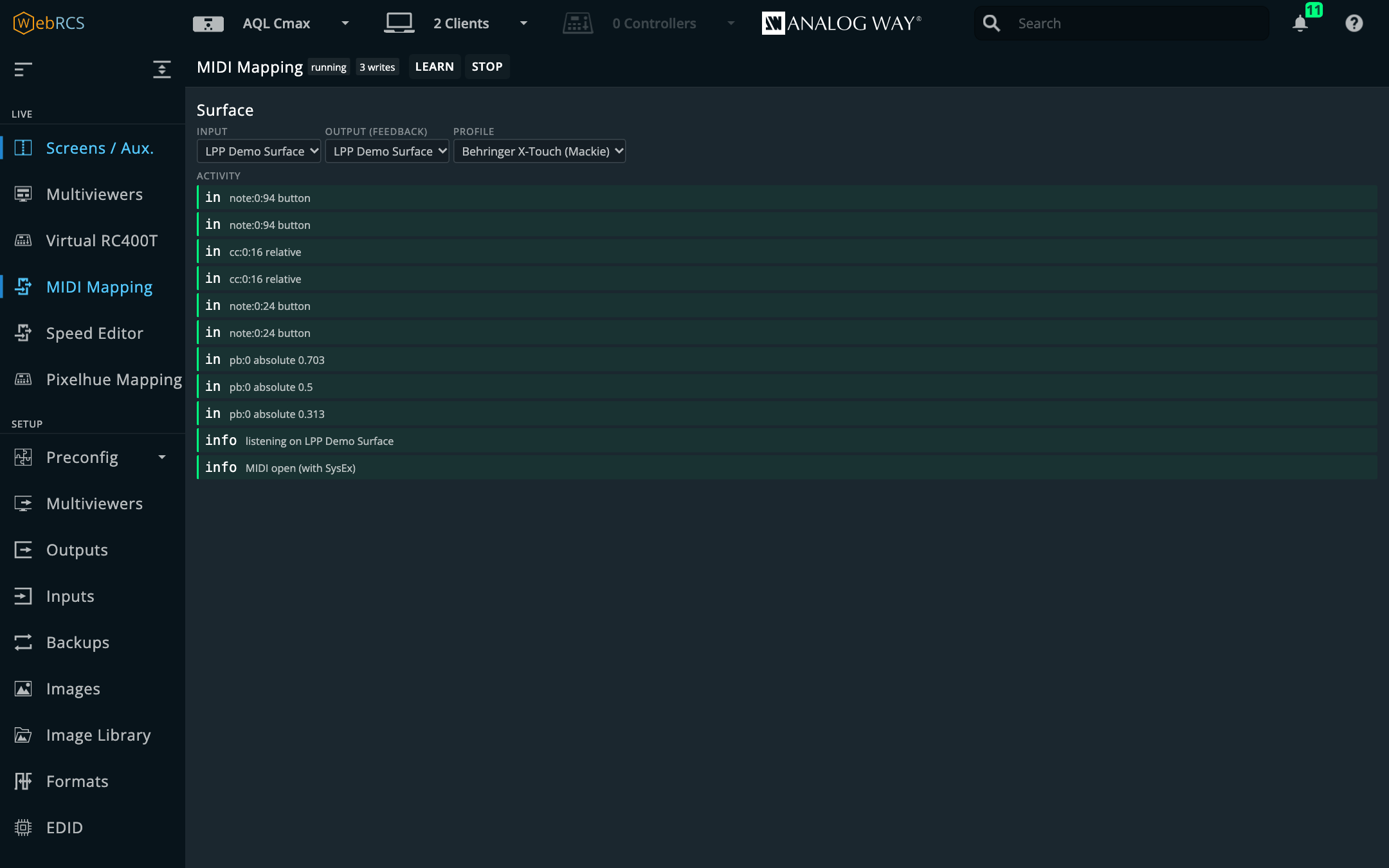
It’s under Virtual RC400T. Pick an input, an output for feedback and a controller profile, then press Start. Faders, encoders and buttons then drive the selected layer.
The engine is awj-surface’s, vendored whole along with its stock profiles (X-Touch/Mackie, APC40, MIDIcon 2 and Pro, plus a generic learn profile).
Soft pickup is the bit worth knowing about. A non-motorised fader won’t move a live value until it’s swept through that value, so grabbing a fader mid-show can’t make a layer’s opacity jump. The panel shows the hold-off rather than looking broken, so if a fader seems dead, that’s what you’re seeing.
Speed Editor (preview)
It’s under Virtual RC400T, next to MIDI Mapping: a DaVinci Resolve Speed Editor as a switcher panel.
- Plug the panel into the machine LivePremier Plus runs on, by USB, or pair it over Bluetooth. That isn’t necessarily the machine your browser is on: the app holds the panel, not the page.
- Quit DaVinci Resolve. Both would hear every key and fight over the lamps.
- Open Speed Editor. It says found once it sees the panel.
- Press Start. The app opens the panel, answers its handshake, and the JOG lamp lights.
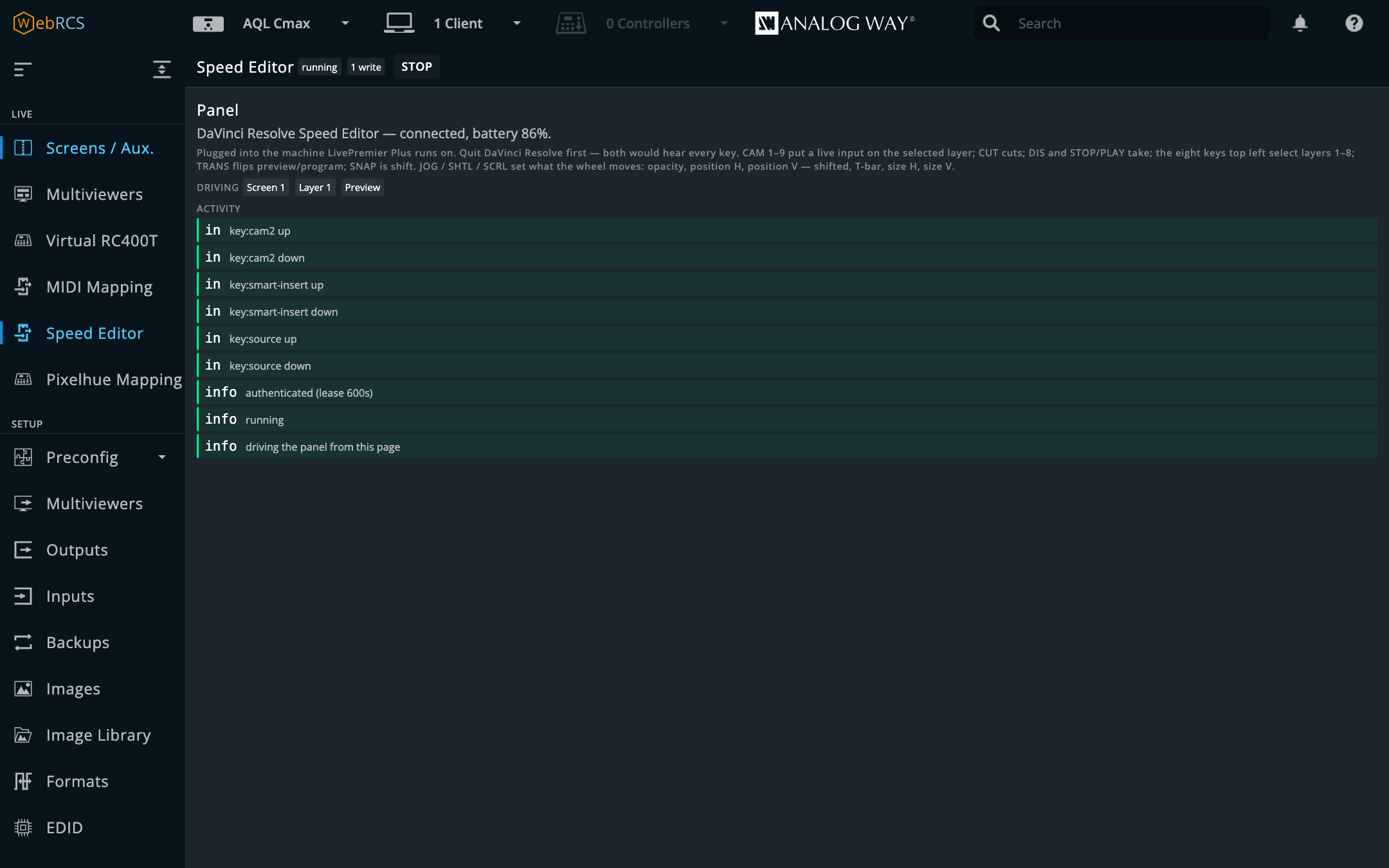
(The panel in that picture is the tests’ stand-in, which plays the real handshake.)
Only one page drives the panel at a time. Another page with it started says Another page is driving it, with Take over to move it there. Press Stop, or close the page, and the app lets the panel go within a few seconds.
The panel is held by the app’s device host, a helper program that the app starts, and restarts
if it ever stops. Its state, and whether it has found the panel, is on Preconfig ▸ LivePremier
Plus, in the Device host card, with a Restart button. The desktop app carries it. If
you’re running from a checkout, install it once with npm run setup:devices. The Docker image has
no USB and no device host, and the Speed Editor page says so.
The keys act on the selected screen, preset and layer:
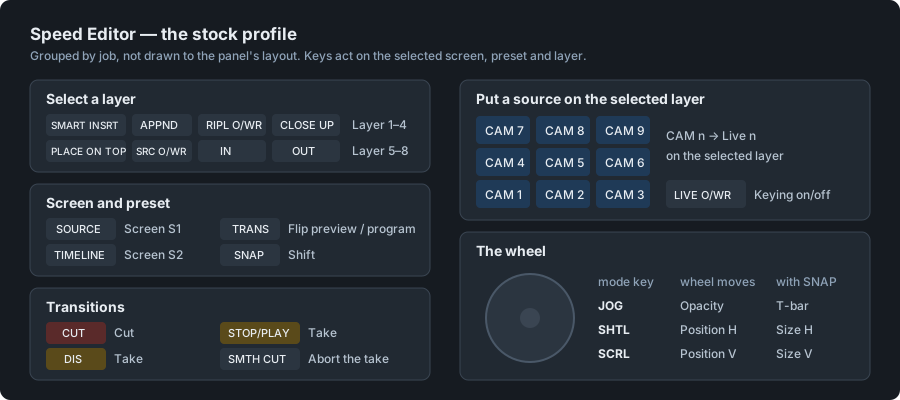
The wheel has the same soft pickup as a MIDI fader, and the panel’s activity list shows each write it made. The panel only talks after a handshake with the app, which is renewed before it lapses; if a renewal fails the panel goes quiet and the page says so, then tries again. Unplug it and plug it back in and it’s found and answered again by itself.
⚠️ Preview. Proven on a real panel over USB on macOS against the simulator: CUT, the CAM keys, the wheel, the battery level, and unplugging it and plugging it back in. The key lamps, Bluetooth and Windows or Linux haven’t been tried yet. Treat the first show with one as a rehearsal.
Pixelhue panel (preview)
A Pixelhue U5, U5 Pro or U5 mini event controller, driving the switcher. It’s off until you tick Drive a Pixelhue console in Preconfig ▸ LivePremier Plus → Pixelhue panel.
The buses aren’t mapped. The console is handed a model of this switcher (its screens, inputs and memories) and labels, lights and pages its own keys from that. What comes back is what the operator meant: select screen S2, put input 2 on the selected layer, take. So there’s nothing to remap when a firmware moves a key.
Everything else is mapped on Pixelhue Mapping, in the sidebar under Virtual RC400T, next to MIDI Mapping — or at the foot of the PLUS section on a Midra 4K or Alta 4K, which has no Virtual RC400T. It draws the console in the Virtual RC400T’s look, with the buses showing what the console shows and every function key, fader and encoder labelled with what it does. Click one to change it. Any key can take, cut, fade to black, step the layer, run the cue stack, recall a memory to preview or press a Companion button, among others; a fader can follow its own layer or the selected one; an encoder can move, size or fade the selected layer. Press a key on the console and it lights up on the page and opens, so you can find it. A changed control has a blue dot, and Reset puts everything back.
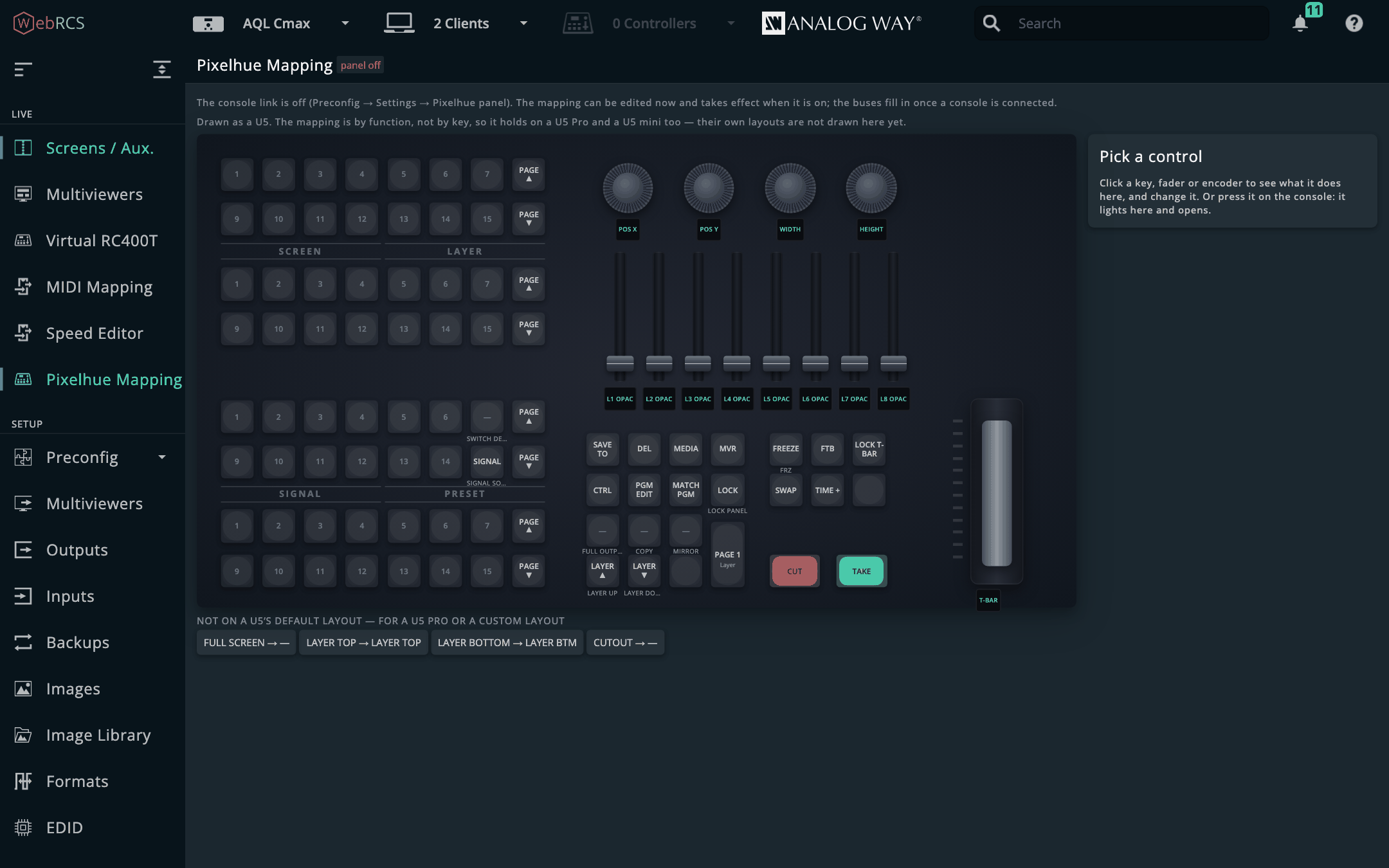
- A U5 mini answers on the network, so it’s driven from wherever this app already runs. It has less on it than a U5: no faders or encoders, and no TIME, MVR, SIGNAL SOURCE or lower-left cluster, so take time, layer stepping and the cue keys have no key on it. Pixelhue Mapping draws every model as a U5 for now.
- A U5 or U5 Pro only serves its control port to itself, so this app has to run on the console. Luckily that’s a Windows mini-PC with a touch screen, and it runs the proxied Web RCS perfectly well.
⚠️ This hasn’t been run against a real console yet. It was built from the consoles’ firmware and proved against the vendor’s own control service running with no panel attached. Treat the first show with one as a rehearsal. Fade-to-black and freeze are sent on LivePremier, not yet on a Midra 4K. SOURCE BACKUP is LivePremier’s only: a Midra 4K or Alta 4K input has no backup, so the key says so instead. docs/PIXELHUE.md lists what each key does, and has a test suite to run the day a console turns up (“Testing it on a console”).
Thumbnail relay (preview)
It’s off until you switch it on in Preconfig ▸ LivePremier Plus → Plugins.
The switcher’s source thumbnails are PNGs with next to no compression (about 150 KB each on an Aquilon C, 590 KB on a Pulse 4K), and the Web RCS asks for every input’s once a second or so, whether anybody’s looking at it or not. With the relay on, this app answers those requests itself: one fetch from the switcher, re-encoded as a JPEG of 10–40 KB, handed to every page that asks. The vendor’s own source cards show it unchanged.
The sources you’re editing are refreshed faster, and the rest are held. A thumbnail drawn in a screen or aux card on Screens / Aux. (or on the Edit page), and actually on screen, is hot: the page refreshes it itself, twice a second by default. While any are hot, every other source is answered from the frame the relay already has until it’s four seconds old. With nothing being edited, every source is treated the same.
Its card in Preconfig ▸ LivePremier Plus has the five settings and what the relay is doing:
| Setting | |
|---|---|
| JPEG quality | 30–95; 70 is hard to tell from the original on a card |
| Max width | 0 keeps the switcher’s size |
| Share for | how old a frame may be and still go to a second page |
| Hot refresh | how often the edited sources refresh, 0.5–10 a second; 0 leaves them to the vendor |
| Idle hold | how old any other source may get while somebody edits; 0 turns holding off |
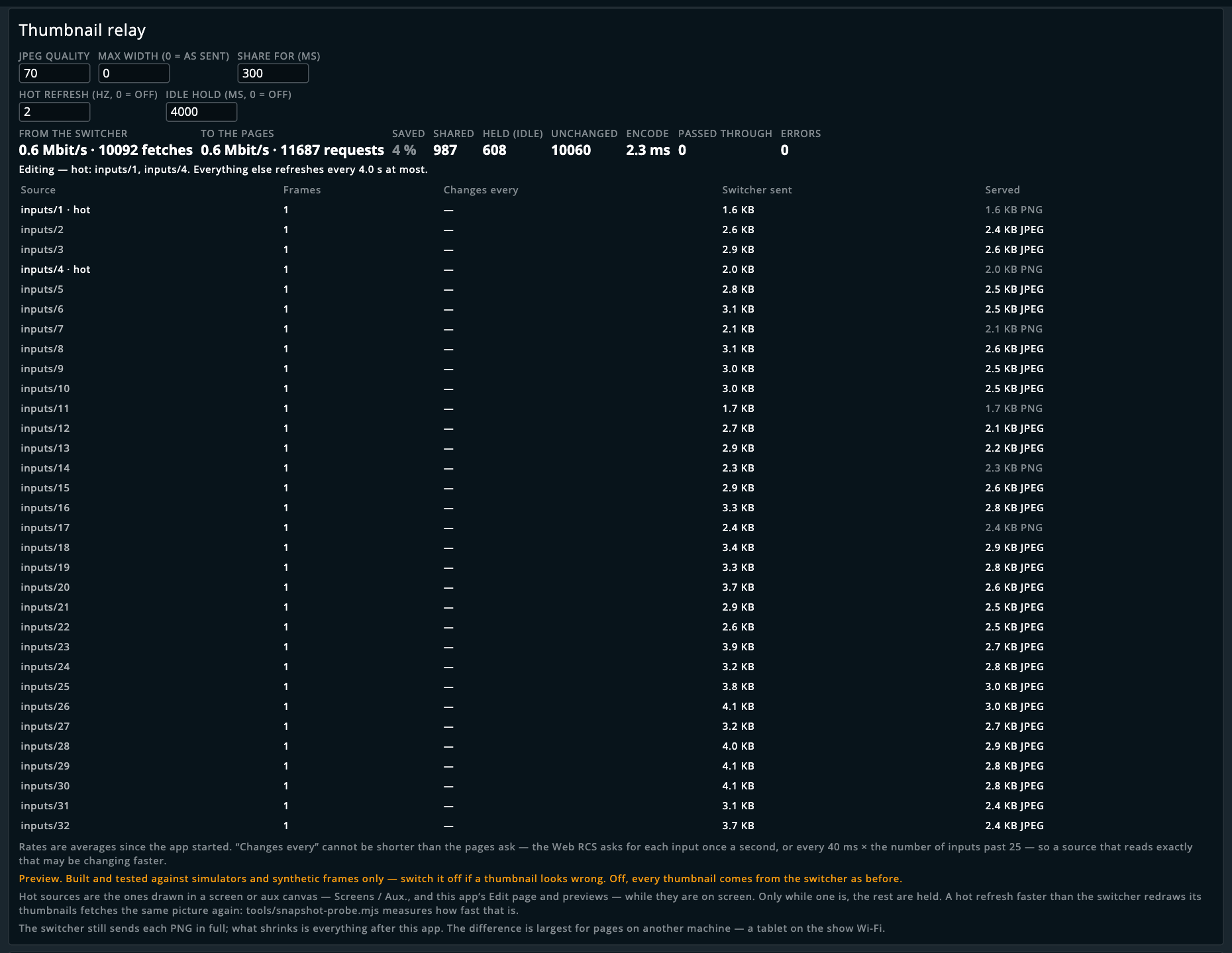
That’s the simulator, whose thumbnails are a few KB of flat colour, so there’s hardly anything to save. A real frame’s are tens of times the size.
⚠️ Proven on the simulator only. A hot refresh faster than the switcher redraws its thumbnails just fetches the same picture again.
node tools/snapshot-probe.mjs --device <address>, run from a checkout of the repo, measures how fast that is, so run it against a moving source before raising Hot refresh. The switcher still sends each thumbnail it’s asked for in full; the saving is largest for a page on another machine.
Multiviewer thumbnails (preview)
It’s off until you switch it on in Preconfig ▸ LivePremier Plus → Plugins.
The switcher already shows every source live on its multiviewer. Bring that multiviewer into the browser and this plugin cuts each source out of it and puts it into the thumbnails (the Sources panel, the screen and aux cards, this app’s own pages) many times a second, instead of the once-a-second pictures the switcher sends. It knows where each source sits from the switcher itself, so there’s nothing to line up.
Choose the picture on each browser, on the plugin’s card in Preconfig ▸ LivePremier Plus:
| This browser’s picture | |
|---|---|
| Off | the switcher’s own thumbnails, as always |
| Capture device | a capture card on this computer, plugged into the multiviewer output. Open the app at localhost on that computer. |
| Stream (WHEP) | the multiviewer as a stream from MediaMTX — from an encoder, or from a Midra 4K / Alta 4K’s own streamer. Works on any computer or tablet. |
| Test pattern | a made-up multiviewer, for trying it on a simulator |
Then check the picture on the card: every green box should sit exactly on a source’s picture, clear of its label. If they don’t, change Picture in a widget, Sits or Trim until they do.
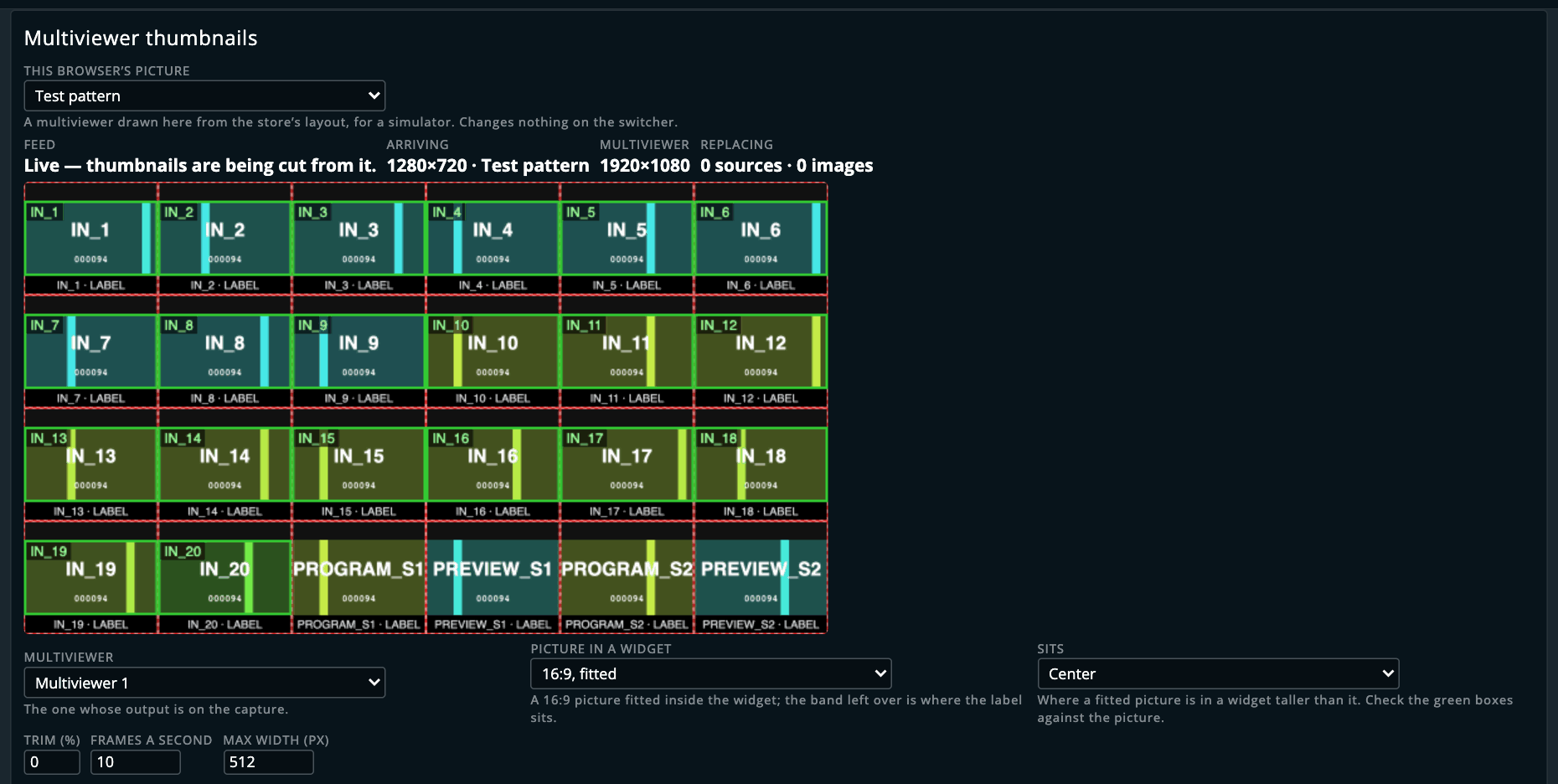
Replacing counts the thumbnails on the page you’re looking at, so it reads nought on the settings page, which has none.
| Setting | |
|---|---|
| Multiviewer | which of a LivePremier’s multiviewers is on the capture |
| Picture in a widget | 16:9 or 4:3 fitted inside each widget, or the whole widget |
| Sits | where a fitted picture is — centre, top or bottom |
| Trim | taken off every edge, for a tally border drawn over the picture |
| Frames a second | how often the thumbnails are redrawn, 1–25 |
| Max width | how large a thumbnail is drawn |
Midra 4K and Alta 4K: using the switcher’s streamer. Run MediaMTX on a computer on the show
network, put its address in RTMP address (rtmp://<computer>:1935/lpp-mv), and press Stream
the multiviewer here. It asks first, writes one of the streamer’s ten destinations (10 unless you
change it), sets the multiviewer as the picture and starts it. It won’t touch a streamer that’s
already streaming something else, since it’s the unit’s only one. Set the browsers to Stream
(WHEP). The pictures run about a second behind the switcher.
If the capture stops, or a source leaves the multiviewer, its thumbnails go back to the switcher’s own within three seconds. Set a browser to Off at any time to have them all back.
⚠️ Proven on the simulator only, with the test pattern. It hasn’t seen a real multiviewer output yet, and the simulators never start a stream, so starting the streamer is untested.
Background Slicer (preview)
It’s off until you switch it on in Preconfig ▸ LivePremier Plus → Plugins. Then open PLUS ▸ Background Slicer; Pop out gives it a window of its own.
A background set gives each output of a screen its own still or input, and shows it 1:1 in the output, with no scaling. So a picture that spans a wall has to be cut into exactly the piece each output shows, at exactly that output’s resolution. This does the cutting and fills the set, which is a lot less fiddly than doing it by hand.
Stills: a picture as the background
- Picture: choose a file, or drop one on the box. Its size is shown. A screen’s UMD from the UMD Generator arrives here the same way, with its screens already picked and a note saying so.
- Screens: click the screens it goes on. With two or more, choose On each screen (the picture placed on each separately) or Span selected screens (the screens side by side, in order, under one picture; type where each sits in the strip if they aren’t edge to edge).
- Placement: the screen’s canvas with its outputs drawn on it, and the picture over them. Drag
the picture, or type X / Y / W / H in canvas pixels (sums work, and so do variables such as
$S1.width/2or@gap), or press Fit, Fill, Stretch, 1:1 or Centre. An output outlined in orange dashes is one whose cut depends on something not yet seen on a real frame (rotated, grouped, sliced or pitched); hover over it to see which. - Plan: nothing has been written yet. For each screen, the background set it goes into (the first empty one; pick another if you like, and one with content says so). For each output: its resolution, the library slot and still it’ll use (free ones only; nothing is ever overwritten unless you pick a set that has content), the still’s capacity and whether it has to change, the content, what it replaces, and whether the cut is a pixel copy or resampled (anything scaled: Fit, Stretch, an LED pitch ratio). A red line is something that stops it; fix that first.
- Generate: cuts one PNG per output. The thumbnails show them, and Download images saves them as a zip. Background is the colour where the picture doesn’t reach.
- Write: give the sets and stills a name (16 characters). Put them into a background set is on; switch it off to leave the images in the library and the stills and touch no set. Tick Load each set into its screen’s preview if you want it ready to take. Write to the switcher… says what it’ll do and asks. Each step then shows as it lands. If one fails it stops there, and Undo what was written takes everything it wrote back off.
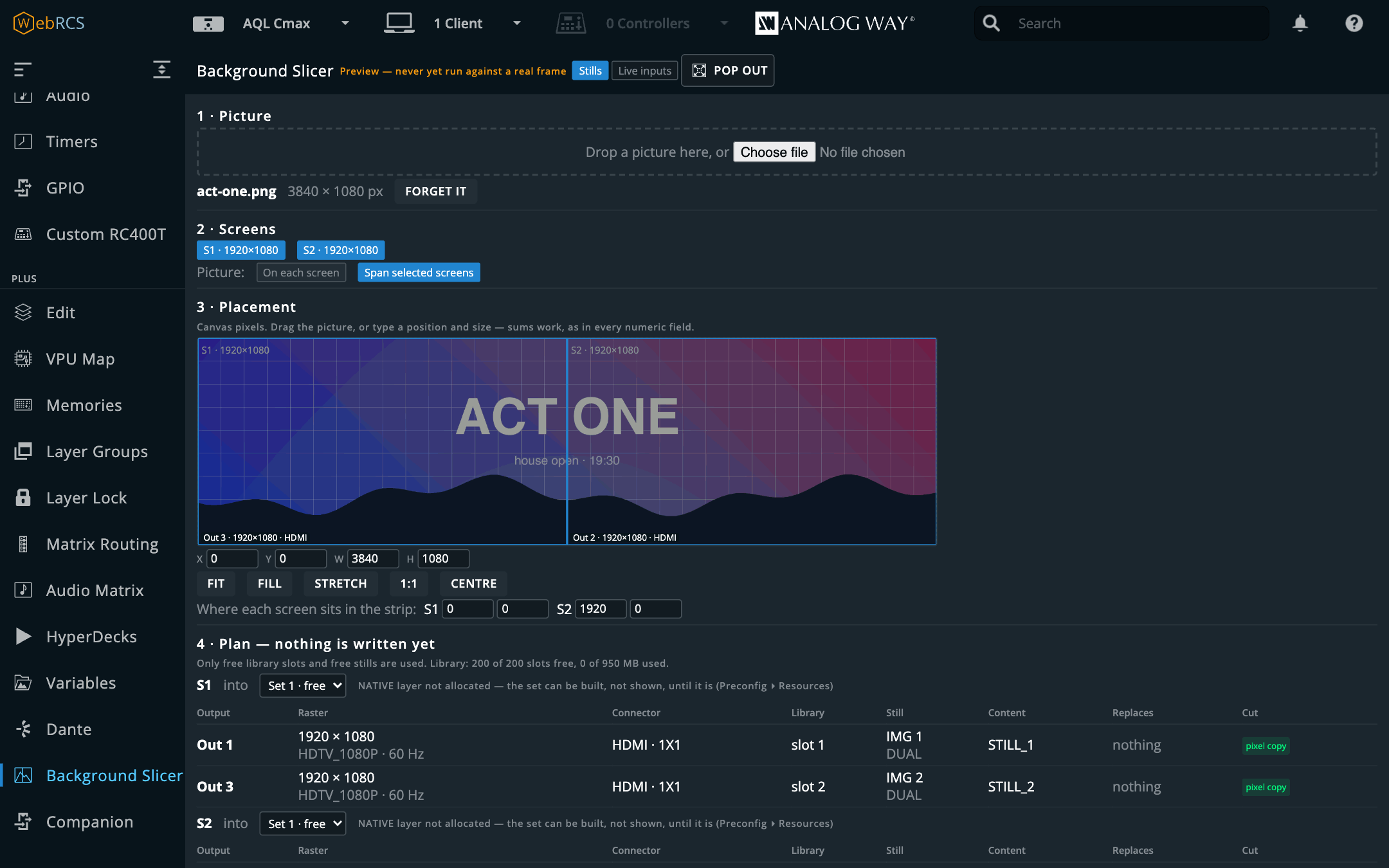
Good to know:
- A set that’s on program is refused unless you tick that it may be written live, because a set’s content changes on air the moment it’s written.
- Raising a still’s capacity (for a 4K output, say) is a preconfig change. It’s only applied when the switcher’s own check says no still in use would be lost, and not at all while someone has other changes waiting in Preconfig ▸ Images.
- A screen shows a background set through its NATIVE layer. If the screen has none allocated (Preconfig ▸ Resources), the set is built but can’t be loaded, and the panel says so.
Live inputs: a media server as the background
Switch to Live inputs. The steps are the same, without Generate: each output gets an input instead of a still (free ones are suggested, an input already receiving the output’s format first, marked ✓; one input per output), and the set takes that input. Load each input plug with the switcher’s EDID (on by default) makes each input ask its source for exactly the output’s resolution and rate, because a live background has to match its output’s format. No picture is needed: type the content size your media server works in.
Then the media server has to play, into each input, exactly the piece of its content that the output shows. Media server downloads that map:
| Resolume Arena | an Advanced Output preset. Copy it into Documents/Resolume Arena/Presets/Advanced Output/, choose it in Output ▸ Advanced Output, then bind each screen to its real output. |
| disguise | a Feed Mapping table: put it in <project>/objects/Table/, then Feed Mapping ▸ Import from table. |
| Pixera, Hippotizer, Millumin, TouchDesigner | files they load, with the step each leaves by hand — the list under What each media server can import says which. |
| QLab, Mitti, MadMapper, Watchout | no file they can import; the pack’s templates and the recipe beside each. |
Everything (.zip) has all of it, plus pixel-map.csv / .json (every region, in pixels) and
templates (the whole content and each output, every region outlined and labelled with its size) to
load into any server as a guide.
On a Midra 4K or Alta 4K
The same steps, with the platform’s own model:
- A screen takes one picture: its canvas, cut at the canvas’s own pixels. Generate makes one PNG per screen, not per output.
- It goes into the image library (the switcher picks the slot, always its first empty one) and into one of the screen’s four Background Images (BKG1–BKG4; the first free one, or pick another), shown 1:1. The write waits for the switcher to report the image at exactly the canvas size.
- The set is Auto Crop with that Background Image: the switcher crops the picture for each output. Under the plan, How the switcher crops it shows each output’s rectangle of the canvas and whether it’s 1:1 or scaled by the switcher (a pitch other than 1.000).
- If a Background or Foreground Image anywhere already points at the slot an upload would take, the plan stops with a red line saying which, because the picture would appear there too. Clear that image in Images, then plan again.
- The screen’s background layer in Preconfig decides what it may show: stills or live inputs or stills for a picture, live inputs or live inputs or stills for the live mode.
- Live inputs fills a Custom set: each output its own input, aligned top left. The EDID option is only offered where the input plug lists preferred formats.
⚠️ Proven on the simulator only. A simulator’s outputs are a still picture, so you can’t see a background written there. Check the first one on a real output, especially a rotated one, and if the picture comes out turned twice, let me know.
Arithmetic in numeric fields
Type an expression into one of Web RCS’s own numeric fields and it’s worked out when you commit, on Enter or when you leave the field:
| typed | becomes |
|---|---|
1080-80 |
1000 |
(1920-40)/2 |
940 |
1920*2 |
3840 |
+ - * / ( ) and decimals, with the usual precedence. The result is clamped to the field’s own
declared range and rounded to its step, so a width of 9000+1000 lands on 8192 rather than being
refused.
Nothing else about the field changes: the vendor still validates it, still decides what to send, and still drags the other axis along if the aspect lock is on.
Where it applies is narrow on purpose. Only fields the vendor itself marks as numeric, by
putting min, max and step on them. That leaves out everything that mustn’t be touched: labels
have no step, and neither does the transition-time field, whose 00:01.000 would be mangled by
anything treating : as arithmetic.
On firmware 6.1.x it works too. There the geometry fields are number inputs, which throw away anything they can’t parse, so while you type in one that has a range it becomes a text field, and it goes back when you leave. Arrow keys and the wheel still step it. If what you typed doesn’t work out, Enter does nothing and the field flashes amber with the reason; leaving the field puts the switcher’s value back. The canvas zoom box has no range and is left alone. It’s been tried on Analog Way’s 6.1.60 simulator, which serves exactly the web page an Aquilon on 6.1.60 does, but not yet on a 6.1.x box itself: if the arrow keys stop stepping a field there, switch Field arithmetic off.
There’s no eval anywhere in this path, and anything the parser doesn’t fully understand is
refused rather than guessed at.
With Variables on (next section), a field takes them too: $S1.width/2, @gap*3. One that
can’t be read right now isn’t applied: the field flashes amber and its tooltip says why.
Variables
PLUS ▸ Variables. Names for numbers, usable wherever a number goes: in the Console, in the vendor’s numeric fields, in an OSC argument. There are two kinds:
$, the switcher’s.$S1.width,$S1.PGM.L2.x,$IN3.rate,$OUT1.cw,$device.modeland a few hundred more, read live. They’re generated from what the switcher has (the screens in service, each one’s allocated layers, the fitted inputs and outputs), so a bigger rig lists more. Search the table, and click a name to copy it.@, yours. Press Add, name it, and give it a definition:@gap=40,@half=$S1.width / 2. The Value column shows what it comes to now, and says why when it comes to nothing. It’s kept for this switcher, and in the setup file.
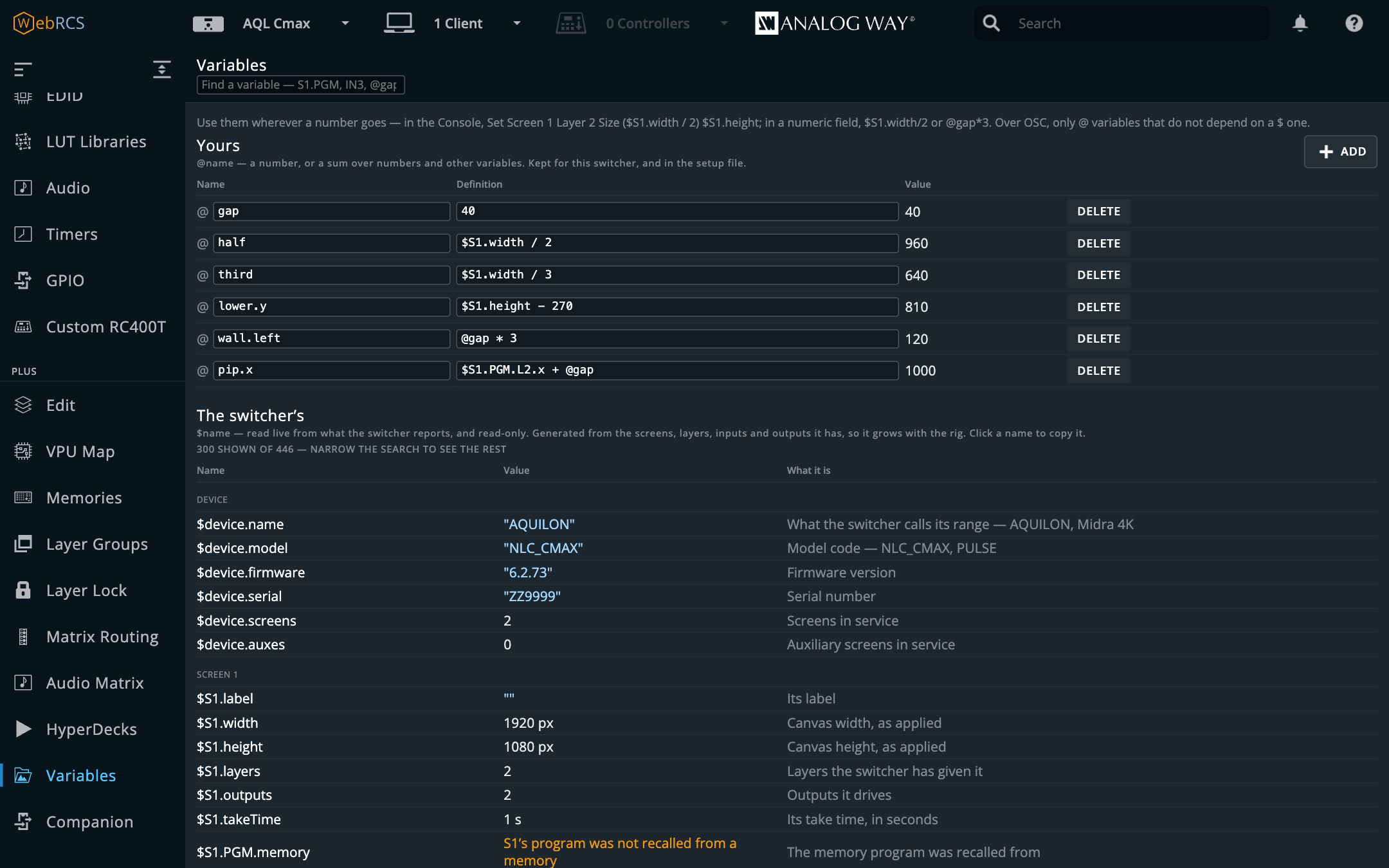
Set Screen 1 Layer 2 Size ($S1.width / 2) $S1.height       at the Console
Set Screen 1 Layer 2 Position (@gap * 3) 540
$S1.width/2                                                 in a width field
Arithmetic goes in brackets at the Console. Take Screen 4 - 1 is still screens 4 without 1;
Take Screen (4 - 1) is screen 3. In a field there’s no list, so $S1.width/2 doesn’t need any.
Four things it refuses rather than guesses, each with a sentence saying so:
- a layer by role while its screen is mid-take:
$S1.PGM.L2.xnames whichever buffer is program, and during a transition that’s changing hands; - a layer that isn’t allocated: the preset holds geometry for every slot, but only allocated layers are real;
- anything the switcher hasn’t reported (a canvas, a memory), rather than a default;
- a cycle:
@anaming@bnaming@a, spelled out above your table.
Over OSC, only @ variables that don’t depend on a $ one work, because the OSC listener
holds no copy of the switcher’s state. It’s the same reason it refuses preview and program.
The plugin only reads. It never writes to the switcher, and a field or a Console line still goes out when you commit it. The full namespace is in VARIABLES.md.
The demo environment
npm run demobrings the whole thing up against a LivePremier Simulator, with a real Aquilon C’s resource map
folded in and an example cue stack loaded, so every panel has something to show without a switcher
in the room. Start the simulator first: the demo looks for it on 127.0.0.1:3000,
127.0.0.1:3001 and localhost:3000, and stops if there’s no Web RCS there. Point it somewhere
else with LPP_DEMO_DEVICE=127.0.0.1:3002. It serves on 8535, the app’s own port, so quit the app
first or move the demo with LPP_DEMO_PORT=8545.
A simulator may have no VPU at all (the one this app’s tests were cut from hasn’t), and against one like that the panel correctly reports there’s nothing to draw. The demo replaces whatever it has with the recorded capture: 32 of 64 mixers fitted, 26 allocated, one screen in Optimized mode, and a staged preconfig that differs in 26 mixers. Everything outside that stays the simulator’s own live state, so cues fired from the timeline really do go out on the wire.
It refuses to run against anything that isn’t loopback. The demo splices a store subtree and seeds a cue stack, and “I thought it was the simulator” is not a sentence anyone wants to say at a production meeting.
The demo’s cue stack lives in a temporary directory and is deleted on exit; your own is never touched.
Switching features off
Preconfig ▸ LivePremier Plus → Plugins lists every feature this app adds, each with a switch. Everything is on until you switch it off, except seven that start off: Preview lock, Surfaces, and the UMD Generator, Dante, Thumbnail relay, Multiviewer thumbnails and Background Slicer previews.
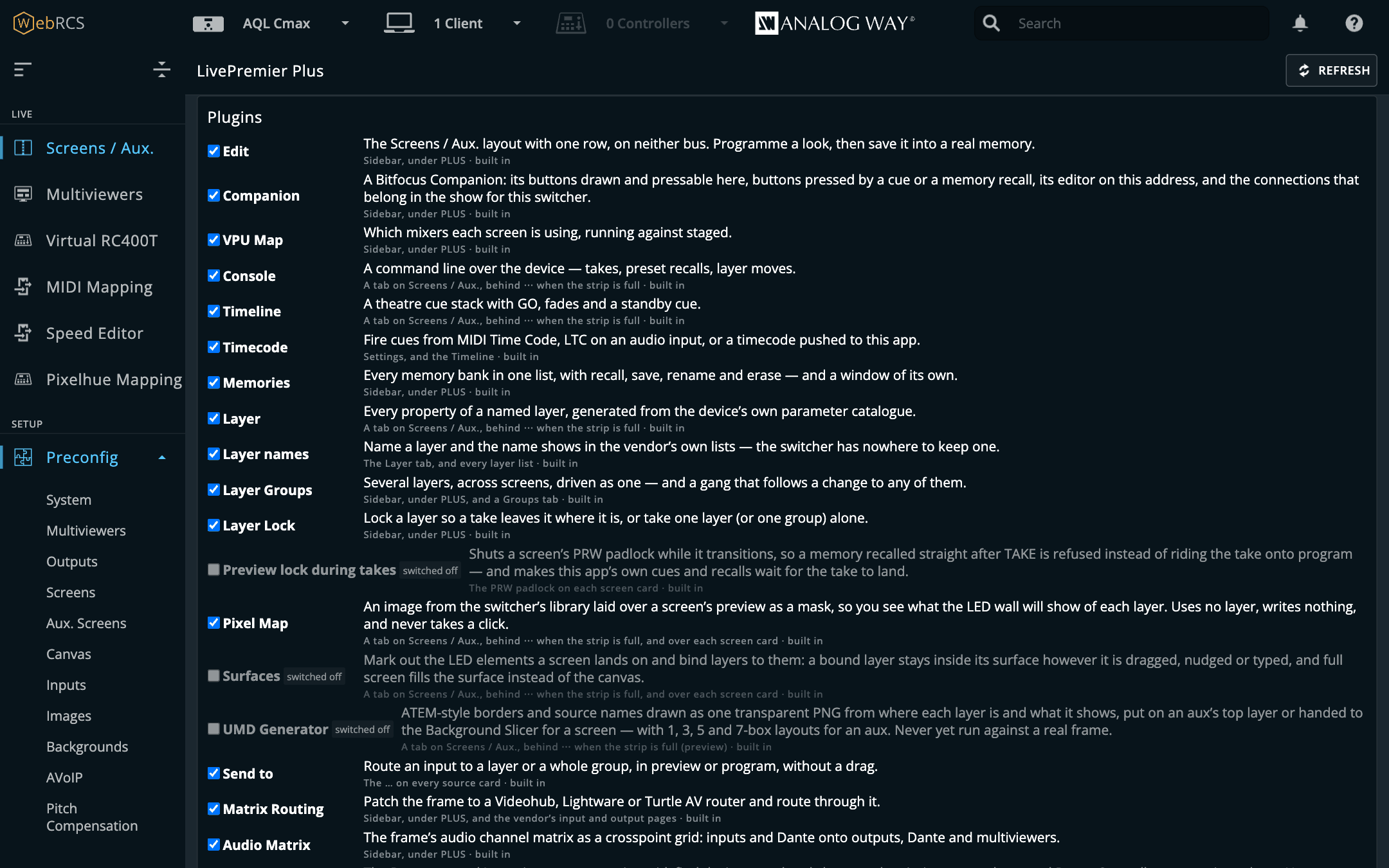
- A switched-off feature is gone, not hidden: no sidebar entry or tab, nothing added to the vendor’s page, and no background service (an OSC listener closes, router and Companion connections hang up).
- Reload the page after a change. The server side applies straight away; the page picks it up on the next load, and the card reminds you.
- Some features need others. Send to needs Layer Groups, and Timecode needs the Timeline: switch Groups off and Send to goes with it, marked needs Layer Groups, and comes back when Groups does.
- A feature’s own switch is separate. Switching OSC input on as a plugin brings its settings back; the listener itself still starts off until you tick Listen for OSC.
Adding a plugin of your own
A plugin somebody else wrote, or one you wrote yourself, is a folder you put in the plugins
folder of the app’s data directory: ~/.livepremier-plus/plugins/ for the desktop app and
npm start, /config/plugins/ in Docker, or plugins/ in whatever --data names.
- Copy the plugin’s folder in, and restart the app.
- In Preconfig ▸ LivePremier Plus → Plugins it’s listed under Added by you, switched off.
- Tick it. You’re asked to confirm, because a plugin runs inside this app with full control of it and of the switcher. Only switch on plugins you trust. Then reload the page.
Nothing in a plugin’s folder runs until you switch it on. A folder that isn’t a working plugin is
listed with the reason instead. The app’s source has an example to start from in
examples/plugins/hello-switcher, and docs/PLUGINS.md is the guide to writing one.
Saving and restoring your setup
A .awc from the switcher restores the processor: inputs, outputs, screens, memories. It holds
nothing about this app: your cue stack, your layer groups, the names you gave layers, the pixel
maps, surfaces and UMDs, the patch to the external routers. Restore a .awc on its own onto a fresh frame and the show comes back with
no cue list, which is not the surprise anyone wants at load-in.
So this app can write all of that into one file:
curl -o livepremier-plus.json 'http://127.0.0.1:8535/__lpp/config?download=1'It’s plain JSON, so it’s readable, diffable and fine in a git repo. It carries which switcher it was written against, and three separate groups:
- installation: the app settings (which plugins are on, and each one’s own settings: the console language, the OSC port and bind, Remote access, the Companion link, the Pixelhue console, the Dante interface and the rest), your external routers, your HyperDecks and your Dante snapshots. Not tied to a switcher.
- show: the cue stack, layer groups, layer names, layer locks, your variables, Companion memory
triggers, pixel maps, surfaces and UMDs. Tied to the switcher they were built on, because they
name screens and layer slots like
S1/2. - rig: the patch between the frame and the routers.
To restore, POST it back:
curl -X POST -H 'content-type: application/json' \
     --data-binary @livepremier-plus.json \
     http://127.0.0.1:8535/__lpp/config
By default that restores everything in the file except the app settings, because a restore
shouldn’t change the OSC port a lighting desk is sending to without telling you. Ask for them
explicitly if you want them. A sections list replaces the default rather than adding to it, so
name everything you want back:
{ "doc": { … }, "sections": ["stack", "groups", "names", "locks", "variables",
  "companion-triggers", "pixel-maps", "surfaces", "umd", "patch", "matrices",
  "hyperdecks", "danteSnapshots", "settings"] }
Reload any open page afterwards. The restore reaches the running app at once (the routers are
dialled, and the patch and any settings you asked for are the ones in force), but a Web RCS page
that was already open still holds the cue stack, groups, names, locks, pixel maps, surfaces and
UMDs it loaded, and its next save would put those back. The answer to the restore says "reloadPages": true when that applies.
A feature that’s switched off is left out of both: its section isn’t written, and a file that has one reports it as skipped rather than restoring it. A plugin of your own can add a section of its own; see PLUGINS.md.
Onto a different frame. The device-keyed parts land under whichever switcher this app is
currently pointed at, so failing over to a backup frame at another address is just this: point the
app at the backup, then POST the file. Add "device": "192.168.2.141" to send it somewhere else
again. To see what a file would do before doing it, POST it to /__lpp/config/inspect.
Both halves in one file. Showbook keeps this
file beside the .awc for the same show and exports the pair as one .showbook bundle. Or, if you
want a single file you can restore straight from the switcher’s own Web RCS, it can put this
configuration inside the .awc. The switcher accepts it and ignores it, and this app reads it
back out. The switcher doesn’t keep it, though: a .awc you export from Web RCS afterwards won’t
contain it.
If something is wrong
| Symptom | Cause |
|---|---|
| No panels in Web RCS | You opened the switcher’s address directly. Go through the proxy. |
| MIDI does nothing | Same cause — Web MIDI needs a secure context, which loopback is and a LAN address is not. |
| A fader does not move anything | Soft pickup. Sweep it through the current value. |
| The Speed Editor does nothing | DaVinci Resolve is still running, or the panel is plugged into a different machine from the one the app runs on, or another page is driving it (Take over), or the device host is not running (see the Device host card in Preconfig ▸ LivePremier Plus), or this is the Docker image, which has no USB. |
| A console command means the wrong thing | The grammar is mynah’s; the fix is there. |
| Arithmetic does not work in a field | It is not one the vendor marks numeric with a range — the canvas zoom box, for one, has none. |
| The VPU panel says there is nothing to draw | This simulator has no VPU (not every one does), or it’s LivePremier firmware 6.1.60, which does not report its VPU allocation. The panel says which, and on 6.1.60 shows each screen’s layers and the room left instead. Either way it is correct, not a failure. |
| The demo refuses to start | It only runs against loopback, on purpose. Or it found no simulator (start one, or set LPP_DEMO_DEVICE), or port 8535 is the app’s and the app is running (quit it, or set LPP_DEMO_PORT). |
| The Console, Timeline or Layer tab has gone | On LivePremier they sit behind the ⋯ at the end of the Screens / Aux. tab strip, because the strip has room for one more tab and no more. |
| I switched a plugin on and it isn’t there | Reload the page; the page picks up a change on its next load. If its row says not on this switcher or needs another plugin, that’s the reason, and a not on this switcher row says why underneath. MIDI Mapping and the Speed Editor never appear on a Midra 4K or Alta 4K, which has no Virtual RC400T to hang them under, and their rows say so. Pixelhue Mapping is there, at the foot of the PLUS section rather than under Virtual RC400T. |
| I restored a setup and the old cue stack came back | A page that was open during the restore saved what it had loaded. Reload every open page after a restore, then restore again. |