

Discovering Shure and Sennheiser wireless receivers on the network, watching their battery and RF, monitoring audio, and triggering Dante routes through your own Companion.
Two things before anything else
There is a successor
RFutils merged MicWizard, wsm-wwb-bridge and
pmse-to-wwb into one suite, and MicWizard’s functionality lives there as the Monitor tab.
If you’re choosing a tool rather than maintaining this one, start there.
None of this has been tested against real wireless hardware
The README’s Protocol status table is the authority, and it is honest. Summarised:
| Discovery | Metering | Trust it? | |
|---|---|---|---|
| Dante / AES67 | verified against real Dante gear | verified end-to-end against a synthetic sender | The decode is proven correct against traffic that was hand-crafted. Real senders can still differ — L24, odd frame sizes, jitter, SDP variation. |
| Shure | TCP scan, port 2202 | protocol is documented by Shure | Never tested against a real receiver. |
| Sennheiser | mDNS _ssc._tcp — real |
speculative | The metering paths are best-effort guesses. Expect them to be wrong. |
Don’t rely on this for a live show without validating against your own hardware first. If you
have real gear, data-captures.md explains exactly what capture would help
— it’s simpler than it sounds, no special network gear or bridging needed.
The window
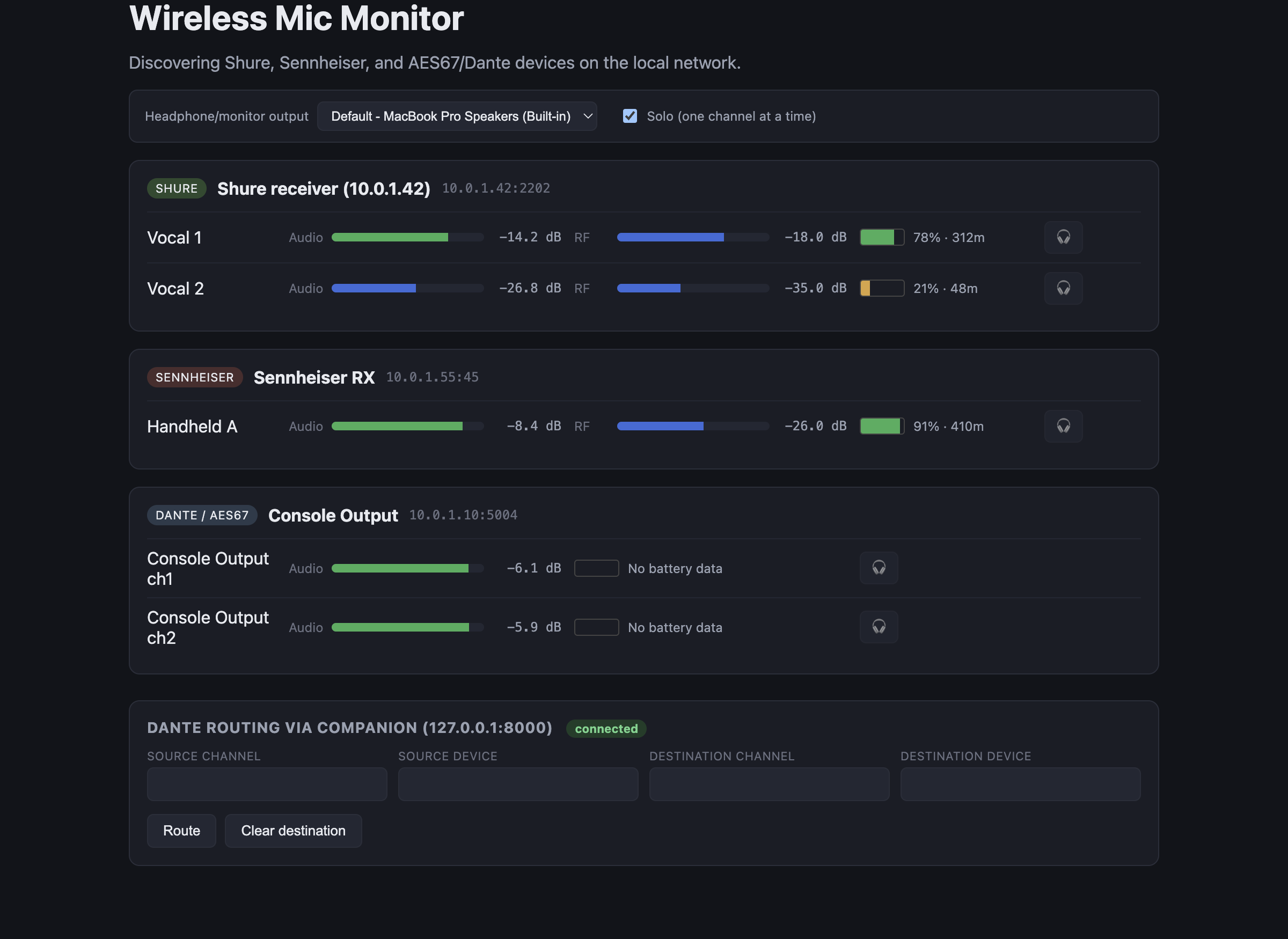
The two features this guide keeps separating are both visible here: the 🎧 button on each channel row, and the Dante routing via Companion panel at the bottom. They sit near each other and have nothing to do with each other.
The output selector and Solo (one channel at a time) at the top govern the headphone button only — see Local monitoring.
Finding receivers
Shure — MicWizard scans the subnet on TCP 2202. A host only appears once a real protocol handshake succeeds, so an unrelated device with that port open won’t show up as a receiver. Because it’s a scan rather than a broadcast, receivers on a different subnet won’t be found.
Sennheiser — discovered over mDNS (_ssc._tcp). This part is real. What follows discovery —
the battery, RF and audio readings — is the speculative part (Two things before anything else).
Dante / AES67 sources — found from SAP announcements, which is how AES67 streams advertise themselves. Nothing appears unless AES67 is actually enabled on the Dante network; a Dante-only flow is invisible to this.
Local monitoring — the headphone button
Every channel has a 🎧 button. This is entirely local. It plays that channel out of whichever output you’ve picked above the device list — built-in speakers, a headphone interface, a Bluetooth speaker.
It has nothing to do with the network audio matrix or the Companion routing feature. Clicking it changes nothing on the Dante network and nobody else hears anything change. It also works for analog-only receivers patched into a USB interface.
If you take one thing from this guide: the 🎧 button and the routing panel are two unrelated features that happen to sit near each other.
Dante routing — it presses your Companion’s buttons
MicWizard does no routing itself, deliberately. It drives your Bitfocus Companion instance, so the routing logic stays in the tool you already trust with it.
How it works: MicWizard sets Companion variables describing the crosspoint it wants, then presses one of two buttons you configure — “make crosspoint” and “clear crosspoint”. Your buttons read those variables and perform the route.
You have to build the Companion side
Copy companion-routes.example.json and set:
companion.host/port— Companion’s HTTP API (default port 8000; it must be enabled).variablePrefix— must match what your Companion buttons read.makeCrosspointButton/clearCrosspointButton— page/row/column of the two buttons.
MicWizard pressing a button that isn’t wired up looks exactly like a successful route. It reports the press, not the outcome. Test both buttons in Companion first, by hand.
Reading the display
Battery and RF come from the vendor adapters (Two things before anything else — Shure documented but untested, Sennheiser speculative). Audio levels come from AES67, which is a separate path from the vendor protocols, so it’s possible for levels to be right while battery is wrong, or the reverse.
The screenshot in the README is a mockup with simulated data, captured from the real running app but with no hardware on the network. Don’t calibrate your expectations from it.
Troubleshooting
| Symptom | Cause |
|---|---|
| No Shure receivers found | Different subnet — discovery is a scan, not a broadcast (Finding receivers). Or the handshake failed: an open 2202 isn’t enough. |
| Sennheiser receiver found, but no readings | Expected. Discovery is real; the metering paths are guesses and differ between EW-DX and Digital 6000 (Two things before anything else). |
| No AES67 sources at all | AES67 isn’t enabled on the Dante network, or SAP announcements aren’t reaching this machine. |
| Levels look wrong on a real Dante sender | The decode is verified against synthetic traffic only — L24 and unusual frame sizes are exactly the untested cases (Two things before anything else). |
| Headphone button does nothing audible | Wrong output device selected above the device list (Local monitoring — the headphone button). |
| Headphone button didn’t change what the room hears | Correct — it’s local only (Local monitoring — the headphone button). |
| Routing button “worked” but nothing routed | The Companion button isn’t wired up, or the variable prefix doesn’t match. MicWizard reports the press, not the result (Dante routing — it presses your Companion’s buttons). |
| Companion never connects | Companion’s HTTP API is off, or the host/port is wrong (Dante routing — it presses your Companion’s buttons). |
| macOS says the app is damaged | Not the released build — those are signed and notarised. A self-built or pre-notarisation copy is quarantined; see the README’s Gatekeeper section. |
See also
- API.md — the vendor protocols, AES67 path, Companion config, IPC
- DEVELOPING.md — build, tests, the provenance rule
- data-captures.md — how to help fix the unverified adapters
- README Protocol status