

For the production coordinator running the show. The README covers installing the app and the one-time admin setup; this is how to run a batch, and the things that go wrong.
What this app actually does to your server
Worth being clear about before you press the button, because three of these are irreversible or visible to people outside your organisation:
- It creates public upload links that anyone with the URL can write to.
- It sends real email to real presenters, immediately, with no preview and no undo.
- Optionally it creates real Nextcloud accounts with generated passwords, downloadable as a CSV. That’s restricted to admins and subadmins.
- Optionally it mirrors your folder tree to another server with
rclone sync, which deletes files at the destination that aren’t in the source (Site-server sync).
There is no dry-run mode. Test with two rows and your own email address before you run a 90-session batch.
This is an AI-assisted codebase, directed and reviewed by a human author — review it before relying on it in production, the same as any code.
The session CSV
Five columns, matched case-insensitively. Order doesn’t matter and extra columns are ignored.
Date, Theatre, Start Time, presenter name, presenter emailAny missing column aborts the whole file with a message naming what’s absent — nothing is created, so a rejected CSV is safe to fix and re-upload.
The same CSV drives resolve-configurator, which builds the DaVinci Resolve project for the same event. Keep one file, feed it to both.
Dates are read day-first
Accepted date formats, tried in this order:
2026-08-01 01/08/2026 08/01/2026 01-08-2026 1 Aug 2026 1 August 2026Because d/m/Y is tried before m/d/Y, 03/04/2026 is read as 3 April, not 4 March. There
is no setting to change this. If your schedule came from a US source, every date where the day
is 12 or lower will silently land on the wrong day — and the folder will still be named from
the original string, so it will look right in the file tree while being wrong in validation.
Use 2026-08-01 format and the ambiguity disappears.
Times accept 14:00, 14:00:00, 2:00pm, 2:00 pm, 2:00 PM, 2.00pm.
Anything the format list rejects falls through to a very permissive general parser, which will accept things a spreadsheet never meant. A value that parses is never questioned.
Folder names
<base folder>/<Theatre>/<Date>/<Start Time> - <Presenter Name>Characters that can’t go in a folder name (/ \ : * ? " < > |) are replaced with -, not
removed — so 10:00 becomes 10-00, and two sessions at 10:00 and 1000 stay distinct.
Names are trimmed to 200 characters. An entirely unusable name becomes untitled.
The date folder is named from exactly what you typed. 2026-08-01 and 1 Aug 2026 are the
same day to the validator and two different folders on disk. Be consistent within a show.
Setting the expiry
One expiry date applies to the whole batch, and it is required.
⚠ Nextcloud link shares expire at day granularity, and expiry is at 00:00. The time of day is ignored entirely, so a link set to expire on the 5th stops working at the very start of the 5th — it does not last through that day. Set the expiry to the day after you want uploads to stop.
This also means today is always rejected as “in the past”. The earliest valid expiry is tomorrow.
The app
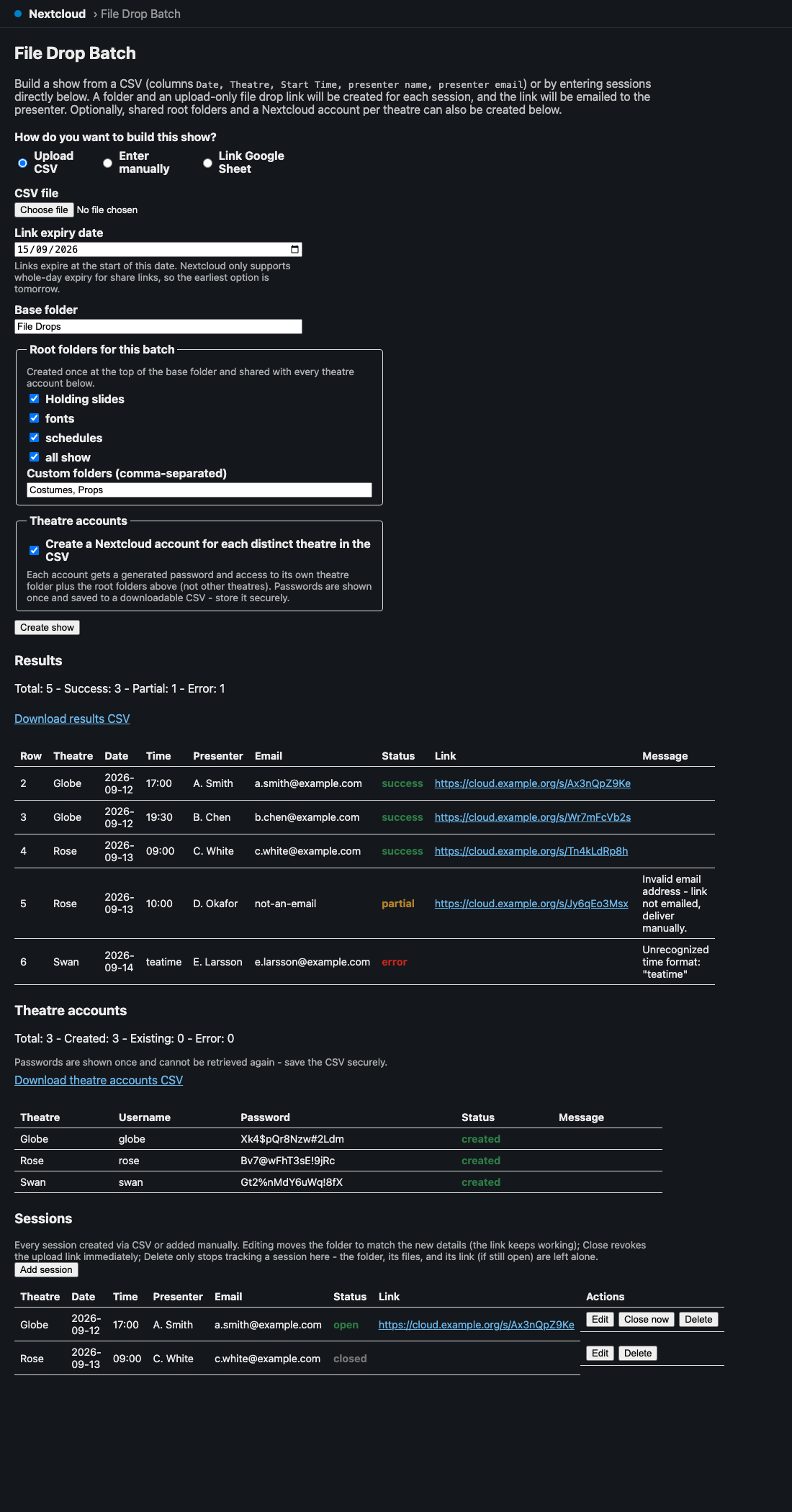
One page, top to bottom: choose a source (CSV, manual entry or a linked Google Sheet), set the expiry and base folder, pick the shared root folders, then Create show. Everything below the button is the outcome.
Reading the results
Every row comes back as success, partial or error, and partial is the one that needs
you:
| Status | What happened | Your action |
|---|---|---|
| success | Folder created, link created, email sent | none |
| partial | Folder and link created, email NOT sent | Send the link by hand. It’s live and works. |
| error | No usable link | Fix the row, re-run |
partial happens either because the email address didn’t look valid, or because the mail server
refused it. The message column tells you which. Either way the presenter has nothing until you
act — a batch that reports “10 success, 2 partial” has two people who don’t know they have an
upload link.
An error row may still have left a folder behind, if folder creation worked and the link
didn’t. The message says so.
Download both CSVs before you close the page. The results CSV (your input plus a
File Drop Link column) and, if you created accounts, the users CSV. They’re not stored
anywhere retrievable — the Sessions list keeps the sessions, not the CSVs, and the generated
passwords are never shown again.
Re-running a batch creates duplicates
Session folders are not reused. Running the same CSV twice gives you
10:00 - Jane Smith and 10:00 - Jane Smith (2), each with its own link, and emails Jane
twice. Fix errors by re-running only the failed rows, not the whole file.
(Root folders and theatre accounts are reused, so those are safe to re-run.)
Theatre accounts
Optional, admin/subadmin only. Creates one Nextcloud account per distinct theatre name, scoped to its own theatre folder plus the shared root folders — deliberately not other theatres. That isolation is the point of the feature.
Two things to watch:
- The username comes from the theatre name, lowercased with anything outside
a-z0-9._-turned into-. So “Studio One” and “studio-one” and “STUDIO/ONE” all becomestudio-oneand share a single account. If two genuinely different theatres sanitize to the same username, the second silently reuses the first’s account — and gets access to the first’s folder. Name theatres distinctly. - An account that already existed comes back with a blank password, because the app can’t read an existing password. A blank password column means “already there”, not “no password”.
Passwords are 16 characters, generated with a CSPRNG, guaranteed to contain upper, lower, digit
and symbol, using an ambiguity-avoiding alphabet (no I/l/0/1).
Managing sessions afterwards
The Sessions list tracks every session that was created (success and partial rows —
error rows leave no record).
- Editing a session moves its folder to match the new theatre/date/time/presenter.
- The link keeps working across that move, because Nextcloud shares point at a file by id, not by path.
- Editing does not re-email the presenter, deliberately — a typo correction shouldn’t spam them. If someone needs a new link, create a new session.
- Closing a session ends its link early, before the batch expiry.
Google Sheets sync
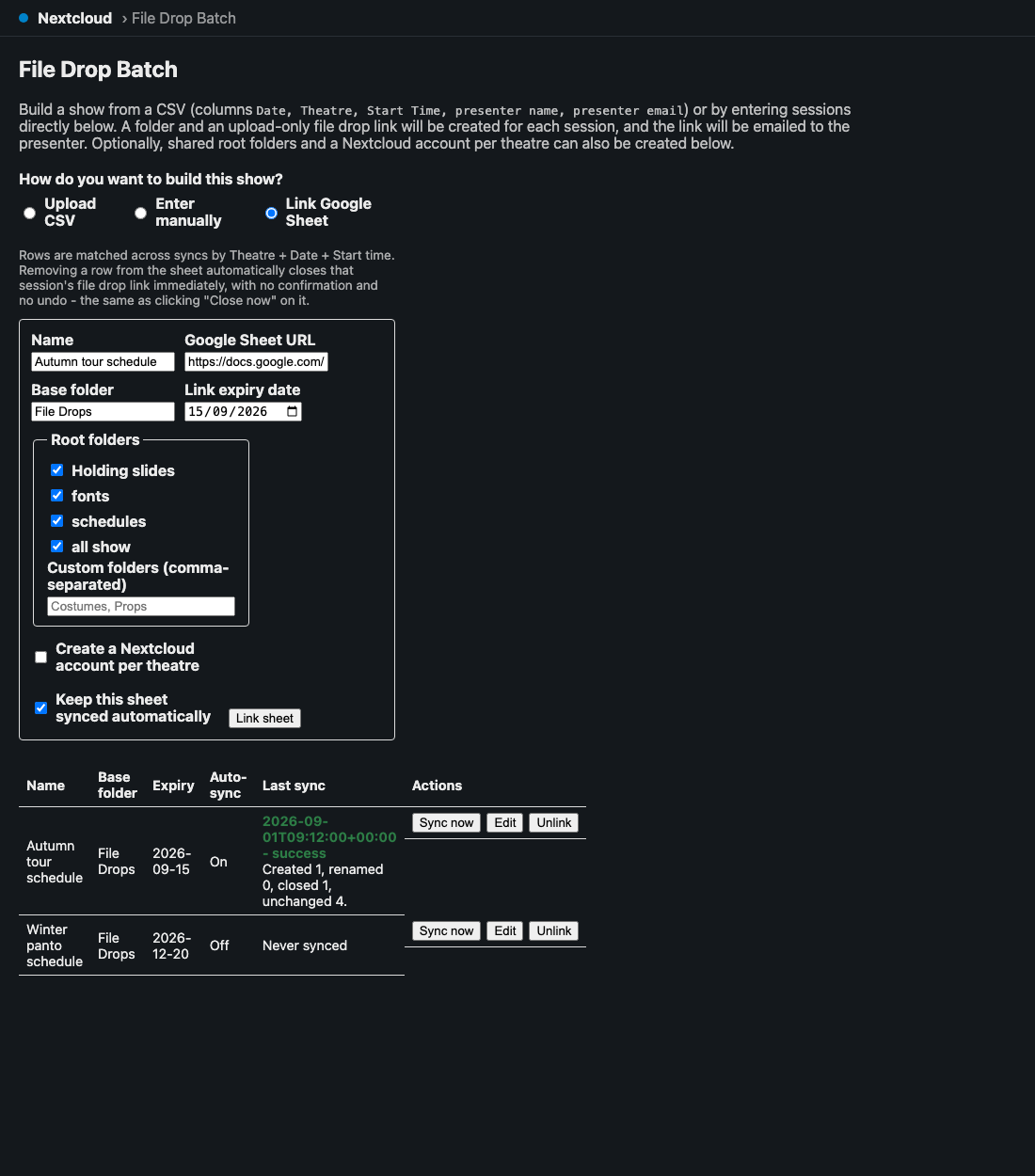
The last-sync column reports what each sync actually did — “Created 1, renamed 0, closed 1, unchanged 4” — which is where you find out that a row you deleted from the sheet has closed somebody’s upload link. Link a sheet and it’s re-read on a schedule, so late additions get folders and links without you running anything.
The sheet must satisfy exactly the same column contract as a CSV (The session CSV) — same five headers, same parsing, same day-first date rule.
⚠ Deleting a row from the sheet closes that session’s link. That’s the designed behaviour, and it’s live: someone tidying up the spreadsheet can revoke a presenter’s upload link without realising. Treat the linked sheet as production data.
Because the Sheets API omits trailing empty cells, a blank row arrives as an empty array and is skipped rather than erroring.
Site-server sync
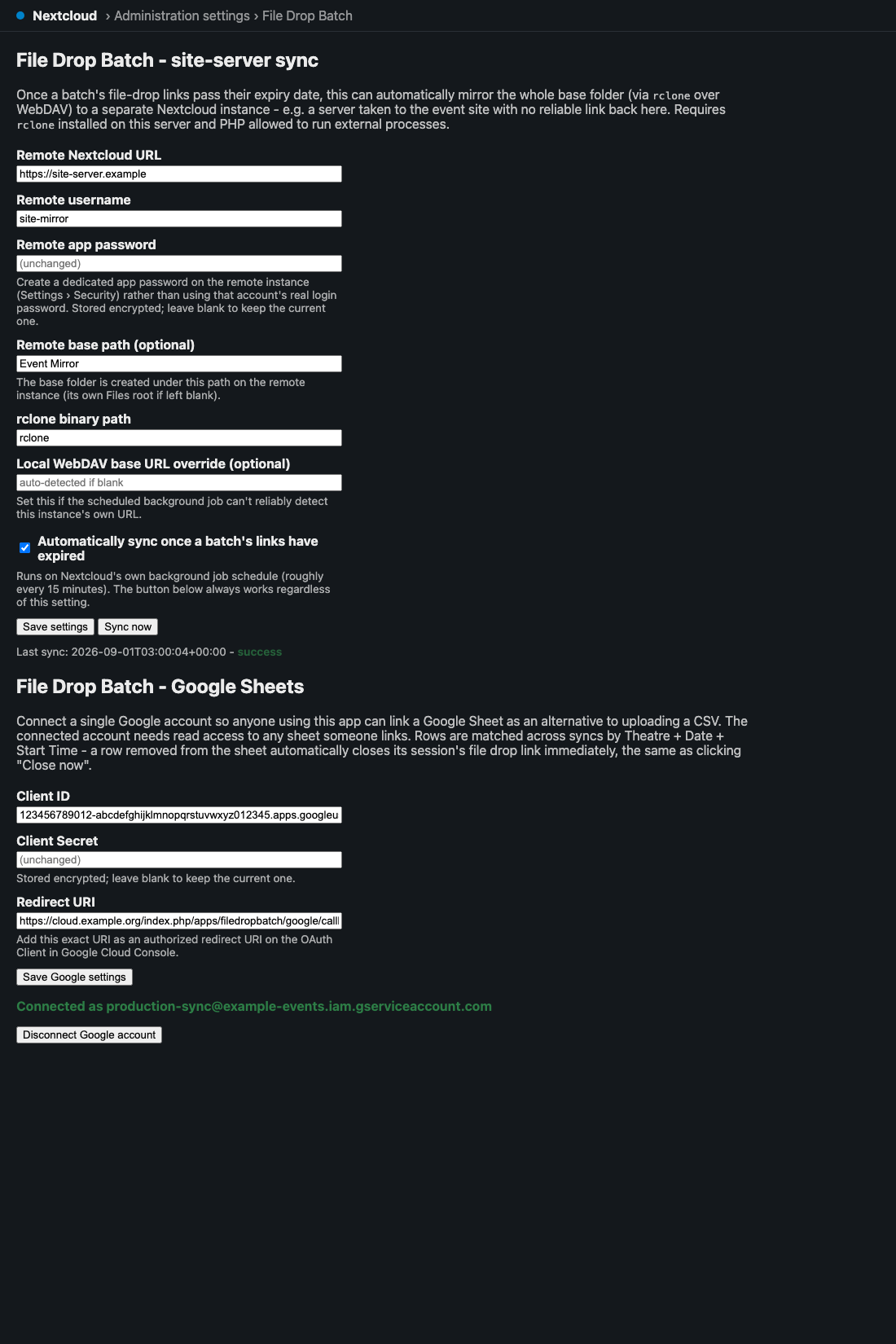
Both of these are configured once, by an administrator, in Administration settings › File Drop Batch — not in the app page everyone else uses. Once a batch’s links pass their expiry, a background job can mirror the whole base folder to a second Nextcloud instance — the “site server” you take to the venue.
⚠ It is
rclone sync, not a copy. The destination is made to match the source: anything at the destination that isn’t in the source is deleted. If someone adds or edits files on the site server between syncs, the next sync removes their work. Treat the site server as a read-only mirror, and do the editing on the main server.
Other things to know:
- It fires on expiry, not on completion. Roughly every 15 minutes a job checks for batches whose expiry has passed. A failed sync is logged and retried next run, not marked done.
- Syncs are per (user, base folder), not per batch — one whole-folder transfer covers every batch sharing that folder.
- The “Sync now” button ignores the automatic toggle, which makes it the right way to test the connection.
- Use an app password from the remote instance (Settings → Security → Create new app password), never a real account password. It’s encrypted at rest.
- The source side stores no password at all: each sync mints a short-lived token and revokes it immediately afterwards, whether or not the sync worked.
If the source leg fails with a connection error but the destination is reachable, set the
“local WebDAV base URL” explicitly. Behind Docker or a reverse proxy, auto-detection produces
the host-mapped address (localhost:8080) rather than the address reachable from inside the
container where rclone runs (http://localhost). This is by far the most common sync failure.
Needs rclone on the server and PHP allowed to spawn processes (proc_open) — normal on a box
you control, often disabled on shared hosting.
Troubleshooting
| Symptom | Cause |
|---|---|
| “The CSV is missing required column(s)” | Header names don’t match (The session CSV). Nothing was created — safe to fix and retry. |
| “The expiry date must be at least tomorrow” | Nextcloud expires links at 00:00 on the chosen day (Setting the expiry). |
| Links stopped working a day early | Same cause — expiry is at the start of the date (Setting the expiry). |
| Sessions on the wrong day | US-format dates read day-first (The session CSV). |
| Two folders for one day | The date was typed two different ways; folders are named from the raw string (The session CSV). |
| Presenter says they never got a link | Check for a partial row — the link exists and wasn’t emailed (Reading the results). |
| Duplicate folders and double emails | The batch was run twice; session folders are never reused (Reading the results). |
| Two theatres share one account | Their names sanitize to the same username (Theatre accounts). |
| Blank password in the users CSV | That account already existed (Theatre accounts). |
| Lost the generated passwords | They’re not recoverable — reset from Nextcloud’s user admin (Reading the results). |
| A presenter’s link died unexpectedly | Someone deleted their row from the linked Google Sheet (Google Sheets sync). |
| Files vanished from the site server | rclone sync deleted what wasn’t in the source (Site-server sync). |
| Sync fails on the source leg only | The local WebDAV base URL needs setting explicitly (Site-server sync). |
| “Only admins or subadmins can create theatre user accounts” | Working as intended — that restriction is deliberate. |
| Nothing syncs automatically | Nextcloud’s cron isn’t running, or the toggle is off. Try “Sync now” to separate the two. |
Before a big batch
- Use
YYYY-MM-DDdates in the sheet (The session CSV). - Set the expiry to the day after uploads should stop (Setting the expiry).
- Run two rows to your own address first — there’s no dry run and no undo on the emails.
- Check theatre names don’t collide once lowercased and hyphenated (Theatre accounts).
- Run the real batch, then download both CSVs before leaving the page (Reading the results).
- Work the
partialrows — those presenters have nothing yet (Reading the results). - If site-server sync is on, remember the site server is a mirror, not a workspace (Site-server sync).
See also
- API.md — routes, the CSV contract, config keys, tables, jobs
- DEVELOPING.md — dev stack, tests, security rules
- README — install, screenshots, admin setup