

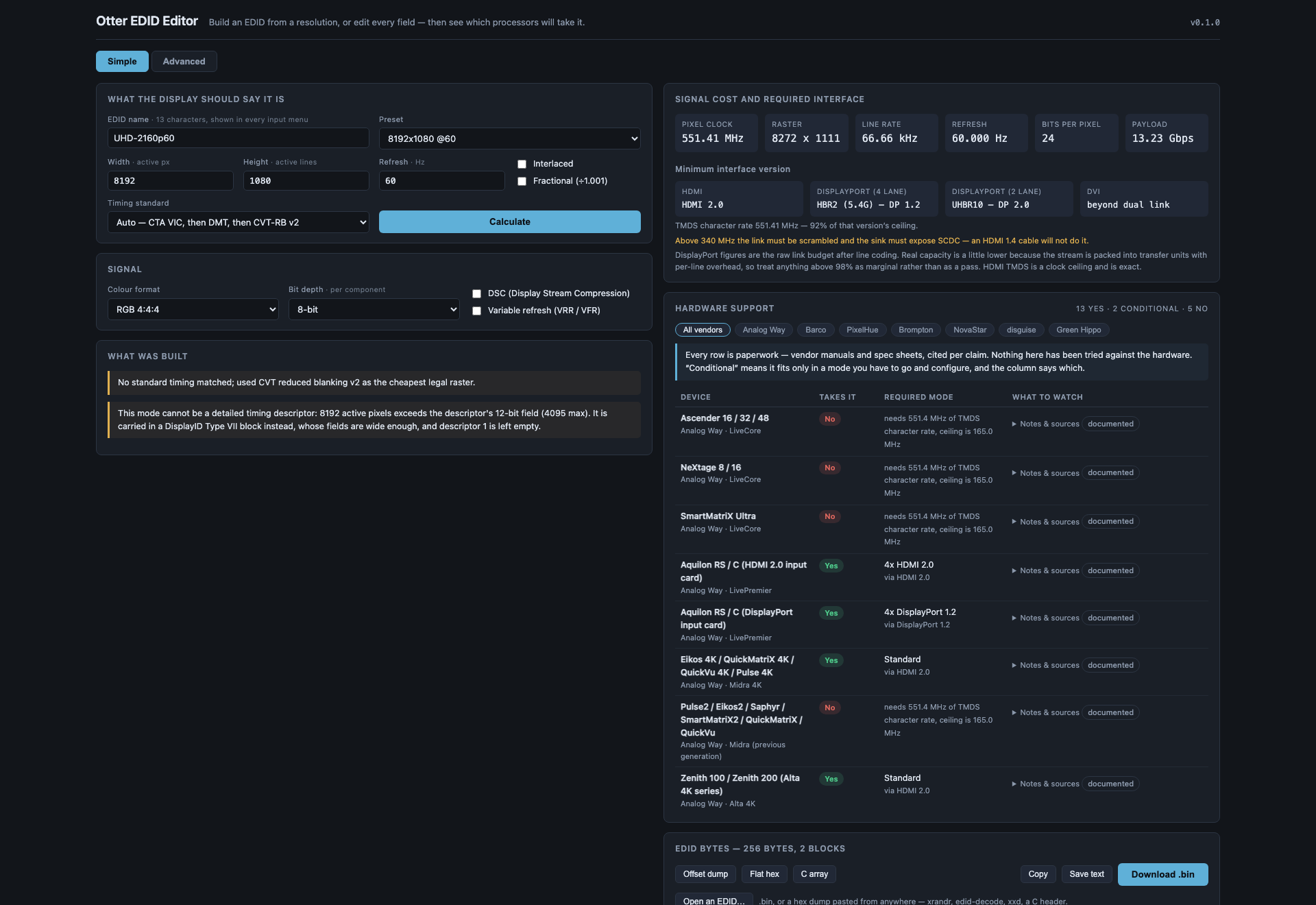
A browser EDID editor for event video. Build an EDID from a resolution and a refresh rate, or edit every field by hand — then see which processors will actually take it, and in which mode.
Nothing is uploaded. There is no backend to upload it to.
Before you rely on this: the timing engine is checked against published VESA DMT values, and the DisplayID layout against the Linux kernel’s own parser.
The hardware table is vendor paperwork, cited per claim, and has not been tried against any hardware. No hardware has ever been fed an EDID this tool produced. Treat a verdict as a shortlist.
Built with AI assistance, directed and reviewed by a human author.
Two modes
Simple. Type a resolution and a refresh rate, name it, press Calculate. You get a complete, valid EDID 1.4: the mode as a detailed timing, a range-limits descriptor sized to it, the name where every input menu will read it, and a CTA-861 extension carrying the VIC when the mode has one.
Advanced. Every field. Identity, video input definition, chromaticity, established and standard timings, all four descriptors, the CTA-861 extension — video and audio descriptors, HDMI and HDMI Forum vendor blocks, HDR static metadata, colorimetry, 4:2:0 maps — and a DisplayID 2.0 extension.
Both modes name the EDID, and both show the same two answers on the right.
The two answers
What the mode costs, and the smallest interface that carries it. Pixel clock, raster, line rate, payload — then the minimum HDMI version (1.0–1.2, 1.3/1.4, 2.0, or which FRL rate), the minimum DisplayPort rate at 4 and 2 lanes, and whether DVI needs one link or two.
Which hardware takes it. Twenty-one models across the major event-video vendors, each answering yes / conditional / no — and where the answer is conditional, the capacity mode you have to configure to get it:
- A LiveCore dual-link input costs you the neighbouring input.
- A Barco E2 Gen 1 does 4K60 only across two cables.
- A Barco E2 Gen 2 quad card is four WQXGA inputs or two UHD60 ones.
- An Aquilon DisplayPort card is four DP 1.2 ports or two DP 1.4 ports — and DP 1.4 preempts ports 2 and 4.
Every device carries its sources, quoted, with the date they were read. That is what to check before a purchase decision rests on a row.
DSC and variable refresh
Both are toggles, and both are real: they change the bandwidth arithmetic, they change which interface version is required, and they are written into the EDID.
Turning DSC on correctly makes every HDMI 2.0 and earlier input say no, because DSC travels only over a fixed-rate link. That is not the tool being pessimistic — it is the constraint.
Import
Open a .bin, or paste a hex dump from anywhere — xrandr, edid-decode, xxd, a C header, a
bare hex string.
A bad checksum is reported, not refused. The dump off a misbehaving device is exactly when you need to look at it, and a tool that refuses to open it is useless at the only moment it matters.
If something is unexpected
| Symptom | Cause |
|---|---|
| Every HDMI input says no after I enabled DSC | Correct. DSC needs a fixed-rate link. |
| A device says “conditional” | It takes the mode only in a particular capacity mode — the answer names which. |
| An imported EDID has a checksum error | Reported deliberately rather than refused. Look at it. |
| A verdict disagrees with a manufacturer | Every row carries its source and the date it was read. Check it — the table is paperwork, not measurement. |
| The processor rejected an EDID this built | Possible, and untested — no hardware has ever been fed one of these. |
Not affiliated with Analog Way, Barco, PixelHue, Brompton, NovaStar, disguise or Green Hippo. Product names appear only to state compatibility.