

Patchwork is a faulty LED wall for Resolume Arena and Avenue, as an FFGL effect. It builds a wall the way real ones are built, cabinets on a daisy-chained cable, each with its own receiving card, calibration table and modules, and then lets any stage of that chain fail.
Nothing is painted on: no stripes, black squares or colour casts laid over the clip. The patchwork, the repeated tiles, the dead runs of cabinets, the zebra stripes and the rest are what those failures do to your picture, the same way they’d turn up on a wall that’s had a rough week.
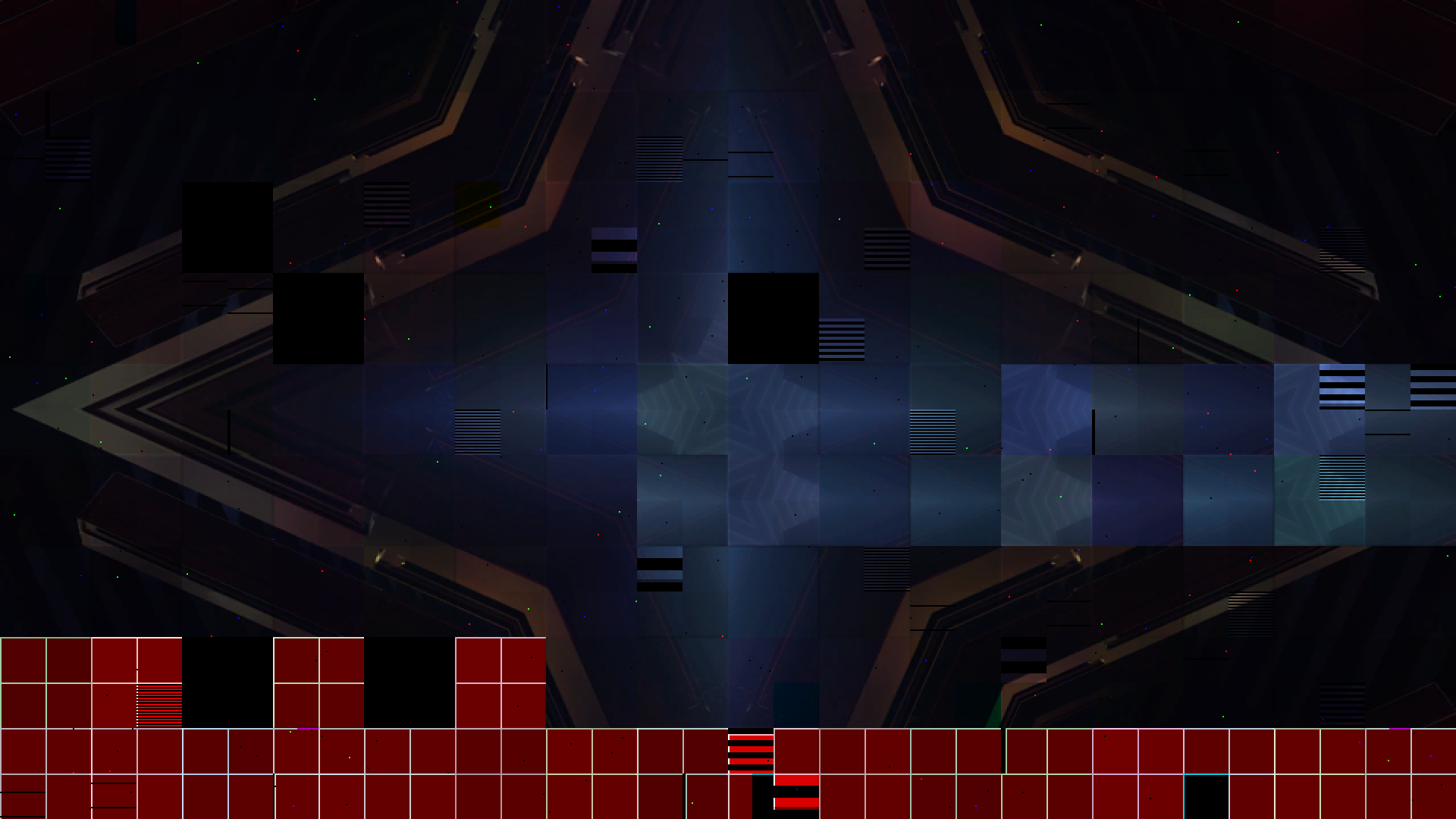
Resolume’s bundled IntoTheGlow_02 through the plugin, rendered by the offline harness rather than captured from Resolume. It’s on the defaults, with three cabinets from the middle of the cable repeated along the next fourteen, more zebra, colour spread and seams, and the cable broken near its end with Lost Signal on Test Pattern.
Before you rely on this: it’s released at v0.1.0, and still early days. The wall is measured rather than taken on trust, by a harness that drives the real plugin class. With every fault off the wall is the clip, byte for byte. Calibration is constant over every cabinet and module and changes on every boundary, and three batches give exactly three looks. A stuck address line blacks one parity of rows and doubles the other while the module’s mean light stays within 0.0002. A cut in the clip reaches each cabinet one frame per hop in the documented order of the cable, for every route, corner and port size. A break loses exactly the cabinets downstream of it. The repeated tiles are right byte for byte in every motion and never mirrored, a lost card holds the last frame it received, and the heat follows its time constant to 1e-7. All 48 controls measurably change the picture. It has never been loaded into Resolume on macOS: the one host it’s run in on a Mac is the fleet’s own test host,
oxbow, for 120 frames. On Windows, a build of v0.1.0 loads, registers and renders in Resolume Arena 7.27.1, with every control matching what the plugin declares. That was on software rendering, so it says nothing about a GPU. Four controls that act on a moving picture or over seconds (Heat Time, Hop Delay, Lag Tiles, Lag Frames) couldn’t be shown moving there on a still picture. Try it on a spare layer before you put it in a show.This codebase was created with AI assistance, directed and reviewed by a human author.
Installing
Every download has one effect in it, SW Patchwork. Drop it into Resolume’s effects folder and restart Resolume:
macOS    ~/Documents/Resolume Arena/Extra Effects/
Windows  %USERPROFILE%\Documents\Resolume Arena\Extra Effects\
Avenue has the same layout under its own folder name. The effect then turns up in the effects browser as SW Patchwork.
The macOS download is a universal build (Apple silicon and Intel), as a .dmg or a .zip. It’s
Developer ID-signed and notarised, so the bundle just loads. The Windows download is an x64
installer or a .zip. It isn’t code-signed, so the installer trips SmartScreen once:
More info → Run anyway.
The wall is a signal chain
An LED wall is a few hundred small displays on a cable, doing their best to look like one.
A processor cuts the picture into cabinet-sized rectangles and sends them down a cable that snakes from cabinet to cabinet. Each cabinet’s receiving card picks out its rectangle by its place on the chain, applies its own calibration table, and drives its modules one scan line at a time: an address decoder picks the row, and a row of shift-register driver chips clocks in the colours. Then the LEDs light up, powered by the cabinet’s supply.
Every failure you’ve seen on a wall is one of those stages lying, and the controls are grouped the same way:
| stage | goes wrong as | group |
|---|---|---|
| the processor’s map | the same few cabinets’ content repeated along the cable | Repeat |
| the cable | a break, a bad connector, a crossed pair | Signal, Mapping |
| the receiving card | late, lost, holding, showing its test pattern | Mapping, Signal |
| the calibration table | another batch’s table: the patchwork | Calibration |
| the address decoder | a stuck or floating line: zebra stripes | Modules |
| the driver chips | a lost colour, slipped data, a dead row | Modules |
| the LEDs | dead, stuck, heat-dimmed | LEDs, Calibration |
| the supply | sagging or tripping under bright content | Power |
A fault never looks the same on two clips, because it’s a fault in how the wall shows your picture rather than a picture of a fault.
Start here
Put SW Patchwork on a layer with something in it and leave every control alone. The defaults are a rental wall after a hard season: 60 × 60-LED cabinets of four modules each at 1/16 scan, two pixels per LED (sixteen cabinets by nine at 1080p), every cabinet a bit off in brightness and colour, dark seams, a dead cabinet or two, a few modules zebra-striped, pinstriped, missing a colour or slipped sideways, and the odd cabinet dropping out for half a second. The repeat is off, because it’s more of a choice than a fault you’d leave in a default.
Then, in this order:
- Repeat Tiles to 3 and Repeat From to about the middle. Three cabinets’ content now repeats along the rest of the cable. Repeat Motion is on Scroll at one cabinet a second: watch the content run right along one row and back left along the next, turning the corner at the end of each. Try Step, then Random.
- Chain Break to 1. The cable breaks somewhere, and every cabinet after the break goes black. Change Lost Signal to Hold, Test Pattern and Garbage to see what different receiving cards do when they lose their input. Fault Seed moves the break.
- Zebra up, and more modules stripe. Zebra Width picks which address line is stuck (from 1 row of light and 1 of dark up to 16 and 16), and Zebra Mode on Floating makes them shimmer.
- Hop Delay up a little, then cut to another clip. The cut ripples down the cable, cabinet by cabinet, in the order the cable visits them.
- Batches to 3 and Colour Spread up. The wall now looks like three deliveries of cabinets from three different years.
The cable is the “line”. Everything that moves or breaks along the wall (the repeat, a break, a ripple, a crossed pair) follows the cable’s route, which is set by Route, Start Corner and Tiles Per Port. On a healthy wall those three change nothing you can see. They matter as soon as something depends on the cable.
Time comes from the host
Dropouts, flicker, an intermittent connector, the repeat’s motion, the heat and the supply’s hiccup all run on the host’s clock, so a re-render of the same composition fails the same cabinets at the same moments. A stall or a jump on the transport moves them on by a quarter of a second at most. Every other fault is seeded: Fault Seed decides which cabinets, modules and LEDs fail, and the same seed fails the same ones every time.
The Wall group
LED Pitch: output pixels per LED, 1 to 16. At 1 every pixel is an LED; at 4 each LED is a 4 × 4 block, the mean of the clip under it. Zebra stripes and dead LEDs are always whole LEDs, so this also sets how coarse they are.
Fill: the lit fraction of each LED’s square. At 1 (the default) the LEDs touch and there’s no gap between them; lower it and black opens up between them. Only visible at an LED Pitch above 1.
Tile W, Tile H: the cabinet, in LEDs. The wall starts at the top-left corner, and partial cabinets at the right and bottom edges are cabinets like any other.
Modules X, Modules Y: how many modules make up a cabinet. Module faults and Module Spread act per module.
Scan: the scan ratio, 1/1 (static drive) to 1/32. In 1/S scan, row r of a module is addressed as r mod S, and that’s what zebra and dead rows act on. At 1/1 there are no address lines, so there’s no zebra at all, and a dead row driver darkens the whole module, which is how static-drive modules fail in the wild.
The Chain group
Route: the order the cable visits the cabinets. Row Snake (along a row and back along the next, which is how most walls are cabled), Column Snake, Rows (every row the same way) and Columns.
Start Corner: which corner the cable starts in.
Tiles Per Port: how many cabinets each sending-card port drives before a new chain starts. 0 is one chain through the whole wall. Each chain breaks, repeats and ripples on its own.
The Calibration group
Tile Spread: how far a cabinet’s brightness can be off, up to 60% darker. Every calibration gain is at most 1, so a full-white clip never clips the evidence away.
Module Spread: the same for each module inside a cabinet, in brightness and colour.
Colour Spread: how far a cabinet’s colour can be off.
Batches: how many calibration tables the wall’s cabinets were dealt from. 0 gives every cabinet its own; 3 gives exactly three looks across the wall, as if from three deliveries.
Seams: the gaps between cabinets. A gap darkens the LEDs either side of it and an overlap brightens them. You’ll see it on flat areas.
Heat, Heat Time: each cabinet’s temperature follows its own brightness with time constant Heat Time (1 s to 10 minutes). As it heats up, red loses light first, green about a third as fast and blue a sixth, so a bright logo held for a minute leaves a cyan ghost of its cabinets after it’s gone. Heat is how much red a fully hot cabinet loses, up to half. Off by default.
The Repeat group
Repeat Tiles: N cabinets whose content is repeated along the cable. 0 is off.
Repeat From: where along the cable the N cabinets start, as a fraction of the chain.
Repeat Reach: how much of the rest of the chain, after the N, shows the repeat. At 0 only the N cabinets themselves are involved (they loop among themselves when they move); at 1 the repeat runs to the end of the chain.
Repeat Motion: Hold (still), Step (a whole cabinet at a time), Scroll (an LED at a time), Ping-Pong (out the length of the N and back) and Random (a random whole-cabinet offset, changing as fast as Repeat Speed says).
Repeat Speed: cabinets per second, −8 to +8. Negative runs against the cable.
A repeated cabinet always shows a rectangle of the clip the right way round. That’s what a mapping fault in a processor does, so the content is never mirrored, even when it flows along a row the cable runs backwards through.
The Mapping group
Swapped Tiles: the chance that a neighbouring pair of cabinets on the cable is crossed, so each shows the other’s content.
Flipped Tiles: the chance that a cabinet was hung upside down, with its content turned 180°.
Hop Delay: frames of buffering per hop along the cable, 0 to 2. Every cabinet shows the clip a little later than the one before it, so a cut ripples down the chain. The total is capped by how many past frames the effect keeps: 32 at most, fewer at large sizes (see Performance).
Lag Tiles, Lag Frames: the chance that a cabinet’s card is late, and by up to how many frames.
The Signal group
Chain Break: the chance that a chain’s cable is broken somewhere. Everything downstream of the break loses its signal.
Intermittent: how often a broken connector makes contact anyway, decided afresh ten times a second, so the run of cabinets behind it flickers in and out.
Dropouts, Dropout Time: the chance that a cabinet loses its signal in any one slot of Dropout Time (0.05 to 5 s), each cabinet on its own clock.
Lost Signal: what a receiving card shows when it has no signal. Black, Hold (the last frame it received), Test Pattern (its own: the module grid over a colour that steps red, green, blue, white once a second) or Garbage (corrupt data, new every frame).
The Power group
Dead Tiles: the chance a cabinet has no power at all.
Flicker Tiles, Flicker Rate: the chance a cabinet’s supply is failing, and how fast it flickers off and on (0.5 to 30 Hz).
PSU Limit: the mean brightness a cabinet’s supply can hold, 5% to 100%. At 100% (the default) there’s no limit.
PSU Mode: on Dim, a cabinet driven over the limit sags down to it. On Hiccup, it trips off, restarts after 0.27 s, and trips again while it’s still over, so a white flash knocks out the bright cabinets and only those, and they blink until the picture gets darker.
The Modules group
Dead Modules: the chance a module is dark.
Zebra: the chance a module’s address decoder has a line stuck. The rows that line should have selected are never lit, and the rows it selects instead are lit twice, showing the sum of two rows’ data. Half the rows go dark and the other half get brighter, and the module’s overall light stays the same.
Zebra Width: which line is stuck, Random per module or a stripe of 1, 2, 4, 8 or 16 rows. A line the scan ratio doesn’t have is clamped to the widest one it does.
Zebra Mode: Stuck holds the line; Floating lets it pick up noise, so the stripes swap every frame.
Dead Rows: the chance a module has a dead row driver, which is one address dark in every scan group, a pinstripe every S rows.
Colour Loss: the chance a module’s data chain breaks at a driver chip, so one colour is missing from that chip’s first column to the module’s edge.
Shifted: the chance a module’s shift register missed a clock, so its content slips one to four LEDs sideways.
The LEDs group
Dead LEDs: black LEDs, from a dead pixel or two at the bottom of the slider to a fifth of the wall at the top.
Stuck LEDs: LEDs with one colour stuck full on, however dark the picture.
The Output group
Fault Seed: which cabinets, modules and LEDs fail. The same seed fails the same ones every time.
Mix: the wall over the clip. The wall is a display, so it’s opaque: a dead cabinet is black rather than a hole, and the output’s alpha goes to 1 as Mix goes up.
How it works
Once a frame, in seven passes, all but the last at the wall’s own resolution of one value per LED:
- The wall. Each LED is the mean of the clip under it.
- The ring. While Hop Delay or Lag Tiles is up, this frame is kept for later.
- The route. For every cabinet: which cabinet’s content it is sent (the repeat, a crossed pair), which way up (a flipped cabinet), and from how many frames ago (the delays).
- The hold. What each card last received, for a card that loses its signal.
- The stats. Each cabinet’s mean brightness, its temperature and its supply’s state.
- The panel. What each LED emits: the card’s output or its lost-signal fallback, through the module’s faults, the calibration table, the seams, the heat and the supply.
- The display. Each pixel takes its LED, at Fill, mixed with the clip.
With every fault, spread and process at zero, Fill at 1 and LED Pitch at 1, every stage is an identity and the clip comes back byte for byte.
Performance
Measured by the offline harness on a Mac (Apple silicon): GPU time per frame, the median of 60 frames after a warm-up, on a GPU that was busy with other work too:
| defaults (LED Pitch 2) | LED Pitch 1, repeat, delays, hold | |
|---|---|---|
| 1280×720 | 0.27 ms | 0.43 ms |
| 1920×1080 | 0.46 ms | 0.92 ms |
| 3840×2160 | 1.40 ms | 3.63 ms |
At 4K and the defaults that’s under a tenth of a 60 fps frame. LED Pitch 1 at 4K is the expensive corner, because every pass then runs per pixel. The ring of past frames for Hop Delay and Lag Tiles is only allocated while one of them is up. It holds up to 32 frames in 256 MB, so it holds fewer at large sizes (seven at 4K with LED Pitch 1), and the delays are capped there.
I haven’t timed anything inside Resolume, or on Windows.
If it looks wrong
Nothing seems to happen. Check Mix. At the defaults the patchwork shows on any clip with flat areas in it; on a very busy clip, raise Tile Spread to see the cabinets.
Route, Start Corner or Tiles Per Port do nothing. On a healthy wall nothing depends on the cable. Turn on a repeat, a break or a Hop Delay.
The repeat doesn’t seem to move. The N cabinets may have no detail along the cable’s direction (a sky that only changes top to bottom won’t visibly scroll sideways). Move Repeat From to busier cabinets, or check Repeat Speed is away from the middle.
Zebra does nothing. Scan is 1/1, and a static-drive module has no address lines.
Hop Delay and Lag do nothing. The clip is still, and a late copy of a still picture is the same picture. Cut to another clip, or play one that moves.
The whole wall went dark. A break near the start of a chain with Lost Signal on Black, or PSU Limit low on a bright clip. Fault Seed moves the break; PSU Limit at 100% is no limit.
The effect does nothing at all. A shader that won’t compile looks just like that, and so does a wall too large to allocate. The actual message is in the log:
macOS    ~/Library/Logs/patchwork/patchwork.YYYY-MM-DD.log
Windows  %LOCALAPPDATA%\patchwork\logs\patchwork.YYYY-MM-DD.log
It records the GL vendor and version at load, which shader failed if one did, and the buffer sizes if they couldn’t be allocated, with the advice to try a larger LED Pitch.
Known limits
- Never loaded into Resolume on macOS, and nothing has driven the controls in a host on a Mac. How 48 controls in ten groups read in the inspector is untested there.
- The mechanisms are real, but the numbers aren’t a vendor’s. How often a real wall’s cabinets fail, what a particular brand’s receiving card shows when it loses its signal, and what its garbage looks like aren’t modelled from any product.
- No gamma before the drive. The wall shows the clip’s code values, where a real processor applies a gamma first.
- The heat ratios are typical rather than one LED’s: red loses light about three times faster than green and six times faster than blue. The supply’s restart is a fixed 0.27 s.
- A cabinet’s brightness for the supply and the heat is estimated from 16 × 16 points in it: exact on flat areas, close on pictures.
- Delayed cabinets are 8-bit, to fit 32 frames in 256 MB; an undelayed cabinet keeps the clip’s precision.
- Each chain repeats its own N cabinets when there are several ports.
- No presets, no audio or beat input (Resolume can drive any control from either), and no OpenFX version.
- There’s a browser demo at patchwork-demo.stoatworks-labs.com. It’s a port to a web page rather than the plugin: the shaders run unedited in WebGL2 and the CPU half is rewritten in JavaScript. Its delays count the browser’s frames rather than a composition’s. The page lists everything it doesn’t reproduce.
About
The last group, About, has the plugin’s name, version, licence and maker, and buttons that open this user guide, the project page, the source on GitHub and the support page in your browser.
Reporting something
If something’s broken or just odd, open an issue at github.com/stoatworks-labs/patchwork/issues. A screenshot, the Fault Seed and the controls you changed, plus the composition’s resolution and frame rate, are usually enough to go on.