

Pixel Peeker is a browser tool for designing LED video walls: lay out cabinets on a canvas, add processors, wire the ports, and find out whether it actually fits — before you find out on site.
Runs entirely in the browser. No account, no server, nothing uploaded.
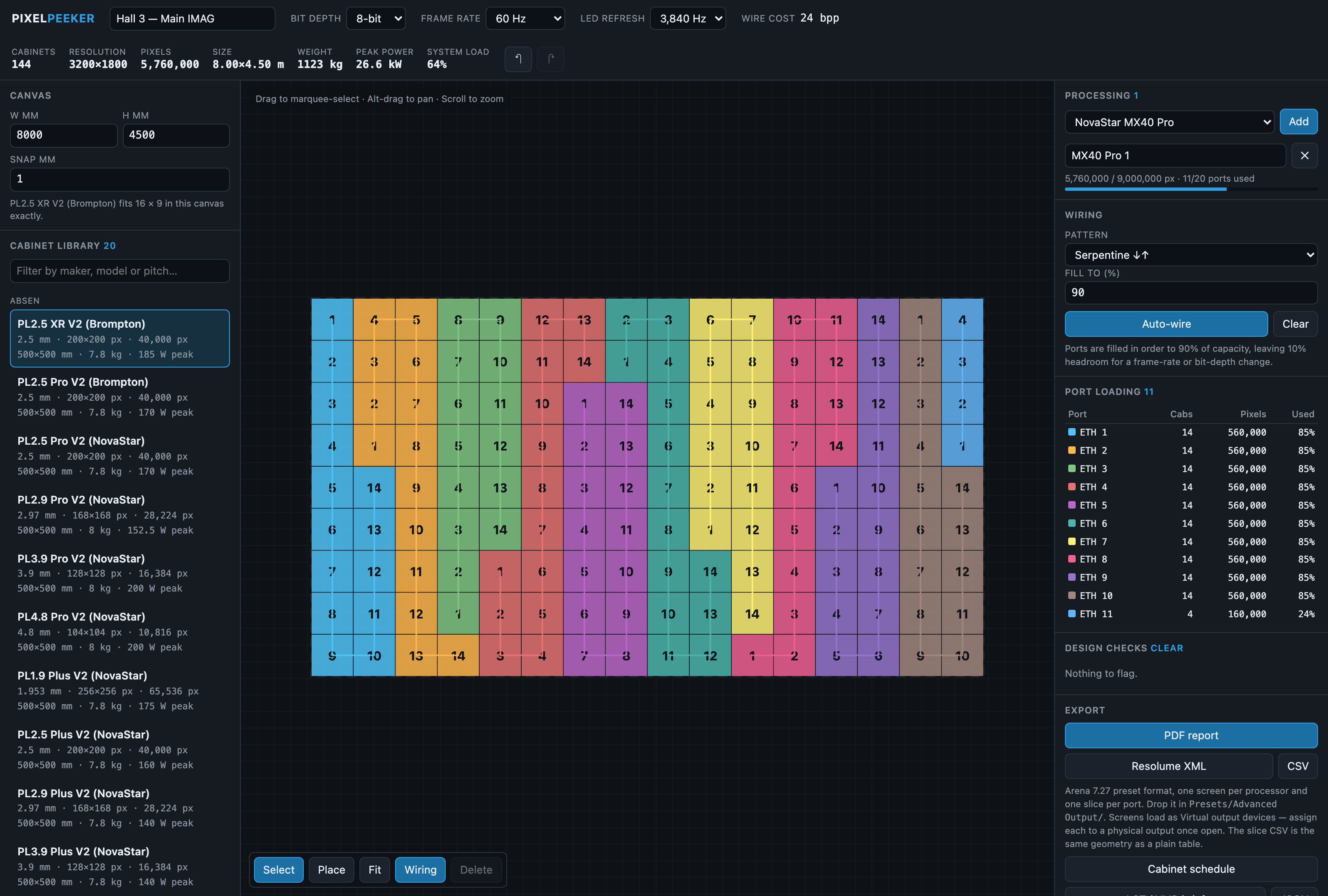
An 8 m × 4.5 m wall: 144 cabinets, 3200×1800, 26.6 kW peak, serpentine-wired to 90% fill. The processor carries it on 11 of 20 ports at 64% device load — each colour on the canvas is one port.
Before you rely on this: the capacity model is verified numerically — it reproduces NovaStar’s three published MX40 Pro per-port figures to the pixel and Brompton’s published SX40 headline, and those are pinned as tests. The cabinet library was parsed from manufacturer datasheet PDFs, each record carrying its source.
It has not been used to design a wall that was then built. No processor, receiving card or panel has been connected to it, and the Resolume file has not been opened in a running Arena. Status: alpha, and the cabinet library is small.
This codebase was created with AI assistance, directed and reviewed by a human author.
The bit that matters: port capacity
Most LED capacity spreadsheets compute pixels = link rate ÷ (3 × bit depth) ÷ frame rate.
That is wrong at 10-bit, and wrong in the direction that gets you into trouble — it overstates capacity by about 7%.
Controllers pack each colour component into a power-of-two container, so the DMA engine stays word-aligned:
| Bit depth | Naive (3 × depth) | Actual container |
|---|---|---|
| 8-bit | 24 bits/px | 24 bits/px |
| 10-bit | 30 bits/px | 32 bits/px |
| 12-bit | 36 bits/px | 48 bits/px |
With those containers, one link-efficiency figure reproduces the manufacturer’s own published per-port numbers exactly — which is why the model is trusted rather than the arithmetic being plausible.
If a spreadsheet says a wall fits at 10-bit and this says it does not, this is the one to believe.
Laying out a wall
Pick a cabinet from the library, or define a custom panel by resolution and receiving card. Then fill a canvas, build blocks, or place tiles by hand.
- New and dragged cabinets snap flush against the ones already up.
- Arrow keys extend a run one cabinet at a time.
- Shift locks a drag to 45°.
Processing and wiring
NovaStar and Brompton controllers, with their real port counts, input connectors and device capacity limits — which are a separate limit from the sum of the ports, and the one that catches people.
Auto-wire in serpentine or column order to a chosen fill limit, or patch ports by hand.
Every port shows its load, its headroom, and the highest frame rate it could sustain at that load — that last figure being the one to check before promising 60 Hz on a 10-bit wall.
What it checks
- Overlapping cabinets
- Unpatched tiles
- Over-capacity ports
- A device that runs out before its ports do
- An input too small to carry the wall
- Panels that cannot reach the wanted refresh rate
- Chains that jump around the wall — legal on paper, miserable in a truck
Exports
A PDF report, a Resolume Advanced Output XML, a cabinet schedule CSV, a screen-configuration brief for the processor vendors’ own software, and a versioned JSON interchange file.
Use
Export → JSONwhen handing a wall to another tool, not Save project. The project file stores cabinets as library references in millimetres, which other tools cannot resolve to pixels.
If something looks wrong
| Symptom | Cause |
|---|---|
| A wall that fits in my spreadsheet does not fit here | 10-bit container padding. See above — the spreadsheet is the one that is wrong. |
| The device is full but the ports are not | Device capacity is a separate limit from the sum of the ports. |
| A port cannot reach 60 Hz | Read the max-frame-rate column for that port’s load. |
| Another tool refuses my export | It needs the JSON export, not the project save. |
| A cabinet’s spec looks wrong | Each record carries its datasheet source — check it there. The library is small and alpha. |