

OFX Bridge runs OpenFX plugins — the format DaVinci Resolve uses — inside Resolume, as native
FFGL effects. You point it at a folder of .ofx.bundle plugins and it writes one FFGL bundle
per plugin into Resolume’s effects folder.
You do not need a compiler. Each generated bundle is a copy of one prebuilt binary plus a JSON manifest that it reads when the host loads it.
Before you rely on this: released at v0.9.2 as a working prototype. The host, the parameter mapping and the pixel path are verified against real OFX plugins by automated harnesses, including a headless OpenGL test that drives a generated bundle exactly as a host would — and generated bundles have since been run inside Resolume itself on real content.
There is now a Windows x64 release as well as the macOS universal build, and Windows runs the same self-test: it finds the same plugins, declines the same ones, and produces the same pixel values digit for digit. What it has not done is run the GL render path — the one Resolume drives every frame — because that needs a desktop session with an OpenGL 4.1 core driver, and neither the machine here nor a hosted runner is one. That is a narrower gap than “untested”, and a real one.
Linux has still never been compiled. Metal and OpenCL are macOS only — a Windows build advertises neither, so plugins wanting them are declined when they introduce themselves rather than failing part-way through a frame. The CUDA path is written from the specification and has never been compiled or run. And licensed commercial plugins will mostly refuse to load — see What won’t work.
Installing plugins
Download the release, unzip, and open OFX Bridge.app: choose a folder of OFX plugins (or a
single .ofx.bundle), choose where to install, press Start.
On Windows there is no app, and none is planned. ofxgen.exe does everything the window
does — see the command-line section below, which is the whole story there.
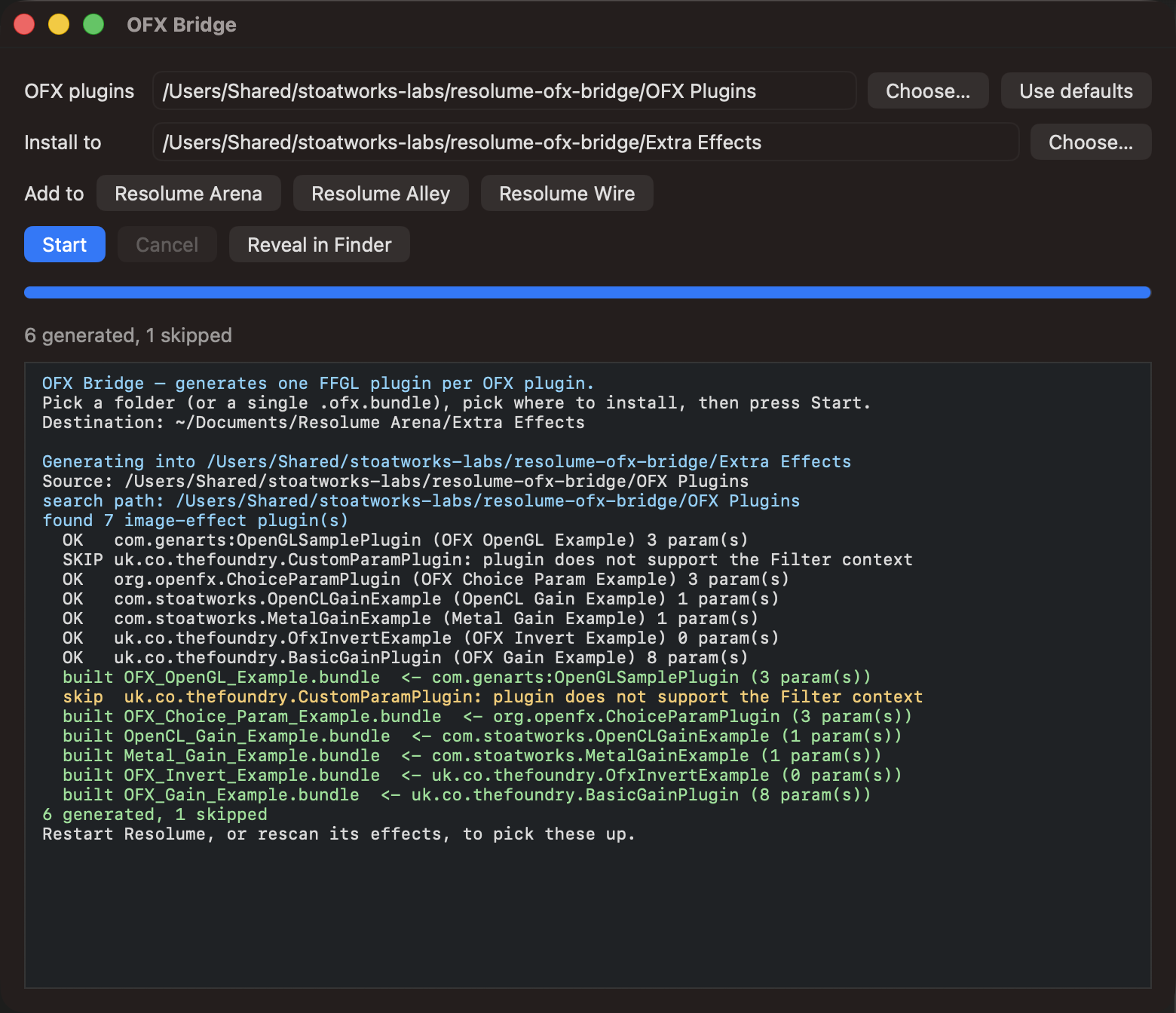
The Add to buttons fill in the destination for whichever Resolume products are installed.
Only Arena and Avenue are known to scan an Extra Effects folder — buttons appear for Alley and
Wire because that is where they would look if support arrives, and clicking one says so in the
log.
Then rescan effects in Resolume.
The app clears macOS quarantine from what it writes, which matters more than it sounds: a quarantined plugin makes Resolume skip it silently rather than prompt. If plugins still fail to appear after being copied around by something else:
xattr -dr com.apple.quarantine ~/Documents/Resolume\ Arena/Extra\ Effects
From the command line
./ofxgen generate --out ~/Documents/Resolume\ Arena/Extra\ EffectsThat scans the conventional OFX locations for your platform (plus anything on OFX_PLUGIN_PATH).
Add --dir to scan elsewhere, or --bundle /path/to/one.ofx.bundle for a single plugin.
“I have Resolve, so I have OFX plugins” — probably not
There is most likely no OFX plugin on your machine even if you have Resolve. Resolve compiles
its own ResolveFX into the application rather than installing loadable bundles, so
/Library/OFX/Plugins is usually empty.
To try the bridge with nothing installed, build a corpus from the OpenFX examples:
./scripts/build-test-plugins.sh
./build/ofxgen generate --dir build/test-plugins --out build/generated

Neither image is a mock-up; both are written straight out of the plugin’s framebuffer.
Why one bundle per plugin, not a dropdown
The obvious design is a single “OFX Host” effect with a dropdown listing your plugins. FFGL cannot express that.
FFGL 2.2 can change a parameter’s display name, visibility and dropdown elements at runtime — but its header explicitly lists range and default-value changes as not supported, and a parameter’s type is fixed when the plugin loads. A dropdown wrapper would have to declare a fixed pool of pre-typed 0–1 sliders and rename them: every parameter would lose its real units, and any plugin with more parameters of a type than the pool has slots would be unrepresentable.
Generating one bundle per plugin keeps each parameter exactly as its author declared it — a 0–100 range stays 0–100.
Speed: which path your plugin takes
| The plugin advertises | What happens | Speed at 1080p |
|---|---|---|
| OFX Metal render | Renders on the GPU, no CPU round trip | 5.4× CPU |
| OFX OpenGL render | GPU, supported | — |
| OpenCL | Implemented and verified | 4.2× CPU |
| Anything else | CPU path — a full GPU → CPU → GPU trip per frame | baseline |
Metal is what Resolve-targeted plugins on macOS use, and Metal wins when a plugin offers both Metal and OpenCL.

What won’t work
- Only the Filter context is hosted — that is what maps onto an effect slot in a Resolume clip. Generator, Transition and General-only plugins are reported and skipped.
- Licensed commercial plugins will mostly refuse to load. The bridge identifies itself honestly as its own host, and many commercial OFX plugins only license themselves to hosts they recognise. That is the vendor’s decision and is deliberately not worked around here.
- CUDA plugins are declined cleanly. The path is written but never compiled or run — it needs an NVIDIA GPU, which macOS has not supported since 10.13. The host does not advertise CUDA, so such plugins are refused rather than half-run.
- OpenGL-render plugins must use core-profile GL. Immediate-mode drawing is illegal in a core profile, and macOS has no compatibility profile above 2.1.
- Parametric (curve) parameters are declined — FFGL has no equivalent, and any flattening would misrepresent the plugin’s UI.
Working out why a plugin didn’t appear
The tools exist for exactly this, and in this order:
./build/ofxgen list                      # what was found, and why anything was skipped
./build/ofxprobe --dir /path/to/plugins  # a plugin's contexts and parameters
./build/ofxgen verify <bundle>           # load a generated bundle as a host would
./build/ffgltest <bundle>                # drive it through a real OpenGL context
ofxgen list is the first stop: a plugin that is skipped says so, with a reason.
ofxgen verify shows what survived the mapping. For the Gain example, eight OFX parameters
become six FFGL ones — the group and page carry no value of their own, the group becomes a
heading on its children, and the 0–100 ranges survive intact.
The other directions: FFGL and After Effects plugins in Resolve
Since v0.8.0 the bridge also runs the other way. If you have an FFGL effect —
one of the Stoatworks set, or any third-party one — wrap-ffgl turns it into
an OpenFX plugin that Resolve, Vegas, Nuke and Natron load:
ofxgen wrap-ffgl --bundle Tinsel.bundle --out /Library/OFX/PluginsAnd an After Effects plugin can cross too, on the bridge’s built-in minimal AE host:
ofxgen wrap-ae --bundle "Luma Key.plugin" --out /Library/OFX/PluginsTo carry an After Effects plugin all the way into Resolume, run the two
generators in sequence — wrap-ae first, then generate on its output.
Three honesty notes. Wrapped FFGL effects render at 8 bits per channel (FFGL is an 8-bit world) and one at a time. Effects that keep their own clock will behave oddly when the host scrubs. And the AE host is deliberately minimal: plain CPU effects work; plugins that need GPU suites, custom UI or a licence check against a running After Effects are refused with the missing piece named in the log rather than guessed around.
Troubleshooting
| Symptom | Cause |
|---|---|
| No plugins found at all | Very likely there are none installed — Resolve doesn’t install loadable bundles. Build the test corpus. |
| A plugin was skipped | Run ofxgen list for the reason: wrong context, parametric parameters, or CUDA-only. |
| Bundle generated but Resolume doesn’t show it | Quarantine, almost always — Resolume skips a quarantined plugin silently. Clear it, then rescan effects. |
| A commercial plugin refuses to license | Expected. It only licenses to hosts it recognises, and the bridge does not spoof one. |
| Effect renders but is slow | It is on the CPU path — a full GPU round trip per frame. Check whether it advertises Metal. |
| OpenGL-render plugin draws nothing | It probably uses immediate-mode GL, which a core profile forbids. |
| A Metal or OpenCL plugin is declined on Windows | Expected — both interops are macOS. The plugin is turned down at describe time rather than failing mid-frame. |
| Linux build | Never compiled. macOS and Windows x64 only. |
See also
- 01-architecture.md — why a generator, and how a copied binary knows which plugin it is
- 02-parameter-mapping.md — how each OFX parameter type becomes FFGL parameters
- 03-verification.md — what is actually tested, and what is not
- 04-gpu-acceleration.md — where a frame actually goes
- README — the tool list and downloads