

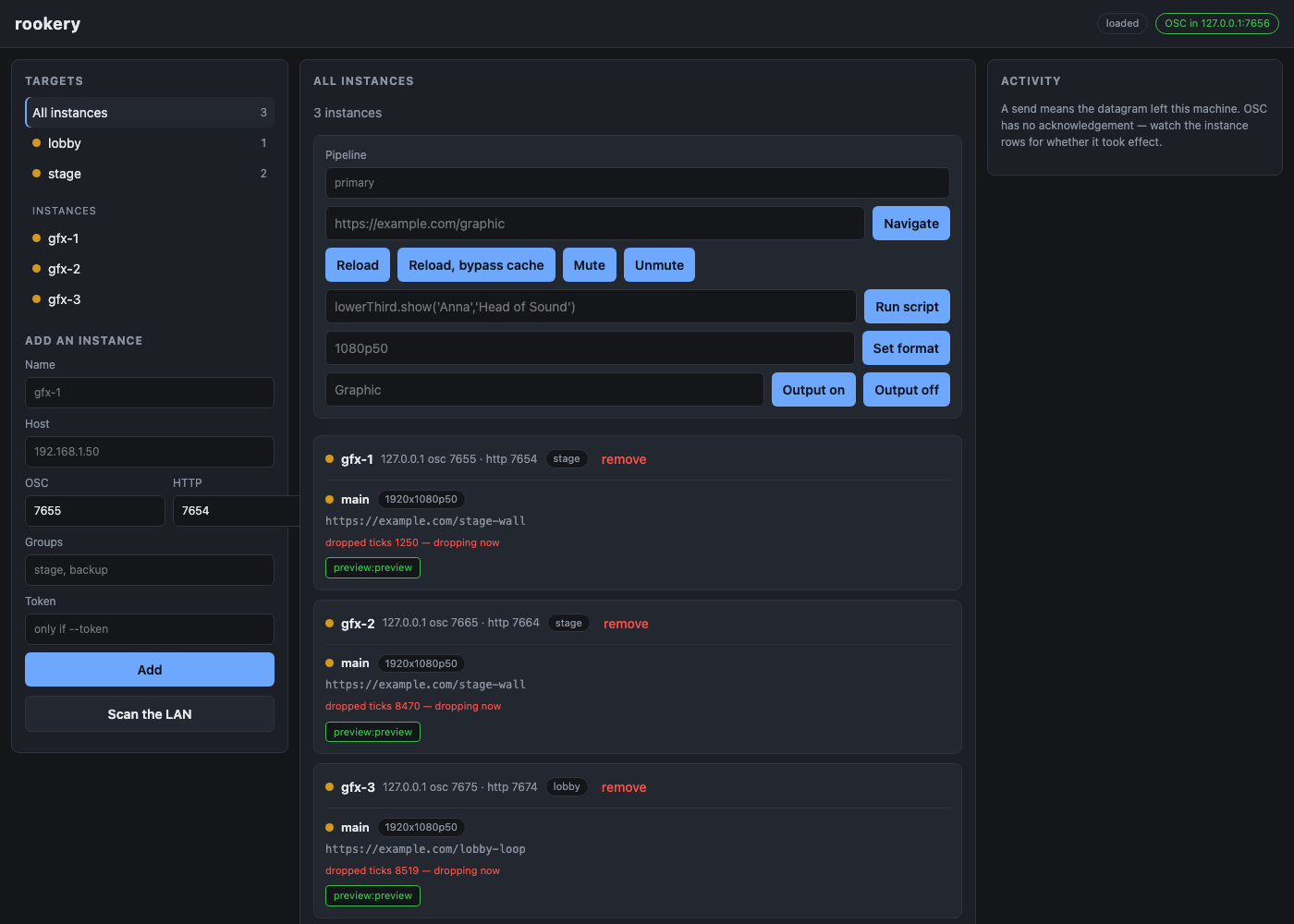
rookery is one web UI for driving any number of WebLinked instances at once. Tag them into groups, see every instance’s state on one screen, and change what is on air across a whole group with one action — or one OSC cue from a lighting desk.
Before you rely on this: treat it as an early-stage project. It has been exercised end to end against three real WebLinked instances on one machine — see verification.md for exactly what that covers. It has not been run across a real multi-machine rig, and it has not been through a show.
This codebase was created with AI assistance, directed and reviewed by a human author.
The one thing that will catch you out
WebLinked binds its HTTP server to 127.0.0.1 by default. Start each instance with
--bind 0.0.0.0 or rookery cannot poll it:
weblinked --url https://example.com --ndi=Graphic --bind 0.0.0.0Without that, commands go out fine — WebLinked’s OSC listener is on 0.0.0.0 already — and
no state ever comes back. The instance shows as unreachable while quietly doing everything you
tell it. rookery reports that honestly rather than guessing, but it is worth knowing before you go
looking for a network fault that is not there.
Getting started
cp config/example.toml config/rookery.toml
./rookery config/rookery.toml
Open http://127.0.0.1:8090, add an instance by hostname, and give it a group tag.
Groups come from tags, and an instance can be in as many as you like. There is no group object to maintain, and membership is resolved when a command is sent — so retagging takes effect on the next cue rather than needing anything rebuilt.
Discovery browses for the advertisement WebLinked publishes from 0.8.0 — which carries its
OSC port and prefix, the two things its HTTP API cannot report — backed by an active subnet
probe for older instances, instances started with --no-mdns, and networks where multicast is
filtered.
A send is not a confirmation
This is the design fact to internalise before relying on rookery.
OSC over UDP has no acknowledgement, and WebLinked sends nothing back. So when rookery says a command was sent, it means exactly one thing: the datagram left this machine. It does not mean the instance received it, parsed it, or acted on it.
That is why rookery polls every instance’s HTTP API. The dashboard is the confirmation, not the send. Nothing in the UI or the API presents a successful send as a confirmed change, and it never will — the network cannot support the claim.
Every response is a per-instance breakdown, never a single ok:
{
  "target": "group \"stage\"",
  "entries": [
    { "instance_name": "gfx-1", "sent": true,  "error": null },
    { "instance_name": "gfx-2", "sent": false, "error": "cannot resolve gfx-2.local:7655" }
  ]
}
Health: what the dots mean
| Dot | Means |
|---|---|
| green | Running, no output errors, keeping up with its clock |
| amber | Dropping ticks right now, or an output that is enabled but not running |
| red | An output reported an error — a card in use, a format it cannot do |
| grey (stopped) | The source is not running |
| grey (unknown) | Not polled, or not yet heard from. Never guessed at |
“Dropping ticks right now” is a delta, not a total. WebLinked’s dropped-tick count is cumulative since it started, and a healthy instance accumulates them — a real one measured here sat at 346 out of 2205 and climbing, purely because macOS throttles a backgrounded process. Colouring on the total would paint every mature instance permanently amber, and an indicator that is always amber tells an operator nothing. rookery compares successive polls instead.
Seeing what is on air
Each instance shows a live picture of its own output. Click one to open it larger.
Interaction is off until you arm it. The large view has a Take control toggle; until you press it the picture is view-only and a stray click does nothing. Armed, the pane turns red and mouse and keyboard go straight into the page — which, on a machine that is on air, changes what the audience sees. Esc releases it.
What the preview costs, and the lever
WebLinked’s preview is a raw BGRA buffer — 8.3 MB a frame at its default factor. rookery never
puts that on the browser: it fetches it, encodes JPEG, and hangs an ETag on WebLinked’s paint
counter, so a graphic that is not moving costs a 304 with no body at all.
Measured on three instances at ~4 fps: 0.19 Mbit/s for animated pages, zero for static ones. Without the JPEG and the ETag the same three would be 95 MB/s.
The remaining lever is the instance’s own preview factor, offered per instance in the large view. It is opt-in, because the factor belongs to that instance’s preview output — turning it down also shrinks the picture on that machine’s own control page.
factor 1  1920x1080   8.3 MB raw     (the default if you set nothing)
factor 4   480x270    518 KB raw
factor 8   240x135    130 KB raw  ->  about 2 KB as JPEG
Driving it from a desk
Enable the northbound listener in config/rookery.toml:
osc_bind = "0.0.0.0:7656"/rookery/all/<verb>
/rookery/group/<tag>/<verb>
/rookery/instance/<name-or-id>/<verb>
/rookery/group/<tag>/source/<source-id>/<verb>The verbs are WebLinked’s own, unchanged — url, reload, script, mute, format,
output/<name>. So a Companion button or a QLab cue already aimed at one WebLinked becomes a
whole-group button by editing the front of the address:
before:  /weblinked/source/lower-third/output/Graphic
after:   /rookery/group/stage/source/lower-third/output/Graphic
Everything the UI does is also available over HTTP — see protocol.md for the full grammar.
Security
rookery has no authentication, and neither does the thing it drives.
WebLinked’s OSC listener accepts commands from anyone who can reach its UDP port — that is the
protocol, not a choice either project made. WebLinked’s --token only covers its HTTP API.
Putting a login on rookery alone would look like protection it cannot provide, so there is not one. Treat rookery, its northbound OSC port and every instance it manages as one trust boundary, on a network you control.
If something is wrong
An instance shows unreachable but is clearly working. It is bound to loopback. See the top of this guide.
A command reported sent and nothing changed. Sent means the datagram left. Read the dashboard, not the response.
Every instance is permanently amber. It should not be — the dot is a delta. If it is, they really are dropping ticks continuously, which on a backgrounded macOS process is expected.
A preview is eating bandwidth. Lower that instance’s preview factor from the large view, and remember it shrinks the picture on that machine’s own control page too.
Discovery finds nothing. Instances older than 0.8.0 do not advertise, --no-mdns disables it,
and multicast is filtered on many venue networks. The active subnet probe covers those; failing
that, add by hostname.