

Schlieren is an FFGL effect for Resolume Arena and Avenue that fires a pulse of sound from a loudspeaker on every beat and shows you your clip through the air it travels in, the way a schlieren camera would.
You can’t see sound, which in most venues is a mercy. You can see what it does to light, though. A pressure wave squeezes the air, squeezed air bends light towards it by a few millionths of a radian, and in 1864 August Toepler worked out that a knife edge at the focus of a lens turns those tiny bends into light and shade. Nothing in the picture is drawn. The rings, the light and dark either side of them, the crack of a loud hit and the echoes off the edges of the frame are the air and the optics, worked out in real units.
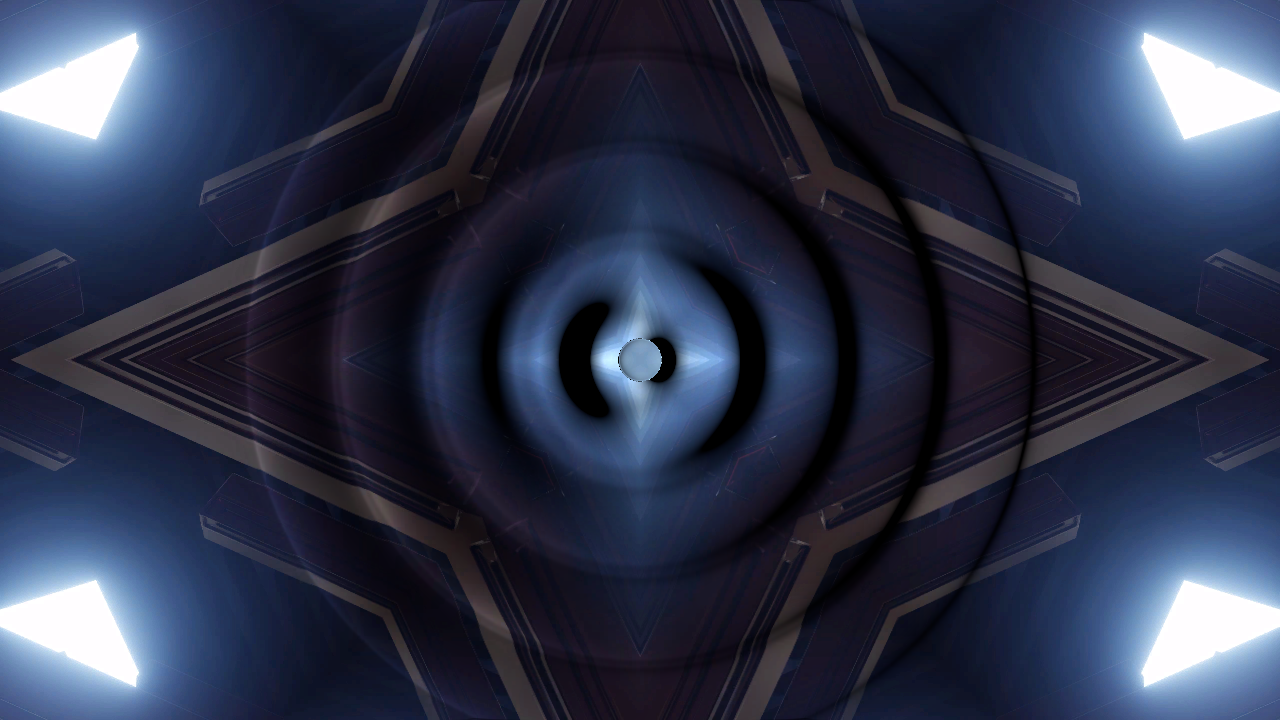
Resolume’s bundled IntoTheGlow_02 through the plugin on its defaults at 120 BPM, rendered by the offline harness rather than captured from Resolume. 2.8 seconds in, five beats’ worth of rings are in the air, the oldest nearly at the frame’s edge. Each is a band of light on one side and shadow on the other, and the clip’s lines bend where the rings cross them.
Before you rely on this: it’s at v0.1.0, the first release, and very early days. The air and the optics are measured rather than asserted, by a harness that drives the plugin’s own class on an Apple Silicon Mac (macOS 26.4.1), at two rasters and again on Apple’s software renderer. Every pulse leaves within 6e-14 s of its beat, and its front is where the speed of sound puts it, to the pixel. The beam’s view of each pulse matches a brute-force line-of-sight integral to 2e-6 of its peak (2e-4 right at a Blast’s shock front). Shocks form where weak-shock theory says they should, and agree with an independent Godunov solver and with closed forms. Each of the four optics obeys its law at every pixel sampled, and a rigid floor mirrors the field bit for bit. Sixteen models that are wrong on purpose and sixteen one-character changes to the shipped code are all caught, and all 21 controls the sweep can move measurably change the picture (the 22nd, Audio, is the input Threshold and Accent are swept through). It’s never been loaded into Resolume on macOS. The one host it’s run in on a Mac is the fleet’s own test host,
oxbow, for 120 frames. On Windows it loads, registers and renders in Resolume Arena 7.27.1, with every control as declared, on a machine with software rendering and no GPU or sound device. Eight controls measurably changed the picture there in one run and nine in another; the rest that act on the rings themselves were too close to call, because with a pulse on every beat the air never sits still long enough for the fleet’s test to tell a setting from the rings moving. No host has played it any music, so what Threshold and Accent make of Resolume’s own spectrum is untested. Try it on a spare layer before you put it in a show.This codebase was created with AI assistance, directed and reviewed by a human author.
Installing
Every download carries one effect, SW Schlieren. Drop it into Resolume’s effects folder and restart Resolume:
macOS    ~/Documents/Resolume Arena/Extra Effects/
Windows  %USERPROFILE%\Documents\Resolume Arena\Extra Effects\
Avenue uses the same layout under its own folder name. The effect then shows up in the effects browser as SW Schlieren.
The macOS download is a universal build (Apple silicon and Intel), as a .dmg or a .zip. It’s
Developer ID-signed and notarised, so the bundle just loads. The Windows download is an x64
installer or a .zip. It isn’t code-signed, so the installer trips SmartScreen once:
More info → Run anyway.
A speaker, some air and a camera
The plugin is the whole chain, and the picture is the light through it:
- The speaker is a 20 cm sphere. On each beat (or onset, or press of Fire) it fires one short pulse: a Pop, a Kick or a Blast.
- The air carries the pulse away as a spherical sound wave at 343.2 m/s, fading as 1/r. A loud one steepens as it goes, because its compressions travel slightly faster than sound and catch up with the air in front of them, until they’re shocks.
- The beam runs straight through the air, at right angles to the frame, and sees the pressure added up along its path. Where that changes across the frame the light is bent, in proportion to air’s Gladstone–Dale constant.
- The optics turn the bending into a picture: a knife edge, a colour wheel, a shadow on a screen some way off, or the clip seen through the air as a backdrop.
| what you see | what causes it | group |
|---|---|---|
| a ring on every beat | a pulse leaves the speaker on the beat and spreads at the speed of sound, slowed down by the camera | Beat, Air |
| light on one side of a ring, shadow on the other | a knife edge passes only the light bent towards its open side | Optics |
| rings fading as they grow | the pulse thins out as 1/r, but the beam crosses the whole shell, so on screen it fades as one over the square root of the radius | Speaker |
| sharp fronts on loud or short pulses | compressions catching up with the air in front of them, as shocks | Speaker |
| the clip bending where a ring crosses it | the camera is focused beyond the air, so bent light lands somewhere else | Optics |
| bright lines and dark gaps | on a shadowgraph’s screen, bent light piles up into caustics, like light on the floor of a swimming pool | Optics |
| echoes that cross each other | the edges of the frame are walls, and every ring comes back off them | Air |
The one cheat is the camera. Sound gets from the middle of a six-metre frame to its edge in under 9 ms, so the camera is a high-speed one: that’s Slow Motion. The beats still arrive in real time, though, and each one fires a pulse that you then watch slowed down. A camera that slowed the beats down too would show you, at 120 BPM and the default 400×, one ring every three minutes or so.
Start here
Put SW Schlieren on a layer with something in it and leave every control where it is. The defaults are a starting pistol’s crack, half a millisecond long at 165 dB, fired on every beat from the middle of six metres of air and filmed at 400×, through a knife edge set to double the light at 12 arcseconds of bend and focused 150 m beyond the air. A ring leaves the middle on every beat of Resolume’s tempo, light on one side and dark on the other, and the clip bends as it passes.
Then, in this order:
- Grey Field up to 1. That’s a classic grey schlieren photograph, the rings and none of the clip. Bring it back to about a third to see both. A dark clip needs some Grey Field to show any rings at all.
- Knife Angle round: the light and shade turn with it. Sensitivity up makes the same rings stronger; down makes them fainter.
- Optics to Colour: a colour wheel where the knife was, so the colour says which way the light bent.
- Optics to Shadowgraph, and Distance to the middle of its slider (a screen a kilometre away). The bent light piles up into bright lines and leaves dark gaps.
- Optics to Background, and Distance a little past the middle: the clip becomes a backdrop a kilometre or two behind the air, and it ripples where the rings cross it.
- Back to Knife Edge with Distance at 0, then Pulse to Blast and Loudness up to about 0.85 (180 dB). The fronts crack into shocks.
- Walls to Box, Speaker X and Speaker Y towards a corner, and Fire On to Half Beat. The rings come back off the frame’s edges and cross each other.
- Fire On to Onset, and point Audio at the music: a pulse on each hit, the softer ones quieter by Accent.
Slow Motion sets the pace. Sound does 343 m a second; at 400× that’s 86 cm of air per second of your time. In the default 6 m frame at 16:9, a ring reaches the top and bottom edges in about two seconds and the sides in about three and a half. Halve Slow Motion and every ring goes twice as fast; the beats don’t change. Widen Field Width and the same ring is smaller on screen and takes longer to reach the edge.
Time comes from the host
The rings travel so many metres a second, so the plugin has to know what a second is, and it takes it from the host’s clock. When the host’s clock stops, the rings stop with it. A stall or a jump forward moves the air on by a quarter of a second at most, and a step backwards passes no time. For the first few frames after it loads, while it works out whether the host counts in seconds or milliseconds, the plugin runs on a steady clock of its own.
There are two clocks. The beats arrive on the host’s, in real seconds; the air runs on the camera’s, Slow Motion times slower. Each pulse is stamped with the moment it left the speaker in the air’s time, so changing Slow Motion changes how fast every ring moves from then on, and doesn’t move any of them.
The beat comes from Resolume. When a beat falls between two frames, its pulse is fired at the point inside the frame where the beat fell rather than at the frame’s start, so each ring’s radius is right to the beat rather than to the frame. A press of Fire and an onset carry no such moment, so they’re fired at the start of the frame that saw them. A host that sends no beat gets a clock of the plugin’s own, at the host’s tempo if it gives one and 120 BPM if not, so Fire On is never dead.
When a ring shows. The speaker’s cone starts to move on the beat, but each shape takes a moment to build, and Slow Motion stretches that wait like everything else. A Blast leaves as a shock on the beat itself. A Kick’s first compression peaks a fifth of a Length later. A Pop builds up and peaks two Lengths after the beat: at the defaults that’s 1 ms of air, which at 400× is 0.4 s of your time. A shorter Length, less Slow Motion or a Blast bring the ring closer to the beat.
Changing the composition’s resolution keeps the air. The pulses live in metres, not pixels.
The Beat group
Every slider in the inspector runs from 0 to 1. The ranges below are what those positions mean, and for the sliders that aren’t linear, where the middle is.
- Fire On: Beat (the default), Half Beat, 2 Beats, Bar, Onset or Off. The first four follow Resolume’s tempo: every beat, every quaver, every other beat or once a bar. Onset fires on each hit found in Audio. Off fires only when you press Fire.
- Fire: a pulse now, at full Loudness, whatever Fire On says. One pulse per press.
- Audio: Resolume’s audio input, which the host fills with a 64-bin spectrum once a frame. In the other Stoatworks plugins with this input, Resolume draws it as an audio-source picker; I haven’t seen this one’s panel in Resolume yet. Onset and Accent read it. As it arrives once a frame, an onset lands on the frame after the hit at the earliest. With nothing routed, Onset never fires and every pulse is at Loudness.
- Threshold: how hard a hit has to be to count as an onset, 0 to 1 (default 0.4). An onset is a sudden rise across the spectrum, and Threshold sets how far it has to clear the music’s recent average: 1.15 times it at 0, 3.5 times at 1. Onsets are at least 80 ms apart. It only matters with Fire On on Onset.
- Accent: 0 to 30 dB (default 15): how far below Loudness the softest hit lands. A pulse is fired at Loudness less Accent times how far the music is below its own recent peak: on Onset, the level the hit arrived at; on the beat settings, the music’s level at that moment. That level is measured against the music’s peak over the last few seconds, so the same Accent means the same dynamics on a quiet stem and a mastered track. At 0 every pulse is the same. With no audio arriving every pulse is at Loudness, and a press of Fire always is.
The Speaker group
Loudness, Pulse, Length and where the speaker is are taken when a pulse fires. Change them and the next pulse has the new settings; the rings already in the air keep theirs.
-
Loudness: the pulse’s peak a metre from the speaker, 120 to 190 dB SPL, in a straight line (default 165, a starting pistol at a metre; the middle of the slider is 155). A louder pulse bends the light further and steepens into a shock sooner. Past roughly 170 dB the shocks are a good look rather than a prediction (see Known limits).
-
Pulse: the shape of the pressure the cone sends out.
- Pop (the default): a clap. A compression, then an equal rarefaction.
- Kick: a sine started smoothly, which rings for a few cycles as it dies away.
- Blast: a blast wave. It arrives as a shock and falls away into a long negative phase.
Every shape adds up to zero overall, as the pressure from a cone that comes back to rest has to, which is why the air behind each ring is still.
-
Length: 0.05 to 20 ms (default 0.5 ms; the middle of the slider is 1 ms). The time from the compression’s peak to the rarefaction’s trough, or for a Kick half the period of its ringing, so one Length is one size of ring whatever the shape. At the speed of sound, 1 ms is 34 cm of air. A shorter pulse steepens into a shock sooner.
-
Speaker X, Speaker Y: where the speaker is. Speaker X runs across the frame from the left, Speaker Y up it from the bottom edge (the Floor); both are 0.5, the middle, by default. Each pulse leaves from where the speaker was when it fired, so moving the speaker leaves the rings already in the air where they started.
The Air group
- Field Width: how much air the frame shows, 0.5 to 50 m across (default 6 m; the middle of the slider is 5 m). The height follows the clip’s shape. The same pulse is smaller on screen in a wider field and takes longer to cross it.
- Slow Motion: how much the camera slows the air down, 30× to 30 000× (default 400×; the middle of the slider is about 950×). That’s a camera running at 1 800 to 1 800 000 frames a second, played back at 60. The beats aren’t slowed (see Time comes from the host).
- Walls: Open (the default: nothing reflects), Floor (the frame’s bottom edge) or Box (all four edges). The walls are rigid, worked out as mirror images of the speaker, and a Box goes six reflections deep. Changing Walls changes the rings already in the air as well. Nothing echoes until a ring reaches an edge, which at the defaults takes about two seconds.
- Reflection: how much of a ring’s pressure each wall sends back, 0 to 1 (default 0.8). It does nothing with Walls on Open.
- Clear: lets every pulse go at once. Fire On carries on firing new ones.
A pulse is let go by itself once it’s left the frame and nothing it could still do would show. At most 24 are in the air at once: a 25th lets the oldest go, echoes and all.
The Optics group
Optics is what turns the bent light into a picture, and the first control in the group:
| Optics | what it is | what it does to each pixel |
|---|---|---|
| Knife Edge (the default) | Toepler’s schlieren: a knife edge where the light source is focused | scales its light by 1 plus the bend along Knife Angle over Sensitivity, from black up to double |
| Colour | colour schlieren: a colour wheel there instead, clear in the middle | tints it: the hue is the way the light bent, measured from Knife Angle, and the saturation is how far, against Sensitivity |
| Shadowgraph | no filter: a screen Distance beyond the air | moves its light by Distance times the bend, concentrated or spread by how the bend changes across the frame |
| Background | background-oriented schlieren: the clip is a backdrop Distance behind the air | shows the clip as seen from there, displaced by Distance times the bend |
On Knife Edge and Colour, the camera is focused Distance beyond the air too. At 0 it’s focused on the air itself and only the knife or the wheel changes the picture; further out, the light is moved and concentrated as it would be on the shadowgraph’s screen before the knife or the wheel gets to it. The colour wheel passes as much light on average as its clear middle.
- Knife Angle: which way the knife faces, 0 to 360° (default 0). At 0 the edge is upright and light bent to the right gets brighter; turn it and the light and shade turn round every ring. On Colour it turns the wheel. It does nothing on Shadowgraph or Background.
- Sensitivity: the bend that doubles the light through the knife (and, bent the other way, cuts it to black), from 50 arcseconds at the left of the slider to 0.05 at the right (default 12; the middle is 1.6). On Colour it’s the bend that fully saturates the wheel, and in the Deflection view it’s full scale. It does nothing to the picture on Shadowgraph or Background. The default pulse bends light by a few arcseconds, which is why schlieren systems are built to see fractions of one.
- Distance: 0 at the bottom of its travel, then 10 m to 100 km (default 150 m; the middle of the slider is 1 km, a quarter of the way is 100 m and three-quarters is 10 km). On Knife Edge and Colour it’s where the camera is focused, beyond the air. On Shadowgraph it’s how far away the screen is, and on Background how far behind the air the backdrop stands. At 0, Shadowgraph and Background show the clip unchanged.
- Grey Field: mixes the bare schlieren field, a flat mid-grey, into the clip before the optics, 0 to 1 (default 0). At 1 it’s a classic grey schlieren photograph, with nothing of the clip left. The knife and the wheel work by brightening and darkening the light they’re given, and black doubled is still black, so a dark clip needs some of this to show rings. It also takes the output’s alpha to 1 as it goes up. It does nothing on Background, where you’re looking at the clip itself.
Why kilometres. A sound wave bends light by a few arcseconds, and an arcsecond doesn’t move light far. In a 6 m frame 1280 pixels wide, a pixel is about 5 mm of air, and it takes about a kilometre for an arcsecond of bend to move light that far. Real background-oriented schlieren uses distant hills for the same reason, and NASA has photographed supersonic shocks against the desert floor from a plane flying above them. Nothing’s been scaled up to look better: the distances are what the physics needs.
The Output group
- View: Picture (the default) is the clip through the optics. The other two show the air on
its own, whatever Optics and Distance are set to:
- Pressure: the pressure the beam sees, added up along its path, as grey. Mid-grey is still air, lighter is compression and darker is rarefaction, scaled to the strongest pulse in the air.
- Deflection: how far and which way the light is bent, with the bend across the frame as red and up it as green. Mid is no bend, and full scale is Sensitivity.
- Mix: the result over the clip, 0 to 1 (default 1). At 0 the clip goes through untouched.
How it works
Every frame:
- The pulses, on the CPU. Whatever the beat, the onsets and Fire call for is fired. Each pulse in the air is steepened to the age its centre has reached, by weak-shock theory: the waveform’s exact entropy solution, shocks and all, worked out on 2048 samples. It’s then laid out by radius as a shell, simplified to at most 256 points. The walls are mirror images of the speaker, and the strongest 128 images that can still change the picture are sent on.
- The beam, on the GPU. For each pulse, the pressure along every line of sight through its shell (an Abel transform) is worked out in closed form into a table of 2048 entries. Each pixel then adds up every image’s share.
- The optics. The bend at each pixel is the slope of that sum across two pixels, times air’s Gladstone–Dale constant over the speed of sound squared. Then the knife, the wheel, the screen or the backdrop, and Mix. The knife, the wheel and the screen change how much light arrives, so they work in linear light.
The air is dry air at 20 °C and one atmosphere: sound at 343.2 m/s, a density of 1.204 kg/m³ and a refractive index of 1.000272. With nothing in the air and Grey Field at 0, the picture is the clip, untouched.
Performance
Measured by the offline harness on a Mac (Apple silicon), GPU time per frame, median of 120 frames after a warm-up, on a GPU shared with other work, so the small numbers wobble from run to run:
| 720p | 1080p | 4K | |
|---|---|---|---|
| the defaults: 120 BPM, about eleven pulses in the air | 0.43 ms | 0.54 ms | 1.91 ms |
| Half Beat in a box of rigid walls, on Shadowgraph: up to 107 images in the air | 0.60 ms | 1.10 ms | 4.04 ms |
The busy case at 4K is about a quarter of a 60 fps frame. Nothing was timed inside Resolume, and nothing was timed on Windows.
If it looks wrong
No rings at all. Check Fire On: on Off only Fire makes a pulse, and on Onset nothing fires until audio is arriving. Check Mix is up. On Shadowgraph and Background, Distance at 0 puts the screen or the backdrop in the air itself, so the picture is the clip.
Rings on a bright clip, nothing on a dark one. The knife and the wheel brighten and darken the light they’re given, and black doubled is still black. Bring Grey Field up.
Everything round the rings is blown out to black and white. Sensitivity is too high for the Loudness, or Distance too far. Bring Sensitivity down first.
The rings come late. A Pop’s strongest part leaves the speaker two Lengths after the beat, slowed by Slow Motion: 0.4 s at the defaults. Shorten Length, lower Slow Motion or use a Blast, which leaves on the beat.
Changing Loudness, Pulse or Length does nothing. They apply from the next pulse. The rings already in the air keep what they were fired with, and so does where they came from.
Knife Angle or Sensitivity does nothing. There’s no knife on Shadowgraph or Background (Sensitivity still sets the Deflection view’s scale there). Grey Field does nothing on Background either.
Threshold or Accent does nothing. Threshold only matters with Fire On on Onset. Accent needs audio arriving at the Audio input, and a press of Fire is always at full Loudness.
Reflection does nothing. Walls is on Open. With walls on, nothing echoes until a ring reaches an edge.
The effect does nothing at all. That’s what a shader that won’t compile looks like. The actual error is in the log:
macOS    ~/Library/Logs/schlieren/schlieren.YYYY-MM-DD.log
Windows  %LOCALAPPDATA%\schlieren\logs\schlieren.YYYY-MM-DD.log
It records the build, the GL vendor, renderer and version at load, which shader failed if one did, and what unit the host’s clock arrives in.
Known limits
- Never loaded into Resolume on macOS, and no host has played it any music. How the 22 controls in five groups read in the inspector on a Mac is untested. What’s been run on Windows is in the box at the top.
- The inspector shows slider positions, not decibels, metres or arcseconds. This guide gives the ranges, and where the middle of each slider is.
- Resolume’s spectrum is unmeasured. Nobody has measured what level Resolume’s bins carry, so Threshold’s scale and how many decibels Accent takes off a soft hit are guesses that worked on the harness’s music.
- Weak-shock theory has a range. It’s honest up to about a third of an atmosphere at the speaker. Past roughly 170 dB at a metre, the shocks are a good look rather than a prediction.
- A pulse is steepened at one radius, its centre’s. The error that makes in a shock’s position is a percent or two, once there’s a shock worth having.
- Echoes are added up as if the air were linear, shocks and all. A shock meeting its own echo does nothing clever (there are no Mach stems).
- The shadowgraph past a caustic shows the nearest branch’s light, capped at sixteen times, so it doesn’t conserve light there. Before the first caustic it does.
- The beam runs through all of the air in depth, as if the test section never ended. For a spherical pulse smaller than the test section, that comes to the same thing.
- The air is fixed: dry, at 20 °C and one atmosphere. There’s no control for it.
- The speaker isn’t drawn. You see its pulses, not the speaker.
- At most 24 pulses are in the air, and 128 images of them reach the GPU; the oldest pulses and the weakest images go first.
- No presets, no browser demo and no OpenFX version.
About
The last group, About, has the plugin’s name, version, licence and maker, and buttons that open this user guide, the project page, the source on GitHub and the support page in your browser.
Reporting something
If something’s wrong, shout at github.com/stoatworks-labs/schlieren/issues. A screenshot, the Optics and Fire On settings and any controls you changed, whether audio was routed, and the composition’s resolution and frame rate are usually enough.