

Scrawl draws doodles to the music for Resolume Arena and Avenue, as two FFGL plugins: SW Scrawl, a source, and SW Scrawl Over, which does the same over your clip. Rings of sound come off the speakers, impact stars go off on the snare, a zigzag bolt lands on the big kicks, little curls float up off the hi-hats, and one long wobbly line across the frame is the music itself. It’s all redrawn twelve times a second by a hand that can’t hold still, so every line boils, which on a projector would be a service call.
It’s after the sound effects in Edgar Wright’s Scott Pilgrim vs. the World (2010), where a basement band’s noise gets drawn into the air in felt tip. Scrawl borrows the idea and none of the film’s artwork, and it has nothing to do with the film’s makers.
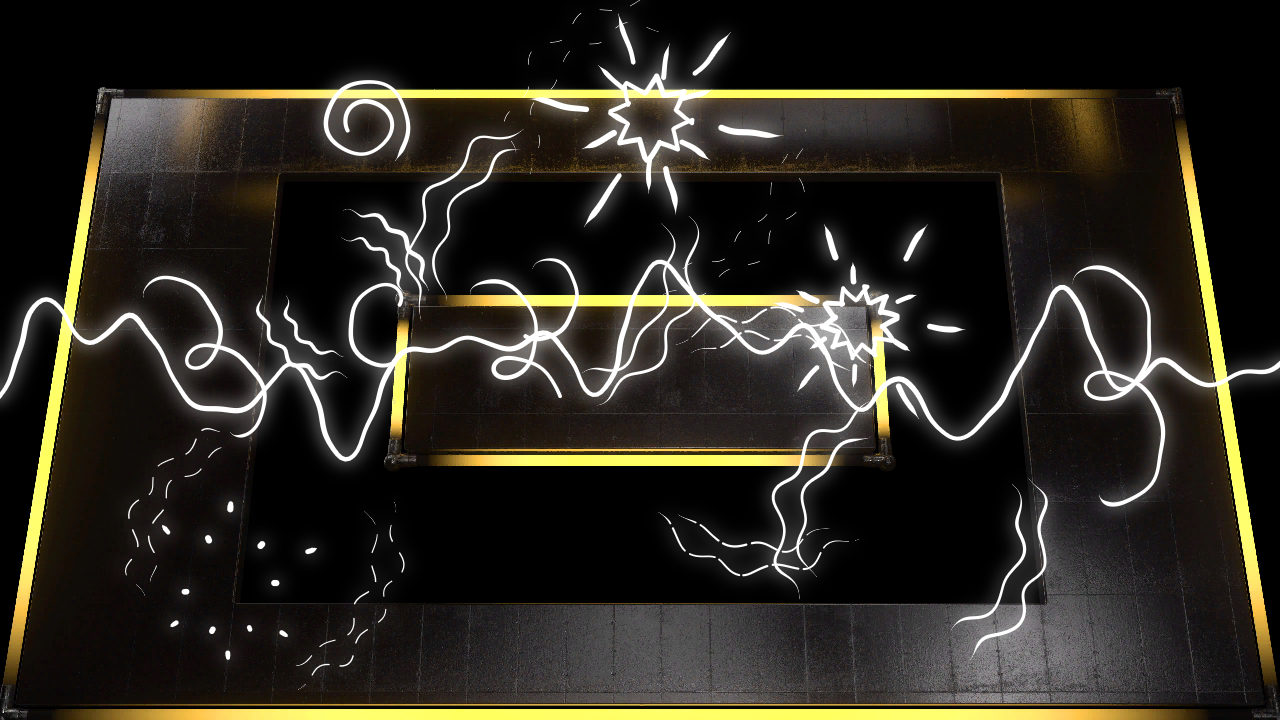
SW Scrawl Over at its defaults on Resolume’s own NeonRoom2 clip, with Resolume’s Beat 001 loop driving it through the harness’s stand-in for Resolume’s FFT, a second and a half in. Rendered by the plugin’s offline harness rather than captured from Resolume.
Before you rely on this: released at v0.1.0, the first release, and still early days. It has never been loaded into Resolume on macOS. It was built and measured on an Apple Silicon Mac (macOS 26.4.1) by its own harness, which drives the real plugin classes in a headless GL context. On twos the picture changes on the frames a new drawing starts on and on no others; the boil, read back out of the rendered picture, matches the hand’s law to 2–3%; a line’s cross-section sums to Line Width to 0.0023 px; and a kick is on the page in the first drawing made at or after its frame. On Resolume’s own drum loops each band’s onsets land on the sixteenth notes 80–100% of the time, against 36% by chance, but that’s through a stand-in for Resolume’s FFT, because nobody has measured what’s in its 64 bins. Fourteen models that are wrong on purpose are all detected, eight one-character changes to the shipped code are all caught, and every parameter but the Audio input and the About block (27 across the two plugins, counting the colour’s red, green and blue apart) measurably changes the picture. The only host it’s run in on a Mac is the fleet’s own test host,
oxbow, which reads both bundles the way a host does and renders through them. On Windows, both plugins load, register and draw in Resolume Arena 7.27.1, with every control as declared, on a machine with software rendering and no GPU or sound device, so it ran on the beat there. The fleet’s test of whether each control changes the picture could only confirm a handful (Backdrop, Centre Y, Drive), because the doodles change between any two frames it grabs; it found none dead. Looked at by eye in Arena’s own frames instead, the palettes, Backdrop, Passes, Wobble, Line Width, Size, Placement, the doodle mix and the effect’s Mix all did what this guide says. Try it on a spare layer before you put it in a show.This codebase was created with AI assistance, directed and reviewed by a human author.
Installing
Every download has both plugins in it, the source and the effect. On macOS they’re
Scrawl.bundle and Scrawl Over.bundle; on Windows, Scrawl.dll and Scrawl Over.dll. Put
both into Resolume’s effects folder and restart Resolume:
macOS    ~/Documents/Resolume Arena/Extra Effects/
Windows  %USERPROFILE%\Documents\Resolume Arena\Extra Effects\
Avenue uses the same layout under its own folder name. SW Scrawl then turns up among the sources and SW Scrawl Over among the effects.
The macOS download is a universal build (Apple silicon and Intel), as a .dmg or a .zip. It’s
Developer ID-signed and notarised, so the bundles just load. The Windows download is an x64
installer or a .zip. It isn’t code-signed, so the installer trips SmartScreen once: More
info → Run anyway.
Two plugins
- SW Scrawl (a source) draws the doodles on their own. With Backdrop on None (the default) there’s nothing behind them, so the layer goes over whatever’s underneath; Black puts them on black and Paper on a warm off-white.
- SW Scrawl Over (an effect) draws them over the clip it’s on. Its Backdrop goes under the clip, so it only shows where the clip is transparent.
The effect declares every one of the source’s controls and adds Mix, in a group of its own called Over, at the end after About, so a look built on one carries across to the other.
A hand that can’t hold still
Hand-drawn effects animation is drawn again for every drawing, twelve a second on twos, and no two passes of a pen land in the same place. Scrawl works the same way. Each doodle has an intended path (a ring, a spike, a zigzag) that changes only as the doodle ages, and each drawing of it gets its own error from the hand:
- the boil, a wobble sideways across the line: three sine waves along its length, whose wavelengths belong to the doodle (a hand has a character) and whose phases belong to the drawing;
- registration, the whole pass landing a little off and a little twisted, as when a sheet isn’t quite back on the pegs;
- pressure, the pen landing at the start of a stroke, lifting off at the end and pressing unevenly in between.
The error grows with the gesture, A = Wobble × (0.003 + 0.02 × extent) frame heights, so a big circle wanders further than a small tick. Between drawings everything holds still, the picture included, and the rest of the look follows from that:
- The line boils at 24, 12 or 8 drawings a second, and nothing moves in between, which is what makes hand-drawn animation look hand-drawn.
- Circles don’t close. A hand-drawn ring runs on past where it started, a little wide of it.
- Strokes taper where the pen lands and lifts, and a stroke that’s still being written stops abruptly at the pen.
- Wobble 0 is a plotter: no boil, no registration error and no wander in the pressure, so every drawing of a line lands in the same place.
- Passes draws everything two or three times with independent errors, for the sketchy doubled line.
The graphics card decides nothing. The hand makes every line on the CPU as a chain of capsules (short pieces of line with round ends); the shaders draw their union, blur a quarter-size copy for the glow and lay the result over the clip.
Start here
- Put SW Scrawl Over on a clip, or SW Scrawl on a layer of its own, and leave every control where it is. With no audio reaching it, Drive on Auto follows Resolume’s tempo: rings on every beat, a burst on two and four, a bolt on the one, curls on the “and”s, and the wave across the middle swelling on each beat.
- Point its Audio input at the music (see The Audio group). Once any sound arrives, Auto follows that instead: the kick draws rings, the snare bursts and the hi-hats curls, and the wave’s wiggle becomes the spectrum.
- Try Drawings on On Ones, On Twos and On Threes: 24, 12 or 8 new drawings a second.
- Move Wobble. At 0 every drawing of a line lands in the same place; towards 1 each one wanders further.
- Set Palette to Ink and Backdrop to Paper for black felt tip on paper, or Neon on Black. Passes on 2 or 3 gives the sketchy doubled line.
- Map Hit to a key, a MIDI note or a pad. It fires one of every doodle at full strength, whatever the music’s doing.
- If the rings land on the hi-hats or the curls on the kick, Bass Bins and Treble From move the bands (see The Audio group).
What sets them off
Drive picks what makes the doodles happen.
- Audio listens to the Audio input, the 64-bin spectrum Resolume hands every FFGL plugin, and runs three onset detectors on it, one each for the low, middle and high bands. Each compares how far its band’s bins rose since the last frame (the spectral flux) with its own running average, so a kick fires the low band and a hi-hat the high one even when the kick is ten times louder. The low band draws rings, the middle bursts and the high band curls, and a kick as hard as the hardest lately can draw a bolt as well. The detectors are primed on the plugin’s first frame, so they hear the first kick straight away instead of sitting deaf for a second and a half. In silence, Audio draws nothing at all, the wave included.
- Beat ignores the audio and follows Resolume’s tempo: rings on every beat (bigger on the one), a burst on two and four, a bolt on the one and curls on the “and”s. The wave swells on each beat and settles between.
- Auto, the default, follows the music while any sound has reached the Audio input in the last two seconds, and the beat otherwise, so it does something the moment you drop it on a layer.
How hard a hit was matters. Each onset’s strength is its band’s level on that frame against the band’s own recent peak, which fades over a few seconds, so a hit as hard as the hardest lately is full strength. Strength makes a doodle bigger, spreads a set of rings further, puts the star round a burst and decides whether a kick earns a bolt. Under Beat the strengths are fixed, and bursts are strong enough to get their star.
A doodle is born on the frame its hit arrives and turns up in the next drawing, which on twos is never more than a twelfth of a second later. A drawing shows each doodle as it is half-way through the drawing’s time on screen, so a hit on a drawing’s own frame is already on the page in it.
The Draw group
- Drive: Auto, Audio or Beat. See above.
- Hit: the button. One of each doodle at full strength, on the press, whatever Drive is doing: a set of rings, a burst, a bolt and a curl. A kind whose amount is 0 in the Doodles group stays out, and a bolt from Hit doesn’t wait for the last one.
- Drawings: On Ones, On Twos (the default) or On Threes: 24, 12 or 8 new drawings a second. Each drawing is held, the same picture to the bit, until the next.
- Wobble: how unsteady the hand is, 0 to 1 (default 0.5). It sets the size of the boil and the registration error (A above) and the pressure’s wander, which grows to ±15% at 0.5 and stays there. At 0 the hand is a plotter; the ends of a stroke still taper.
- Line Width: the pen’s full width, 0.0015 to 0.02 of the frame’s height (default 0.0065, which is 7 px at 1080p). It’s a share of the frame, so a look keeps its weight at any composition size.
- Passes: 1 to 3 (default 1). Each extra pass goes over every line again with its own hand error, thinner and lighter: the second at 72% of the width and 80% opacity, the third at 55% and 65%.
- Size: 0.5× to 2× every doodle and the wave’s height (default 1×, the middle of the slider). It doesn’t change Line Width.
- Linger: 0.5× to 2× every doodle’s lifetime (default 1×, the middle of the slider). At 1× a set of rings lives 0.9 s, a burst 0.42 s, a bolt 0.32 s and a curl 1 s. The wave isn’t a doodle, so Linger leaves it alone.
- Seed: 0 to 9999. Where each doodle lands, which way it faces, its shape, its colour under Neon and its hand’s character come from the Seed and how many doodles came before it; the wave’s colour and hand come from the Seed alone. The same Seed with the same music and controls draws the same thing, to the bit, from the moment the plugin loads.
The Doodles group
How much of each, 0 to 1. At 0 there are none of that kind at all. Each amount also scales its doodles, from 0.7× near the bottom to 1.2× at the top. At most 96 doodles are on the page at once, and one more pushes the oldest off.
| doodle | default | set off by | how it’s drawn |
|---|---|---|---|
| Rings | 0.7 | the kick (the low band) | 1–3 wavy lines spreading out from where the sound came from, thinning and breaking into dashes as they go |
| Bursts | 0.6 | the snare (the middle band) | spikes shooting out from an impact and shrinking to their tips; on a hard hit, a jagged star round it |
| Bolts | 0.4 | a kick as hard as the hardest lately | a zigzag with a fork, written in one drawing, flickering on alternate drawings, then gone |
| Curls | 0.5 | the hi-hats (the high band) | a loop-the-loop or a spiral, written on, drifting up, and wiped off from the tail |
| Wave | 0.5 | always, while there’s sound | a line across the frame whose wiggle is the spectrum |
- Rings: one line a set below 0.25, two from 0.25 and three from 0.75. Each set is written on in 0.08 s and spreads out, slowing as it goes and thinning all the while, and from just over half-way through its life it breaks into dashes. What shape the lines are depends on Placement (below).
- Bursts: 8 to 14 spikes, more the higher Bursts is, alternately long and short, shooting out in 0.07 s and then shrinking towards their tips. From 0.5 up, a hit of at least half strength also puts a jagged star round the impact, closed the way a hand closes one, by running on past the start, and wiped away from just before half-way through its life.
- Bolts: a zigzag of six to eight legs, written in 0.04 s, which is inside one drawing, with a fork from 0.5 up. Once it’s 45% of the way through its life it’s only there on every other drawing, then it’s gone. Under the music a bolt needs a kick whose strength reaches 1 − 0.5 × Bolts (0.8 at the default), no sooner than 0.4 + 1.6 × (1 − Bolts) seconds after the last (1.36 s at the default), so the shortest gap runs from nearly 2 s near the bottom of the slider to 0.4 s at the top. Under the beat there’s one on the one of every bar.
- Curls: a loop-the-loop of two or three loops or, one time in three, a spiral drawn from the outside in. Each is written on over 0.3 s (scaled by Linger), drifts upwards, within 40 degrees of straight up, and is wiped off from its tail from just past half-way through its life. From 0.67 up, each hi-hat (or each “and”, under the beat) draws two.
- Wave: the line across the frame. It’s six sine waves added together, one for each slice of the spectrum (bins 0, 1, 2–3, 4–7, 8–15 and 16–63), each drifting along at its own rate: the bass a slow swell of one and a half cycles across the frame, the top a fast fizz of fifteen. Each slice’s height is how loud it is against the whole spectrum’s recent peak, and Wave and Size scale the lot. The line keeps its full width until the music falls to about an eighth of its recent peak, thins below that, and is gone below about a fiftieth, so it goes in silence. Under the beat it swells on each beat and settles between. It isn’t spawned by anything, so Hit, Linger and the onsets don’t touch it.
The Place group
- Placement:
- Scatter (the default): each doodle starts somewhere in the middle 80% of the frame’s width
and 72% of its height. Rings are arcs either side of their point,
(( )), sound marks rather than bubbles. The wave runs across the middle. - Centre: everything comes from Centre X and Centre Y. Rings are full circles round it that never quite close, bursts and curls go off a little way out from it (further with Size), bolts shoot out from it, and the wave runs across at its height.
- Speakers: two stacks, either side and low, 16% of the frame’s width in from each edge and 14% of its height below the middle. Rings come off them in turn, as arcs facing the room; bursts go off just above a stack, bolts shoot inwards from one, and curls rise off them. The wave runs across at the speakers’ height.
- Scatter (the default): each doodle starts somewhere in the middle 80% of the frame’s width
and 72% of its height. Rings are arcs either side of their point,
- Centre X, Centre Y: where Centre is, from 0 to 1 across and up the frame (default the middle). Centre only: the other two placements ignore them.
The Look group
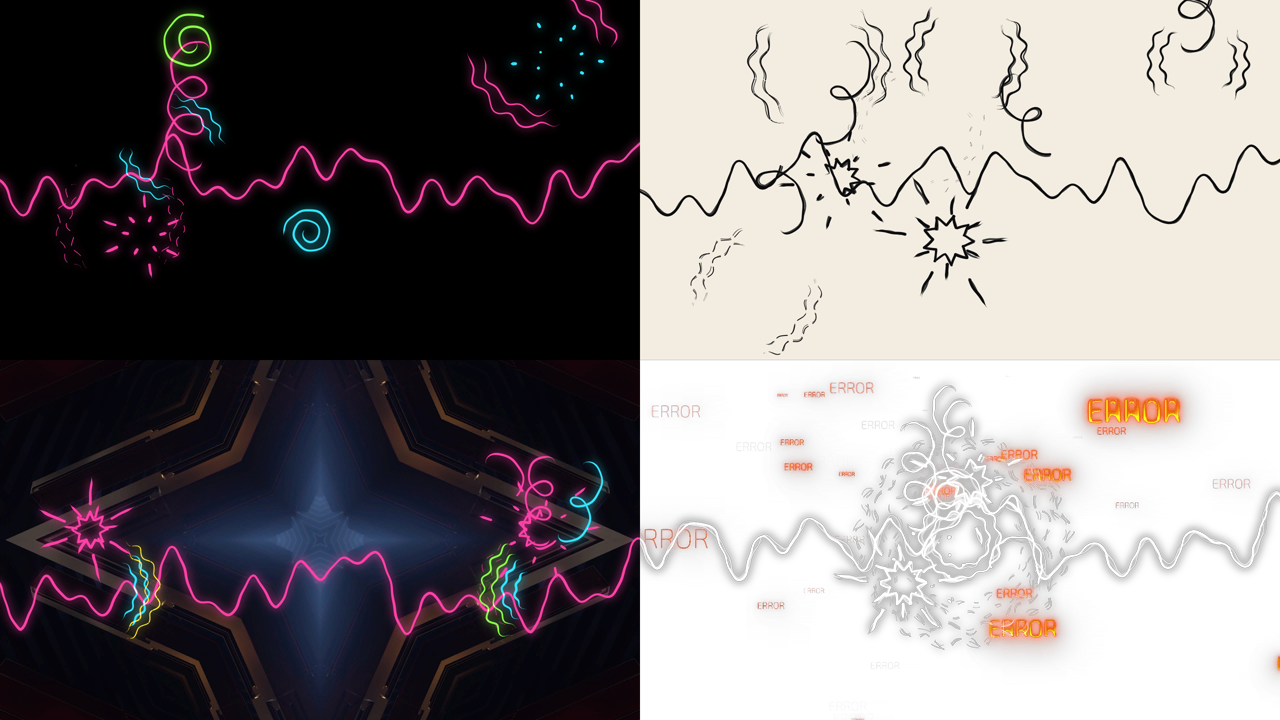
Top: Palette Neon on Backdrop Black, from the source, and Ink on Paper with two passes. Bottom: Placement Speakers over Resolume’s IntoTheGlow clip, and three passes at Wobble 0.9 round the Centre over its Cyberspace clip. Each has one of Resolume’s AV loops driving it through the stand-in FFT, and each was rendered by the offline harness.
- Palette: White (the default), Ink (a near-black, for paper), Neon (each doodle in one of hot pink, cyan, yellow, lime or violet, and the wave in one of them too) or Colour (everything in the Colour below). Where two lines cross, each colour channel takes the brighter of the two, so crossings read as light.
- Colour: the ink under Colour, a pink by default. Colour only.
- Glow: 0 to 1 (default 0.35). A soft halo under the lines: a quarter-size copy of the drawing, blurred by about 1.2% of the frame’s height (13 px at 1080p). It takes the lines’ colour, so under Ink it darkens round the line. 0 switches it off.
- Backdrop: None (the default: nothing behind the lines, so the source is transparent and the effect’s clip shows as it is), Black, or Paper (a warm off-white). On the effect it goes under the clip, so it only shows where the clip is transparent.
The Audio group
- Audio: the input, Resolume’s 64-bin spectrum of whatever audio you point it at. In the other Stoatworks plugins that declare this input, Resolume draws it as its own audio-source picker (Local, Composition or External). I haven’t seen Scrawl’s panel in Resolume on a Mac yet, so check it shows up the same way.
- Sensitivity: 0 to 1 (default 0.6). How easily an onset fires. A band’s flux has to beat its own running average by a margin, from 3.5 times the average at 0 down to 1.15 times at 1, so higher Sensitivity lets quieter notes count. A band fires at most once every 80 ms. Music only.
- Bass Bins: 1 to 8 (default 2). How many of the lowest bins are the low band, the kick’s: rings and bolts.
- Treble From: 4 to 48 (default 16). The bin the high band starts at, the hi-hats’: curls. Everything between the two is the middle band, the snare’s: bursts.
Nobody has measured Resolume’s bins. What frequencies its 64 bins cover, and whether they’re magnitudes or powers, hasn’t been measured for any of these plugins. The bands were checked through a stand-in: a 2048-sample Hann window, with magnitudes folded into 64 equal bins up to Nyquist. If Resolume spaces its bins differently, the rings will follow the wrong instrument, and Bass Bins and Treble From are how you put the bands back on the kick and the hats. The wave’s six slices are fixed and don’t follow them.
SW Scrawl Over
Everything above, over the clip. Mix, in the Over group at the bottom of the panel, fades between the clip alone (0) and the clip with the doodles (1, the default). With Backdrop on None, wherever there’s no line and no glow the clip comes through untouched, alpha and all, and at Mix 0 the whole clip does.
Time comes from the host
The doodles live on the host’s clock. A new drawing is due when the clock says so rather than every so many frames, so a doodle lasts as long at 30 fps as at 60, and on twos at 50 fps the drawings fall every four or five frames. When the host’s clock stops, the drawing on screen holds. A step backwards in the host’s clock, or a jump forward of more than a second (a scrub or a restart), counts as a sixtieth of a second, and the doodles carry on from where they were. For the first few frames after it loads, the plugin runs on its own steady clock while it works out whether the host counts time in seconds or milliseconds.
The beat drive takes Resolume’s BPM and lines its bars up with Resolume’s bar phase whenever the host sends one, taking it as the downbeat. The first bar phase the host sends is where the plugin starts, so loading it mid-bar doesn’t set off a beat that never happened. A host that sends no beat gets a steady 120 bpm of the plugin’s own, so Beat and Auto are never dead.
How it works
Every frame:
- Listening. The plugin’s clock moves on by the host’s frame time. The three bands, the tempo and Hit spawn any new doodles at the frame’s time, and doodles whose life is over are dropped.
- The drawing. If a new drawing is due, the hand makes every line again on the CPU, with this drawing’s error, as a chain of capsules (about 50,000 in a busy drawing). The graphics card draws their union, so overlapping capsules don’t darken the joints, and blurs a quarter-size copy for the glow.
- The composite. Backdrop, clip, glow and lines, every frame. A held drawing costs only this step, and it’s the same picture to the bit.
Moving a control, or a change of size, makes the drawing on screen again at once, with the same hand, so you see the change without waiting for the next drawing.
Performance
Measured by the offline harness on an Apple M4 Max, busy (every kind at full, a Hit every ten frames, the harness’s synthetic band driving it, Passes 3, up to about 50,000 capsules a drawing), the median of 120 frames, over four runs on a machine shared with other jobs:
| 720p and 1080p | 4K | |
|---|---|---|
| a new drawing | 2.7–3.5 ms | 4.0–4.2 ms |
| a held drawing | 0.2–0.5 ms | 0.9–1.1 ms |
On twos at 60 fps a new drawing is one frame in five, and every other frame is a held one. Nothing was timed inside Resolume, and nothing was timed on Windows.
If it looks wrong
Nothing is drawn at all. Drive is on Audio and no sound is reaching the Audio input, or every amount in the Doodles group is at 0, or, on the effect, Mix is at 0. Auto draws to the beat when there’s no sound.
It ignores the music. Auto only follows the music once sound reaches the Audio input, so check the input is pointed at something that’s playing. The log (below) records the first time audio arrived; if it never did, nothing reached the plugin.
Rings on the hi-hats, curls on the kick. The bands are in the wrong place for Resolume’s bins. Bring Bass Bins down or Treble From up until the rings follow the kick and the curls the hats.
Rings all over a bassline. A bass slide never stops rising, so it keeps firing the low band. Lower Sensitivity so fewer of its notes count, lower Rings so each set is smaller, or put Drive on Beat.
No bolts. Under the music a bolt needs a kick as hard as the hardest lately, and enough time since the last one. Turn Bolts up: it lowers both.
The lines don’t boil. Wobble is at 0.
It looks jerky. It’s meant to. On twos each drawing is held for a twelfth of a second; On Ones halves that.
Centre X and Centre Y do nothing. They’re Centre’s. Set Placement to Centre.
Colour does nothing. Palette has to be on Colour.
Backdrop does nothing on the effect. It goes under the clip, so it only shows where the clip is transparent.
The effect does nothing at all. A shader that won’t compile looks just like that. The message is in the log:
macOS    ~/Library/Logs/scrawl/scrawl.YYYY-MM-DD.log
Windows  %LOCALAPPDATA%\scrawl\logs\scrawl.YYYY-MM-DD.log
It records the build and the GL vendor, renderer and version at load, a shader that failed to compile, a framebuffer that wouldn’t complete, and the first time audio reached the Audio input.
What is verified, and what is assumed
In Resolume: never loaded on a Mac. The only host it’s run in on a Mac is the fleet’s own test
host, oxbow: oxbow probe reads both bundles the way a host does and finds SW Scrawl (SK01, a
source) and SW Scrawl Over (SK02, an effect), and oxbow selftest renders through them. On
Windows, the Arena run in the box at the top of this guide is the only one.
Measured, on an Apple M4 Max under macOS 26.4.1, by the offline harness driving the real plugin classes: over four seconds, the picture changing on the frames a new drawing starts on and on no others (96 at On Ones, 48 at On Twos, 32 at On Threes), source and Over, at 640×360 and 320×180; 400 drawings of a circle at two sizes and two Wobbles spreading between drawings as the hand’s law says, to 0.4–1.5%, and one ring drawn 120 times spreading by the law to 2–3% when its radius is read back out of the picture along 282 rays; a stroke’s ends at zero width and its middle at half Line Width, still pressing when it’s stopped half-way, and the pressure at full Wobble within ±15%; a flat line’s every column of coverage summing to Line Width to 0.0023 px, at three widths and two rasters; a lone kick on the page in the first drawing made at or after its frame, at 24, 12 and 8 drawings a second, on every frame it can land on; from a cold start mid-song, the kick firing only the low band, the snare only the middle and the hats only the top, each on its own frame, with rings, bursts and curls born on those frames; Resolume’s six Beat loops (128 bpm) through the stand-in FFT, each band’s onsets 80–100% on the sixteenth notes against 36% by chance (p ≤ 5e-6 for every one of the 18); with no audio, every doodle born within a frame of its eighth note at 100 bpm free-running and at 128 bpm from a host bar phase; Drive Audio drawing nothing in silence and Auto falling back to the beat; the same Seed and music giving the same drawing to the bit, and another Seed another; a size change mid-show carrying on; the clip coming through bit-identical, alpha and all, with nothing drawn or at Mix 0; and the host’s GL state, blend equation included, coming back as it went in. Every picture check passes again on Apple’s software renderer. Every check also runs against a model that’s wrong on purpose and must fail it (14, all detected), eight one-character mutants of the shaders and C++ are all caught, and a sweep fails if any control does nothing.
Assumed, or not verified:
- Resolume’s FFT is a guess. Nobody has measured what’s in its 64 bins (magnitude or power, window, frequency spacing). The real-drum check feeds the loops through a stand-in: a 2048-sample Hann window, with magnitudes folded into 64 equal bins up to Nyquist. If Resolume’s bins are spaced differently, Bass Bins and Treble From put the bands back on the kick and the hats.
- The 128 bpm of the loops is inferred from their length: 7.5 s is four bars at 128.
- The bass and synth loops are off the grid. A bass slide fires the low band all over the place, so Rings on a bassline is busier than on drums.
- Resolume’s bar phase is trusted as a downbeat, as it is across these plugins, and hasn’t been measured.
- The clip is taken as premultiplied, as Resolume’s DXV clips with alpha are, and the doodles are laid over it in the clip’s own code values, as Resolume’s own blending is.
- No sound has reached it in a host. It’s never been loaded into Resolume on a Mac, and the Windows machine has no sound device, so the ears have only ever heard the harness.
- The inspector shows slider positions, not frame heights, multiples or seconds. This guide gives the ranges.
- The film’s lettering isn’t here. No “KRAKOOM” or “RIIING”: that needs a typeface and its own design, and it’s the obvious thing for v0.2.
- No outline of the subject. The film draws a crackling aura round its characters; Scrawl draws in the air, not round anything in the clip.
- No OpenFX version, no presets and no browser demo.
About
The last group in the source’s panel, About, has the plugin’s name, version, licence and maker, and buttons that open this guide, the project page, the source on GitHub and the support page in your browser. In the effect, the Over group with Mix comes after it.
Links
- Project page: stoatworks-labs.com/software/scrawl
- Source: github.com/stoatworks-labs/scrawl
Reporting something
Open an issue at github.com/stoatworks-labs/scrawl/issues. A screenshot, the Drive, Palette and Placement, any controls you moved, whether it was the source or the effect, what the music was, and the composition’s resolution and frame rate are usually enough to go on.