

SoundBench measures an audio interface. It plays test signals out of one of the interface’s outputs, records them through one of its inputs, and reports what happened on the way round: how long it took, what the frequency response and distortion are, how quiet the input is, and which buffer sizes the interface runs cleanly at. Alongside every measurement it shows what the driver claims, because the difference is often the finding.
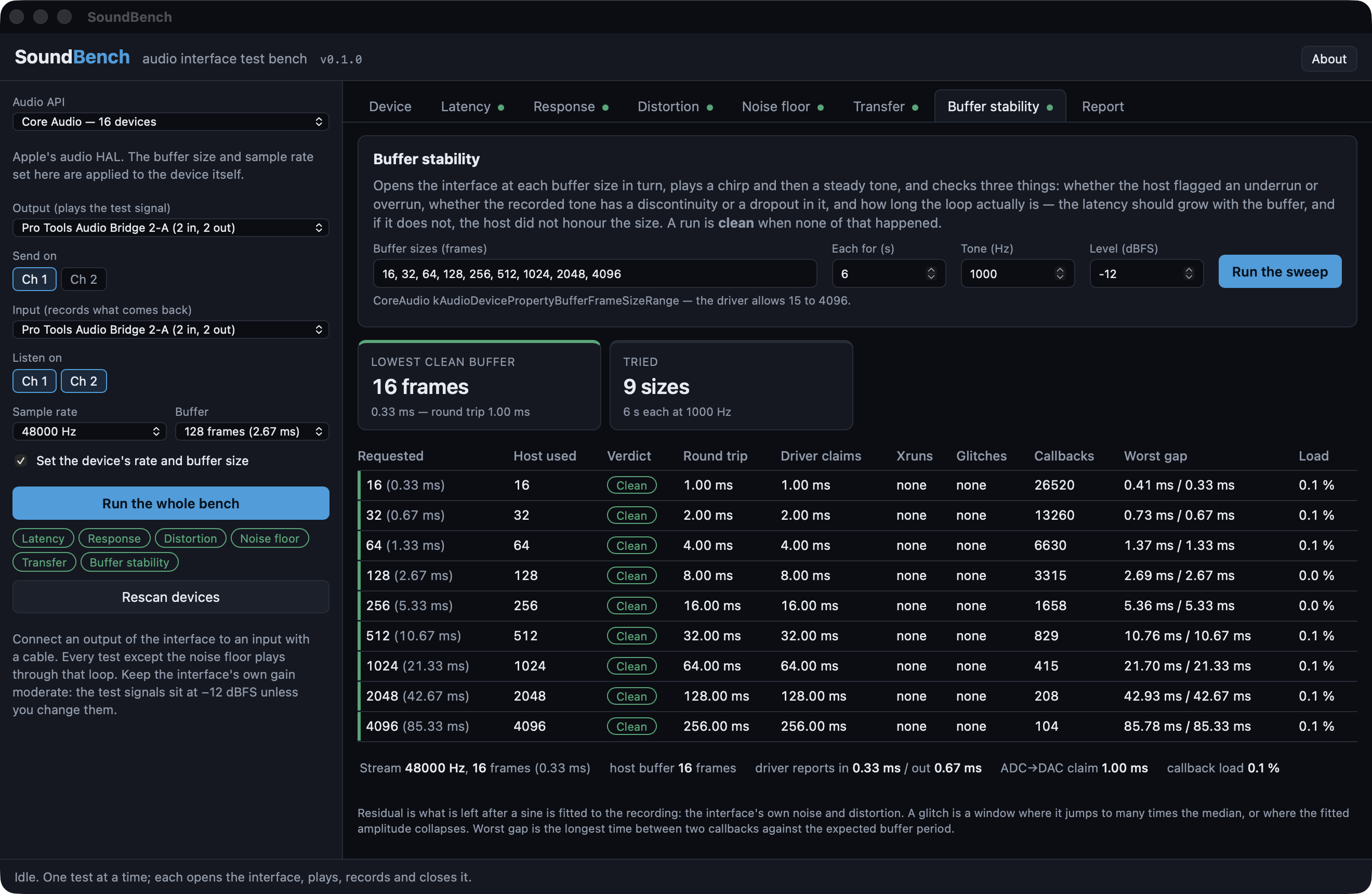
The Buffer stability tab after a full run against Pro Tools Audio Bridge — a virtual CoreAudio loopback, not a hardware interface, which is why every size comes back clean and the round trip is exactly the buffer. Nine sizes from 16 to 4096 frames, each checked for xruns, for glitches in the recorded tone, and for the latency the driver claims against the one measured.
Before you start
Make a loop. Connect an output of the interface to an input with a cable. Analogue is what you want — the point is to measure the converters — but a digital loop (S/PDIF out to in, or a virtual loopback device) works too and tells you about the driver alone.
Set the gain. The test signals sit at −12 dBFS, except the distortion tone at −1 dBFS. Set the interface’s input gain so a −1 dBFS tone comes back near −1 dBFS without the input stage clipping. If the interface has a line/instrument switch on that input, use line.
Close the DAW. ASIO drivers are exclusive; CoreAudio devices can be shared but the device’s sample rate and buffer size will change while SoundBench runs a test, and a DAW using the same device will hear it.
The setup column
- Audio API. CoreAudio on a Mac. On Windows: WASAPI, WDM-KS, DirectSound, MME, and ASIO if the build includes it. Each is a different route to the same hardware, and a device measures differently through each — WASAPI shared mode in particular goes through the Windows mixer at its own 10 ms period.
- Output / Input. The devices; usually the same one. Send on picks the output channel that carries the signal; Listen on picks the input channels to record. More than one input can be listened on at once, and each gets its own results — so a stereo loop measures both sides in one go.
- Sample rate. Only the rates the driver accepts are offered.
- Buffer. Frames per callback. On CoreAudio and ASIO this is applied to the device; on WASAPI exclusive mode it sizes the period. The candidates come from the driver where it publishes a range (CoreAudio, ASIO) and are powers of two elsewhere.
- Set the device’s rate and buffer size (macOS). On, SoundBench sets the device’s own nominal rate and buffer frame size for the test and refuses to resample. Off, PortAudio converts, and the buffer size applies only to its own buffering.
- Exclusive mode (WASAPI). On by default: the measurement is of the device, not the mixer.
Run the whole bench runs every test in turn. Results stay until the device, the channels or the sample rate change.
Device
Everything the driver says. From PortAudio: channels, default rate, the rates it accepts, the buffer range, and the latency it declares. On macOS the HAL’s own properties follow: transport (USB, Thunderbolt, built-in, virtual, aggregate), device and model UIDs, the manufacturer, the nominal rate and the list of available ones, the buffer size the device is on right now and its range, the declared latency and safety offset per direction, the physical stream format (the bit depth the hardware is actually running, and whether it is integer or float), whether another process has the device open, and whether anyone holds it in hog mode.
Latency
Five short chirps are played at known positions and found again in the recording by cross-correlation. The distance between where a chirp was written and where it came back is the round trip: output buffers, DAC, cable, ADC, input buffers, in samples of the stream’s own clock. Nothing to calibrate.
- Measured round trip — the number a DAW needs to compensate.
- Driver reports — PortAudio’s input plus output latency for the stream.
- Unreported — measured minus reported. Positive means the interface has latency the driver does not declare; a DAW compensating from the driver’s figure would place recorded audio early by this much.
- Stability — the spread between the five bursts. More than a sample means the loop’s delay is moving.
- Polarity — whether the signal came back inverted.
Raise Listen up to for network audio or virtual devices whose loop is longer than a second.
Response
One exponential sine sweep — 10 Hz to 22 kHz over ten seconds by default — deconvolved with its inverse filter. The linear part of the loop becomes an impulse response; each order of harmonic distortion becomes its own smaller impulse response arriving a fixed time before it. From one sweep: the magnitude response, the phase (with the round-trip delay removed, so what is left is the converters’ filters), the harmonic distortion against frequency (THD, and the second and third harmonics separately), and the impulse response itself.
Everything is relative to the same sweep through a perfect wire, so 0 dB is unity and a bit-exact loop reads flat. The distortion curve is blank in the first octave above the sweep’s start and wherever a harmonic would fall above the sweep’s top.
The readings table gives the numbers at standard frequencies for a report.
Distortion
One steady tone — 997 Hz at −1 dBFS by default, as AES17 specifies — and one long FFT.
- THD+N — everything in the 20 Hz–20 kHz band that is not the fundamental, against the fundamental. The headline distortion figure.
- THD — the harmonics alone.
- SNR and SINAD.
- Level received — against the level sent, giving the loop gain.
- Frequency — the received tone’s frequency against the generated one, in ppm. Through one interface this is near zero; through two devices on separate clocks it is their difference.
- DC offset.
- The harmonics H2–H9 individually, and the spectrum.
The band is capped at 20 kHz whatever the sample rate, so a device measured at 96 kHz gets the same figure as at 48 kHz rather than a worse one for the extra octave of noise.
Noise floor
Digital silence goes out; the input is recorded with the stream running. Reported unweighted in the 20 Hz–20 kHz band (0 dBFS minus this is the dynamic range a spec sheet quotes), A-weighted, over the full bandwidth, and as a peak. Narrow peaks standing more than 12 dB above the surrounding floor are listed by frequency: mains hum and its harmonics, USB packet whine (1 kHz, 8 kHz), switch-mode supplies.
Transfer
The cross-check on the sweep, with a different stimulus (pink or white noise) and a different estimator (Welch-averaged cross-spectra). It adds coherence: 1 where the output is a linear function of the input, lower wherever noise or distortion dominates. Where coherence is high the sweep and this should agree; where it drops, believe neither.
Buffer stability
The interface is opened at each buffer size in the list, a chirp and then a steady tone are played through the loop, and it is closed again. For each size:
- Host used — the buffer the host actually reports (CoreAudio’s device buffer size, WASAPI’s host buffer), or the frames per callback where the host cannot say.
- Round trip — measured from the chirp. It should grow with the buffer; if it does not, the host did not honour the size.
- Driver claims — the reported latency at that size.
- Xruns — underruns and overruns the host flagged.
- Glitches — discontinuities (the tone’s phase or level jumped) and dropouts (the tone vanished) found in the recording, with when and for how long.
- Callbacks — how many, and how many arrived late (more than 1.5× the expected period after the previous one). Worst gap is the longest interval against the expected one.
Clean means none of that happened. Xruns, audio intact means the host flagged a problem but the recording shows none. Glitches means the recording does. Would not open means the driver refused the size; No signal back means it opened but the loop was silent — usually a size the interface accepts but cannot actually clock.
The lowest clean buffer, and its round trip, is the number to set the DAW to.
Report
Everything measured on the current setup, as Markdown to read and JSON to keep. The JSON carries every curve and every burst; the Markdown is the summary with the readings tables.
What the numbers do not tell you
- Everything is measured through the loop — output and input, converter and converter. A response or distortion figure is the pair’s, not one side’s.
- The latency is the loop’s under this host API at this buffer size. Change either and measure again.
- A virtual or digital loop measures the driver, not the converters, and reads perfect.
- Nothing here measures levels in volts, only in dBFS. An interface’s headroom, output level and input sensitivity need a meter.