

Injecting kernel modules into a SquashFS initrd, and writing a bootable UEFI USB stick.
The README explains the vermagic constraint, the bootability model and the safety model in detail. This is the workflow, and what to be careful with.
Read this before running anything
This tool erases disks
The USB writer repartitions and erases whole block devices. Point it at the wrong device and it destroys a disk. There is no undo and no recovery.
Several guards exist and they are good ones — external devices only, internal disks rejected even when named explicitly, the device re-read immediately before writing, anything mounted at a system path refused, and the GUI making you type the device node after showing model, size, bus and mount points. Do not look for ways around them.
What is actually proven
Three separate claims that are easy to collapse into one:
| Evidence | |
|---|---|
| The patch path — injecting modules into the initrd | 16 tests, run on Ubuntu and macOS in CI, and exercised against a real appliance firmware image. Genuinely well-evidenced. |
| The USB writer | Only ever run against an attached disk image — never a physical stick. |
| The result booting | No image produced by this tool has ever been booted on real hardware. |
| The Linux write path | Implemented and completely untested. |
So: the transformation is well tested, the delivery mechanism largely isn’t, and the end result has never been proven to boot. Plan for the possibility that the stick doesn’t boot, and keep the original image.
macOS is the tested platform for writing. Windows isn’t supported.
The workflow
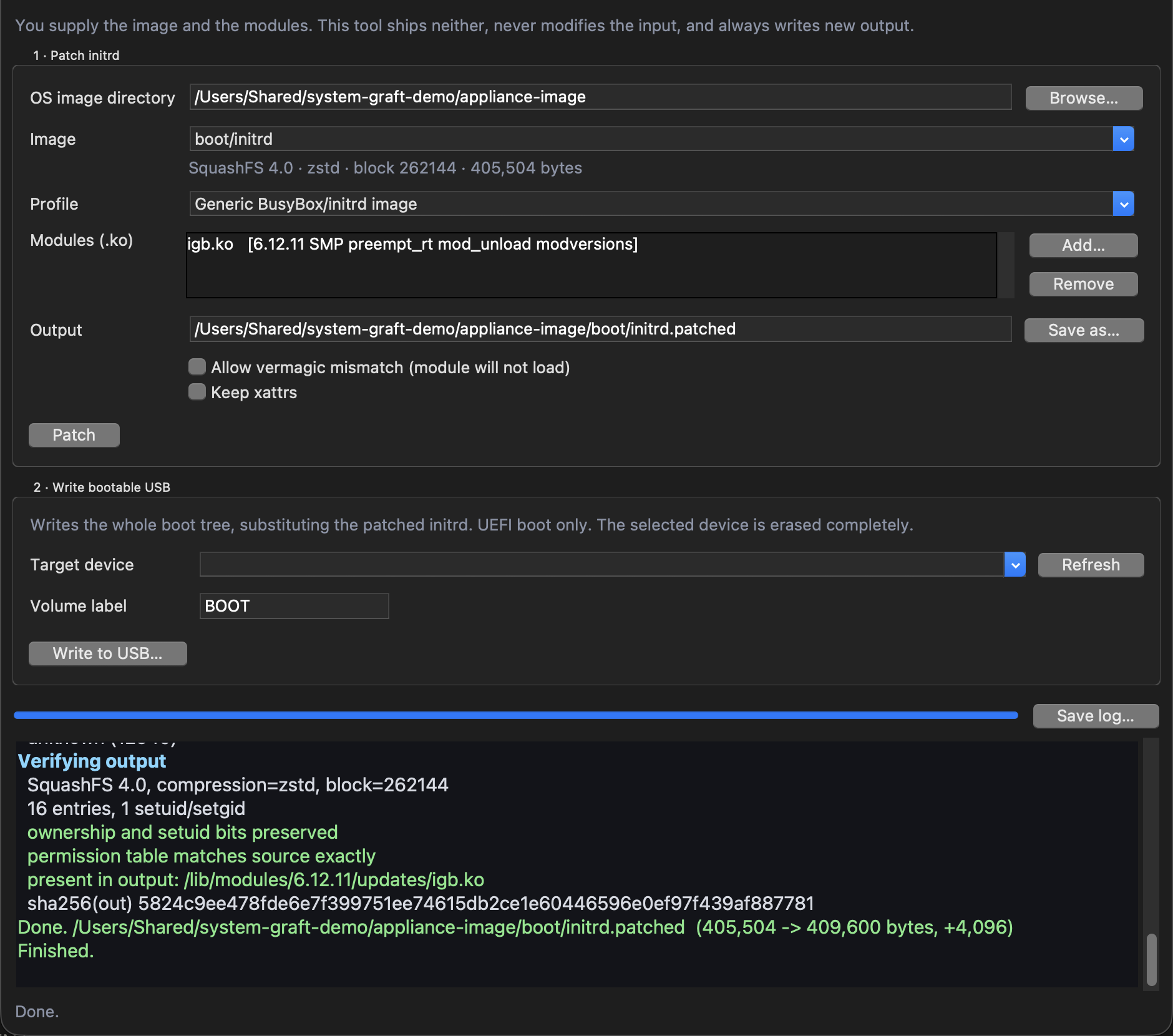
“You supply the image and the modules. This tool ships neither, never modifies the input, and always writes new output” — the app’s own first line, and the shape of the whole thing.
- Get the image and the modules. The tool reads an image you provide and modules you provide, and writes a new initrd. It doesn’t fetch anything.
- Patch — inject the modules into the initrd.
- Write — put the boot tree, with the patched initrd substituted in, onto a USB stick.
There’s a GUI and a CLI; see the README for invocation.
The vermagic wall, and why you shouldn’t climb it
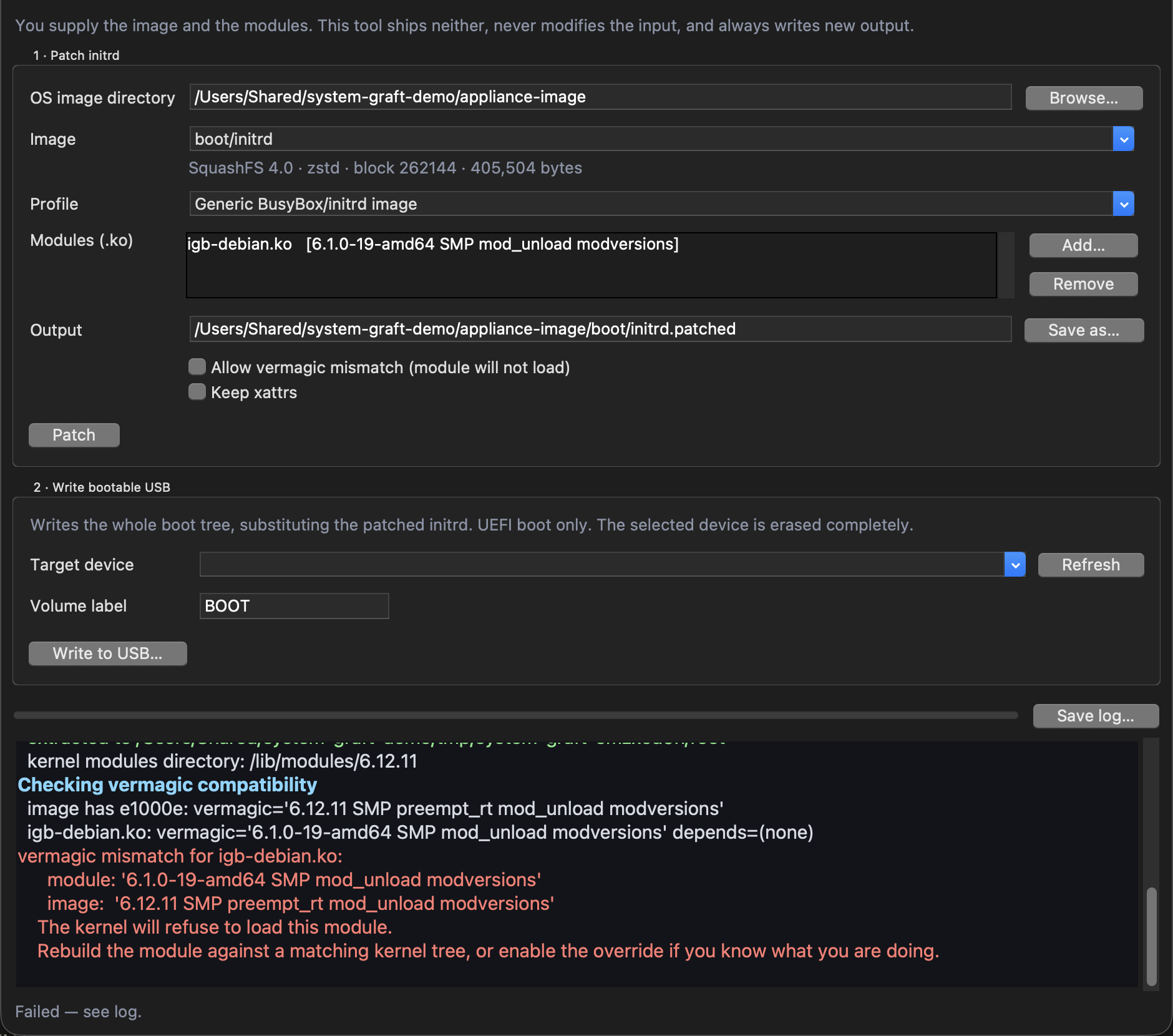
The refusal states both vermagic strings and what to do about it. Allow vermagic mismatch above the Patch button is the override, and its own label tells you the outcome: “module will not load”.
A module only loads into a kernel whose vermagic matches exactly — kernel version, SMP,
preemption model, mod_unload, modversions.
Get it wrong and the kernel refuses the module silently, at boot, on a machine you may not have
a console on. That’s the failure this tool exists to prevent, so it reads the vermagic of every
.ko already in the image and every .ko you’re adding, and blocks on mismatch by default,
printing both strings side by side.
There is an override. It is off by default and it “exists for people who know why they want it”. It is not a way past an inconvenient error — the module still won’t load; you’ll just find out at boot instead of now.
Matching the vermagic string is necessary but not sufficient. If
CONFIG_MODVERSIONSappears in it, the symbol CRCs must match too. Build against the same kernel source and config as the image’s kernel — not merely the same version number.
If the driver you need can’t be built as a module against that kernel, this tool can’t help you. It doesn’t touch the kernel, only the initrd.
Choosing a profile
A profile tells the tool where the initrd lives, which init script to hook, and how a module load is written in that image’s idiom.
| Profile | For |
|---|---|
generic |
Generic BusyBox/initrd image |
sgs |
Waves SGS (SoundGrid Server) — boot/initrd, etc/init.d/system |
The hook goes in immediately before the image’s own module loading, or failing that before it brings up networking.
The sgs profile writes loads wrapped in Run "…" because SGS init scripts do — matching the
image’s own conventions rather than looking foreign in it.
Re-patching an already-patched image replaces the hook rather than stacking another one.
Things that are silently dropped or refused
| Behaviour | |
|---|---|
| cpio/gzip initramfs | Detected and rejected with a clear message. SquashFS only — it won’t corrupt one by trying. |
| xattrs | Dropped by default. On macOS the extract picks up host com.apple.* attributes, and baking those into a Linux image is at best noise. |
| File capabilities | Live in xattrs, so dropped with them. If your image relies on file caps rather than setuid, you need --keep-xattrs — and to run on Linux, since macOS is what introduces the junk. |
| SELinux labels | Same. |
| The kernel | Never touched. |
| Everything outside the initrd | Never touched — no vendor container formats opened, no checksums recomputed, no compatibility lists edited. |
Writing the USB stick
Only external devices are ever offered. Internal disks are filtered out before you can see them and rejected again if you name one explicitly.
Attached disk images are excluded unless you explicitly allow them — that switch exists so the write path can be tested against a throwaway image instead of a real stick, and it is deliberately not offered in the GUI.
Before the destructive step the device is re-read, so a stale selection can’t be acted on. If the stick was removed or changed, the write aborts.
Every written file is verified by sha256 against its source before the volume is ejected.
Bootability is UEFI-only, and only warned about
The volume boots through the removable-media fallback path \EFI\BOOT\BOOTX64.EFI — no NVRAM
entry, no boot sector.
If your tree doesn’t contain that file, the tool warns you and still writes. A warning you click past produces a stick that isn’t bootable. Read the warning.
Legacy BIOS is not supported — that needs a boot sector this tool doesn’t install. You can do it afterwards yourself.
The partition type is set to EFI System if sgdisk is available and can elevate; otherwise
it’s left as Microsoft Basic Data, which virtually all firmware accepts on removable media. So
the partition type quietly depends on whether elevation succeeded.
Troubleshooting
| Symptom | Cause |
|---|---|
| “vermagic mismatch” and it refuses | Working as intended. Rebuild the module against a matching kernel tree (The vermagic wall, and why you shouldn’t climb it). |
| Overrode the mismatch, module still doesn’t load at boot | Expected. The override doesn’t make the kernel accept it — and with CONFIG_MODVERSIONS, CRCs must match too (The vermagic wall, and why you shouldn’t climb it). |
| Image rejected as not SquashFS | It’s a cpio/gzip initramfs. Not supported, and refusing beats corrupting it (Things that are silently dropped or refused). |
| File capabilities lost in the patched image | xattrs are dropped by default; use --keep-xattrs, on Linux (Things that are silently dropped or refused). |
| Stick written but won’t boot | No \EFI\BOOT\BOOTX64.EFI in the tree — the tool warned (Writing the USB stick). Or the firmware is legacy-BIOS only (Writing the USB stick). Or: no image from this tool has ever been booted on real hardware (Read this before running anything). |
| Firmware doesn’t see the partition | sgdisk couldn’t elevate, so the type stayed Microsoft Basic Data (Writing the USB stick). |
| My USB stick isn’t listed | Only devices the OS reports as external are shown (Writing the USB stick). |
| A disk image isn’t listed | Virtual devices need the explicit allow flag, and it isn’t in the GUI (Writing the USB stick). |
| The write aborted just before starting | The device was re-read and had changed or gone (Writing the USB stick). |
| On Linux and it behaved oddly | The Linux write path is implemented and completely untested (Read this before running anything). |
See also
- API.md — both CLIs, the Python API, and the profile system
- DEVELOPING.md — the rules for working on this safely
- README — vermagic, bootability, safety model, scope