

Valve puts your picture through a valve amplifier, as an FFGL effect for Resolume Arena and Avenue: your clip run through a guitar amp’s valves the way a guitar is, for overdrive, saturation and distortion.
There’s no drawn curve. Each stage is a real valve, from Norman Koren’s published models, solved on the load line of the circuit it sits in, and the stages are chained the way an amplifier chains them: up to four preamp triodes, then a single power valve or a push-pull pair. The soft fade into black, the hard knee at the top, the warmth of one valve against the hard edge of four, the crossover step of a cold-biased pair, and the colour that survives in Y/C and swings in RGB all fall out of the valves rather than being drawn.
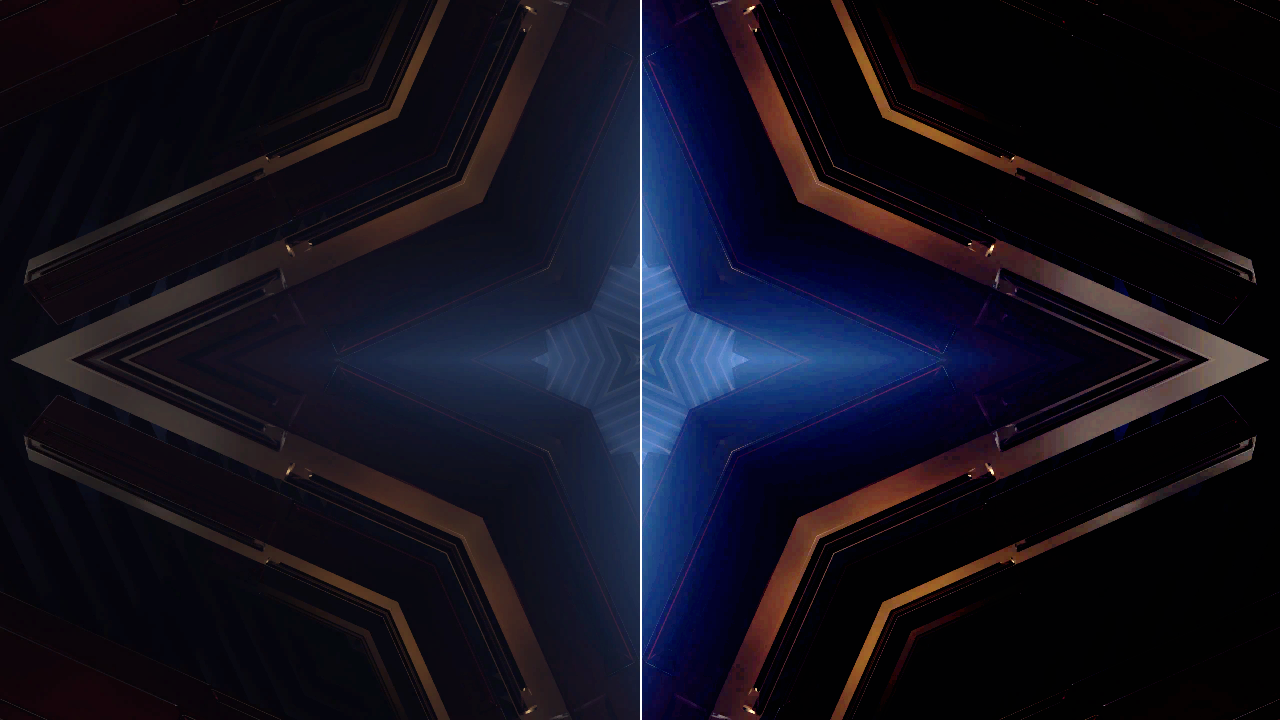
One frame of Resolume’s bundled clip IntoTheGlow_02, rendered by the offline harness rather than captured from Resolume. Left: the clip. Right: the defaults, which are two 12AX7 stages into a push-pull pair of EL34s, 1.2 V of drive, resting at 0.3.
Before you rely on this: it’s released at v0.1.0, and still early days. The valves are measured rather than taken on trust, by a harness that drives the real plugin class and reads each claim back out of the picture it made. The slope at the operating point is each valve’s small-signal gain to four or five figures (a 12AX7 stage 58.900 against 58.901 from theory, a 12AU7 13.054 against 13.054, an EL34 pair 8.7404 against 8.7405). Where the grid starts to conduct, the slope drops to 0.0285 of itself against r_g/(r_g + R_s) = 0.0286, at the column where the grid crosses 0 V. One valve’s second harmonic is 0.01702 of the fundamental against Taylor’s 0.01697; a matched pair makes 4e-8 of it, and twice the mismatch makes twice as much. A cold pair’s crossover notch has exactly the model’s depth. Y/C keeps every hue to float precision while RGB through the same valve turns hue by up to 0.58 rad, and Composite’s chroma gain follows the curve’s slope up a modulated staircase. Eight deliberate faults are shown to make those checks fail, and all 24 controls are shown to change the picture. It has never been loaded into Resolume on macOS: the one host it’s run in there is the fleet’s own test host,
oxbow, for 120 frames. On Windows, a build of v0.1.0 loads, registers and renders in Resolume Arena 7.27.1, with every control matching what the plugin declares and every one of them moving the picture. That was on software rendering, so it says nothing about a GPU. Try it on a spare layer before you put it in a show.This codebase was created with AI assistance, directed and reviewed by a human author.
Installing
Every download has one effect in it, SW Valve. Drop it into Resolume’s effects folder and restart Resolume:
macOS    ~/Documents/Resolume Arena/Extra Effects/
Windows  %USERPROFILE%\Documents\Resolume Arena\Extra Effects\
Avenue has the same layout under its own folder name. The effect then turns up in the effects browser as SW Valve.
The macOS download is a universal build (Apple silicon and Intel), as a .dmg or a .zip. It’s
Developer ID-signed and notarised, so the bundle just loads. The Windows download is an x64
installer or a .zip. It isn’t code-signed, so the installer trips SmartScreen once: More
info → Run anyway.
A valve’s curve is not drawn
A valve passes current from its cathode to its plate, and a grid between them controls how much. The plate hangs off the supply through a resistor, so more current means a lower plate voltage. Put a signal on the grid and the plate swings, upside down and much bigger, and that’s a gain stage. How it bends is decided by two things at once: the valve’s own law for current against grid and plate voltage, and the resistor’s straight line, the load line. Where they meet is the plate voltage. Valve solves that meeting point for every level of your picture.
Everything a guitarist hears in an overdriven amp is in that meeting:
- Gain is set by the operating point. A 12AX7 in this circuit has a gain of about 59 and clips with a volt on its grid; a 12AU7 in the same socket has 13 and stays clean. That’s the swap guitarists make to tame an amp, and it works here for the same reason.
- The two sides clip differently. Turn the grid down and the current fades away softly into cutoff. Turn it up past 0 V and the grid starts drawing current itself, loading whatever drives it, and the slope drops by about thirty-five times at a knee. Soft at one end, hard at the other: asymmetric clipping.
- Every stage turns the signal upside down, so in a chain the soft side and the hard side swap at each stage. Two stages don’t look like one stage driven harder.
- One valve makes even harmonics; a pair cancels them. A push-pull output stage drives two valves in opposite directions into one transformer, and whatever is even about their curve cancels. Mismatch the two valves and it comes back.
- A pair biased cold has crossover. If both valves idle almost switched off, the middle of the curve (where neither is conducting much) goes flat: a step at mid-grey.
The video level goes on the first grid as a voltage (Drive says how many volts the whole range from black to white spans), and what comes out of the last plate is turned back into a picture.
Start here
Put SW Valve on a layer or a clip. The defaults are two 12AX7 preamp stages into a push-pull pair of EL34s at 1.2 V of drive, with the valves resting at a picture level of 0.3: a clear crunch (deep shadows, hot highlights, saturated colour) on most footage.
Then:
- Drive. The control that matters most. Down towards 0.4 (about 0.6 V) for warmth; up past 0.55 (about 3 V) for a near-posterised fuzz.
- If the picture is mostly black, lower Rest Level. The valves rest at that level of your picture, and anything much darker sits in cutoff. Dark clips want 0.15–0.25.
- Stages and Preamp. Four 12AX7s is a high-gain amp: a few tenths of a volt and the picture is nearly black and white. One 12AU7 is a clean amp that only rounds the extremes off.
- Power Bias down to 0 with Stages at 0 and Drive up near 0.85 (about 70 V): the pair’s crossover, a flat step through the mid-tones.
- Signal → Y/C and raise Chroma Drive: the colour saturates and then limits, but no hue moves. Then try the same in RGB, where hues swing towards the primaries.
- Show Curve on at any time: the box in the corner draws what the valves are doing.
Every slider is declared to the host as 0 to 1, so the host only knows its position. The value each position stands for is given with each control below.
The Signal group
Signal: how the picture goes into the valves.
- RGB: red, green and blue each go through their own copy of the Luma / RGB chain. Clipping happens per channel, so strong colours swing towards the primaries and secondaries, the way an overdriven RGB signal does.
- Y/C: luma through the Luma / RGB chain, chroma through the Chroma chain, as S-Video carries them. Chroma travels as a subcarrier, so its amplitude is compressed and limited but its phase (the hue) can’t change.
- Composite: luma and the subcarrier together through the Luma / RGB chain, as one signal. The colour’s gain becomes the slope of the curve at the brightness it rides on (differential gain), and a strong colour pushes its own brightness about.
Rest Level: the picture level the valves rest at, 0 to 1 (default 0.3). It’s where a black-level clamp in front of the first valve would hold the signal: that level sits at the valve’s operating point and the rest swings either side of it. Mid-grey (0.5) suits a test card, but real footage is usually darker, which is why the default is lower. Too high and the shadows sit in cutoff and go black; too low and the highlights run into the grid’s knee.
Interstage: the loss between one preamp stage and the next, −40 to 0 dB (default −20 dB at the middle), standing in for the tone stack’s loss in a real amp. Higher means each stage drives the next harder. It only acts with two or more Stages.
Mismatch: how far the valves differ from each other, 0 to 25 % (default 0). In RGB, red, green and blue get three different valve sets (at the top of the range red’s draw a fifth less current than nominal, green’s are nominal and blue’s draw a third more), so the channels clip at different levels and the picture fringes in colour. In any mode, the two halves of a push-pull pair differ by the same amount, which brings back the even harmonics a matched pair cancels.
The Luma / RGB group
The main amplifier: what every channel goes through in RGB, and the luma (or the whole composite signal) otherwise.
Stages: how many preamp triodes, 0 to 4 (default 2). Each is a common-cathode stage with a 100 k plate load on a 300 V supply. With 0 stages and no power stage, the effect is a wire.
Preamp: the triode in every preamp stage:
| valve | gain in this circuit | character |
|---|---|---|
| 12AX7 | 59 | the high-gain guitar preamp valve; clips at about a volt |
| 12AT7 | 40 | in between |
| 12AU7 | 13 | low gain, clean, needs about 14 V to clip |
| 6DJ8 (ECC88) | 23 | a hi-fi and instrumentation triode |
Drive: the volts on the first grid for the whole swing from black to white, logarithmic: 0.01 V at 0, 0.1 V at 0.22, 1 V at 0.44, 10 V at 0.67, 100 V at 0.89, 316 V at 1 (default 1.2 V). A preamp valve clips with a few volts; a power valve driven directly (0 stages) needs tens.
Bias: where each preamp valve rests, from just above cutoff (0, cold) to just below 0 V on the grid (1, hot); the default is the middle. Cold puts the rest near the soft end, so the shadows round off early; hot puts it near the grid’s knee, so the highlights clip early.
Power Stage: Off, Single-ended (one valve into an output transformer, class A: its curve is lopsided, and it inverts) or Push-pull (two valves driven in opposite directions into one transformer: symmetric, and the even harmonics cancel). Default Push-pull.
Power Valve: EL34 (450 V, 25 W rated), 6L6GC (450 V, 30 W), KT88 (500 V, 35 W) or the 300B triode (400 V, 36 W). Default EL34.
Master: how hard the preamp drives the power stage, in volts on the power grids per volt of the preamp’s swing (the phase inverter’s gain and the master volume together), 0.01 at 0, 0.1 at 0.25, 1 at 0.5, 10 at 0.75, 100 at 1 (default 0.3). It only acts with a power stage and at least one preamp stage.
Power Bias: the power valves’ idle dissipation as a share of their rating, 5 % at 0 to 100 % at 1 (default 70 %, at 0.68, which is where an amp tech sets it). Cold (low) gives a push-pull pair its crossover step; hot fills it in.
The Chroma group
The chroma’s own amplifier, only used in Y/C: the same eight controls (Chroma Stages, Chroma Preamp, Chroma Drive, Chroma Bias, Chroma Pwr Stage, Chroma Pwr Valve, Chroma Master, Chroma Pwr Bias) with the same ranges. (“Pwr”, because a host is only handed sixteen characters of a control’s name.) The defaults are one gentle 12AU7 stage at 10 V and no power stage.
Chroma Drive here is the volts for a chroma amplitude of 1. The largest chroma a legal colour has is about 0.63 (fully saturated red and cyan), so 10 V of Chroma Drive swings the grid about ±6 V.
The Output group
Output: how the valves’ volts become a picture again.
- Fit (default): black stays black and white stays white; everything between follows the valves’ curve. Overdrive shows as contrast and clipping rather than a darker or greyer picture. In Y/C the most saturated legal colour keeps its saturation, and the rest is pushed towards it.
- Unity: the valves’ small-signal gain at the rest level is scaled to 1, so a whisper of Drive is the picture unchanged and more Drive compresses towards the rest level. That’s an honest view of a valve running out of headroom, which goes grey when driven hard.
- Plate: the last plate’s swing in volts, over its supply, about the rest level. Mostly a diagnostic.
Polarity: Corrected (default) turns the picture the right way up whatever the stages did. As Wired shows it as the circuit leaves it: with an odd number of inverting stages (each preamp stage, and a single-ended power stage) the picture is a negative, and in Y/C an inverting chroma chain turns every hue half way round the colour wheel.
Show Curve: draws the valves’ transfer in a box in the bottom-left corner, input across and output up, with the diagonal for reference. In RGB the three channels are drawn in their own colours (one valve set draws white); in Y/C and Composite the luma curve is white and the chroma’s amplitude response magenta.
Mix: the effect against the clip.
How it works
Each valve is Norman Koren’s 1996 model: one equation for the plate current against the grid and plate voltages (with a separate form for pentodes like the EL34), with his published constants for each valve type. The grid conducts above 0 V through Koren’s grid resistance. A preamp stage is solved on its load line (a 100 k plate resistor to 300 V, the next stage’s 1 M grid leak, the cathode held steady), and the first grid is fed through a 68 k input resistor, each later grid from the plate before it, so grid current loads its source as it does in an amplifier. A push-pull pair is solved on the composite load line of a centre-tapped transformer; a single-ended stage on the transformer’s load about its supply.
Because every stage here is instantaneous, each one is a fixed curve. The plugin solves each curve once, when a setting it depends on changes, at 4,097 points on the computer’s processor, and the graphics card only looks them up. Drive, Master, Interstage, Stages and Rest Level are applied between lookups, so moving them costs nothing.
In Y/C and Composite the chroma is a subcarrier: a small pass works out, for every level and amplitude, what comes out of the valves over one cycle of it. That’s the average, which joins the luma in Composite, and the fundamental, which is the chroma the decoder keeps.
The picture is un-premultiplied before the valves and premultiplied after, so clips with alpha keep clean edges.
Performance
The display costs about 0.1–0.2 ms a frame at 720p and 1080p and about 0.6 ms at 4K on an Apple M4 Max; Y/C and Composite add up to 0.3 ms. Changing a valve, a bias or the mismatch re-solves the curves that setting touches, which takes a few milliseconds of processor time (about 10 ms for a whole chain). Dragging Bias continuously costs that on every frame.
If it looks wrong
The picture is nearly all black. The clip is darker than the Rest Level, so most of it sits in the valves’ cutoff. Lower Rest Level (0.15–0.25 for dark footage), or lower Drive.
The picture is flat grey. Output is on Unity with a lot of Drive: the valves have run out of headroom and Unity shows it as it is. Use Fit.
It’s a negative. Polarity is As Wired with an odd number of inversions. Use Corrected.
The colours are wrong or neon. RGB with heavy Drive clips each channel separately, and that’s the look. For overdrive that keeps hue, use Y/C.
Interstage, Master or a power control does nothing. Interstage needs two or more Stages; Master needs a power stage and at least one preamp stage; the power controls need Power Stage on. The Chroma group only acts in Y/C.
Moving Bias or Mismatch stutters. Those re-solve the valve curves, a few milliseconds each time. Drive, Master and Rest Level don’t.
SW Valve isn’t in the effects browser. Check the folder under Installing, and that Resolume was restarted.
The effect does nothing at all. A shader that won’t compile looks just like that, and the actual message is in the log:
macOS    ~/Library/Logs/valve/valve.YYYY-MM-DD.log
Windows  %LOCALAPPDATA%\valve\logs\valve.YYYY-MM-DD.log
It records the build that was loaded, the GL vendor, renderer and version at load, and which shader failed if one did.
Known limits
- Never loaded into Resolume on macOS, and nothing has driven the controls in a host. How the controls read in the inspector is untested.
- Instantaneous valves only. A real valve stage also smears a picture sideways (the Miller capacitance: a 12AX7 would lose most of a video signal’s bandwidth and all of its colour), its coupling capacitors charge up after something bright (blocking), and its supply sags. None of that is modelled yet.
- Koren’s models are fits to published curves, good to a few per cent. The circuit values are typical guitar-amp ones rather than any particular amplifier’s.
- Grid current starts at exactly 0 V. In a real valve it creeps in a fraction of a volt earlier.
- No tone stack between stages: Interstage is a flat loss.
- The chroma’s 64-point cycle is exact for a gentle chain but approximate for a chroma chain driven into hard clipping.
- Checked at up to 1280×720, and timed at 4K. Only ever run on an Apple M4 Max, although the macOS build has an Intel slice in it.
- No presets, no audio input, no OpenFX version and no browser demo.
About
The last group, About, has the plugin’s name, version, licence and maker, and buttons that open this user guide (stoatworks-labs.com/software/valve/guide/), the project page, the source on GitHub and the support page in your browser.
Reporting something
If something’s broken or just odd, open an issue at github.com/stoatworks-labs/valve/issues. A screenshot with Show Curve on, the Signal, Stages, Preamp, Drive, Rest Level and power settings, and the composition’s resolution are usually enough. If the effect did nothing, attach the log.