

WebLinked turns a URL into a broadcast signal. One binary takes a web page and produces a proper video output at the raster and rate you specify — SDI on a DeckLink or AJA card, NDI and OMT on the network, and a fullscreen GPU window — all from the same pipeline, at the same time.
It is for someone who already knows what 1080p50 means and has a vision mixer to plug into. It does not try to hide the broadcast decisions from you.
What’s proven, and what isn’t. WebLinked has been run on a live event. NDI is verified end to end against a real receiver, alpha included. SDI is measured against a real DeckLink Duo 2, with colour confirmed by loopback capture against an independent BT.709 reference.
Not everything: the SDI key channel itself, audio over SDI and genlock over hours are unmeasured, and AJA and OMT compile against their SDKs and have never met hardware or a receiver. The fullscreen output’s Linux backend has now been run and renders correctly. Its Windows backend showed only black until v1.0.5, and is verified on a software renderer but not yet on a real GPU. Windows and Linux themselves are no longer signed off on a compile — both were run on real systems in August 2026, NDI included — but frame-rate performance is verified on macOS and Linux only, because that Windows machine cannot sustain a rate. 04-verification.md gives the numbers and the method rather than a promise.
What it is not
- Not a media server. No playlist, no layers, no compositing, no transitions. It renders one page. Two graphics at once is a job for the page.
- Not a capture tool. Output only.
- Not genlocked. The engine’s clock is a software clock; an SDI card’s scheduled playback
absorbs the difference. 01-architecture.md says which number in
/api/statetells you it is going wrong. - Not a replacement for CasparCG if you already run CasparCG.
Running it
WebLinked has no window of its own. It is a render host and a control server; the control page it serves is the entire UI. Open it in any browser, or click the WebLinked icon in your menu bar (macOS) or notification area (Windows and Linux) and choose Open control page.
Double-click it and it opens the control page in your default browser once the server is up —
a launch with no arguments at all is taken as “show me something”. Type a command line and it
stays quiet, because you asked for something specific; --open and --no-open decide it
explicitly.
There is one download per platform. Earlier versions offered a second, a desktop app that wrapped the engine in a separate tray launcher; the engine now puts its own icon in the menu bar or notification area, so that wrapper was retired in v1.0.0.
WebLinked --url https://example.com --format 1080p50 --ndi=Test --headlessThen open http://127.0.0.1:7654/. --help lists every flag and which backends this build
actually contains, which is the quickest way to find out whether your download has SDI in it.
Downloads bundle the NDI runtime, so NDI works on a machine that never installed the SDK. The hosted builders have no DeckLink or AJA SDK, so SDI output needs a local build — see 02-building.md.
The control page
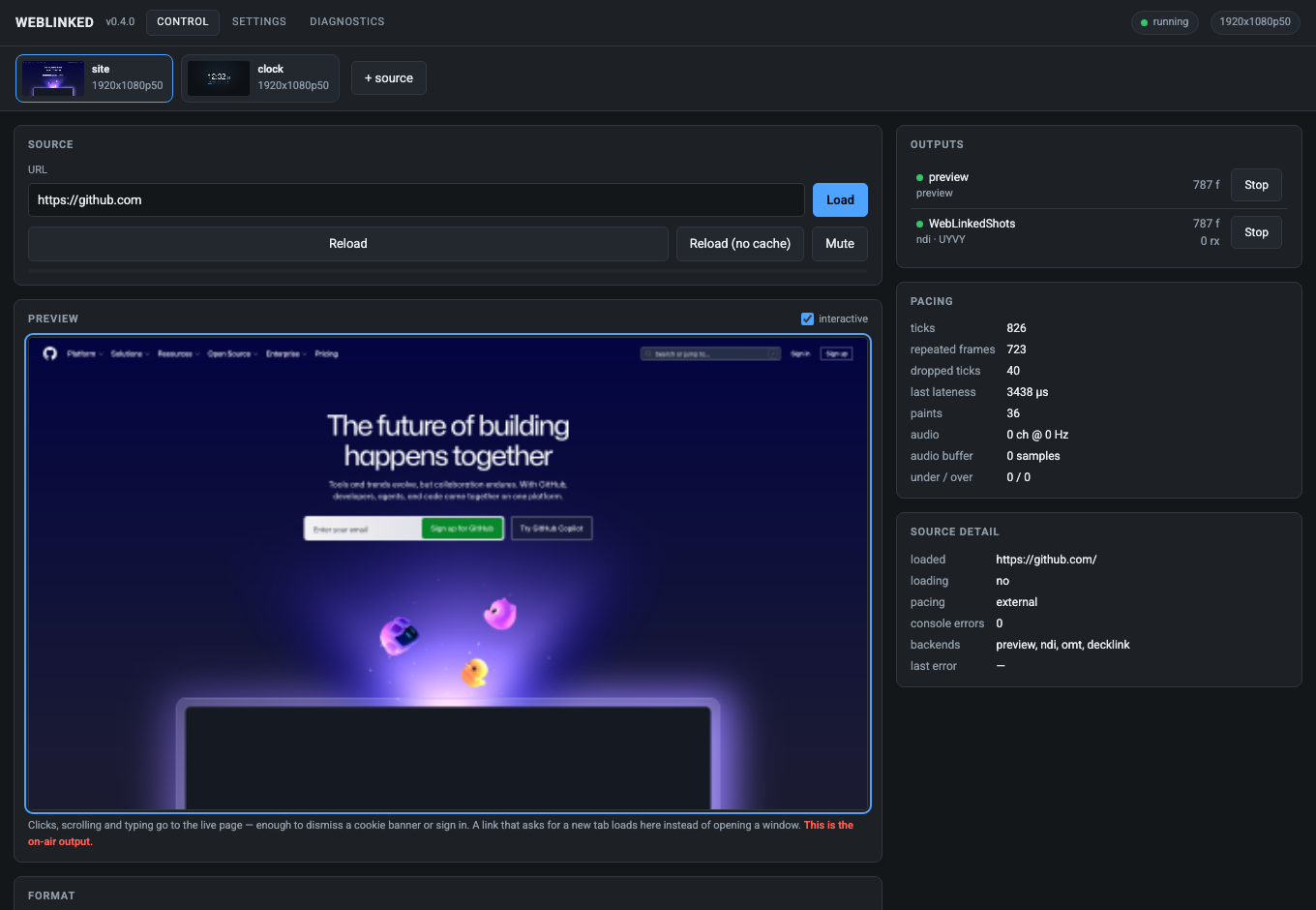
The preview is itself an output, fed by the same pipeline as everything else — which is the point: if the preview is right, the outputs are right. The red note under it says so plainly: this is the on-air output.
The preview is interactive. Clicks, scrolling and typing go to the live page — enough to dismiss a cookie banner or sign in. A link that asks for a new tab loads here rather than opening a window.
Several sources run as tabs. Each is a whole pipeline with its own browser, clock, raster and outputs, so one hung page cannot touch the others.
The pacing panel is the health readout
| Field | What it tells you |
|---|---|
| ticks | Frames the clock has asked for |
| repeated frames | The page didn’t paint in time, so the last frame went out again |
| dropped ticks | The pipeline missed a frame slot entirely — the number to watch |
| last lateness | How late the most recent frame was |
| paints | How often the page actually rendered |
| under / over | Audio buffer starvation and overflow |
A page that only repaints on data change will show a high repeated-frame count and be perfectly healthy. Dropped ticks are the ones that mean something is wrong.
Outputs
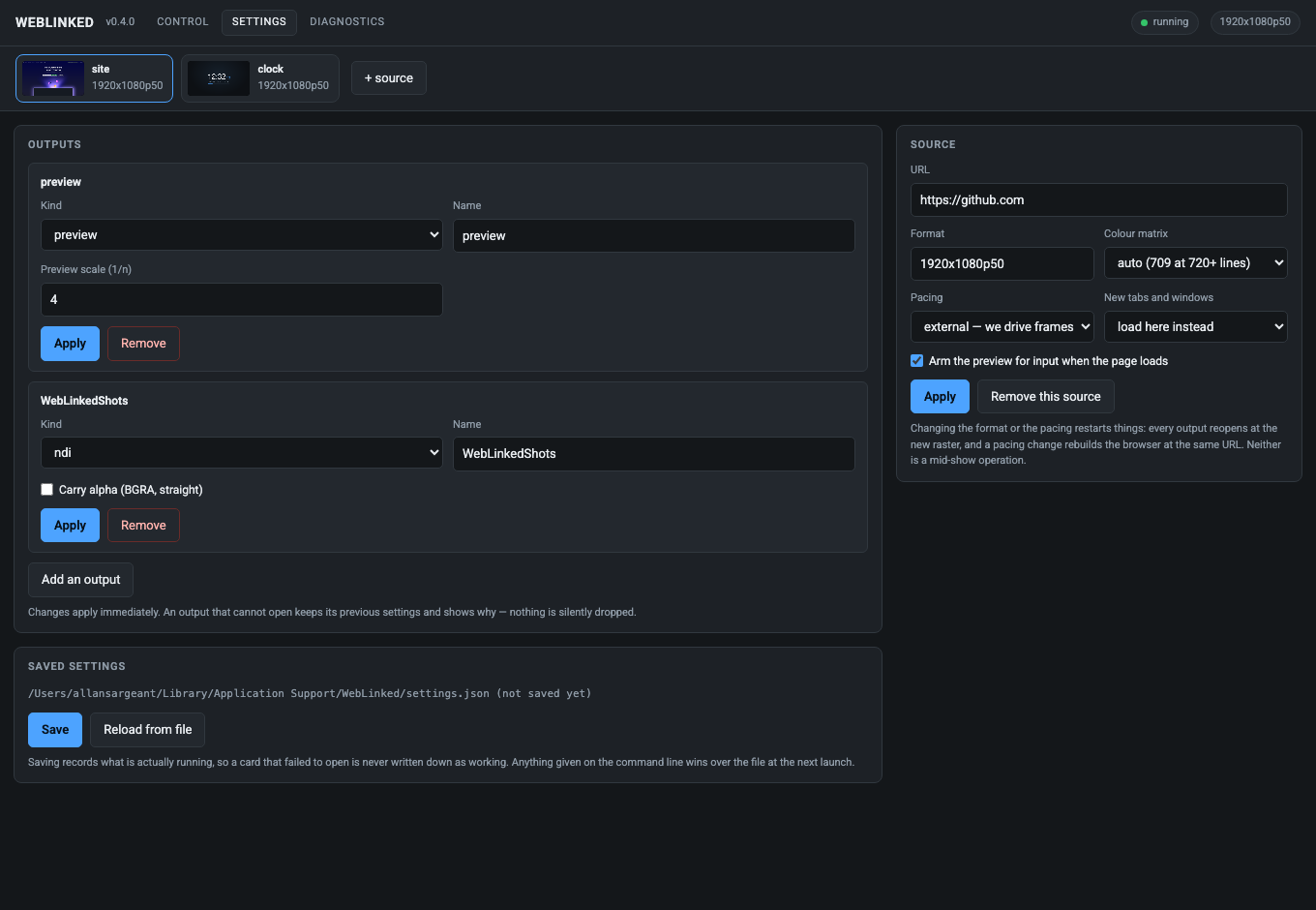
Each output editor shows only the fields that backend really has — an NDI sender gets a name and an alpha checkbox, a DeckLink gets a device index and keying, the preview gets a scale factor. Offering a DeckLink keying mode on an NDI output would invite you to set something that is then silently ignored.
Background is on every output, because it is not a backend setting — the engine composites before a frame reaches a backend:
- Transparent keeps the page’s own alpha, for a keyed SDI fill or an NDI feed with alpha.
- A colour composites the page over it and leaves the frame fully opaque, for a switcher that only has a chroma keyer.
Changing it does not restart the output.
Apply replaces an output in place rather than removing and re-adding it. If the new settings cannot open — a card already claimed, an NDI name in use — the previous output is restarted and the reason is shown. Renaming an output cannot leave you with no output.
Settings, and what wins
macOS    ~/Library/Application Support/WebLinked/settings.json
Windows  %APPDATA%\WebLinked\settings.json
Linux    $XDG_CONFIG_HOME/WebLinked/settings.json, else ~/.config/WebLinked/
Override with --settings <file> or $WEBLINKED_SETTINGS; --no-settings ignores it entirely.
The command line always beats the file.
The settings file is deliberately not in the log directory — logs are disposable, settings are not.
Control from a show
Two protocols, the same verbs: HTTP for the control page and scripting, OSC for a Companion button or a show-control cue. A graphic that can only be changed by someone with a browser open is no use in a running show.
Security. The HTTP server binds
127.0.0.1:7654with no authentication by default. If you bind it to a network interface (--bind 0.0.0.0), set--token— anyone who can reach the port can change what is on air. There is no TLS: put it behind a reverse proxy or keep it on a trusted show network.OSC has no authentication at all — that is the protocol, not a choice made here. It listens on
0.0.0.0:7655;--no-oscdisables it.
Full verb list in 03-control-api.md.
When something is wrong
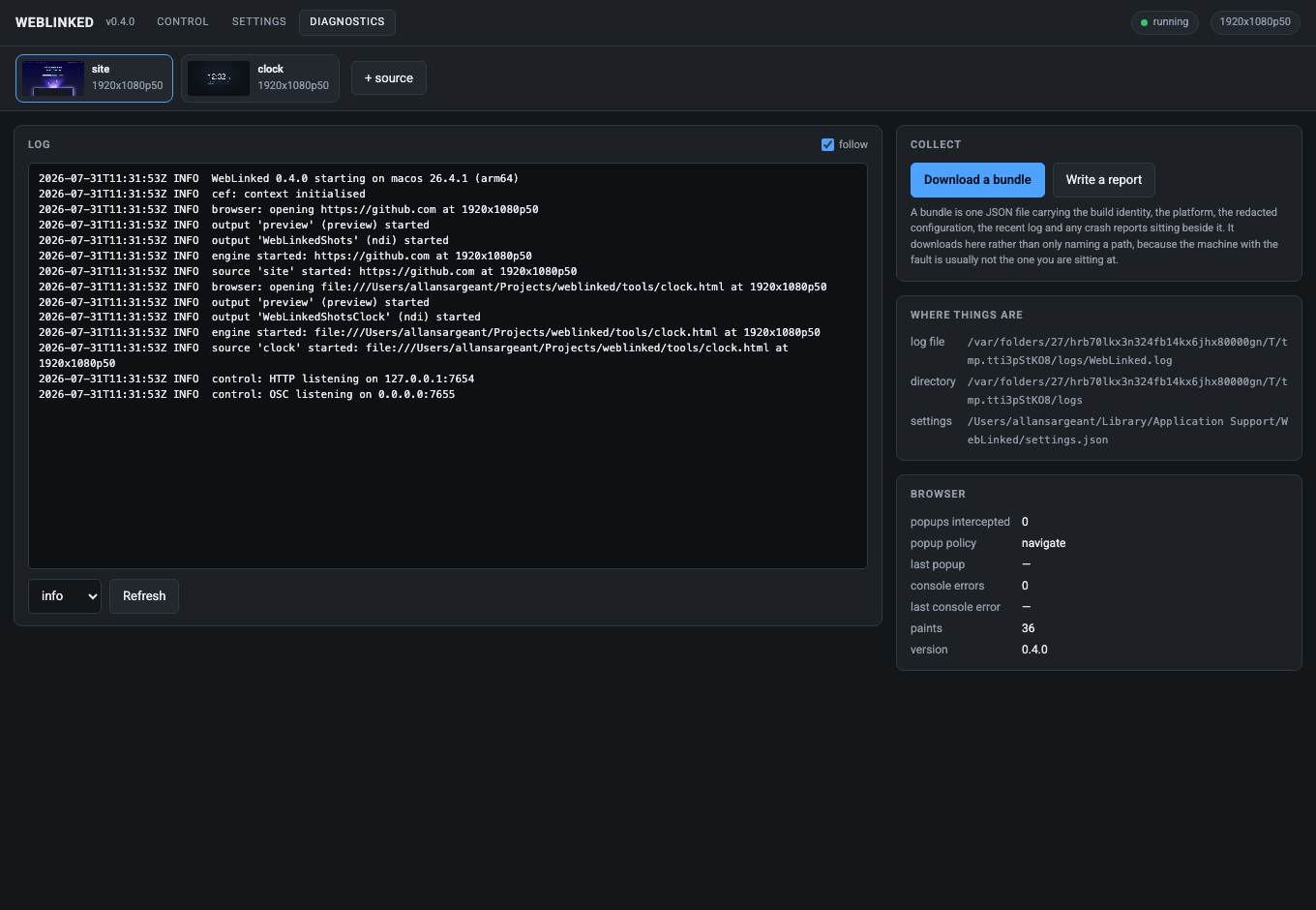
The log lives at ~/Library/Logs/WebLinked/WebLinked.log (or $WEBLINKED_LOG_DIR), and
WEBLINKED_LOG=debug raises the level.
The app’s own counters only prove it sent something. To check what actually arrived, the repo ships two independent receivers —
tools/ndi_probe.cppandtools/sdi_probe.mm— each carrying its own BT.709 reference, so a check is not a restatement of the code under test../ndi_probe --source Test --frames 100 --bars
Troubleshooting
| Symptom | Cause |
|---|---|
| Control page sits on “connecting” | The page has no build step, so one syntax error kills every line after it. If it looks dead, that is the first suspect. |
| No SDI options anywhere | Your build has no DeckLink/AJA SDK. --help lists the backends this binary contains; SDI needs a local build. |
| High repeated-frame count | Usually fine — the page simply isn’t repainting. Watch dropped ticks instead. |
| Dropped ticks climbing | The pipeline is missing frame slots. Check page complexity, raster and CPU. |
| Alpha looks wrong on SDI key/fill | Straight alpha is measured on SDI; the key channel itself is not yet measured. Verify on your own hardware. |
| Output opened, then reverted to the old one | Apply failed — a card already claimed or an NDI name in use — and the previous output was restarted. The reason is shown. |
| A new tab opened a window instead of loading | Shouldn’t happen: no browser here owns a window, and popups are always cancelled into the same view. |
| Colour looks off | Check the colour matrix against the raster. Verify with ndi_probe --bars rather than by eye. |
See also
- 00-overview.md — why this exists and what it deliberately isn’t
- 01-architecture.md — the pipeline, the clock, and the genlock boundary
- 02-building.md — building, and the optional SDKs
- 03-control-api.md — HTTP and OSC
- 04-verification.md — what has actually been measured, with commands
- 05-settings.md — every setting and what wins
- 06-ndi-distribution.md — the bundled NDI runtime