

Moving wireless-mic coordination data between Shure Wireless Workbench and Sennheiser Wireless Systems Manager, plus generic CSV.
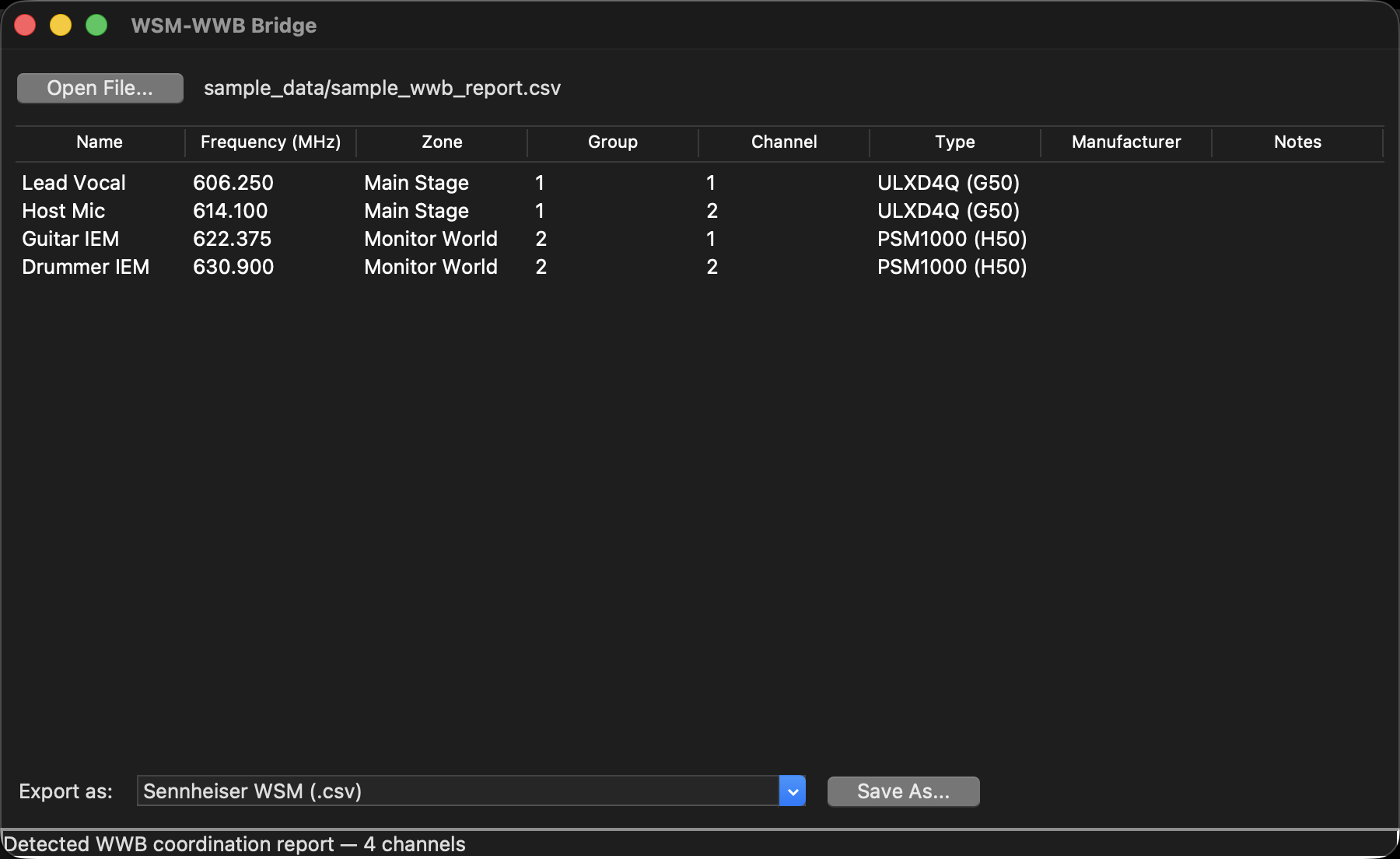
A real WWB coordination report loaded: four channels across two RF zones.
Two things before you use it on a show
Every parser was reverse-engineered
Neither vendor publishes full schemas for most of these files. Everything this tool understands was worked out by inspecting real exports and cross-checking two independent formats from the same project against each other.
Verify the output against your own WWB/WSM versions before relying on it for a live show. The formats were read from WWB 7.8.2.63 and WSM 4.9.0.13; a different version may differ.
There is a successor
RFutils merged this tool with MicWizard and
pmse-to-wwb into one suite. This repo stays a standalone, MIT-licensed, releasable desktop tool
— but RFutils is where new feature work goes.
The workflow
- Open File… — the format is auto-detected.
- Check the preview table — Name, Frequency, Zone, Group, Channel, Type, Manufacturer, Notes.
- Pick an export format and Save As…
If a file isn’t recognised, you get a column-mapping dialog instead of an error. That’s the designed fallback, not a failure.
What it can read
| Source | Format |
|---|---|
| Shure WWB | .shw (Show) and .cws (Coordination Workspace) native XML |
| Coordination report CSV (the printable/exportable one) | |
| A bare frequency list | |
| Sennheiser WSM | .wsm native project file |
| HTML “Coordination Report” | |
| “Frequencies/Bands” CSV export | |
| Anything else | via the column-mapping dialog |
Which WWB file you open changes what you get
- A
.shwcarries the deployed device inventory — what’s actually on the gear. It also embeds workspace data, and the reader prefers the device inventory when both are present. - A
.cwscarries the candidate frequency pool across all RF zones — the coordination engine’s options, not the deployment.
Those are very different lists. If a file yields far more channels than you expected, you’re looking at the candidate pool.
Only the WWB report knows primary vs backup
Neither .shw nor .cws exposes a primary/backup flag at the XML level — only the printed
coordination report does. So if you need “what am I actually using” versus “what’s in the spare
pool”, open the report CSV, not the native file.
(The report was verified against a real 291-channel export: 44 primary and 247 backup across 3 zones, matching the file’s own section counts exactly.)
WSM .wsm has two frequency fields and they disagree
A real coordinated project had CurrentFrequency sitting at the receiver’s default — not
reflecting the coordination result at all — while AllocatedFrequency matched the real result.
The tool reads AllocatedFrequency. If WSM shows you one number and this tool shows another,
that’s the field difference, and the tool is reading the coordinated one.
What it can write, and which to choose
| Target | Use | Why |
|---|---|---|
| WWB frequency list | The safe default for WSM → WWB | The one format Shure documents as importable |
| WWB inventory CSV | round-tripping with this tool | Not a real WWB format — best-effort flat CSV |
| WSM “Frequencies/Bands” CSV | feeding a candidate pool into WSM | Not a coordinated channel list — see below |
| Generic CSV | anything else |
Writing .shw / .cws is deliberately not implemented
Those files have many interdependent sections — compatibility profiles, band planning, zone matrices — well beyond channel data. Generating one from scratch risks producing a file WWB can’t open cleanly. Reading them is safe; the safe way to get data into WWB is the frequency list import.
The WSM CSV export does not populate named channels
WSM’s “Frequencies/Bands” CSV feeds a candidate frequency pool into WSM. You then run WSM’s own Start Coordination and drag-allocate frequencies onto device channels yourself.
It will not write coordinated frequencies onto your named channels. If that’s what you wanted, this format won’t do it — there is no export that does, because WSM doesn’t import one.
Frequencies in that file are in kHz, and the real schema is lowercase and semicolon-delimited — which differs from Sennheiser’s own documentation. The real file won.
Troubleshooting
| Symptom | Cause |
|---|---|
| A column-mapping dialog appeared | The file wasn’t recognised. Expected behaviour, not an error (The workflow). |
| Far more channels than expected from a WWB file | You opened a .cws, or a .shw whose candidate pool was read — that’s the whole candidate pool (What it can read). |
| No primary/backup distinction | Only the WWB coordination report carries it (What it can read). |
| Frequencies differ from what WSM shows | WSM’s CurrentFrequency is often the receiver default; the tool reads AllocatedFrequency (What it can read). |
| A European-locale file parsed correctly | Expected — a comma with no dot is read as a decimal point. |
| Imported into WSM and nothing landed on my channels | The CSV is a candidate pool. Run Start Coordination and allocate (What it can write, and which to choose). |
Can’t export a .shw |
Intentional — write-back isn’t implemented (What it can write, and which to choose). |
| Output looks wrong against my WWB/WSM version | Formats were read from WWB 7.8.2.63 / WSM 4.9.0.13. Verify before a show (Two things before you use it on a show). |
| macOS says the app is damaged | The .dmg and .pkg are signed and notarised. The .tar.gz payload is not — it is ad-hoc signed, and Gatekeeper refuses it. Take the disk image or the installer. |
See also
- API.md — the module surface, the channel model, format detection
- DEVELOPING.md — extending the parsers
- README Format notes — what each format actually contains