

Zero EQ is an 8-band parametric equaliser and compressor plugin (VST3 / AU), built around one promise: it adds no latency at all.
Before live use: the DSP has been verified analytically and against real audio, passes
pluginvaland Apple’sauval, and has been hosted in REAPER. It has not been used on real hardware in a live signal chain. Review it before putting it on a show.
Why “zero latency” matters
Most EQ plugins that offer a linear-phase mode buy it with lookahead — the plugin delays your audio so it can see ahead. That’s fine when mixing, but it means you can’t sing or play through it: you’d hear yourself late.
Zero EQ deliberately gives that up. Every filter is minimum-phase, there’s no lookahead, no oversampling and no internal buffering. You can track through it and monitor through it.
The trade-off is honest and permanent: there is no linear-phase mode, and there never will be. That’s the deal.
Installing
Build it, or take a release build. On macOS the VST3 goes to
~/Library/Audio/Plug-Ins/VST3/Zero EQ.vst3; the AU alongside it. Rescan plugins in your DAW.
The EQ
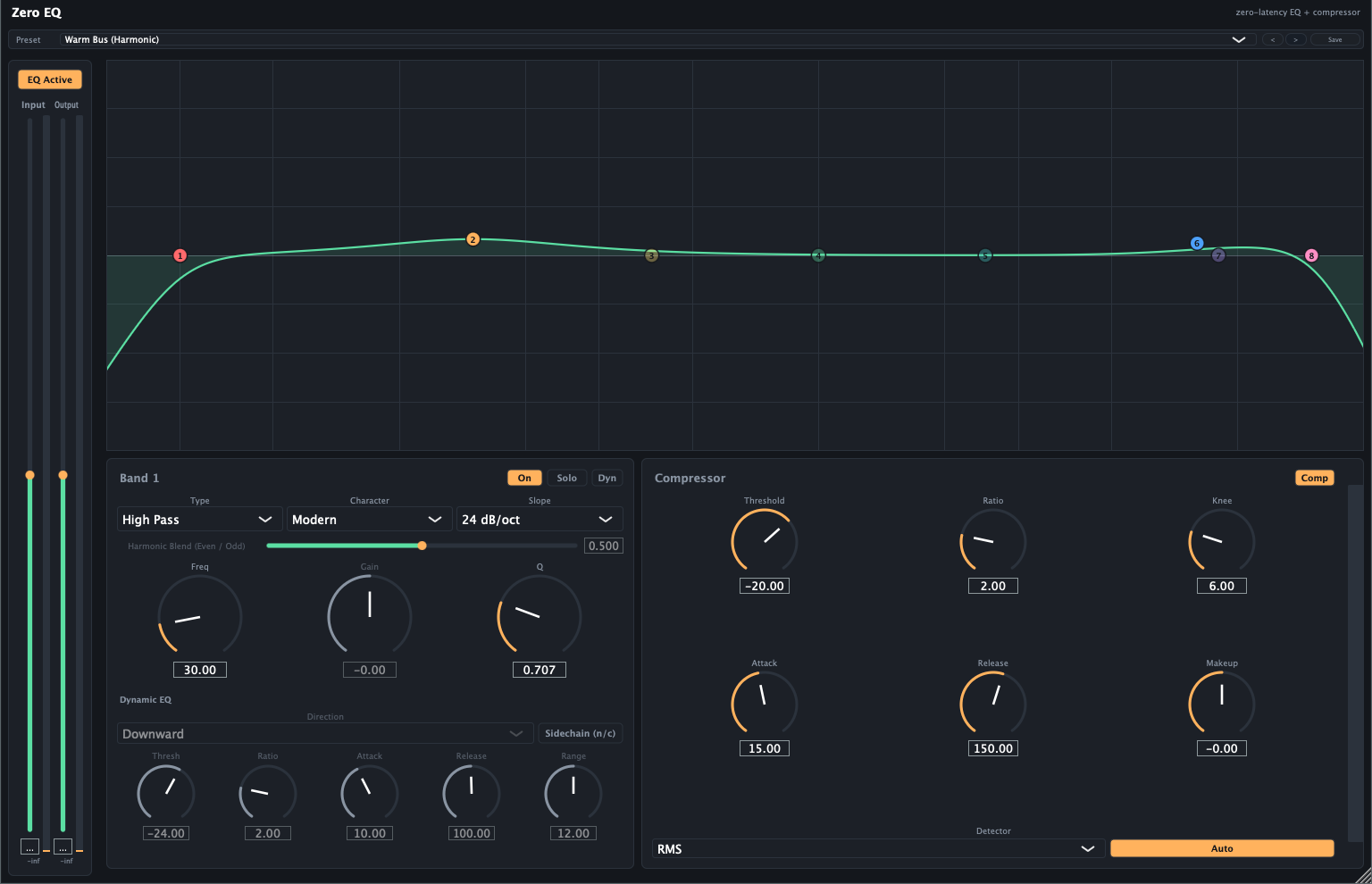
Everything is on one surface. Band 1 is selected below the curve, with its dynamic-EQ section underneath it and the compressor alongside — so the EQ move and the gain reduction reacting to it are visible at the same time.
Working with the curve
The main display is a spectrum analyser with your EQ curve over it, and a draggable node per band.
- Drag a node — frequency (left/right) and gain (up/down)
- Scroll on a node — Q, i.e. how wide or narrow the band is
- Double-click — add a band, or toggle one on and off
Band types
Bell boosts or cuts around a centre frequency. Low/High Shelf lift or drop everything below/above a corner. High Pass / Low Pass remove everything below/above a corner entirely. Notch cuts sharply at one frequency (for hum or a ringing resonance). Band Pass keeps only a region. Tilt Shelf tilts the whole spectrum about a pivot.
For High Pass and Low Pass you also get a Slope: 12, 24, 36 or 48 dB/octave — how steeply it cuts.
Character — the interesting control
Each band has a Character, and it changes how the band behaves, not just how it sounds:
- Modern — the textbook parametric. Q is independent of gain: a narrow band stays narrow however much you boost.
- Vintage — proportional Q. The more gain you apply, the wider the band gets, the way passive and console EQs behave. Broad musical moves feel more natural; surgical cuts are harder.
- Harmonic — Modern’s response, plus harmonics generated from that band’s own frequency region and mixed back in. Boosting adds warmth or grit rather than just level.
Harmonic Blend (only meaningful on Harmonic) sweeps from even harmonics at 0 — tube-like warmth — to odd at 1 — transistor-like grit.
A Harmonic band at 0 dB gain is completely transparent, so the character costs nothing until you use it.
Solo
Soloing a band lets you hear only what that band is affecting — invaluable for finding a resonance. Soloing one band mutes the others.
Dynamic EQ
Any band with gain (Bell, shelves, Tilt) can be switched to dynamic, meaning it only acts when the audio in its own region needs it.
- Downward — pull back when the region gets loud. A de-esser is the classic case: the band dips only when there’s actually sibilance, leaving the rest of the vocal alone.
- Upward — lift when the region gets quiet.
Controls: Threshold (the level it reacts around), Ratio (how hard), Attack and Release (how fast in and out), Range (the most it may move).
Sidechain
Switch a dynamic band to Sidechain and it reacts to an external input instead of the audio passing through — this is how you duck music under a voice at specific frequencies rather than pulling the whole track down.
If your host isn’t feeding the sidechain input, the band quietly falls back to listening to the internal signal rather than failing.
Compressor
A feed-forward compressor after the EQ.
Threshold — where it starts working. Ratio — how hard. Attack / Release — how fast. Knee — how gradually compression eases in around the threshold; a wide knee is gentler and less obvious.
Detector picks how loudness is measured: Peak catches short transients, RMS (the default) follows average loudness and sounds more natural on programme material.
Auto Makeup is on by default and estimates how much level to give back. Note that while it’s on, the manual Makeup control does nothing — turn Auto off to set makeup yourself. Auto is deliberately gentle rather than fully restoring peak level.
Metering
Three readings, answering different questions:
- Peak — the highest sample. Rises instantly, falls back gradually so you can actually read a transient.
- True Peak — the highest point of the reconstructed waveform, including between samples. This is the one that matters for clipping: a signal can read safe on sample peak and still clip on conversion or in a lossy encoder.
- VU — slow and averaged; tracks perceived loudness.
The clip indicator trips slightly below 0 dBFS (-0.1 dB) and holds for about 1.5 seconds so a brief clip doesn’t vanish before you see it.
Presets
Factory presets are on the preset bar; you can save your own. Every factory preset has been swept to confirm it applies correctly, produces no NaN audio, and reports zero added latency.
Known quirks — not bugs
Two pluginval warnings on the AU build are expected and benign: “Disabling non-main
buses failed” (a documented JUCE/AudioUnit interaction for plugins with a sidechain bus) and
“Current program is -1” (the AU wrapper reports no preset selected until a host picks one).
Apple’s own auval passes clean.
Troubleshooting
Gain does nothing on a band. High Pass, Low Pass, Notch and Band Pass have no gain — they remove or keep a region, they don’t level it. Use a Bell or shelf.
Slope does nothing. It only applies to High Pass and Low Pass.
Harmonic Blend does nothing. The band’s Character isn’t set to Harmonic, or its gain is at 0 dB (where a Harmonic band is transparent by design).
Makeup gain does nothing. Auto Makeup is on. Turn it off.
A dynamic band isn’t reacting to my sidechain. Check your host is actually feeding the plugin’s sidechain bus — routing it is host-specific. Without it the band falls back to the internal signal, which looks like “sidechain isn’t working”.