

Dante-BabelBox is a cross-vendor Dante control bridge. Dante carries audio and basic device discovery, but nothing about preamp gain, phantom power or wireless-mic status — each vendor layers its own proprietary control protocol on top of the same network. This translates between them, so state on one vendor’s device is usable from outside its own ecosystem.
It covers two separate domains:
- Preamp control — bridging gain and phantom power across consoles and stageboxes from different vendors, with a patch-bay web UI.
- Radio-mic telemetry — battery, RF and audio level from wireless receivers, across vendors, whether or not the hardware has a Dante audio option installed — because the adapters only ever talk to a device’s IP control channel and never touch Dante audio at all.
Before you rely on this: adapters are built against official or community-authoritative vendor protocol specs, not guesswork, and are tested against mock devices. But no adapter has been validated against real hardware, and the Lectrosonics mic adapter’s wire format is an unverified placeholder — a scaffold, not a working adapter.
One thing has been proven on hardware, and it is worth knowing which: the Yamaha R-series HA protocol was captured from a real QL1 + Rio3224-D2, decoded, documented, rebuilt from that documentation and transmitted back — and the stagebox accepted it and changed its gain. That is a protocol proven on hardware, not code: the write came from a standalone script, and the Rio adapter is still unimplemented. See yamaha-ha-remote-over-dante.md.
This codebase was created with AI assistance, directed and reviewed by a human author.
Which devices are supported
Preamp control
| Vendor | Device | Protocol | Status |
|---|---|---|---|
| Behringer / Midas | X32, M32 | OSC | Done |
| Behringer | Wing | OSC | Done — 8 built-in preamps only |
| Allen & Heath | AHM-series | NRPN over TCP | Done |
| Allen & Heath | dLive | NRPN over TCP (Socket addressing) | Done |
| Yamaha | DM3 / DM3S | OSC | Done |
| Allen & Heath | Qu, SQ | — | Not implemented — no public preamp-control spec exists |
| Yamaha | DM7, CL, QL | — | Not implemented — no public spec |
| Yamaha | Rio, Tio | Legacy AD8HR (MIDI SysEx) | Not implemented — setup docs exist, wire format doesn’t |
Radio-mic telemetry
| Vendor | Device | Protocol | Status |
|---|---|---|---|
| Shure | ULX-D | ASCII over TCP 2202 | Done |
| Shure | Axient Digital | ASCII over TCP 2202 | Wire framing done; field behaviour only spot-checked |
| Sennheiser | EW-DX EM 2 / EM 2 Dante / EM 4 Dante | SSC (JSON over UDP) | Done |
| Lectrosonics | DSQD / Duet | Ethernet control port | Placeholder wire format — correct the bytes and the port before use |
The Lectrosonics adapter keeps the project’s no-fabrication rule for what it reports — audio dBFS and RF dBm stay unset rather than being invented — but treat it as a scaffold until the wire format is confirmed.
Getting a bridge running
1. See what is on the network.
cargo run --bin preamp-bridge -- discoverThis browses Dante’s own mDNS advertisements. It tells you what is there; it does not tell you what this bridge can drive.
2. Generate a config.
cargo run --bin preamp-bridge -- init --output bridge.tomlinit discovers devices and probes each one against every implemented adapter’s identify()
until one claims it. Confidence varies by protocol, and it is worth knowing which you are
getting:
- X32-family and Wing confirm vendor and model, from documented replies.
- AHM and dLive confirm the protocol family only — their specs have no model-string query.
- DM3 is the weakest signal: its spec documents no identify query at all, so a scene-status request is reused as a presence probe.
[[mapping]] entries are not generated by default — add them by hand, or see below.
3. Run it.
cargo run --bin preamp-bridge -- run --config bridge.tomlEditing bridge.toml while the bridge runs hot-reloads the mapping table.
Inferring mappings from live Dante patching
cargo run --bin preamp-bridge -- init --output bridge.toml --infer-mappingsWith this flag, init also queries each identified device’s current Dante RX subscriptions and
writes a [[mapping]] for every subscription pointing at another device in the file. It is a real
signal — it comes from watching live patching, not from guessing.
One real caveat, and it is why this is opt-in. The channel numbers it writes are Dante audio channel numbers. Whether those match the preamp/headamp channel a vendor adapter addresses is a default-configuration convention on most gear — Dante channel order mirrors physical I/O order 1:1 out of the box — not a protocol guarantee. A console with customised Dante patching breaks the assumption silently.
Treat inferred mappings as a first draft to verify against each adapter’s channel numbering.
The patch-bay web UI
run also serves a web UI, bound by default to 0.0.0.0:8080 — reachable from any browser on the
LAN at http://<this-machine's-IP>:8080.
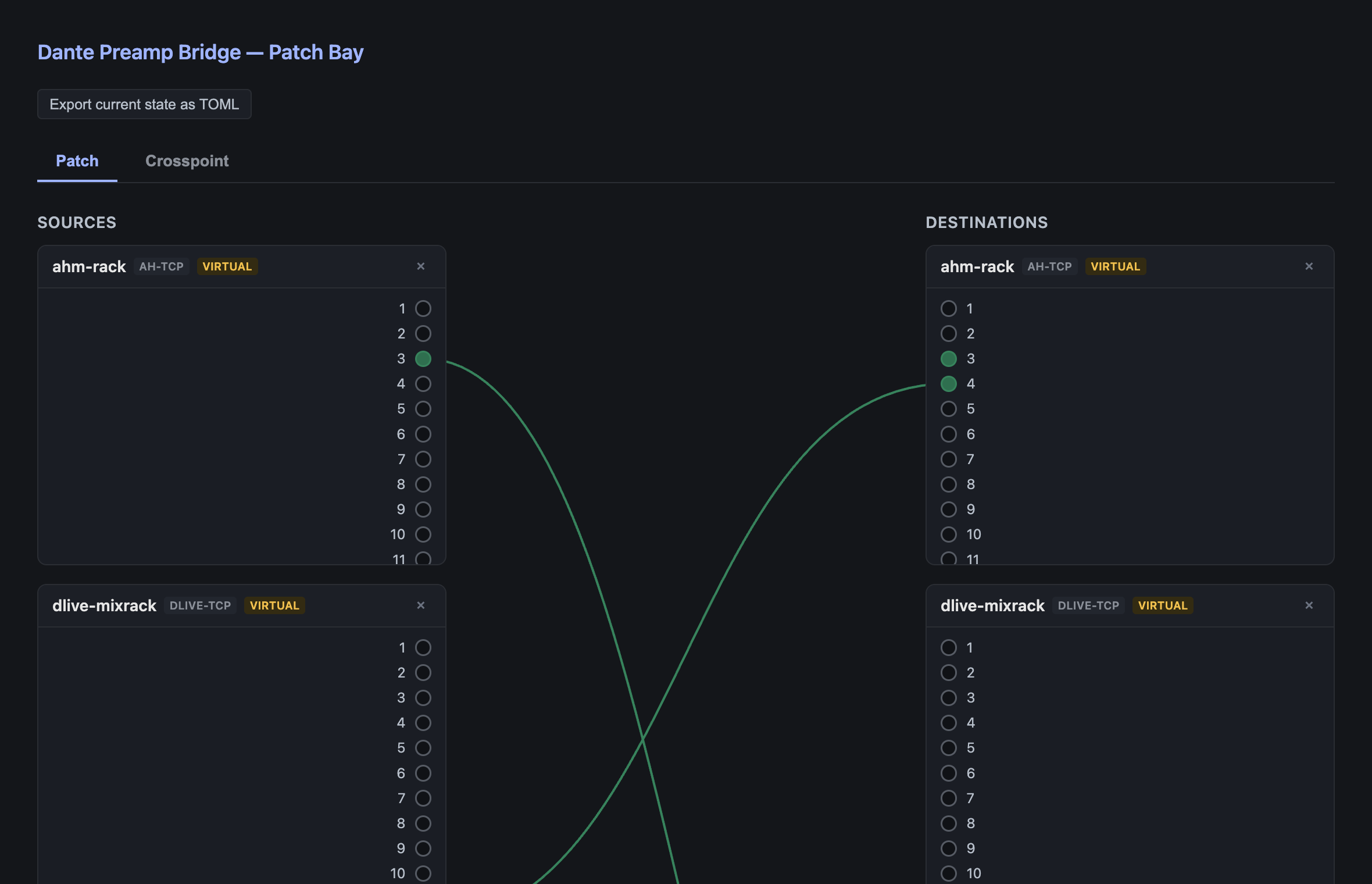
A real screenshot of the running web UI. The devices shown are virtual placeholders, so the UI can be demonstrated with no hardware on the network.
- Patch tab — click a source channel, then a destination channel, to connect them; click a patch cable to disconnect.
- Crosspoint tab — the same mappings as a matrix, scoped to channels that are actually mapped. A full all-channels grid across even two devices would be tens of thousands of cells, so pin a device to bring all its channels into the grid on demand.
- Device management — add real devices (connects immediately) or virtual ones.
- Export as TOML — devices and mappings added through the UI are in-memory only and do not
survive a restart. This button exports the current state so you can paste it into
bridge.tomland keep it.
Change the bind with --web-bind 127.0.0.1:8080 to restrict it to this machine, or turn it off
with --no-web.
There is no authentication and no TLS — the same trust model as a hardware router’s control port. It belongs on a trusted operations network, not the open internet.
What “virtual” means
A virtual device is a placeholder for a not-yet-built emulation layer. Today the bridge is a translating router you configure by IP and channel — genuinely useful, but not invisible to the consoles. Making it answer as if it is a native device of a foreign brand, so a console’s own preamp UI drives it directly, needs packet captures of real gear paired with its own native device, and none of that handshake is in any public spec.
Virtual devices let you design the intended topology now, before the emulation exists to back it.
If you can help with those captures, docs/ has a non-technical field guide, one edition per
OS: Windows · macOS ·
Linux.
The config file
[[device]]
id = "ahm-rack"
kind = "ah-tcp"        # osc-x32 | osc-wing | ah-tcp | dlive-tcp | yamaha-dm3
address = "10.0.0.10"
port = 51325           # optional — defaults to the protocol's standard port

[[device]]
id = "future-x32"
kind = "osc-x32"       # the protocol this virtual device will eventually emulate
virtual = true         # placeholder — no address needed
channels = 8

[[mapping]]
from = { device = "ahm-rack", channel = 3 }
to   = { device = "x32-monitors", channel = 7 }
bidirectional = true
channelmeans whatever the underlying protocol’s native addressing unit is — an X32 headamp number, a dLive physical preamp Socket number (which is not the processing channel number), a DM3 Local Input number. This is the single most likely thing to get wrong. Check the relevant adapter’s module doc comment for exact ranges.
kind is an open string, not a fixed list: a loaded plugin can register additional kinds. A fully
worked example is in bridge.example.toml.
Radio-mic telemetry
A separate binary, because the domain is a different shape — telemetry is read-heavy (battery, RF and audio level are monitoring-only; mute is the only realistic write), so it has its own adapter trait rather than extending the preamp router.
cargo run --bin mic-monitor -- discover
cargo run --bin mic-monitor -- watch
mic-telemetry-architecture.md diagrams both vendors’ wire protocols sequence by sequence, and exactly what ends up in the reported state per vendor.
Adding a device the bridge doesn’t support
Device support loads two ways, and both look identical to the router and the web UI. The one that
matters to you is dynamic loading: a plugin is a separate .so/.dylib/.dll, scanned from
--plugins-dir (default plugins) at startup.
Adding a vendor needs no recompile of this project at all — build your plugin, drop the file in, restart the bridge. All five real preamp vendors already work this way.
plugin-development-guide.md has the full contract, two worked examples, and the real pitfalls hit while building it.
Troubleshooting
| Symptom | Cause |
|---|---|
discover lists devices, init doesn’t claim them |
Discovery is Dante’s mDNS; identification is per-adapter. A device can be visible and unsupported. |
init identified a DM3 that isn’t one |
DM3 has no identify query; a scene-status request stands in as a presence probe. It is the weakest signal of the five. |
| Gain moves the wrong channel | Channel numbering is per-protocol. On dLive especially, the Socket number is not the processing channel. |
| Inferred mappings are off by a channel or scrambled | The console has customised Dante patching, so Dante channel order no longer mirrors physical I/O. |
| Devices added in the web UI vanished after a restart | They are in-memory only. Use Export as TOML and keep it in bridge.toml. |
| A command bounces back and forth between two devices | Shouldn’t happen — the router has echo suppression on bidirectional mappings. Worth reporting. |
| Web UI unreachable from another machine | --web-bind is set to loopback, or --no-web is on. |
| Wing preamps above 8 don’t respond | Only the 8 built-in preamps are covered. |
| Lectrosonics receiver reports nothing | Expected — the wire format is an unverified placeholder. |
See also
- plugin-development-guide.md — adding a device without a PR
- mic-telemetry-architecture.md — the telemetry domain in full
- yamaha-ha-remote-over-dante.md — the protocol note proven against real hardware
- API.md · DEVELOPING.md
- Capture guides for helping build device emulation: Windows · macOS · Linux
- README — status tables, architecture and downloads