

Gauge is the film strip itself, as two FFGL plugins for Resolume Arena and Avenue: SW Gauge, an effect that prints your clip onto 35 mm, 16 mm or Super 8, and SW Gauge Leader, a source that runs the countdown leader on the same film. You get the perforations, the frame lines and the rebate where the standards put them, an anamorphic squeeze, one frame filling the screen or a strip of film running across it, an optical soundtrack that wiggles with the music, the countdown and a sync flash.
The holes, apertures and soundtrack areas were all published, mostly in inches, by people who cared a great deal about thousandths of them, and the strip’s built from their numbers. It doesn’t do grain or the projector: rebate does the emulsion and gate does the projector, so put either after Gauge for those.
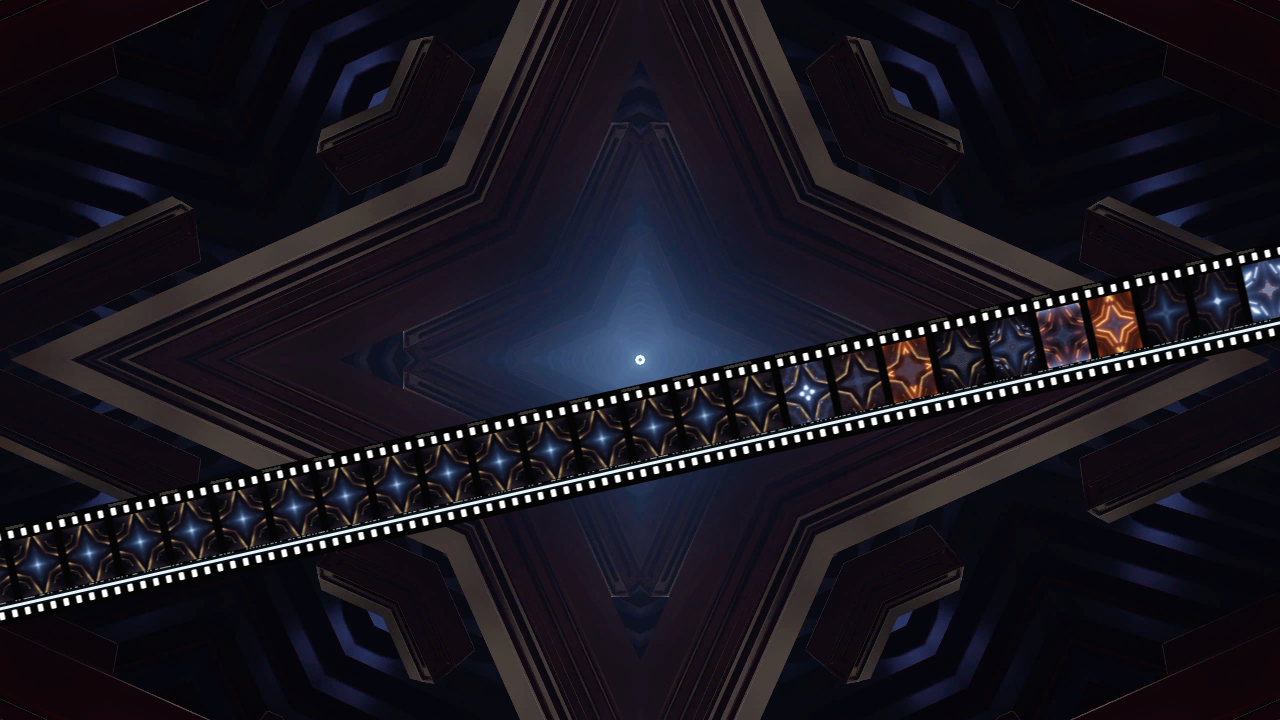
Mode on Strip over Resolume’s bundled IntoTheGlow_02, with Surround on Clip: the clip full screen, and a strip of its own recent past running across it. Rendered by the offline harness rather than captured from Resolume.
Before you rely on this: this is v0.1.0, the first release, and still early days. The strip is measured rather than asserted, by the plugin’s own harness (
tools/verify.sh) on an Apple silicon Mac (an M4 Max, macOS 26.4.1), driving the real plugin classes and reading each claim back out of the picture. Every format’s holes, pictures and frame lines come back at the published dimensions, within 0.005 mm of a separate table of the standards’ own figures; a disc that’s round as seen comes back half as wide as it’s tall through Scope’s 2× squeeze; every frame of a moving strip keeps the picture it was exposed with; the countdown runs frame for frame to the picture at exactly eight seconds (or eight beats, on the bar); a flash is one film frame; and the optical track is the sound at the film’s speed. Ten models broken on purpose each fail their check, a one-character change to the shipped shader is caught, and every control but the Audio input (50 across the two plugins) measurably changes the picture. It’s never been loaded into Resolume on macOS. The one host it’s run in on a Mac is the fleet’s own test host,oxbow, which loads both plugins and renders 120 frames through each. So on a Mac its panel in Resolume, Resolume’s audio on the Audio input and Resolume’s beat driving Start On and Rate Beat are all untried. On Windows, both plugins load, register and render in Resolume Arena 7.27.1, with every control as declared, on a machine with software rendering and no GPU or sound device. Every control that can act without sound changed the picture there, bar two of the leader’s, Edge Print and Shutter, which were too close to call against a countdown that never sits still. Nothing has played sound into it there either. The look has only been seen on a test card and Resolume’s bundled demo clips, never on camera footage or a film scan. Try it on a spare layer before you put it in a show.This codebase was created with AI assistance, directed and reviewed by a human author.
Photosensitivity. Auto Flash on Beat flashes a whole film frame white once a beat: 2 Hz at 120 BPM, and 3 Hz from 180 BPM up, where it enters the 3 to 30 Hz band that broadcast flash guidelines restrict. On a bright LED wall in front of an audience, use it with care.
Installing
Every download has both plugins in it, the effect and the source. On macOS they’re
Gauge.bundle and Gauge Leader.bundle; on Windows, Gauge.dll and Gauge Leader.dll. Put both
into Resolume’s effects folder and restart Resolume:
macOS    ~/Documents/Resolume Arena/Extra Effects/
Windows  %USERPROFILE%\Documents\Resolume Arena\Extra Effects\
Avenue uses the same layout under its own folder name. SW Gauge then turns up among the effects and SW Gauge Leader among the sources.
The macOS download is a universal build (Apple silicon and Intel), as a .dmg or a .zip. It’s
Developer ID-signed and notarised, so the bundles just load. The Windows download is an x64
installer or a .zip. It isn’t code-signed, so the installer trips SmartScreen once: More
info → Run anyway.
Two plugins
- SW Gauge (an effect) prints the clip on its layer onto the film, frame by frame.
- SW Gauge Leader (a source) has no clip, so it runs the countdown leader on its own film, looping by default.
The source has the effect’s controls less the ones that need a clip or programme sound (Fit, Track Level, Audio, Frames, Mix and the Clip surround), and two more in its Leader group: Loop and After. Both end with the About group.
A film strip is a standard
Every gauge’s holes, pitch, apertures and soundtrack areas are published figures. So Gauge builds the strip in film millimetres from those figures, points a camera at it, and works out every pixel of the output from where it lands on the film; nothing is drawn at a place on the screen. Each frame on the film is exposed once and keeps that picture as it travels.
| on the film | what you see |
|---|---|
| holes at the published size, pitch and distance from the edge, in the rows each format has | perforations where the standards put them: 35 mm’s four to a frame with the frame line midway between two, 16 mm’s frame line through its hole, Super 8’s small hole beside the middle of its frame |
| the camera aperture’s height against the frame pitch | the frame line: Academy’s thick black bar (3 mm), Scope’s hairline (0.4 mm) |
| the picture exposed through an anamorphic lens | the squeeze: something round is tall and thin on the print, the leader included |
| a frame keeps the picture it was exposed with | a moving strip is a contact strip of the clip’s past, and the frame above the gate is the one before |
| a variable-area track whose clear width follows the sound at the film’s speed | an optical track that wiggles with the music, finer for higher notes |
| the leader spliced onto the film, 24 frames to a count | the countdown at the film’s rate: eight seconds at 24 fps, or eight beats at Rate Beat |
| a flash is one frame exposed fully | a sync flash one film frame long |
The frame line is the same subtraction on every format, which gives Super 8 a frame line of 0.014 mm. That is to say its frames very nearly touch.
Start here
- Put SW Gauge on a layer with something moving in it and leave every control where it is. You get a 35 mm Academy release print at 24 fps: the clip in the frame with the thick frame line above and below, the soundtrack and the DTS dashes down the left, white holes either side, and the stock’s code printed on the right.
- Framing to 1. That’s the film’s whole width, with the edges of the frames above and below the gate in view. The one above holds the clip as it was just before the last pull-down; the one below hasn’t been exposed yet, so it shows the clip as it is now. Rack slides the frame line into view; Drift rolls it through.
- Format to 35 mm Scope. The clip is squeezed to half its width, the frame line is a hairline, and the print carries the stereo analogue track, DTS, Dolby Digital between the left-hand holes and SDDS down both edges. Route some music to Audio and the analogue track wiggles with it.
- Mode to Strip. A strip of film 30% of the output’s height runs across the middle at two frames a second, right to left, and every frame keeps the picture it had when it came into view. Size, Angle and Position place it, Travel speeds it up or reverses it, and Shutter blurs it.
- Surround to Clip: the clip full screen with a strip of its own recent past running across it, as in the picture at the top. Holes to Clear lets the layers below show through the holes.
- Mode back to Cell, and press Roll Leader. The countdown comes through the gate in front of the clip, and the clip’s back eight seconds later. With Rate on Beat and Start On on Bar, PICTURE START lands on the next bar and the picture two bars after it.
- Press Flash for a single white frame, or set Auto Flash to Beat for one on every beat (see the photosensitivity note above).
- For the countdown on its own, put SW Gauge Leader on a layer. It loops by itself.
Every slider is declared to the host as 0 to 1. The value each position stands for is given with each control below.
The Film group
- Format: the gauge and the print. 35 mm Academy (the default) is a 35 mm sound release print: four holes a frame, the Academy picture with its thick frame line, a mono analogue track and DTS. 35 mm Scope is the anamorphic print: a 2× squeeze, a hairline frame line and all four soundtracks. 35 mm Full is silent full aperture. 35 mm Still is the 135 still roll: 36 × 24 frames with their long side along the film, eight holes a frame. 16 mm is double perf and silent, a hole either side of every frame line. 16 mm Sound is single perf with an optical track on the far edge. Super 16 is single perf with the picture widened into the old track area. Super 8 has one small hole beside the middle of each frame. See the table below. Changing Format starts new film, and every picture it was holding is forgotten.
- Stock: what the print is made of. Colour Print (the default): a black rebate, light edge print, and an analogue track printed in cyan dye, so its dense part is a deep blue-green. B&W Print: black and white, the picture reduced to its luma and everything else neutral. Clear Base: unexposed print film on a light box, so the rebate’s pale and the edge print and the track are dark. The pictures stay in colour. The stock codes printed on the edge (GP 7712, GB 7302, GC 7015) are made up.
- Squeeze: the anamorphic lens the picture is exposed through. Format (the default) uses the format’s own, 2× on 35 mm Scope and none on the rest; None, 1.33x, 1.5x and 2x pick one. The clip is fitted to the picture’s shape as it’s meant to be seen (the aperture’s own shape times the squeeze) and then squeezed into the aperture, so something round in the clip is printed 1/squeeze as wide as it’s tall. A leader on a squeezed print is squeezed too.
- Fit (the effect only): how the clip fills that shape. Crop (the default) fills it and trims what’s left over, centred; Letterbox shows the whole clip with black bars, which print black; Stretch fills it by stretching the clip.
- Edge Print: on (the default) or off. The stock’s code on every frame, in the margin outside the holes, and a four-digit key number after it once a foot: every 16 frames on 35 mm, every 20 on 16 mm. The still roll carries its code twice a frame along one edge and the frame numbers along the other, with an A number between frames. 35 mm Scope (whose margins carry SDDS) and Super 8 have no edge print.
- Soundtracks: on (the default) or off. 35 mm Academy carries a mono variable-area track and DTS time code beside it; 35 mm Scope a stereo analogue track (both channels the same signal), DTS, Dolby Digital blocks between the holes on the soundtrack side and SDDS down both edges; 16 mm Sound one analogue track on the far edge. The other five formats are silent. DTS, Dolby Digital and SDDS are drawn as data patterns, with no logos.
- Track Level (the effect only): the analogue track’s gain on the audio, 0 to 2, default 1 (slider 0.5). At 0 the track is a band of constant width whatever the music.
- Audio (the effect only): the FFT input, 64 bins of the host’s audio spectrum. Route the music to it and the analogue track wiggles with it: each bin is laid along the film as a sine at its own frequency, at the film’s speed, so a high note is a finer ripple than a low one, and a ripple finer than half a pixel is left out rather than aliased. Each bin’s magnitude is square-rooted first, so the track moves for more than the kick drum. A held frame keeps the track it was printed with, so a moving strip carries its sound along with its pictures. With nothing routed every bin is zero and the track is a band of constant width.
The formats, in film millimetres (the picture is across × along the film; “as seen” is its shape after the format’s own squeeze, the shape Crop fits the clip to):
| Format | holes | frame line | picture | as seen | soundtracks | edge print |
|---|---|---|---|---|---|---|
| 35 mm Academy | 4 a frame, both edges | 2.998 | 20.955 × 16.002 | 1.31:1 | mono analogue, DTS | code; number every 16 frames |
| 35 mm Scope | 4 a frame, both edges | 0.407 | 20.955 × 18.593, 2× | 2.25:1 | stereo analogue, DTS, Dolby Digital, SDDS | none |
| 35 mm Full | 4 a frame, both edges | 0.331 | 24.892 × 18.669 | 1.33:1 | none | code; number every 16 frames |
| 35 mm Still | 8 a frame, both edges | 2.000 | 24 × 36 | 1.5:1 | none | code twice a frame; frame numbers |
| 16 mm | 1 a frame, both edges | 0.127 | 10.262 × 7.493 | 1.37:1 | none | code; number every 20 frames |
| 16 mm Sound | 1 a frame, guided edge | 0.127 | 10.262 × 7.493 | 1.37:1 | mono analogue | code; number every 20 frames |
| Super 16 | 1 a frame, guided edge | 0.210 | 12.52 × 7.41 | 1.69:1 | none | code; number every 20 frames |
| Super 8 | 1 a frame, guided edge | 0.014 | 5.69 × 4.22 | 1.35:1 | none | none |
35 mm film is 34.975 mm wide, with KS holes 2.794 mm across by 1.981 along on a 4.75 mm pitch, 2.01 mm from each edge. 16 mm is 16.00 mm wide, with holes 1.829 × 1.270 on a 7.62 mm pitch, 0.90 mm from the edge, and the frame line through the middle of each. Super 8 is 7.976 mm wide, with a 0.914 × 1.143 mm hole (across by along) on a 4.234 mm pitch, 0.51 mm from the edge, level with the middle of its frame. The guided edge is the soundtrack side of a 35 mm print and the perforated side of single-perf film.
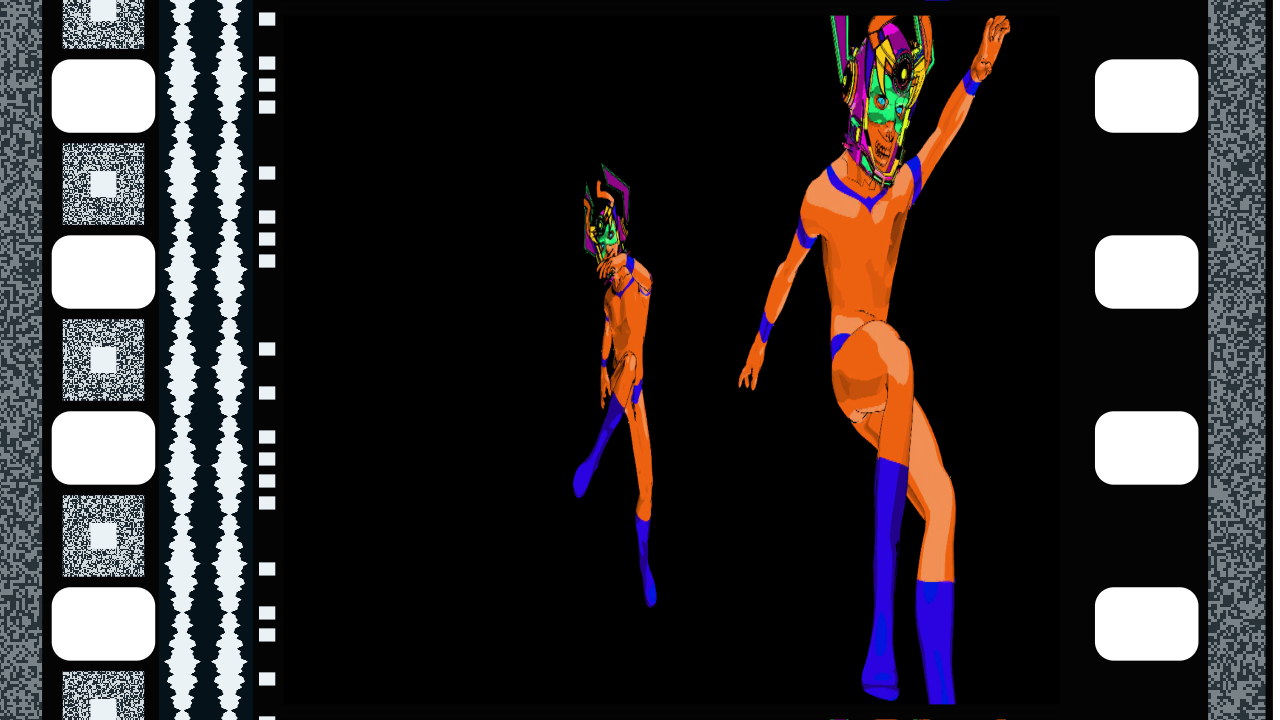
35 mm Scope over Resolume’s bundled Galactucity_21, with a few tones on the Audio input: the squeeze, and all four soundtracks. Rendered by the offline harness.
The View group
- Mode: Cell (the default) or Strip. Cell looks at the frame in the gate, the way a scanner would, with the picture upright and the guided edge on the left (on the still roll, the film runs across the output and the guided edge is at the top). Strip lays the film across the output as a moving strip. A strip starts with the gate’s frame in the middle, so the frames the cell held are the first ones it shows.
Framing, Rack and Drift work in Cell:
- Framing: how much of the film is in view, from the picture filling the output (0) to the film’s whole width and a quarter again (1), on a log scale; default 0.7, which shows a 35 mm frame with its holes and track on a 16:9 output. At 0 the view is centred on the picture (a sound print’s picture sits off the film’s centre line), at 1 on the film.
- Rack: moves the view along the film by up to half a frame either way; default centred (slider 0.5). Towards 0 the frame above (the previous picture) comes down into view, and towards 1 the frame below (not yet exposed, so the clip as it is now) comes up; at either end the frame line’s across the middle.
- Drift: rolls the frame line steadily through the view, up to 4 frames a second either way, default 0 (slider 0.5). It’s cubic, so most of the slider is the slow end: 0.75 is half a frame a second. It wraps round, so the frames in view are always the gate’s frame and its neighbours.
Size, Angle, Position and Travel work in Strip:
- Size: the film’s width as a share of the output’s height, 5% to 100% on a log scale; default 30% (slider 0.6).
- Angle: turns the strip, −180° to +180° (slider 0 to 1), default 0° (slider 0.5). At 0° the film runs left to right with its head on the left: each frame lies on its side with its top towards the head, and the guided edge runs along the bottom. Positive angles turn it clockwise, so +90° (slider 0.75) stands it up with its head at the top and its frames upright. The still roll’s frames stand upright at 0°.
- Position: moves the film’s centre line across the strip, from the top edge of the output (0) through the middle (0.5, the default) to the bottom edge (1), at Angle 0°.
- Travel: how fast the film runs, −24 to +24 frames a second, default 2 (slider 0.72). It’s cubic: 0.6 is about 0.2 frames a second, 0.75 is 3, 0.9 about 12 and 1 is 24. Positive runs it head first, right to left at 0°, so new frames come into view at the right; negative runs it the other way; the middle (0.5) stops it.
And both:
- Shutter: motion blur on moving film, as the share of each host frame the picture is averaged over: 0° (sharp) to 360° (the whole frame), default 180° (slider 0.5). It averages up to 16 positions of the film, about one for each pixel it moves, so it only shows when the film moves more than a pixel a frame: on a running strip, or with Drift in Cell.
The Frames group
- Rate: 24 fps (the default), 25 fps, 18 fps, 16 fps or Beat. The film’s speed in Cell: how often the gate pulls down a new frame, how long the countdown takes (it’s 192 frames, so 8 seconds at 24 fps, 7.68 at 25, about 10.7 at 18 and 12 at 16), how long a flash lasts, and how the soundtrack’s frequencies lie along the film. Beat runs the film at 24 frames to a beat of Resolume’s tempo, so a count of the countdown is a beat (48 frames a second at 120 BPM). On a strip, Travel sets how fast the film moves, and Rate only sets the soundtrack’s scale.
- Frames (the effect only): Held (the default) or Live. Held: each frame keeps the picture it was exposed with. In Cell the frame in the gate is being exposed for as long as it’s there, so it shows the clip as it is now, and each frame above it holds the picture from just before it was pulled down; on a strip each frame is exposed when it first comes into view and keeps that picture all the way across. Live: every frame in view is the clip as it is now.
The picture in the gate is the clip at the host’s frame rate, so Gauge doesn’t judder at the film’s rate. That’s the projector’s job; put gate after Gauge for it.
The Leader group
The source’s Leader group starts with Loop and ends with After; the effect has neither.
- Loop (the source only): on (the default), the leader goes round and round; off, it plays once and then shows After. See SW Gauge Leader below.
- Roll Leader: a button. Splices the countdown onto the film at the next frame, or at the frame Start On waits for. In Cell it comes through the gate, and on the effect the clip comes back 192 frames after PICTURE START (eight seconds at 24 fps). On a strip it starts at the next frame to come into view, so it passes as a row of numbered frames. On the source it starts the leader again from PICTURE START.
- Start On: Press (the default), Beat or Bar. Press takes the next frame. Beat and Bar wait for the next beat or bar of Resolume’s tempo (one the frame is sitting on counts) and land on the frame that starts there. It applies to Roll Leader and Flash.
- Pop Frame: Number (the default) draws the 2; Flash makes the 2 a white frame instead. Either way the 2 carries the pop on the soundtrack, a 1 kHz tone for that one frame, on a format with an analogue track.
- Flash: a button. One frame of film fully exposed, which prints white: one film frame long wherever it lands (1/24 of a second at 24 fps), on the next frame or on the beat or bar Start On waits for.
- Auto Flash: Off (the default), Beat or Bar: a flash on every beat or every bar of Resolume’s tempo, by itself. See the photosensitivity note at the top.
- After (the source only): what follows a leader that doesn’t loop. Black (the default) is black film; Clear cuts the picture area out of the film, so the layers below show through it with the rebate and holes still round them.
The countdown
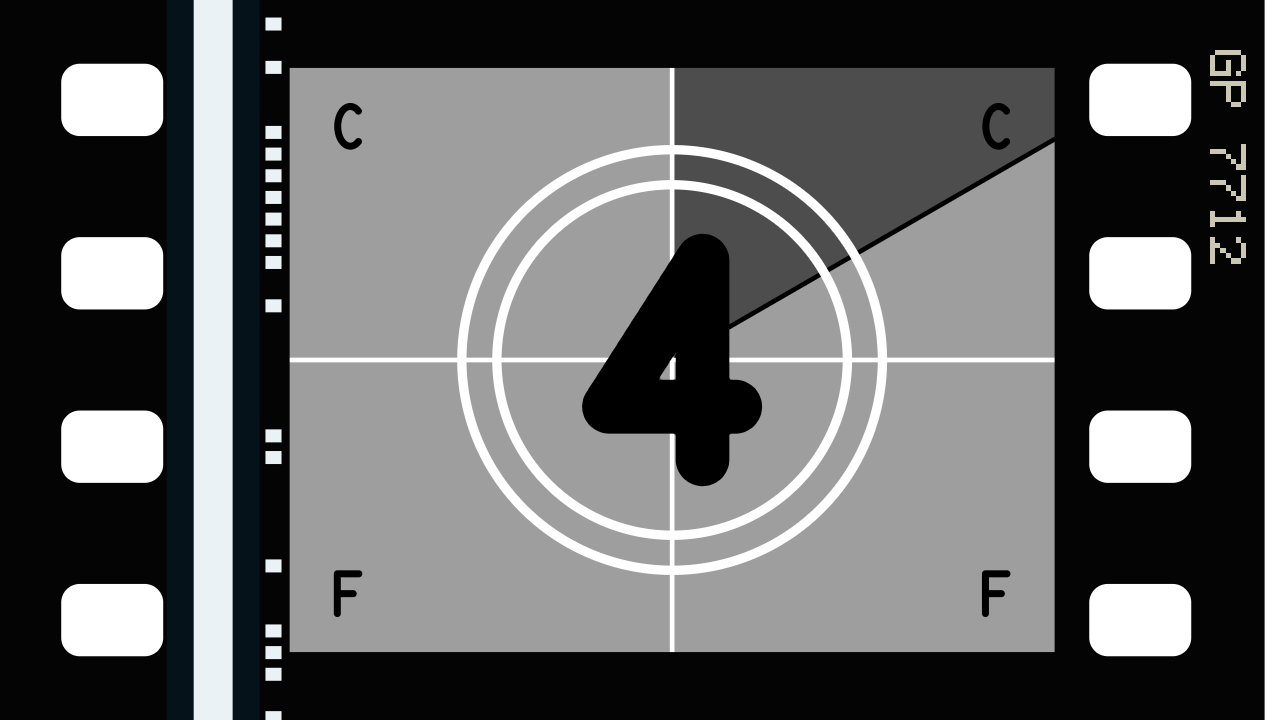
SW Gauge Leader on the 4, with the control frames’ C C F F in the corners. Rendered by the offline harness.
It’s after the SMPTE Universal Leader, counted in film frames from PICTURE START:
| film frames | on the film | at 24 fps |
|---|---|---|
| 0 | PICTURE START | 0 s |
| 1 to 23 | 8 | from 1/24 s |
| 24 to 143 | 7, 6, 5, 4 and 3, 24 frames each | 1 s to 6 s |
| 144 | 2, for one frame, with the pop | 6 s |
| 145 to 191 | black | to 8 s |
| 192 | the picture | 8 s |
Each count is a light grey frame with two white rings, a white crosshair and the number in black, and a hand sweeps clockwise from twelve once round in the count, leaving the frame dark grey behind it. On the 4 the letters C C F F sit in the corners. The leader is drawn in the picture’s shape as seen, so on a Scope print its circles are squeezed along with everything else. The greys, the line weights and the typeface are mine (the numerals are a stroked face, not the original’s Futura), and it’s the only style of leader Gauge has.
At Rate Beat a count is a beat, so with Start On on Bar, PICTURE START lands on a bar and the picture on the bar two after it.
The Surround group
- Holes: Light (the default) prints them white; Clear makes them transparent, so whatever’s on the layers below shows through them; Black fills them black.
- Surround: what’s beyond the film’s edges. Clear (the default) is transparent, Black and Light (white) fill it, and on the effect only, Clip puts the clip itself there, full screen behind the film.
- Mix (the effect only): the film over the clip, from the clip alone (0) to the film (1, the default). The film itself is opaque, so a transparent part of the clip prints as black film; only the holes and the surround can be clear.
SW Gauge Leader
The source draws the countdown leader on its own film, with the same Film, View and Surround controls as the effect less Fit, Track Level, Audio and the Clip surround, Rate alone in its Frames group, no Mix, and Loop and After in its Leader group.
With Loop on (the default) the leader runs from the moment the source starts and goes round: PICTURE START, the 8 to the 2, just under two seconds of black (47 frames) and PICTURE START again, every 192 frames. At Rate Beat it runs from the beat count rather than from when it started, so PICTURE START lands on every other bar, eight beats apart. On a strip the countdown frames go past in a row, round and round.
With Loop off it plays once from the first frame, then After: black film, or the picture area cut out. Roll Leader plays it again.
The source carries no programme sound, so its analogue track is silent except for the pop on the 2.
Time comes from the host
The film runs on the host’s clock. Each frame it moves on by the host’s time since the last, so a paused composition stops the film, a jump forward moves it on by a quarter of a second at most, and a step backwards passes no time. For the first few frames after it loads, the plugin runs on its own steady clock while it works out whether the host counts time in seconds or milliseconds.
Rate Beat, Start On Beat and Bar and Auto Flash follow Resolume’s tempo. The plugin keeps its own beat from the BPM and lines it up with Resolume’s position in the bar whenever one arrives, taking every bar as four beats. A host that sends no tempo gets 120 BPM.
How it works
Every host frame:
- The clock (on the CPU, in double precision): the film’s position from the host’s clock and Rate, the strip’s travel and the drift; Roll Leader and Flash given the frame they land on, now or at the beat or bar they wait for.
- The camera: which film millimetre each output pixel sees, in Cell or Strip, and which frames are in view across the whole shutter.
- The exposures: the clip, fitted and squeezed into the picture’s shape, copied into the held frames. In Cell that’s the frame in the gate, every host frame until it’s pulled down; on a strip, each frame the first time it’s seen. They’re kept as 8-bit pictures sized to how big the camera draws a frame, up to 40 megapixels in all, and a change of raster or Size resamples them rather than losing them.
- The composite: for each output pixel, the holes, the rebate, each frame’s picture by how much of the pixel it covers, the soundtracks and the edge print, then Holes, Surround and Mix, averaged over up to 16 positions of the film across the Shutter.
Every edge’s coverage is worked out from its distance in film millimetres rather than sampled, so it’s exact at any raster to float precision, and that’s what lets the harness measure a hole to a thousandth of a pixel.
Performance
Measured by the offline harness on an Apple M4 Max, best of three runs of 60 frames, glFinish
both sides, on a GPU shared with other work:
| defaults (Cell) | Strip at 24 fps, 360° shutter | |
|---|---|---|
| 1280×720 | 0.08 ms | 0.12 ms |
| 1920×1080 | 0.09 ms | 0.21 ms |
| 3840×2160 | 0.36 ms | 0.42 ms |
Under a fortieth of a 60 fps frame either way. The held frames cost memory instead: up to 40 megapixels of 8-bit RGBA, 160 MB at worst, for a strip full of large frames. Nothing was timed inside Resolume.
If it looks wrong
The strip doesn’t move. Travel is at its middle, or near it: it’s cubic, so 0.6 is only about 0.2 frames a second.
Roll Leader or Flash does nothing on a strip. They land on the next frame to come into view, which is just off the edge of the output. A slow strip takes a while to bring it on, and a stopped one never does. In Cell they come through the gate on the next frame. With Start On on Beat or Bar they wait for it as well.
All the frames on the strip show the same picture. The strip has just started, and everything in view was exposed at once; newer pictures come in as it runs. Or Frames is on Live, or the clip doesn’t move.
The strip lost its pictures. Changing Format starts new film, and what was held is forgotten. A change of raster or Size keeps them.
The soundtrack doesn’t wiggle. Nothing’s arriving on Audio, Track Level is at 0, or Soundtracks is off. Only 35 mm Academy, 35 mm Scope and 16 mm Sound have an analogue track, and a leader’s track is silent except for the pop on the 2.
There’s no edge print, or no key number. Edge Print is off, or the format is 35 mm Scope or Super 8, which have none. The stock’s code is on every frame, but the key number is only on every 16th (every 20th on 16 mm), so in Cell it flicks past once a foot.
The picture’s tall and thin. That’s the squeeze: on a Scope print, or with Squeeze above None, the clip’s printed through an anamorphic lens. Squeeze on None prints it as it is.
The clip’s cropped, or has black bars inside the frame. Fit: Crop trims the clip to the picture’s shape, Letterbox shows all of it with black bars, and Stretch fills the frame by stretching it.
Shutter does nothing. Nothing’s moving fast enough: the blur needs the film to move more than a pixel a frame, on a running strip or with Drift in Cell.
Framing, Rack or Drift do nothing. They’re Cell’s. Size, Angle, Position and Travel are Strip’s.
Everything round the film is transparent. Surround is on Clear, the default. Black, Light or, on the effect, Clip fill it.
The effect does nothing at all. A shader that won’t compile looks just like that. The actual message is in the log:
macOS    ~/Library/Logs/gauge/gauge.YYYY-MM-DD.log
Windows  %LOCALAPPDATA%\gauge\logs\gauge.YYYY-MM-DD.log
It records the GL vendor, renderer and version at load, which shader failed if one did, and held frames that couldn’t be allocated.
What is verified, and what is assumed
In Resolume on a Mac: never loaded. On Windows, see the note at the top of this guide.
In a host on a Mac: the fleet’s test host, oxbow, sees SW Gauge (GU01, an effect) and
SW Gauge Leader (GU02, a source), and renders 120 frames through each. Both bundles are
universal.
Measured, on an M4 Max under macOS 26.4.1, by the offline harness driving the real plugin
classes (tools/verify.sh, every check at 320×180 and 1280×720, the geometry also at 640×480 and
333×187, and every check again on Apple’s software renderer at 320×180): all eight formats’ holes
at the published size, pitch and edge distance, to a thousandth of a pixel against the model and
within 0.005 mm of a separate table of the published figures, and every hole where the frame line
puts it; every picture’s width, height and centre, and the frame lines in the table above; a disc
that’s round as seen reading back 0.50002 as wide as it’s tall through Scope’s 2×, and at 1/1.33,
1/1.5 and 1/2 on Academy, Super 16, Super 8 and the still roll; every frame on a strip moving at
6 fps holding the clip from the host frame it came into view on, and in Cell the frame above the
gate holding the last picture before its pull-down; 209 host frames of the countdown at 24 Hz with
none wrong, each number read back against the face’s own digits and the sweep where it should be,
the 2 for one frame and the picture at frame 192, and at Rate Beat (125 BPM, Start On Bar)
PICTURE START on the third bar and the picture on the fifth; a pressed flash white on exactly the
two host frames its film frame spans at 60 Hz, and Auto Flash on Beat whitening the 21 host frames
the beats predict over four seconds; one FFT bin drawn as a sine at the frequency its film speed
predicts, silence a band of constant width, and the 2’s pop at 1 kHz with the frames either side
silent; alpha exactly 0 off the film and in a clear hole and exactly 1 on the rebate and the
picture, and the source’s After Clear cut out of the film; a strip’s held frames surviving the
raster doubling. Ten models broken on purpose (a hole turned through 90°, the 35 mm frame line
through a hole, the picture centred on a sound print, the squeeze ignored, held frames re-exposed
every frame, 25 frames to a count, a two-frame flash, the track at the wrong speed, opaque clear
holes, a resize that forgets) each fail their check, and a one-character change to the shipped
shader is caught. Every control but the Audio input measurably changes the picture.
Assumed, or not verified:
- Never in Resolume on a Mac. Its panel there, Resolume’s audio on the Audio input and Resolume’s beat driving Start On, Rate Beat and Auto Flash haven’t been tried. The harness drives the beat with an exact bar phase.
- Resolume’s 64 FFT bins are taken to run evenly from 0 to 22 kHz, which nobody has measured. It only sets how finely the track wiggles.
- Placed by eye, in the space the standards leave for them, because I couldn’t find a drawing: the DTS track, the Dolby Digital blocks, the SDDS bands and the 16 mm optical track. Nothing measures them against anything.
- The sound is level with the picture. A 35 mm print carries its sound about 21 frames ahead of the picture; this one prints it level, because the clip’s next second hasn’t happened yet.
- Scope’s two channels carry the same signal.
- The frame below the gate is the present. In Cell, frames below the gate haven’t been exposed, so they show the clip as it is now rather than the next frames.
- Held frames are 8-bit. The frame in the gate and Live frames show the clip at full precision.
- The stocks are typical, not a datasheet’s, and their codes are made up.
- The countdown is the SMPTE Universal style only, with my greys, line weights and face.
- Not modelled: grain, curves and dyes (rebate’s), the projector’s shutter, weave, dust and fading (gate’s), splices and damage, a negative stock, 70 mm, VistaVision, 2-perf and 3-perf.
- Seen on a synthetic test card and Resolume’s bundled demo clips through the harness, never on camera footage or a film scan.
- The inspector shows slider positions, not frames a second or degrees. This guide gives the ranges.
- No presets, no OpenFX version and no browser demo.
About
The last group in each plugin’s panel, About, has the plugin’s name, version, licence and maker, and buttons that open this guide, the project page, the source on GitHub and the support page in your browser.
Links
- Project page: stoatworks-labs.com/software/gauge
- Source: github.com/stoatworks-labs/gauge
Reporting something
Open an issue at github.com/stoatworks-labs/gauge/issues. A screenshot, the Format and Mode, any controls you moved, whether it was the effect or the source, and the composition’s resolution and frame rate are usually enough to go on. If the effect did nothing, attach the log.