

Lowband is a Hi8 tape played back on a Video8 deck, for Resolume Arena and Avenue, as an FFGL effect. It records the clip’s brightness the way a Hi8 camcorder does, as a radio-frequency carrier that swings between 5.7 and 7.7 MHz, and plays it back through a Video8 deck, which was built for a carrier between 4.2 and 5.4 MHz.
There’s no “bad tape” look painted over the clip. The blown highlights, the glow trailing every bright edge, the lifted black, the black streaks and the highlights that dissolve into sparkle are just what a deck does with a carrier it wasn’t built for.
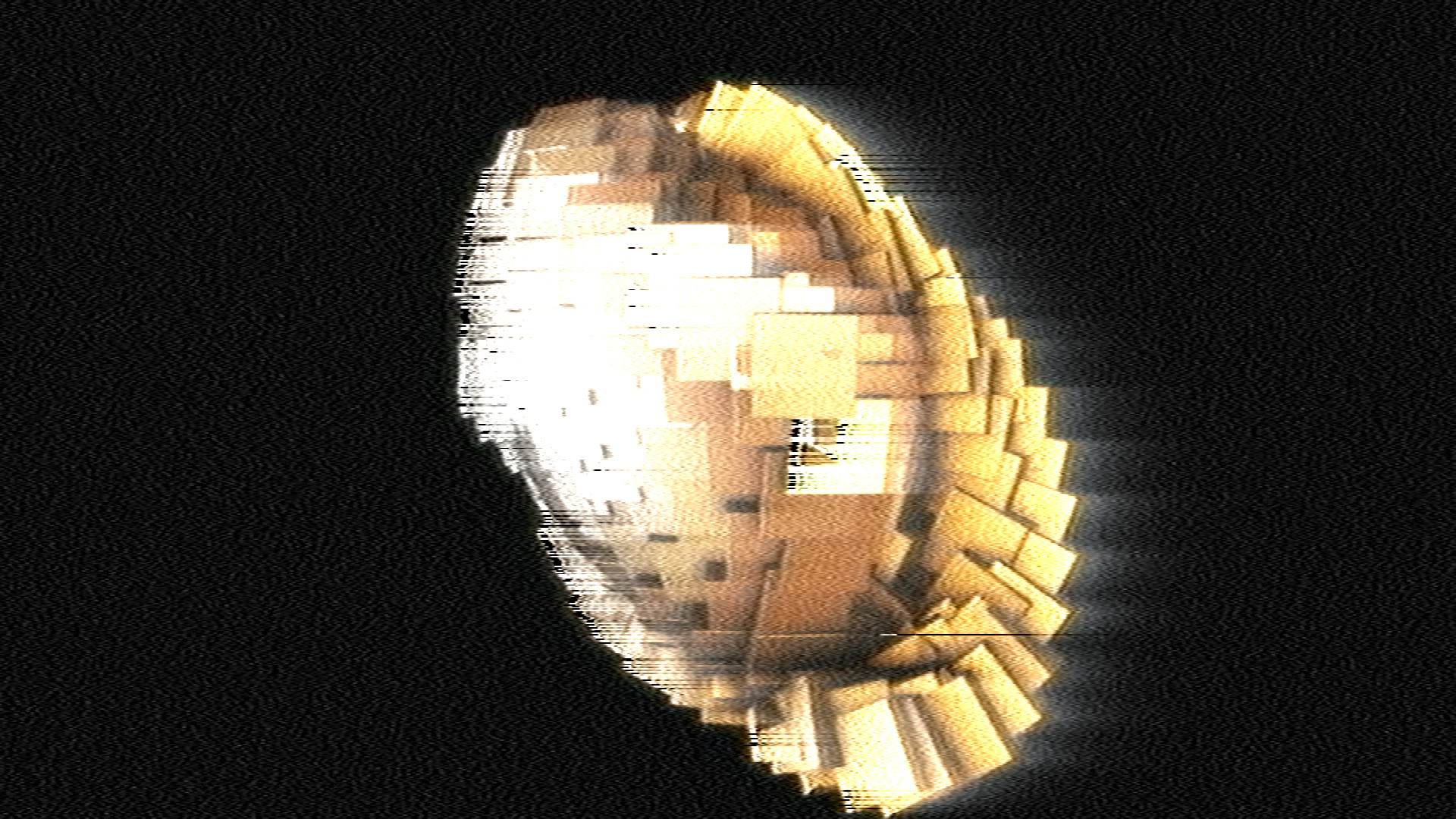
Resolume’s bundled demo clip Metalive at the defaults. Rendered by the offline harness rather than captured from Resolume.
Before you rely on this: it’s out at v0.1.0, and still early days. The deck is measured rather than asserted, by a harness that drives the real plugin class and the signal engine it runs, at 320 × 180, 960 × 540 and 1280 × 720 and again on Apple’s software renderer. The recorded carriers, counted crossing by crossing, are the formats’ own (Hi8 5.7 and 7.7 MHz, Video8 4.2 and 5.4 MHz). A deck playing its own format gives a flat field back to 3e-4 of white. A Hi8 tape on the Video8 deck has a gain of 1.66675 against the 2.0 / 1.2 = 1.66667 the formats predict, and the glow’s tail decays with 1.30–1.32 µs, the Video8 deck’s own de-emphasis. The lifted black is within 4 % of what the sync left in the back porch predicts, and at the same tape noise a Hi8 tape’s white is 2.6 times as noisy as its black, where a Video8 tape’s is 1.02. Twelve deliberately broken models are each shown to fail their check, and all 8 controls are shown to change the picture. The checks verify the stated model, not a real deck: I couldn’t find a recording of a real Hi8 tape on a real Video8 machine to compare against, so the look is the model’s prediction, and the deck’s band is a decoder’s stand-in (see Where the numbers come from). On macOS it’s never been loaded into Resolume; the one host it’s run in there is the fleet’s own test host,
oxbow. On Windows, a CI build of v0.1.0 loads, registers and renders in Resolume Arena 7.27.1, with all 14 host controls matching what the plugin declares, and 7 of the 9 that can move the picture shown doing so. Dropouts and Standard couldn’t be shown there: the tape noise changes every frame, and their change to a single frame was no bigger than that. It’s on software rendering, so it says nothing about a GPU or about speed. Try it on a spare layer before you put it in a show.This codebase was created with AI assistance, directed and reviewed by a human author.
Installing
Every download carries one effect, SW Lowband. Drop it into Resolume’s effects folder and restart Resolume:
macOS    ~/Documents/Resolume Arena/Extra Effects/
Windows  %USERPROFILE%\Documents\Resolume Arena\Extra Effects\
Avenue uses the same layout under its own folder name. The effect then appears in the effects browser as SW Lowband.
The macOS download is a universal build (Apple silicon and Intel), as a .dmg or a .zip. It’s
Developer ID-signed and notarised by the release pipeline after publication, so the bundle just
loads. If macOS refuses a download, it’s from before the signing, so download it again. The Windows
download is an x64 installer or a .zip. It isn’t code-signed, so the installer trips SmartScreen
once: More info → Run anyway.
The tape and the deck, not the look
Video8 and Hi8 both record the picture’s brightness as a frequency: a carrier that sits low for the sync pulses and black and swings up for white. Video8 uses 4.2 MHz for the sync tip and 5.4 MHz for peak white. Hi8, which came four years later, moved the whole carrier up (5.7 MHz to 7.7 MHz, with 2.0 MHz of swing instead of 1.2) so it could carry finer detail, and it shortened the pre-emphasis that boosts fine detail before recording from 1.3 µs to 0.47 µs. The colour, recorded separately underneath at 732 kHz (PAL) or 743 kHz (NTSC), stayed put.
A Video8 deck reads a Hi8 tape with a head, a channel, a demodulator, a scale and a de-emphasis built for its own carrier. Lowband models each of them on a real FM signal (recorded, filtered, limited, demodulated by counting zero crossings 40.5 million times a second), and the picture falls out:
| the mismatch | what comes out |
|---|---|
| the deck maps 1.2 MHz of swing to the whole picture; the tape swings 2.0 | contrast 5/3 too high: midtones bright, highlights clipped |
| Hi8’s short pre-emphasis undone by Video8’s long de-emphasis | a glow trailing right of every bright edge: a step lands half-way at once and creeps the rest |
| the same on the sync pulse’s trailing edge, read by the monitor’s clamp | the black lifts, about 5 % on PAL and 6 % on NTSC |
| the pre-emphasis overshoot at a bright edge, near 10 MHz, outside the Video8 deck’s band | black streaks just after bright edges |
| white’s carrier furthest outside the band, the tape noise the same everywhere | highlights break up first under tape noise; the darks hold |
| the colour carrier common to both formats | the colour survives: Video8’s own soft colour |
Play a Video8 tape on the same deck, or play either tape on a Hi8 deck, and the picture is clean. That’s what the Recording and Deck controls are for: they’re the reference.
How this differs from Colourunder, Ferric and Old Cathode
- Colourunder is VHS’s colour system and its heads: the narrow, late chroma, the head switch, the tracking bar, the dropout compensator. Its luma is a noise shape, never a carrier. Lowband is the luma carrier and nothing else of that, so the two stack: Colourunder after Lowband adds VHS’s colour and tracking faults on top.
- Ferric is the tape transport: wow, flutter and a noise-reduction round trip. Lowband has no time-base error.
- Old Cathode is the broadcast composite route to a CRT. Lowband never makes a composite colour signal and has no tube.
Start here
Drop SW Lowband on a clip. The defaults are a PAL Hi8 tape on a Video8 deck, with some tape noise, a slightly dirty head and a few dropouts: the picture is too bright and too contrasty, every highlight trails a glow to the right, the black sits a little above black, and the brightest areas break into sparkle while the darks stay clean. The output is opaque at Mix 1, since a tape has no alpha.
Then:
- Switch Recording to Video8. The same deck with its own tape: the contrast, the glow, the lift and the sparkle all go. That’s the deck working as designed, and the reference to judge the rest by.
- Switch Deck to Hi8 (with Recording back on Hi8). A Hi8 deck plays the tape properly, and Hi8’s sharper picture comes back.
- Raise Tape Noise or Head Clog on a Hi8 tape and watch the whites dissolve first; do the same with Recording on Video8 and the picture gets grainy evenly instead.
- Bright, hard-edged shapes on black show it best. The glow and the streaks happen at edges, and the sparkle in the brightest areas.
The Tape group
Recording: Video8 or Hi8: which format wrote the tape. It sets the carrier (4.2–5.4 MHz or 5.7–7.7 MHz), the swing, the pre-emphasis (1.3 or 0.47 µs) and the camcorder’s own picture sharpness (3.5 or 5.0 MHz). Hi8 is the default.
Tape Noise: the tape’s and the head amplifier’s noise, as a carrier-to-noise ratio. At 0 there’s none. Above 0 it runs from 46 dB (barely there) to 10 dB (a ruined tape) at 1. The noise is the same at every frequency, so it hurts whichever carrier the deck’s band attenuates most: on a Hi8 tape played on Video8, that’s white. The default 0.6 is 24.4 dB. The pattern changes every video frame, 25 or 29.97 times a second, and is the same every time that frame is played.
Dropouts: missing oxide: the carrier drops 30 dB for 1 to 25 µs at a random place on a random line, with soft edges. With no carrier the deck’s demodulator reads noise, so a dropout is a short streak of noise. Up to 30 a frame at 1 (30 × Dropouts², so 0.7 at the default 0.15). There’s no dropout compensator; Colourunder has one.
The Deck group
Deck: Video8 or Hi8: the machine. A Video8 deck has one mode and reads every tape as Video8. A Hi8 deck recognises the format of the tape and plays each in its own mode, so it plays both cleanly. The default is Video8.
Standard: PAL or NTSC: the line timing (576 or 480 active lines), the sync’s depth (0.3 V of 1 V on PAL, 40 IRE of 140 on NTSC), the drum’s writing speed (3.14 or 3.77 m/s) and the frame rate the noise refreshes at. NTSC is modelled without set-up (black at blanking, the Japanese convention).
Head Clog: dirt or wear between the head and the tape, as extra spacing, 0 to 0.15 µm. A head reading through a gap loses the short wavelengths first: Wallace’s law, 54.6 dB per wavelength of spacing. So the high carriers lose most: a Hi8 tape’s white before its black, and Hi8 before Video8. The default 0.4 is 0.06 µm: about 4 dB off Video8’s sync tip and 8 dB off Hi8’s peak white on PAL. The clog costs carrier, not noise, so it shows only with some Tape Noise.
The Monitor group
Sync AGC: off, the monitor does what a television’s video input does: it sets black from the back porch of every line and nothing else, so a Hi8 tape on a Video8 deck is 5/3 too contrasty. On, it also scales the picture so the sync pulse is its proper height. That takes back only part of the excess, because the sync is read through the same mismatched emphasis and measures short: a Hi8 tape on the Video8 deck ends at about 1.2 times its proper contrast instead of 1.7.
Mix: back to the clip. At 1 the output is fully opaque; below 1 the output’s alpha moves back toward the clip’s.
Where the numbers come from
Some of the formats’ figures are solid and some aren’t. Here’s where each one stands. ATTRIBUTIONS.md in the repository has the sources in full.
| figure | value here | status |
|---|---|---|
| FM carriers | Video8 4.2 / 5.4 MHz, Hi8 5.7 / 7.7 MHz (sync tip / peak white) | confirmed: a Sencore service note, Wikipedia and the vhs-decode project agree |
| colour-under carrier | 732.42 kHz PAL (46.875 fH), 743.44 kHz NTSC (47.25 fH) | one source (vhs-decode); Sencore gives 743 kHz. Informational: the colour is band-limited, not heterodyned |
| emphasis time constant | Video8 1.30 µs, Hi8 0.47 µs | unconfirmed: vhs-decode only (Hi8’s marked “from spec”) |
| emphasis shelf | 11.58 dB, both formats | unconfirmed: vhs-decode only, and the shelf’s shape is this plugin’s reading of a time constant and a gain |
| white and dark clips | 220 % above the sync tip, 90 % below blanking | unconfirmed: a vhs-decode comment on Hi8, with a question mark, applied to Video8 too |
| the deck’s band | 1.9 to 7.0 MHz (Video8), 1.85 to 10.3 MHz (Hi8) | a stand-in: the filters vhs-decode puts on a capture of each format’s signal, in place of a deck’s head, equaliser and RF stage, which no source here describes. The streaks and the sparkle live at its upper edge, so this is the number the look depends on most |
| the picture’s sharpness | 3.5 MHz (Video8), 5.0 MHz (Hi8) after the demodulator | vhs-decode; the camcorder’s own is assumed the same |
| writing speed | 3.14 m/s PAL, 3.77 m/s NTSC | a 40 mm drum (Wikipedia) turning once a frame |
| head clog | 54.6 d / λ dB | confirmed: Wallace, Bell System Technical Journal, 1951 |
| what a real Video8 deck shows on a Hi8 tape | — | not found: forum summaries say snow and streaking; a Sony patent says only that the picture “tends to be disturbed” |
| noise levels, clog range, dropout rate and length, filter orders | see the controls above | chosen, not sourced |
How it works
The host picture is averaged down onto the standard’s raster (701 × 576 on PAL, 711 × 480 on NTSC: the active line sampled at 13.5 MHz) and read back to the CPU. There, each line becomes a line of video (sync pulse, blanking, picture) and goes through:
- the camcorder: a low-pass filter, the pre-emphasis, the white and dark clips, and the FM modulator, at 40.5 MHz;
- the tape: the head clog (Wallace’s loss as a filter), dropouts, and noise;
- the deck: its RF band, a limiter, a pulse-count demodulator (a unit of charge at every zero crossing, smoothed), its low-pass, its own scale back to volts and its de-emphasis;
- the monitor: the back-porch clamp, and the sync AGC if it’s on.
The colour is band-limited to the colour-under band (half amplitude at 0.5 MHz) and joined back on. The deck’s picture goes back to the GPU and is drawn into the composition: each row its nearest line, smoothly across.
- Eight lines run side by side, on up to eight worker threads; a line’s result never depends on how many.
- Every line starts from its own previous line in the same field, so the filters are settled.
- The deck’s own delay is taken out, as a delay line in a real deck would; a Hi8 tape’s different delay is part of the glow.
Performance
Measured by the offline harness on an M4 Max, best of three, glFinish both sides, at the
defaults, on a machine running other builds:
| ms a frame | % of a 60 fps frame | memory held | |
|---|---|---|---|
| 1280 × 720 | 3.9 | 23 % | 26 MB |
| 1920 × 1080 | 4.2 | 25 % | 26 MB |
| 3840 × 2160 | 5.3 | 32 % | 26 MB |
About 2.6 ms of that is the signal chain on the CPU (8 worker threads), and the rest is the GPU’s work and the copies between them. The composition’s size barely matters, because the chain always runs on the standard’s own raster. This is heavier than most Stoatworks effects; if a show is tight, run it on one layer, not all of them. Nothing was timed inside Resolume, and nothing was timed on Windows, where the chain may be slower.
If it looks wrong
It just looks too bright. That’s the first thing a Hi8 tape on a Video8 deck does: 5/3 the contrast. Turn Sync AGC on, or put a levels effect after it.
There’s no sparkle. The highlights break up only with some Tape Noise or Head Clog, and only where the picture is bright. Raise Tape Noise, or try a clip with large bright areas.
There are no streaks. They follow edges from dark to bright, left to right. Soft clips have few.
Video8 looks clean and Hi8 doesn’t, on the Hi8 deck too. Check Deck: a Hi8 deck plays both formats cleanly; only the Video8 deck has the trouble.
SW Lowband isn’t in the effects browser. Check the folder under Installing, and that Resolume was restarted.
The effect does nothing at all. A shader that won’t compile looks just like that, and the actual error is in the log:
macOS    ~/Library/Logs/lowband/lowband.YYYY-MM-DD.log
Windows  %LOCALAPPDATA%\lowband\logs\lowband.YYYY-MM-DD.log
Known limits
- The look is a prediction. I couldn’t find a recording of a Hi8 tape on a Video8 machine to check it against, and the deck’s band is a decoder’s stand-in, not a real deck’s head and filters.
- The emphasis is the main shelf only, with no non-linear emphasis; the clips are a guess.
- No head switch, no tracking, no time-base error, no dropout compensator, no colour noise: Colourunder and Ferric have those, and stack with this.
- The colour is a plain band-limit, the same for both tapes, not a heterodyne.
- Never loaded into Resolume on macOS. Everything numeric was compiled, rendered and measured
offline against the real plugin class in a headless CGL context, plus an
oxbowload. - Never seen on camera footage, only on Resolume’s bundled CG loops.
- Only ever run on an Apple M4 Max, although the macOS build contains an Intel slice.
- No presets and no OpenFX version. There’s a browser demo, but it runs a JavaScript port of the engine. A script in the repository checks the port against the plugin’s own C++ code, but on the page you’re trusting it, and it runs behind a playing clip. Treat it as a preview, not the plugin.
About
The last group, About, carries the plugin’s name, version, licence and maker, and buttons that open this user guide (stoatworks-labs.com/software/lowband/guide/), the project page, the source on GitHub and the support page in your browser.
Video8 and Hi8 are formats; the plugin is not affiliated with, or endorsed by, Sony or any maker of camcorders or video recorders, and names are used only to describe the formats it models.
Reporting something
github.com/stoatworks-labs/lowband/issues. A screenshot, the Tape, Deck and Monitor settings, and the composition’s resolution and frame rate are usually enough. If the effect did nothing, attach the log.