

What it does
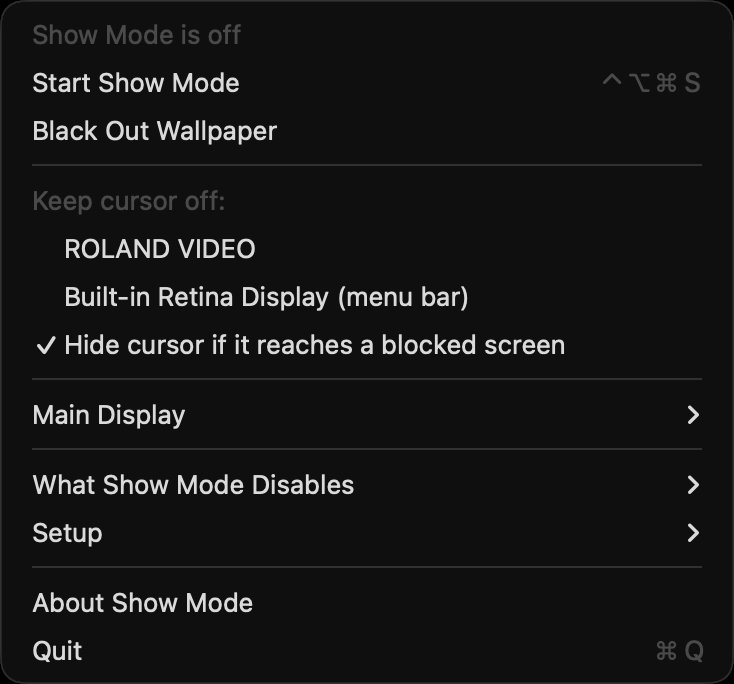
A show Mac fails in small, embarrassing ways: the display sleeps during a long hold, a hand brushes a hot corner and Mission Control sweeps across the projector, a notification banner lands on the LED wall, Night Shift warms the picture at sunset, or the cursor wanders onto the output. Show Mode turns every one of those off with one click in the menu bar, or ⌃⌥⌘S, and puts them all back with another.
The cursor fence keeps the pointer on the operator's screens. Tick the screens the audience sees; with Accessibility granted, every mouse movement that would land on one is caught on its way in and moved to the nearest usable point, so the cursor never gets there. Without it, a 120 Hz check moves it back and hides the cursor near those screens so a crossing is never drawn. ⌃⌥⌘F pauses it for the moment you need to drag something across.
Restoring is the half that matters. Before Show Mode changes anything it records the value it replaced, and ending the show restores only what it changed — a setting you had already turned off stays off. Quitting, a launcher stopping it, a crash or a restart mid-show all end the same way: the next launch finds the record and puts the machine back.
- Prevents display and system sleep, and optionally sleep on lid close for a laptop driving a projector
- Turns off Low Power Mode per power source, the screen saver, hot corners, Mission Control, App Exposé, their gestures, and click-wallpaper-to-show-desktop
- Do Not Disturb through two generated Shortcuts, since macOS gives apps no direct way to switch it
- Night Shift off with its schedule cleared, True Tone off, the light/dark appearance pinned, and f.lux, Shifty and Lunar quit and relaunched afterwards
- Blacks out the desktop wallpaper on every screen, including one plugged in mid-show, and brings the original back exactly — dynamic and aerial wallpapers and every Space included
- A cursor fence that keeps the pointer off chosen screens, remembered by make, model and serial across replugs. It never lets you block the last screen the cursor has, and asks before blocking the main display
- Locks which display is main — the one chosen, or whichever was main at start — and splits any screen that starts mirroring mid-show back to extended, leaving mirrors that were there at start alone
- showmode://on, off, toggle, fence-on, fence-off, wallpaper-black and wallpaper-restore for Companion or a show-control script
- Every change journalled and restored — on end, quit, SIGTERM, or the next launch after a crash
Where it stands
Beta, released at v0.3.1. The sleep, Low Power Mode, screen saver, hot corner, Mission Control, True Tone and Night Shift guards were run end to end on macOS 26.4, and restoring was checked by ending the show, by killing the app and relaunching it, and by SIGTERM. On a real two-screen setup the cursor fence held the pointer off a blocked screen with Accessibility granted, and without it pulled the pointer back within one mouse step while hiding it near the edge; the main-display warning and the last-screen rule behaved as documented. The display lock split a new mirror back to extended, made the locked display main again, gave up after repeated reversals rather than fighting, and restored the original main display at the end of the show and after a crash. Do Not Disturb went on at start, off at the end and off again after a crash, and appearance pinning switched System Settings from Auto to the showing appearance and back. Not yet checked: the display lock with AirPlay, Sidecar or DisplayLink screens, and a real evening switch held off by a pinned appearance. Try it on the show machine with the show screens connected before a show depends on it. The macOS build is signed and notarised by Apple and opens normally.