

Aquilon VPU Map
Where every mixer in the chassis went
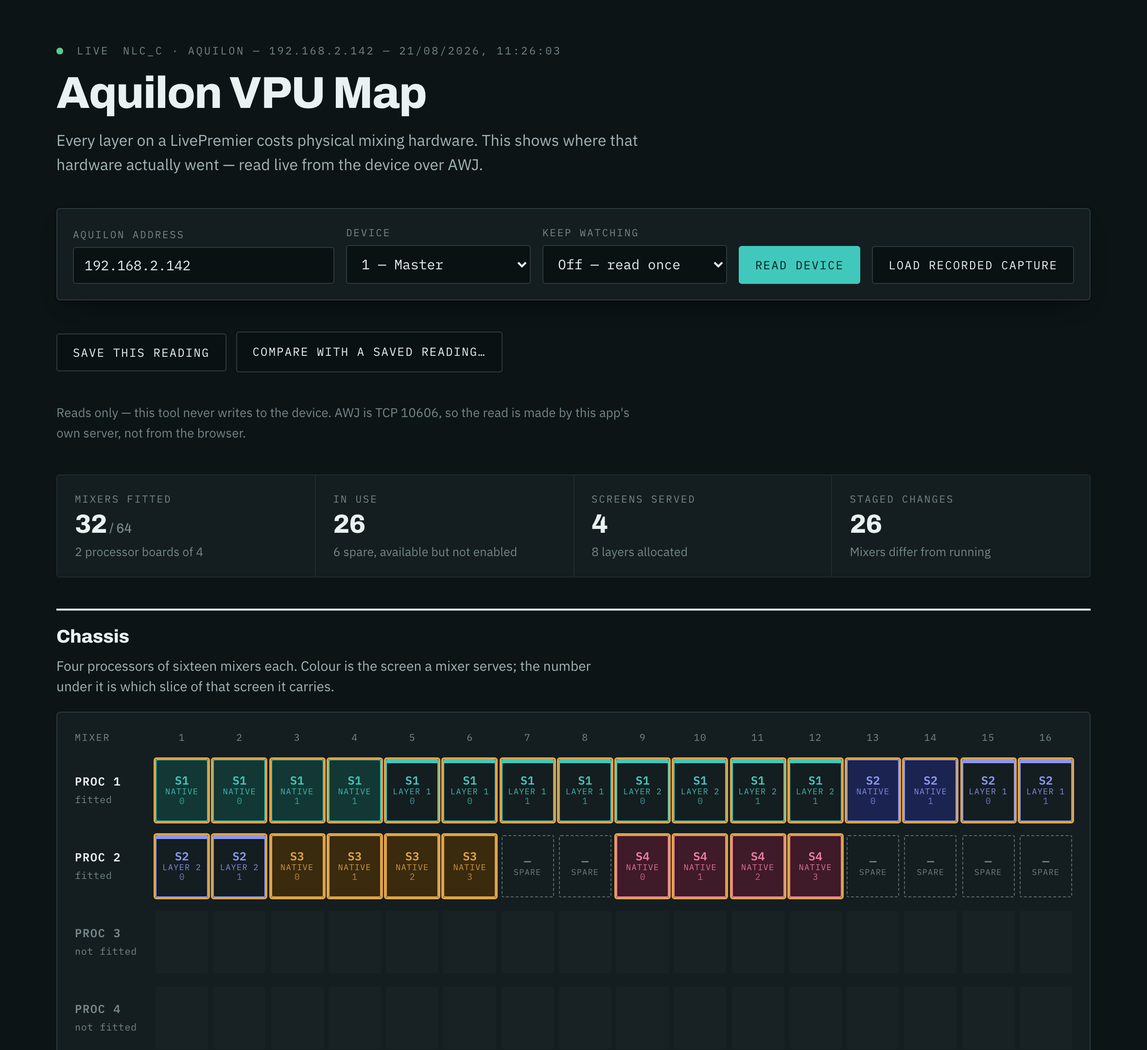
What it does
A LivePremier won't tell you a configuration doesn't fit until it fails to fit. On 6.2 firmware the device does report the mixer allocation behind that answer in full, but the stock Web RCS shows it a panel at a time, so the question everyone actually has (is there room for another layer, and where?) takes a guided tour of the interface to answer.
This puts the whole chassis on one screen. A VPU mixer is the physical mixing and scaling resource the device hands to a (screen, layer) pair. An Aquilon has up to four processors of sixteen, and a layer too wide for one mixer gets split across several as slices. That's why counting layers never tells you whether a configuration will fit, and why one eight-slice native layer can eat a whole processor board.
The grid follows the manual's own figures rather than inventing new ones. A row is one layer-capacity link and carries one layer and only one, columns belong to screens in unbroken runs, and a layer spread wider than four output links wraps onto another link with the manual's own hook. Optimized mode lifts that limit for capacity-2 layers and only those, so those VPUs stop drawing the scaling-engine centre line.
The device keeps two copies of the map, `current` (what's running) and `new` (what's staged), so the tool also shows what applying the pending configuration would change. That includes the case where every difference is a link moving and no property changes at all, which a properties-only comparison would cheerfully call no change.
The desktop builds for macOS, Windows and Linux are about 2 MB, because they use the system WebView, and there's a server build and a container too. It builds and runs on iOS and Android as well, though neither is published. Screens get the names you gave them, read live from the frame.
Firmware 6.1.x doesn't report the allocation at all. Rather than draw an empty chassis, or call a live switcher a simulator, the app says which box and firmware it found and shows what that firmware does report: each screen's layers by size, and the room left on the box.
Where it stands
Released at v1.4.0. A box with no mixer map is no longer called a simulator: an Aquilon RS4 on firmware 6.1.60, three screens on air, reports no allocation at all, so the app now says so in the device's own terms, then shows each screen's layer sizes and the room left on the box. Checked read-only on that RS4. v1.3.0 reads the grid top to bottom, the way an output link runs: the native band sits above the eight layer links, and a screen that runs out of mixers carries on onto the next VPU with the two cards stacked. It also puts a header over the columns naming each link's region and output plug. That header is checked against the screen's own output counts and left off when they don't add up, because the order the device deals the links out across several outputs hasn't been confirmed on a frame yet. The macOS build is now one universal image. It has read a real Aquilon C end to end in three different configurations, and the captures, the tests and the screenshots all come from real frames; the second configuration corrected two things the first had made look settled. What hasn't been exercised: Link setups (devices 2-4), capacities other than 4K and 5K, combined VPUs, Optimized mode and Cut & Fill. On 9 September 2026 the model was checked against a second Aquilon C on firmware 6.2.73 and held: 32 mixers fitted, 24 enabled, capability 4K, and still no per-layer collection on the device, so the link grid still has to be worked out from the allocation the frame does report. A whole-store pull from that frame is now the fourth recorded capture, and the only one with the outputs in it. Between visits those four captures in the repo are the ground truth, and the capture guide is written for anyone with a frame who can settle one of the open questions. The macOS builds are signed and notarised.