

EDID Editor is a browser EDID editor for event video. Build an EDID from a resolution and a refresh rate, or edit every field by hand, then see which processors will actually take it, and in which mode.
Nothing’s uploaded. There’s no backend to upload it to.
Before you rely on this: the timing engine is checked against published VESA DMT values, and the DisplayID layout against the Linux kernel’s own parser.
The hardware table is vendor paperwork, cited per claim, and has not been tried against any hardware. No hardware has ever been fed an EDID this tool produced. Treat a verdict as a shortlist.
Mosaic mode’s macOS widths are the widest other people have reported, not limits anyone has found. Nobody has shown a Mac bonding a plug wider than 6144, though the editor will build one.
Built with AI assistance, directed and reviewed by a human author.
Three modes
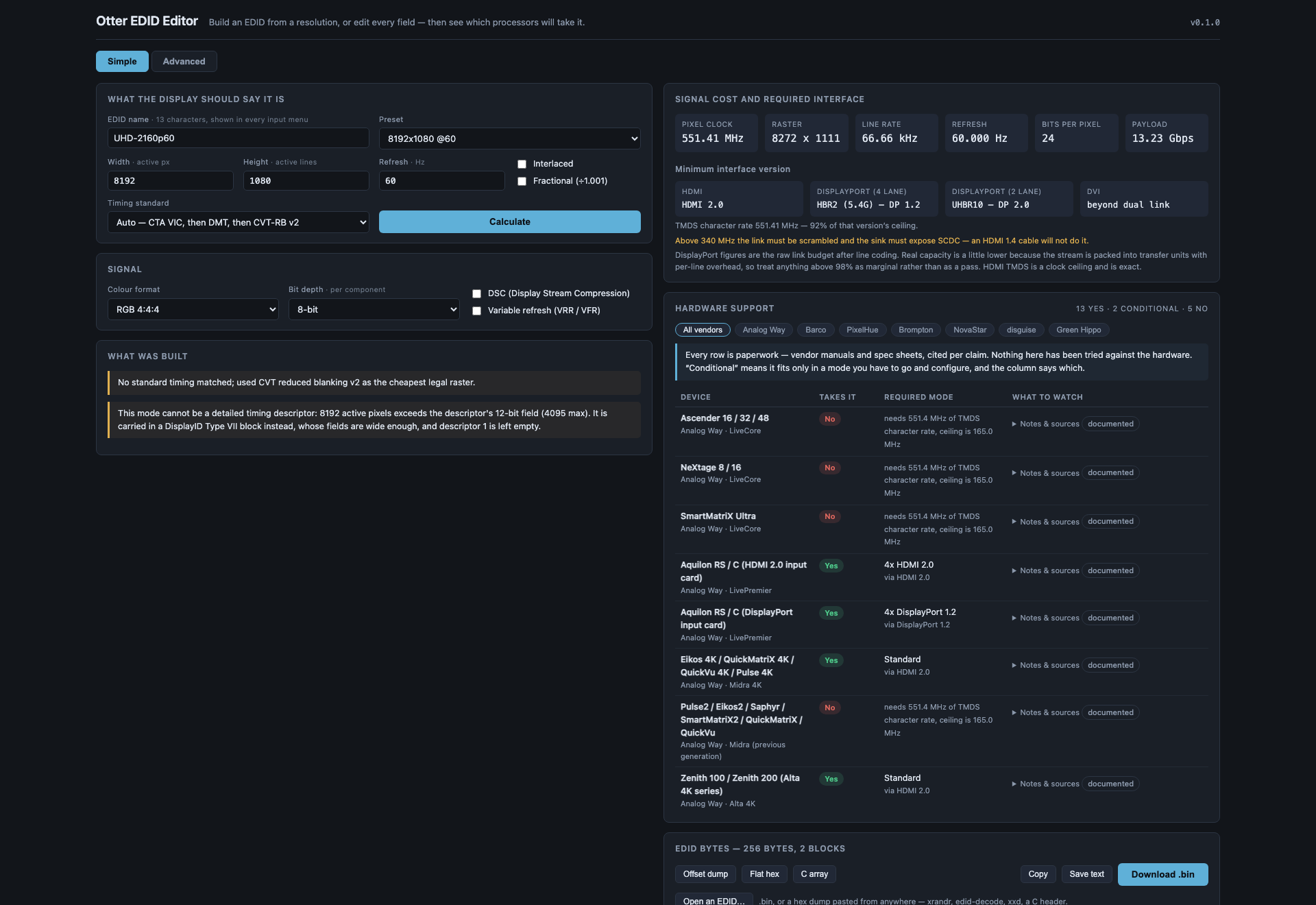
Simple. Type a resolution and a refresh rate, name it, press Calculate. You get a complete, valid EDID 1.4: the mode as a detailed timing, a range-limits descriptor sized to it, the name where every input menu will read it, and a CTA-861 extension carrying the VIC when the mode has one.
Advanced. Every field. Identity, video input definition, chromaticity, established and standard timings, all four descriptors, the CTA-861 extension (video and audio descriptors, HDMI and HDMI Forum vendor blocks, HDR static metadata, colorimetry, 4:2:0 maps) and a DisplayID 2.0 extension.
Mosaic. For frame-synced output from a Mac across several plugs. Give the whole canvas, the
grid (2 × 1 or 2 × 2) and the rate. You get one EDID per plug: load left.bin on the
input the Mac’s left-hand output feeds and right.bin on the other (for 2 × 2, tile_r1_c1.bin is
the top left). Each carries a DisplayID Tiled Display Topology block. A Mac that finds matching
blocks on its outputs joins them into one display, drives them together, and the seams don’t
tear. If the Mac lists the plugs as separate displays, they haven’t bonded and aren’t in sync.
- Up to 6144 wide at 50 or 60 Hz bonds on any recent macOS. Before macOS 27, 7680 has been reported at 30 Hz on M2 to M4 Max (which chips manage it is inferred from who reported it).
- On macOS 27 the reference files bonded two 6144 plugs, 12288 wide. That was the Barco E3’s ceiling in the test, not macOS’s, so nobody knows yet how far 27 goes.
- 6144 is the widest plug anyone has shown bonding. The editor builds wider ones with a warning, so you can try a 2 × 8192, but don’t promise it to anyone until you have. Three or four across never bonds on a Mac.
- The editor warns when a plug’s pixel clock goes past 600 MHz, the most the copied range-limits descriptor allows (12288 × 2160 at 60 needs 840 MHz a plug), and when its line rate goes past 255 kHz, the same descriptor’s other ceiling (3840 × 4320 plugs at 60 Hz). Whether a Mac minds either is untested.
- A second mosaic on the same Mac needs a different mosaic number, because the Mac groups plugs by it.
The layout copies, byte for byte, reference files that have bonded on macOS 26 and 27. The editor hasn’t loaded its own files into a Mac. The one exception is a plug taller than 4095 lines: the reference’s fallback mode in the base block wraps there, so the editor halves its height instead.
All three modes name the EDID, and all three show the same two answers on the right.
The two answers
What the mode costs, and the smallest interface that carries it. Pixel clock, raster, line rate and payload, then the minimum HDMI version (1.0–1.2, 1.3/1.4, 2.0, or which FRL rate), the minimum DisplayPort rate at 4 and 2 lanes, and whether DVI needs one link or two.
Which hardware takes it. Twenty-three models across the major event-video vendors, each answering yes / conditional / no, and where the answer is conditional, the capacity mode you have to configure to get it:
- A LiveCore dual-link input costs you the neighbouring input.
- A Barco E2 Gen 1 does 4K60 only across two cables.
- A Barco E2 Gen 2 quad card is four WQXGA inputs or two UHD60 ones.
- An Aquilon DisplayPort card is four DP 1.2 ports or two DP 1.4 ports, and DP 1.4 preempts ports 2 and 4.
Every device carries its sources, quoted, with the date they were read. That’s what to check before a purchase decision rests on a row.
DSC and variable refresh
Both are toggles, and both are real: they change the bandwidth arithmetic, they change which interface version is required, and they’re written into the EDID.
Turning DSC on correctly makes every HDMI 2.0 and earlier input say no, because DSC travels only over a fixed-rate link. That’s just how DSC works.
Import
Open a .bin, or paste a hex dump from anywhere: xrandr, edid-decode, xxd, a C header, a
bare hex string.
A bad checksum is reported, not refused. The dump off a misbehaving device is the one you most need to look at, and a tool that won’t open it is no use at the one moment it matters.
If something is unexpected
| Symptom | Cause |
|---|---|
| Every HDMI input says no after I enabled DSC | Correct. DSC needs a fixed-rate link. |
| A device says “conditional” | It takes the mode only in a particular capacity mode — the answer names which. Or, on the Aquilon cards, the mode fits the port’s clock but isn’t one of the formats Analog Way names, so it may not be accepted. |
| An imported EDID has a checksum error | Reported deliberately rather than refused. Look at it. |
| A verdict disagrees with a manufacturer | Every row carries its source and the date it was read. Check it — the table is paperwork, not measurement. |
| The processor rejected an EDID this built | Possible, and untested — no hardware has ever been fed one of these. |
Not affiliated with Analog Way, Barco, PixelHue, Brompton, NovaStar, disguise or Green Hippo. Product names appear only to state compatibility.