

What it does
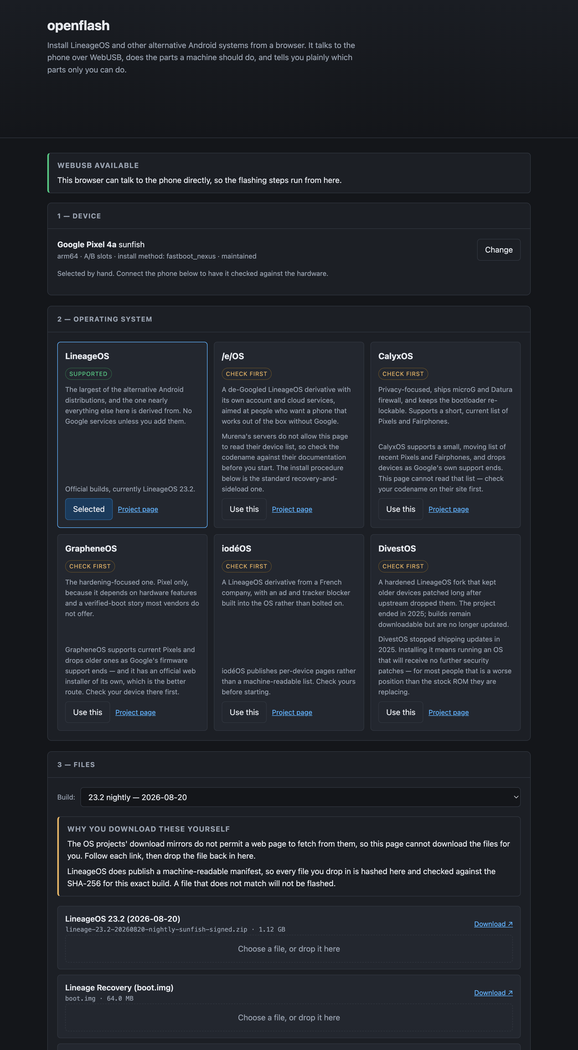
A browser-based installer for LineageOS and other alternative Android systems. It speaks fastboot and ADB over WebUSB, reads the codename, firmware version and lock state off the connected handset, and builds the install procedure for that exact device: the extra partitions it needs, the stock firmware it expects, and the unlock command it actually takes. The device data is generated from the LineageOS wiki's own files rather than copied out by hand, so all 733 devices the wiki documents are covered. 554 get a full procedure, and the other 179 are told straight that no browser can flash them. Files you drop in are hashed in the page and checked against the official SHA-256 for that build before anything is written, and every automated step prints the adb and fastboot commands it stands in for, so in a browser without WebUSB you still get a correct, ordered command list for your device. Tested end to end on a Pixel 4a, from bootloader unlock through to a booted LineageOS.
Where it stands
In development, with no release: it runs as the page at openflash.stoatworks-labs.com, or from its Docker image. I've run it end to end on one phone, a Pixel 4a, from bootloader unlock to a booted LineageOS 23.2 with MindTheGapps, every step driven from the page. That's one device, one vendor, one install method and one OS. The plan generator is checked against all 733 devices in the LineageOS database, but the other 553 procedures it writes have never been run on the hardware they describe, and the factory-image engine (GrapheneOS, CalyxOS) has never been run at all. Flashing needs WebUSB, so Chrome, Edge or another Chromium browser.