

Will my show fit? takes a description of a show (screens, layers, sources, destinations) and tells you which video switchers will actually take it, with a proposed wiring topology for each one that fits.
It goes further than “does the input count add up”. It checks whether there’s a physical plug of the right type and capability for every signal, whether the layer budget covers the layers, and whether the canvas fits the chassis.
Nothing is uploaded. There’s no backend to upload it to.
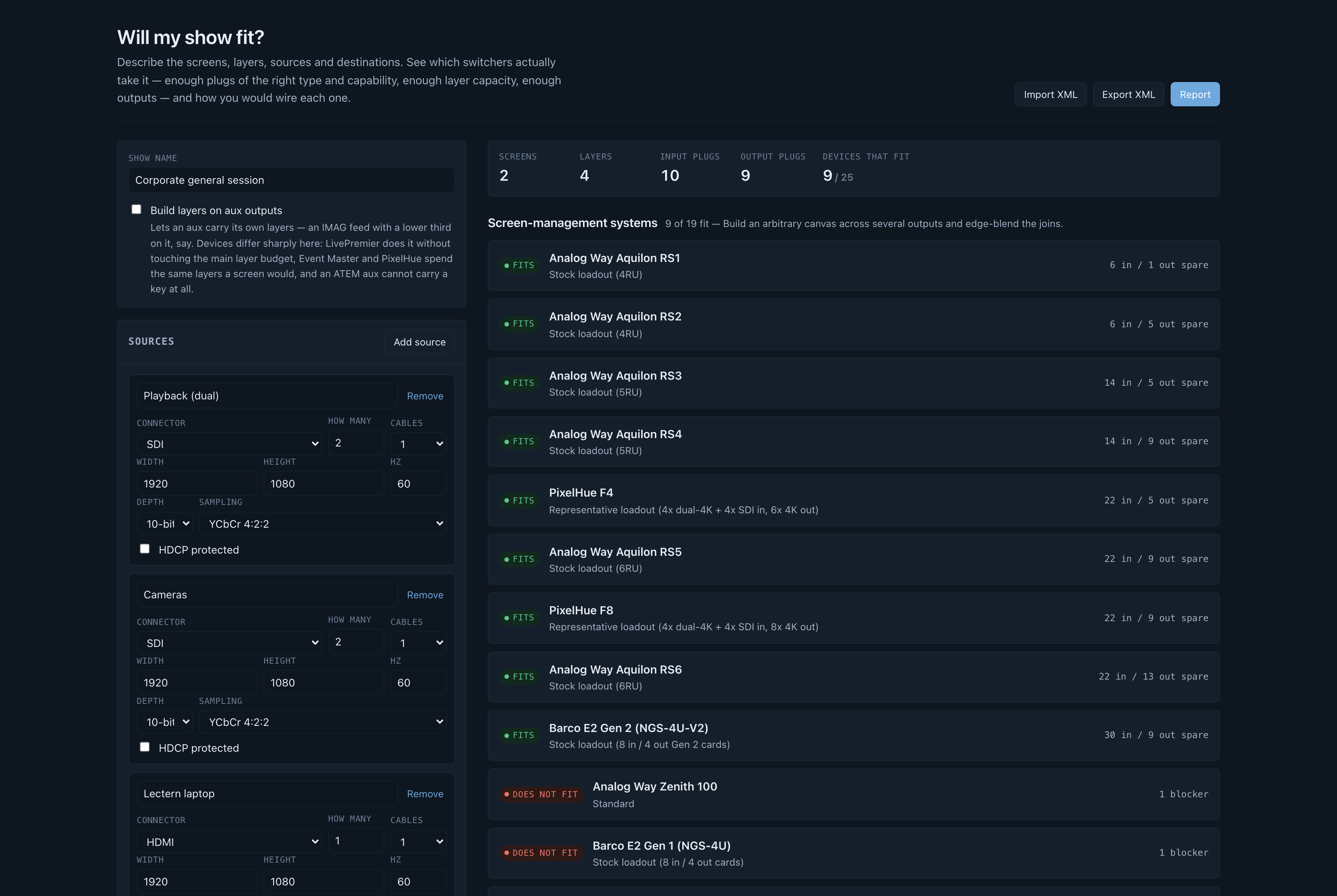
Before you rely on this: every figure is transcribed from a manufacturer’s published documentation, and none of it has been verified against hardware. No show has been built from a topology this tool proposed.
Vendors revise spec sheets without notice, several of the relevant numbers are published as ranges or with conditions, and a few are internally inconsistent: one vendor’s sheet copies its Aux text into the Mixers row, and another disagrees with itself about the output slot count. Both are recorded in the data rather than smoothed over. Figures that couldn’t be sourced are marked
unverifiedand say so in the UI.Treat a “fits” as a shortlist, not a purchase order.
Built with AI assistance, directed and reviewed by a human author.
What it checks that a count cannot
Plugs, as a matching rather than a count. Twelve inputs and twelve sources isn’t an answer: four SDI cameras and two SDI plugs is a “no”, and a count will never spot it. Every signal is matched to a specific connector, respecting capability. A 4K60 source doesn’t go into an HDMI 1.4a plug, 4:4:4 doesn’t go down SDI, and a DisplayPort link budget is checked as well as its pixel clock.
The plugs that aren’t what they look like. A Midra 4K output is an HDMI socket and a 12G-SDI socket carrying the same picture, so that’s one output, not two. Its inputs 1 and 2 are HDMI or 3G-SDI, so pick one. Counting the sockets on the back panel overstates that chassis by a third.
Card capacity, which isn’t the connector count. This is the limit that catches people out. A Barco Event Master Gen 1 card has four connectors and takes exactly one 4K60 signal between them, so a single 4K60 source eats the whole card and strands its other three sockets.
The backplane, separately. The chassis caps below the sum of its cards: an E2 Gen 1 has four output cards rated one 4K60 each and is still limited to three 4K outputs.
The wide-screen layer penalty. Analog Way quotes layer counts “depending on the screens setup”, and this is what that phrase is hiding: a LivePremier scaling engine spans four output links, so a layer on a screen wider than four outputs takes a second layer link and costs twice. It’s a cliff at five outputs, not a slope. Going from a four-output blend to a five-output one doubles that screen’s entire layer bill, which is how a show runs out of chassis when the headline layer count looked like plenty.
Layer capacity in each vendor’s own arithmetic. Analog Way charges a 4K mixing layer twice what it charges a DL/2K one; Barco’s ladder is 4K : DL : 2K = 1 : 2 : 4; PixelHue budgets layers per output card, so an F8 advertising sixteen 4K layers still can’t put three on a screen that lives on one card. None of these are modelled or derived. They’re each vendor’s published numbers, cited.
Dual- and quad-cable signals. A 4K60 feed on two cables is two half-rate signals, which is why it fits plugs that 4K60 doesn’t.
Passive adapters, where one actually works (HDMI↔DVI-D is the same signalling), and it says so in the patch list rather than pretending the plug matched.
Layers on aux
It’s a global toggle, and it changes the shape of the answer rather than the ranking:
| Analog Way LivePremier | Free. Documented outright: layers on aux use adjacent unused outputs, not the main layer budget. |
| Barco Event Master, PixelHue | Charged at the same rate as an on-screen layer. |
| Blackmagic ATEM | Impossible. An aux is a clean routed bus; keys live on an M/E. |
That last row is why the toggle exists: it turns a “which is cheapest” list into a “which can do this at all” list.
Two kinds of machine, kept separate
A presentation switcher builds an arbitrary canvas across several outputs and edge-blends the joins. A vision mixer doesn’t: every output is one raster, and layers are keyers over a program bus.
So a 7680×2160 blend isn’t “too big” for an ATEM the way it’s too big for a Midra. It’s the wrong shape, and the tool says so in those words.
Vision mixers are in the database because a lot of the shows people reach for a presentation switcher to solve turn out to be one screen, one raster and two keys.
Two things the older lines make visible
A pre-4K Midra has no edge blending at all (soft edge arrived with Midra 4K), so a screen there has to fit on one output. That’s a different answer from “you’ve run out of plugs”, and it’s reported as one.
The whole Midra platform is a 165 MHz single-link machine: 1080p60 and 1920×1200 fit; 2560×1600 and anything 4K don’t, in any mode. LiveCore stops at 4K30. To check a 4K60 display against one, describe it as a destination fed by four cables and the tool sizes the quadrants.
Custom card loadouts
When a modular chassis doesn’t fit as it ships, “doesn’t fit” is only half an answer. The question anyone specifying a build actually has is whether a different set of cards would take it.
So the tool searches for one and shows the smallest arrangement that does, with the wiring topology that follows.
Loadouts are enumerated in increasing card count, so the first feasible one is minimal by construction. Among equals, fewer distinct card types wins (four identical cards are easier to order and swap on site than four different ones), then the tightest fit. The chosen loadout goes through exactly the same evaluation as a stock profile, so there’s no second, looser idea of “fits”.
Trimming the report
The full report is every selected switcher with a wiring topology under each one that fits. That’s right when you’re choosing a machine and far too much when you’re sending three pages to a client who’s already chosen.
The report page carries the switcher picker plus five sections you can drop: input list, output list, screen breakdown, wiring topology and source-document links. The example show goes from about 30,000 characters to about 5,600.
Three things stay whatever you choose:
- A trimmed report prints a line saying so, because otherwise a matrix of nine machines reads as the whole field to whoever receives it.
- The caveat stays, because a report that says what fits has to say what that rests on.
- The signature stays: the tool, the build version, and the line saying it isn’t a product of any manufacturer it names.
If an answer surprises you
| Symptom | Cause |
|---|---|
| A chassis with plenty of sockets does not fit | Card capacity, or the backplane cap. Both are below the connector count. |
| One extra output doubled my layer bill | The five-output cliff. See the wide-screen penalty above. |
| A vision mixer is rejected for a blend | It cannot build one. That is a shape answer, not a size answer. |
A figure is marked unverified |
It could not be sourced. The build fails if anything claims to be documented without a citation. |
| A 4K60 source will not go somewhere | Check whether it can be described as dual- or quad-cable — half-rate signals fit plugs 4K60 does not. |