

Ferrofluid is ferrofluid spikes on the beat, for Resolume Arena and Avenue, as two FFGL plugins in one download: SW Ferrofluid, a source, which is a dish of ferrofluid in a photographer’s studio, and SW Ferro Over, an effect, which is the same pool with your clip hung on a screen above it, broken up in its mirror.
Ferrofluid is oil full of magnetite particles about ten nanometres across. Put it in a magnetic field and it magnetises; push the field past a critical value and the flat surface gives up and stands in spikes, all at once, on a hexagonal lattice. That’s the Rosensweig instability, worked out by Cowley and Rosensweig in 1967, and it’s why people pay good money for a jar of black oil and a magnet to keep on their desk. The plugins are the whole rig: an electromagnet whose current is the music, a pool of a real fluid off a datasheet, and a camera looking down at it. Nothing draws a spike. The pool’s surface follows the physics, the spikes come up when the current crosses onset, and what you see is whatever the fluid, a black mirror, happens to reflect.
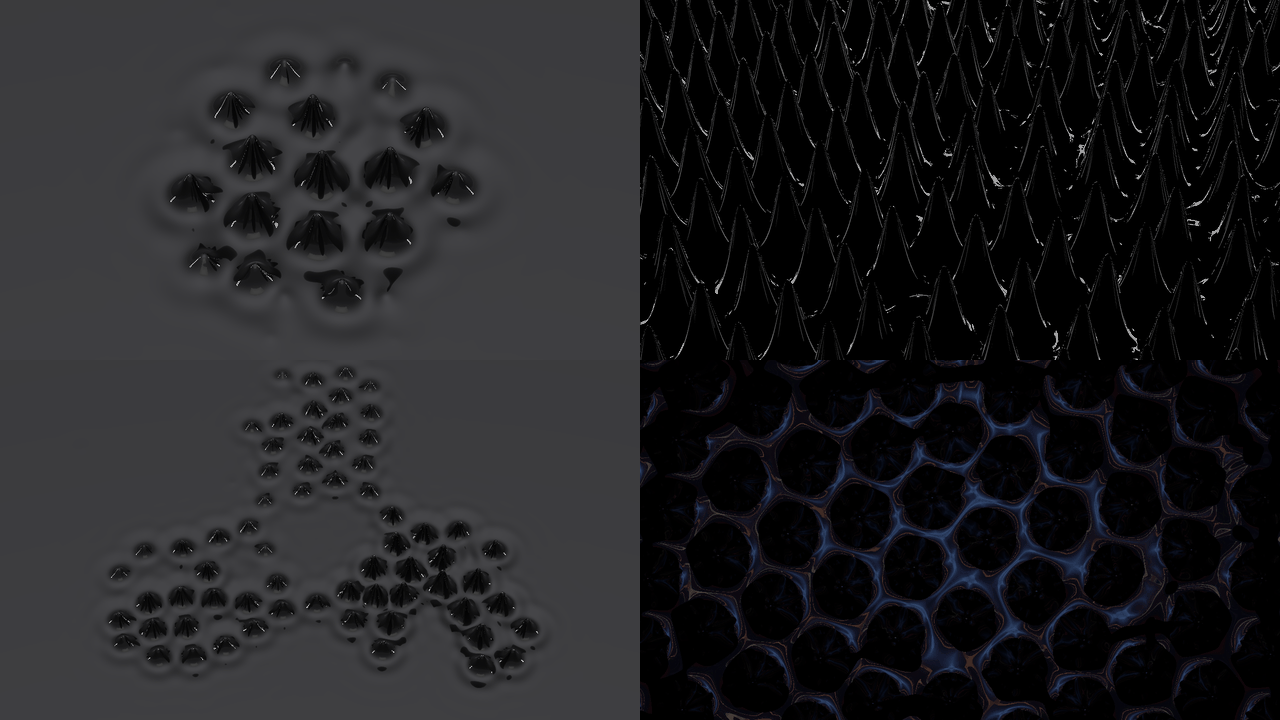
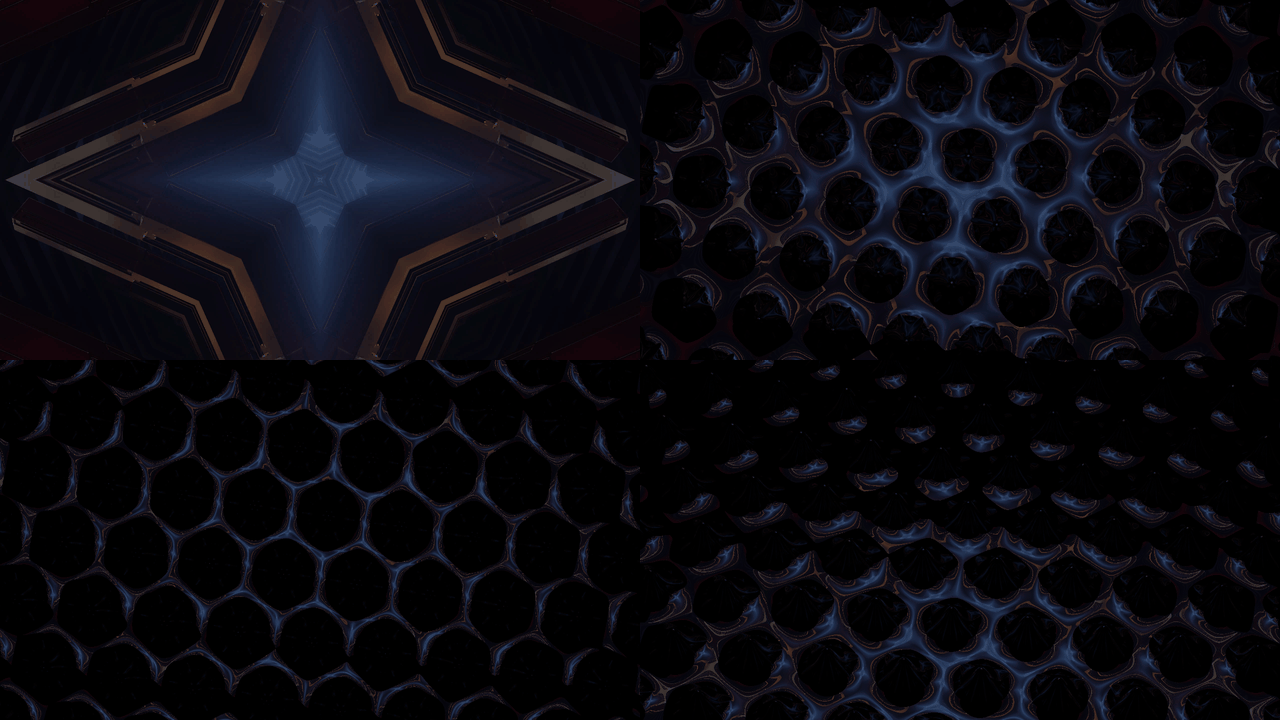
Rendered by fetest, the offline harness, rather than captured from Resolume. Top left, SW
Ferrofluid at its defaults 3.1 seconds in, a tenth of a second into a beat’s kick. Top right, the
Helmholtz pair (Magnet Uniform) held at 1.5 critical currents with Fire On Off, seen from 60°
under Backlight on a Black backdrop, five seconds in. Bottom left, Three Coils with Fire On
Off, Gain 0.3 critical currents and Field Width 20 cm, following the harness’s synthetic music
(a kick every half second and a busy hi-hat), five seconds in. Bottom right, SW Ferro Over at its
defaults on a frame of Resolume’s own IntoTheGlow_02 clip, 3.1 seconds in. Each panel is a whole
1280 × 720 frame at half size.
Before you rely on this: it’s at v0.1.0, the first release, and early days. It has been loaded into Resolume Arena 7.28.1 on macOS: both plugins register (
SW Ferrofluid,FE01, a source;SW Ferro Over,FE02, an effect), the controls change Arena’s output, all of them but Audio, Band and Threshold, which need sound, and the Over at Mix 0 is bit for bit the clip with the effect bypassed. No sound reached it there. On Windows it has been in Arena 7.27.1 on software rendering, with no GPU and no sound, from the Windows download itself: both plugins load and register with every parameter as declared, and SW Ferrofluid renders and passes the fleet’s Arena checks, with no dead control. SW Ferro Over’s picture couldn’t be measured there (Arena’s capture went black for the bare clip too), so on Windows the Over is untested beyond loading.Everything else was measured offline by a harness (
fetest) that drives the plugins’ own class in a headless GL context on an Apple M4 Max, andtools/verify.shpasses (20 October 2026), at 1280×720 and 320×180 on the GPU and four of its checks again on Apple’s software renderer. Every mode of the surface rings or grows at the Cowley–Rosensweig rate to 1.3e-5 of its height. The flat pool goes unstable between 12.003 and 12.033 A against the theory’s 12.018 A, and the harness reproduces a published critical field (Mahr and Rehberg’s 5.9 kA/m). The settled lattice sits at the critical wavelength, with three peaks 60.7°, 56.1° and 63.2° apart. The spikes jump up at onset and hang on below it down to the model’s own fold, to within a sweep step. Each spike’s shape is solved offline with the full nonlinear magnetostatics, and the solver matches Gollwitzer et al.’s measured pattern amplitudes to within 1.1%. Twenty-one models broken on purpose and seventeen one-character changes to the shipped code are all caught, and all 20 controls of each plugin that have pixels change the picture.What isn’t solved is where the spikes stand and how far they’ve grown: that’s a chosen model, fitted to the solver, and over a single coil held past onset it lays down rows of spikes where a real pool would make hexagons (Known limits). No real audio has reached it anywhere, only the harness’s synthetic kicks. Fire On does follow Arena’s beat; what it does with Arena’s transport stopped I haven’t seen. There’s a browser demo at ferrofluid-demo.stoatworks-labs.com, which has no audio. Try it on a spare layer before you put it in a show.
This codebase was created with AI assistance, directed and reviewed by a human author.
Installing
Every download has both plugins in it: SW Ferrofluid (a source) and SW Ferro Over (an
effect), as Ferrofluid.bundle and Ferrofluid Over.bundle on macOS and Ferrofluid.dll and
Ferrofluid Over.dll on Windows. Get them from the
v0.1.0 release on GitHub
or the project page, drop both into
Resolume’s effects folder and restart Resolume:
macOS    ~/Documents/Resolume Arena/Extra Effects/
Windows  %USERPROFILE%\Documents\Resolume Arena\Extra Effects\
Avenue uses the same layout under its own folder name. SW Ferrofluid shows up among the sources and SW Ferro Over in the effects browser.
The macOS download is a universal build (Apple silicon and Intel), as a .dmg or a .zip. It’s
Developer ID-signed and notarised by the release pipeline after publication, so the bundles
just load. If macOS refuses a download, it’s from before the signing, so download it again. The
Windows download is an x64 installer (-setup.exe) or a .zip. It isn’t code-signed, so the
installer trips SmartScreen once: More info → Run anyway.
Start here
- Put SW Ferrofluid in a clip slot and trigger it. That’s a grey studio, a dish of Ferrotec’s EFH1 seen from 35°, and a coil under the middle of it. On the first beat of Resolume’s tempo a hexagonal patch of black spikes stands up over the coil, and on every beat after that the spikes swell and settle back.
- Stop Resolume’s transport. The spikes stay. Press Settle and the pool goes flat, and stays flat until the transport starts again. That’s not a fault, and How the pool works says why. (That’s the harness’s account; I haven’t watched a stopped transport in Arena yet.)
- Change Magnet to Uniform. The coil becomes a Helmholtz pair, the field is the same everywhere, and the next beat stands the whole pool up at once.
- Change Lights to Backlight and Backdrop to Black, and turn Tilt up to 1. That’s the classic ferrofluid photograph: black spikes, each picked out by a thin rim of light.
- Turn Bias up past 0.67 (one critical current). The pool spikes with no beat at all, and the further past 0.67 you go, the taller the spikes, but the spacing between them doesn’t change.
- For your own footage, put SW Ferro Over on a clip. The clip is on a screen just above the pool, so while the pool is flat you see the clip; on the first beat it breaks into a lattice of dark discs with a web of the clip’s light between them.
How the pool works
The drive
The coil is asked for a current, and everything the plugins do starts there:
current asked for = Bias + Gain × (the music's level + the pulses on now)Bias is the steady part. Gain is how hard the rest pushes: each pulse adds one Gain, and the music adds Gain times the level of its band (0 to 1). A pulse comes from a beat, an onset in the audio or a press of Fire, and lasts Pulse. The coil can’t follow instantly: its current gets there through its own lag, Coil Lag, the coil’s L/R. The whole thing is clamped at 1.6 critical currents.
Bias and Gain are in critical currents, not amps. One critical current (I_c) is the current at which the fluid’s surface over the magnet’s strongest point goes unstable. In amps that moves by a factor of six between the fluids and magnets, so a slider in amps would put the interesting bit somewhere different every time you changed fluid. In critical currents, 1 is always onset, and Resolume’s slider shows it at 0.667. The amps behind it, at the default coil size and spread:
| fluid | Uniform (Helmholtz pair) | Coil | Three Coils (each) | λ_c | applied field at onset |
|---|---|---|---|---|---|
| EFH1 | 12.02 A | 3.52 A | 3.94 A | 9.82 mm | 8.60 kA/m (10.8 mT) |
| EMG 901 | 17.27 A | 5.05 A | 5.66 A | 8.81 mm | 12.36 kA/m (15.5 mT) |
| EMG 909 | 21.60 A | 6.32 A | 7.07 A | 10.23 mm | 15.46 kA/m (19.4 mT) |
Onset, and the spikes hanging on
Below one critical current the pool is flat, whatever the music does. Above it, ripples of one wavelength (λ_c, about a centimetre) grow, and the surface stands up in spikes on a hexagonal lattice that far apart. Louder pushes them taller, not closer together.
The onset is subcritical: the spikes come up with a jump, to 4.5 mm for EFH1, and once up they survive until the current falls well below where they appeared, to the fold. Between the two the pool can be flat or spiked, and which you get depends on what happened last.
| fluid | the fold | a spike at onset | at 1.5 I_c |
|---|---|---|---|
| EFH1 | 0.928 I_c (Bias 0.619) | 4.48 mm | 11.15 mm |
| EMG 901 | 0.976 I_c (Bias 0.651) | 2.33 mm | 8.49 mm |
| EMG 909 | 0.995 I_c (Bias 0.664) | 0.93 mm | 5.57 mm |
The heights are the solved spike’s, peak above the pool’s mean level; the harness holds the drawn spikes to them to 0.3%.
The default Bias, 0.98 I_c, sits inside EFH1’s loop. The flat pool stays flat until a beat kicks the current past onset, the spikes jump up, and when the pulse ends they hang on, swelling on every beat after. EMG 901’s fold is 0.976, so 0.98 is only just inside it, and its spikes sit low between beats. EMG 909’s loop is narrower than that, so its spikes fall between kicks: that’s the fluid, not a setting to tune round.
In the harness, with EFH1 in the Helmholtz pair and the beats stopped, the spikes held at Bias 0.93 I_c and collapsed at 0.92. Over the default coil they’re slower to go: at 0.92 they were still standing seven seconds later, and at 0.90 they were down to ripples.
A stopped transport is a flat pool
With Fire On at Beat, the default, the kicks are Resolume’s beats. Stop the transport and the beats stop, the coil settles at Bias, just under onset, and a flat pool stays flat however long you wait. It’s the physics doing its job, but it looks like a broken plugin. Start the transport, press Fire, set Fire On to Onset with some audio routed, or turn Bias up past 0.67.
Two wrinkles:
- Spikes that are already up hang on when the transport stops, because 0.98 is inside the loop. In the harness they were still standing ten seconds after the last beat. Press Settle, or take Bias under 0.6 (0.9 I_c).
- A host whose bar phase never moves gets a beat of the plugin’s own, at the host’s tempo, so that Fire On is never dead. The plugin switches to following the transport the first time it sees the bar phase move, and from then on a stopped transport means no beats. I haven’t seen what Resolume sends while its transport is stopped. If it keeps sending the same bar phase, a clip triggered while the transport is already stopped will spike on the plugin’s own beat until the transport has run once.
The Drive group
Resolume shows every slider as 0 to 1. The ranges below are what the slider positions mean, and where a slider is geometric (each step along multiplies rather than adds), a table gives a few positions.
Fire On (Off, Beat, Half Beat, 2 Beats, Bar, Onset; default Beat). What fires a pulse. Beat is every beat of Resolume’s tempo, Half Beat every quaver, 2 Beats every other beat and Bar the first beat of each bar of four. A beat’s pulse starts at the moment inside the frame where the beat fell, not at the frame’s start: the harness has every pulse within 1.8e-15 s of its beat at 120 and 97 BPM. Onset fires on hits in the audio (see Threshold), and an onset’s pulse is as tall as the hit was hard, from 0 to 1 Gain. Off fires nothing but Fire.
Fire (a button). One pulse, now, whatever Fire On says. It acts on the press, so holding it does nothing more. Whether a press shows depends on Bias. A pulse has to hold the current past onset long enough for spikes to grow out of the noise, and a short, small one doesn’t. Then, once they’re up, they only stay if Bias is inside the loop. At the default Bias, 0.98 I_c, the default press (Gain 0.2 I_c for 150 ms) raises the patch and it stays. From 0.9 I_c, below EFH1’s fold, the same press does nothing visible at all, and looks for all the world like a dead button. Measured in the harness from a flat pool, EFH1 over the default coil: the tallest spike after one press, then what’s left of it four seconds after the press (under a millimetre is ripples):
| Bias, Gain (I_c) | Pulse 150 ms (0.588) | Pulse 300 ms (0.739) | Pulse 1 s (1) |
|---|---|---|---|
| 0.9, 0.2 | nothing | 4.3 → 0.1 mm | 6.0 → 0.2 mm |
| 0.9, 0.3 | 3.7 → 0.1 mm | 5.3 → 1.8 mm | 7.2 → 0.3 mm |
| 0.9, 0.5 | 5.2 → 2.2 mm | 8.8 → 0.6 mm | 9.3 → 0.3 mm |
| 0.98, 0.1 | nothing | 5.0 → 4.1 mm | 5.8 → 4.1 mm |
| 0.98, 0.2 (the defaults) | 4.3 → 4.1 mm | 6.0 → 4.1 mm | 6.7 → 3.7 mm |
At 0.98 the patch stays at about 4 mm; at 0.9 it goes, though close to the fold it can take a few seconds about it. So for a press that shows and then goes away, take Bias below the fold and give the pulse more Gain or more length: Gain 0.5 I_c with a 1 s Pulse from 0.9 I_c raised spikes in Arena on macOS too. For one that shows and stays, keep Bias inside the loop. A press in the first few frames after the clip is triggered can do nothing either: the coil starts from nothing and is still coming up to Bias.
Audio (Resolume’s FFT input). The music. Arena shows it as a choice of where the sound comes from: Local, Composition or External. With nothing routed, the band levels are 0 and Onset never fires.
Band (Low, Mid, High, Full; default Low). Which part of the spectrum the coil follows. Of Resolume’s 64 bins, Low is the first sixteenth, Mid up to a quarter and High the rest. Each band is measured against its own recent peak, so a quiet band still moves the coil, and a long loud passage reads as 1 throughout. Nobody has measured where Resolume’s bins sit in frequency. The level is added to the drive all the time, in every Fire On mode, so with music routed the coil follows the band and the pulses ride on top. Band does nothing with Three Coils, which follow Low, Mid and High one each, or with no audio.
Gain (0 to 1.5 I_c; default 0.2, at 0.133). How hard the pulses and the music push: a pulse adds Gain, the band’s level adds Gain times the level. At the default Pulse and Coil Lag a beat peaks at about 1.17 I_c. Gain 0.05 never raised a spike in ten seconds of beats in the harness; 0.1 did.
Bias (0 to 1.5 I_c; default 0.98, at 0.653). The steady current. 1 I_c, at 0.667, is onset; above it the pool spikes with no beat at all, and below the fluid’s fold (see the table above) the spikes can’t hang on.
| I_c | 0.5 | 0.9 | 0.93 | 0.98 | 1 | 1.05 | 1.1 | 1.2 | 1.5 |
|---|---|---|---|---|---|---|---|---|---|
| slider (Bias, Gain) | 0.333 | 0.6 | 0.62 | 0.653 | 0.667 | 0.7 | 0.733 | 0.8 | 1 |
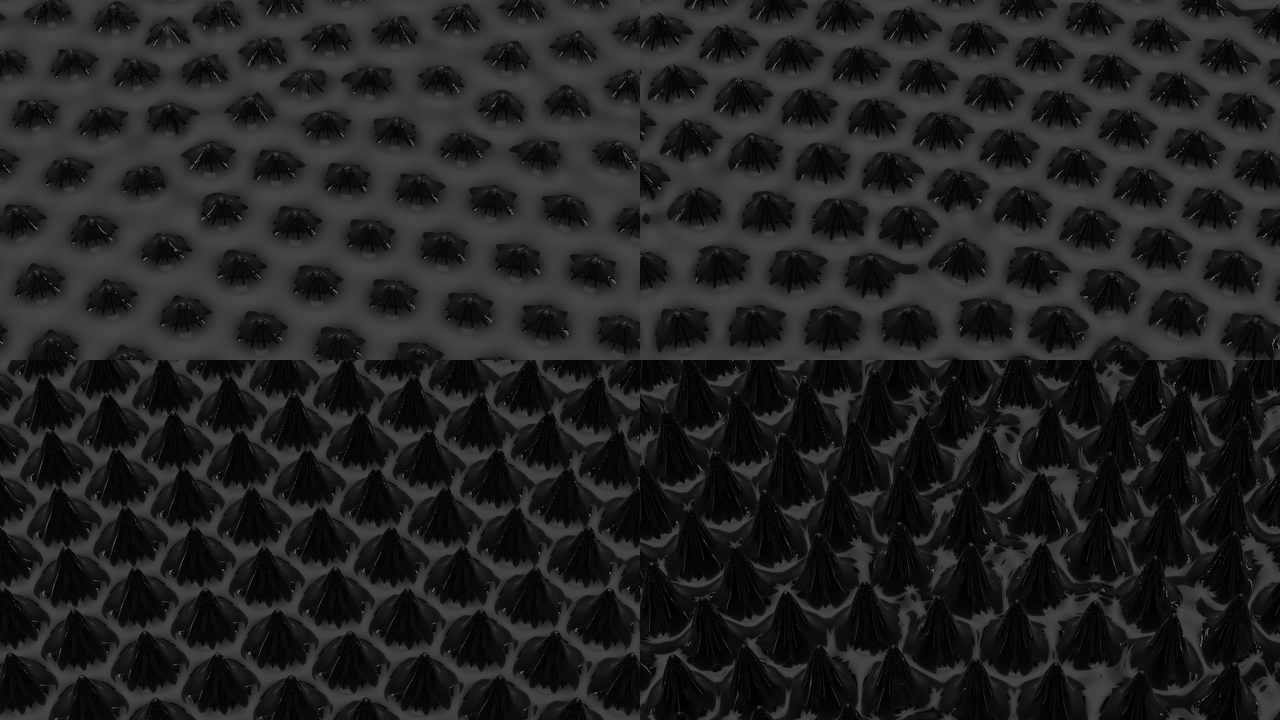
EFH1 in the Helmholtz pair (Magnet Uniform*) with Fire On* Off*, five seconds in, SW Ferrofluid
otherwise at its defaults, rendered by fetest rather than captured from Resolume. Top left, Bias
1.02 I_c; top right 1.1; bottom left 1.3; bottom right 1.5. The spikes measure 4.8, 5.9, 8.5 and
11.4 mm tall. Each panel is a whole 1280 × 720 frame at half size.*
Coil Lag (1 to 300 ms, geometrically; default 40 ms, at 0.647). The coil’s L/R: how long its current takes to follow what it’s asked for. A 150 ms pulse through the default 40 ms gets almost all the way up; through 300 ms it gets 39% of the way, and the harness’s beat peaked at 1.07 I_c instead of 1.17.
Threshold (0 to 1; default 0.4). How far a hit must rise above the recent average before Onset fires: at 0 a little over it, at 1 three and a half times it. On the harness’s music, with a hi-hat that changes every frame, turning Threshold from 0 to 1 cut the onsets that weren’t kicks from 84 to 33 in ten seconds. It only matters for Fire On Onset.
Pulse (10 ms to 1 s, geometrically; default 150 ms, at 0.588). How long each pulse lasts. Pulses that overlap add up: at 120 BPM on Beat, a Pulse of 500 ms holds the coil at Bias + Gain the whole time, and 1 s holds it at Bias + 2 × Gain. A short pulse through a slow coil does very little. At the default Gain and Coil Lag, pulses of 10 and 30 ms raised nothing in ten seconds.
| ms | 1 | 5 | 10 | 20 | 40 | 50 | 100 | 150 | 250 | 300 | 500 | 1000 |
|---|---|---|---|---|---|---|---|---|---|---|---|---|
| Coil Lag | 0 | 0.282 | 0.404 | 0.525 | 0.647 | 0.807 | 1 | |||||
| Pulse | 0 | 0.349 | 0.5 | 0.588 | 0.699 | 0.849 | 1 |
The Magnet group
Magnet (Uniform, Coil, Three Coils; default Coil in the source, Uniform in the Over). Uniform is a Helmholtz pair (two 200-turn coils 20 cm across), so the field is the same over the whole pool and the whole pool spikes. Coil is one solenoid (400 turns over 40 mm) under the middle of the frame, its top 13 mm below the surface. Its field is strongest over its middle, so the spikes start there and the patch spreads outward as the current rises. Three Coils are three of those on a triangle, each following its own band: Low on the far side, Mid on the left and High on the right. Every pulse goes to all three.
Coil Size (5 mm to 8 cm, geometrically; default 4 cm, at 0.75). The solenoid’s radius. At the defaults, coils of 5 mm to 2 cm raise one spike; 8 cm raises a field of them. It does nothing with Uniform.
Coil Spread (2 to 10 cm, geometrically; default 8 cm, at 0.861). The side of Three Coils’ triangle. At 2 cm the three patches are one. It does nothing with one coil or with Uniform. It stops at 10 cm because the pool stops not far past it: the pool is 19 to 22 cm deep, depending on the fluid, and a wider triangle put the far coil’s patch over its edge (Known limits).
| cm | 0.5 | 1 | 2 | 4 | 8 | 10 |
|---|---|---|---|---|---|---|
| Coil Size | 0 | 0.25 | 0.5 | 0.75 | 1 | |
| Coil Spread | 0 | 0.431 | 0.861 | 1 |
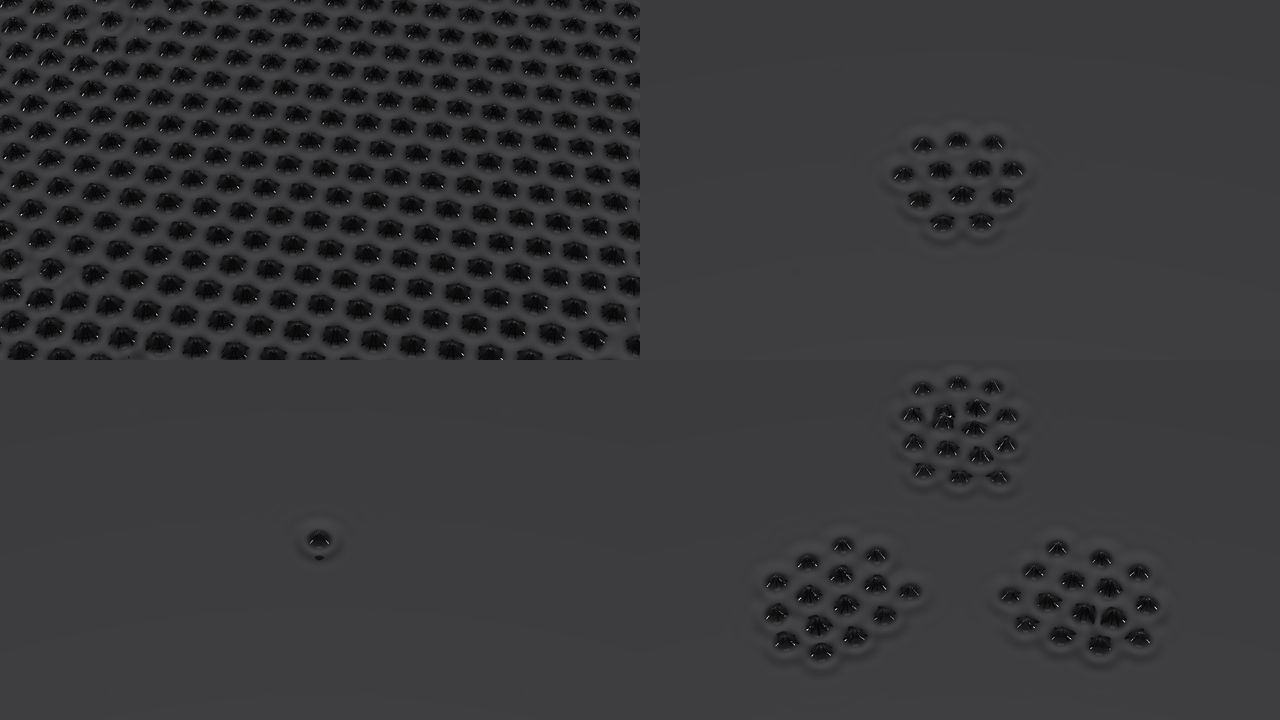
The magnets, each at Bias 1.05 I_c with Fire On Off*, Field Width 20 cm, five seconds in, SW
Ferrofluid otherwise at its defaults, rendered by fetest rather than captured from Resolume. Top
left* Uniform*; top right* Coil at the default 4 cm; bottom left Coil with Coil Size 1 cm;
bottom right Three Coils at the default 8 cm spread. Each panel is a whole 1280 × 720 frame at
half size.
The Fluid group
Fluid (EFH1, EMG 901, EMG 909; default EFH1). Which fluid is in the dish, each from its datasheet: Ferrotec’s EFH1 from their 2010 technical data sheet, EMG 901 and EMG 909 from Mahr and Rehberg (1998), whose numbers are complete. They differ in what matters here: EFH1’s spikes are tallest and its loop widest, EMG 909’s spikes are low, round and fall between kicks at the default Bias (the tables under How the pool works). Each fluid’s pool is its own, so changing Fluid starts a fresh, flat pool.

The three fluids in the Helmholtz pair at Bias 1.2 I_c with Fire On Off*, ten seconds in, SW
Ferrofluid otherwise at its defaults, rendered by fetest rather than captured from Resolume. Left
to right, EFH1, EMG 901 and EMG 909, their spikes 7.0, 5.1 and 3.7 mm tall. Each panel is a whole
1280 × 720 frame at half size.*
Viscosity (a quarter to 100 times the datasheet’s, geometrically; default 1×, at 0.231). How thick the fluid is. Thicker is slower: at 100× the default beats raised nothing in three seconds and a full patch by fifteen. Thinner rings more.
Noise (0, then 1 µPa to 0.1 Pa, geometrically; default 1 mPa, at 0.6). A faint random pressure on the surface, the floor every spike grows from. At 0 (the slider right at the bottom) there’s nothing to grow from, and the pool stays flat however hard it’s driven: the harness held it at 1.2 I_c for ten seconds and nothing moved. Turned down, it takes longer to get going: at 1 µPa the default beats raised nothing in three seconds. Turned up, it doesn’t make the surface visibly rough below onset.
Settle (a button). Flattens the pool, now. On the next beat, at the defaults, the spikes come back.
| 0 | 0.116 | 0.2 | 0.231 | 0.4 | 0.415 | 0.6 | 0.616 | 0.799 | 0.8 | 1 | |
|---|---|---|---|---|---|---|---|---|---|---|---|
| Viscosity | 0.25× | 0.5× | 1× | 3× | 10× | 30× | 100× | ||||
| Noise | none | 10 µPa | 0.1 mPa | 1 mPa | 10 mPa | 0.1 Pa |
The View group
The camera is a 100 mm lens, the product photographer’s choice, looking at the middle of the pool.
Field Width (2 to 40 cm, geometrically; default 10 cm, at 0.537). How wide the frame is at the pool. At 2 cm one spike fills it. Three Coils at the default spread want about 20 cm, or their patches are cut off at the frame’s edges. The pool itself is 42 × 21 cm for EFH1 (38 × 19 for EMG 901, 44 × 22 for EMG 909) and repeats beyond its edges, so a wide frame tilted well over can take in more than one pool’s depth: at 40 cm and a Tilt of 60°, a coil’s patch is there twice.
| cm | 2 | 5 | 10 | 15 | 20 | 30 | 40 |
|---|---|---|---|---|---|---|---|
| slider | 0 | 0.306 | 0.537 | 0.673 | 0.769 | 0.904 | 1 |
Tilt (0° to 60°; default 35° in the source, at 0.583, and 0° in the Over). How far the camera leans from straight down, towards you, so the far side of the pool is the top of the frame. Straight down a spike is a dark disc; from 60° it’s a cone.
Height (SW Ferro Over only; 2 cm to 1 m, geometrically; default 4 cm, at 0.177). See SW Ferro Over below.
Exposure (−4 to +4 stops; default 0, at the middle). The fluid reflects about 4.5% of the light that hits it straight on, so at 0 stops that’s made up: a soft box, or the Over’s clip, seen straight on in a flat pool shows at its own brightness. Each stop doubles it.
Lights (SW Ferrofluid only: Soft Box, Two Boxes, Strips, Backlight, Window, Neon, Rim; default Rim). The studio. A mirror shows you the lights, not the fluid, so this is most of the look. Soft Box is one big box overhead, a little behind the camera, and puts a broad white stripe down every spike. Two Boxes is a key and a dimmer fill either side. Strips is three tall strip boxes. Backlight is a wide low panel beyond the pool, which every spike’s outline catches as a bright rim. Window is a warm four-pane window. Neon is a magenta strip and a cyan one. Rim, the default, is two tall strips low on either side and a dim fill overhead, so each spike carries a thin line of light down its flanks, as in product photographs of ferrofluid.
Backdrop (SW Ferrofluid only: Black, Studio; default Studio). What the rest of the studio is. Studio is a dim seamless sweep, brighter overhead, and it’s what makes the flat pool grey. Black leaves nothing but the lights: on Rim that’s very nearly a black frame.
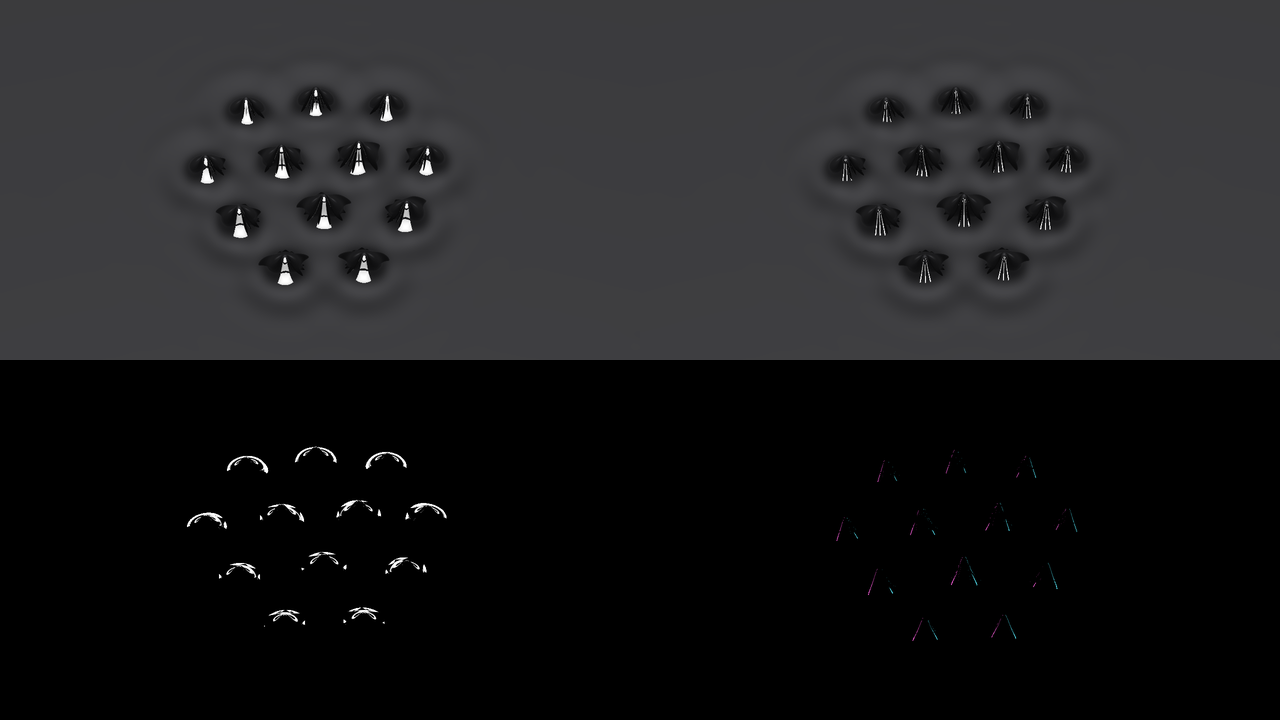
SW Ferrofluid at Bias 1.05 I_c with Fire On Off*, five seconds in, otherwise at its defaults,
rendered by fetest rather than captured from Resolume. Top left* Soft Box*, top right* Strips*,
both on* Studio*; bottom left* Backlight and bottom right Neon*, both on* Black*. Each panel is a
whole 1280 × 720 frame at half size.*
Mix (SW Ferro Over only; 0 to 1, default 1). See below.
SW Ferrofluid’s output is opaque everywhere: the studio fills the frame.
SW Ferro Over: your clip above the pool
The Over is the same pool with your clip on a screen hanging Height above it, facing down. The screen shows the clip mirrored, the way a teleprompter’s monitor does, so a flat pool’s reflection reads the right way round. Past the screen’s edge is a dark room. It starts in the Helmholtz pair, seen straight down, so the whole frame is pool.
- A flat pool is your clip. The screen is sized to fill the frame, so with nothing spiking you see your clip as it is, whatever Height and Field Width say. In the harness, with the fluid’s reflectance forced to 1, not one channel of 3,686,400 differed from the clip in 8 bits.
- A spike is a small curved mirror. Its steep flanks throw the clip’s light away from the camera, so from above each spike is a dark disc with a pinpoint of the clip at its tip, and the troughs between spikes catch the clip in a web of bright lines.
- Height (2 cm to 1 m, geometrically; default 4 cm, at 0.177) is how far the screen hangs above the pool. Higher throws each tilted bit of surface further across the screen: at 2 cm a lot of the clip survives between the spikes, at 15 cm it’s a web of thin lines, and at 1 m only the flattest troughs see it at all.
- Tilt works as in the source, but the screen doesn’t follow it: lean the camera over and the far part of the pool reflects the dark room beyond the screen’s edge. At 35° the top of the frame goes dark; at 60° a flat pool shows only a sliver of the clip along the bottom.
- Mix (0 to 1, default 1) is the whole effect against your clip. At 1 the output is opaque wherever your clip was transparent, because a picture of a pool is; at 0 you get your clip back bit for bit, alpha included.
At the defaults the first beat breaks the whole picture up and, Bias being inside the loop, it stays broken. For a clip that’s whole between hits, see Recipes.
SW Ferro Over on a frame of Resolume’s IntoTheGlow_02 clip, five seconds in, otherwise at its
defaults, rendered by fetest rather than captured from Resolume. Top left, Fire On Off*: the
flat pool. The other three at Bias 1.05 I_c with Fire On* Off*: top right Height 2 cm, bottom left
Height 15 cm, bottom right Tilt 35° at the default Height. Each panel is a whole 1280 × 720 frame
at half size.*
Recipes
Each of these was run in the harness, with its synthetic beat at 120 BPM or its synthetic music (a kick every half second over a busy hi-hat) standing in for Resolume’s.
The photograph. SW Ferrofluid, Magnet Uniform, Fire On Off, Bias 0.7 (1.05 I_c), Tilt 0.75 (45°), Lights Two Boxes. The pool comes up of its own accord within half a second and settles into a field of spikes, each with two hard white highlights down its near flank and its neighbours reflected round its base.
A forest. Magnet Uniform, Fire On Off, Bias 1 (1.5 I_c), Tilt 1, Lights Backlight, Backdrop Black: tall sharp cones as far as you can see, each outlined in light (the top right of the picture at the top of this guide).
A hit on cue. Fire On Off, Bias 0.567 (0.85 I_c, below every fluid’s fold), Gain 0.267 (0.4), Pulse 1 (one second), and Fire mapped to a pad or a MIDI note. Each press stands the spikes up in under a fifth of a second and holds them for the second; within half a second of the pulse ending they’re down to ripples. On SW Ferro Over it breaks the clip up on the hit and gives it back afterwards.
The clip, broken on the one. SW Ferro Over, Fire On Bar, Bias 0.567 (0.85 I_c), Gain 0.267 (0.4), Pulse 0.849 (500 ms). On the first beat of every bar the clip shatters into the lattice for half a second, then wobbles back together; at 120 BPM it’s whole again, give or take a ripple, well before the next bar. On Beat the gaps are too short for the spikes to fall all the way.
Breathing with the bass. Route the audio, then Fire On Off, Band Low, Magnet Uniform, Bias 0.533 (0.8 I_c) and Gain 0.333 (0.5). The coil follows the kick drum: with the harness’s music the current ran between 0.99 and 1.15 I_c and the spikes swelled from 4.3 to 6.4 mm on every kick. Since each band is measured against its own recent peak, a busy track keeps the level high, and the spikes rarely go all the way down.
Three coils, three bands. Route the audio, then Magnet Three Coils, Field Width 0.769 (20 cm), Fire On Off and Gain 0.2 (0.3 I_c). The far patch follows the low end, the left one the mids and the right one the top. On the harness’s music the hi-hat kept the right-hand patch the tallest (the bottom left of the picture at the top).
A slow swell. Fire On Bar, Bias 0.6 (0.9 I_c), Gain 0.2 (0.3), Pulse 1 (one second), Coil Lag 1 (300 ms) and Viscosity 0.799 (30×). The coil drags and the fluid’s thick, so after the first bar the spikes swell over the first second of each bar, to about 7 mm, and sink back to about 2 mm over the second, never quite gone.
Time and tempo
The pool’s waves have frequencies in hertz, so the plugins run on the host’s clock. For the first few frames after loading they run on a clock of their own while they work out whether the host counts in seconds or milliseconds (Resolume has been seen to send both); after that, every frame moves the pool on by the host’s time since the last, in double precision. A frame longer than a tenth of a second only passes a tenth of a second, so a stall doesn’t arrive as one enormous kick. If the host’s clock stops, the pool stops where it is, spikes and all. Which of Resolume’s clocks that is, and whether stopping the transport stops it, I haven’t seen.
The beats come from the host’s bar phase, and A stopped transport is a flat pool says what happens when it doesn’t move. Changing the composition’s size keeps the pool as it was: the harness checks that a pool that changes raster mid-run is identical, to the byte, to one that started at the new raster.
How it works
Every host frame:
- The drive, on the CPU: which pulses fired inside the frame and when, the music’s level, and the coil’s current through its lag, in closed form.
- The magnet and the fluid, on the CPU: the field each coil makes (a real loop’s, summed over the winding), and the fluid’s magnetisation along its Langevin curve, from which the stress that pulls the surface up.
- The pool, on the GPU: a 512 × 256 grid, twelve cells to a critical wavelength, whatever the raster, held as its spectrum. Each wave is moved on by the linear theory’s own solution, and a chosen nonlinear stress (the pattern engine) decides where the spikes stand and how far they’ve grown. It takes as many substeps a frame as stability needs: 12 at the defaults, up to 48.
- The spikes, on the GPU: every spike the pool has raised is replaced by the real fluid’s spike at the field it stands in, solved offline with the full nonlinear magnetostatics and shipped as a table, scaled by how far the pool’s spike has grown.
- The light, on the GPU: each pixel’s ray is followed to that surface, reflected with the exact Fresnel reflectance of the fluid, followed for one more bounce off a neighbouring spike, and sent on to the studio’s lights or the Over’s screen. The neighbours’ dark reflections round each spike’s base are that second bounce, and they’re most of what makes photographs of ferrofluid look the way they do.
Performance
GPU time measured by the offline harness (fetest --bench) on an Apple M4 Max, the median of 120
frames, on 20 October 2026. The GPU was busy with other work at the time:
| plugin | moment | 720p | 1080p | 4K |
|---|---|---|---|---|
| SW Ferrofluid | defaults | 8.40 ms | 7.45 ms | 12.5 ms |
| SW Ferro Over | defaults | 10.0 ms | 12.1 ms | 22.7 ms |
| SW Ferrofluid | Three Coils, from 60° | 9.5 ms | 10.7 ms | 16.5 ms |
That’s about half a 60 fps frame at 720p for the source, and more than a whole one for the Over at 4K, so give it a machine with room to spare. A quiet run on 15 October, before the solved spikes, gave the source 4.0, 4.4 and 6.2 ms. Most of the cost is the pool, which costs the same at any raster (about 150 passes a frame), and it grows with the drive: the defaults take 12 substeps a frame at 60 fps, 1.5 I_c takes 31 in the Helmholtz pair and 36 over a coil, and the drive’s 1.6 I_c ceiling 43.
At 30 fps each frame needs twice the substeps, and past about 1.4 I_c the pool can’t take enough: it runs slow, by up to a third at the very top of the drive, and says so in the log. Nothing was timed inside Resolume, and nothing was timed on Windows.
If it looks wrong
The pool is flat. Something isn’t getting the current past onset:
- the transport is stopped (A stopped transport is a flat pool);
- Fire On is Off, or Onset with no audio routed;
- you’re pressing Fire with Bias below the fold and the default Gain and Pulse, which isn’t enough to raise anything (the table under Fire);
- Gain is too low (under about 0.067, which is 0.1 I_c, at the defaults), or Pulse is too short for the Coil Lag;
- Noise is right at 0;
- Viscosity is high, and it’s on its way: give it a while;
- the Fluid is EMG 909, whose spikes fall between kicks at the default Bias.
The spikes won’t go away. Bias is inside the fluid’s loop, so they hang on. Press Settle, or take Bias under 0.6 (0.9 I_c).
A row of spikes instead of a hexagonal patch. Over a coil held past onset, at around 1.1 to 1.3 I_c, the pattern lays down as stripes, and each stripe is drawn as a row of spikes. It’s a limit of the model (Known limits). The default, biased under onset and kicked past it, comes up as hexagons, and so does anything in the Helmholtz pair.
A Three Coils patch is cut off at the frame’s edge. Turn Field Width up to about 0.77 (20 cm). If it’s cut off in a straight line inside the frame, a big Coil Size at the top of Coil Spread has reached the pool’s own edge: turn either down.
The same patch is there twice. Field Width is wide and Tilt is high, and the frame takes in more than the pool. Turn one of them down.
Changing Fluid flattened everything. It does: each fluid is its own pool.
The Over is mostly black. The spikes are throwing the clip away from the camera, which is what they do. Lower Height, lower the drive, or turn Exposure up. If it’s the top of the frame that’s black, Tilt is up and you’re seeing past the screen’s far edge.
It runs in slow motion. The frame rate is low and the drive is high, and the pool can’t keep
up. The log says substep cap. Lower the drive or raise the frame rate.
Neither plugin is in the browser. Check the folder under Installing, and that Resolume was restarted.
It does nothing at all. That’s what a shader that won’t compile looks like. The error is in the log:
macOS    ~/Library/Logs/ferrofluid/ferrofluid.YYYY-MM-DD.log
Windows  %LOCALAPPDATA%\ferrofluid\logs\ferrofluid.YYYY-MM-DD.log
It records the GL vendor, renderer and version at load, which shader failed if one did, whether the pool’s buffers couldn’t be allocated, each fluid’s critical wavelength and current, and when the pool falls behind real time.
Known limits
- Barely in Resolume yet: Arena 7.28.1 on macOS with no sound, and Arena 7.27.1 on Windows on software rendering, where the source passed and the Over’s picture couldn’t be measured. For what was checked, see the box at the top.
- No real audio has reached it, only the harness’s synthetic kicks, and nobody has measured what Resolume’s FFT bins hold, so Band and Threshold are untested against music.
- Where the spikes stand and how far they’ve grown is a chosen model. The shape of each spike is solved; the pattern engine that places them is a chosen nonlinear stress with two constants fitted per fluid, so that its fold and its spike height at onset are the solver’s. Growing and collapsing spikes are the equilibrium spike scaled down, not the real dynamics. A spike without all six neighbours (at a patch’s edge, or in a defect) gets a shape the solver never saw. Each spike takes the field at its centre, normal component only, so a coil’s tangential field, which stretches real spikes into ridges at its edge, is left out.
- Over a coil held past onset the pattern is rolls, not hexagons. At 1.125 or 1.3 I_c held for ten seconds over the default coil the patch lays down as stripes, drawn as rows of spikes, which no real pool does. It’s marginal (a slightly longer time step gave hexagons at 1.3) and still open. In the Helmholtz pair it’s hexagons.
- EFH1’s table stops at 1.566 I_c, where the solver’s grid gives out under the sharpest tips. The drive’s last few hundredths draw that spike.
- Coil Spread stops at 10 cm. The pool repeats at its edges and the coils’ field doesn’t, so a wider triangle had its far coil’s patch cut off at the pool’s edge, or missing. The harness checks every fluid at the top of the range with the default coil; with Coil Size near its 8 cm top, a patch can still reach the edge.
- The pool is about 42 × 21 cm and repeats, so a wide, steeply tilted frame shows it twice.
- The Over’s screen is finite, and doesn’t follow Tilt: beyond it is a dark room.
- At 30 fps and a hard drive the pool runs slow, by up to a third, to stay stable.
- Assumed rather than measured: the fluid’s optical constants (magnetite in oil), a deep layer, and the coils’ hardware (plausible, not anyone’s real rig).
- Only ever measured on an Apple M4 Max and Apple’s software renderer, although the macOS build has an Intel slice.
- No presets and no OpenFX version.
- There is a browser demo at ferrofluid-demo.stoatworks-labs.com. It’s a port to a web page, not the plugin itself, and it has no audio.
About
The last group, About, has the plugins’ name, version, licence and maker, and buttons that open this guide, the project page, the source on GitHub and the support page in your browser.
Links
- Project page: stoatworks-labs.com/software/ferrofluid
- Source: github.com/stoatworks-labs/ferrofluid
- User guide: stoatworks-labs.com/software/ferrofluid/guide
- Browser demo: ferrofluid-demo.stoatworks-labs.com
Reporting something
If something’s wrong, shout at github.com/stoatworks-labs/ferrofluid/issues. A screenshot, the Magnet, Fluid, Bias, Gain and Fire On, whether the transport was running, any other controls you moved, and the composition’s resolution and frame rate are usually enough. If the plugin did nothing, attach the log.
The instability is Cowley and Rosensweig’s (1967); the solved spikes are checked against Gollwitzer, Matthies, Richter, Rehberg and Tobiska (2007), and the critical field against Mahr and Rehberg (1998). The full list of the work it stands on is in ATTRIBUTIONS.md.