

atem-scopes puts video scopes around a live ATEM multiview. You capture the switcher’s multiview output over USB, draw a region round each window, and put a waveform, vectorscope, histogram, false colour, zebras or focus peaking on any of them, program and preview included.
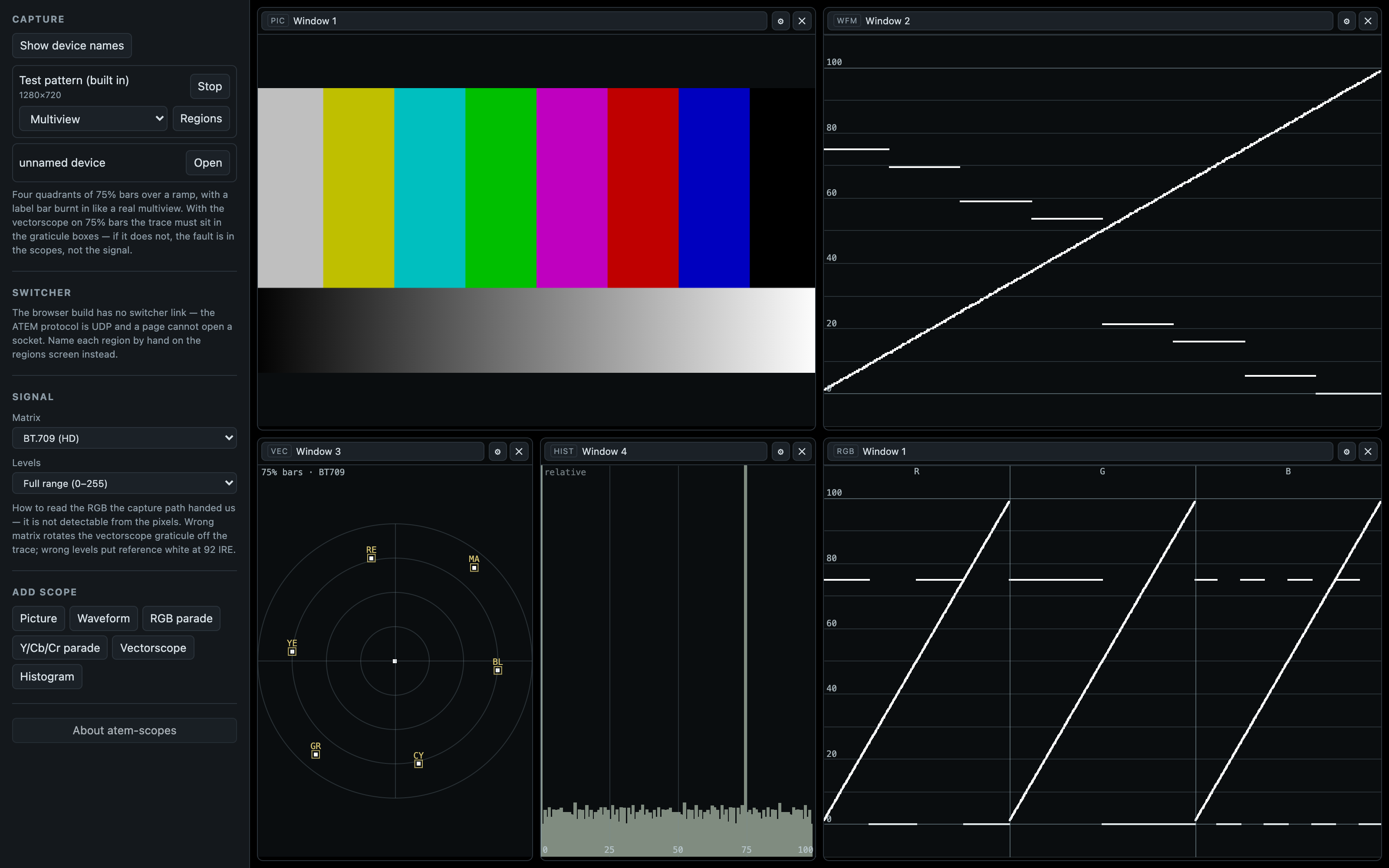
The browser build on its built-in test pattern: 75% bars over a ramp in four multiview windows, with a picture tile, a waveform, a vectorscope, a histogram and an RGB parade. The signal is synthetic; the scopes are the real ones.
Sources are named from the switcher’s own multiviewer configuration, live, so re-routing a multiview window mid-show relabels the scope watching it without touching the geometry.
Before you rely on this: the scope engine is verified against a built-in test pattern, and the numbers are good: with 75% colour bars in BT.709 the waveform reads every bar to within the row quantisation of the readback, and the vectorscope trace lands on its 75% targets to within a pixel.
It hasn’t been used with a real ATEM switcher, a real multiview capture or a DeckLink card. No switcher has ever been connected, no multiview has been captured, and the mapping from multiview window index to screen position is an assumption the calibration screen exists to correct.
This codebase was created with AI assistance, directed and reviewed by a human author.
Read this before you trust a reading
The app never sees the video signal. It sees whatever RGB the capture path handed the browser, and that path has already made two decisions it doesn’t tell you about:
- which matrix it used to get from Y’CbCr to RGB (BT.601 or BT.709), and
- whether it expanded studio-range levels (16–235) to full range.
Get either wrong and the scopes are plausibly wrong rather than obviously wrong. A BT.709 signal read as BT.601 throws every vectorscope target 5.74° off its box; unexpanded studio levels put reference white at 92 IRE. Both look like a mildly misadjusted camera.
There’s no way to detect this from the pixels, so it’s an explicit setting the UI shows you, not a guess. Set it to match your capture path.
Two more honesty points, surfaced per tile
A multiview tile is a monitoring aid, not a measurement. It’s a few hundred pixels wide,
compressed over USB, and often has a label bar, tally border or audio meter burnt into it. The
window inset exists to keep those out of the trace, and a tile whose window the switcher reports an
overlay on is badged overlay in crop.
Seeded geometry is badged uncalibrated until a human has looked at it.
For a proper measurement, capture an aux out whole as a second device and scope that. The multiview is for watching; an aux is for measuring.
Two builds
| Desktop | Hosted | |
|---|---|---|
| UVC capture and every scope | yes | yes |
| Region drawing and naming | yes | yes |
| Live source names from the switcher | yes | no |
| DeckLink capture | unbuilt — see below | no |
The hosted build’s two gaps are down to the browser rather than unfinished features:
- The ATEM control protocol is UDP on port 9910. A page has no UDP API. WebRTC and WebTransport are negotiated transports, and neither can talk to a switcher that’s never heard of them.
- A DeckLink card is reached through Blackmagic’s SDK against a kernel driver. It doesn’t enumerate as a webcam, so the browser can’t see it. Blackmagic’s boxes (UltraStudio Recorder 3G, the Web Presenter family) do present as UVC, on purpose, and those work in the browser like any other camera. The PCIe cards don’t.
So the hosted build names regions from what you type when you draw them, and the desktop build prefers the switcher’s answer. Same screen, same workflow.
Setting it up
- Capture the multiview as a UVC device. Any USB capture stick will do; a Blackmagic UltraStudio Recorder or Web Presenter is the tidy option.
- Set the colorimetry (matrix and range) to match that capture path. See above. Do this before you look at any number.
- Draw a region round each multiview window. On the desktop build the names come from the switcher; on the hosted build you type them.
- Calibrate the geometry. The seeded layout is an assumption, and the badge says so until you’ve checked it.
- Put a scope on a window. Waveform, vectorscope, histogram, false colour, zebras, focus peaking.
Checking the instrument
Start test pattern generates the app’s own 75% colour bars.
That exists for the same reason a real analyser generates its own noise: it’s the only way to check the instrument without trusting the thing you’re measuring. It checks itself, too: the vectorscope graticule is computed from the same matrix the shader plots with, so with 75% bars the trace must land in the boxes.
If it doesn’t, the colorimetry setting is wrong, and every reading you were about to take would have been wrong in the same plausible way.
Measured, BT.709 full range:
| 75% bar | Expected IRE | Waveform read |
|---|---|---|
| Blue | 5.42 | 5.4 |
| Red | 15.95 | 15.8 |
| Green | 53.64 | 53.4 |
| White | 75.00 | 74.8 |
DeckLink
The native capture addon has never been compiled or run. The Blackmagic SDK is a free but licence-gated download and isn’t mine to redistribute, so it isn’t vendored.
It only builds with DECKLINK_SDK_DIR set, and the app works fully without it: the
capability reports false and the UI hides DeckLink entirely rather than offering a button that
fails.
When it’s built, it captures native UYVY rather than letting the card convert to BGRA, on purpose, because the driver doesn’t report which matrix it used, and you can’t un-convert RGB.
If a reading looks wrong
| Symptom | Cause |
|---|---|
| Vectorscope targets all sit just off their boxes | Wrong matrix. About 5.7° is the BT.709-read-as-BT.601 signature. |
| Reference white reads 92 IRE | Studio levels that were never expanded. |
| A trace has a bright band across the top | A label bar or tally border inside the crop. Adjust the window inset. |
A tile is badged overlay in crop |
The switcher reports an overlay on that window. Move the inset, or scope an aux instead. |
A tile is badged uncalibrated |
The geometry is still the seeded assumption. Calibrate it. |
| The test pattern does not land in the boxes | The colorimetry setting is wrong. Fix that before anything else. |
| DeckLink is missing from the UI | The addon was not built. That is expected in the published builds. |