

Orrery draws primitive shapes moving on deterministic paths, for Resolume Arena and Avenue as a pair of FFGL plugins, and again as an OpenFX plugin for Resolve, Nuke, Natron and Vegas. It’s for quick animated masks, and for chroma animations driving a pixel map.
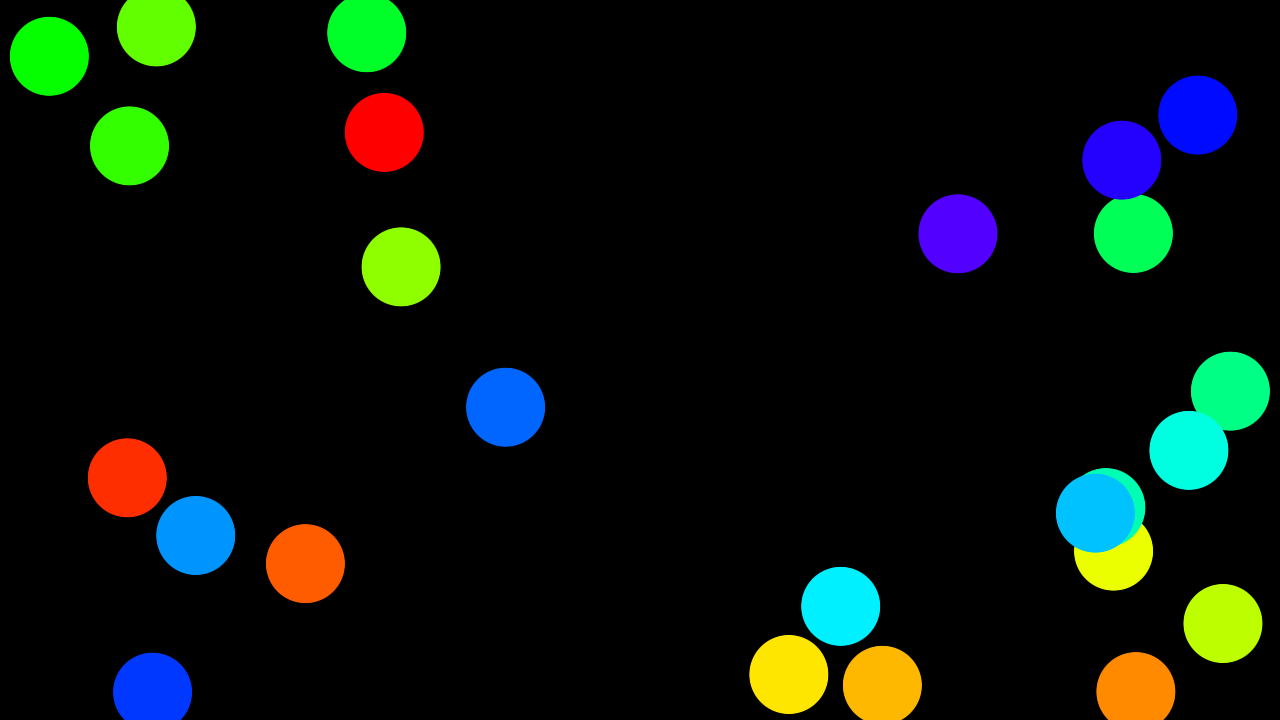
Twelve circles on a 3:2 Lissajous, hue spread across the set.
Before you rely on this: the motion is measured rather than taken on trust. 47 instances landed within 1.5 px of an independent prediction across 5 paths and 4 aspect ratios, circles stay round to 0.00% and correctly sized to 0.01% at 1:1, 16:9, portrait and 2.39:1, each of the 4 mask modes was checked inside a shape and outside it, and all 46 parameters change the picture.
Both plugins load and run in Resolume Arena 7.27.1. The shipped Windows build is checked in a real Arena at every release: that each registers with the right name, uid and category, that all 52 controls the host reports match the ones declared (name, order, type, range and default), and that 42 of them demonstrably move the picture. That check runs on software rendering, so it says nothing about an NVIDIA or AMD driver, and the machine has no sound device, so the three audio-driven controls are unverified. Whether Bar sync locks against a real transport still needs a real transport. Try it on a spare layer first.
This codebase was created with AI assistance, directed and reviewed by a human author.
Installing
Both plugins are in every download. Drop them into ~/Documents/Resolume Arena/Extra Effects (or
the Avenue equivalent) and restart Resolume. The macOS builds are Developer ID-signed and
notarised; the Windows builds are unsigned, and only the installer trips SmartScreen.
For OpenFX hosts, copy Orrery.ofx.bundle into /Library/OFX/Plugins (macOS),
C:\Program Files\Common Files\OFX\Plugins (Windows) or /usr/OFX/Plugins
(Linux); one bundle carries both plugins. It’s the same motion, linking the same code the
harness measures. There’s no Audio group there, as OFX hosts have no audio analysis.
| Orrery | A generator. Shapes over their own background. |
| Orrery Mask | An effect. The same shapes over — or cut into — the incoming clip. |
The two jobs it is for
Quick animated masks. Shapes over black used as a luma mask, layered with a blend mode, or applied straight to a clip with Orrery Mask.
Chroma animations for pixel mapping. Point Resolume’s pixel mapper at a composition running Orrery and the shapes become the lights. Grid lays shapes out on a fixture grid, Hue Spread gives every one its own colour, and Sync locks the whole chase to the track.
If you’re pixel mapping, set Softness to zero. A feathered edge means a fixture sitting on the boundary reads a half-brightness colour that was never in the design.
Why the motion never drifts
An instance’s placement is a pure function of (index, phase). Nothing is integrated frame by frame, so nothing accumulates error and nothing slows down when the show gets heavy, which matters rather more when the output is driving a lighting rig than when it’s driving a screen.
The same property is why beat sync costs nothing extra: phase is just a number, so Sync swaps the host clock for the host’s bar position with no separate code path. Set it to Manual and the Phase parameter becomes the only driver, so you can hand it to Resolume’s own BPM-synced animation, a keyframe or a MIDI fader.
Paths
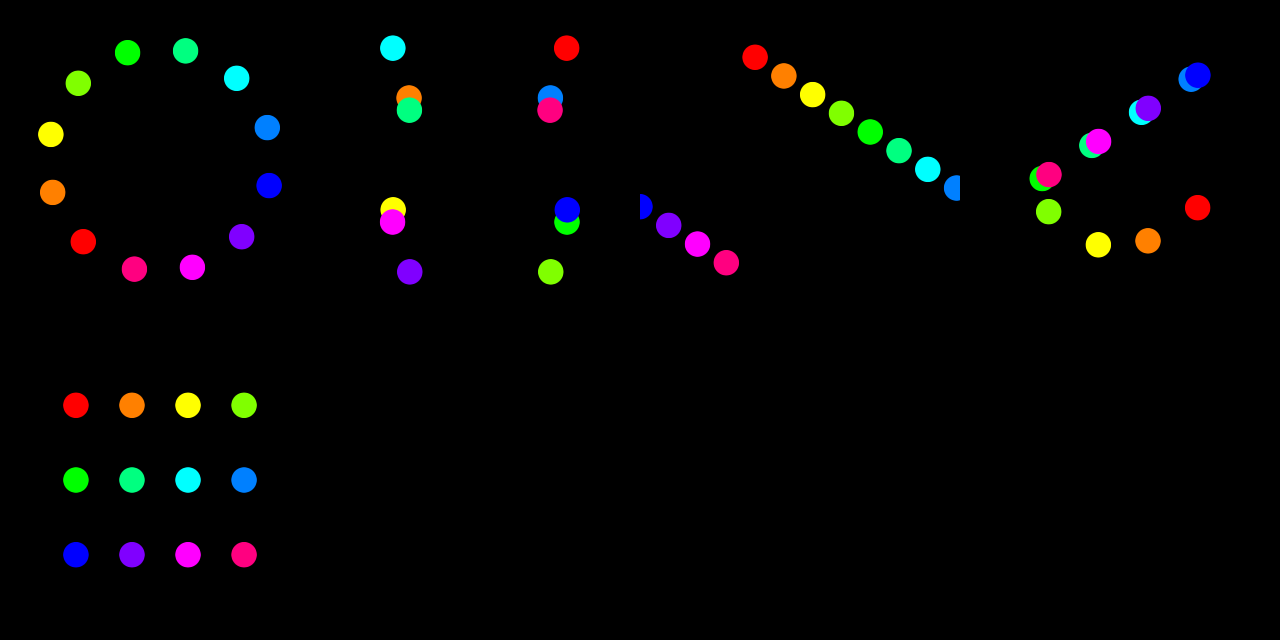
| Path | What it does |
|---|---|
| Orbit | A circle. With Spread up, a chase around it. |
| Lissajous | Two frequency ratios. Whole-number ratios close and repeat; a ratio slightly off a whole number precesses, so the pattern stays interesting for hours. |
| Drift | Travel at a heading, wrapping at the edges. Wipes, bars crossing a rig. |
| Bounce | Reflection off the frame edges. Scatter detunes the axes per shape for independent wandering. |
| Grid | Fixed positions on a grid. The animation is the pulse — made for pixel mapping onto a fixture layout. |
Spread distributes the instances along the path in phase, which is what turns a clump into a chase. Scatter blends that even spread towards a hashed one, from metronome to swarm.
The Lissajous note is worth acting on: set a ratio slightly off a whole number and the figure never quite repeats, which is what you want behind a long set.
Shapes
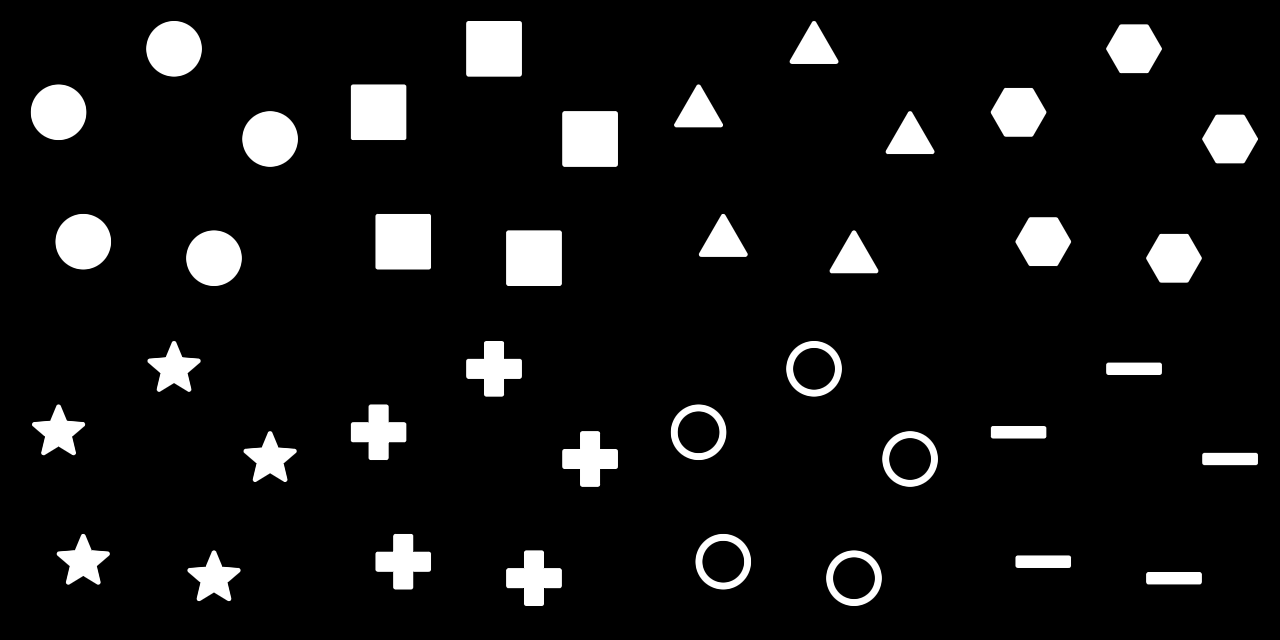
Circle, Square, Triangle, Hexagon, Star, Cross, Ring and Bar, each with Roundness, Outline, Stretch, Softness and Shade.
Roundness sets corner rounding on everything except Ring, where it sets the ring’s thickness.
Shade lights the shape as though it had been inflated, with Light setting where the light comes from (one full turn over the slider, with a quarter of the way up being straight down from the top). The normal is read out of the same distance field that draws the shape, so a Circle is exactly a sphere; the other primitives round the way their own field says they should, which makes a Star faceted and a Triangle barely domed at all. It’s off by default, and a shape with Shade at zero renders exactly as it did before the control existed.
Audio
Pick an audio source on the Audio parameter and every shape gets its own slice of the spectrum, low frequencies first. Audio Size grows each shape with its band; Audio Bright fades quiet shapes towards nothing.
On a Grid with Audio Bright up, the shapes are a spectrum analyser. And because the bands arrive per instance, it does the one thing Resolume’s own per-parameter audio link can’t: that link moves one slider for the whole plugin, and this moves sixty-four shapes independently.
The bands are smoothed fast-up, slow-down (~150 ms release), so a hit lands the frame it happens and dies away like a meter rather than flickering.
Mask modes
Orrery Mask adds four ways of combining the shapes with the clip:
| Mode | Result |
|---|---|
| Over | Shapes drawn on top, in their own colours. |
| Reveal | The clip shows only where the shapes are. |
| Hide | The clip shows everywhere except the shapes. |
| Colourise | The clip, tinted by the shape colour, inside the shapes. |
Colourise needs a Colour Mode other than White to do anything visible: against a white shape colour it’s arithmetically identical to Reveal.
If it looks wrong
Colourise looks exactly like Reveal. The shape colour is white. See above.
The chase is a clump. Spread is at zero, and that’s the control that distributes instances along the path in phase.
Fixtures on the edge of a shape read the wrong colour. Softness. Set it to zero for pixel mapping.
Nothing renders at all. A shader that won’t compile looks just like a plugin that does nothing. The log says which:
~/Library/Logs/orrery/orrery.YYYY-MM-DD.log