

Proximate is a VST3, Audio Unit and standalone plugin with one knob against the proximity effect: when a talker leans into the microphone and the low end swells, it takes the swell off again, so the voice keeps the same tonal balance wherever the mic is.
Put it on a vocal or speech channel. It’s a low shelf that deepens as they get closer and comes back off as they step away. It never boosts, it adds no latency, and it doesn’t react to level, only to balance.
Before you rely on this: the compensator is pinned down by 85 unit checks (it never boosts at any frequency, amount 0 is bit-for-bit transparent, it holds still through pauses, the same signal 20 dB quieter gets the same cut, and both channels of a stereo pair get the same filter), and the VST3 and AU pass
pluginvalat its strictest level andauvalwith a reported latency of 0. On synthesised speech run through a model of a cardioid at 4 cm, the plugin loaded the way a host loads it produced the same output, sample for sample, as the bare compensator. It hasn’t been used on a real microphone in a real room yet, and it’s met few hosts. Check it in your own rig first.This codebase was created with AI assistance, directed and reviewed by a human author.
The idea
Every directional microphone has a proximity effect: the closer the source, the more bass it picks up. A handheld dynamic at a few centimetres reads something like +10 dB at 100 Hz against the same voice at arm’s length, tailing off through the low mids. On a presenter who wanders towards and away from the mic, or a singer who works it, that’s a tone that keeps changing (boomy and chesty when they’re close, thin when they step back), and a static EQ can only be right at one distance.
Proximate doesn’t know where the talker is. What it can measure is the balance between the energy below 250 Hz and the energy above it. A voice at a steady distance keeps that balance within a few dB of itself from phrase to phrase, and a talker who leans in tips it towards the low end by several dB on top. So the plugin holds the balance at or under a ceiling, and whatever the low band is over the ceiling by gets taken off again with a first-order low shelf. That’s the same shape as the effect it’s undoing, flattening at 120 Hz and reaching further up the spectrum the deeper it goes, just as the boost does the closer they get.
- One knob. Amount sets the ceiling, from “never” at 0 % to a balance that’s thin on purpose at 100 %. Zero is off, bit for bit.
- It never boosts. The shelf only cuts. The output is the input with less low end, or the input untouched.
- Zero latency. No look-ahead, and no buffering beyond the host’s block. It’s safe to monitor through.
- It reacts to balance, not level. The detector is a ratio, so a talker who just gets louder is left alone, and one who whispers close to the mic still gets corrected.
- It holds through pauses. When nobody’s talking the cut stays where it is. A pause isn’t a change of distance, and the balance of the room’s noise floor tells it nothing.
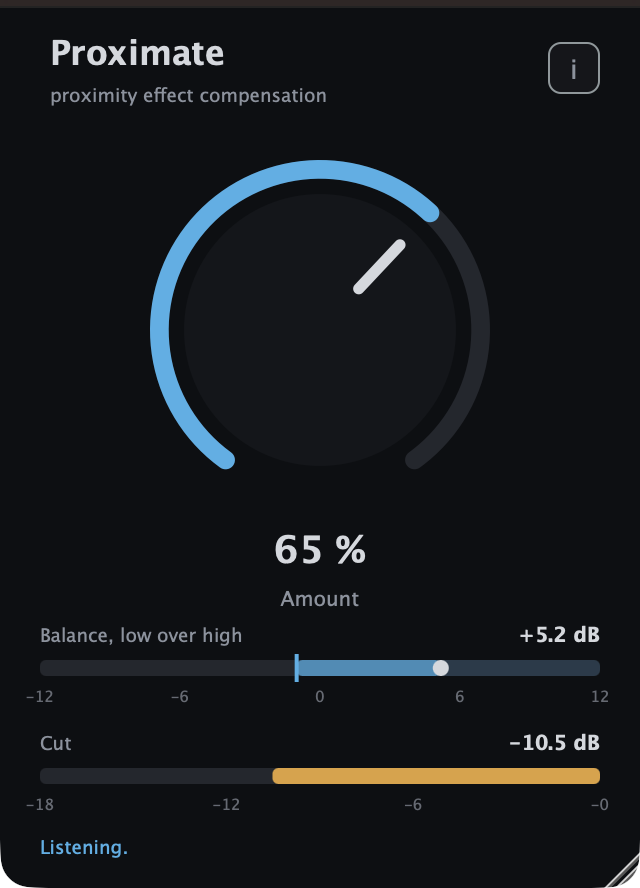
Synthesised speech run through a model of a cardioid microphone at 4 cm, at 65 %: the balance reads +5.2 dB against a ceiling of −1 dB and the shelf is taking 10.5 dB off.
Installing
Take a release build from the releases page, or build it from source with CMake (see the README).
- macOS: the
.pkginstalls the VST3 to/Library/Audio/Plug-Ins/VST3/, the Audio Unit to/Library/Audio/Plug-Ins/Components/and the standalone to/Applications, with a checkbox for each. The.dmgcarries the same three bundles for anyone who’d rather drag them into~/Library/Audio/Plug-Ins/. The builds are Developer ID-signed and notarised, so there’s no quarantine step. - Windows: the installer drops the VST3 into
C:\Program Files\Common Files\VST3\, which every host scans. The.zipis the same bundle plus the standalone, without the installer. The Windows builds are unsigned, so see UNSIGNED.md for the one-time SmartScreen click-through. - Linux: the
.deband.rpminstall the VST3 to/usr/lib/vst3/. The.zipholds the bundle and the standalone binary.
Then rescan plugins in your host. Proximate appears under Stoatworks Labs, as a mono or a stereo effect.
Setting it up on a channel
Insert it on the microphone channel, after the channel’s high-pass filter and any static EQ, and before the compressor. The order matters for two reasons. The static EQ sets the tone at the talker’s normal distance, so Proximate only has to deal with the change from there. And a compressor placed before it would be driven by the boom Proximate is about to take off.
- Start at 50 % and have the talker speak at their normal distance. Watch the Balance meter: the dot is where the balance is and the line is the ceiling. At the right setting the dot sits under the line most of the time, touching it on the odd phrase. Nothing much should be happening on the Cut meter yet.
- Have them lean in. The dot moves right past the line, the cut meter fills from the right, and the boom comes off. If it doesn’t come off enough, turn the knob up. If the voice is thin at the normal distance, turn it down.
- Leave it. There’s nothing else to set. The speed it moves at, where it splits the band and how deep it’ll go are all fixed, and they’re described below so you know what to expect.
A voice with a lot of natural low end (a bass speaker on a large-diaphragm condenser) sits higher on the balance meter and wants a lower knob setting, and a high voice sits lower and wants a higher one. There’s no right number. The meter is there so you can set the knob by looking rather than by guessing.
The control
| Control | Default | What it does |
|---|---|---|
| Amount | 50 % | Where the ceiling sits. 0 % is off, bit for bit. At 50 % the ceiling is at +2 dB; at 100 % it is at −8 dB. Linear in between: each 5 % is 1 dB of ceiling. Double-click returns it to 50 %. |
Everything else is fixed tuning, and here it is:
| Split | 250 Hz | The detector’s low band is everything under this, the high band everything over it. |
| Shelf floor | 120 Hz | Under this the cut is the full amount. The shelf’s corner rises with depth: a 12 dB cut reads −10 dB at 100 Hz, −6 dB at 250 Hz, −2.6 dB at 500 Hz and −0.8 dB at 1 kHz — the inverse of a handheld dynamic’s published proximity curve at a few centimetres, to within a dB. |
| Ratio | 2 dB per dB | How much shelf a dB of balance over the ceiling buys. The balance as the detector measures it moves by only a quarter to a third of the shelf’s nominal depth, so 1:1 would be far too gentle. |
| Knee | 6 dB | Soft: the cut fades in from 3 dB under the ceiling to 3 dB over it, so an odd phrase that grazes the line is nudged rather than grabbed. |
| Maximum cut | 18 dB | However far over the ceiling the balance goes. |
| Balance integration | 200 ms | Long enough that the balance follows where the talker is standing rather than which vowel they are on. |
| Attack / release | 80 ms / 300 ms | How fast the cut deepens and comes off once the balance has moved. A talker who leans in is corrected within about half a second; the low end is back about half a second after they step away. |
| Hold below | −50 dBFS | Under this level in the high band nobody is talking, and the cut freezes where it is. |
The meters
Balance, low over high is the detector’s reading in dB, from −12 to +12: the energy under 250 Hz relative to the energy above it. The vertical line is the ceiling the knob has set, the dot is the balance right now, and the bar between them lights up when the balance is over the ceiling. That lit part is what’s being taken off. Cut is the shelf’s depth, filling from the right like a gain-reduction meter, with the number beside it. The status line says Listening while the detector is live, Holding while nobody’s talking, and Off at 0 %.
Stereo channels
On a stereo track the detector listens to the mean of the two channels and both get the same shelf. A mono mic on a stereo insert behaves the same as it would on a mono one, and a stereo pair isn’t pulled apart.
The standalone app
The standalone runs the plugin on an audio device, which is the quickest way to hear what it does on a real microphone. Three things to know:
- It opens no audio input on its first run. Choose the microphone under Options > Audio Settings, and it remembers the choice. (It starts output-only on purpose: opening an input and an output on two different devices makes the audio system combine them, and on a machine with several virtual audio devices installed that can stall before the window appears. A USB interface or an aggregate device, which has both, never has the problem.)
- The input is muted until you say otherwise. The yellow bar across the top says so. Untick Mute audio input in the same settings dialog. Use headphones: a microphone into the speakers is a feedback loop with or without a plugin in it.
- On macOS it’ll ask for permission to use the microphone the first time.
Troubleshooting
Nothing happens. The balance is under the ceiling: the dot never reaches the line. Turn the knob up until leaning in pushes the dot past it. Or the level is under the hold threshold (the status line says Holding), which means the plugin isn’t hearing enough signal, so check the gain before it.
The voice is thin all the time. The ceiling is under the talker’s natural balance, so the shelf is always in. Turn the knob down until the dot sits under the line at their normal distance.
It pumps on low notes. A sung low note is more low end, and the detector can’t tell a low note from a close mic, because it only sees balance. The 200 ms integration and the soft knee keep this small on speech. On a bass singer, turn it down until only proper leaning-in crosses the line, and let the static EQ do the rest.
It cuts plosives and handling noise. It does. They’re low end, and taking low end off is what a low shelf does. If you don’t want that, a high-pass filter before Proximate is the right tool for them.
I want it to add low end when they step back. It won’t, and that’s on purpose. The static EQ sets the tone at the normal distance, and Proximate only ever removes what proximity adds.