

simpleVIS is a lightweight real-time lighting visualiser. Import an MVR, take live levels over Art-Net, sACN, USB DMX or CITP, fly a camera around the rig, and see your programming in volumetric haze.
It’s for seeing what a rig will do before you’re in the room with it: checking looks and coverage against a real patch, without a visualiser licence and without modelling the venue by hand.
Before you rely on this: the import chain, DMX evaluation and protocol parsers are tested against real files and real packet layouts. The full 119-fixture MA Demostage renders at 60–70 fps, and the receive path is verified over real sockets.
No real console and no DMX interface has driven it yet. Every packet so far has come from a test that wrote it, or from the built-in demo source. CITP has had first contact with a real peer (Capture 2026), but Capture is a DMX consumer like simpleVIS, so levels and patch from a real console remain unverified.
This project was built with AI assistance.
Two builds, and why
Art-Net and sACN are UDP, and a browser can’t receive UDP. There’s no flag, polyfill or workaround. So simpleVIS ships two targets from one codebase:
| Build | What it is | Live input |
|---|---|---|
| Desktop (Tauri v2) | the real tool | Art-Net, sACN, USB DMX, CITP |
| Hosted | offline previz and plot viewer in a tab | none — built-in demo look |
The shared code is identical; only the transport differs. The hosted build hides what it can’t do rather than offering controls that fail.
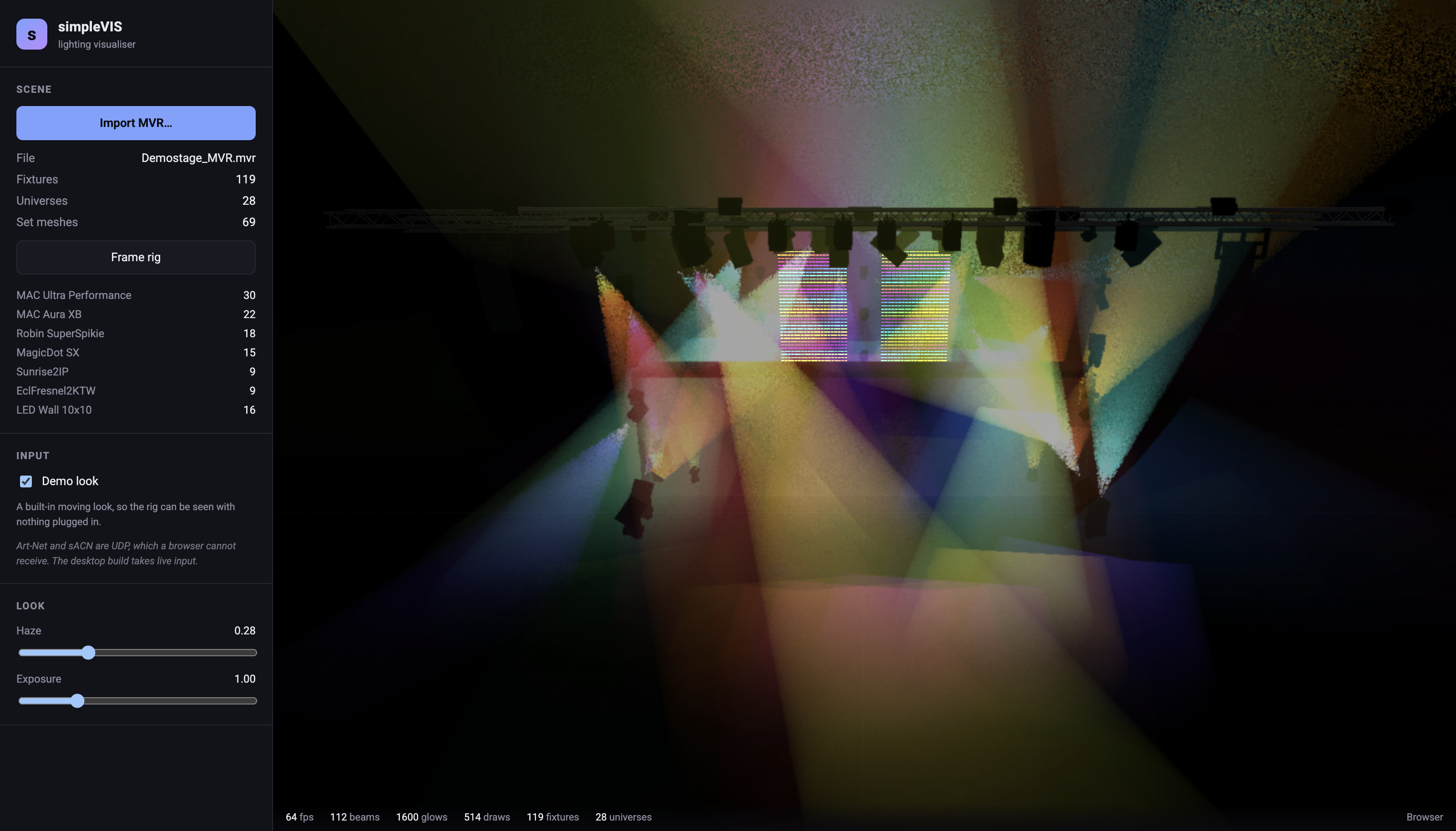
Importing a rig
MVR (.mvr), including the GDTF fixture definitions embedded inside it: geometry tree, DMX
modes, beam angles, colour mixing.
Import only. simpleVIS never writes MVR. Nothing you do here can damage the file the desk gave you.
Pixel-mapped fixtures work properly. An MVR whose LED wall declares four template channels
across a hundred GeometryReferences is resolved to its real 300-channel footprint, one DMX
slot per pixel, rather than being taken at face value as four channels.
Live input
| Protocol | What’s covered |
|---|---|
| sACN (E1.31) | Priority arbitration, CID source identity, multicast group joins per patched universe |
| Art-Net 4 | ArtDmx, and ArtPoll replies so consoles list simpleVIS as a node |
| USB DMX | Enttec DMX USB Pro only. An Open DMX USB has no receive path and cannot be an input at all |
| CITP | Peer discovery (PINF), levels (SDMX), and fixture patch from the console (FPTC) |
Two sources per universe are merged HTP or LTP with a 4-second timeout. A third is refused and reported rather than silently dropped, so a mystery universe gets a message instead of a guess.
What CITP does and doesn’t cover
Three layers are implemented:
- PINF: peer discovery.
- SDMX: levels. It does carry them, as channel blocks, whatever the common misconception says.
- FPTC: fixture patch, so the patch can follow the desk without re-importing an MVR.
SXSr is honoured, so a console that says “take my levels from Art-Net” isn’t also counted as
a CITP source and double-merged.
MSEX and CAEX (thumbnails and viewport streaming) aren’t implemented. simpleVIS won’t stream its viewport back to the desk.
Video on LED walls
Any fixture whose GDTF expands into more than one addressable emitter is treated as a video surface: an LED wall, a pixel bar, a two-cell batten. The sidebar says how many the loaded rig has and how many pixels that comes to, so a rig with none says so rather than appearing to ignore you.
| Source | Desktop | Hosted |
|---|---|---|
| A video file | yes | yes |
| Screen or window capture | no — WKWebView has no getDisplayMedia |
yes |
| NDI, Syphon, Spout | not implemented | impossible — a browser has neither UDP nor macOS IPC |
Every pixel-mapped fixture plays the whole frame. Sixteen walls show sixteen copies, not sixteen tiles of one picture.
Video replaces the pixel’s colour, not its dimmer. A blackout blacks the walls out with everything else. That also means that with no desk connected and the demo look switched off, the walls’ dimmers are at zero and video plays on a black wall. That’s the fixture doing what it’s told, not a broken feed.
The picture is placed from the wall’s geometry as it hangs, so content is upright in the room whatever attitude the wall is at. Left-right can’t be worked out (nothing in an MVR says which face of a wall is its front), so a mirrored wall would need a per-fixture flip, which doesn’t exist yet.
Nothing leaves the machine. A file is read through the page, and a captured stream is never sent anywhere.
Look and quality
Two panels in the sidebar, split on purpose: Look changes what the rig looks like, and Quality changes what a frame costs.
| Control | What it does |
|---|---|
| Haze density | How much the air scatters, 0–1. At 0 the air is clean and a beam is invisible until it lands on something; at 1 the room is thick. |
| Exposure | Overall brightness of the beam accumulation. The composite rolls off at the top, so overlapping beams soften rather than clipping to flat white. |
| Wireframe only | Edges, no beams, no haze — one render pass instead of three. For finding a fixture in a crowded rig, and for a machine that cannot carry the volumetrics. |
| Detail | One slider over the four things that decide the cost of a frame: raymarch steps, beam-buffer resolution, the cap on volumetric cones, and pixel ratio. The panel spells out what the current position resolves to. |
Detail sits at Medium by default, and Medium is the tuning the renderer was measured at: on a 119-fixture, 1,721-emitter show it runs at full frame rate there. Minimum roughly doubles the headroom on a tired GPU. Maximum is a lot more expensive, and it’s meant for a machine with a GPU to spare, not as the setting to leave it on.
Nothing here changes the numbers. These are rendering costs, not lighting values: the levels, angles and colours the desk sends are evaluated identically at every setting.
Troubleshooting
| Symptom | Cause |
|---|---|
| No live input options in the browser | Correct — a browser cannot receive UDP. Use the desktop build. |
| USB DMX interface not receiving | An Open DMX USB has no receive path at all. Only the Enttec DMX USB Pro can be an input. |
| A universe won’t take a third source | By design — two sources merge, a third is refused and reported. |
| Levels stopped after a source disappeared | The merge has a 4-second timeout before it drops a stale source. |
| LED wall renders as four channels, not per pixel | Shouldn’t happen — GeometryReference expansion is tested. Worth reporting with the MVR. |
| Console doesn’t list simpleVIS as a node | Art-Net discovery is ArtPoll/ArtPollReply; check the desk is polling the right subnet. |
| CITP peer found but no levels | The peer may be a consumer rather than a console — a visualiser sends neither levels nor patch. |
| Desk can’t see simpleVIS’s viewport | Not implemented. MSEX/CAEX viewport streaming is out of scope for now. |
| Fixture renders but doesn’t move | Check the DMX mode the MVR declared matches what the desk is patched to — a mode is a template, not a footprint. |
| Frame rate is poor on a big rig | Pull Detail down — it cuts raymarch steps, beam-buffer resolution, cone count and pixel ratio together. Wireframe only is the floor. |
| No beams at all, and the rig is all edges | Wireframe only is on. It disables the volumetrics by design, and greys out the Look sliders while it is. |
| Video is playing but the walls are black | Their dimmer is at zero. Video sets colour, not intensity — switch the demo look on, or send levels. |
| “Nothing in this rig is pixel-mapped” | Correct for a rig with no wall or pixel bar. Video needs a fixture whose GDTF gives it more than one addressable emitter. |
| No “capture a screen or window” button | The desktop build’s webview has no getDisplayMedia. Play a file, or use the hosted build for capture. |