

5-wire is a long run of VGA or RGBHV, and the amplifier at each end of it, as an FFGL effect for Resolume Arena and Avenue.
It is not a glitch filter with a cable theme. It is a transmission line, and everything on screen is what happens to a signal on its way down five conductors — red, green, blue, H and V. The idea it is built on is one sentence: coax loses the square root of frequency, and that loss has a step response which is strictly one-sided. A bright edge smears to the right and only to the right; the same curve is still going four hundred pixels later, which is what streaking is. Get the direction wrong and you have a blur. Get it right and you have a cable.
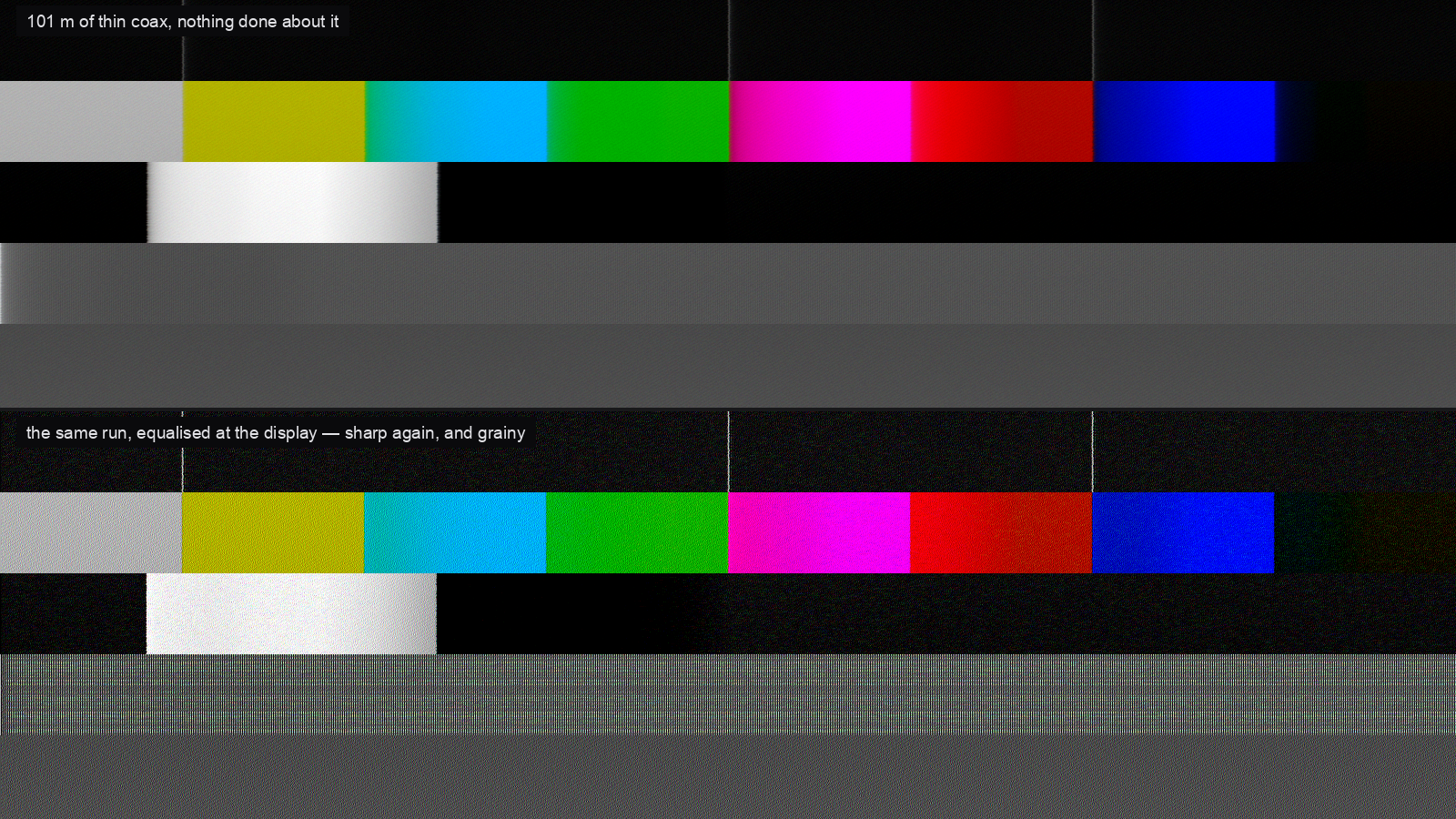
Two renders of the plugin’s own test card, both through the same 101 m of thin coax. The top one has nothing done about it. The bottom is the same run with the equaliser at the display wound up: the fine stripes are back, and so is the noise.
Before you rely on this: the cable model is verified numerically by a harness that drives the real plugin class in a headless GL context. The response has unit gain at DC to one part in a hundred thousand, is strictly one-sided, never rises with frequency, and its measured −3 dB point tracks the analytic square-root law. The equaliser is proved to be the inverse of it and never to make a picture softer. One bright column through the whole six-pass chain comes out equal to the C++ kernel to within a thousandth of a level, on four different cables. The reflections land within two pixels of twice the cable’s transit time. All 30 controls demonstrably change the picture.
Still open: it has never been loaded into Resolume, or any other FFGL host — everything above comes from the harness, so the parameter layout and the About block are unproven in a real inspector. The Windows build comes from CI and has never been loaded into Resolume on Windows. No real cable run has been photographed and compared against this: the loss and skew figures are the manufacturers’ own, but the crosstalk, pickup and sync constants are calibrated by eye. Try it on a spare layer first.
This codebase was created with AI assistance, directed and reviewed by a human author.
Installing
Drop the plugin into Resolume’s FFGL folder and restart Resolume:
macOS    ~/Documents/Resolume Arena/Extra Effects/
Windows  %USERPROFILE%\Documents\Resolume Arena\Extra Effects\
Avenue uses the same layout under its own folder name. There is also a macOS disk image and a Windows installer in the release, which put it there for you.
The macOS builds are Developer ID-signed and notarised, so there is nothing to clear. The
Windows builds are unsigned; plugin files are not gated the way .exe files are, so Resolume
loads them normally, and only the installer trips SmartScreen — once.
Start here: pick a cable and a length
Cable Type decides more than it looks like it does. One choice sets the loss, the propagation velocity, how far apart the conductors are in length, and how well the run keeps the room out:
| What it stands for | |
|---|---|
| RGBHV Coax | Five 75 Ω coaxes on BNC. What a fixed installation is made of, and near enough transparent at any length a room has. |
| VGA Lead | The moulded lead in the flight case. Three times the loss, and far more of the room gets in. |
| Mini-Coax | The compromise: real coax, but 28 AWG of it. |
| CAT5 Balun | Structured cabling and passive baluns. The pairs are twisted at deliberately different rates so they do not couple, which means they are genuinely different lengths — this is the one that fringes colour. |
| Ribbon Loom | No shield worth the name, conductors parallel for their whole length. Which is the definition of a coupling capacitor. |
Length is squared across the slider, so the resolution is at the bottom where it matters. The difference between 2 m and 10 m is nothing; the difference between 90 m and 100 m is whether the show works.
Pixel Clock is not decoration. Everything in a cable happens in time, and the pixel clock is the only thing that turns a nanosecond into a pixel. The same 30 m lead is invisible at 640×480 and a plainly visible ghost at 1600×1200 — which is exactly the surprise people get when they change resolution and blame the new projector.
The ghost needs two mismatches
Termination is the load at the far end. The middle of the slider really is 75 Ω and really is right; each half is one of the two ways of being wrong. Below it, somebody has left a terminator on a through connection and the repeat comes back dark. Above it, a high-impedance input with nothing terminating the run, and the repeat is bright.
Ghosting is the other half, and it is the one people do not expect: it is the mismatch looking back into the amplifier. A reflection has to make the return trip and then be sent forward again, so an output stage with a proper series resistor simply absorbs it. Set Ghosting to zero and there is no ghost at any termination — that is not the effect being switched off, it is a correctly back-matched amplifier behaving properly.
Where the repeat lands is not a control. It is twice the cable’s transit time, converted to pixels by the pixel clock, and every bounce is softer than the last because it has been down the cable two more times.
Bounces is how many of them to draw. Past the fourth there is nothing left.
Pre-Emphasis and Cable EQ are the same filter, and they are not the same control
This is the argument the whole plugin exists to make, and it is worth two minutes.
Both of them invert the cable. Both bring the picture back. What is different is where they sit relative to the things that joined the signal in between — the noise, the reflections, the crosstalk, the hum:
- Cable EQ is the equaliser at the display. It is after all of that, so it lifts the noise and the ghost along with the picture. A hundred metres equalised at the receiver is sharp and grainy, and there is no setting that is not.
- Pre-Emphasis is the same correction applied at the amplifier, before any of it. The picture comes back and the noise does not — and it is paid for in Headroom instead, because pre-emphasis overshoots every edge and the overshoot meets the output stage’s rail. Turn Headroom down and you can watch the whites clip.
That is why a real distribution amplifier offers both, and the plugin ships the same run as three presets — Long Haul, Equalised and Pre-Emphasised — so the difference is one click apart.
EQ Length is a length, not a frequency. A real cable equaliser is calibrated in metres and so is this one. Set it short and the picture stays soft; set it long and it rings, with a bright outline on the trailing side of every edge. Setting it to something other than Length is the ordinary way of getting it wrong, and it looks like what it is.
The things that are not effects
Several of the most recognisable artefacts here have no control of their own, because they are consequences.
Skew separates the three conductors in time, so vertical edges grow coloured fringes. On coax cut from one drum it is nearly nothing and the control is nearly dead — which is what coax is for. On a CAT5 balun it is tens of nanoseconds and every edge has a red and a blue side.
Crosstalk couples a neighbour’s rate of change, not its level, because that is what mutual inductance does. So it draws coloured outlines on edges and never tints a flat area — which is the difference between crosstalk and a bad white balance. It also gets weaker as the cable gets softer, because there is less rate of change left to couple.
Hum is on the sync conductor as well as the picture. That is why the bar bends the lines it passes through instead of only dimming them. Whether it crawls or stands still depends on Mains against your composition’s frame rate: 50 Hz on a 50 Hz frame rate puts every line at the same phase and the bar does not move at all.
Ingress is a transmitter down the road. Each line catches the carrier at a different phase, which is what turns it into a herringbone rather than vertical stripes. Screening scales hum and ingress together, because they arrive by the same route — no cable is good at keeping mains out and bad at keeping radio out.
There is no Roll control. Sync came down the same cable, and a rolling frame is what is left when the receiver cannot find it. Wind Sync Level down and the picture jitters, then tears, then runs. Sync On Green puts sync on the green conductor, so a bright green line loads the sync tip and the picture wobbles on exactly the shots that are green.
Length buys jitter, not loss of lock. An H sync pulse is tens of kilohertz against a pixel clock of a hundred megahertz, so a long run barely touches the sync amplitude — what it takes is the edge, and a slow edge is a slicer that is less sure when the line started.
The receiving end
DC Restore is the clamp that holds black at black. A video signal is AC coupled, so without a working clamp its average is forced to zero and a bright area pushes everything after it down. That is streaking, and it is why an overexposed caption leaves a dark trail across the rest of the line. Wind it down for a receiver that has given up.
Sample Phase is the “auto adjust” button on the front of every VGA monitor. At the right phase the receiver samples each pixel where the signal has settled; half a pixel out it samples the transition, and fine vertical detail loses contrast and shimmers. On a sharp source it barely registers; on a cable-softened one it is the difference between legible and not.
Gain, Red, Green, Blue and Headroom are the amplifier at the sending end — per-channel drive, the way a distribution amplifier gives you three trims. Output Gain and Black Level are the display end.
Presets
| House Run | A proper installation: five coaxes, terminated, near enough transparent. The preset that proves the plugin is not simply a blur. |
| Long Haul | A hundred metres of thin coax with nothing done about it. |
| Equalised | The same run, fixed at the display. Sharp, and grainy. |
| Pre-Emphasised | The same run, fixed at the amplifier. Sharp, and clean, and short of headroom. |
| Unterminated | Nobody terminated the far end and the amplifier has no series resistor. |
| Skip Lead | The lead out of the bottom of the flight case, run across a floor full of dimmer packs. |
| CAT5 Extender | Passive baluns over structured cabling. Every vertical edge grows a colour fringe. |
| Losing Sync | Sync on its last legs. Lines land in the wrong place and the frame has started to run. |
| Tired Amp | An amplifier that has been in the rack since the last century: the clamp has given up and the channels have drifted apart. |
| Dead Run | Everything at once, for the shot where the picture is meant to be falling apart. |
Picking a preset overrides the controls it covers; moving one of them hands control back and the dropdown falls to Custom. Pixel Clock and Mains are deliberately never covered — the first is the raster you are actually running and the second is a fact about the country you are in.
Try it in a browser first
There is a full browser demo at 5-wire-demo.stoatworks-labs.com. It runs the plugin’s own shaders on real pixels with the plugin’s own controls, so it is a fair way to find out what the effect does before installing anything. It is not the plugin — no Resolume, no composition — and the page says so and lists its own specific gaps.
If something looks wrong
The effect does nothing at all. Almost always a shader that would not compile, which from Resolume’s side looks like silence. The log says which pass and what the driver reported:
macOS    ~/Library/Logs/5-wire/5-wire.YYYY-MM-DD.log
Windows  %LOCALAPPDATA%\5-wire\logs\
Everything is soft and no control fixes it. Check Length against Pixel Clock. A hundred metres at 340 MHz has thrown away almost everything above a twenty-pixel period, and no equaliser recovers what is under the noise — a real one cannot either. That is the honest answer, and it is why the number on EQ Length matters more than the amount.
Ghosting is turned up and there is no ghost. Termination is at 75 Ω. A ghost needs a mismatch at both ends.
Skew does nothing. Cable Type is coax. It is meant to.
Licence and source
MIT. Source, releases and issues: github.com/stoatworks-labs/5-wire.