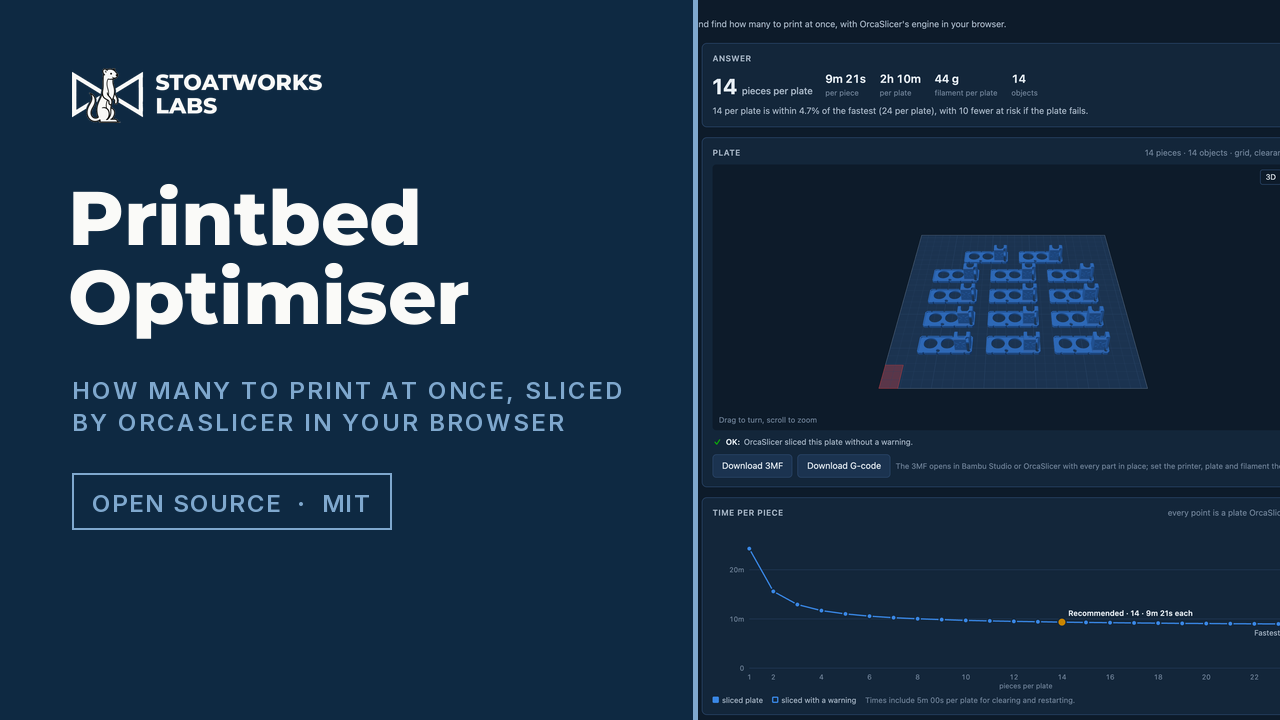
How many to put on the plate is a slicing question. So it slices every answer.
Drop in an STL or 3MF and pick the printer, process and filament. It packs the fullest plate the bed will take, slices the plate at every count from one up to that with OrcaSlicer's own engine, and tells you which count gives the shortest print time per piece. Every time it shows came out of a slice; the layout rules only decide where the parts go.
An early preview, and I've only tried it in Chrome. The slicing runs on your own machine: OrcaSlicer's engine, compiled to WebAssembly, runs in the browser tab, and your models are read there and never uploaded. There's no server and no account, and the first visit downloads up to 13 MB of slicer and printer profiles, which the browser then keeps. I haven't printed anything it has laid out yet, so check the first plate before you leave a long job running. The source is on GitHub.
One of the printed USB guards from this site's parts on the Bambu Lab X1 Carbon preset, 0.20 mm Standard, Bambu PLA Basic, Smooth Cool Plate: twenty-four plates sliced in the tab, and 14 a plate recommended, within 4.7% of the fastest time per piece with ten fewer at risk if the plate fails.
What it does
01
Every count, sliced
The point
It slices the plate at every count from one to twelve, then about fourteen more up to the fullest plate, up to three slicers at once depending on the machine's cores and memory. Every point on the chart is a plate OrcaSlicer sliced. The answer is the fewest per plate within a tolerance you set of the fastest time per piece, counting the time you say it takes to clear the bed and start again.
02
A layout the printer will take
The packer works on a 0.5 mm grid with conservative footprints. It keeps to the printable area and the printer's no-go zones, and on a two-nozzle printer like the H2D it only uses the bed both nozzles reach. The gap between parts grows with their height, and if OrcaSlicer still refuses a plate, the margins widen and it packs again.
03
Room for the brim
Each part is sliced on its own before anything is laid out. That proves it prints at all, and measures the brim OrcaSlicer's auto brim gives it, so the layout leaves room for a brim the slicer was going to add anyway.
04
Checks before the slice
It flags a part too tall for the printer, one that barely touches the bed, a tall thin part without a brim and overhangs with supports off, and it suggests a better face to lay a part on. Lay flat turns it.
05
Make a number
Need a hundred? It splits the order across plates for the shortest total time, and any plate size the split uses that the sweep skipped gets sliced as well.
06
Back to your slicer
Download the plate as a 3MF with every part where the optimiser put it, for Bambu Studio or OrcaSlicer, or its G-code from the same engine. The 3MF carries geometry and positions only, so you pick the printer and presets again in your slicer.
What to check before a show
01
Tested in Chrome only
I've run it end to end in Chrome on a Mac, on OrcaSlicer's Bambu Lab X1 Carbon preset, and the H2D's two-nozzle bed is covered by a test against the real engine. Other makers' presets load in the pickers, but I haven't sliced a plate on any of them, or tried Firefox or Safari. The engine needs the page to be cross-origin isolated, and where it isn't, the page says the slicer can't start.
02
Nothing printed from it yet
The times are OrcaSlicer's own estimates, plus the time you set between plates, and a plate OrcaSlicer passes without a warning has only been checked by the slicer. I haven't printed a plate it laid out, or opened an exported 3MF in Bambu Studio, yet. Check the first plate before you leave a long job running.
03
The slicing runs on your machine
There's no server behind the page. Cloudflare hands out the page, the engine and the printer profiles as static files, and from then on the slicing is your computer's CPU in a browser tab. Your models are read in the tab and never uploaded. A sweep of a simple part has taken anywhere from twenty seconds to a minute and a half on the Mac I built it on, depending on what else the machine was doing, and a plate is capped at about four million triangles, which is what a tab's slicer memory holds.
04
Two licences, kept apart
The app is MIT. The slicer is the Muon3D Slicer Engine, OrcaSlicer's libslic3r compiled to WebAssembly and licensed AGPL-3.0-only, served beside the page as its own unmodified files and started by URL, so the app only ever sends it messages. The page footer links the exact engine source it runs. The printer, process and filament presets are OrcaSlicer's profile set, also AGPL-3.0.
Run your own copy
There's no container for Printbed Optimiser (preview), so the hosted copy is the one to use.
Its build is plain static files, though, and its README says how to host them. Whatever serves them has to send the two cross-origin isolation headers (COOP same-origin and COEP require-corp), or the slicer can't start.