

Atrac is a perceptual coder modelled on MiniDisc’s ATRAC, run on the picture, for Resolume Arena and Avenue, as an FFGL effect. It does not paint blocks or noise onto a clip. It cuts the picture into overlapping blocks, puts each through a lapped transform, groups the coefficients into bands with a scale factor and a word length each, and shares a fixed budget of bits per block out by a masking model. Fine texture goes first, hard edges ring one block either side, the allocation shimmers from frame to frame, and a cell that runs out of bits falls to grey. On top sits the disc: a shock-proof buffer that a knock drains, and when it empties the picture holds. None of it is drawn; it all falls out of the one coder.
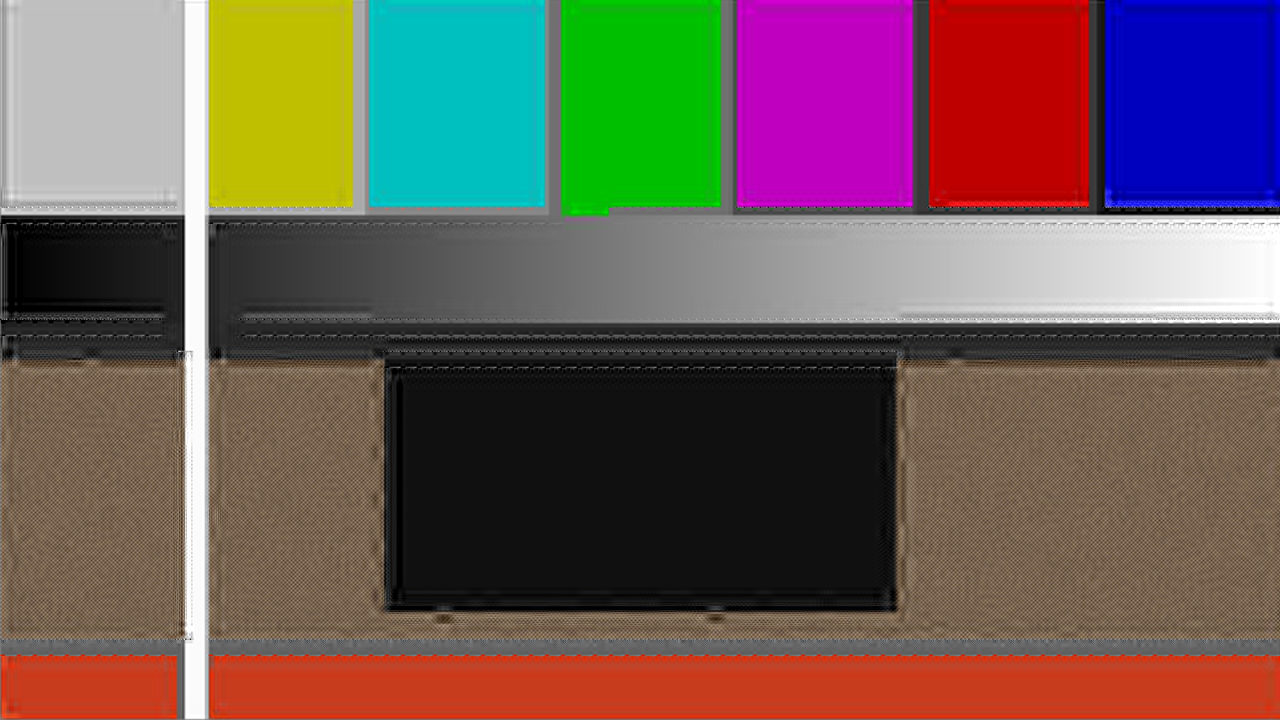
The repo’s test card through the plugin at its defaults, rendered by the offline harness rather than captured from Resolume: half a bit per pixel on 16-pixel blocks, adaptive switching, a moderate masking model. The texture at the bottom has lost its grain to the budget; the dark block’s edges ring; the flat bars carry a faint block ripple.
Before you rely on this: released at v0.1.0, and honestly early. The coder is measured rather than asserted, by a harness that drives the real plugin class and reads each claim back out of the picture it made, or out of the allocation texture the plugin’s own shader wrote: at unlimited bits the lapped transform returns the input within a rounding bound derived from the arithmetic, through long, short and mixed blocks, at 0.3% of that bound; every cell spends at most its budget and wastes less than one increment, in 3,660 cell-channels; a step’s noise reaches exactly one block before the edge in Long mode and within three eighths of a cell in Short; SNR rises strictly with Bit Rate, 19.4 to 35.6 dB over five doublings; a band beside a louder one is zeroed with Masking on and coded with it off; and a knock breaks playback exactly when it outlasts the buffer, resuming on the closed form. Twelve deliberate faults are shown to make those checks fail, and one character changed in the shipped shader is caught. All 13 controls are shown to change the picture. It has never been loaded into Resolume on macOS — the one host it has run in is the fleet’s own test host,
oxbow, for 120 frames. On Windows, a build of v0.1.0 loads, registers and renders in Resolume Arena 7.27.1, with every control matching what the plugin declares — on software rendering, so that says nothing about a GPU. Buffer, Read Speed and Knock Length could not be shown moving there, because they act only during a knock and the gate never presses the button; the harness measures all three. Try it on a spare layer before you put it in a show.ATRAC and MiniDisc are trademarks of Sony Group Corporation. This project is modelled on the published description of the format and is not affiliated with or endorsed by Sony.
This codebase was created with AI assistance, directed and reviewed by a human author.
Installing
Every download carries one effect, SW Atrac. Drop it into Resolume’s effects folder and restart Resolume:
macOS    ~/Documents/Resolume Arena/Extra Effects/
Windows  %USERPROFILE%\Documents\Resolume Arena\Extra Effects\
Avenue uses the same layout under its own folder name. The effect then appears in the effects browser as SW Atrac.
The macOS download is a universal build (Apple silicon and Intel), as a .dmg or a .zip. It is
Developer ID-signed and notarised, so the bundle simply loads. The
Windows download is an x64 installer or a .zip. It is not code-signed, so the installer trips
SmartScreen once: More info → Run anyway.
Detail goes by bits, not by resolution
Most things that make a picture look “compressed” throw away resolution: fewer pixels, softer edges. ATRAC, the coder inside MiniDisc, did something else. It cut the sound into overlapping blocks, put each through a modified discrete cosine transform — the lapped transform whose overlapping halves cancel each other’s aliasing — grouped the coefficients into block floating units, each with a scale factor and a word length, and handed out a fixed budget of bits per block, always the same, by a masking model: a band next to a loud band is masked, and gets few bits or none.
Atrac runs that coder on the picture. The frame is cut into N × N cells; along each axis a cell is one lapped block, or four short ones; the coefficients are grouped into bands by diagonal; a budget of bits per cell is spent by a greedy on noise-to-mask ratio; and the coefficients are quantised, dequantised and transformed back. Everything you see is a consequence of that:
- Fine texture goes first. The high bands of a busy cell are at the bottom of the queue and get zero bits. Flat cells have bits to spare, busy ones starve, because the budget is fixed.
- A starved cell falls to grey. Luma is coded centred on zero, and a lapped transform has no compact DC — a flat field is not one coefficient — so a cell whose bands are all zeroed decodes to mid grey, not black. At low rates a dark clip with a bright object turns into grey blocks where the object’s cells ran out of bits.
- Pre-echo. Quantisation noise is a sum of basis functions over the whole window, so a hard edge rings for one block either side. ATRAC’s cure is block switching: a transient selects short blocks, which confine the ringing to a quarter of the cell.
- The swirl. The allocation is recomputed every frame, so a band’s bits come and go, and texture shimmers at low rates. Even a still picture carries a faint block ripple in flat areas, because a flat field projects onto every band.
- The skip. A MiniDisc read the disc faster than it played, into a shock-proof buffer. A knock stopped the read, the buffer drained, and only if it emptied did playback break. Here an audio onset, or the Knock button, is the knock; when the buffer empties the picture holds until it has refilled.
Start here
Put SW Atrac on a clip or a layer with footage that has texture and some hard edges. The defaults are half a bit per pixel on 16-pixel blocks with adaptive switching: out of the box the grain is gone, the cells shimmer, and edges ring a little. Then:
- Bit Rate → about 0.15. A tenth of a bit per pixel. Whole cells run out of bits and fall to grey; on a dark clip with a bright object the object breaks into grey blocks. Bring it back up and watch the detail return, coarse structure first, grain last.
- Block Size → 32, Block Mode → Long, Bit Rate → about 0.7 (one bit per pixel). Thin bright lines on black now carry a smear a whole 32 pixels wide either side: pre-echo. Block Mode → Short and the smear stops within 12 pixels, at the cost of a blockier edge. Block Mode → Adaptive with Show Blocks on tints the cells the detector switched.
- Show Bits on, then sweep Bit Rate. Every cell is painted as its own coefficient plane, the word length of each band as heat; at low rates only the corner is lit, and the bands fill outward as the budget grows.
- Chroma Bits → 0. The picture goes grey: colour is coded as Cb and Cr at a fraction of the luma budget, and at zero it gets nothing. At 1 it costs as much as the luma.
- Press Knock. Nothing: at the defaults a half-second knock on a two-second buffer never empties it. Knock Length → about 0.9 (3 s) and press again: two seconds later the picture holds, and it plays again a quarter of a second after the knock ends. Route audio to the Audio input and turn Sensitivity up, and every onset is a knock.
Every slider is declared to the host as 0 to 1, so the host only knows its position. The value each position stands for is given with each control below.
The Coder group
Bit Rate — bits per pixel, from 0.05 to 4 on a logarithmic slider; 0.5 at the default of 0.525. The budget for a cell is the rate times its area, floor(bpp × N²), for luma, and that times Chroma Bits for each of Cb and Cr. On MiniDisc the budget was 212 bytes a sound unit, always; here it is this control, always.
| Slider | bits per pixel | what a 16-pixel cell gets | what it looks like |
|---|---|---|---|
| 0 | 0.05 | 12 bits | almost nothing survives: grey blocks with a hint of the picture |
| about 0.16 | 0.1 | 25 bits | coarse structure only; starved cells go grey |
| 0.525 | 0.5 | 128 bits | the default: grain gone, edges ring, a faint ripple |
| about 0.68 | 1 | 256 bits | most of the picture; pre-echo still visible on thin lines |
| about 0.84 | 2 | 512 bits | close to the clip; the ripple fades |
| 1 | 4 | 1,024 bits | effectively transparent |
Block Size — 8, 16 or 32 pixels; 16 by default. The cell is N × N, and a bigger cell spreads its budget over more coefficients: smoother inside, but the ringing is wider and a starved cell is a bigger grey square. At 8 the artefacts are fine-grained and the swirl is busy; at 32 they are broad and the render cost is three times the default.
Block Mode — Long, Short or Adaptive; Adaptive by default. Long is one block of N along each axis of the cell; Short is four blocks of N/4 along each axis, sixteen sub-blocks, whose bands are the union over the sixteen. Adaptive looks inside each cell at the energy of its first differences: if one half of the cell has eight times the other’s, along x or along y, the cell is short. The switch is exact — the overlap at every block boundary is the smaller of the two blocks meeting there, so a short block beside a long one reconstructs perfectly with no transition windows. Only the cell itself is looked at; a cell’s mode never depends on its neighbours.
Masking — how far the masked threshold sits below the spread of the neighbouring bands, from 60 dB below it at 0 to level with it at 1; 0.6 by default, 24 dB below. Each band’s threshold is the largest contribution from any other band, spread by 10 dB a band upward and 24 dB a band downward, less this offset, and floored at half an 8-bit code squared. A band below its threshold is not thrown away: it goes to the back of the queue, and on a short budget is never reached. At 1, a band beside a loud one gets nothing until every louder band has been driven below it; at 0, the model is nearly flat and bits go by energy. The difference is subtle on most footage; the harness proves it on a planted pair of tones.
Chroma Bits — each of Cb and Cr’s share of the luma budget, 0 to 1; 0.25 by default. At 0 the colour is gone and the picture is grey; at 1 colour costs as much as luma. The picture is coded as BT.601 luma and colour difference, with luma centred on zero.
The Disc group
The shock-proof buffer, and what knocks it. Everything here is seconds and a multiplier, in double precision on the CPU, on the host’s clock — so a knock lasts the same time at 30 fps and at 60.
Buffer — how many seconds of playback the buffer holds when full, 0 to 10 s; 2 s by default (0.2 on the slider). It starts full. Playback always drains it at 1×; while the disc is being read it fills at Read Speed, so at rest it sits full.
Read Speed — how fast the disc is read, 1× to 4× the play rate; 2× by default (a third of the way). Playing and reading, the buffer gains Read Speed − 1 seconds a second. Broken, nothing plays, so it fills at the full Read Speed.
Sensitivity — the onset detector’s threshold on the Audio input, 0 to 1; 0.5 by default. An onset is a rise in the spectrum — the positive change in each of Resolume’s 64 FFT bins since the last frame, summed over all of them — against a running mean of itself (one second) times a margin, from 2.5× at low sensitivity to 0.15× at high, with an absolute floor and an 80 ms refractory period. At 0 nothing ever knocks. The detector is primed on the first frame, so triggering a clip on a loud passage does not knock the disc.
Knock Length — how long a knock stops the read, 50 ms to 5 s on a logarithmic slider; 0.5 s by default. A knock during a knock extends it.
Knock — the button. One press is one knock, whatever the audio is doing.
Audio — Resolume’s audio source picker, an FFT buffer of 64 bins. With nothing routed the detector hears silence.
What happens on a knock. The read stops for Knock Length while playback keeps draining the buffer at 1×. If the buffer still has something in it when the read comes back, nothing shows: the buffer simply refills. If it empties first, playback breaks: the picture holds the last decoded frame. While broken the read fills the buffer at Read Speed once the knock is over, and playback resumes when it has a quarter of a Buffer in hand. In numbers: a knock of L on a full buffer of B breaks playback iff L > B, at B after the knock, and resumes at L + (B/4)/r after it. At the defaults, a 3 s knock holds the picture from 2 s to 3.25 s. The harness measures both times out of the picture to within one frame.
While the picture is held nothing is decoded, so the hold is free. A change of resolution during a hold scales the held picture; it does not clear it.
The View group
Show Blocks — off by default. Draws the cell grid in cyan, tints the cells that are coded short orange, and draws their sub-block grid. At Block Size 8 the grid is a mesh over the whole picture; it is most useful at 16 and 32.
Show Bits — off by default. Paints every cell as if it were its own coefficient plane: the pixel at (i, j) of the cell shows the word length of the band that coefficient (i, j) of the luma belongs to, as heat from blue at 2 bits through orange to white at 16, black for a band that got nothing. The corner is the lowest band. At the default rate almost every band is at 2 bits, so the view is mostly a dim blue; raise Bit Rate to watch the bands fill outward, or lower Block Size so each cell has fewer coefficients to share the budget among.
Mix — the coded picture against the untouched clip, 0 to 1; 1 by default. Zero is the clip as it arrived. The disc keeps running underneath whatever Mix says, so a hold at Mix 0.5 blends a frozen decode with the moving clip. The output always carries the clip’s own alpha.
How it works
Once a frame, on the GPU except where it says:
- Clock, audio, disc (CPU). The spectrum is read from the Audio buffer, the onset detector primed or stepped, the buffer stepped by the frame’s elapsed time. If the disc is broken, the frame stops here and the display shows the held picture.
- Convert. The picture to BT.601 Y − ½, Cb, Cr; alpha kept.
- Cells. One texel per cell: long or short, by the transient detector in Adaptive.
- Transform. The lapped transform along x, then along y. The window is a sine ramp centred on each block boundary, of length the smaller of the two blocks meeting there and zero at the picture’s edge; the basis and the ramps are computed on the CPU in double and handed over as tables.
- Allocate. Per cell and channel: the bands’ energies and peaks, the masked thresholds, the greedy — the band with the highest noise-to-mask ratio takes the next increment (2 bits first, then 1 at a time, each dividing its ratio by 16 and then 4) until nothing fits — and the scale factor of each band, the smallest of ATRAC1’s 64 (2.007 dB steps) not below its peak.
- Quantise. Each coefficient to a signed integer of its band’s word length, symmetric, scaled by its scale factor, and back. Word length 0 zeroes it.
- Inverse transform, along y then x, overlap-added, back to RGB, into the held picture.
- Display. Mix, Show Bits, Show Blocks.
Nothing in the coder outlives a frame except the held picture; the disc and the detector are a handful of numbers on the CPU.
Performance
Measured by the offline harness on an M4 Max, best of three runs of 60 frames after a warm-up,
glFinish both sides, on a GPU shared with other work:
| N = 16 (default) | % of a 60 fps frame | N = 8 | N = 32 | |
|---|---|---|---|---|
| 1280×720 | 3.2 ms | 19% | 1.4 ms | 7.2 ms |
| 1920×1080 | 4.9 ms | 30% | 3.0 ms | 15.1 ms |
| 3840×2160 | 16.1 ms | 97% | 10.0 ms | 30.4 ms |
It is not cheap, and 4K is the edge. Each pixel costs 2N taps in each of four lapped passes, each tap two texel fetches, so the cost is linear in Block Size and in area. At 4K on the default blocks that is a whole 60 fps frame on this GPU, and at Block Size 32 it is two. The buffers are five RGBA float planes the size of the picture or its padded plane: about 165 MB of GPU memory at 1080p and 660 MB at 4K. Nothing has been optimised yet — the basis could be a packed uniform array rather than a texture, the allocation pass could write both halves at once, and the picture buffers could be half-float. For a 4K composition, run it at Block Size 8, or on a layer rendered at 1080p. Nothing was timed inside Resolume, and nothing was timed on Windows.
While the disc is broken the coder does not run, so a held picture costs nothing.
If it looks wrong
Nothing seems to happen. Bit Rate is high, or Mix is low. At 2 bits per pixel and above the coder is close to transparent on most footage; bring Bit Rate down to the default or below.
Grey squares where the picture is dark. That is the effect at a low rate: a cell whose bands all got zero bits decodes to mid grey, because luma is coded centred on zero. Raise Bit Rate, or lower Block Size so the grey squares are smaller.
Flat areas ripple even when nothing moves. A lapped transform has no compact DC: a flat field projects onto every band, and at a low rate not every band is kept. Raise Bit Rate; the ripple fades by 2 bits per pixel.
Everything is grey. Chroma Bits is 0.
Show Bits is nearly black. Most bands are at 2 bits at the default rate, the bottom of the heat map. Raise Bit Rate, or lower Block Size.
Show Blocks is a mesh over everything. Block Size is 8. The grid is one line every 8 pixels.
The picture froze and does not come back. A knock is still running (a long Knock Length, or an onset every frame extending it), or Buffer is 0, so the disc can never get a quarter of a buffer in hand. Turn Sensitivity to 0 and Buffer up.
The picture froze the moment the clip started. Sensitivity high with loud audio: the detector is primed on the first frame, but a real onset on the second frame is a real knock. Lower Sensitivity or shorten Knock Length.
Knock does nothing. At the defaults a half-second knock on a two-second buffer never empties it: that is the buffer working. Lengthen Knock Length past Buffer, or shorten Buffer.
Audio does nothing. Nothing is routed to the Audio input, or Sensitivity is 0.
It is slow at 4K. See Performance. Block Size 8, or a smaller layer.
SW Atrac is not in the effects browser. Check the folder under Installing, and that Resolume was restarted.
The effect does nothing at all. A shader that will not compile looks exactly like that, and the real message is in the log:
macOS    ~/Library/Logs/atrac/atrac.YYYY-MM-DD.log
Windows  %LOCALAPPDATA%\atrac\logs\atrac.YYYY-MM-DD.log
It records the build that was loaded, the GL vendor, renderer and version at load, which shader failed if one did, a buffer that could not be allocated, when the first non-zero spectrum arrived on the Audio input, and at frame 60 the host’s clock and the unit the plugin decided it is in.
Known limits
- Never loaded into Resolume on macOS, and nothing has driven the controls in a host there. How the fourteen controls read in the inspector is untested.
- What Resolume puts in its 64 FFT bins is unmeasured — magnitudes or powers, and how they are laid out. The detector sums over every bin so the layout does not matter to it; the square root of each is an assumption inherited from the rest of the fleet.
- The masking model is stated, not tuned. Its slopes and offset are defensible numbers from the psychoacoustic shape; nothing has been looked at against a reference.
- A flat field is not one coefficient, so flat areas ripple until the rate is high. That is the transform the plugin set out to be, and it is why the swirl shows where nothing moves.
- Side information is free. MiniDisc’s budget included the word lengths and scale factors; here the budget is coefficient bits only.
- The transient detector looks inside the cell only, and its decision is local. ATRAC1’s compared with the previous block.
- A knock lands on the frame after it: one spectrum per frame is the input’s resolution.
- Costly at 4K: a whole 60 fps frame on an M4 Max at the default Block Size, and about 660 MB of GPU memory. See Performance.
- Checked at up to 1280×720 and 333×187, and only timed at 4K.
- Only ever run on an Apple M4 Max, although the macOS build contains an Intel slice.
- No presets and no OpenFX version.
- There is a browser demo at atrac-demo.stoatworks-labs.com. It is a port to a web page, not the plugin: the shaders run in WebGL2 and the CPU half — the tables, the disc and the clock — is rewritten in JavaScript. It has no audio. The page lists what it does not reproduce.
About
The last group, About, carries the plugin’s name, version, licence and maker, and buttons that open this user guide (stoatworks-labs.com/software/atrac/guide/), the project page, the source on GitHub and the support page in your browser.
Reporting something
github.com/stoatworks-labs/atrac/issues. A screenshot, the Bit Rate, Block Size and Block Mode settings, and the composition’s resolution and frame rate are usually enough; for a disc problem, Buffer, Read Speed, Knock Length and whether audio was routed. If the effect did nothing, attach the log.